




The plan price on a builder's pricing page is never the whole bill. Add a domain, hosting, apps, and renewals, and your first-year total can land at double the plan price before the site goes live.
To find out how much it costs to build a website in 2026, I priced the same small-business brief across six build routes and eight platforms, from a weekend DIY build to five-figure custom project quotes and an AI app build. For each one, I compared the upfront cost against the recurring bill it leaves behind.
By the end, you'll know what a brochure site, a store, and an app-style build each cost, and which route fits your budget in year one and every year after.
How Much Does It Cost to Build a Website? The Short Answer
The cost of building a website for a small business ranges from nearly free to about $12,000 in this comparison. A DIY site can cost a few hundred dollars in its first year. A one-off freelancer project can cost $300 to $9,000, while a one-off agency project can cost $500 to $12,000. Larger custom applications and continuous in-house staffing can cost more.
Track the upfront build cost alongside the yearly expenses for hosting, plans, apps, and maintenance. The initial quote covers only part of what the site may cost over time.
The rest of this guide splits the cost by build route and by platform, then shows where the bill grows. Start with what you're paying for.
What Goes Into the Price
When I calculated the cost of the same site across each route, the plan price made up only part of the total. The domain, hosting, apps, and my own hours filled in the rest.
A website budget includes the following costs:
- Domain name: A standard .com runs about $10 to $20 a year, though premium names cost far more.
- Web hosting: Shared hosting runs about $5 to $13 a month, and managed WordPress hosting about $10 to over $400 a month.
- SSL certificate: This is often free now, bundled with your host or plan. Paid certificates exist, but most small sites don't need one.
- Design or template: A premium theme costs around $40 to $100 as a one-time purchase (including 6-12 months of support and updates).
- CMS or platform plan: This is the monthly builder fee. It swings widely by platform, from about $10 a month on the low end to $39 a month or more for a store.
- Plugins and apps: Premium plugins cost around $50 to $200 per year, each.
- Payment processing: Expect roughly 2.9% plus $0.30 per transaction if you sell anything.
- Business email: A professional inbox runs about $1 to $32 per user a month, and free tiers exist.
- Professional services: Design, copy, and dev work depend entirely on your route.
- Maintenance: Ongoing upkeep runs about $20 to $100 or more a year if you do it yourself.
How Does Website Pricing Work? Cost by Build Route
Website pricing depends on the route you choose. I put the same small-business brief through six build routes and priced it on eight platforms, from DIY builders and self-hosted WordPress to one-off custom projects, hand-coded development, and AI tools. For each one, I recorded the upfront build cost and the recurring bill that follows, since the two rarely move together.
The brief was a five-page site for a small service business: a home page, an about page, a services page, a contact page with a form, and an online booking feature. I kept e-commerce out of the base brief and priced adding a store separately, since a storefront changes the math on every route.
The table below sets the routes side by side.
Freelancer and agency figures are one-off project costs. Hiring a full-time designer or developer creates a continuous in-house staffing expense and falls outside these ranges.
Every figure above is a range. Your final cost depends on the scope and how much work you handle yourself.
DIY Website Builder
On a drag-and-drop builder, the site came together over a weekend. The cash cost stayed low, and the time added up instead.
This is often the cheapest route to start, especially when you choose an affordable website builder and keep the site simple.
The first-year cost commonly lands around $130 to $500 once you add a plan and a domain. Builder plans start around $10 a month on the low end, and a .com domain adds about $10 to $20 a year on top.
The big names here are Wix and Squarespace, with GoDaddy, Weebly, Duda, and Canva all offering their own builders. For a genuine one-pager, Carrd does the job for a few dollars a year.
The catch is that "easy" and "cheap" hold only while the site stays simple. The moment you need a booking system, a members area, or a store, you climb the plan tiers, and the monthly cost climbs with you.
Self-Hosted WordPress
The self-hosted WordPress version had the lowest running cost of anything I priced, and it needed the most maintenance.
The software itself, WordPress, is free. You pay for hosting and a domain, and optionally a page builder like Elementor Pro. Shared hosting runs about $5 to $13 a month, and Elementor Pro is an optional annual license from $60 a year for a single site. Cheap hosts like Hostinger advertise rates well under a builder subscription, though that promo rate climbs at renewal.
This route has a lower long-term cost but requires you to handle more of the upkeep. You handle updates, backups, and the occasional plugin conflict yourself. If you want to sell later, WooCommerce bolts on for free, while extensions and setup time still add to the total.
Pick this if you value control and can handle the learning curve.
Hiring a Freelancer
I collected one-off project quotes for the same small-business brief. Freelancer pricing ranged from $300 to $9,000. Scope drives the spread: lower-cost packages generally covered templates or limited customization, while higher quotes included more original design, strategy, or development.
Marketplaces like Fiverr and Upwork list developers and designers below these ranges, but the cheapest listings often deliver low-quality work or lean on the same AI builders you could use yourself.
Hiring an Agency
Agency pricing ranged from $500 to $12,000, reflecting a team of copywriters, designers, and developers rather than one freelancer.
These figures cover a defined project. Maintenance, later changes, and retainers cost extra. Hiring a designer or developer in-house creates a continuous salary and employment cost, so it would cost more over time than these one-off project quotes.
Coding It From Scratch
I also calculated the cost of building the site from scratch. You can write the code yourself or treat it as a one-off custom project and hire a developer.
When I priced the brief hand-coded, it stopped being a budget option: the quotes overlapped the top of the freelancer and agency ranges above, and anything past five pages pushed higher.
You avoid a builder subscription, but you still pay for hosting and take responsibility for security, maintenance, and future fixes. Self-hosting alone runs about $5 to $13 a month.
You don't need to know how to code to get a site online, since builders and AI tools exist for that reason. Code-from-scratch pays off only when the site needs something no platform offers. An AI app builder may lower the cost when the required features fall within the platform's limits.
Building It Yourself With AI (The App-Builder Route)
For the AI route, I rebuilt the brief as an app-style build with Emergent (an AI website builder) and set its cost against template builders and custom development.
This route is newer, so it rarely appears in website cost breakdowns. Instead of dragging blocks around a template, you describe what you want (a.k.a. vibe coding). Behind the scenes, AI agents build a working site around the custom interactions a simple builder cannot cover.
The AI app builders here include Base44, Lovable, and Bolt, each priced by subscription. Paid plans start around $20 a month on Emergent and Base44, and run higher elsewhere, with the running cost scaling with how much you build.
When I ran the same site brief through this route, it built the page structure and contact flow without a plugin hunt. The cost works when a standard builder can't handle the features you need, and a custom quote is out of budget.
Website Development Cost by Platform
Platform cost is where the "affordable plan" trap lives. Pricing the same site on each one, I found that the lowest monthly plan was rarely the lowest overall cost once apps, domains, and renewals were factored in.
Each platform is built for a different job, so it's fairer to read each against its own strength than to line them up on price alone. Here's the platform-by-platform cost breakdown, with what each one is best for.
Compare each starting price with the apps, domain, transaction fees, and renewal costs required for your site.
Wix Cost
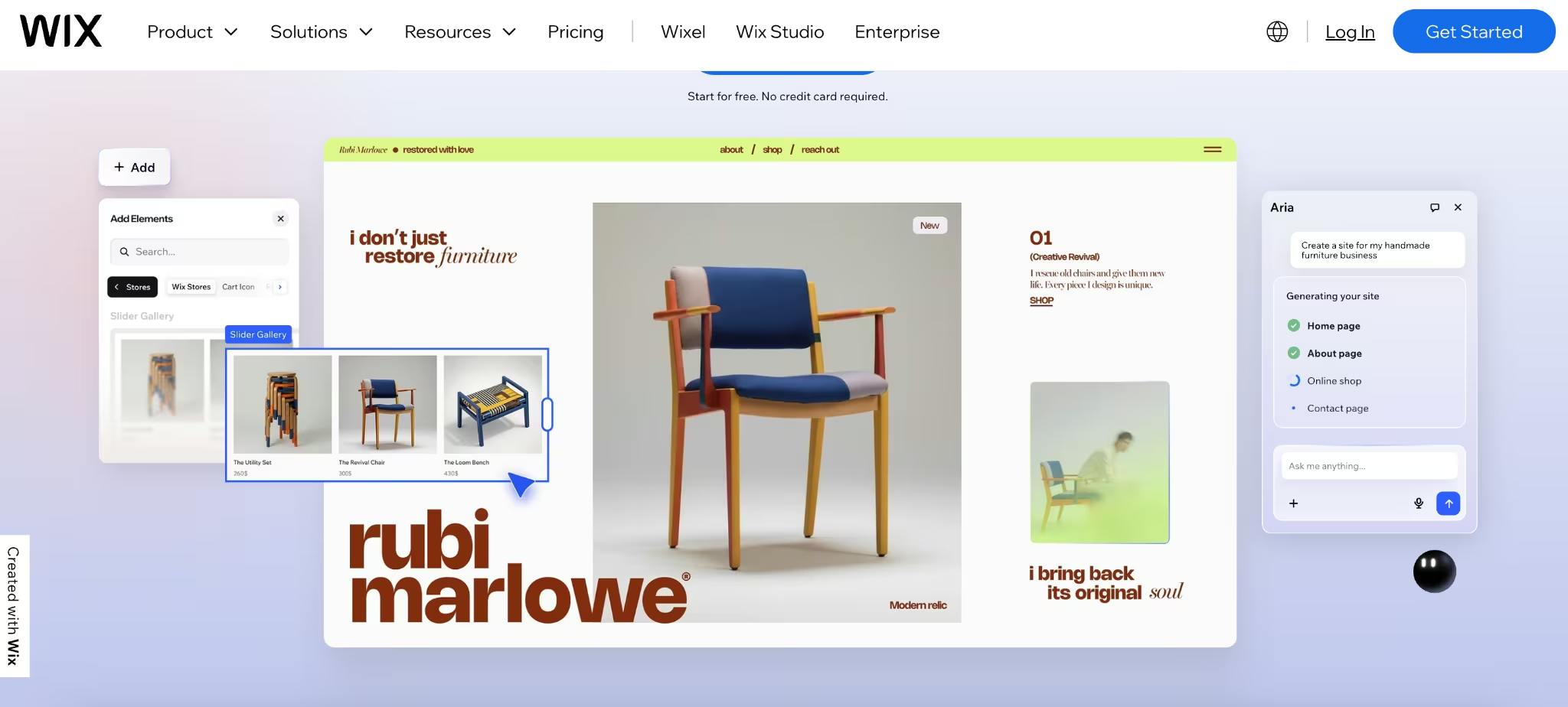
On Wix, the advertised entry price is where the monthly total starts, before apps and the domain renewal push it higher.
Wix runs on tiered premium plans. The entry Light plan starts at $17 a month, the Core plan runs $29 a month, and the Business plan runs $39 a month, all billed annually. Business Elite sits at the top at $159 a month. The starter tier covers a basic site. Payments, more storage, ecommerce, and advanced marketing sit on higher plans.
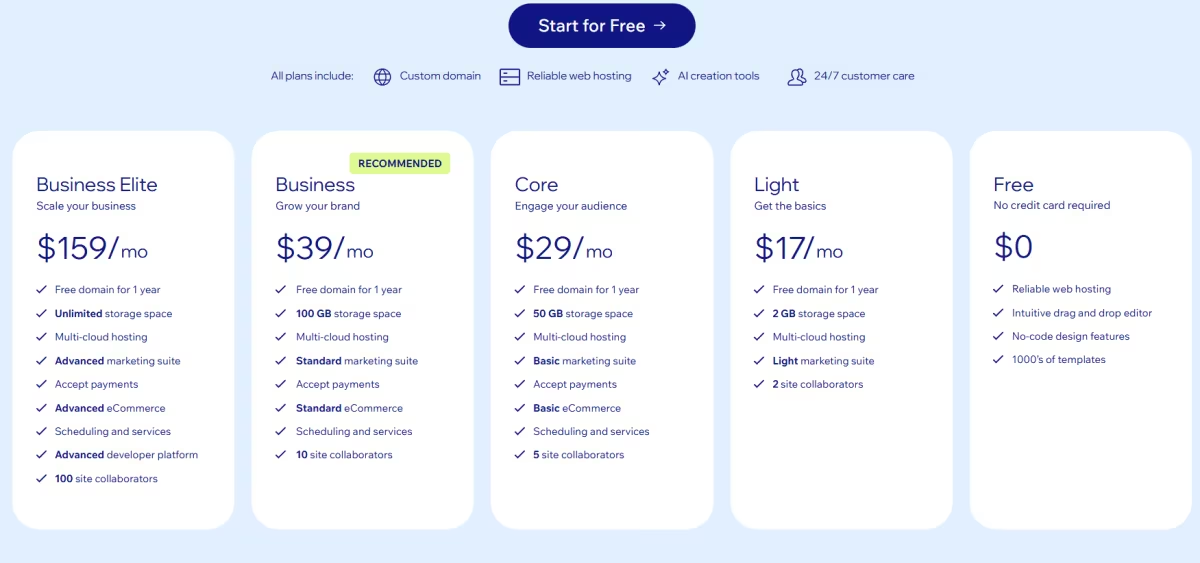
The pattern to watch is add-on creep. A base plan plus a few paid apps and a renewed domain can double your monthly total by year two. Wix is strong for a fast, simple launch. Budget for the plan you'll grow into, since the one on the ad rarely stays big enough.
Want the full breakdown of what each Wix plan covers? Read our Wix pricing guide before you commit.
Emergent Cost
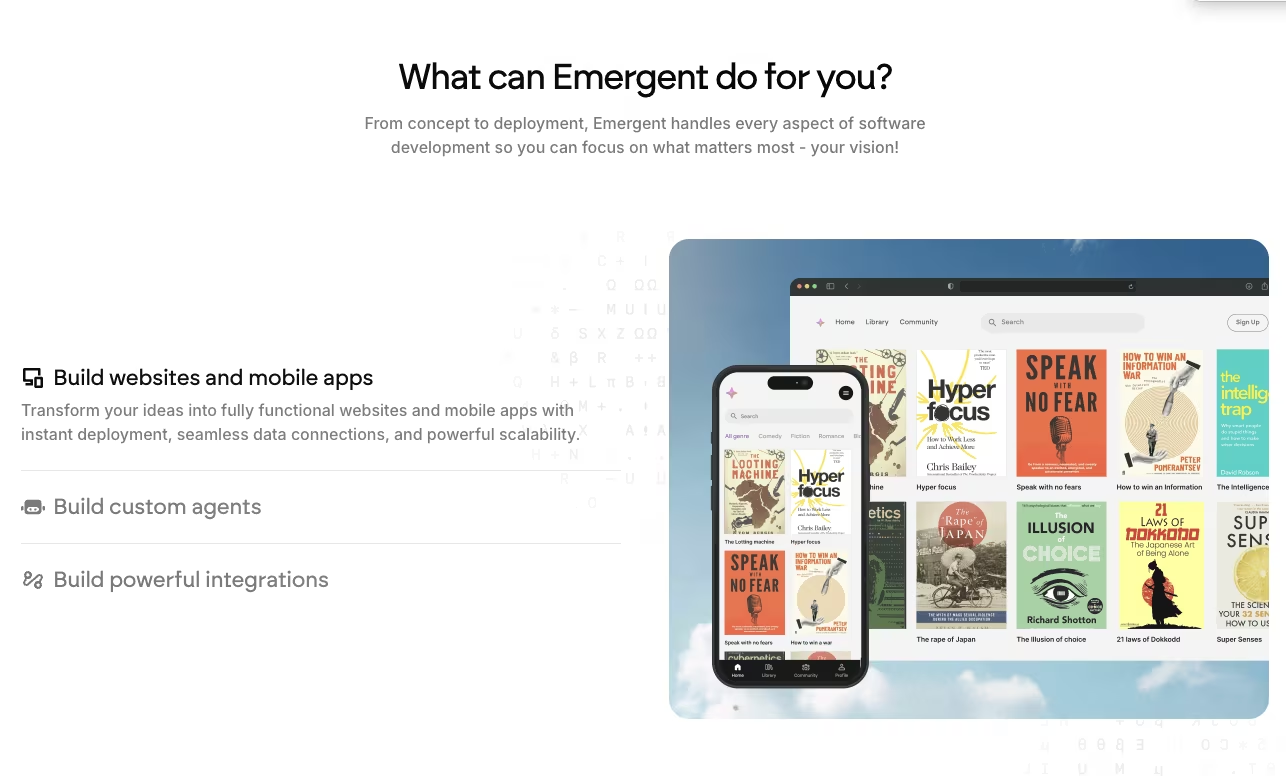
Because it delivers the brief as a working web app, Emergent is priced somewhere between a template builder and a custom project.
Emergent runs on a subscription. A free tier covers testing the idea, and paid plans start at $20 a month. Hosting runs inside the platform (billed as monthly credits), and the running cost scales with how much the site does.
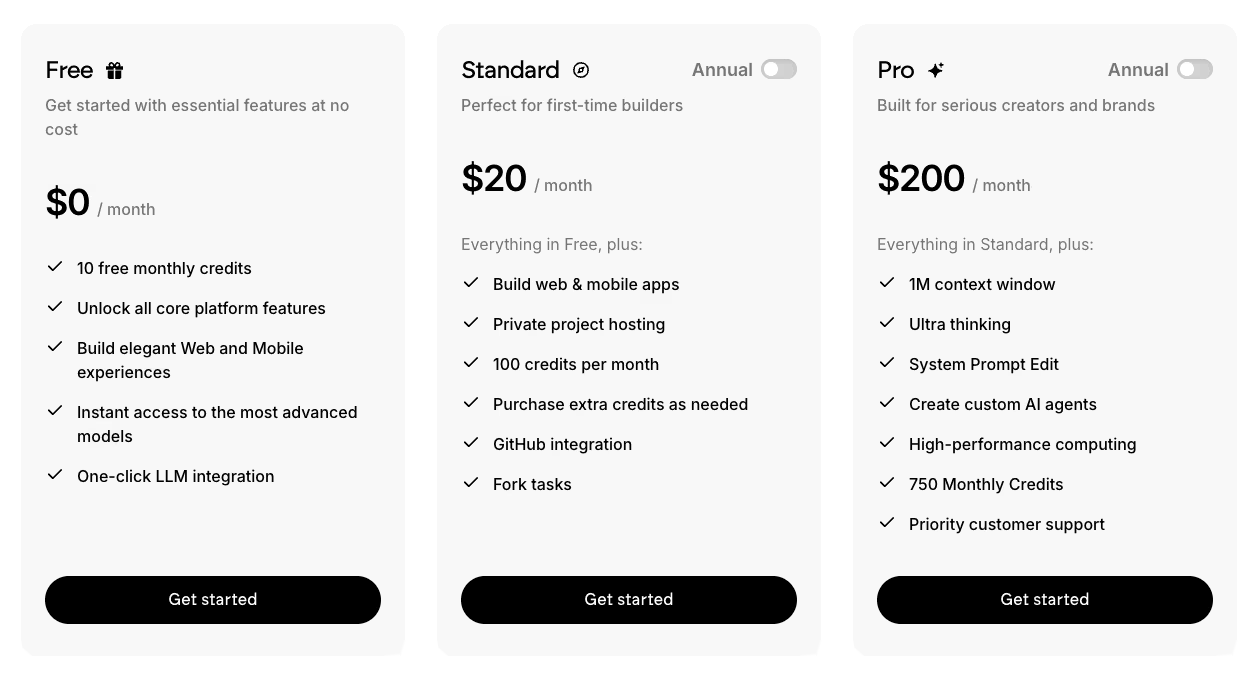
Emergent generates application-style sites with working user accounts and other functionality beyond a standard template builder. It suits projects whose scope does not justify a larger custom quote.
Squarespace Cost

Squarespace had a higher estimated upfront cost, but its all-in-one plan removed the need for separate hosting.
Its entry Basic plan starts at $25 a month. Lower tiers carry a 2% online store transaction fee on sales, which higher tiers drop. Hosting is baked in, so there's no separate host bill to track.
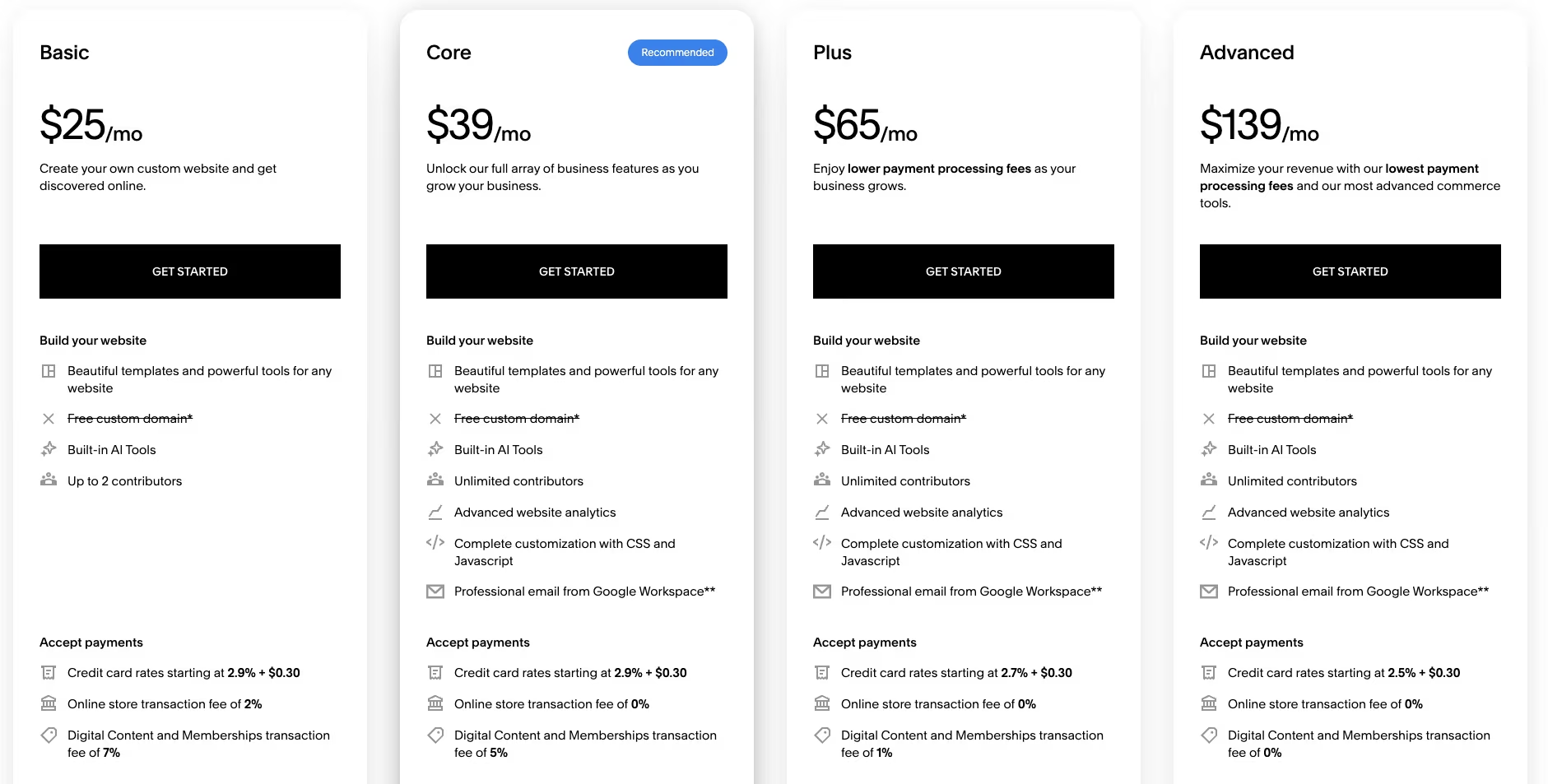
Squarespace charges more than the lowest-priced options, and in return you get templates that look finished out of the box, built-in hosting, and a setup with no plugins to maintain.
Want the full breakdown of what each Squarespace plan covers? Read our Squarespace pricing guide before you commit.
WordPress + Elementor Cost
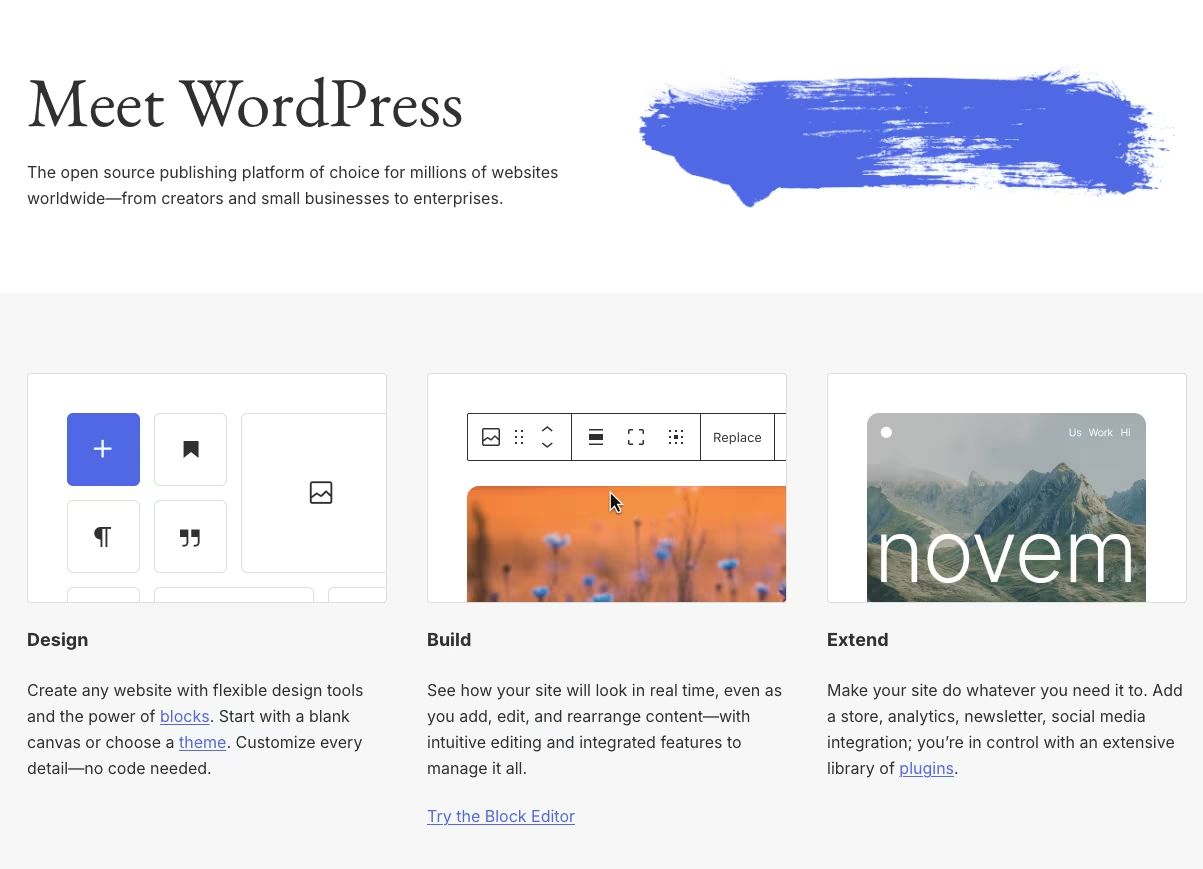
WordPress plus Elementor had the lowest estimated ongoing cost. It also required the most work on my side.
The stack is mostly free where it counts. The WordPress software is free, and you pay for hosting and a domain. Elementor Pro is optional: an annual license, billed by site count, starts at $60 per site.
If you host on WordPress.com instead of a separate host, its paid plans start at $9 a month, and you can install a plugin like Elementor on any paid tier, though the $40-a-month Business plan adds the storage and resources a plugin-heavy build usually wants.
The tradeoff is ownership. You control everything, and you handle the upkeep, too. If you're cost-conscious and don't mind doing the upkeep yourself, this stack is the cheapest way I found to keep a site running year after year.
Webflow Cost
On Webflow, the free tier ran out the moment the site needed a blog, so real use meant paying for the Premium plan.
Webflow splits pricing into Site plans, and anything content-driven needs the Premium plan, plus add-ons if you sell. The Basic plan runs $25 a month, and the CMS-capable Premium plan runs $39 a month. The free Starter plan is a two-page demo, enough to try Webflow and too small to host a working site.
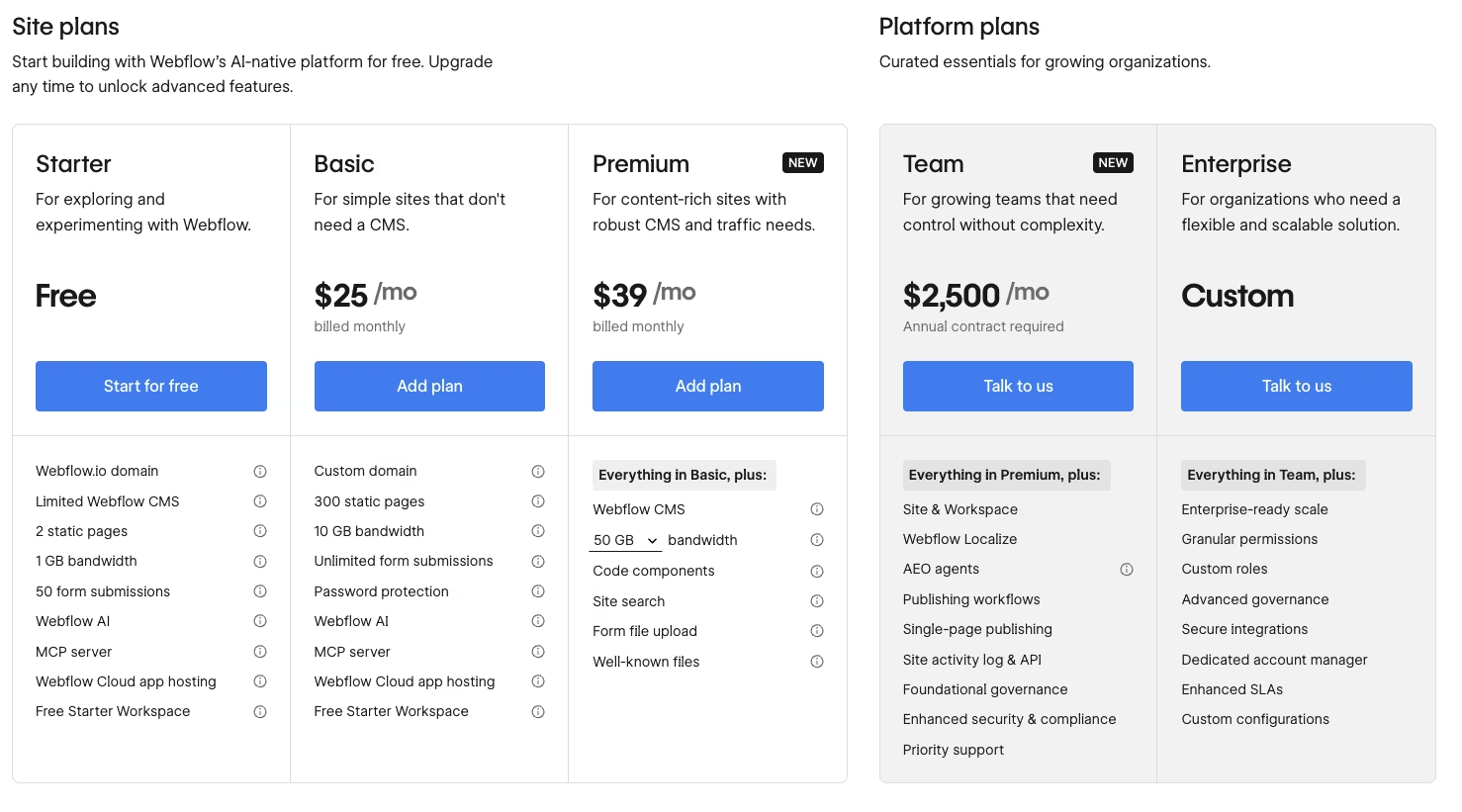
Webflow offers more layout control than the template builders in this comparison, but it takes longer to learn. For a plain five-page site, the added cost and setup time may be unnecessary. It fits projects where custom layout control is the priority.
Want the full breakdown of what each Webflow plan covers? Read our Webflow pricing guide before you commit.
Shopify Cost

Pricing a store on Shopify, the plan itself was a small share of the monthly total. Apps and per-sale fees drove most of it.
Shopify's entry Basic plan runs $39 a month. On top of the plan, you pay card processing from 2.9% plus $0.30 a sale, plus an extra 2% platform fee on Basic if you don't use Shopify Payments. Then come the apps, and stores tend to run a stack of them.
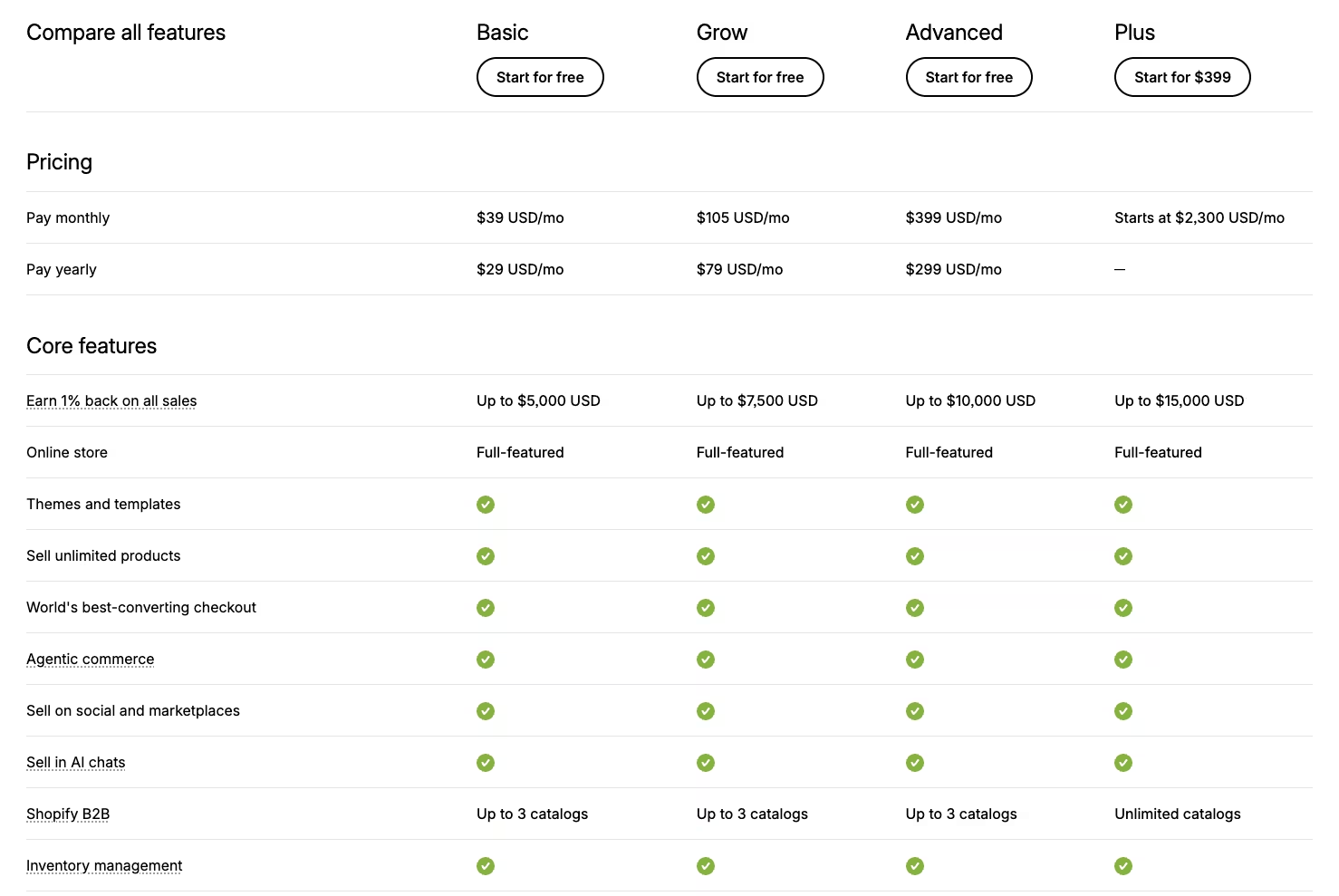
One of the main Shopify alternatives is WooCommerce on WordPress, paired with Stripe or PayPal for payments. That keeps the platform free, and moves cost into extensions and setup. Shopify is built for selling, and it's simple to launch. Add up the whole stack first, because the base plan is the smallest number on the bill.
Upfront vs Ongoing Costs: Where a Website Bill Grows
Every website has upfront and recurring costs. The upfront price gets the attention, but in my calculations, renewals, apps, and plan upgrades could eventually overtake the initial build cost.
Upfront and One-Time Costs
These are the costs you can see coming and pay once. They're the easy half of the budget.
- Domain registration: Your first-year domain, usually about $10 to $20 for a .com.
- Template or theme: A premium theme is about $40 to $100 one time, if you don't use a free one.
- Initial design and setup: Your own hours on DIY, or a one-time fee if someone builds it.
- Content and logo: Copy, photos, and branding, whether you make them or buy them once.
Budget these once and move on. Ongoing costs make websites harder to price than the upfront total suggests.
Ongoing and Hidden Costs That Blow Up the Budget
Renewals, plan upgrades, app creep, and per-sale fees caused the largest cost increases I recorded. The sign-up price covered only the starting cost.
These costs arrive separately, so track them together when estimating the site's yearly cost.
- The renewal cliff: Intro and promo prices on hosting and builders often renew at two to three times the sign-up rate, so the renewal is your true recurring number.
- Tier ceilings: The one feature you need often sits a plan up, like a CMS-driven blog on Webflow's $39-a-month Premium tier or plugin installs on WordPress.com's $40-a-month Business plan.
- App and plugin creep: Monthly spend grows as you add apps and extensions, and it's heaviest on stores that run a whole stack of them.
- Transaction fees: Payment processing runs roughly 2.9% plus $0.30 a sale, and some platforms add their own fee on top if you skip their processor.
- Maintenance: Upkeep can run about $20 to $100 or more a year if you handle it yourself. Outsourced maintenance is a separate recurring cost.
- The DIY time cost: Doing it yourself is cheap in cash and expensive in hours, and those hours cost you even when no invoice shows them.
- Migration and lock-in: Picking a platform that can't add a store or bookings later means a costly rebuild when you outgrow it.
- The eventual redesign: A later redesign can cost as much as the first build on the same route, while migration costs depend on how difficult the site is to move.
Most of these costs do not appear in the advertised plan price. Budget for annual renewals, future features, and the possibility of moving or redesigning the site later.
Is It Worth It to Build a Website Yourself or Hire a Pro?
Whether it's worth building a website yourself or hiring a pro comes down to budget, skill, time, and whether the site has to convert. I compared each route by whether its cost could be justified by the site's expected role. Hiring help makes more sense when conversions directly affect revenue.
Judge the budget against the site's expected return. A site that generates bookings can justify a higher upfront cost, while a low-cost site that produces no action still wastes money.
Build It Yourself If You:
- Have a tight budget: You need a working site for a few hundred dollars a year, with a few thousand out of reach.
- Need a simple site: A brochure, portfolio, or basic booking page fits DIY tools cleanly.
- Have time to learn: You have evenings available to learn the tool and build the site.
- Want to own the upkeep: You're comfortable handling updates and small fixes yourself.
Hire a Freelancer or Agency If You:
- Need the site to convert: Revenue depends on it, and design and strategy earn their fee.
- Want custom design or features: Your needs go past what templates and stock apps cover.
- Need to protect your work time: A DIY build would take hours away from running your business.
How to Keep Website Costs Down Without Cutting Corners
The largest savings come from recurring costs. These steps reduce the overall bill without reducing the site's quality.
- Check the renewal rate before you commit: Look up what the plan and hosting cost after the promo ends, because that's the number you'll live with.
- Right-size the plan: Buy the tier your site needs now, before you pay for features you're only guessing you'll use.
- Avoid app and plugin creep: Add paid add-ons only when a clear need shows up, and audit them once a year.
- Use free SSL: Your host or plan almost certainly bundles it, so don't pay for a certificate you don't need.
- Buy your domain separately if it's cheaper: Registrars sometimes beat the bundled builder price, and a domain you own is easy to point anywhere.
- Start on a route that fits your expected growth: Check that the platform supports the features you expect to add.
- Judge spend by whether the site converts: Put money where it earns bookings or sales, and stop paying for polish that doesn't move the needle.
Use the yearly total, rather than the sign-up price, when comparing routes.
Website Cost by Type: Blog, Portfolio, Small Business, and Ecommerce
The same platform produced one estimate for a brochure site and a different estimate when I added store features. What you're building drives the cost as much as who builds it.
A one-pager, a blog, a small-business site, and a store aren't the same bill, even on identical tools. Here's the read by site type.
A brochure or five-page site is among the cheapest site types, and DIY builders or WordPress handle it well. A blog adds ongoing hosting and content over time. A small-business site like the one in my brief is a brochure plus a booking or contact layer, which nudges the plan up a tier.
Ecommerce adds recurring app charges and per-sale processing fees to the platform plan. A web app that needs logins, a database, or custom logic can cost more, depending on whether you use an AI builder or a custom project. Custom web apps fit either a one-off custom project or the AI route, depending on the scope and budget.
My Verdict: What a Website Costs in 2026
So, how much does it cost to build a website? I compared the upfront price of each route with its expected yearly costs. A low starting price can become more expensive once you add renewals, apps, hosting, and maintenance.
For a simple site on a budget, DIY builders and self-hosted WordPress had the lowest costs in my comparison, with WordPress plus Elementor producing the lowest estimated ongoing total when you handle the upkeep.
Squarespace costs more but includes hosting and avoids plugin maintenance. Shopify required the least setup time for a store, provided you include apps and per-sale fees in the budget.
When the site needs custom design or functionality, a one-off custom project costs more than DIY but avoids the continuous expense of an in-house hire. An AI web app builder offers another route when you need more than a template but want to direct the build yourself.
Set your budget using the upfront build cost, annual expenses, and the bookings or sales the site would need to generate.
How Emergent Helps You Build a Full Website Without a Full Budget
DIY builders can become limiting once a site needs custom workflows or stored user data. Custom development can add those features, but a one-off project can cost up to $12,000, while hiring an in-house team creates a much larger recurring expense.
An AI custom application build offers another route when the site needs more than a brochure but custom development exceeds the budget. Emergent is one option built for that middle ground. You tell it what the finished site should do, down to the features a template can't reach. A team of AI agents then builds it, from the interface to the logic and data to the testing.
The result is an application-style site built around your brief. Emergent connects the components that would usually require several plugins or a development team.
If your project needs that kind of functionality but a custom quote feels like too much, it's worth a look before you commit to the priciest route. The free tier lets you try the product before upgrading, while paid plans start at $20 a month.

Emergent designs, writes, and publishes your whole site from one prompt. No templates, no drag-and-drop.
- Full site from one prompt
- Custom design, real pages
- Publish in minutes







