



Naming a business takes an afternoon. Choosing a website builder for it can eat up way more time than that.
For me, it came down to Wix vs Squarespace, two of the most popular website builders right now. Both sell the same pitch: no code, no developer, just show up and build. The pitch skips the part where you end up with six tabs open, comparing pricing pages, no closer to a decision than when you started.
Staring at pricing pages wasn't going to settle it, so I built the same site on both platforms instead and ran every AI tool each one offers.
Here's what testing both turned up.
Wix vs Squarespace: What's the Difference?
Wix is an open-canvas website builder built around a range of templates, marketing tools, and a free plan to get started with.
Squarespace is a structured, design-first website builder focused on visual polish and a cheaper entry point for selling.
Choose Wix if: You want the larger template library, deeper SEO and marketing tools, and a free plan to test-drive before paying anything.
Choose Squarespace if: Design quality is your top priority, and you want to start selling on a cheaper entry-level plan.
How I Tested Both Platforms
I built the same brief on each platform: Marlow & Birch, a fictional coffee roastery, with a homepage, a shop page for three coffee blends, and a contact page.
Beyond that build, I compared fee structures across all tiers, support channels on both sides, and ran each platform's SEO and AI visibility panel through the same checks.
I also pulled independent data where it existed, Semrush's AI Visibility Index and G2's review aggregation, rather than relying only on what each vendor's own dashboard claims about itself.
A quick summary, before the full breakdown:
| Platform | Best For | Core Strength |
|---|---|---|
| Wix | Businesses that want more templates, AI tools, and marketing features | Over 2,000 templatesand a free plan to start on |
| Squarespace | Creative brands and portfolios that want a polished look with less tinkering | Design polish andthe ability to sell, starting on itscheapest plan |
Meet Wix
Wix has over 2,000 templates and an App Market with roughly 800 apps.
It also includes a free-forever plan that lets you build and preview a site before paying anything. Its editor is a blank canvas, so elements go wherever you drag them rather than snapping into a fixed grid.
Wix also includes its own AI website builder and an AI Visibility Overview that tracks how often a site is mentioned by AI platforms in response to generated test questions.
Meet Squarespace
Squarespace is the smaller, more curated platform, with a structured grid editor and commerce tools that sit inside the core product rather than behind an add-on.
There's no free plan, only a 14-day trial. Squarespace's AI builder, Blueprint AI, runs a guided multi-step setup rather than a single freeform prompt.
It also includes a dedicated Search Engine/AI Optimization panel with an in-dashboard assistant called Beacon AI (currently in beta), plus a smaller Extensions marketplace of third-party plugins available on every plan.
Wix vs Squarespace: Feature-by-Feature Comparison
Wix tends to win on tooling depth, templates, and marketing features. Squarespace tends to win on design quality and a cheaper path into selling. The breakdown below goes category by category, with a winner called for each.
Ease of Use and AI Builders
Both platforms get a beginner to a published site quickly, but they do so through different editors and AI flows.
In my test, Wix's onboarding chat, run by its AI agent Aria, asked what the site was for, then followed up with questions about my level of expertise, my niche, and what sets the business apart, before suggesting a set of apps to add.
That led to a dashboard checklist, where the "Design Site" step offered a choice between generating the site from everything Aria had gathered and starting from a recommended template.

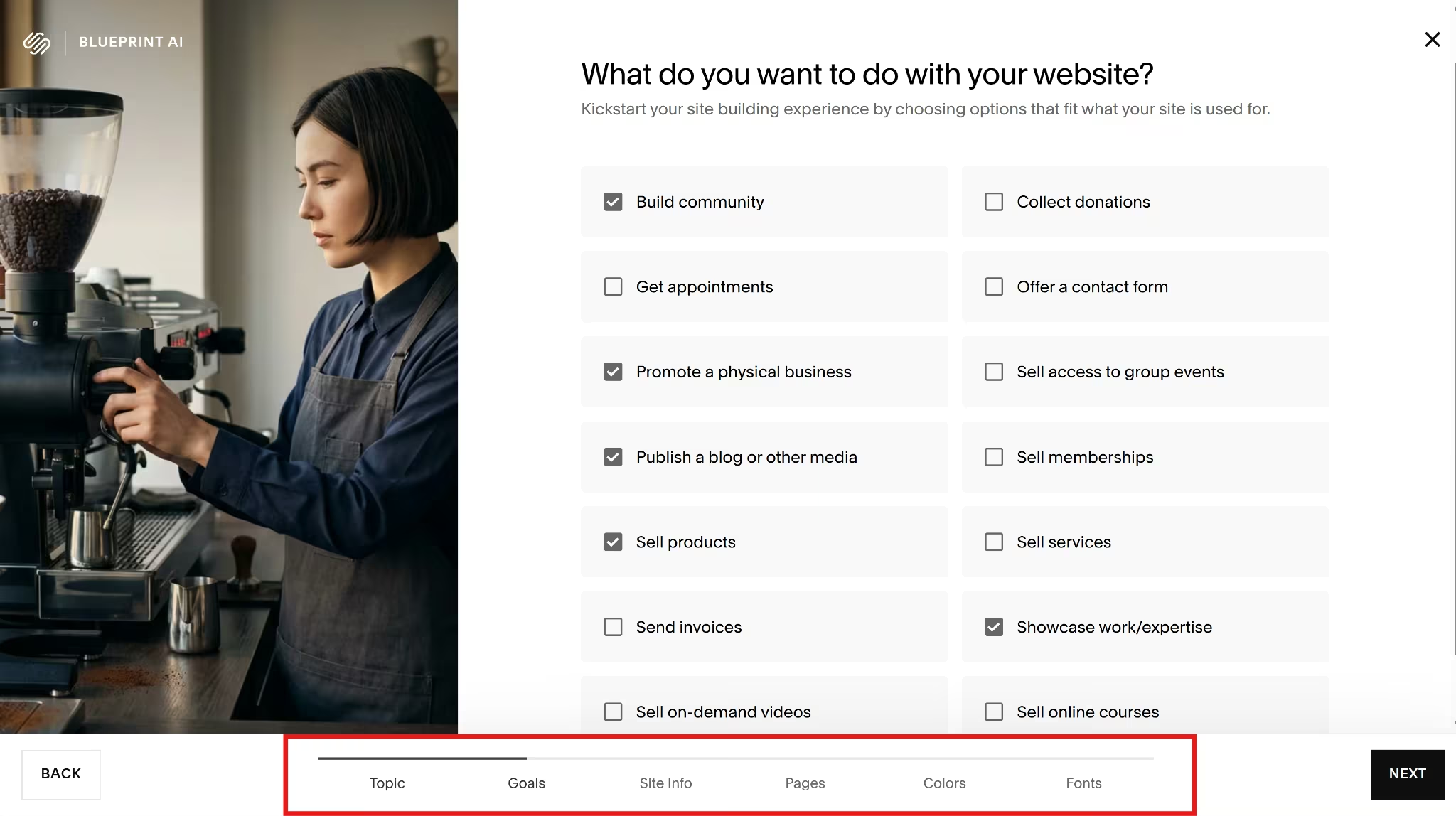
Squarespace's AI wizard, Blueprint AI, skips the open prompt entirely, walking through several guided setup steps where you pick from options shown on screen instead of typing anything. It ended up faster than Wix's chat-based flow and generated three finished site options to choose from, along with a set of standard templates.
Neither platform's AI assistant makes visual changes on its own.
Asked directly to change a site's colors, Squarespace's in-dashboard assistant, Beacon AI, opened the manual color palette editor instead of applying the change itself.

Winner: Tie. Squarespace's Blueprint wizard got me to a finished draft faster, while Wix's chat flow gathered more useful details along the way. Both assistants route visual changes back to a manual editor.
Templates and Design
Wix and Squarespace can both produce well-designed sites, and in testing, they held up at about the same level. Every template I opened, on either platform, looked like it had a designer behind it, with consistent typography and spacing out of the box.
The difference between the two is the range.
Wix wins on range, with over 2,000 templates sorted by industry; Wix's library is far larger than Squarespace's, so you're more likely to find something close to your exact business type before customizing.
Neither platform lets you switch templates once a site is live, confirmed in testing on both. If you want a different look, three things work instead of a full swap:
- Changing the site theme, which updates fonts, colors, and button styles site-wide.
- Redesigning individual sections by hand.
- Starting an entirely new site if a full reset is needed.
Changing the theme is the fastest option of the three for a quick visual refresh.
Winner: Tie on design quality. Wix wins on its template library, with a much larger assortment to browse.
Ecommerce
Wix's Light plan has no ecommerce features at all. Squarespace's cheapest plan, Basic, can sell from day one. Once you're selling, the comparison breaks down like this:
- Entry point for selling: Wix requires Core ($29/month annual) to sell anything. Squarespace sells from Basic ($19/month annual).
Transaction fees:
- Wix charges 0% platform fee on standard product sales, with Wix Payments processing costing 2.9% + $0.30 per U.S. transaction.
- Squarespace charges a 2% online store transaction fee on Basic, dropping to 0% on Core, Plus, and Advanced, plus a separate digital content fee stepping down from 7% to 0% across the same tiers.
- Squarespace's card processing rate is 2.9% + $0.30 on both Basic and Core, the same rate Wix charges.
- Product limit: Wix caps every ecommerce plan at 50,000 products. Squarespace allows unlimited products from Basic.
- Abandoned cart recovery: Wix includes it from Core. Squarespace includes it from Basic.
- Dropshipping or print-on-demand: Wix's Modalyst integration scales from 25 products on Core up to 50,000 on Business Elite. Squarespace includes print-on-demand dropshipping from Basic, with no product cap.
- Automated tax calculation: Wix limits this to Business and above. Squarespace includes it from Core, with the rate improving at each higher tier.
None of that settles which one costs less, so the numbers below work it out.
Say a candle shop sells 20 orders a month at $30 each ($600/month in total sales). Card processing costs the same $23.40 on every plan (2.9% of $600, plus $0.30 per order):
- Squarespace Basic: $19 annual plan + $23.40 processing + $12 platform fee (2% of $600) = $54.40.
- Squarespace Core: $29 annual plan + $23.40 processing + $0 platform fee = $52.40.
- Wix Core: $29 annual plan + $23.40 processing + $0 platform fee = $52.40.
At this volume, Squarespace Core and Wix Core tie as the cheapest of the three, while Squarespace Basic is the most expensive.
Squarespace Basic beats Squarespace Core below $500 a month in sales. Also, this example is specific to physical products. Digital products are subject to a different Squarespace fee schedule.
Winner: Tie between Squarespace Core and Wix Core. They cost the same at every volume tested on annual billing. But if you made less than $500 a month in sales, pick Squarespace Basic.
SEO and AI Visibility
Semrush’s 2026 AI Visibility Index analyzed 126 million U.S. AI search prompts; the same report found that 45% of marketing leaders cannot accurately measure their brand's visibility within AI-generated answers.
Wix does more to solve the measurement side of that problem. Its AI Visibility Overview tracks visibility across ChatGPT, Gemini, and Perplexity, including site mentions and citations, competitor scores, referenced sources, brand perception, and traffic from AI platforms.
It also reports user-query activity, pages scanned by AI bots, and when the site was last crawled. In my account, the traffic view also showed that it could track crawl activity from Claude.
There is a catch for new sites. In my test, Wix required 50 unique visitors within 30 days before it would show the full report, so Marlow & Birch had not yet qualified.
Of the two tools, Wix also has a deeper traditional SEO toolkit. Its SEO Setup Checklist walks users through business details, keywords, and Google verification, while the SEO dashboard brings Wix’s SEO tools and settings into one place.
In my test, that dashboard also included Site Inspection, sitemaps, redirects, site verification, a Robots.txt Editor, llms.txt, and NLWeb.

Squarespace is simpler. Its Search Engine / AI Optimization panel gives the site an SEO Score and checks the site title, page and product descriptions, and image alt text. It flags unfinished work, generates suggested titles and descriptions, and automatically manages the XML sitemap.
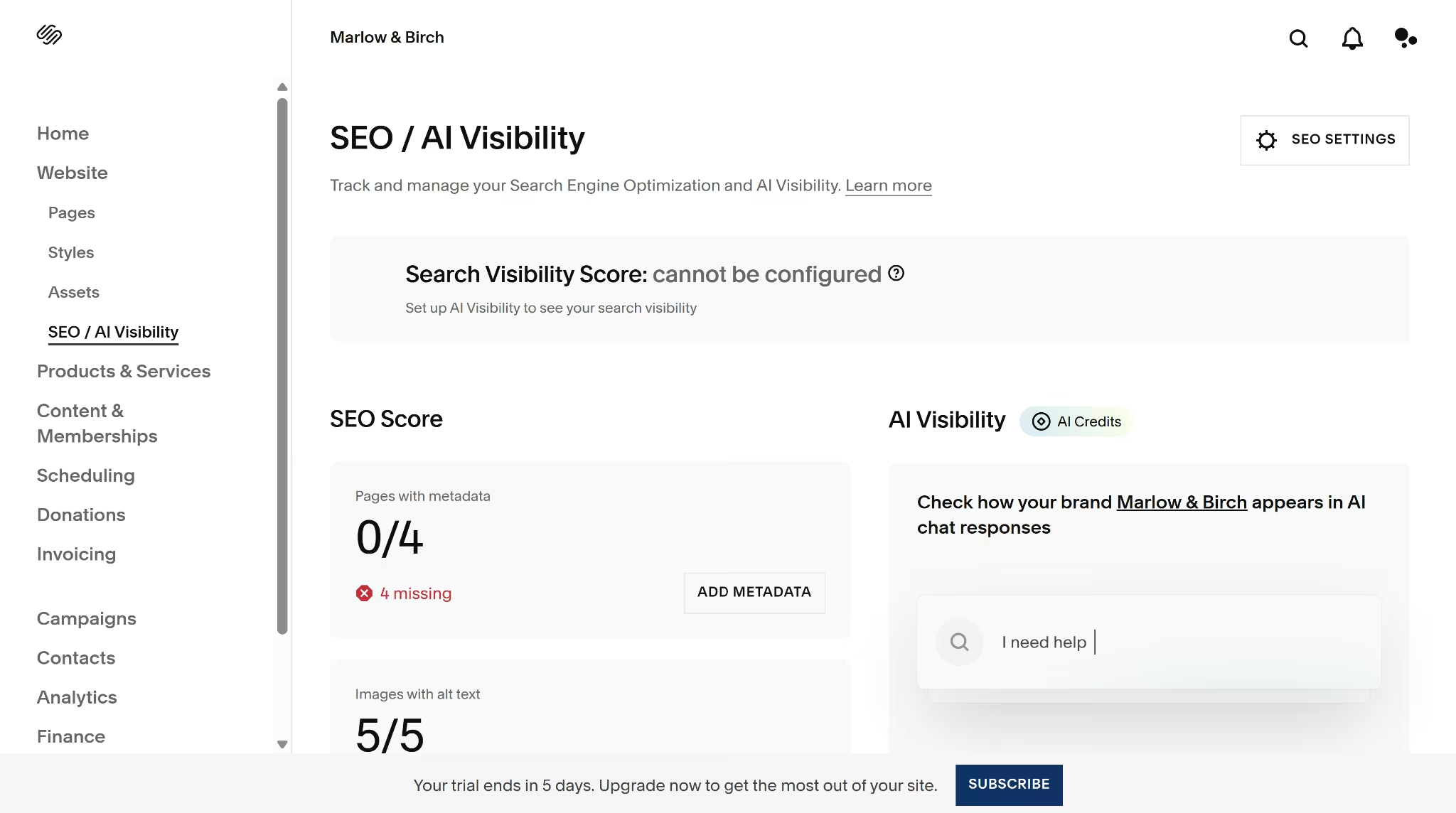
Winner: Wix. Squarespace is easier for working through basic page-level SEO, but Wix gives you much more information about whether the site appears in AI search results and more control over the technical side of SEO.
Marketing
Wix offers email campaigns, social posts, Google Ads, Facebook and Instagram tools, messaging, referrals, and Google Business Profile management.
The advantage is where the setup happens. More of it lives inside Wix itself. You can build a Google Ads campaign in Wix, including the ad copy, keyword themes, locations, and budget. Running the ads still costs extra because the advertising budget and any separate Wix service fee are not included in the website plan.
Wix also lets you create and schedule social posts using templates and AI-assisted ideas. Its email builder includes 200 marketing emails per month for free, so a small business can test a campaign before paying for a separate Wix Email Marketing plan.

Squarespace provides marketing support, but the workflow is more spread out.
Email Campaigns are sold separately from the website plan. It starts at $12/month ($8/month annual pricing) for 500 emails and includes templates, segmentation, personalization, automations, analytics, ecommerce tools, and AI email copy.
For paid social, Squarespace can sync products with Facebook and Instagram, pass catalog data to Meta, and support product ads. The campaign itself is still created and managed in Meta Business Manager.
Its social-sharing tools can publish content to connected networks, though automated scheduling may require an extension like Outfy. Squarespace also has a Marketing Kit in its iOS app that turns site images and videos into reusable marketing graphics. It is available for English-language sites on certain higher-tier plans.
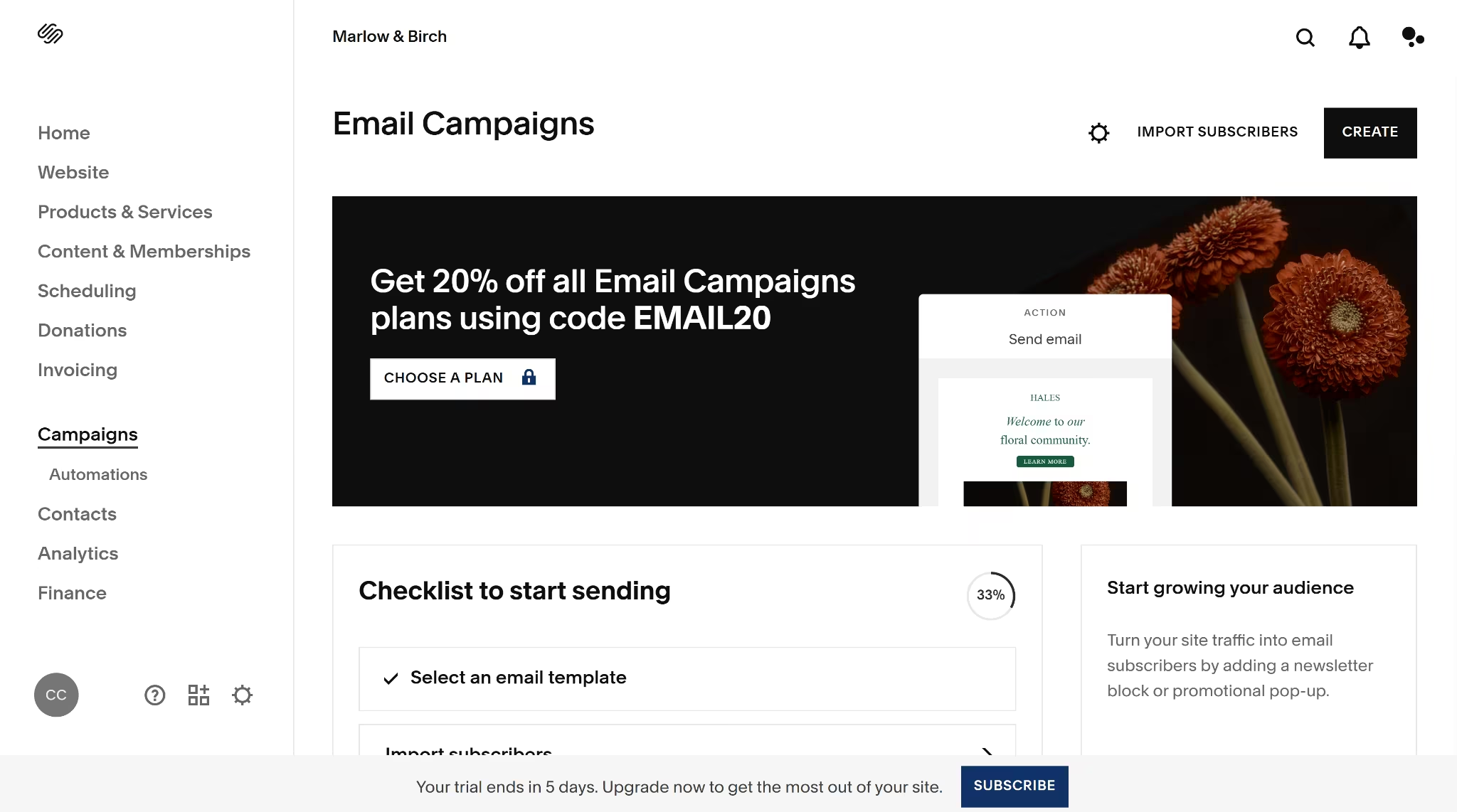
Side by side, the marketing differences are easier to spot:
| Task | Wix | Squarespace |
|---|---|---|
| Send marketing emails | 200 emails per month included before upgrading | Separate add-on from $12/month for 500 emails |
| Schedule social posts | Built into Wix’s social tools | May require an extension |
| Run Google Ads | Campaign setup happens in Wix | Campaign setup happens outside Squarespace |
| Run Meta product ads | Wix provides campaign and tracking tools | Squarespace sends product data to Meta; the campaign is managed in Meta Business Manager |
| Manage the workflow | Offers more tools in one dashboard | Many tools are split across add-ons and external tools |
Winner: Wix. Squarespace offers capable email and social integrations, but Wix has more range and keeps more of the work in one dashboard.
Blogging
Wix and Squarespace both cover the essentials: scheduling, categories and tags, comments, SEO settings, social sharing, multiple authors, imports, paid content, and several blog-page layouts.
The biggest difference showed up in the writing experience.
Wix’s AI Post Creator produced the stronger full article in my test. It followed a clearer blog structure, used anchor links properly, and suggested relevant visuals. Wix also supports AI-generated post ideas and drafts, plus outlines, images, SEO titles, and meta descriptions. The editor also autosaved the post as I worked.
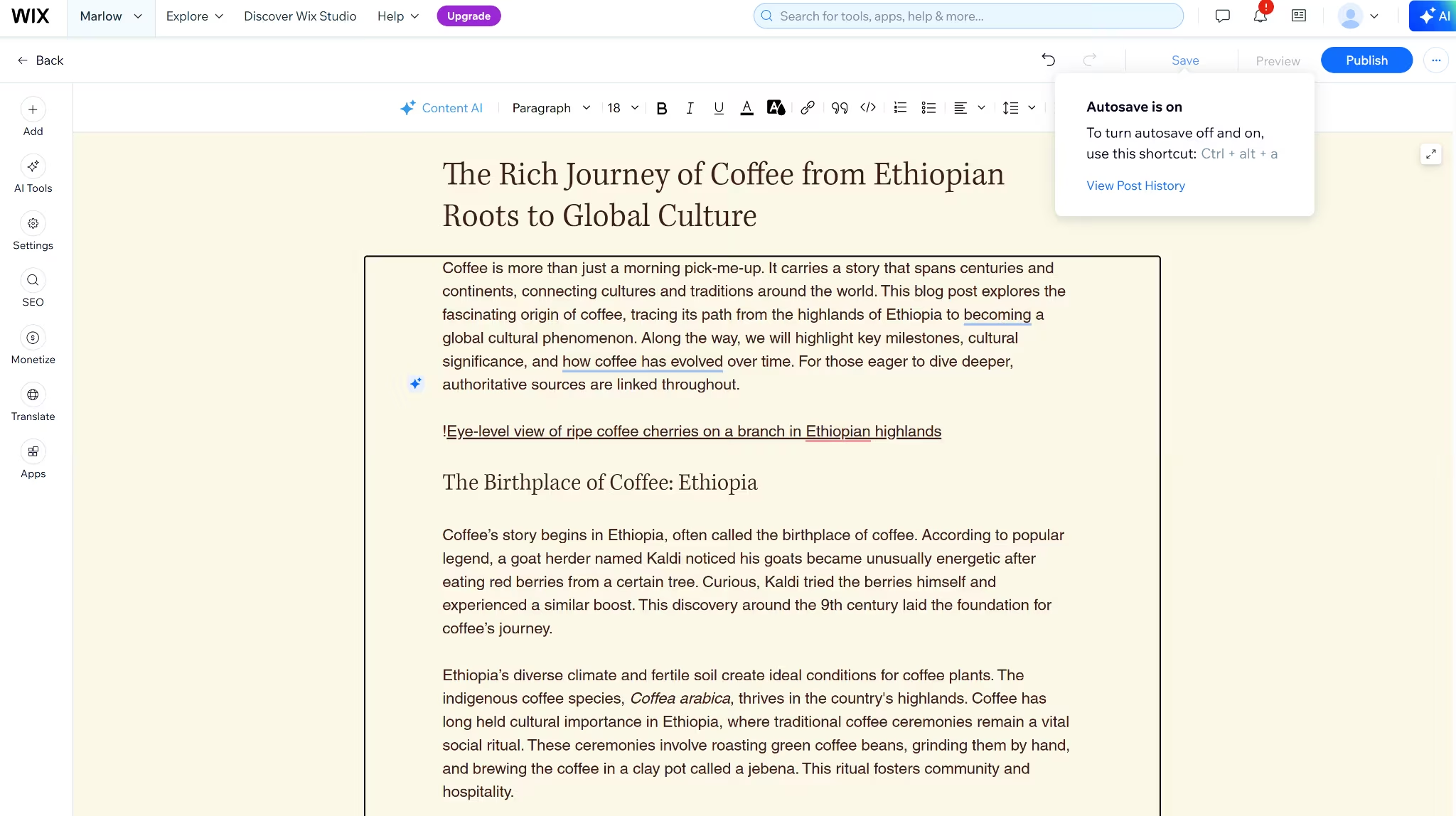
Squarespace also has AI writing inside the blog editor, but it worked better for shorter passages.
The coffee article hit its character limit, and when I asked it to continue, the new text abandoned the original structure and drifted into an unrelated fictional café scene. The first output also mixed article copy with image notes and broad source links that still needed replacing.
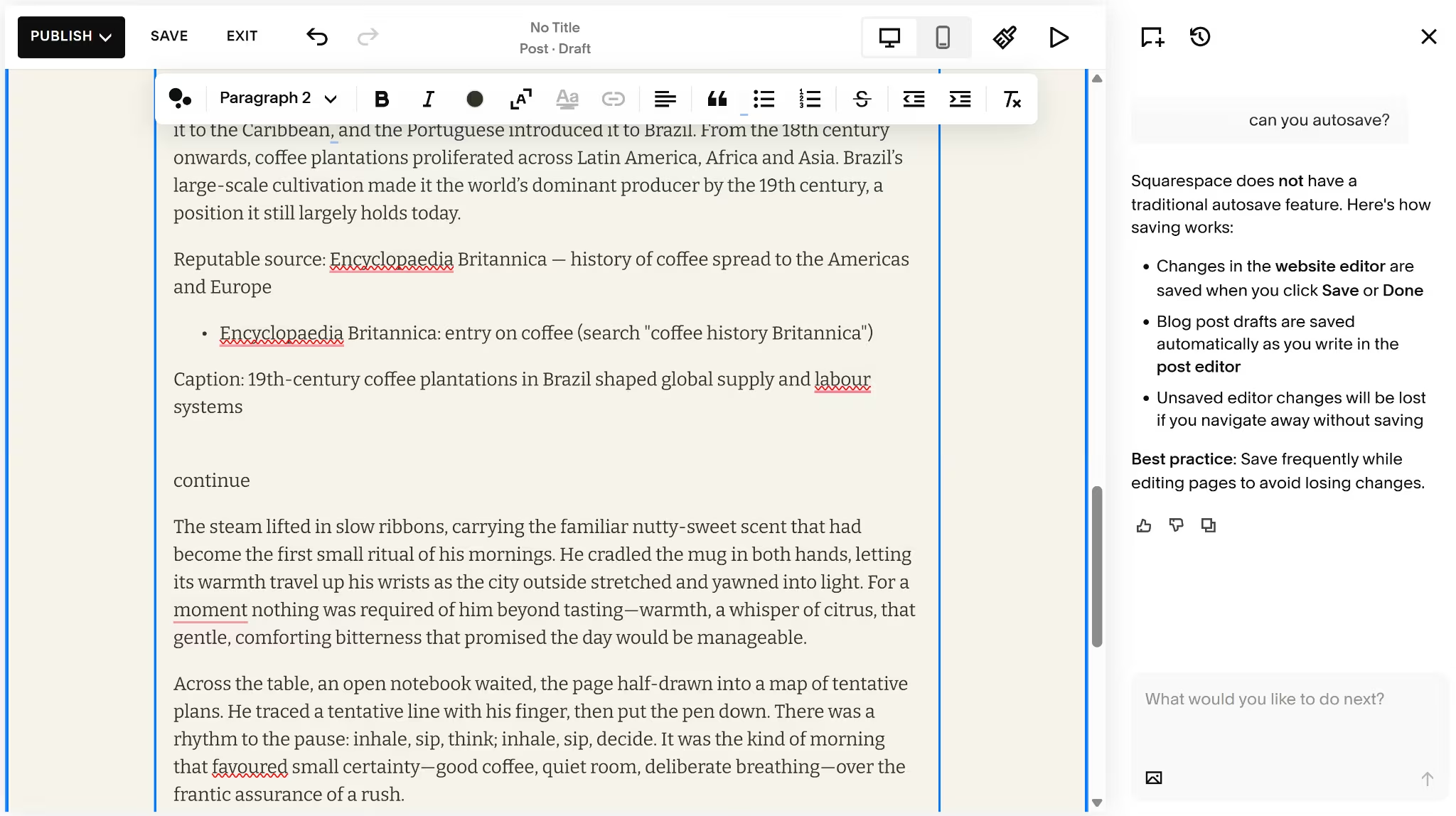
Once the standard features are out of the way, the main blogging differences look like this:
| Area | Wix | Squarespace |
|---|---|---|
| Analytics | Dedicatedblog analyticsfor views, visitors, clicks, reading time, engagement, and reader activity | Blog performance is spread across Popular Content, Search Keywords, and RSS Subscribers |
| Writer management | Dedicated public writer profiles and controls for displaying names, reading time, views, likes, and other post details | Authors are assigned through contributor accounts |
| Paid posts | Paywall select postswhile leaving others free | Paywall applies to the blog collection, so a free-and-paid mix needs separate blog pages |
| Imports | WordPress and other Wix sites | WordPress, Blogger, and Tumblr |
| Draft protection | Autosaves while you write | No autosave in the blog editor during my test |
Winner: Wix. Squarespace supports more import sources and covers the standard publishing tools well. Wix wins because its AI produced a stronger full post, drafts autosaved, and it gives publishers clearer analytics, better writer management, and more precise paywall control.
Customer Support
Wix and Squarespace each start with an in-app AI assistant that can answer questions and point you toward relevant help.
Wix gives you more ways to reach a person. You can move from 24/7 AI help to live chat, an email ticket, or a phone callback. English callbacks are available 24/7, while English live chat runs Monday to Friday from 2 a.m. to 6 p.m. Eastern. You request the call through Wix rather than dialing a public support number.
Squarespace offers 24/7 email support and English live chat Monday to Friday from 4 a.m. to 8 p.m. Eastern. It does not offer phone support.
Winner: Wix. Both offer AI help, email, and weekday live chat. Wix adds 24/7 English callbacks, which gives you another option when a billing or technical problem is easier to explain out loud.
Pricing and Plans
Wix gives you longer to decide before paying. Its free plan has no time limit or credit-card requirement, though your site keeps Wix branding and a Wix subdomain. Squarespace has no permanent free plan; it starts with a 14-day trial.
| Use case | Wix | Squarespace |
|---|---|---|
| Basic website | Light: $17/month annually | Basic: $25/month ($19/month annually) |
| Small online store | Core: $29/month annually | Core: $39/month ($29/month annually) |
| Growing business | Business: $39/month annually | Plus: $65/month ($49/month annually) |
| Highest standard tier | Business Elite: $159/month annually | Advanced: $139/month ($99/month annually) |
But the plan that matters is the first one that supports the site you want to run, not the one with the lowest starting price. Wix Light cannot accept payments, while Squarespace Basic can sell physical products from the start. Basic charges a 2% commerce transaction fee for selling on its plan, though.
As covered earlier, Squarespace Basic is cheaper only below the $500 monthly-sales break-even point. Once sales pass that amount, Squarespace Core becomes the cheaper Squarespace option.
The next question is how Squarespace Core compares to Wix Core, Wix's first selling plan.
Both cost $29 a month on annual billing. Neither charges a platform or transaction fee on standard product sales, and both charge the same 2.9% + $0.30 card processing rate. With no fee gap to close, they cost the same at every sales volume.
The next tier up pits Wix Business against Squarespace Plus, the plan most growing stores land on.
| Wix Business | Squarespace Plus | |
|---|---|---|
| Price, annual billing | $39/month | $49/month |
| Card processing rate | 2.9% + $0.30 | 2.7% + $0.30 |
| Storage | 100 GB, up from Wix Core's 50 GB | Video capped at 50 hours, up from Squarespace Core's 5 hours; images and files stay unlimited, as they are on every tier |
| Collaborators | 10, up from Wix Core's 5 | Unlimited, already true from Squarespace Core |
| Other | Adds automated sales tax calculation; moves to Standard marketing and ecommerce toolset | Dropsdigital content fee to 1%; dropstax-calc service fee to 0.10% |
Wix Business runs $10 less per month, but Squarespace Plus's lower processing rate closes some of that gap as sales grow:
- Savings per $1,000 in sales: Squarespace Plus's rate is 0.2 percentage points lower, worth $2 per $1,000 sold.
- Savings needed: $10, to match Wix Business's lower plan price.
- Break-even: $10 ÷ $2 = 5 chunks of $1,000, so $5,000 a month.
Below $5,000 in monthly sales, Wix Business is the cheaper plan. Above it, Squarespace Plus pulls ahead.
Want the full breakdown of what each Wix plan covers at your sales volume? Read our Wix pricing guide before you commit.
At the top tier, here's how the two flagship plans compare:
| Wix Business Elite | Squarespace Advanced | |
|---|---|---|
| Price, annual billing | $159/month | $99/month |
| Storage | Unlimited | Video also reaches unlimited; images and files stay unlimited, as they are on every tier |
| Collaborators | 100 | Unlimited |
| Card processing rate | 2.9% + $0.30 | 2.5% + $0.30 |
| Other | Full marketing and ecommerce toolset; Modalyst dropshipping cap of 50,000, up from Wix Core's 25 | — |
At $99 a month, Squarespace Advanced undercuts Business Elite by $60, matches it on storage, and beats it on collaborators and processing rate. Wix's case for Business Elite rests less on hard limits and more on the depth of its marketing and ecommerce tools.
Want the full breakdown of what each Squarespace plan actually covers? Read our Squarespace pricing guide before you commit.
Winner: It depends on the plan. Squarespace wins at entry, with Squarespace Basic ($19) costing $10 less than Wix's cheapest selling plan, Wix Core ($29). Wix Light is cheaper still, at $17, but it can't sell at all.
Squarespace Core and Wix Core tie exactly at every sales volume. At the growth tier, Wix Business wins below $5,000 a month in sales, and Squarespace Plus wins above it.
Squarespace pulls ahead again at the top on price, storage, and collaborators. Wix's case for Business Elite rests on its deeper marketing and ecommerce toolset.
What Real Users Are Saying
Feature lists only tell half the story, so this section draws on G2's independent comparison instead, which aggregates reviewer pros and cons rather than either company's own marketing.
Wix
- Pros: Ease of use is the most-cited strength, and customer support comes up almost as often.
- Cons: Cost and limited customization are the two recurring complaints, roughly tied in frequency.
Squarespace
- Pros: Ease of use and template quality are the top two callouts.
- Cons: Limited customization is the most common complaint, with cost a secondary concern.
Overall, Squarespace holds a 4.4/5 rating from 1,100+ reviews, and Wix holds 4.2/5 from 1,800+ reviews. Wix having a phone option didn't translate into a higher support score either. Squarespace scores 8.5 on G2's Quality of Support metric against Wix's 8.0.
How to Make Your Choice
Wix and Squarespace both help a small business go online fast. The choice comes down to whether you'd rather have more templates and tools to configure, or a smaller set that already looks finished.
Wix Is Better For:
- Founders who want the largest template library to start from.
- Anyone who wants to test the platform on a free plan before paying.
- Sites that need deeper SEO tooling or a blog built to grow its own audience.
Squarespace Is Better For:
- Portfolios, creative brands, and anyone who wants a finished-looking site with less tinkering.
- Small stores that want to start selling on the cheapest available plan.
- Anyone who'd rather work inside a structured grid than an open canvas.
My Verdict
I'd point most nontechnical founders toward Wix first, mainly for its free plan and the room to grow into more advanced marketing tools without switching platforms later.
Squarespace is the better pick specifically for design-first brands, portfolios, and small catalogs where a lower-cost entry into selling counts for more than template range.
But if you want to edit design and logic in the same AI conversation, own your code on GitHub, and ship a mobile app alongside the site, all starting at a similar or lower price than either platform's ecommerce tier, it's worth looking beyond these two.
Next Steps: When a Website Builder Isn't Enough
Wix and Squarespace both handle the common cases well: a homepage, a store, and a booking calendar. Two things stop working once a business needs more than that.
Neither platform's AI assistant can change the site's design on request. It writes a copy when you ask, but asks it to change how the site looks, and it points you back to the manual editor.
When I asked Wix's assistant directly to change the site's colors, it explained where to click instead of doing it. Wix's Help Center confirms this is intentional: the AI "does not automatically make any changes to your site." Squarespace's assistant gave the same non-answer.
Custom business logic still needs a developer. Both platforms include pre-built automation templates for common patterns: recovering an abandoned cart, tagging a contact who fills out a form. If the business rule matches one of those templates, no code is required.
Outside those templates, the options run out fast. Squarespace's code injection only reaches the front end (CSS and JavaScript in the header or footer). Wix's Velo goes further, but it means writing JavaScript. A rule that doesn't fit a pre-built template means hiring a developer either way.
Emergent builds that kind of custom logic directly from a description, with no separate coding step and no template to fit into. Design changes work the same way: ask for a different layout or color scheme, and it changes, rather than being routed to a manual settings panel like Wix's and Squarespace's assistants do.
The code stays yours, too. Every project pushes to a private GitHub repository, so nothing is locked inside the platform if you decide to leave.
Once a business rule falls outside those pre-built templates, that's the actual choice: describe the logic once, or hire someone to build it by hand.

Emergent designs, writes, and publishes your whole site from one prompt. No templates, no drag-and-drop.
- Full site from one prompt
- Custom design, real pages
- Publish in minutes







