




You want a portfolio website template that looks sharp by Friday and still lets you put your headshot where you want it.
I built a data scientist portfolio twice: once on Wix’s Free plan using a template, once on Emergent. Same bio, same headshot. The template took about 55 minutes, most of it manual. I couldn't put a headshot in the hero section because the template had no slot for one. And Wix won't let you switch templates afterward, so I was stuck with my choice.
On Emergent, I typed: “Build me a data scientist portfolio website to show my projects to potential clients. Use my full name (William Nzewi), pick professional colors (fit for business), and place the headshot in the hero section to build trust.” The first draft landed in roughly 15 minutes.
By the end, you'll know which option fits your budget, your customization needs, and your plans to grow or hand it off later.
Portfolio Website Template vs. AI Build: What's the Difference?
A portfolio website template gives you a pre-designed layout. You swap text, images, and links inside a fixed structure. An AI build generates a working site from a text prompt, so you end up with custom pages and code you own rather than blocks you rearrange.
- Choose a portfolio website template if you want a quick, static layout and won't touch it again.
- Choose an AI build if you need a portfolio that grows with your business, with custom forms, logic, and clean code.
There’s a middle option too. Hosted builders like Squarespace or Adobe Portfolio sit between the two: more flexible than a static template, more locked down than code you own.
What a Template Gets You
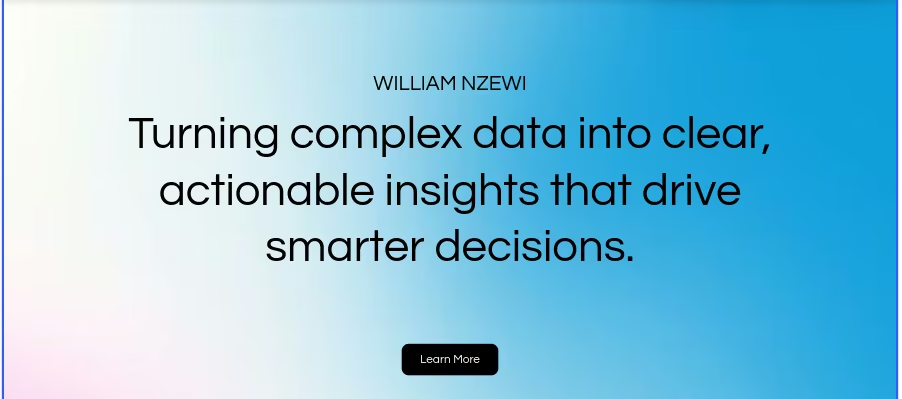
A portfolio website template saves you from designing a layout from scratch, and there are plenty of portfolio website builders that ship with one. Pricing varies by marketplace. ThemeForest's HTML portfolio templates mostly run $9 to $40. Webflow's portfolio templates are typically priced from $49 to $150.
Framer's marketplace spans from free to about $129. Wix gives you portfolio website templates free, though a free site keeps Wix branding and can't use your own domain until you upgrade.
A template hands you a structured starting point: preset typography, responsive grids, and placeholder sections for your bio and case studies.
HTML templates have a catch under the hood: you get the layout, and that is the whole delivery. Storage, data, and any custom logic behind the page are on you.
Swapping placeholder text is fast. Moving a button is where you hit rigid CSS and locked containers. And the license terms usually cover one end product per purchase, so a second site means buying again.
What an AI Build Gets You
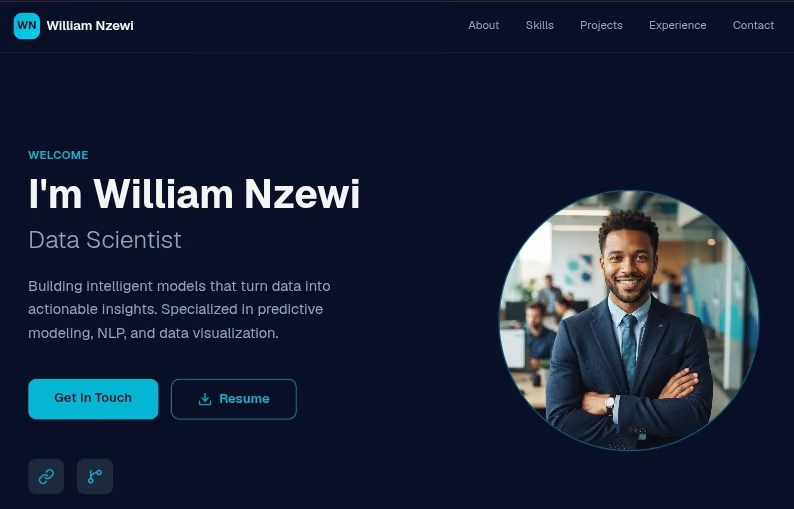
An AI website builder like Emergent turns plain English prompts into a working app in minutes. You describe what you want. The system builds custom pages, layout, and working features automatically, the same flow covered in how to build a website.
You shape the design through conversation, one request at a time. Ask for a dynamic project gallery or a client intake form, and the platform writes the code.
Emergent handles hosting, login, and data storage out of the box, and it walks you through buying and connecting a custom domain when you want one. Lead capture and your database both run inside the same project.
You own the underlying code. Once you move to a paid plan, you can push your project to a GitHub repository and export your source files anytime.
You can start on the free plan, but finishing a build and keeping it live takes a paid tier.
One honest limitation: PDF export is still rough, with page breaks that can land mid-chart. If you want a downloadable case-study PDF, keep it simple, or host the case study as a page instead.
Portfolio Website Template vs. AI Build: At a Glance
Where each one actually wins:
Feature-by-Feature Comparison
Setup Speed
Winner: Portfolio Website Template, with one caveat
If your copy, images, and case studies are already in a folder, a template wins outright. Pick a theme, upload your assets, hit publish, and you're live with no prompting and no credits spent. Those 55 minutes of mine went almost entirely on swapping in my own content, not on setup.
That speed drops the moment you edit the layout. Adjusting section heights or editing stylesheets adds hours.
With an AI website builder, you type a prompt describing your services and style. The system drafted my full site in 15 minutes, though it still took a few passes to get it right.
Real Cost
Winner: Depends on your time horizon
I built on the Free Wix plan, which is why my version couldn't carry a custom domain. For a site you'll never change, a one-time $9 to $40 template is cheaper to buy, full stop. It draws no credits month to month, while an Emergent app keeps drawing them for as long as it stays live. On a site like that, the template is cheaper to own as well.
The math flips the moment you need more than a static page. The real costs are in the extensions: monthly subscriptions for a booking calendar, client portal, or custom form. Add hosting fees on top, and the cheap template stops looking cheap.
An AI build through Emergent bundles hosting, SSL, forms, and database management in one place. The free plan gives you 10 credits every month, enough to try the platform before paying a theme marketplace anything.
Ten credits were not enough for a full portfolio site. Mine took about 23.
And the build is only part of the cost. Each deployed app draws about 50 credits a month, on top of the credits you spend building it.
Customization Depth
Winner: AI Build
Templates lock you into fixed boxes. Move a bio image from left to right, and you'll likely break the surrounding CSS. Your content ends up bent to fit the template.
By the time I realized the hero section had no headshot slot, I couldn't switch templates. Wix locks the template once a site exists, and the documented route is to start a second site and carry over what you can, which leaves your design, your apps like Wix Bookings, your contacts, and your SEO settings behind. To be fair, not every template builder locks you in like that.
Say you want your case studies to filter by industry. On a template, the grid sits where the theme put it. With an AI build, you type that request in plain English, and that fixed grid becomes an interactive project slider with filter tags. The AI rewrites the code and keeps your branding intact.
With a template, that's a rebuild. With an AI build, it's one more prompt.
If the AI route is where you're landing, our idea to live website in a day guide covers what that build looks like.
Growing Past a Simple Portfolio
Winner: AI Build
If you run a service business, you'll want client bookings, deposits at intake, or gated project files before long.
Adding that to a template means embedding third-party code snippets or installing plugins that slow your page down.
An AI build handles application logic natively. Ask for intake forms, logins, or payments, and they get built into the same project. Ask for a booking calendar, and Emergent wires up the form and the database that stores the bookings, from one prompt. To send a booking confirmation by email, you connect an email service. Emergent ships Resend and SendGrid integrations that run on your own key.
Hand-Off and Ownership
Winner: AI Build
When you buy a website template from a marketplace, you buy a license to use someone else’s design system for one project. The files are yours to use, but the structure stays locked to the original layout. Moving that theme code to a clean server usually breaks the styling it depends on.
Emergent gives you real code ownership once you're on a paid plan. Upgrade to the $20/month Standard tier, and your site syncs to a GitHub repository, giving you clean, readable code you can hand to an engineering team, export, or self-host. A developer will still want to review it before it carries real traffic.
Once you've settled on a route, our best portfolio website builders guide compares the platforms on each side.
What People Run Into
Templates get harder after launch. You spend days tweaking padding, fixing broken mobile views, and fighting locked CSS. A simple contact form often means paying monthly widget fees or wrestling with a plugin that doesn't quite match the template's styling.
An AI builder trades that grind for a different problem: your output is only as good as your prompt. A vague prompt gets you a generic layout and placeholder copy. Refine your instructions, and you get a site that looks like yours.
How to Make Your Choice
Will you be editing this site in six months, or is it done the day it goes live?
Template is better for
- Solo creatives who need a static visual showcase.
- Project owners who won't touch their content or layout again.
- Anyone who wants a simple online resume without dynamic features.
AI build is better for
- Consultants, agencies, and service providers who need booking forms and client portals.
- Founders who want clean code, custom databases, and zero plugin fees.
- Anyone building a portfolio that needs to adapt as their business grows.
My Verdict
A portfolio website template works fine if you want a digital business card that never changes.
For everyone else, an AI build wins where it counts: customization, growth, and hand-off. It skips the design friction, adds native app features, and gives you full code ownership through GitHub on any paid plan. You keep control of your data, and you skip the monthly plugin fees just to run a contact form.
Start Your Portfolio on Emergent's Free Plan
A portfolio should be something you can change on a Tuesday afternoon. With Emergent, you turn ideas into a working site in minutes, using plain text prompts.
Hosting, login, and database features come built in, with zero setup on your side. You don't need a credit card to start, and your account gets 10 free credits every month. Keep in mind that an app you keep online draws credits of its own, separate from the build.
Want to hand the project to a developer? Your code syncs to GitHub on the Standard plan.
Not sure what to type first? Ask Emmy, the chat assistant built into Emergent. Emmy helps you turn a rough idea into a build-ready prompt and understand what you're looking at. Emergent takes it from there.
Build your custom portfolio website on Emergent today.

Most AI app builders stop at prototypes. Emergent creates production-ready apps you can actually launch.
- Production-ready apps
- Web & mobile apps
- Deploy in minutes







