




TL;DR
- Softr's real monthly cost depends more on tier caps than the sticker price; Professional's add-on packs and Business's SQL/API gating both push totals higher.
- Professional includes 100 app users; each extra 10 costs $10 a month, up to a 250-user cap and $317 a month.
- SQL databases, BigQuery, HubSpot, and REST API access are gated to Business at $323/month ($269/month billed annually), $156 more than Professional.
- A custom domain is included on every plan, even Free; each additional domain costs $13 a month, so five portals add $52 a month in domain fees alone.
- Free includes unlimited apps and collaborators, capped at 10 app users, 5,000 database records, and 500 workflow actions a month.
Softr's headline price is one clean monthly number. By day four of testing, the total I was tracking had climbed well past it, once the per-user packs and data-access fees started stacking up.
I spent a week building a test portal on Softr: a small team portal where each member logs in and sees only their own project status, files, and invoice total, all wired to a made-up Airtable base. Free, Basic, and Professional got a hands-on run, and I modeled Business and Enterprise from Softr's own documented limits to see where its five tiers start to pinch.
By the end, you'll know what each Softr pricing tier includes, where the real cost creeps past the published price, and whether a cheaper alternative fits your build better.
Softr Pricing Plans: At a Glance
Softr's own pricing page opens on a discounted longer-term toggle by default, so the number you see first isn't what renews each month. Here's the monthly price for each published tier, plus Enterprise's custom quote.
| Plan | Price | Best For |
|---|---|---|
| Free | $0/month | Side projects and testing the platform |
| Basic | $59/month ($49/month, billed annually) | Freelancers and small internal tools |
| Professional | $167/month ($139/month, billed annually) | Agencies and client-facing portals |
| Business | $323/month ($269/month, billed annually) | Teams that need SQL databases or REST API access |
| Enterprise | No public price; contact sales | Large orgs needing SSO, audit logs, and SOC 2 reporting |
Softr Pricing Plans Breakdown
Each of those numbers buys you something specific. I'll go through them tier by tier.
Free: $0/month
I started on Free, and that's also where the build brief for this whole piece came together. I created a fresh Softr workspace and connected it to a made-up Airtable base built specifically for this test. That base had a project name, a status field, an uploaded-files field, and a mock invoice total.
Then I used Softr's block-based builder to wrap a simple portal around it. The test included fictional content, invented to see how far a free plan gets you.
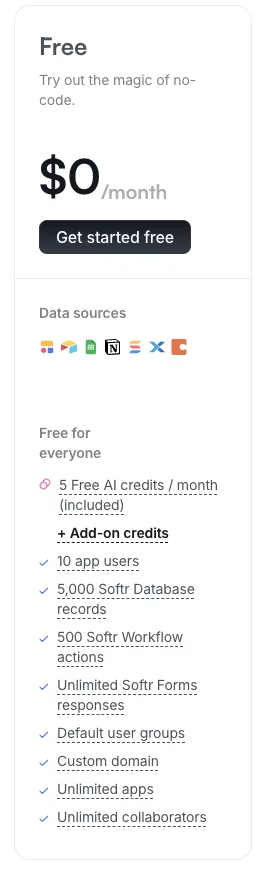
Free currently allows 10 app users, which is enough to test a small internal-style portal but not much else. What surprised me is everything Free does not limit. Softr's current plan gives you unlimited apps and collaborators on the workspace itself. That's a real edge if you want to fully test the platform before you pay a cent.
Free also caps you at 5,000 Softr Database records and 500 workflow actions a month. That's plenty for a test portal but tight for anything with real usage.
A custom domain is included even on Free, which is rare for a free tier. It meant I never had to touch a Softr-branded subdomain during this test. Free also includes five AI credits a month for the built-in app generator, enough for a handful of test generations but not much beyond that.
I spent the last of that week on those five monthly AI credits, since a number that small forces you to be deliberate. I described the test portal to the built-in generator in one sentence and burned a credit on a first pass. It came back with a bare-bones single-page layout, the right fields present but none of the block-based structure I'd already built by hand.
A second credit on the same prompt didn't move the result any closer, so I stopped there and finished the rest of the build manually. The 5,000-record ceiling was never close to a limit either. My test base topped out well under 200 rows across projects, statuses, files, and invoice totals, so that number reads more like a formality than a felt limit at this scale.
The 500 monthly workflow actions told a different story. A short afternoon of test sign-ins and status changes burned through roughly a fifth of that allowance, an early sign that Free's ceilings bite on activity before they bite on data volume.
What's included: 10 app users, 5,000 Softr Database records, 500 workflow actions a month, unlimited apps, unlimited collaborators, a custom domain, and unlimited Softr Forms responses.
Best for: A side project or a first hands-on test of the platform before you commit to a paid tier.
Pros:
- Unlimited apps and collaborators on the whole workspace.
- A custom domain included at no cost.
- Room to fully evaluate the builder before paying anything.
Cons:
- Only 10 app users are allowed before an upgrade is required.
- Record and workflow-action caps are tight for anything beyond a small test.
Basic: $59/month ($49/month, billed annually)
The test portal stopped looking like a demo on Basic and started looking like a working tool. I needed custom CSS and JavaScript to tweak the layout, plus a payment block to model a mock invoice total against a test Stripe integration.
The spec for that build was specific. It called for a mock invoice total of $1,240.00, a one-line CSS override that read "padding-top: 4px" on the header block, and a short JavaScript snippet to auto-format that invoice field as currency the moment the page loaded.
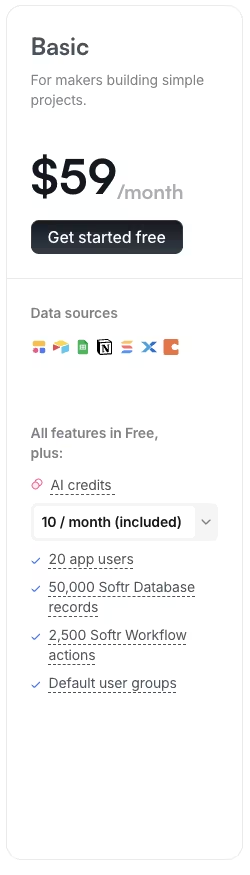
Free's limits weren't going to cut it. Basic raises the app-user ceiling to 20, bumps Softr Database records to 50,000, and adds 2,500 workflow actions a month.
For a small team or a single client-style use case with simple data, Basic is the sweet spot. It also avoids the per-user overage math. Professional adds more users and features, and SQL access starts on Business.
None of Basic's caps gave me trouble during this test. The mock invoice data and handful of test logins stayed well under 20 users and nowhere near 50,000 records. If your data footprint stays that small, the tier holds up fine on its own.
The moment a build needs more than 20 real logins, Basic runs out of room fast. There's no smaller add-on inside Basic to buy more room. You either fit inside its 20-user, 50,000-record ceiling, or you move straight to Professional and pay for the headroom that comes with it.
The other limit I ran into showed up inside Softr's own built-in database, once the test portal needed one project record to point at more than one related record. The pricing page doesn't list it anywhere. Think one project linked to several files, or one project linked to more than one test login.
There's no native rollup the way Airtable's linked records give you for free. Getting that relationship to work meant rebuilding it by hand, field by field. For anything beyond a flat dataset, keep the data in Airtable or Sheets and use Softr purely as the interface layer on top.
What's included: 20 app users, 50,000 Softr Database records, 2,500 workflow actions a month, custom code (CSS and JavaScript), and payment blocks with Stripe.
Best for: A freelancer, solopreneur, or small internal tool with simple data and light customization needs.
Pros:
- Custom code access without jumping straight to Professional.
- Stripe payment blocks built in.
- A predictable flat price, with no per-user math yet.
Cons:
- Still capped at 20 app users.
- No SQL or REST API access if a build needs to pull from an existing database.
Professional: $167/month ($139/month, billed annually)
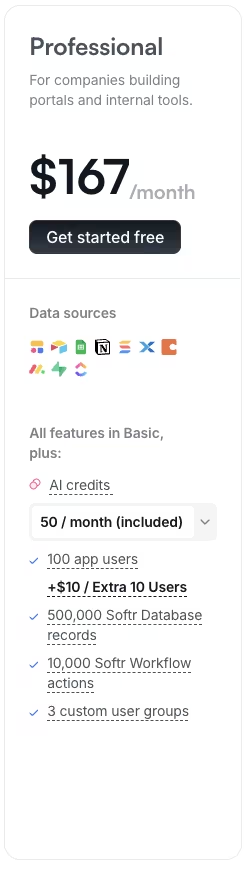
Professional broke the test portal's simple math, so read this tier closely before you commit. It includes 100 app users.
Every 10 users past that costs another $10 a month, all the way up to a hard cap of 250 total users. I modeled the test portal's user count climbing past the included 100, and watched the add-on packs pile on.
Add enough $10 packs and Professional's running total climbs to $317 a month by the time you hit its 250-user hard cap, $6 short of Business's $323/month ($269/month, billed annually).
It never gets more expensive than Business, because the 250-user hard cap forces the upgrade first. Once a portal needs more than 250 users, Professional stops being an option regardless of budget. That add-on structure has one flat rule: the same $10 for every extra 10 users, forever. There's no volume discount, and no way to buy a bigger block at a better rate.
The second wall I hit on Professional was data access. I tried pointing the test portal at a second, SQL-based data source to model a scenario where an agency-style setup needs to pull from an existing database. Professional flatly refuses. SQL (Structured Query Language) databases like PostgreSQL, MySQL, SQL Server, and MariaDB are gated to Business and up.
So is your access to BigQuery, HubSpot, and REST API (the standard way two software tools exchange data online).
If you need any of that, even for one single integration, Softr forces the full jump to Business, a $156-a-month gap over Professional with no cheaper path. That's the single biggest way Professional's real cost outruns its sticker price once your user count or your data needs grow past a small, controlled group.
I also ran Softr's built-in AI app generator on this tier to see whether the higher tier changed how editing works. I typed one instruction into the generator: "Build me a portal for my team to track project status and files." It produced a working starting layout in one pass.
That first pass is as conversational as the generator gets. Every change afterward happened through manual, drag-and-drop editing, the same as on any other tier. Treat the generator as a fast way to get a first draft that still needs finishing by hand.
What's included: 100 app users with +$10/month per extra pack of 10 (up to 250 total), 500,000 Softr Database records, and 10,000 workflow actions a month. It also adds monday.com, Supabase, and ClickUp as new data sources, plus three custom user groups and the ability to embed apps externally. Rounding it out are a Call API action, PDF and CSV export, PWA (progressive web app) support, and the removal of Softr branding.
Best for: An agency-style setup or a growing internal tool that needs more users, custom code freedom, and a branding-free look.
Pros:
- Removes Softr branding entirely.
- Adds monday.com, Supabase, and ClickUp as connectable data sources.
- PDF and CSV export plus PWA support.
Cons:
- Per-user overage packs add up fast past the included 100.
- SQL databases and REST API access are still out of reach here.
Business: $323/month ($269/month, billed annually)
A full Business-tier trial wasn't part of this round, so I modeled it from Softr's own documented limits and the math I worked out from Professional's overage structure. Softr publishes Business's user, record, and workflow-action ceilings the same way it does for every paid tier below it, so modeling from those numbers meant working from real limits instead of a guess.
The two things I was chasing, the per-user overage math and the SQL wall, both showed up clearly enough on Professional already.
It's also the tier that clears the SQL wall I hit on Professional. Modeling that same attempt on Business, the connection goes through. SQL databases, BigQuery, HubSpot, and REST API access all become available at once, with nothing gated behind a smaller add-on.
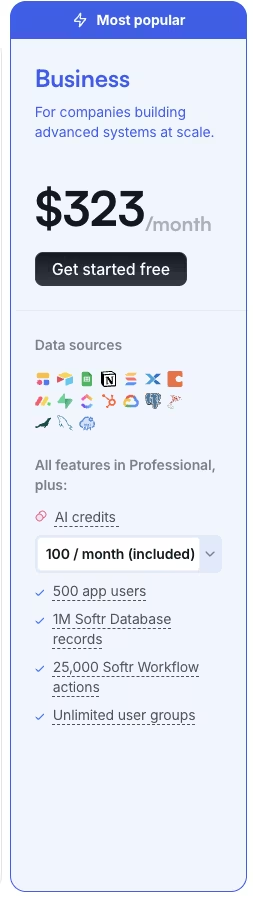
The ceilings jump too. Business raises the app-user limit to 500, five times what Professional gave you. It also pushes Softr Database records to one million and workflow actions to 25,000 a month, replacing Professional's cap of three user groups with an unlimited allowance. If your team already runs on a SQL-based system, or needs programmatic access through the REST API, this is the tier that gets you there.
Nothing cheaper does. The $156-a-month jump over Professional buys real data access, and it only earns that jump once SQL or REST API becomes a hard requirement. Until then, most of Business's extra headroom goes unused.
What's included: 500 app users, one million Softr Database records, 25,000 workflow actions a month, unlimited custom user groups, and access to SQL databases, BigQuery, HubSpot, and the REST API.
Best for: A company running data-heavy systems that need direct SQL or REST API access.
Pros:
- The lowest-priced tier with SQL database and REST API access.
- A much higher app-user ceiling than Professional.
- Unlimited custom user groups.
Cons:
- A significant price jump over Professional.
- Overkill if SQL access isn't a real requirement yet.
Enterprise: Custom Pricing
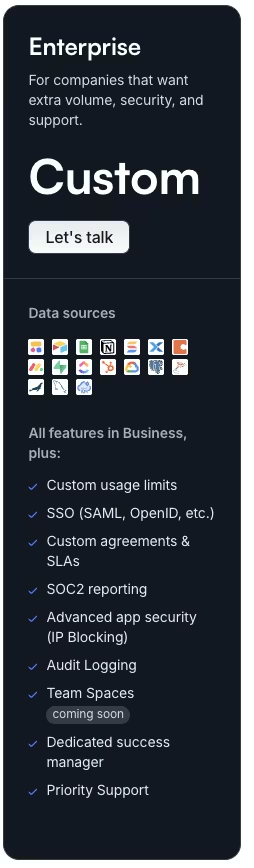
Enterprise sits outside both this round's hands-on testing and its modeling. It's priced by custom quote and built around compliance needs; a one-week test on fake project records never touches it. Softr doesn't publish exact user or record ceilings for Enterprise the way it does for the other four tiers, so you won't find them listed anywhere.
Business's own numbers, 500 users and one million records, sit right there on the pricing page. Enterprise's version of those ceilings only comes up once you're on a call with sales.
Enterprise adds single sign-on (SSO) through SAML or OpenID, so your employees log in once through your company's identity system, with no separate Softr password required. Audit logs track who changed what and when, the record your security review will ask for after the fact. SOC 2 (a security compliance standard) reporting and IP blocking, restricting access by network location, exist to satisfy a procurement checklist.
Most of it speaks to the procurement and security teams reviewing the tool on your behalf, though employees do notice SSO at login. Custom agreements and a dedicated success manager round it out, replacing the standard support queue with a named point of contact.
If your organization needs any of those for compliance reasons, Enterprise is the tier to talk to sales about. The custom quote reflects how specific your requirements get from one company to the next. None of the other four tiers hide their price this way.
Free through Business all show a number on the page. Enterprise is the only one where the price depends on a conversation. Without those compliance needs, Business already covers the data access you need, and that's where your money is better spent.
What's included: SSO (SAML or OpenID), audit logs, SOC 2 reporting, IP blocking, custom agreements, and a dedicated success manager.
Best for: Large organizations with compliance or security requirements that go beyond what Business covers.
Pros:
- SSO and audit logs for compliance-heavy teams.
- A dedicated success manager as your named point of contact.
Cons:
- No public pricing, so budgeting requires a sales conversation.
- Most of these features go unused by a smaller team.
Which Softr Plan Should You Choose?
The same test portal I built maps onto any of these five buyer types, depending on how far it scaled.
Choose Free if you:
- Want to test Softr before committing to a paid plan
- Are building a side project well under 10 users
- Don't need a custom domain beyond what's already included
Choose Basic if you:
- Run a small internal tool or serve a single client-style use case
- Need custom code or a Stripe payment block, but not SQL access
- Have simple, mostly flat data
Choose Professional if you:
- Need more than 20 app users and don't want Softr's branding showing
- Are modeling several client-facing portals and need to budget for an extra domain when a portal needs its own
- Don't yet need SQL databases or REST API access
Choose Business if you:
- Need SQL databases, BigQuery, HubSpot, or REST API access
- Have grown past Professional's 250-user overage cap
- Need unlimited custom user groups
Choose Enterprise if you:
- Need SSO, audit logs, or SOC 2 reporting for compliance
- Want a dedicated success manager as your direct point of contact
- Have security requirements a sales conversation needs to scope out
Is Softr Worth the Cost?
Across a week of testing, Softr earned its cost in some places and stretched thin in others.
Softr is worth it if you:
- Already have your data in Airtable, Google Sheets, or a similar source and need a portal wrapped around it
- Serve a known, controlled group of logged-in users, like clients or employees, who access through invited logins
- Value speed to a working interface over building a data layer from scratch
Skip Softr if you:
- Need SQL databases or REST API access on a tight budget, since that forces the full jump to Business
- Expect an unpredictable or fast-growing public user count, where per-user pricing gets expensive quickly
- Need a native mobile app, since Softr's output is web only
Where Softr's Costs Escalate (the Per-User, SQL, and Domain Traps)
Softr's sticker price is only the entry point. Three pricing rules can push the monthly total past what the pricing page first suggests.
The first is the per-user overage math on Professional. Every 10 users past your included 100 costs another $10 a month, all the way to a 250-user cap. That's a flat rate with no volume discount, and it adds up fast once your user base outgrows a small, fixed group.
The second is the SQL and REST API wall, the same one I hit while testing Professional.
SQL databases, BigQuery, HubSpot, and REST API access are all gated to Business, a jump of $156 a month over Professional. There's no smaller add-on that adds that one feature. You either need it and pay for Business, or you don't need it at all.
The third is domain costs, and it only shows up if you're running more than one portal. Softr includes one custom domain, and every domain after that carries its own monthly fee of $13, paid month to month. Across several client-facing portals, that surcharge compounds quickly. Run five separate portals and you're paying for four extra domains every single month, on top of whatever tier you're already on.
Of the three, the per-user math is the one that catches people off guard fastest. It's easy to model a comfortable 100-user portal on Professional and forget that every batch of 10 after that costs the same $10, forever.
Softr Alternatives & Pricing Comparison
Once you've hit one of those walls, here's how the alternatives stack up on price.
| Tool | Starting Price | Best For |
|---|---|---|
| Softr | $59/month ($49/month, billed annually) | Wrapping a portal around data you already have |
| Emergent | $20/month ($17/month, billed annually) | Generating a working app and database from a description |
| Zite | $19/month ($15/month, billed annually) | Unlimited users on every plan |
| Glide | $25/month ($19/month, billed annually) | Turning a spreadsheet into a mobile-friendly app |
Also read our best Softr alternatives guide for a deeper look at what else is worth trying beyond this comparison.
Emergent vs Softr: Which Should You Choose?
I gave Emergent one instruction to build it: "Build a portal where each team member logs in and only sees their own project's status, files, and invoice total."

I never connected it to an existing spreadsheet, the way I did with Softr. Emergent generated its own database from scratch, no external source needed. The result ran on both web and a mobile-capable build from that single description.
Softr's job is wrapping an interface around data you already have. Emergent's job is building the whole thing, database included, from a plain-language description you write. Softr's Professional tier charges $10 for every extra 10 app users past its included 100. Emergent's credit-based pricing doesn't touch per-app-user math at all.
On the build I ran, Emergent needed zero external data connections to get started, against Softr's core dependency on an existing source. Emergent also offers GitHub integration and exportable code on its Standard tier, something Softr's managed builder doesn't offer at any tier.
If you don't have an existing data source to connect to, and the build needs to work on mobile too, Emergent is the better starting point. Softr is web only, with no way to export the underlying code either.
If your data already lives in Airtable or Sheets, Softr is still the faster, simpler pick, and I wouldn't reach for Emergent instead.
Emergent is better for: Teams with no existing structured data source that want a working app, database included, built from a plain-language description.
Softr is better for: Teams that already store their data in Airtable, Google Sheets, or a similar tool and need a portal wrapped around it fast.
Use both if: You want to prototype the interface in Softr against data you already have. Then move to Emergent once you need a from-scratch database, mobile output, or exportable code.
If building from scratch sounds closer to what you need, trying Emergent is worth the 10 minutes it takes to describe the same brief and see what comes back.
My Bottom Line on Softr Pricing
Tier caps decide your real cost far more than the sticker price does. That's where I land on Softr pricing. Free and Basic are honest, straightforward tiers for a side project or a small internal tool. Professional is where the math gets interesting.
Run the overage packs to their 250-user cap and you're paying $317 a month, $6 short of Business's $323/month ($269/month, billed annually). That 250-user cap limits Professional well before the price does. Business earns its jump once SQL or REST API access moves from nice-to-have to non-negotiable.
If you already know your data lives in Airtable or Sheets, and your user count is small and controlled, Softr is worth it. If you're staring down a public, high-volume app or a SQL-first data need on a tight budget, look at what Business costs first. Don't commit to Professional and grow into the wall.

Emergent designs, writes, and publishes your whole site from one prompt. No templates, no drag-and-drop.
- Full site from one prompt
- Custom design, real pages
- Publish in minutes







