



I learned quickly that ToolJet alternatives can feel completely different once you try to build the same type of app.
Retool took my plain-English brief and produced a useful dashboard in about five minutes. UI Bakery took six minutes and asked smart questions before it built anything. Appsmith took closer to 20 minutes because I first had to understand its data-first workflow.
I also used Emergent for a more involved client portal, generated a lead table with Budibase AI, and worked through Lowcoder's component-based editor.
This guide is specifically for you if you’re deciding whether to leave ToolJet. Emergent’s broader internal-tool and self-hosted roundups cover the wider category.
What Changes When You Leave ToolJet
ToolJet itself has changed a lot in 2026. Its Free plan supports two builders, up to 50 end users, two apps, and 100 monthly AI credits. The current product can generate apps, pages, queries, business logic, database tables, and code with AI.
That makes ToolJet harder to replace with a simple “this competitor has AI” argument.
The more useful question is where you want to start: Do you want to describe the finished app in a sentence, or wire up data, components, and queries yourself?
Your AI Credits Can Go Quickly
I tried to include ToolJet as the baseline for my lead-tracker test. When I returned to ToolJet for this benchmark, the account showed no free AI credits left, so I couldn’t run the same lead-tracker build there.
That limitation is easy to understand once you look at ToolJet's credit documentation, which says credit use scales with the complexity of each request. Generating a whole app can consume most or all of Free's 100 monthly credits in one go, while smaller edits cost far less.
ToolJet now has a Basic plan below Pro. Basic is currently shown at $29/builder/month ($23/builder/month billed annually). Pro costs $99/builder/month ($79/builder/month billed annually), Team costs $249/builder/month ($199/builder/month billed annually), and Enterprise starts at $3,000/month.
Some Builders Start With Your App Idea
Emergent, Retool, and UI Bakery let you start with the app you want to build.
With Retool, I pasted my lead-tracker brief and got an app preview. UI Bakery read the brief, asked two questions, created a plan, and then built it.
Emergent applies the prompt-first workflow across internal tools, client portals, web apps, and mobile apps. You can describe screens, records, roles, and workflows through conversation, with the project taking shape from your brief..
Other Builders Start With Your Data
Appsmith and Budibase made more sense once I stopped looking for a single “build my whole app” box.
Appsmith led me toward a datasource and then generated a create, read, update, and delete page around it. Budibase used AI to create my Leads table and sample records, then left the application layer for its visual builder.
That workflow can be a good fit when your internal tool already revolves around a database.
Compare Self-Hosting Across the Shortlist
Appsmith, Budibase, Lowcoder, ToolJet, and UI Bakery all offer self-hosting. Retool can also run self-hosted on every plan, with the deeper deployment and governance controls on higher tiers.
Lowcoder supports Docker, Docker Compose, Kubernetes, Google Cloud Platform, and other deployment options. Its Community Edition remains free and open source.
Appsmith also has a free Community Edition, while Budibase’s Open Source plan includes unlimited apps, users, agents, and automations on your own infrastructure within one workspace.
If self-hosting is why you’re thinking about leaving ToolJet, compare the deployment and licensing options before you narrow the list.
Read More: 5 Best Self-Hosted No-Code App Builders That Work in 2026
How I Tested These ToolJet Alternatives
I used a simple marketing-agency lead tracker as the main benchmark.
Here is the prompt I used when the platform could accept a full app brief:
Build a simple internal lead-tracking app for a small marketing agency. Create a dashboard with three summary cards showing total leads, open leads, and won leads. Add a table with 12 realistic sample leads with name, company, email, status, estimated value, owner, and last contact date. Use these statuses: New, Contacted, Qualified, Won, and Lost. Let me search the leads, filter them by status, add a new lead, edit an existing lead, and click a lead to see its full details. Keep the design clean and easy to use on a laptop. Use sample data only. Make the app functional, not a static mockup.
I used the platform's normal workflow when a full prompt wasn't how it worked.
Appsmith used a sample PostgreSQL datasource and its Generate New Page flow. Budibase used AI to create the data first.
Lowcoder doesn’t use the same whole-app prompt flow I found in Retool and UI Bakery, so I tested its normal visual editor. In 20 minutes, I worked through the component panel, data-query area, global variables, and reporting widgets to judge how much manual work the same kind of dashboard would require.
For Emergent, I used a client portal I'd already built. That project gave me a deeper example than another basic lead table because it had separate roles, private project data, files, and client-facing screens.
I tracked six practical points:
- Time to a useful result: How long it took before I had something worth working with.
- Navigation: Whether I knew what to click next.
- AI help: What AI handled and where I had to take over.
- Manual work: How much I still had to configure.
- Output: Whether I reached an app, working data layer, or usable editor state.
- Long-term fit: Who I could picture maintaining the app after the first build.
This testing ran across for over an hour. I also opened Superblocks, but after two minutes navigating it, I was blocked by the 14-day trial and asked for billing details before I could reach the builder. That left the six tools where I had enough hands-on time to judge the workflow.
For a wider category view, see Emergent's 10 Best Internal Tool Builders I Tested in 2026.
How the Six Compare
My test results and current entry pricing:
Emergent
Emergent gave me the broadest real-world build in this comparison.
Full disclosure: Emergent is our product, and I built the client-portal example below myself.
I used a client portal I'd previously built for a fictional creative agency called Northline Creative. The portal took about 17 minutes to reach a usable version. Itl had two roles, Admin and Client, and six main screens covering login, a client dashboard, project details, files, revision requests, and an admin view.
My brief included this instruction:
Build a client portal for a creative agency called Northline Creative. Use two roles, Admin and Client. Clients can sign in and see only projects that belong to their client account.
I also asked for sample data for three fictional clients.
That project pushed the platform into work that a basic lead table wouldn't show. The app needed account-specific data, project stages, files, due dates, and separate views for the client and administrator.
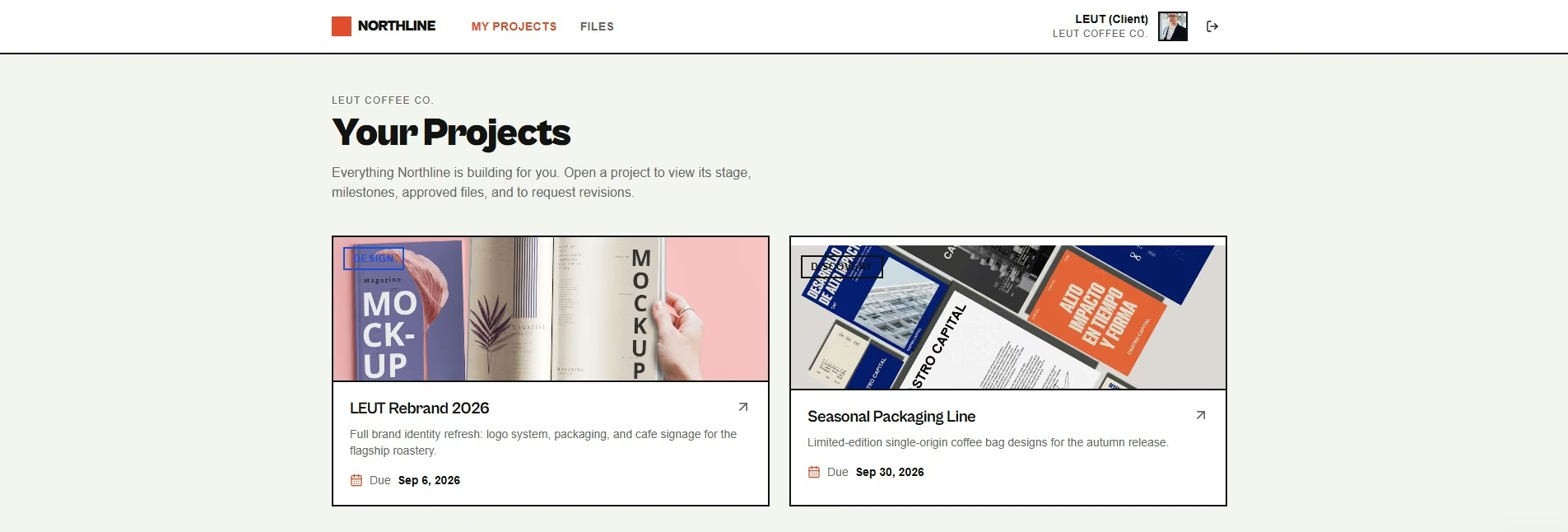
The finished build gave clients a clean “Your Projects” page with project cards and deadlines. The broader workflow included private project records and separate admin controls.
For me, that's where Emergent feels most different from ToolJet. I spend more time describing what the software should do and less time placing individual interface pieces.
If that style appeals to you, Emergent's AI app builder is the relevant product hub. You describe the app, its pages, data, and flows through conversation, then work through revisions from the same project.
There's also a useful new helper for the blank-prompt problem. Emmy is Emergent's built-in chat assistant. For a new build, she can help turn a rough idea into a build-ready prompt before you spend credits. It’s built into Emergent, free to use, and costs no build credits.
My take: I’d start here if you don't want to learn an internal-tool editor before you can explain your business idea. It also makes sense when the app may later face clients or customers.
Key Features
- Conversation-led building: You can describe pages and workflows in everyday language and refine them through chat.
- Broader app types: The same product can handle internal tools, web apps, mobile apps, and customer-facing portals.
- Code handoff: GitHub integration on Standard gives you a route into a developer workflow later.
- Prompt help: Emmy can help you shape a clearer first brief before you spend build credits.
Pros
- Easy for non-technical builders: You can stay focused on the job the app needs to do.
- Useful beyond internal tools: Your project can grow into software customers use directly.
- Conversation stays central: Follow-up requests use the same plain-language workflow.
- GitHub option: Paid plans give developers a route into the code.
Cons
- Credit use needs attention: Bigger requests and repeated changes consume more of your monthly allowance.
- Free allowance is small: 10 monthly credits give you limited room for larger projects.
- Human review still belongs in the workflow: Apps with private data, payments, or permissions need careful testing.
Best for
- Non-technical founders.
- Agencies building portals and workflow software.
- Operations teams whose internal app may grow into customer-facing software.
What Users Say
Emergent has 4.6/5 from 14 Product Hunt reviews. Reviewers praise fast app creation, an approachable interface, useful AI help, and strong output on bigger projects. One detailed review describes code loss and a poor recovery experience, which is a serious warning if the app becomes central to your business.
Pricing
Free includes 10 monthly credits. Standard costs $20/month ($17/month billed annually), and Pro costs $200/month ($167/month billed annually) with 750 monthly credits. Business and Enterprise use custom pricing.
Retool
Retool gave me the fastest complete result from the shared lead-tracker brief.
I pasted the prompt into its AI builder and had a useful preview in about five minutes. Retool used 14 AI credits.
The interface was easy to follow. Chat, Data, Code, Preview, and Publish were visible without making me hunt through menus.
The generated dashboard also looked close to what I'd asked for. It showed 12 total leads, eight open leads, and two won leads. The page included search, a status filter, lead values, owners, and an Add Lead button.
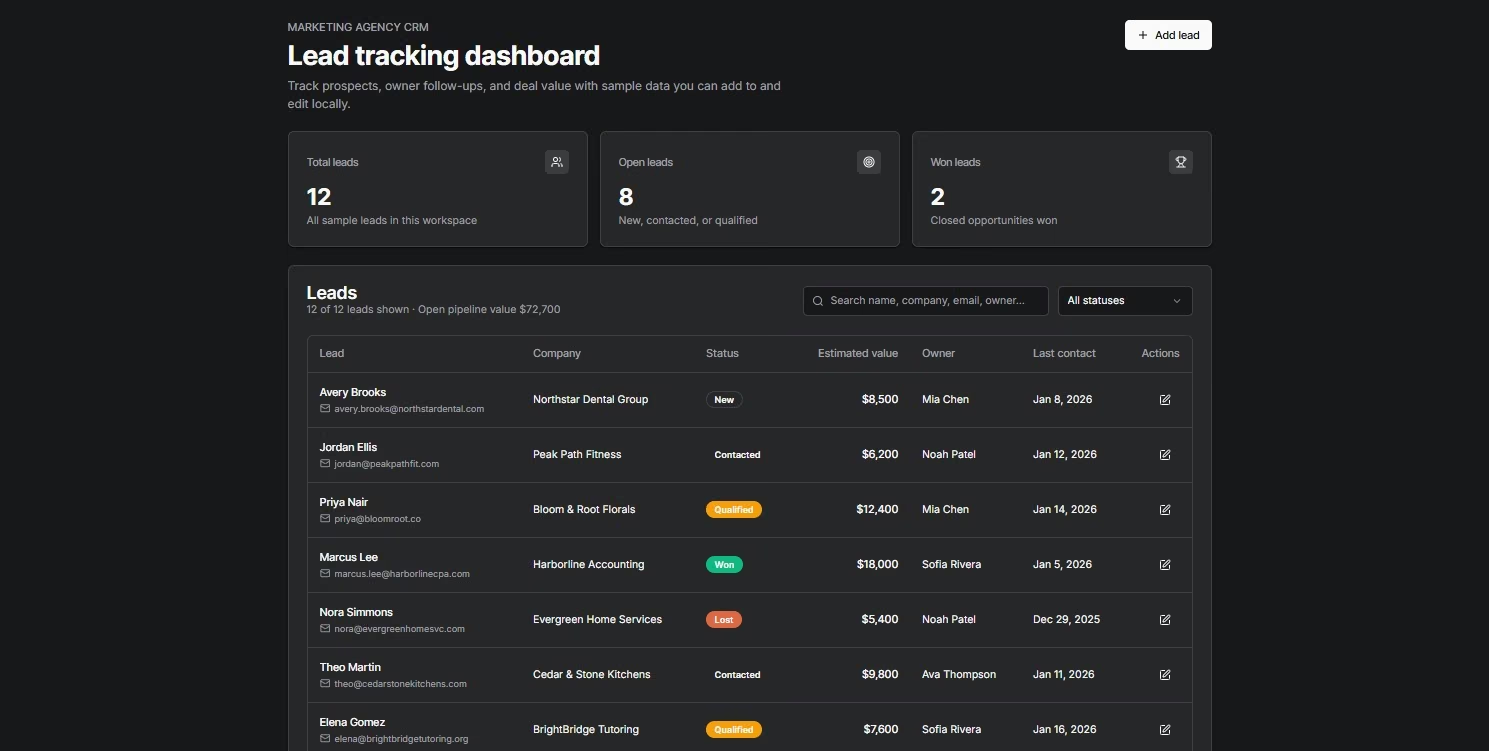
Retool's current product is more AI-first than older comparisons make it sound. Its rebuilt app builder generates a working app from a description and can connect the result to your data. You can then keep working through AI or move into the underlying code.
That workflow explains why Retool felt quick without feeling shallow. I could see a route from the first generated screen into data, code, and publishing.
The main planning issue is pricing. Retool separates builders from internal users. If two people build apps and 50 employees use them, you need both numbers before you compare Retool with a per-builder platform.
My take: Retool is the closest direct ToolJet replacement in this list for a company that plans to run several internal apps on existing business data.
Key Features
- AI-native app generation: A written brief can become a working starting app.
- Business-data connections: Your internal app can work with databases and services your company already uses.
- Different user types: Builders and employees who only use apps can be priced separately.
- Governance on higher tiers: Business adds richer permission controls and audit logs, while Enterprise adds source control and custom single sign-on.
Single sign-on (SSO) means employees can use the same company identity system they already use for other work software.
Pros
- Fast initial build: My usable preview appeared in about five minutes.
- Clear navigation: I knew where to find chat, data, code, preview, and publishing.
- AI stays useful after generation: You can keep asking for changes after the first build, and the AI stays in the same project.
- Strong company controls: Higher plans cover teams that need stricter access and release management.
Cons
- Two seat types affect cost: Builders and internal users create separate charges.
- Advanced controls cost more: Audit logs and richer permissions start on Business.
- Source control sits on Enterprise: Developer teams that need Git should include that tier in the budget.
- Self-hosting sits on Enterprise: Retool’s current self-hosted deployment options, including VPC and air-gapped deployments, are part of Enterprise.
Best for
- Operations software tied to company data.
- Engineering-supported business teams.
- Companies planning to run several internal apps.
What Users Say
Retool has 4.6/5 from 359 G2 reviews. Reviews frequently praise how quickly people can build internal tools and connect data. The weaker feedback tends to appear around larger apps, deeper customization, and the learning curve once the work gets more advanced.
Pricing
Free supports up to five users. Team costs $12/builder/month plus $7/internal user/month ($10/builder/month plus $5/internal user/month billed annually). Business costs $65/builder/month plus $18/internal user/month ($50 plus $15 billed annually). Enterprise uses custom pricing.
Read More: 10 Best Retool Alternatives in 2026: Tested + Ranked
UI Bakery
UI Bakery gave me the cleanest guided experience of the direct internal-tool builders.
My total time from prompt to preview was about six minutes.
The onboarding stood out before I even generated the app. UI Bakery asked about my programming level so the product could adjust the help it gave me.
After I pasted the lead-tracker brief, it asked two questions. The first was how the sample data should be stored. The second asked whether clicking a lead should open a side panel, a modal, or a separate detail view.
I chose session-state data and a side panel.
UI Bakery then showed me a written plan. It covered the three summary cards, the 12 sample leads, search, status filtering, add and edit forms, and the lead-details drawer.
I approved the plan and didn't need another corrective prompt to reach the first useful preview.
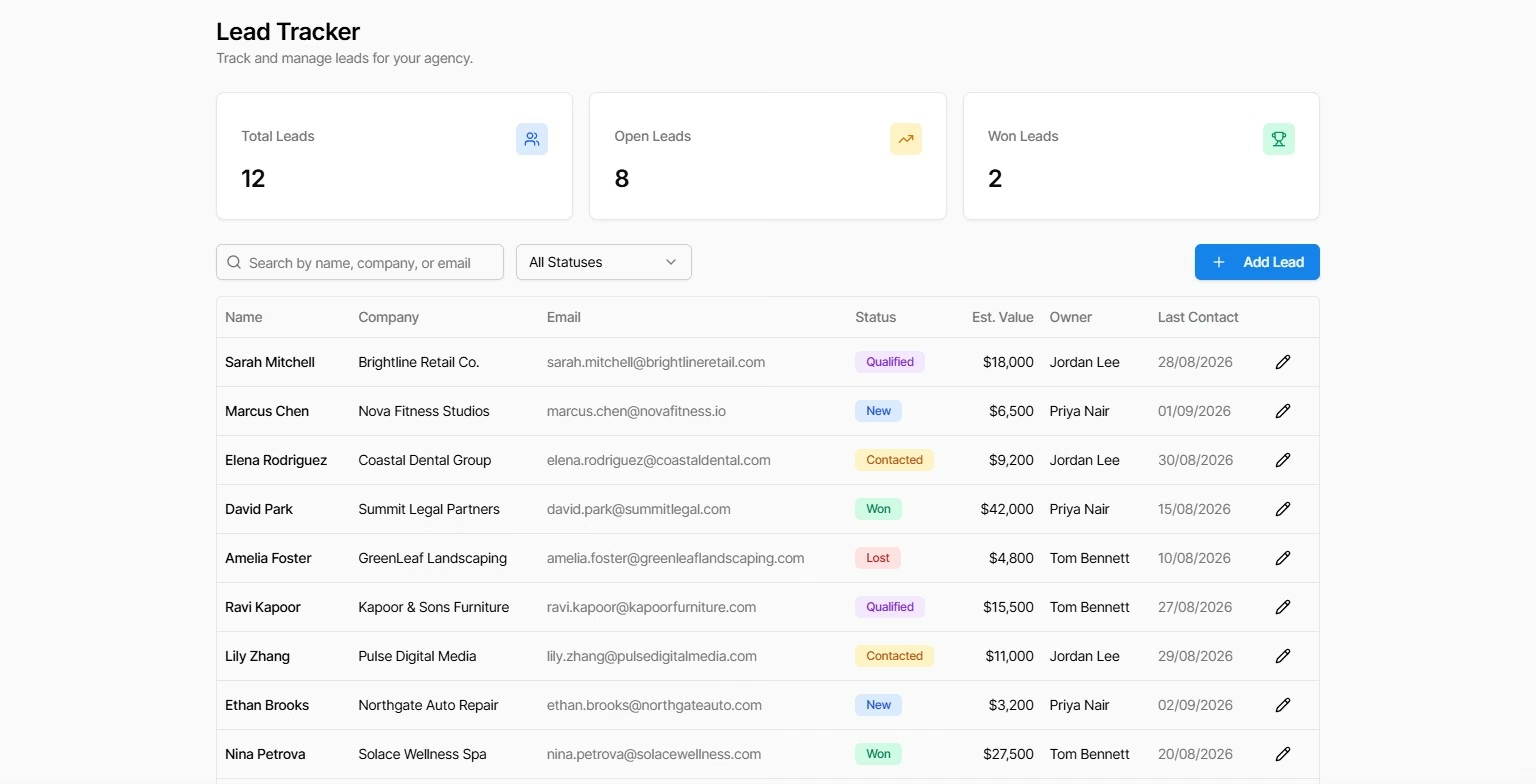
I liked that the questions were tied to real app decisions. They weren't a long intake form. Both changed how the finished app would behave.
The visual result was also easy to scan. I could see the summary cards, search, filter, lead statuses, estimated values, owners, and edit controls immediately.
After generation, UI Bakery still gives you the visual builder, data sources, actions, JavaScript, and Python when you need them. Its paid plans also include monthly AI usage credits for the AI App Agent.
My take: UI Bakery is the option I'd show first to someone who wants AI help and still likes the idea of a visual editor. Its guided build asked the right questions without slowing me down.
Key Features
- AI App Agent: You can describe an internal app in normal language.
- Planning before generation: The agent can turn your request into a visible plan before it builds.
- Visual editor: You can continue adjusting the app after generation.
- Code extension: JavaScript and Python are available when visual controls aren't enough.
Pros
- Easy onboarding: It was one of the least confusing tools I opened.
- Useful AI questions: The agent clarified real choices before building.
- Fast preview: My app was ready to inspect in about six minutes.
- Good bridge between AI and manual editing: You can keep using the visual tools later.
Cons
- Developer seats drive paid pricing: Teams with several app editors should calculate that number.
- AI has a usage allowance: Larger AI workloads can go beyond the credits included with your plan.
- Team controls move up the plans: Role-based access control and audit logs are part of Team.
- Deeper custom work still gets technical: JavaScript and Python become useful as the workflow grows.
Best for
- Small operations teams.
- Semi-technical builders.
- Dashboards and record-management apps.
- Teams that want AI and a visual editor in one product.
What Users Say
UI Bakery has 4.6/5 from 131 G2 reviews. A July 2026 reviewer praised how quickly it turned a complex decision tool into something ready to present. Another recent reviewer liked the SQL connections and interface while calling out limited support availability and inconsistent AI help.
Pricing
Free includes unlimited apps and data-source connections with trial AI credits. Builder costs $25/developer/month ($20/developer/month billed annually). Team costs $40/developer/month ($35/developer/month billed annually), and Enterprise is custom.
Appsmith
Appsmith clicked once I followed its data-first workflow.
It took me about 20 minutes to get comfortable with the navigation and reach a useful app page. That was the longest timed build in this group.
I started with a blank Lead Tracker Test app. The editor showed widgets and a large empty canvas, and I initially wasn't sure where I should go next.
The useful route was through data.
I opened Datasources, selected Appsmith's sample PostgreSQL users database, chose a table, and clicked Generate New Page.
Appsmith created a working CRUD page around the sample table. CRUD means create, read, update, and delete. It's the basic pattern behind an admin app where you can view records, add new ones, change them, and remove them.
The generated page included a table, search, filters, add controls, delete actions, and a record-update form. The editor showed 13 columns, and I successfully changed headers and edited the generated fields.
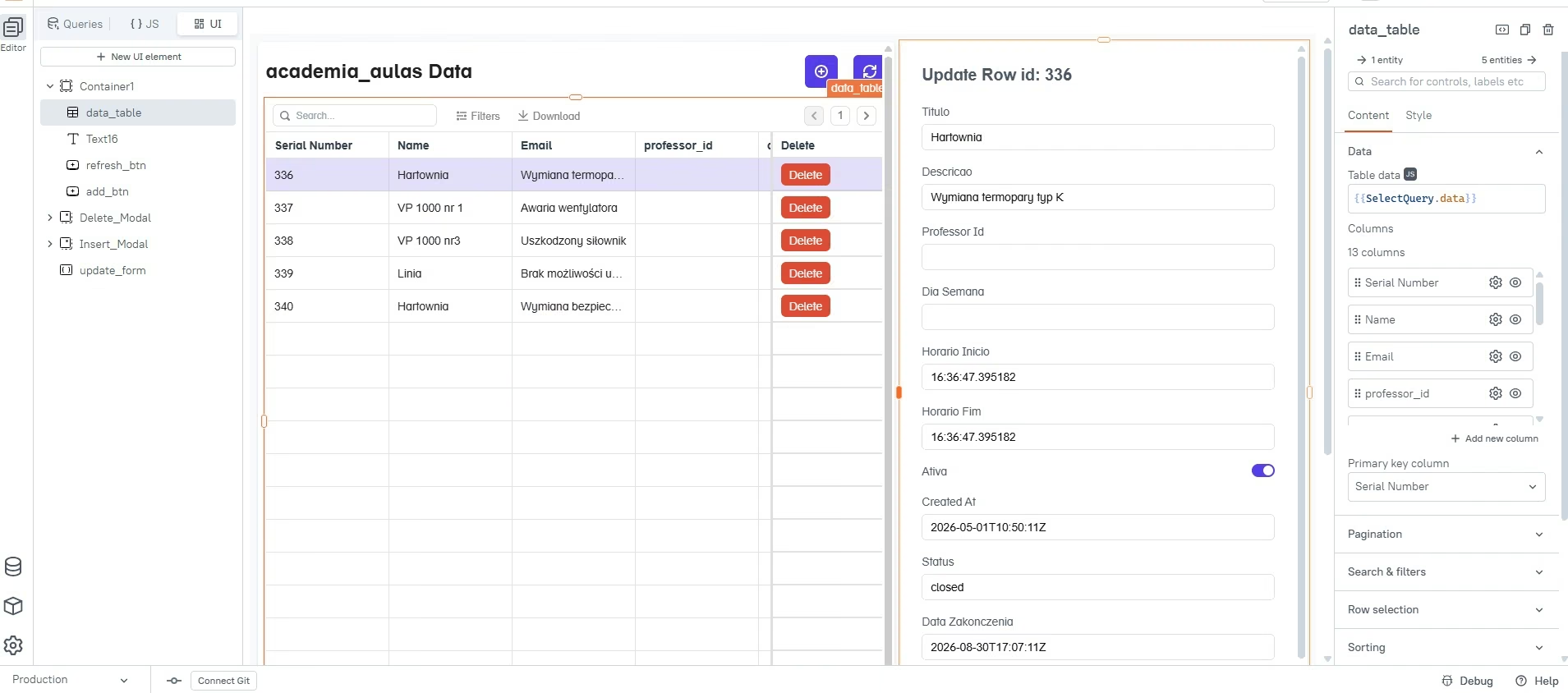
That experience made Appsmith's audience clearer to me. You're closer to the data and the mechanics of the app than you are in Retool's new prompt-first flow or UI Bakery's guided generator.
Appsmith's AI story is also newer than many existing comparisons suggest. Version 2.3 brought Ask AI into the Community Edition in August 2026. The older Appsmith AI datasource reaches end of life on September 30, 2026.
My take: Appsmith is one of the strongest choices here for a developer-led team that wants open source and self-hosting. I wouldn't make it my first recommendation for someone who wants the AI to guide the entire first build.
Key Features
- Free Community Edition: You can run the open-source platform on your own infrastructure.
- Data-led page generation: Connected tables can become working record-management pages.
- JavaScript control: Developers can add custom logic throughout the app.
- Git versioning: Free includes three Git repositories, while Business removes that repo limit.
Pros
- Strong self-hosting option: Technical teams can control where Appsmith runs.
- Generated CRUD pages save time: Once the datasource was chosen, Appsmith handled a lot of routine interface work.
- JavaScript gives you room to grow: You aren't limited to visual controls.
- Git is part of the product: That makes ongoing development easier for engineering teams.
Cons
- My learning time was longer: I spent about 20 minutes reaching the useful page.
- The editor assumes technical comfort: Datasources, queries, and components become part of the normal workflow.
- Every Business user is billable: Appsmith uses simple per-user pricing rather than separate builder and viewer seats.
- The older AI datasource is being retired: Existing projects using it need to move before September 30, 2026.
Best for
- Developer-led internal apps.
- Companies that want open-source software.
- Teams that already use Git.
- Apps built on existing company databases.
What Users Say
Appsmith has 4.6/5 from 67 G2 reviews. Reviewers commonly praise the internal-app workflow, data connections, and ease of getting common business interfaces running. The product becomes more technical as you move into deeper logic and customization.
Pricing
Free supports up to five cloud users, and the Community Edition is also available for self-hosting. Business costs $15/user/month. Enterprise starts at $2,500/month for 100 users. Appsmith bills Business monthly and doesn't show a separate discounted annual Business rate.
Budibase
Budibase was quick once its AI tools were enabled.
The slow part came before generation.
I first landed in the normal workspace and assumed I would have to create my Leads table manually. Then I found Generate data using AI inside Data tables.
Activating it took a few extra steps. Budibase sent me into workspace settings, where I had to turn on an AI model before the generation field would work.
After that, the actual AI task took about three minutes.
I used this prompt:
Create a Leads table for a small marketing agency with 12 realistic sample leads. Include these fields: name, company, email, status, estimated value, owner, and last contact date. Use these status options: New, Contacted, Qualified, Won, and Lost.
Budibase returned a populated Leads table with 12 records. It included names, emails, statuses, estimated values, contact dates, owners, and extra generated fields.
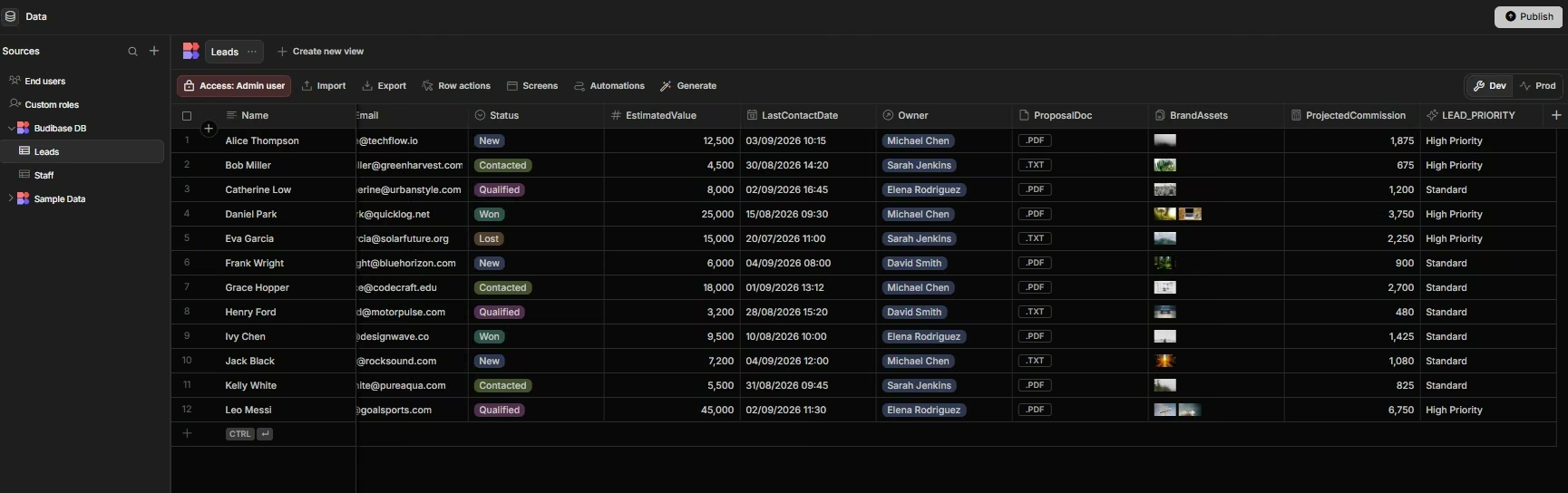
This test showed me where Budibase is strongest. The product is very comfortable around data.
Its current plans bring App Builder, Automation Builder, Agent Builder, Budibase DB, external data connections, and a drag-and-drop designer into the same workspace. Cloud plans also include AI credits.
Budibase prices cloud usage partly through actions. Saving or deleting a row, running an automation step, or making an agent tool call can count as an action. Custom SQL queries and application programming interface (API) requests don't count toward that total.
An API is a way for one piece of software to send data or instructions to another.
My take: Budibase fits apps that start with records and business processes. The interface felt easier than Lowcoder to me, and the data generation was fast once the AI model was active.
Key Features
- AI data generation: A short prompt can create a table structure and sample records.
- Built-in data: Budibase DB gives you a place to store internal app records.
- Automation Builder: You can turn record changes and other events into repeatable workflows.
- Agent Builder: Current paid cloud plans support AI agents alongside normal internal apps.
Pros
- Fast data creation: My 12-row table appeared in about three minutes after configuration.
- Good fit for record-heavy apps: Forms, approvals, and operational data feel natural here.
- Free open-source route: The self-hosted Open Source plan has no software fee.
- Several workflow tools share one workspace: Data, apps, automations, and agents can work together.
Cons
- AI activation took extra work: I had to find the model controls before generation became available.
- Cloud actions need budgeting: Busy workflows can reach their monthly action limit.
- Creator and end-user add-ons can raise cloud cost: Team size still affects the final bill.
- AI table generation is one part of the build: You still work in the app builder to shape the finished interface.
Best for
- Request trackers.
- Approval tools.
- Operations databases.
- Internal forms tied to business records.
What Users Say
Budibase has 4.5/5 from 67 G2 reviews. Reviewers praise its drag-and-drop workflow, templates, and ease of creating internal apps without writing everything from scratch.
Pricing
The self-hosted Open Source edition is free. Pro costs $23/month ($19/month billed annually), Premium costs $59/month ($49/month billed annually), and Business costs $359/month ($299/month billed annually). Enterprise uses custom pricing.
If most of your app starts in spreadsheets, this AppSheet alternatives comparison covers tools built around that style of workflow.
Lowcoder
Lowcoder gave me the most hands-on visual-editor experience of the six.
I logged in looking for an AI app prompt similar to Retool or UI Bakery. The product took me into a traditional visual builder instead.
The screen was dense at first.
On the left, I had Active Components, in-App Modals, Data Queries in Your App, and Global Data Variables. The query area sat along the bottom. On the right, the Insert panel exposed dashboard and reporting components.
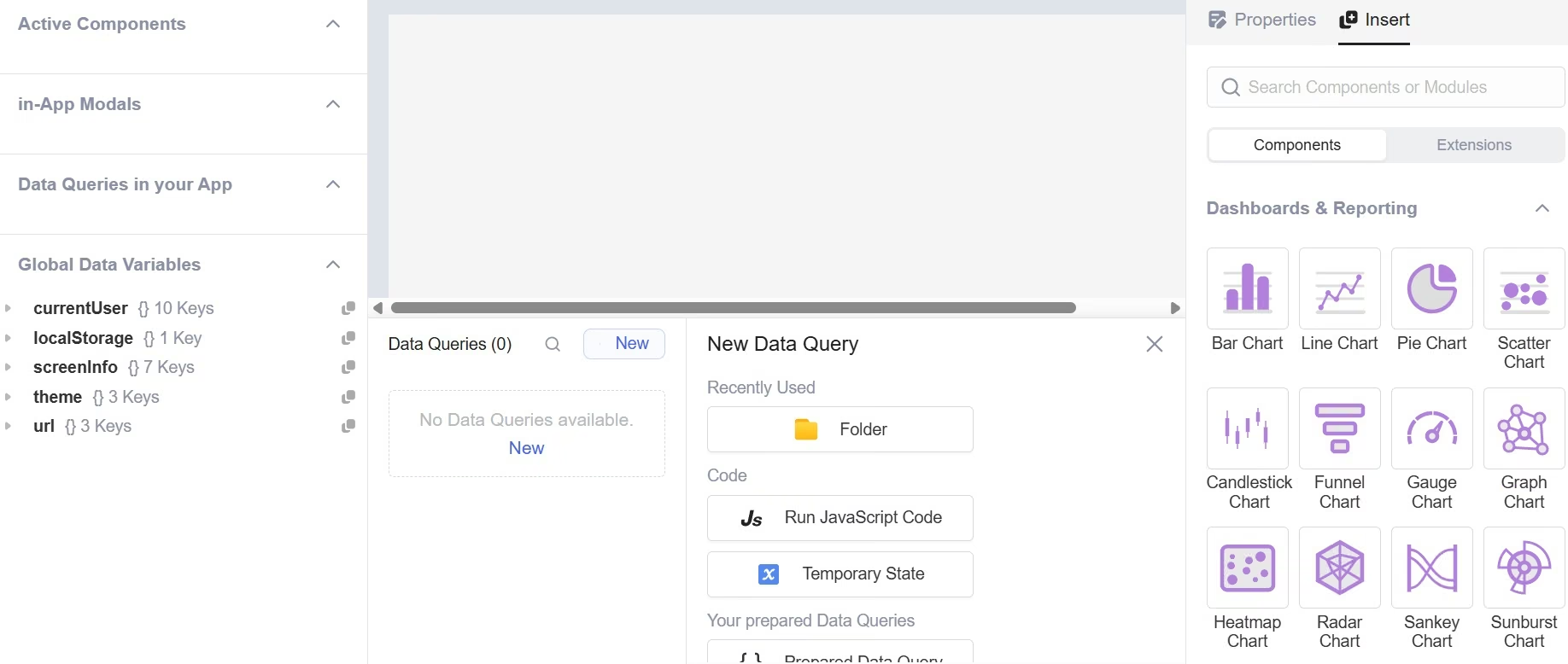
That arrangement matches Lowcoder's own documentation. Its app editor is split across the canvas, data browser, query editor, and component/property pane. You drag components onto the canvas, create queries to work with data, then connect actions and controls yourself.
Lowcoder also gives you more than 120 visual components. The list covers forms, tables, charts, dashboards, navigation, and more specialized visual elements.
That breadth is useful once you understand the editor. On my first visit, it also made the screen feel busier than Budibase or UI Bakery.
The self-hosting options are another strong point. Lowcoder directly supports Docker, Docker Compose, Kubernetes with Helm charts, Google Cloud Platform, Heroku, and even Raspberry Pi deployments.
My take: Lowcoder makes the most sense for detailed visual control and builders who are comfortable learning the editor. I wouldn't choose it when your main goal is to describe a dashboard once and have AI build the whole thing.
Key Features
- 120+ components: The editor covers a wide range of common and specialized interface needs.
- Query editor: You can connect data operations directly to the components on the page.
- JavaScript access: Data from queries and components can be transformed with JavaScript.
- Several self-hosting routes: Docker and Kubernetes are among the supported options.
Pros
- Large component library: You have plenty of interface pieces to work with.
- Strong self-hosting choice: Community Edition is free, and several deployment routes are documented.
- Fine visual control: The editor exposes layout, component, query, and property settings directly.
- No per-user Enterprise pricing: Paid Enterprise options use installations or API calls.
Cons
- Navigation felt harder at first: More controls are visible before you know which ones you need.
- The build is more manual: The workflow I used centered on the canvas, data, and queries.
- Technical concepts appear early: JavaScript and data connections become useful quickly.
- Independent review data is thin: There isn't enough current review volume to give Lowcoder the same G2-style sentiment summary as the other tools.
Best for
- Technical operations teams.
- Open-source deployments.
- Apps that need unusual interface components.
- Builders who want detailed control over queries and page behavior.
What Users Say
Independent review volume for Lowcoder is still too thin for a useful aggregate rating, so I’m keeping my verdict based on the hands-on editor experience above.
Pricing
Community Edition self-hosting is free. Enterprise Edition costs $1,690 per instance, or $0.01 per API call. Prepaid usage packages cost $1,000 for 100,000 calls, $10,000 for 1 million calls, and $100,000 for 10 million calls.
How to Evaluate ToolJet Alternatives
Decide How Much You Want AI To Build
My biggest practical split was prompt-first versus editor-first. Emergent, Retool, and UI Bakery let me begin by describing the result. Appsmith, Budibase, and Lowcoder brought data, components, or queries into the process earlier.
Match The Tool To The Person Who Will Maintain It
Think about who will own the app after launch. Appsmith and Lowcoder fit a developer who is comfortable with JavaScript, queries, Git, and infrastructure controls. Emergent and UI Bakery are easier for a founder or operations manager to pick up.
If you want a wider look at editor-led products, Emergent's guide to the best low-code app builders covers that group in more detail.
Price Your Real Team
Retool separates builder and internal-user seats, UI Bakery charges per developer, Appsmith charges Business per user, and Budibase combines plan limits with creators, end users, AI credits, and actions. Count builders, viewers, apps, and monthly workflow activity before comparing totals.
Filter For Self-Hosting Early
Appsmith, Budibase, Lowcoder, ToolJet, and UI Bakery all offer self-hosting. Retool’s current self-hosted deployment sits on Enterprise.
Think About Who Will Use The Finished App
Internal-only tools keep all six in play. Customer accounts, private client pages, and a wider web or mobile product give Emergent a stronger fit.
Pick a ToolJet Alternative for the Workflow You Want
After working through these six, the interface changed my recommendation more than the feature lists did.
Retool produced my fastest complete lead-tracker result at about five minutes and 14 AI credits. UI Bakery followed at six minutes and gave me my favorite onboarding, especially the two useful questions it asked before generation.
Appsmith took longer, around 20 minutes, and rewarded a more technical way of thinking. Budibase generated my 12-row data table in about three minutes once AI was active. Lowcoder offered the most visible manual control from the start.
Emergent fits the broader project. My client portal had two roles, six screens, and account-specific project data, which is much closer to the type of software I'd choose it for.
ToolJet still has a strong case of its own. If AI generation, self-hosting, a visual editor, and per-builder pricing already line up with the way you work, keeping it can be the right call.
For readers who want to start from a written app idea, Emergent gives you that prompt-first route.

Most AI app builders stop at prototypes. Emergent creates production-ready apps you can actually launch.
- Production-ready apps
- Web & mobile apps
- Deploy in minutes







