



TL;DR
- v0 pricing starts free with $5 of monthly credits and seven messages per day, then moves to $30 per user per month for Plus, which includes $30 of credits plus $2 of daily login credits.
- Business costs $100 per user per month but carries the same $30 of monthly credits as Plus, so the extra $70 buys data privacy and administrative controls, not more build capacity.
- Credit burn is the real variable, with community users reporting tasks that once cost $0.15 to $0.30 spiking to 10 times that, and one user spending $10 on a single message and $40 in a day.
- v0 generates the interface only, so user accounts, data storage, payments, and hosting still need extra tools or developer time, which makes cost per shipped app a better metric than cost per month.
- Alternatives like Emergent, Lovable, Bolt.new, and Replit start between $20 and $30 per month and build more of the app, with Emergent and Lovable both priced below v0's $30 Plus plan.
I tried building a project using v0 to find out what it would cost. I ended up burning through my v0 credits in one night, building my data scientist portfolio website.
Here's the full v0 pricing breakdown, plan by plan, including what each one gets you (with credits in mind) and which tier is worth paying for. You'll know if v0 is right for you, or if you should consider alternatives.
v0 Pricing Plans: At a Glance
Your monthly bill depends as much on how quickly you burn through credits as it does on which plan you choose. That's why I've included who each plan is for.
How the plans compare at a glance:
| Plan | Price | Best for |
|---|---|---|
| Free | $0/month | Trying v0, generating a few UI screens, or testing prompts before paying. Includes $5 of monthly credits and daily usage limits. |
| Plus | $30/user/month | Solo founders building regularly, freelancers, and small teams that need more credits, collaboration, and shared billing. Each seat includes $30 of monthly credits. |
| Business | $100/user/month | Companies that need security features, centralized administration, and data privacy controls in addition to higher-end collaboration tools. |
| Enterprise | Custom pricing | Large organizations that need SAML SSO, role-based access control, dedicated support, and enterprise compliance. |
The included credits often drive your real cost more than the sticker price does. Two people on the same plan can end up with very different total costs depending on how many prompts, revisions, and regenerations they make.
v0 Pricing Plans Breakdown
How the plans compare at a glance:
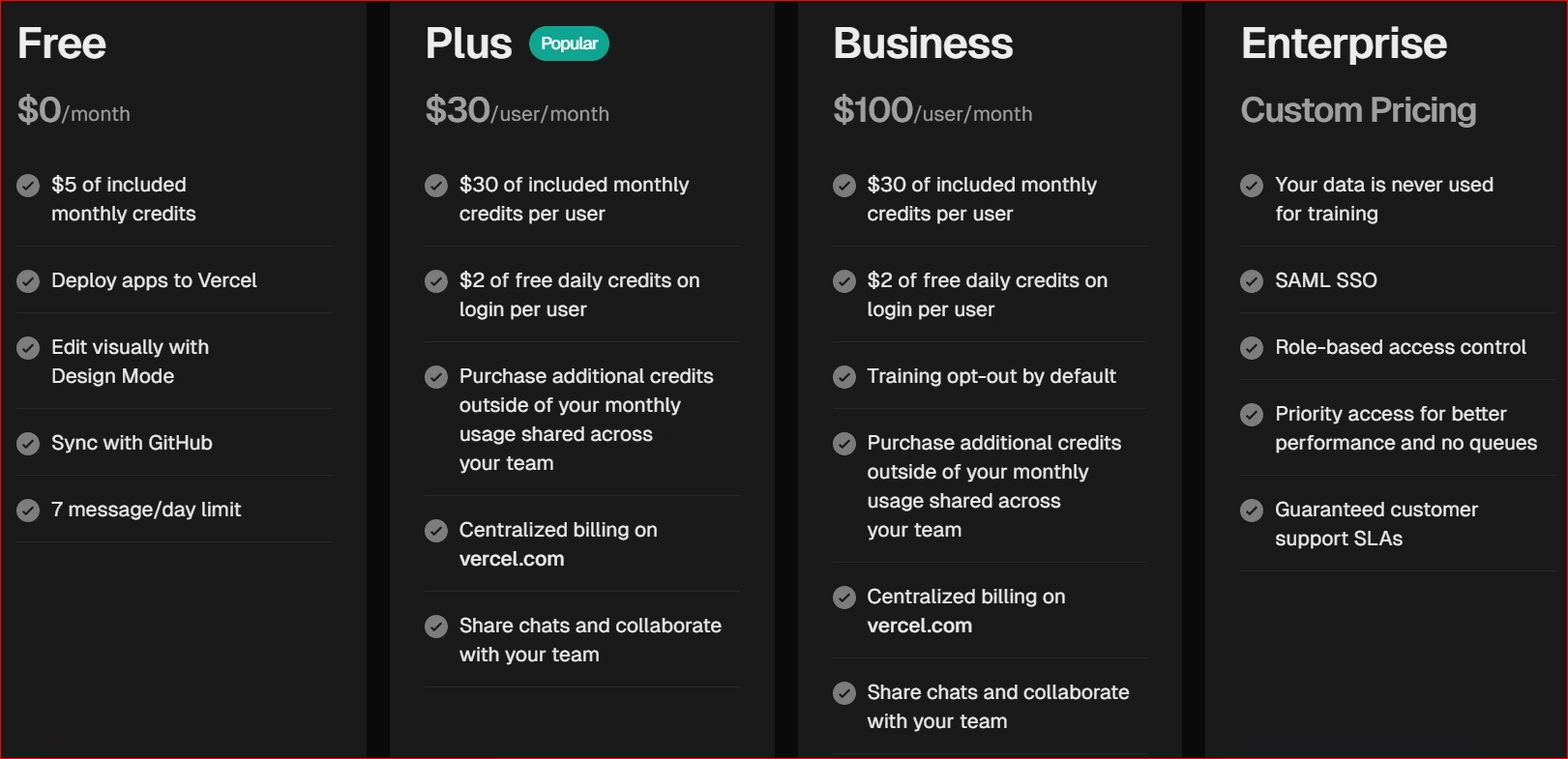
The plan you choose determines how many credits you start with, but how far those credits go depends on how many prompts, revisions, and iterations your project needs. If you run out of credits, you'll have to buy more outside your plan. v0 calls it “credit top-ups.”
For non-technical founders, that's a much more useful way to think about pricing than the monthly subscription alone.
Free: $0/Month
The free plan is a good place to start if you're just curious about v0. You get $5 of monthly credits plus a small daily message allowance, which is enough to experiment with prompts, create a few landing pages, or generate UI concepts.
What's included:
- $5 of monthly credits.
- Seven messages per day.
- Publish your app live through Vercel's hosting.
- Design Mode.
- GitHub sync.
Best for:
- Testing whether you like v0's workflow.
- Creating mockups or UI concepts.
- Learning how app building with AI works before paying.
Pros:
- Completely free to try.
- Enough credits to evaluate the platform.
- Access to the core AI experience.
Cons:
- You'll hit usage limits quickly.
- Not enough credits for building a serious product.
- Multiple design iterations can exhaust your monthly credits surprisingly fast.
Plus: $30/User/Month
This is the entry-level paid plan today for most solo founders and small businesses. Every seat includes $30 of monthly credits, and you can purchase additional credits if you run out.
Team members can also collaborate using shared projects and centralized billing.
v0 also gives you $2 worth of credits each day you log in. Unlike Business and Enterprise, the Plus plan doesn't keep your data out of Vercel's model training.
What's included:
- $30 of monthly credits per user.
- $2 of free daily credits on login per user.
- Shared projects.
- Team collaboration.
- Shared credit pool for purchased credits.
- Centralized billing.
- Additional credit purchases.
Best for:
- Solo founders building consistently.
- Freelancers creating client interfaces.
- Small startup teams.
Pros:
- More generous credit allowance.
- Easier collaboration.
- Can buy extra credits instead of waiting for renewal.
Cons:
- Credits can still disappear quickly on larger projects.
- Doesn't eliminate the need for the logic that runs behind your app.
- Monthly costs become less predictable once you start buying additional credits.
Business: $100/User/Month
It includes the same monthly credit allowance per user as Plus. The extra $70 buys data-privacy and administrative controls.
The build capacity is identical to Plus. That's the main difference from Plus.
What's included:
- $30 monthly credits per user.
- $2 of free daily credits on login per user.
- Data excluded from model training by default.
- Team collaboration.
- Centralized billing.
- Shared credit purchasing.
- Administrative controls.
Best for:
- Agencies with multiple developers.
- Companies handling sensitive client data.
- Businesses with compliance requirements.
Pros:
- Better privacy protections.
- Enterprise-style administration.
- Easier team management.
Cons:
- Costs over three times as much as Plus.
- Included monthly credits don't increase.
- Doesn't solve the technical gaps in everything that runs behind your interface.
Unless your business specifically needs the security features, keep it in the Business block.
Enterprise: Custom Pricing
Enterprise is designed for large organizations with strict security, compliance, and support requirements. Pricing is negotiated directly with Vercel.
What's included:
- Custom credit allocation.
- SAML SSO.
- Role-based access control.
- Priority access.
- Enterprise support and SLAs.
Best for:
- Large enterprises.
- Organizations with strict IT policies.
- Teams requiring dedicated support and custom agreements.
Pros:
- Highest security level.
- Dedicated enterprise support.
- Custom contracts and usage.
Cons:
- Custom pricing.
- Overkill for startups and small businesses.
- You'll still need additional infrastructure to launch a production-ready application.
The Hidden Cost Every Founder Should Budget For
Even if your credits last all month, v0 mainly builds what your users see and click. The parts behind that are still on you.
Most production apps still need user accounts and login, data storage, payment processing, hosting, and a deployment before customers can actually use them.
It's worth asking "How much will it cost me to ship a working app?"
For many non-technical founders, that answer includes both the v0 subscription and the tools or developer time needed to finish everything v0 doesn't generate. That's where the real cost of the project lies.
Which v0 Plan Should You Choose?
It depends on how often you'll build and how close you are to shipping a real product. Here's who each plan actually makes sense for.
Choose the Free plan if you:
- Want to see whether v0 fits your workflow before spending any money.
- Need to generate a few landing pages, wireframes, or UI mockups.
- Are learning how app building with AI works and don't mind usage limits.
- Already have a developer and just want to quickly prototype interface ideas.
Skip it if your goal is to build a customer-ready app. The included credits are enough to experiment, but not enough for the amount of iteration most real projects require.
Choose the Plus plan if you:
- Are a solo founder building your first app.
- Are a freelancer creating apps or dashboards for clients.
- Expect to use v0 every week rather than occasionally.
- Want collaboration features and the option to buy extra credits instead of waiting for your monthly reset.
It gives you enough flexibility to build without paying for enterprise features you'll probably never use.
You may need another tool (or a developer) if your app requires additional components (like logic and payments) to work.
Choose the Business plan if you:
- Manage multiple builders inside your organization.
- Handle sensitive customer or company data.
- Need administrative controls, centralized billing, and stronger privacy guarantees.
- Work in an industry with compliance or security requirements.
You're paying for business infrastructure here; the app-building capacity is the same as Plus.
If none of that applies to you, Plus is the better buy.
Choose the Enterprise plan if you:
- Are a large company with hundreds of employees.
- Work in an IT department that requires SAML SSO, role-based access control, or custom contracts.
- Need dedicated support and enterprise-grade service agreements.
If you're reading this article as a founder or small business owner, you can safely ignore this plan. It's built for organizations with enterprise procurement processes, rather than startup app development.
My Recommendation
If you're just evaluating v0, start with the Free plan.
If you're serious about building with it, the Plus plan is the one I'd recommend. It's the only plan that makes financial sense for most founders and small businesses.
That said, paying for a tool that generates just the interface may not be in your best interest. A platform that can help you ship an entire working application might be better.
Tools like Lovable, Bolt.new, Replit, and Emergent do much of the additional work v0 doesn't.
That can make a greater difference to your total project cost than moving from one v0 pricing tier to another.
Is v0 Worth the Cost?
Yes, as long as you're paying for what v0 does today. v0 offers excellent value for the right user. It can turn an idea into a polished UI in minutes, so you can test a first version the same day.
For example, it produced the homepage of my data scientist portfolio in under 10 minutes. So if you need just a working website or a landing page, you'll appreciate v0’s speed.

Also, if you're a developer or a technical founder who already has a plan for the logic behind your app, the subscription price is easy to justify.
For non-technical founders, however, the equation is different. For example, v0 would struggle to create a production-ready client portal with logins and storage, because it's built to design screens, not wire up a whole app.
v0 can burn through credits fast, especially on repeated edits. When I tried to tweak my portfolio website, my credits drained fast. A single complex website can burn through your entire $30 monthly allowance in a day, especially on the larger models.
A few v0 users have documented sharp, unpredictable credit spikes. A user in Vercel’s community (Alexcumbers 9492) tracked their costs against a 30-day usage average and found that tasks which used to cost $0.15 to $0.30 had spiked to as much as 10 times that.
On the same thread, Roberto 8408 reported spending $10 on a single message, and $40 total in one day from just a handful of messages.
The real cost is per shipped app, not per month
v0 only builds the interface and leaves you to figure out the other parts that make an app.
Then there's ongoing maintenance. Hiring someone to do this can take weeks and cost thousands of dollars. That's why I judge v0 on cost per shipped app rather than cost per month.
When v0 is worth paying for
v0 is worth it if you:
- Are a developer who wants to generate React interfaces faster.
- Already have the logic side of your app built, or an engineering team handling it.
- Are building marketing sites, dashboards, admin panels, or internal tools where the interface is the biggest bottleneck.
- Enjoy iterating on prompts and don't mind managing your credit usage.
- Need high-quality UI generation more than an agent platform that builds the whole app.
In these situations, v0 can easily save dozens of development hours, making the paid plan a worthwhile investment.
When to skip v0
Skip v0 if you:
- Are a non-technical founder expecting to build and launch an app without writing code.
- Want the logic, accounts, and data handled for you, alongside the design.
- Prefer predictable monthly costs instead of monitoring credit consumption.
- Plan to hand the project to a freelancer or agency later and want a more complete production-ready codebase from the start.
For non-technical founders and service businesses, tools like Lovable or Emergent may provide better overall value because they cover much more of the app.
The base price for both tools (Emergent and Lovable) is lower than v0's equivalent Plus plan, which makes them even more attractive.
v0 is worth paying for if you need an interface generation tool. If you're expecting an agent platform that builds the whole app, it's much harder to recommend.
v0 Alternatives and Pricing Comparison
Most of these tools start between $20 and $30 per month, so the real difference is how much of your app they build.
| Tool | Starting price | Best for |
|---|---|---|
| Emergent | Free (Standard from $20/month) | Non-technical founders who want to build, launch, and iterate on complete web or mobile apps with minimal manual setup. |
| v0 | Free (Plus from $30/user/month) | Developers and technical founders who primarily want AI-generated React interfaces and already have a plan for the logic side of their app. |
| Bolt.new | Free (Pro from $25/month) | Founders who want a browser-based coding environment that builds the whole app, with one-click publishing and direct file access. |
| Lovable | Free (Pro from $25/month) | Non-technical creators who want complete apps with user accounts, data storage, and Stripe integrations built into the workflow. |
| Replit | Free (Core from $20/month) | Developers who want a complete cloud IDE where AI writes code, sets up data storage, and hosts applications. |
- Choose v0: if you already have technical resources and simply want to speed up interface development.
- Choose Bolt.new: if you want more direct control over your project's files while still building visually in the browser.
- Choose Lovable: if you're a non-developer who wants user accounts, data storage, and payments handled with much less manual setup.
- Choose Replit: if you want a full development environment and you're comfortable working closer to the code.
- Choose Emergent: if your priority is getting from idea to a live application with the fewest moving parts and the lowest overall implementation effort.
A tool that costs $20-30 per month but lets you launch your product without hiring extra developers is cheaper than one with a similar subscription price that only solves the interface.
Also read our best v0 alternatives guide for a deeper look at what else is worth trying when interface generation alone isn't enough.
My Bottom Line on v0 Pricing
My view (after looking closely at v0's pricing) is that it's fairly priced, but only if you judge it as an interface generation tool.
That may be okay if you're a developer. You can handle the other aspects yourself.
That's not the case for non-technical users. They're better off with a tool like Emergent, which builds a full working app.
Most builders stop at a prototype. Emergent ships real web and mobile apps, with accounts, databases, and payments included.
- Production-ready apps
- Web & mobile apps
- Deploy in minutes







