TL;DR
- Grok Bot was launched by xAI (which is now referred to as SpaceXSI) on 11th of August 2026
- In Grok Bot, you message your colleague like you do every day. The difference is that the bot will operate your tools and their interfaces, perform approval checks, and can be trained by learning your workflow after you demonstrate it.
- It has plans: Free, Plus, Premium, Super, and Ultra. Two other plans are also available: Enterprise controls exist.
- All Bots on one account share a single cloud computer, so separate bots aren’t a security boundary.
- Choose Grok Bot for exploratory, multi-app work that a person can review. For high-volume or regulated processes, build software you control.
Grok Bot is SpaceXSI’s always-on AI teammates platform. According to the platform's announcement, Bot is a persistent cloud computer assigned to the user’s account. They can easily sign in across applications such as email, CRM platforms, and ticketing systems, including platforms with no clear MCP or API. The Bot completes multi-step jobs end to end and returns to the user only when something requires human approval.
Bots are managed virtual machines with a file system, a browser and a terminal. That was the initial August launch eligibility, not the current full availability. Access later expanded to base SuperGrok and multiple Cursor plans. The autonomous AI agent is also available on Cursor Pro, Cursor Pro+, and Cursor Ultra for Standard and Premium teams, both on desktop and iOS.
Early users of Grok Bot say it doesn’t feel like a prompting agent, but more like a highly capable teammate you assign tasks to. Your tasks don't stall when you step away because Bots run on computers in their own cloud.
In this guide, we will walk you through what Grok Bot is, how it works, its features, and more.
What is Grok Bot?
Grok Bot was launched by SpaceXSI (Formerly referred to as xAI) on 11th of August 2026. For the past three years, AI has behaved like a request-and-response model: a user enters a prompt, gets an output, and then acts on it. Grok Bot was created to handle bug fixes, marketing campaigns, office operations, and more. It is built on a different architecture; instead of returning text, each bot is an agent with a cloud computer.
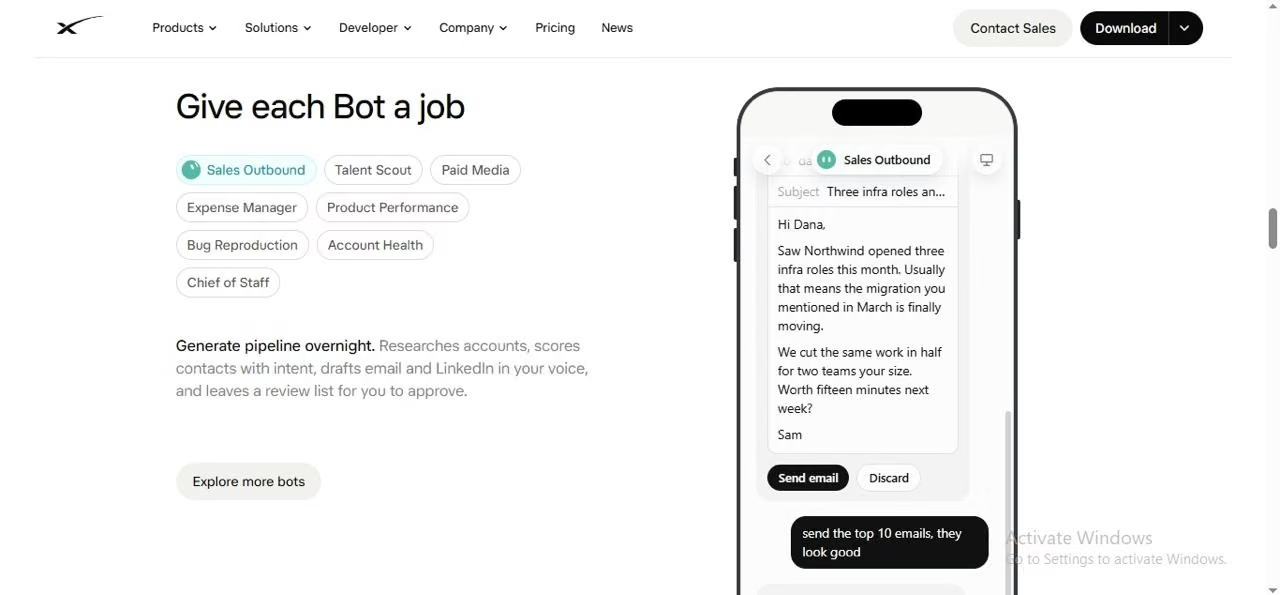
For example, to better explain Grok Bot, its multi-step coordinated jobs are handled as follows: an operations Bot seats new hires and works on invoices received in Gmail; an engineering Bot fixes a bug in the product UI, processes the ticket, and hands the fix over to a debugging Bot. A sales Bot is also working in the CRM, drafting follow-ups and call transcript notes.
To keep it simple, “Bot” does not mean a chat widget. It works like a persistent agent, the one you will text in the way you text your colleagues, keeping the context the same as how you like the work done.
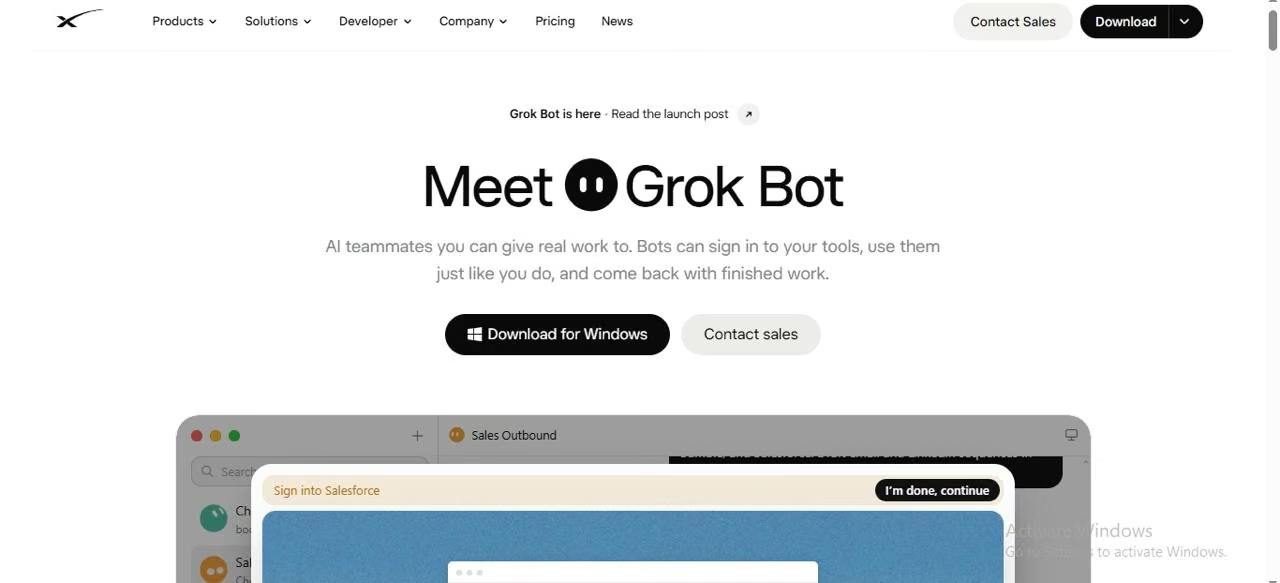
One of the biggest differences between Grok and Grok Bot is that Grok, the earlier version, is a conversational assistant from xAI. It isn’t a replacement or a workflow builder, where you design flowcharts before the work.
Also Read: Dots vs Muse vs Grok Bot for how it compares with two other always-on agents. Inferred from its slug, so confirm it is live.
Grok Bot at a Glance
Here is a quick look at the details of the Grok Bot.
| Dimension | Grok Bot |
|---|---|
| Developer | xAI (now SpaceXSI) |
| Launch | August 11, 2026 (Beta stage) |
| Category | Persistent AI Agents with a cloud computer |
| Interface | Desktop (macOS and Windows) and iOS. It also works on Slack. |
| Compute | Per user account, one persistent cloud computer shared by the user’s Bots |
| Interaction | Text the Bot like your teammate; group chats |
| Controls | Approval cards, secure handoff, rule-based auto review |
| Pricing | Monthly plans are: Premium: $30, Super: $100, Ultra:$200, including Teams and Enterprise |
How a Grok Bot Task Works
Grok Bot gives every member of your team a bot for everyday tasks such as research, documents, operations, automations, and browsing. These are AI teammates with context, jobs, and names, and they compound over time. Here are the steps it follows.
Instruction
You text the Grok Bot in plain language with no workflow to configure it. You can set guardrails from the start, for instance, by asking the Bot to draft the documentation provided but not apply the changes.
Environment
Grok Bot works on a persistent cloud computer that stores your files, browser and even logged-in sessions. So the machine stays there when your device isn't working or is asleep.
Access
Grok Bot signs in to any application required by the task. According to its official website documentation, it should hand off control to you for any passwords, passkeys, payment confirmations, and verification codes. Either the Bot should use a secure form with masked values that are kept out of the transcript.
Execution
Grok Bot operates the application via its interface, clicking, reading screens, and moving data between the tools. If a connector exists, the bot can use the connector.
Approval
Grok Bot can use Auto Review to evaluate tool calls and computer actions against the configured rules before they run. Approval behavior depends on the settings and the type of work being performed, so Auto Review should not be treated as a guarantee that it will stop every risky action. Set explicit boundaries, limit the Bot’s access to what the task requires, and review consequential actions before approving them.
Delivery and Memory
The Grok Bot posts the outcome in the group or personal chat. Whatever the Bot learns through the process about your preferences carries into later work.
Parallel coordination is another step worth mentioning. In this process, the Bot lets you place many Bots in a single thread, so they hand off work to each other. For processes like inboxes, recruiting, operations, and expenses, the Bot acts as a chief of staff.
The 3 Types of Bots
xAI’s documentation identifies three types of bots, a distinction with direct implications for governance.
Individual or Personal Bots
A personal Grok Bot works for your personal account, like a dedicated AI assistant tailored to your day-to-day role. Its purpose comes from the task you assign, such as product management, coding, or routine communication.
Team Bots
The owner of the team bot sets it up once with all the details, like secrets, plugins, files, and skills it requires, and then publishes it to the entire team. Every teammate can chat in the group using the Grok Bot application or Slack.
What it does
- It learns from the team: whenever anyone types anything to the Bot, it saves it to its memory. Every teammate must read it.
- Every conversation stays private because each teammate can only view their own conversation. The owner cannot see other teammates' messages and vice versa.
- Any plugin that requires sign-in uses the account of the person talking to the bot. One major perk is that it never shares another person’s sign-in access.
Public Templates
You can easily share a Bot's configuration as a Template, and others can save it to their copy, either within a team or publicly. Though sharing a template in the chat does not share your login details, xAI advises not to place secrets, customer data, or URLs inside anything you publish.
Team Bot conversations are separated for individual teammates, while team memory and the Bot’s shared configuration can be available across the team. That distinction matters: private chat history doesn't mean all information, files, or activity associated with the Bot is private. Shared-channel conversations and shared computer resources can have different visibility rules, so avoid placing secrets or sensitive customer data in shared conversations or templates.
What Grok Bots Can Do
The five features of the Grok Bot that matter most to the operating leaders are listed below.
Work Across Applications
Grok Bot signs in and works on websites and desktop-type applications and tools, like platforms with no clean or clear API and MCP. xAI cites examples on its official website, such as working in and updating a CRM platform with call-transcript notes, processing Gmail invoices and fixing a bug in a product interface before filing a ticket.
Communicate
Bots can forward messages on Slack, claim their own email address, draft emails, and respond in Slack threads.
Produce Work Product
Bots can build pages such as dashboards, reports, and memos. They can also assemble slides like PowerPoint presentations and Google Slides files, and produce videos.
Automate on a Schedule or Trigger
You can automate routines using Grok Bot. For example, a webhook can run on a schedule or in response to events like Slack messages or other PagerDuty incidents.
Grok Bot can easily do recurring work that eats time, such as auto-replies, scanning and flagging subscriptions, research and briefs, and team workflows across sales, marketing and more.
Grok Bot vs Grok
It is usually a tricky question because Grok already does things that people associate with AI agents. Regular Grok can easily research the web, analyze the information, work through multi-step tasks, and use connected business tools. Grok automations can also follow a schedule and react to incoming emails. Here is a quick comparison between the two.
| Dimension | Grok | Grok Bot |
|---|---|---|
| Primary role | Conversational assistant | Persistent autonomous agent that does work in your tools |
| Where it runs | Web, mobile apps, and X | Desktop app along with a cloud computer |
| Access to your apps | Limited to what a chat can reach | Signs in and operates websites, inboxes, and applications. |
| Autonomy | Responds only when asked or prompted | Works independently, in parallel, round the clock |
| Memory | Conversation-level | Ongoing context, per-bot memory, and routines |
| Usage | Governed by a Grok plan | Separated from your Grok and Cursor plans |
Pricing and Availability
Here is a quick introduction to the pricing for the Beta version of Grok Bot.
| Plan | Pricing | Value that it adds |
|---|---|---|
| Free | $0 | Does not include Grok Bot |
| Plus | $8/month | Does not include Grok Bot |
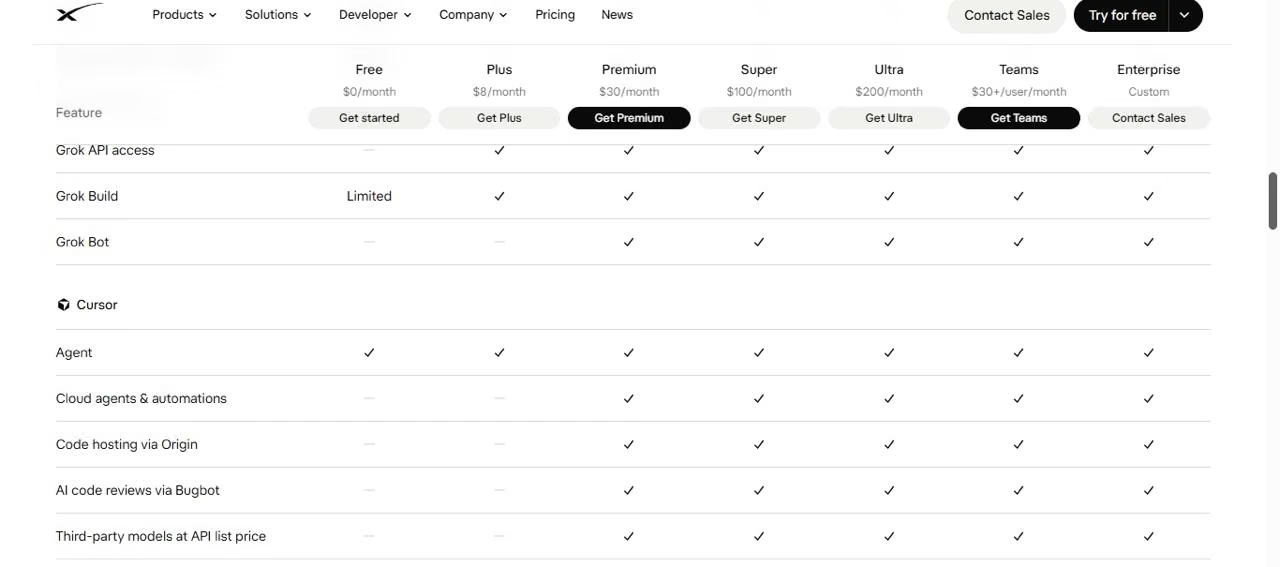
| Premium | $30/month | Grok Bot, latest Grok models, code hosting, cloud agents and weekly Grok Bot usage included. |
| Super | $100/month | Everything in Premium plus3.5x Premium usageand priority model access |
| Ultra | $200/month | Everything in Super plus12x Premium usageand earliest access to products/models |
For new customers using The X Subscription, the listed monthly prices are Free ($0), Plus ($8), Premium ($30), Super ($100) and Ultra ($200). Grok Bot is included with Premium, Super, and Ultra; the Plus plan does not include it.
Under the X Subscription, Grok Bot is included with Premium, Super and Ultra. Its usage draws from the subscription's shared weekly allowance across Grok, Grok Bot and Cursor. Existing Cursor and SuperGrok subscribers may have different access and billing arrangements, so check the applicable plan before upgrading.
Usage rules also depend on the plan. For The X Subscription, Grok Bot usage draws from the seat’s shared weekly usage allowance. Don't assume usage is always separate from other products or that the same overage terms apply to every subscription.
Cursor Pricing:
Here is a quick review of Cursor pricing for using Grok Bot.
Early Beta Limitations
A balanced assessment must treat the following as live constraints, not footnotes.
A shared computer, not an isolated one
Launch copy emphasizes that Bots have a computer of their own, but the documentation clarifies that all Bots on an account share one persistent cloud computer. Each Bot receives its own screen, yet files, browser sessions, and command-line credentials are visible across the roster. xAI explicitly advises against treating separate Bots as a security boundary. A Bot you set up for low-risk research can therefore reach sessions you signed in for finance work.
Deletion is not erasure
Deleting a Bot does not remove files or browser sessions on the shared computer. Offboarding a workflow requires signing out of services, revoking connector authorizations, and clearing files.
Approvals are model-assisted, not absolute
The documentation describes Auto Review as model-based and recommends that it complement least-privilege access rather than replace it. Approval requests that arise from unattended work, such as a routine, expire after about thirty minutes, and the action does not run. For how permissions and approval checkpoints are designed, see our guide to the principles of building AI agents.
Best Use Cases
The best Grok Bot use cases share some similar traits, including that the work is done across several applications, a human can see the output, and it is recurring but varies each time.
Sales Outbound
Sales Outbound examples from xAI’s own team include contact prioritization, review-ready outreach, and account research. It connects with tools like customer relationship management (CRM), company websites, email, professional networks, and product -intent sources.
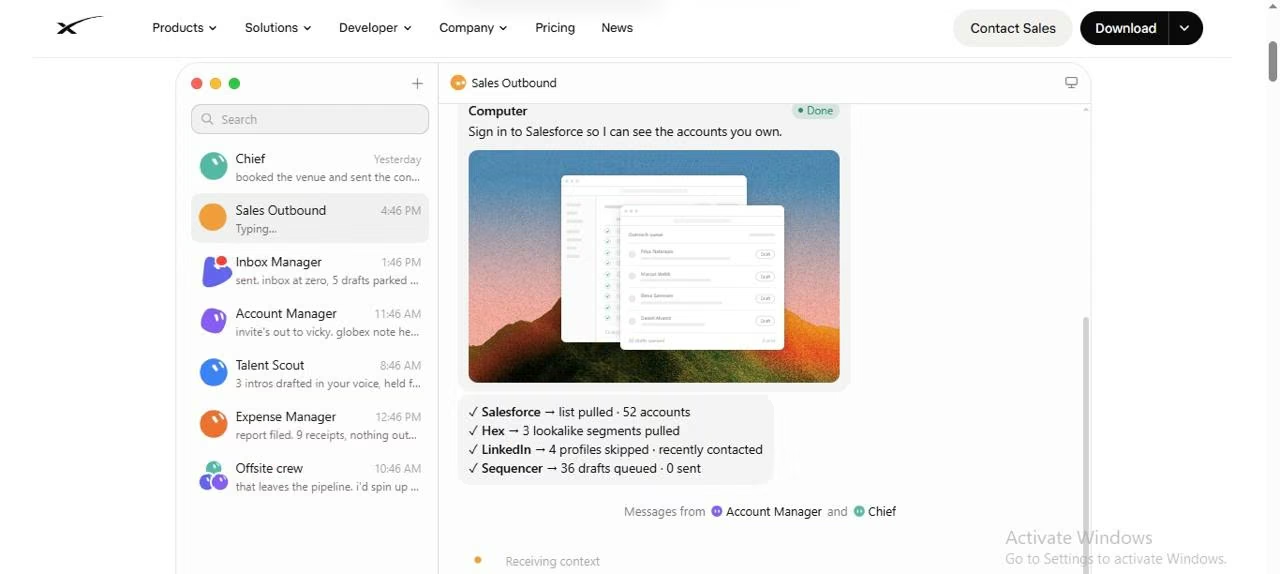
Example: You research 25 customer accounts in the CRM and score them against Grok Bot’s Ideal Customer Profile (ICP). Then you identify at least three contacts per account with recent intent and draft an email, along with LinkedIn Outreach. Now the Grok Bot just has to return the review list without sending or enrolling anyone.
Talent Scout
A talent scout or recruiter can source a candidate, conduct research on them, schedule preparation, and draft outreach. It connects Grok Bot with an application tracking system (ATS), email, approved sourcing tools and a calendar.
Example: You search for 20 applicants who meet your must-have criteria. Exclude any contact that already exists in your ATS; explain your choice for every match, and then draft a personalized outreach in your voice. But do not contact anyone.
Before the bot does external outreach, set limitations, such as respecting a candidate’s regional requirements, privacy, and source terms.
Grok Bot vs Claude Duet
Anthropic started a research preview of Claude Duet in October, 2026. Both products share the same premise: they run on their own cloud infrastructure, but they differ in posture. The Duet details below come from press releases and its own announcements.
| Dimensions | Grok Bot | Claude Duet |
|---|---|---|
| Developer | xAI | Anthropic |
| Status | Grok Bot is a beta product included with eligible plans | Research preview via waitlist |
| Release date | 11, August 2026 | 21 October, 2026 (Source) |
| Availability | Premium, Super, Ultra, Teams, Enterprise | US Pro, Max, and Ultra subscribers via waitlist [claude][support.claude] |
| Surfaces | macOS and Windows desktop, iOS, Slack for Team Bots | iOS, Android, and Claude.ai |
| Compute | Persistent cloud computer shared across a user’s bot | Cloud virtual machine with its own browser |
| Credential handling | Takeover handoffs, secure forms, and vault | As per Anthropic, Duet does not see passwords directly |
| Usage | Shares the existing Claude plan’s usage limits; no separate Duet price disclosed during the preview. | Draws on existing Claude plan limit |
| Pricing | Included with eligible plans; weekly usage allowance plus token-based overage | No extra charge during preview; uses existing Claude plan limits [support.claude][claude |
How to Try Grok Bot
Here are the steps to try the latest version of Grok Bot:
- Confirm your eligibility and check if your plan includes Grok Bot. On the X Subscription, Premium also includes Grok Bot; Free and Plus do not.
- Download Grok Bot from its Product page on your desktop, whether you're on Windows or macOS.
- Create one bot that does just one task. Avoid multi-level mandates.
- Prefer scoped service accounts where the source system supports them, and connect only what the workflow needs.
- Set limited Auto Review rules for external publishing, email, and product changes.
- Measure metrics like time saved, approval frequency and error rate against the plan allowance.
- Add a bot to the team only after its initial demonstration shows value.
When to Use Grok Bot
Choose Grok Bot when the task spans applications that lack APIs, varies from run to run, needs judgment on messy inputs, and can tolerate a human approval step. Examples include assembling a weekly pipeline review from three tools, triaging an inbox, or drafting a vendor follow-up.
If your business needs a purpose-built application or internal tool rather than a general-purpose agent, Emergent can help you build a functional, deployable software solution from a plain-language description. Emergent’s AI agent builder helps you describe what you want to build in plain English, then builds it for you. On Emergent’s platform, you can build a working software with its own API key and move forward only when you are satisfied.
Get Started with Emergent.
Conclusion
Grok Bot represents a shift in AI and how it's packaged. It's moving from an AI assistant that answers user queries to a team of agents that carry out work inside the systems you use. For Grok Bot, governance is the issue or limitation, not capability. The shared computer, model-assisted approvals, a fast-moving beta and identity attribution suggest that constraints will determine how far you can move it.
Describe it. Build it. Launch it.
- End-to-End Creation
- No Code Needed
- Live in Minutes
Most AI app builders stop at prototypes. Emergent creates production-ready apps you can actually launch.
- Production-ready apps
- Web & mobile apps
- Deploy in minutes