




On paper, Wix and GoDaddy look like the same choice. Both get a site live in an afternoon, and both bundle hosting with a store and booking. They're also the two names most people already trust. The real differences only show up once you start building.
So I built the same site on both. The test was a pottery studio site, run through Wix's Core plan and GoDaddy's Commerce plan on one identical AI setup brief. Both builds covered the same pages and features, so any difference traced back to the tool rather than the brief.
What follows is where they split, from setup speed and design freedom to how far the store stretches and what it costs long-term. By the end, you'll know which builder fits the site you're trying to build.
Meet Wix: Features & Highlights
Wix is the name most people already have in mind when "website builder" comes up, and it earns that reputation with real design freedom. Its drag-and-drop editor lets you place text, images, buttons, and widgets anywhere on the page.
Add a template library north of 2,000 designs and an App Market with 800+ integrations (QuickBooks, Klaviyo, Mailchimp, and more), and there's plenty of headroom to expand into.
I started the build the same way on both tools, running each AI setup flow first with the identical pottery-studio brief. Wix's setup asked more questions than I expected, right down to a specific one about my monthly sales goal for the shop, before it finally handed me off to the editor. That first draft landed a few minutes behind GoDaddy's.
Once inside, drag-and-drop lived up to its name. I dropped a floating "Book Now" button outside any preset section, something GoDaddy's editor structurally can't do.
Adding the class-schedule booking widget next was the same motion. I dragged it onto the page, set the weekly class slots, and it sat wherever I placed it instead of locking into a preset block. No separate plugin or app install stood between placing the widget and having a working bookable calendar on the page.
Wix's hosting is a closed system it manages start to finish, which is exactly why setup feels this smooth. The catch shows up if you ever want to leave. Your site lives inside Wix's platform, and there's no simple export if you decide to move it somewhere else. You'd start from scratch on whatever platform you moved to.
Also read our best Wix alternatives guide for platforms that don't lock you in when you're ready to move.
Meet GoDaddy: Features & Highlights
GoDaddy built its reputation on domains, and its website builder leans into that same "get it done" philosophy. You work inside a section-block editor, picking a layout, dropping in preset blocks, and adjusting colors. It bundles your domain, hosting, booking, and basic social-media tools under one dashboard, exactly the pitch for anyone who wants one login instead of five.
Booking here means GoDaddy's own built-in appointment tool, the same one that ran the class-schedule widget for this test, built right into the dashboard. There's no real third-party app marketplace to extend it further, only GoDaddy's own bundled tools built into that same panel.
Running the same pottery-studio brief through GoDaddy's Airo AI builder moved fast from the first click, with barely any questions before it started building.
That same session generated a full color palette and a starter homepage, ready to edit before I'd even finished reading through it once. Wix was still several minutes into a longer question flow by the time GoDaddy had finished.
Where GoDaddy pulls back is customization. Templates here number closer to 100 to 200, a fraction of Wix's library. The editor only lets you swap the section blocks and recolor the theme. That limit appeared early.
The class-schedule widget landed inside its own fixed block, and there was no option to pull it out from under a section header or set it beside another block on the same row. It sits where GoDaddy decided it sits.
Also read our guide on the best GoDaddy website builder alternatives for what else is worth trying when the block editor and limited templates feel too restrictive.
Why This Comparison Goes Beyond Price
Wix and GoDaddy earned their name recognition in different ways, and that shows the moment you start comparing how each one gets a site built. Wix leans toward design freedom, GoDaddy toward bundled speed.
What neither of their pricing pages shows is where each builder's editor, integrations, and product-option limits start to pinch as the site grows. Miss that, and the wrong pick gets expensive quickly.
How I Tested Wix vs GoDaddy
I built one site, twice. The test build was a single-location pottery and ceramics studio, hypothetical, never a real client or business I run. It had a homepage, an About page, a bookable class schedule, a three-product shop, a contact form, and one blog post.
I ran the identical AI setup brief through both tools first:
"A single-location pottery and ceramics workshop offering beginner classes and a small online shop. Build a bookable class schedule and three products: a handmade mug with three color options and two size options, a single-variant clay kit, and a gift card in three denominations. I want people to book a class and buy from the shop online."
From there, I used each tool's own editor to hand-edit the same three additions into both builds. I added the class-schedule booking widget, built out the three-product shop, and set up the contact form.
The shop itself was built to compare how each plan handles product options. It included a mug with three colors and two size options, a single-variant clay kit, and a gift card in three denominations.
I tested Wix's Core plan and GoDaddy's Commerce plan, the tiers that add an online store and bookings to each. Active build time came to roughly three to four hours per tool, spread across two weeks of evenings and weekends, and both sites were torn down once testing wrapped.
I judged them on how each one held up under the same brief. That meant counting the AI setup's questions and timing how long it took to hand over control, then testing how freely the editor placed things.
From there, I compared each plan's product-option handling, its SEO and blogging controls on a test blog post, its apps and integrations, its marketing and form tools, and how support and pricing were structured.
Wix vs GoDaddy: At a Glance
Wix vs GoDaddy: Feature-by-Feature Comparison
Eight things separated these tools once I got past the homepage, and each one gets a closer look below.
Ease of Use & AI-Assisted Onboarding
Onboarding speed created the clearest difference between these two tools.
GoDaddy's Airo asked exactly two questions, first what the business does, then what the goal is. I fed it the same pottery-studio brief I used across the test.
That got me a generated logo and a working draft site in under a minute. That's the fastest first-draft moment of the whole test, and it stayed the benchmark for everything after it.
Wix's AI setup took the same brief and asked considerably more, handing me into the editor only after a longer run of follow-ups. Reaching a usable starting point took a few minutes longer here than it did on GoDaddy.
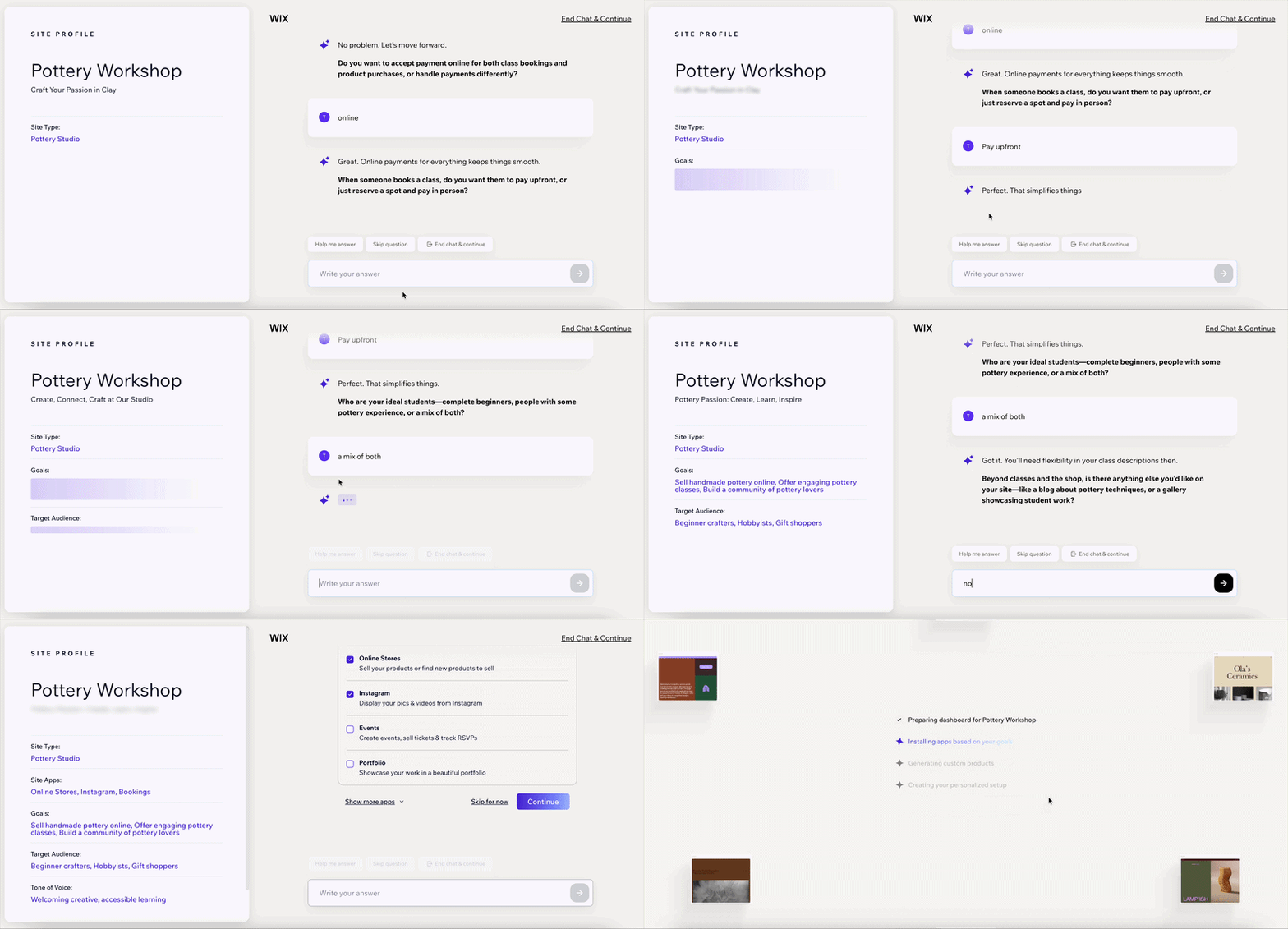
A different slowdown turned up later, well past setup. Going back into Wix's newer Harmony (Aria-driven) AI editor to resize two product images so they'd match turned a simple edit into a slow, laggy back-and-forth. The classic drag-and-drop canvas never had that problem.
My take: If getting something set up in the next 10 minutes is the whole goal, GoDaddy wins this one outright. If you're going to spend real time in the editor past day one, budget for Wix's AI editor to occasionally slow you down, especially anywhere images need resizing or repositioning inside that newer editor.
Winner: GoDaddy.
Design Freedom & Templates
Wix let me place a button outside its preset sections. GoDaddy kept each block in its assigned slot.
Wix's canvas let me place elements anywhere on the page and resize them freely. Between that freedom and a template library north of 2,000 designs, the layout never felt boxed in.

I placed the three-product shop in a custom grid and sized it without fighting the template's built-in spacing.
GoDaddy's section-block editor had a hard ceiling by comparison. I tried moving the class-schedule widget into a custom two-column layout, and the editor doesn't allow it. You get a fixed stack of sections and a single color or theme choice to adjust.
GoDaddy's smaller template set gives you a starting look and a few tweaks to make it yours.

The same shop, dropped into GoDaddy's grid, took whatever spacing and column count the template shipped with, with no way to change either.
Once you pick a Wix template, switching to a different one means starting from scratch, since your edits don't carry over. GoDaddy lets you swap templates without losing your content, though you're trading that for the same customization limits either way.
GoDaddy's fixed layout reduces the number of design decisions, but it becomes restrictive when you want to move beyond the starting template.
Winner: Wix.
eCommerce & Online Selling
The shop build is where the two plans' option limits show their difference.
On Wix, the mug listing (three colors, two sizes, two options total) went in without a hint of friction. Wix's ceiling on the Core plan runs up to six options and 1,000 variants per product, so this three-product shop barely touched what the plan allows. Wix takes 2.9% plus $0.30 per transaction.
GoDaddy's Commerce plan sets tighter caps. Its plan caps you at three options per product, and 100 choices store-wide; every color, size, and denomination across your whole catalog counts against that one number. Wix's 100-choice cap applies per option, not per store, so it's far harder to hit.
The mug used two of its three allowed options and the gift card used one option with three denomination choices, so the pottery shop stayed well within GoDaddy's limits. The ceiling only bites on a larger, more configured catalog, where GoDaddy's store-wide cap and lower option count are reached first.
With GoDaddy Payments, checkout stays on the site's own domain as a single-page flow. Connect a third-party gateway such as PayPal instead and the customer is sent to the processor's site to pay, then returned. The processing fee runs slightly lower here, at 2.7% plus $0.30.
Wix keeps checkout on the site's own domain no matter which processor you use. The customer enters card details on the same URL they have been browsing, with no redirect.
Winner: Wix. The pottery shop stayed inside both builders' limits, but GoDaddy's are lower and store-wide, so a larger, more configured catalog reaches them first.
SEO & Blogging Tools
Publishing one test blog post (an announcement about a new glaze color) surfaced the SEO difference fast, in ways a feature list alone never would have shown.
Wix ships with built-in analytics covering session tracking, behavior data, and performance benchmarking. Checking the analytics dashboard right after publishing showed the post already logged as a new page, session data included, without any extra setup.
Its SEO tools also go deeper: you can tell Google which version of a page is the 'main' one to index (a canonical tag), add the behind-the-scenes markup that helps search engines read your page, and follow a built-in SEO learning hub that walks you through fixes before you publish.
Writing and publishing the blog post took the same few minutes on both tools, but Wix's version came with an SEO checklist attached to the post first. That checklist runs four steps, naming the business, setting a location, adding up to three keyword phrases, and an optional keyword-research pass, before it hands you off to connect Google Search Console.
GoDaddy's version leaned on an external Google Analytics link instead of anything built in. Its blogging and SEO tools stayed noticeably lighter. Publishing the same test post exposed another limitation.
GoDaddy auto-fills the post's meta title straight from its headline, with no separate field to override it, and the page URL locks in from that same headline the moment you publish, with no way to edit it after the fact.
There's enough to get a post published, but little else behind it to help that post get found. If organic traffic is a priority, Wix gives you more control over how each post appears in search.
Winner: Wix.
Customer Support
I opened Wix's live chat on a Wednesday afternoon and had a rep on the thread in about four minutes.
Calling GoDaddy's line at 11 p.m. that same night, I reached a person almost immediately. GoDaddy runs a genuine 24/7 phone line. Wix has no always-on phone, so an urgent Wix issue outside chat hours routes through a callback instead of an immediate call.
That difference appears most when something breaks at an inconvenient time. A studio owner hitting a payment or booking problem on a Sunday afternoon, mid-sale, needs someone to pick up fast, and GoDaddy's direct line removes the callback step.
Winner: GoDaddy.
Pricing & Long-Term Value
The two companies present monthly and annual pricing differently.
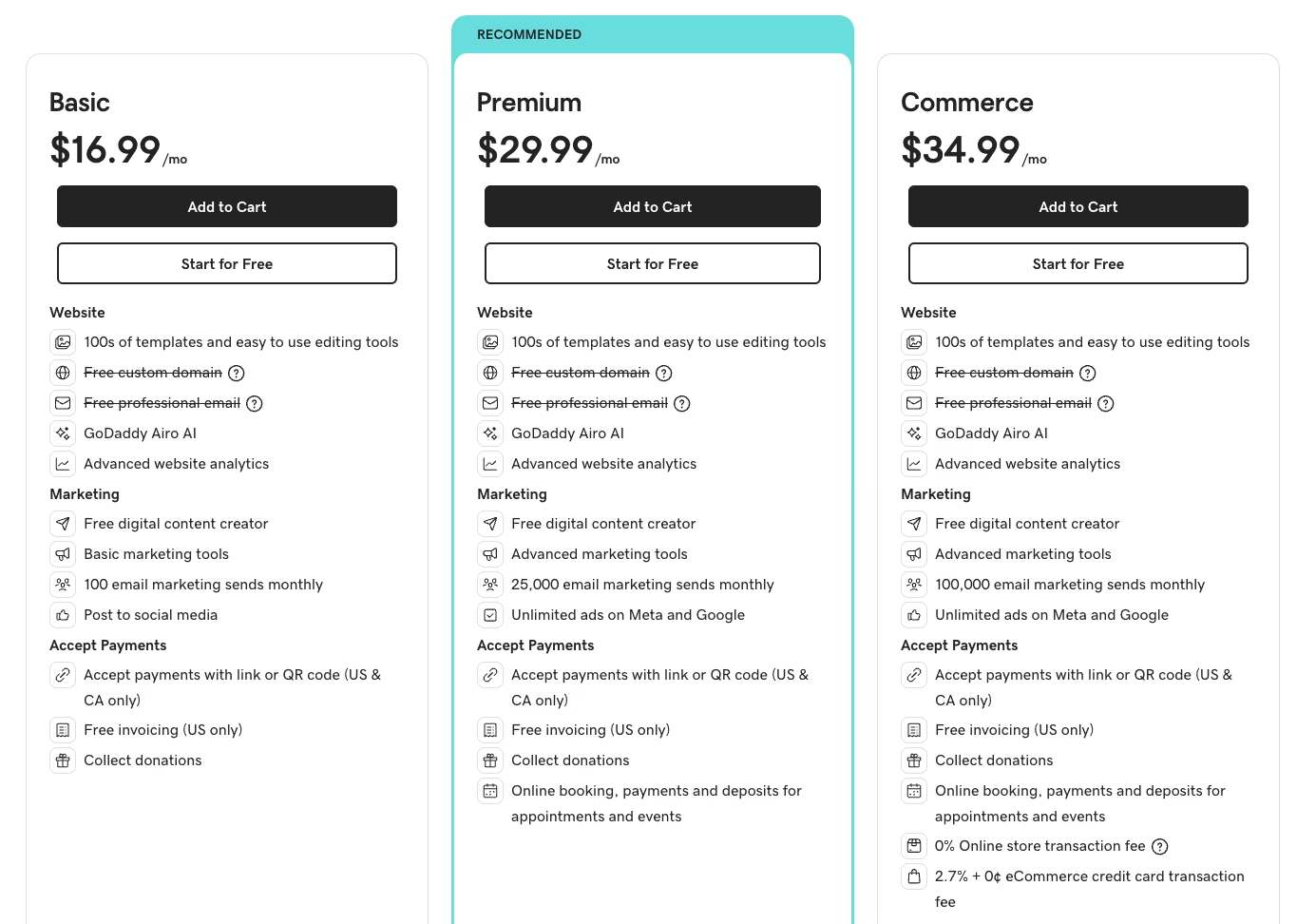
GoDaddy's Commerce plan, the one I tested for this build, runs $34.99/month ($20.99/month, billed annually). The $34.99 rate is what you pay to stay month-to-month without committing to a year upfront.
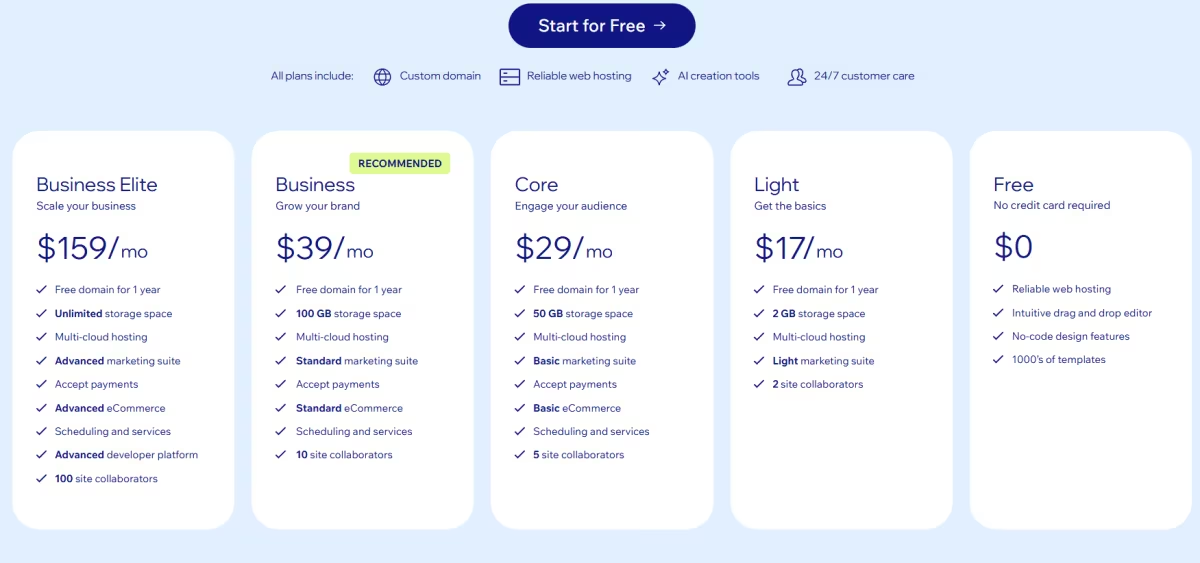
Wix runs on annual billing by default. Its public pricing page lists Core at $29/month, billed annually, paid upfront for the year. A month-to-month rate of $39/month exists too, but Wix keeps it inside the logged-in upgrade flow instead of showing it on the main pricing page, making the monthly option less visible before checkout.
At the regular annual rate, Wix includes deeper eCommerce tools, built-in analytics, and a larger app market that GoDaddy's builder does not match.
The processing-fee difference, 2.9% plus $0.30 on Wix versus 2.7% plus $0.30 on GoDaddy, widens GoDaddy's cost advantage as order volume grows. GoDaddy also costs less on monthly and annual billing, making it the lower-cost pick when the extra Wix tools are not a priority.
GoDaddy's Basic plan starts at $16.99/month ($9.99/month, billed annually), though that cheaper tier drops the online store and booking tools this whole comparison is built around.
Winner: Wix on bundled value, GoDaddy on price. GoDaddy Commerce costs less than Wix Core on both monthly and annual billing.
Apps & Integrations
The shop and the contact form both needed to talk to something outside the site eventually, and that's another place the two tools diverge.
Wix's App Market carries 800+ apps, covering everything from accounting (QuickBooks) to email (Mailchimp) to loyalty programs. I opened it from inside the same Core-plan build I'd used for the shop, searched for Mailchimp, and had it installed and asking to connect an account within a couple of clicks.
GoDaddy doesn't have a marketplace to run a search like that in the first place. I clicked through every tab in that dashboard looking for anything resembling an add-on library, and never found one. What you get instead is a fixed set of connections built into the builder itself, links to six social platforms (Facebook, Instagram, X, Pinterest, LinkedIn, and YouTube), a Google Analytics tracking ID field, and GoDaddy's own bundled tools.
If what you need to connect isn't on that list, GoDaddy's website builder can't get you there. GoDaddy offers a developer interface for third-party platforms, but you can't use it from inside the website builder.
Integration needs create a concrete difference between the builders. Wix's app market may include the accounting, email, or inventory tool you need. GoDaddy's dashboard is limited to its built-in connections, and upgrading to Commerce does not add an app marketplace.
Winner: Wix.
Marketing & Business Tools
The contact form I built for both sites turned into the easiest way to see how far each tool's marketing toolkit reaches beyond the basics.
Wix's version runs on Wix Forms, which supports conditional logic. I set a rule so a "preferred class time" field only appears after a visitor picks "Book a class" from a dropdown, something neither test site strictly needed but worth checking since a booking-heavy business would lean on it constantly.
File uploads are capped at 30 files per submission on the plan I tested, useful for businesses that collect portfolios or specifications. Every submission can feed straight into Wix's own email marketing tool, where the free tier caps out at 200 sends a month before you need a paid tier to go further.
GoDaddy's form builder doesn't branch. You can reorder fields, mark them required, and turn on file attachments, capped at 10MB per file, but there's no logic to show or hide anything based on an earlier answer. Submissions land in GoDaddy's own inbox or its bundled email list, and that list's free tier starts lower, at 100 sends a month.
GoDaddy has an advantage in social-post planning. Its Airo marketing calendar pulls from hundreds of upcoming dates and suggests a ready-to-edit post for each one to start your content calendar. Wix's Social Media Marketing dashboard skips the suggestions and instead publishes the same post out to seven platforms at once: Facebook, Instagram, TikTok, YouTube, LinkedIn, Google Business, and Pinterest, from a single screen.
GoDaddy's calendar does the thinking for you if content planning isn't your thing. Once you need more than 100 email sends a month, Wix's 200-send free tier and branching forms offer more room.
Winner: Wix, though GoDaddy's social calendar is worth knowing about on its own.
What Real Users are Saying
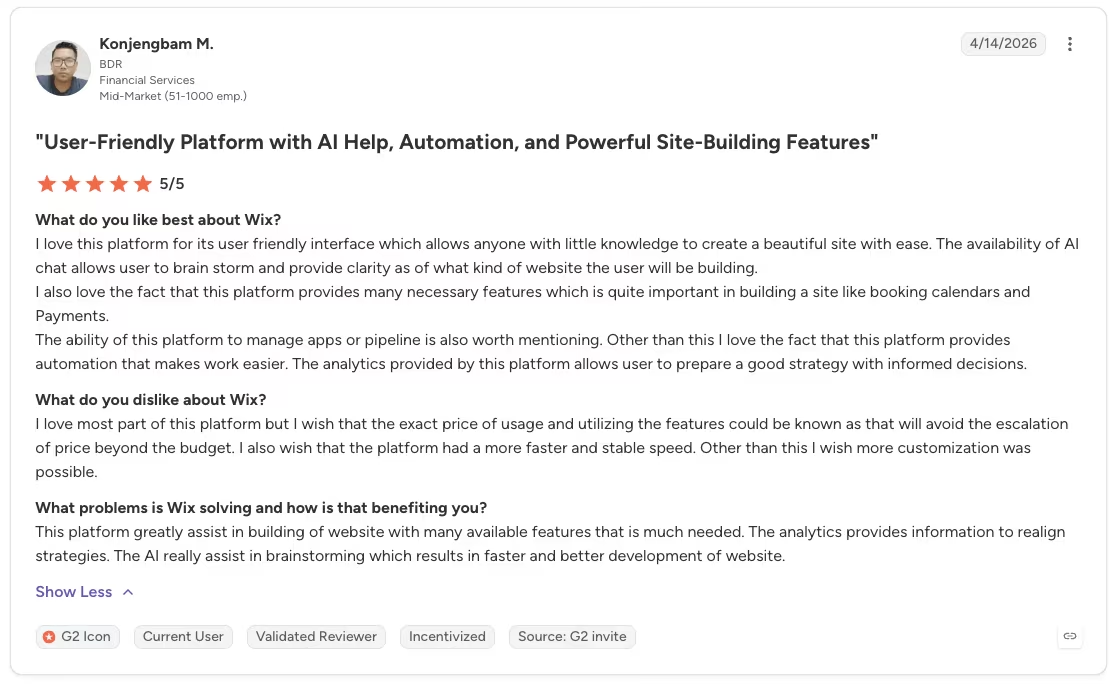
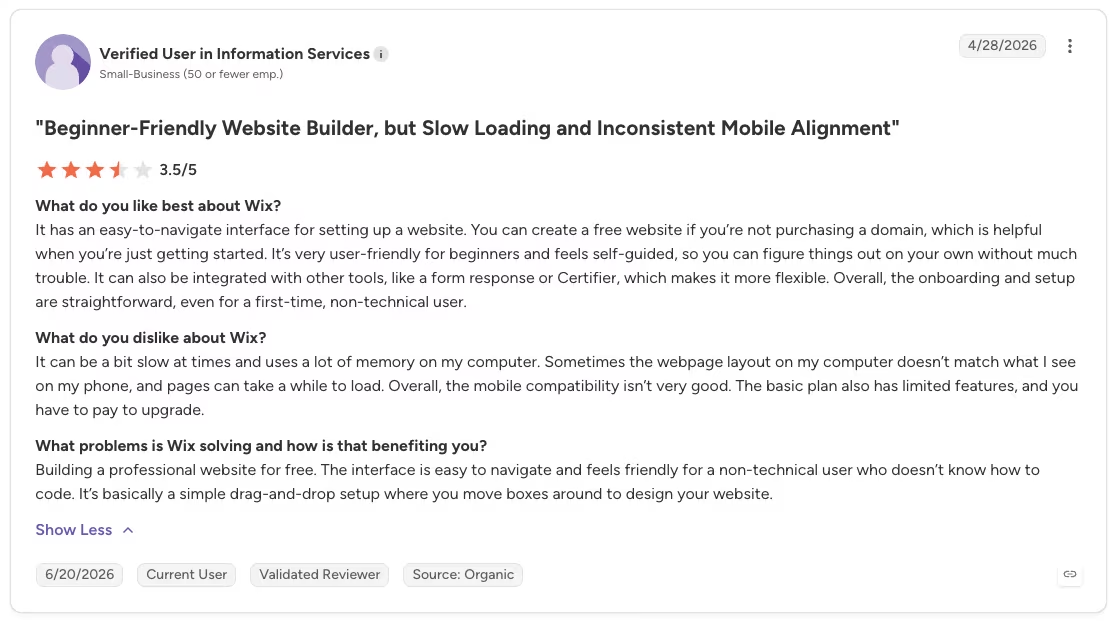
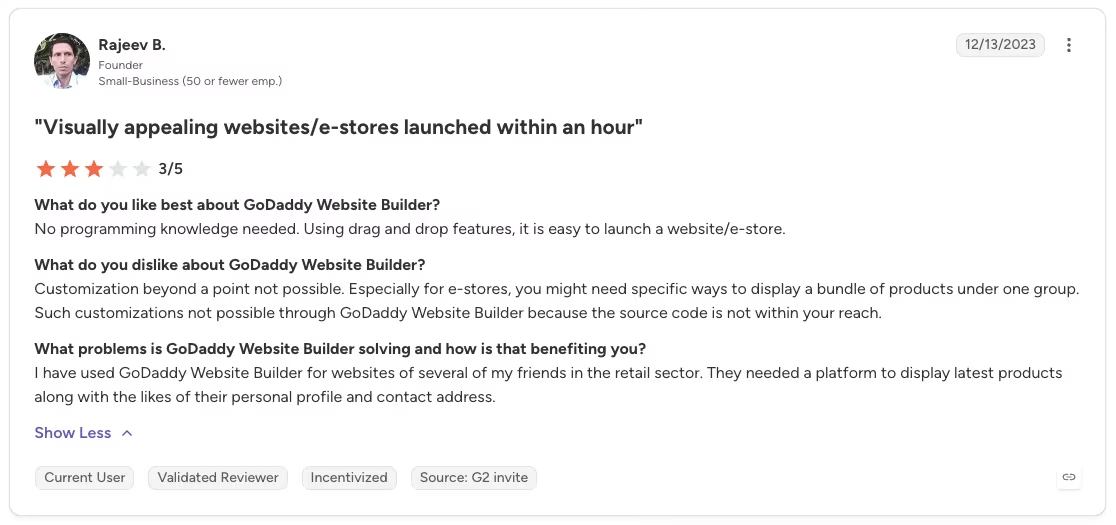
The reviews below are from G2, where GoDaddy Website Builder holds a 4.1/5 rating and Wix a 4.2/5.
Wix
“The ability of this platform to manage apps or pipeline is also worth mentioning. Other than this, I love the fact that this platform provides automation that makes work easier. The analytics provided by this platform allow users to prepare a good strategy with informed decisions.” - Konjengbam M., G2
“Overall, the mobile compatibility isn’t very good. The basic plan also has limited features, and you have to pay to upgrade.” - Anonymous, G2
GoDaddy
“I appreciate that GoDaddy Airo is flawless, problem-free, and affordable. It works with almost zero errors, which is impressive, especially compared to other AI-generated websites that struggle with SEO.” - Kubilay U., G2

“Customization beyond a point [is] not possible. Especially for e-stores, you might need specific ways to display a bundle of products under one group.” - Rajeev B., G2
How to Make Your Choice
Your choice comes down to how much control you need after the first build. Wix gives you design control and a shop with room for more product options per item. It also brings stronger built-in SEO and analytics, plus better value if the extra tools earn their place for you.
GoDaddy still earns its spot. If you already own a GoDaddy domain and want a site live fast, it's the cheaper pick. Don't expect the same configuration room once your products need more than three options each or your catalog fills up on store-wide choices.
If you've never built a website before, GoDaddy's fewer decisions make the first hour easier. Wix takes a little longer to learn, but it stays flexible once you want more than the template gave you.
Wix is Better For:
- Anyone whose products need more than a few options each, or a larger configured catalog
- Businesses that value design control and SEO depth
- Owners willing to spend a bit more time upfront for more room later
GoDaddy is Better For:
- Anyone who already owns a GoDaddy domain and wants one dashboard
- A basic site you need running fast
- A small shop with simple products and few options per item
My Verdict
After two weeks across both builders, Wix is my pick in the Wix vs GoDaddy debate. It's the clear winner once you look past the first afternoon.
GoDaddy's lower product-option caps and the fixed-section editor both pointed to the same conclusion. GoDaddy gets you set up fast, but it stops growing with you. Wix took longer to set up and had its own rough patch in the newer AI editor. The Wix build never felt cramped, though.
If speed and the lower price are all you need, GoDaddy is a fine, straightforward choice. For anything you plan to keep building on, Wix is the one I'd choose again.
Try Wix Free Before You Decide
Wix lets you build and preview a full site before upgrading. Run the AI setup with your own business brief, test how easily you can change the layout, and then decide whether the Core plan's store and booking tools justify the upgrade.
How Emergent Helps When a Website Outgrows a Page Builder
Wix and GoDaddy both handle a marketing site, a blog, a storefront, and a booking page well, all on their own templates and editors. Logic-driven internal tools are a different job, one built on custom workflows, data, and access controls.
Take that same pottery-studio brief and grow it past a marketing site. It might need a custom booking system tied to your own business rules, a customer database and dashboard, or an internal tool with logins and its own workflows. That combination sits beyond what either page builder is built to handle.
This is the gap I tested Emergent against, on a separate experimental build for a project that had outgrown a page builder entirely. Tell it what you're after: a working internal tool with its own logins and business rules, and that's the brief it runs with.
Here’s what Emergent gave me on the same brief:

A set of AI agents scopes the build, puts it together end-to-end, and checks it before handing back one finished, working tool. You skip the separate step of wiring the parts together yourself.
For a project that needs custom logic and a real database behind it, Emergent builds the internal tool complete with its own sign-ins and the operating rules the job needs.
If that's the build ahead of you, it's worth trying yourself. Lay out what you want built and see how far Emergent gets you on the first draft.

Most AI app builders stop at prototypes. Emergent creates production-ready apps you can actually launch.
- Production-ready apps
- Web & mobile apps
- Deploy in minutes







