



TL;DR
The first five are the tools I got hands-on with, although MindStudio was only a partial test. The remaining seven are researched options I couldn't test fairly. This order groups tested and researched tools. It isn't a best-to-worst ranking.
- Emergent: Best for turning your consulting process into client portals, diagnostics, dashboards, and other working software.
- ChatGPT Work: Best for going from research to a finished report, briefing, spreadsheet, or presentation.
- Zapier Agents: Best for lead qualification and workflows that move across business apps.
- Relevance AI: Best for sourced research agents with clear rules and tools.
- MindStudio: Best for turning a consulting framework into a client diagnostic.
- Lindy: Best for meeting prep, inbox work, scheduling, and follow-up.
- Suits.ai: Best for firms that want to package their own playbooks into client AI products.
- Gumloop: Best for building visual agent workflows.
- n8n: Best for technical consultants who want deeper workflow control.
- Microsoft Copilot Studio: Best for firms already centered on Microsoft 365.
- Glean Agents: Best for large firms that want agents grounded in company knowledge.
- Hebbia: Best for document-heavy research and diligence.
One of these tools gave me a client-ready consulting briefing in about five minutes. Another took around 20 minutes before I could run the workflow.
I tested five of these AI agents for consultants using the same fictional engagement for a 12-location coffee chain. The difference from broader AI tools for consultants shows up after the prompt. A tool helps you do the work. An agent can take a step, use connected tools or data, and hand back a result.
I tracked time, credits, output quality, friction, and how much work still landed back on me. Each tool got the job it was built for, so treat each timing as friction inside that job, not as a speed ranking.
The biggest lesson was simple: Choose the job first, then choose the agents.
What Is an AI Agent for Consultants?
An AI agent is software that works toward a goal, decides what steps to take, and can use tools or data while it works.
Boston Consulting Group describes the basic agent cycle as observe, plan, and act. An agent can take in information, work out a plan, then use connected systems to complete parts of that plan.
Agent use has already moved beyond small pilots. KPMG’s 2026 survey of 2,500 technology executives found that 88% of organizations are already embedding AI agents into workflows, products, and value streams.
That makes it different from a normal chatbot conversation.
A chatbot usually answers. An agent can continue the job.
You might ask a chatbot to draft a client follow-up. An agent could read the meeting notes, pull out action items, prepare the follow-up, update a tracker, and pause for your approval.
If your main need is question answering or customer conversations, an AI chatbot builder is the more focused category. If you want a system that can work through a task, an AI agent builder gives you room to define the goal, tools, knowledge, and actions.
Consulting use cases usually fall into five main groups:
- Research: An agent can search sources, read them, pull evidence, and create a pre-meeting brief.
- Lead qualification: It can score an inquiry, explain the score, prepare the record, and flag strong leads.
- Client delivery: Your framework can become an assessment, dashboard, portal, or guided client tool.
- Follow-up: An agent can organize meeting notes, owners, due dates, and next steps.
- Firm knowledge: It can search past proposals, documents, account notes, and approved internal sources.
A few of these jobs overlap with common chatbot use cases. The line becomes clearer once the system starts deciding on steps and acting across a workflow.
Also read our best AI agents for business guide to see how agents like these hold up on real work.
How I Tested Five AI Agents for Consultants
I used one fictional engagement across the hands-on tests.
Consulting firm: Cedar Bridge Consulting.
Client: Harbor & Pine Coffee, a fictional 12-location Texas coffee chain.
Known client facts:
- Labor costs are 18% of revenue.
- The internal target is 15%.
- Weekly management reporting takes six hours.
- Managers struggle to track action items.
I used the consulting framework Diagnose → Prioritize → Pilot → Measure.
The broader engagement was a four-week operational diagnostic with a 90-day improvement plan at the end.
I also gave the tools a rule I’d use in real client work. Missing information had to stay missing. I didn’t want an agent quietly inventing a budget, owner, deadline, or operational fact to make its answer look complete.
I got hands-on with Emergent, ChatGPT Work, Zapier Agents, Relevance AI, and MindStudio.
For the Emergent test, I used a Pro plan. The other tools were tested with the access available to me at the time, including free or trial access where possible.
MindStudio was a partial test. I got through the build and into the editor, then the included credits ran out before I could complete the final diagnostic run.
I left other general assistants out of the numbered list on purpose. Claude and Gemini can both handle consulting research and writing, but I kept this list focused on tools that also build something, act across apps, or hand back a finished work product.
A Reddit discussion on AI in consulting helped shape what I watched for. Consultants there described real gains in secondary research, writing, and coding. They also raised hallucinations, client trust, and the need to check AI output against firm-specific sources.
So I kept one question in front of me through every test: How much work do I still have to do myself?
AI Agents for Consultants Compared
Quick comparison:
| Tool | Hands-On Status | Best For | Free + Starter Pricing |
|---|---|---|---|
| Emergent | Tested | Client-facing software | Free $0. Standard$20/month($17/month billed annually) |
| ChatGPT Work | Tested | Finished deliverables | Free $0. Plus$20/month |
| Zapier Agents | Tested | Cross-app workflows | Free $0. Pro$50/month($33.33/month billed annually) |
| Relevance AI | Tested | Sourced research | Free $0. Pro$29/month($19/month billed annually) |
| MindStudio | Partial test | Client diagnostics | Free $0 + usage. Individual$20/month($16/month billed annually) |
| Lindy | Researched | Admin and follow-up | No free plan. Plus$29.99/user/month |
| Suits.ai | Researched | Productized consulting | Custom pricing |
| Gumloop | Researched | Visual workflows | No free plan. 14-day trial. Pro from$37/month |
| n8n | Researched | Technical workflows | Community Edition free. Starter$24/month($20/month billed annually) |
| Copilot Studio | Researched | Microsoft firms | Copilot Studio license$200 per 25,000-Copilot-Credit pack/month(billed annually) |
| Glean Agents | Researched | Company knowledge | Custom pricing |
| Hebbia | Researched | Diligence | Custom pricing |
1. Emergent: Best for Client-Facing Consulting Tools
Emergent is our own product, and it gave me the most client-facing result in this test. I’m putting it first so you know that up front. I tracked the same time, credits, friction, and drawbacks here that I did in the other hands-on tests.
I asked it to build a working engagement portal for Cedar Bridge Consulting and Harbor & Pine Coffee. I wanted the client to log in and see their engagement, rather than receive another static file.
The app had to show labor cost, reporting time, action items, progress, a five-question diagnostic, recommended priorities, and a 90-day plan.
I also wanted separate consultant and client views.
Emergent asked me how those roles should differ and what design direction I wanted. Its agents split the work from there. Some planned the structure, others built the screens and the data behind them, and testing agents checked the result before I saw the preview.
The prompt I used:
“Build a client-facing consulting engagement portal for Cedar Bridge Consulting and its fictional client, Harbor & Pine Coffee, a 12-location coffee chain.
The client has three problems: labor costs are 18% of revenue against a 15% target, weekly reporting takes six hours, and managers struggle to track action items.
Build a professional web app with a client intake form, a dashboard, a five-question operational diagnostic, three recommended priorities, a 90-day action plan, separate consultant and client views, and demo data already loaded so I can test the experience immediately.
Use the consulting framework Diagnose → Prioritize → Pilot → Measure.”
The first preview took around 15 minutes. I kept working from there, and the more complete preview with the client and consultant views, data, and working flows took around 30 minutes. The build used 15 credits on my Pro plan.
Once I opened the working preview and logged in, I could see the engagement metrics. The consultant dashboard showed 18% labor cost, the 15% target, six weekly reporting hours, open action items, a diagnostic score, progress, priorities, and milestones.
The separate client and consultant experiences also worked the way I’d asked.
This was the strongest client-facing result from my five tests. The working preview already looked like something I could develop into part of a consulting engagement, rather than keeping the work behind the scenes as an internal assistant.

If the blank prompt box slows you down, Emmy is built into Emergent as a chat assistant. It can ask follow-up questions and turn a rough idea into a build-ready prompt. Emmy is free to use and its chats cost no credits.
Where Emergent Fits
Client portals: Give clients one place to see metrics, priorities, milestones, and actions.
Diagnostics: Turn a repeatable assessment into an interactive client experience.
Dashboards: Package engagement data in a format clients can revisit between meetings.
Productized consulting: Turn a method you repeat across clients into software you can reuse with an AI agent builder for consultants.
Pros and Cons
Pros:
- My build became a working client tool.
- The consultant and client views were clearly separated.
- The visual result looked ready for a real consulting conversation.
- I could describe changes in plain language.
Cons:
- The full build took 30 minutes.
- Credit use grows as you add changes and test deeper flows.
- A client-facing app still needs a careful review before you hand it over.
What Users Say
Product Hunt shows Emergent at 4.6/5 from 14 reviews. Reviewers often praise the ability to get working apps quickly. One detailed critical review reported lost project code and support that did not recover it. That is a real risk on paid client work, so keep your own copy of anything you build for a client.
Pricing
Free costs $0/month with 10 monthly credits. Standard costs $20/month ($17/month billed annually) with 100 monthly credits.
Pro costs $200/month ($167/month billed annually) with 750 monthly credits. Business and Enterprise use custom pricing.
2. ChatGPT Work: Best for Research to Finished Deliverables
ChatGPT Work gave me the quickest usable result.
I asked it to act as the research analyst supporting a management consultant. It had to research current operating practices for multi-location retail or hospitality businesses, then turn that work into one consultant-ready briefing.
I also told it to keep sourced information separate from hypotheses.
The prompt I used:
“Act as the research analyst supporting a management consultant.
The fictional client is Harbor & Pine Coffee, a 12-location coffee chain.
Research current operational practices relevant to multi-location retail or hospitality businesses, especially labor scheduling, store-level reporting, reducing administrative workload, and improving operational visibility.
Then create one concise consultant-ready briefing that includes an executive summary, three operational areas worth investigating first, five discovery questions, a proposed 90-day improvement plan, a short source appendix with links, and a section called ‘Hypotheses, not confirmed facts.’
Complete the research and produce the finished briefing in one run.”
It finished in about five minutes and completed the job in one run. The result came as a downloadable document, which made the output much easier to use in a real client-prep workflow.
The briefing included three operational areas, five discovery questions, a 90-day plan, a source appendix, and a separate hypotheses section.
One detail stood out. It calculated that moving from an 18% labor-cost ratio to 15% means a 16.7% relative reduction. It then stopped short of inventing a dollar saving because revenue, wage, and staffing data were missing.
That was the right call.
The 90-day plan also gave me a sensible sequence through baseline work, pilot design, testing, refinement, and a scale decision.
ChatGPT Work was the easiest win in my testing. I got a usable consulting artifact fast, and I didn’t spend extra time fighting the interface.

Work is built for longer tasks that end in finished documents, spreadsheets, presentations, reports, and Sites. It can also use connected files and apps where your plan allows them.
If most of your consulting work lives in research, reports, meeting prep, and writing, the broader AI productivity tools category is also worth comparing.
Where ChatGPT Work Fits
Research briefs: Move from sources to a structured meeting document.
Client deliverables: Create reports, presentations, spreadsheets, and other finished files.
Planning: Turn a messy problem into discovery questions, workstreams, and a first action plan.
Long tasks: Give Work an outcome and let it continue across several steps.
Pros and Cons
Pros:
- My finished document arrived in about five minutes.
- It researched before writing.
- It kept client assumptions in a separate section.
- The structure needed very little cleanup.
Cons:
- I’d still check the evidence before presenting the document to a client.
- Work limits depend on your ChatGPT plan.
- A polished report can still contain a weak recommendation if the starting information is thin.
What Users Say
ChatGPT has a 4.6/5 G2 rating from more than 2,200 reviews. Reviewers praise its range of uses and speed. Critical reviews still flag confident factual errors. Check every fact in the output before it reaches a client.
Pricing
ChatGPT Work is available on desktop across all plans and on Plus, Pro, Business, Enterprise, and Edu on web and mobile. Plus costs $20/month.
Pro has $100/month and $200/month usage tiers. ChatGPT Business offers two seat types in the same workspace: Standard seats at $25/user/month ($20/user/month billed annually) and Premium seats at $125/user/month ($100/user/month billed annually). Enterprise uses custom pricing.
3. Zapier Agents: Best for Cross-App Consulting Workflows
Zapier Agents gave me a usable final result after a frustrating start.
I wanted a consulting lead qualification agent.
Each lead had a company, business problem, budget, and decision timeline. The agent had to score the lead from one to five, explain the score, prepare a tracker record, draft an internal alert, and create three discovery questions.
The prompt I used:
“Build an AI agent for a consulting firm that qualifies new client opportunities.
Each lead includes company name, business problem, budget, and decision timeline.
Score each lead from 1 to 5. A strong lead has a defined business problem, budget of at least $10,000, and a decision timeline within 90 days.
Record the score and rationale in a lead tracker. For scores of 4 or 5, prepare a short internal alert for review.
Require human approval before sending or posting anything externally.”
The sample Harbor & Pine lead had a $20,000 budget and a 60-day decision timeline.
My first problem was Google Sheets, which I couldn’t get connected. Then I found that the preview wouldn’t run until I added a trigger. The On Demand trigger finally gave me a free manual test route.
The whole session took about 20 minutes.
Once it ran, the result was easy to read. Zapier scored Harbor & Pine 5/5, showed the scoring logic, prepared the exact lead tracker entry, drafted an internal notification, and wrote three discovery questions.
It also stopped at a human approval point, as requested.
My account still showed 0/400 activities after the test.
The agent did slip in a few small assumptions. It described the 60-day decision timeline as if it were the engagement length in one discovery question. That’s the kind of wording I’d catch before it reaches a client.
Zapier Agents makes the most sense when the AI decision needs to move into another app. That could be a lead score going into a tracker, a support issue going to a team, or a client request creating follow-up work.

Pros and Cons
Pros:
- The qualification logic worked well.
- The agent paused for human approval.
- On Demand gave me a free way to test manually.
- The output clearly showed what would be written to the tracker.
Cons:
- Google Sheets caused the biggest delay in my test.
- Finding the right trigger took time.
- The final prose included a small assumption about the 60-day timeline.
What Users Say
Zapier Agents has no dedicated G2 reviews yet. The wider Zapier product has a 4.5/5 rating from more than 2,000 reviews. Reviewers praise its app connections and automation. Price growth and troubleshooting on larger workflows appear often in critical feedback.
Pricing
Agents Free costs $0 and includes 400 activities per month. Agents Pro costs $50/month ($33.33/month billed annually) with 1,500 activities. Agents Enterprise uses custom pricing and custom activity allowances.
Also read our Zapier alternatives guide for what else is worth trying.
4. Relevance AI: Best for Sourced Consulting Research
Relevance AI was the research-agent test I wanted most.
I asked it to build a pre-meeting research agent that could search the web, read sources, separate facts from hypotheses, and prepare a short consulting brief.
I liked that the final agent had two named tools attached to it: Current Web Search and Read Web Sources.
The prompt I used:
“Create a pre-meeting research agent for a management consultant.
Input a company or industry and a consulting question.
Return five current factual findings with source URLs, three potential business issues labeled clearly as hypotheses, three discovery questions, a 100-word executive meeting brief, and a section called ‘What we still don’t know.’
Run research tools before making factual claims. Never present a hypothesis as a fact. If evidence is weak, say so. Prefer primary or authoritative sources.”
I tested it on U.S. multi-location specialty coffee chains and asked where the main operational opportunities might sit in labor scheduling and weekly management reporting.
It took about 20 minutes and used 73 Vendor credits.
The test returned all five factual findings with source links, and the three possible operational issues stayed clearly labeled as hypotheses instead of being presented as facts. It also returned the requested discovery questions, investigation priorities, 150-word executive brief, and a “What we still don’t know” section.
That made the output much easier to review before using it in client work because I could see what was sourced, what was still a hypothesis, and where the research still had gaps.
My frustration came before that point. I had several approval screens to work through before seeing the first real result, which felt slow when I already knew what I wanted.
Once I reached the agent, I liked the control. The research rules were visible. The tools were visible. The response format was visible.
That makes Relevance AI my research pick when the process needs to be repeatable. You can turn “research this company” into a defined method your team can reuse.

Pros and Cons
Pros:
- Research tools are explicit.
- Facts, hypotheses, and unknowns can be separated by rule.
- The agent can be reused across client questions.
- The finished configuration was easy to inspect.
Cons:
- Getting to the first useful result took longer than I wanted.
- Credit use adds another cost to monitor.
- A sourced answer still needs a human check before it becomes client advice.
What Users Say
Relevance AI holds a 4.3/5 G2 rating from more than 20 reviews. Reviewers often praise the interface and speed of creating agents. Cost and some missing integrations show up in critical feedback.
Pricing
Free costs $0/month and includes 200 Actions per month. Pro costs $29/month ($19/month billed annually) and includes 2,500 monthly Actions on monthly billing.
Team costs $349/month ($234/month billed annually). Enterprise pricing is custom.
5. MindStudio: Best for Consulting Diagnostics
MindStudio got close to the client-facing diagnostic I wanted.
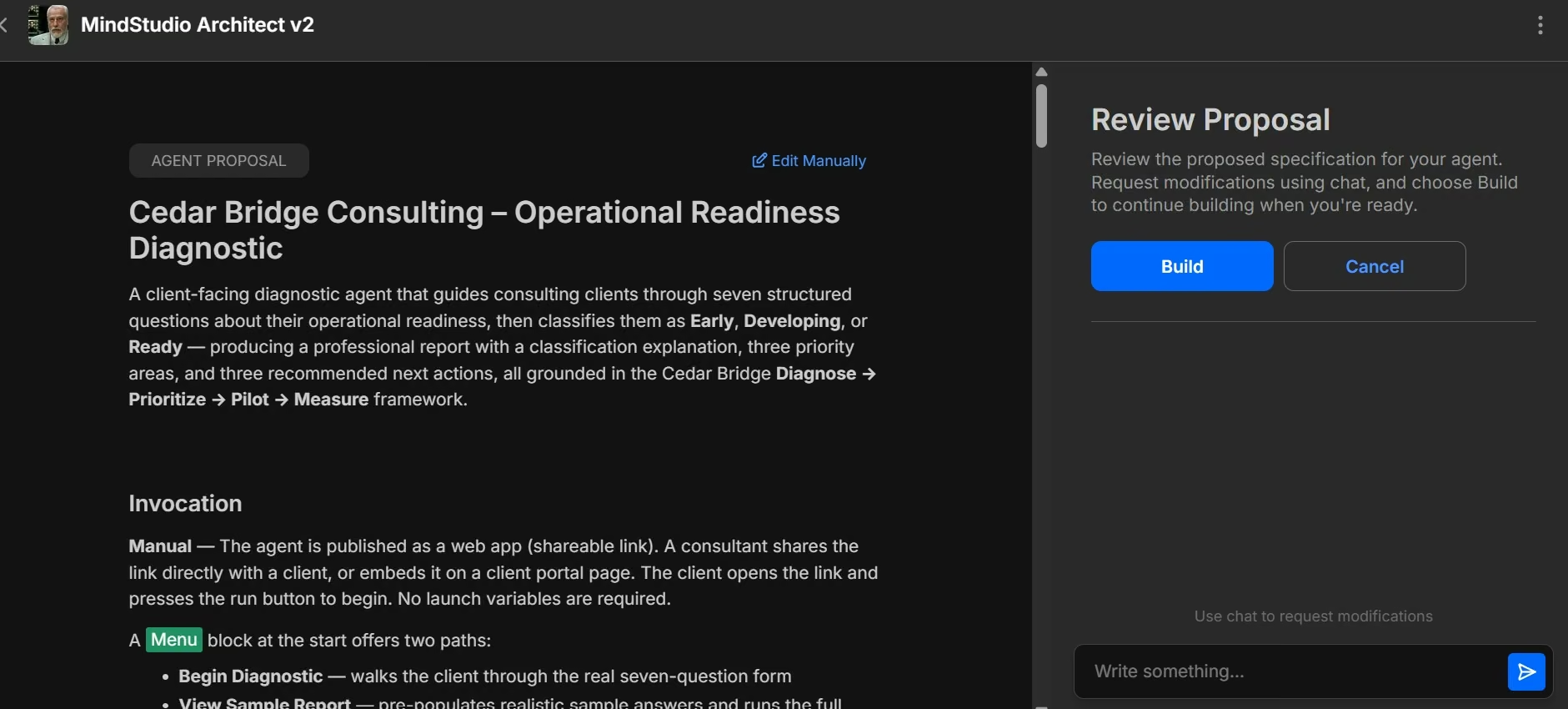
I used MindStudio Architect to describe a Cedar Bridge Consulting Operational Readiness Diagnostic.
The agent had to ask seven questions, classify the client as Early, Developing, or Ready, then produce priorities and next actions.
The prompt I used:
“Build a client-facing Operational Readiness Diagnostic agent for Cedar Bridge Consulting.
Ask exactly seven questions covering reporting workload, labor visibility, scheduling, KPI ownership, process documentation, decision-making, and change readiness.
Based only on the client’s answers, classify the client as Early, Developing, or Ready.
Then produce a short explanation, three priority areas, and three recommended next actions.
Use Diagnose → Prioritize → Pilot → Measure. Do not invent information the client has not provided.”
The first working screen appeared in around 10 minutes.
MindStudio Architect mapped all seven requested question areas, kept the three outcome labels (Early, Developing, and Ready), and carried Diagnose → Prioritize → Pilot → Measure into the workflow. It also planned a client-facing web app. I couldn’t verify the final scoring or recommendations because my included usage ended before the preview ran.
The navigation slowed me down at the start. I spent a few minutes figuring out where I was supposed to describe the agent.
Once I found Architect, the build itself moved quickly. Then I hit the limit. I hit the free plan’s included usage limit before I could complete the final preview, so my hands-on evidence stops at the built workflow and editor.
MindStudio still makes sense for consulting diagnostics. Its visual workflow gives you a practical way to package a questionnaire, assessment, or repeatable advisory method.
Pros and Cons
Pros:
- Architect turned my plain-language brief into an agent structure quickly.
- The visual workflow was easy to inspect once I reached it.
- It understood the consulting framework correctly.
- The client-facing web app route fits assessments and diagnostics.
Cons:
- Finding the right place to start took a few minutes.
- My included credits ended before the final diagnostic run.
- I’d budget usage before promising a client-facing diagnostic to a paying client.
What Users Say
MindStudio holds a 4.9/5 G2 rating from more than 25 reviews. Reviewers praise its visual builder and easy learning curve. The current review sample is still much smaller than products such as Zapier or n8n.
Pricing
Free costs $0/month + usage and includes one agent plus 1,000 runs per month. Individual costs $20/month ($16/month billed annually) + usage.
Business uses custom pricing.
6. Lindy: Best for Meetings, Inbox, and Follow-Up
Lindy is built around the admin that surrounds client work.
I’d look at it for meeting prep, scheduling, inbox work, call notes, follow-up, and recurring routines. Those tasks rarely look important on their own, yet they can eat a surprising part of a consulting week.
I tried to get a clean hands-on run going and hit an access dead end, so this section comes from my product research and current user feedback.
Lindy can work in Slack, manage meeting workflows, draft replies, prepare follow-ups, connect up to five inboxes, and use thousands of integrations. External actions wait for approval.
That approval rule is important for consulting.
You can let the agent prepare an email or update and keep the final send with you. That gives you speed without handing away client communication.
Lindy also describes different credit ranges by workload. Everyday asks can use 2 to 250 credits. Deeper research can use 250 to 1,000. Larger artifact-building jobs can use 1,000 to 2,500.
I’d shortlist Lindy when coordination is the problem. It works on the calendar, inbox, and follow-up that surround an engagement.
Pros and Cons
Pros:
- Strong mix of email, meetings, scheduling, and follow-up.
- External actions can wait for approval.
- Slack gives teams another way to work with the assistant.
- Credit usage is described by workload size.
Cons:
- Direct sign-ups are billed right away. New teammates who join an existing Lindy workspace through Slack get a seven-day free trial before the seat is billed.
- Heavy research can consume credits quickly.
- I couldn’t get enough access for a fair hands-on test.
What Users Say
Lindy holds a 4.9/5 G2 rating from more than 170 reviews. Reviewers praise the quick workflow building and time savings. Critical feedback often points to credit limits and price as teams expand usage.
Pricing
Plus costs $29.99/user/month with 3,000 credits per user each month.
Pro costs $99.99/user/month with 15,000 credits. Max costs $199.99/user/month with 35,000 credits. Enterprise uses custom pricing.
7. Suits.ai: Best for Productizing a Consulting Playbook
Suits.ai is built specifically around professional services.
Its strongest use case is a consulting firm that already has a repeatable method and wants to turn parts of that method into agents, workflows, or branded client apps.
Suits.ai gathers research from more than 100 data sources. It can also turn a firm’s own methods into repeatable workflows.
That gives it a clear place in this list.
Think about a consulting firm that runs the same marketing diagnostic for every new client. The research sources change. The client answers change. The framework stays mostly the same.
Suits.ai gives that firm a way to package the process.
It also supports branded client AI apps. Those can turn a one-off advisory process into something clients keep using between engagements.
I’d look at Suits.ai once your method is documented and repeatable. The product becomes more useful when the firm already knows which steps should repeat.
Pros and Cons
Pros:
- Built around agencies and consulting firms.
- Supports firm methods and client context.
- Branded client apps create a route to recurring services.
- Security controls include SOC 2 Type 2 certification and SSO support.
Cons:
- Pricing isn’t public.
- Independent review volume is limited.
- A firm with an undefined process has more work to do before automation pays off.
What Users Say
Suits.ai features a customer quote from Hirsch Leatherwood VP Julia Chapell, who says its AI handles more of the heavy work so the team can spend time on strategy and client relationships. That example comes from Suits.ai’s own site, so I’d treat it as a customer story rather than independent review evidence.
Pricing
Suits.ai doesn’t publish self-serve pricing. Request a demo for a quote.
8. Gumloop: Best for Visual Agent Workflows
Gumloop looked promising as a sixth hands-on test.
I reached the checkout screen and stopped when the 14-day Pro trial asked for payment details.
That still told me something about the buying path.
The current product centers on visual workflows and agents. Its listed use cases include competitor analysis, lead qualification, meeting prep, customer relationship management, and data analysis.
Those are good consulting jobs.
A research workflow could collect sources, summarize them, sort findings, and send a briefing into another tool. A lead agent could enrich an inquiry, score it, and route it.
The visual approach also helps when you want to see the steps clearly.
I’d shortlist Gumloop when you prefer a visual map of the work. It sits in a useful middle ground for teams that want agent workflows without starting from a blank technical canvas.
Pros and Cons
Pros:
- Strong list of agent use cases for consulting work.
- Visual workflows make multi-step jobs easier to follow.
- Pro includes unlimited agents and 20,000 monthly credits.
- Company Brain gives agents shared business context.
Cons:
- My trial route required payment details.
- Pro adds an 8% orchestration fee.
- Larger visual workflows still need clear rules and testing.
What Users Say
Gumloop holds a 4.8/5 G2 rating from more than five reviews. Reviewers praise the visual interface and support. The review sample is still small.
Pricing
Pro starts at $37/month with 20,000 monthly credits and an 8% orchestration fee.
Enterprise uses custom pricing.
9. n8n: Best for Technical Consulting Workflows
n8n gives you deeper control over how a workflow runs.
I tried to get a clean free test going and didn’t reach a complete final run in the time I had. The current pricing page does offer no-card cloud trials for Starter and Pro, plus a self-hosted Community Edition.
The product is aimed at technical teams, and you feel that in the range of controls.
You can build visual workflows, add code where needed, connect data, and control how steps branch or repeat.
Its pricing model is also easy to understand once you learn the unit. n8n charges cloud plans by full workflow execution. One complete run counts as one execution even when the flow contains many steps.
For a consulting firm, that could suit recurring reports, research pipelines, account monitoring, data processing, or internal workflows that need custom logic.
I’d give n8n to the technical person on the team. A solo consultant who wants a quick assistant will get there faster with ChatGPT Work or Lindy.
Pros and Cons
Pros:
- Deep control over workflow logic.
- Free self-hosted Community Edition.
- Cloud plans include AI credits.
- Full workflow runs are the pricing unit.
Cons:
- The learning curve is steeper.
- Self-hosting creates extra work for your team.
- A non-technical consultant can spend too much time inside the workflow itself.
What Users Say
n8n holds a 4.7/5 G2 rating from more than 270 reviews. Reviewers praise flexibility, the visual builder, and self-hosting. A steep learning curve appears often in critical feedback.
Pricing
Community Edition is free to self-host. Starter costs $24/month ($20/month billed annually) for 2,500 workflow executions and 2,300 AI credits per month. Pro costs $60/month ($50/month billed annually). Business costs $800/month ($667/month billed annually). Enterprise uses custom pricing.
Also read our n8n alternatives guide for what else is worth trying when the learning curve or self-hosting work doesn't fit.
10. Microsoft Copilot Studio: Best for Microsoft-First Firms
Microsoft Copilot Studio belongs here for firms already living inside Microsoft 365.
My quick test hit account and tenant requirements before I got far enough to judge the finished agent.
That experience will feel different inside a larger firm with Microsoft administrators already managing the environment.
Copilot Studio lets licensed Microsoft 365 Copilot users build internal agents within Microsoft 365. The standalone product adds external publishing and wider agent access.
For consulting, that could mean an internal knowledge agent, an engagement assistant, a policy helper, or a process agent tied to the firm’s Microsoft data.
The main buying reason is existing Microsoft use. If Teams, SharePoint, Outlook, and Microsoft 365 already hold most of your firm’s work, Copilot Studio can sit close to that information.
Pros and Cons
Pros:
- Strong fit for Microsoft-centered firms.
- Internal agents can work from Microsoft 365 context.
- Standalone Copilot Studio supports external channels.
- Human and admin controls suit larger organizations.
Cons:
- Account and tenant rules slowed my test.
- Licensing takes some reading.
- Advanced agent work can pull in technical staff.
What Users Say
Microsoft Copilot Studio holds a 4.4/5 G2 rating from more than 145 reviews. Reviewers praise Microsoft 365 integration and basic agent creation. Advanced customization, cost, and complex workflows appear in critical feedback.
Pricing
Standalone Copilot Studio costs $200 per 25,000-Copilot-Credit pack each month.
Pay-as-you-go billing is also available.
11. Glean Agents: Best for Firm Knowledge
Glean Agents is built for a larger knowledge problem.
A consulting firm can have years of proposals, project notes, research, documents, emails, tickets, and client history spread across many tools. Glean connects that information while keeping the original source permissions in place.
Glean supports 275+ app connectors for enterprise search and agent workflows. Permissions from the original source carry into Glean, so people only see information they already have access to.
Its Agent Builder can start from plain-language instructions. You can connect the agent to live company knowledge, refine the flow, and deploy it with versioning and rollback controls.
That fits large consultancies with years of institutional knowledge.
You could build a proposal research agent that finds similar engagements, an account brief agent that pulls client context, or an internal expert finder.
Glean is the enterprise knowledge pick in this list. Solo consultants won’t get the same value because they have less scattered internal knowledge to connect.
Pros and Cons
Pros:
- 275+ connectors.
- Source permissions stay in place.
- Agents can work from live company context.
- Human approval controls are available for actions.
Cons:
- Geared toward larger organizations.
- Pricing isn’t public.
- Rolling it out across company knowledge is a bigger project than creating one personal agent.
What Users Say
Glean holds a 4.7/5 G2 rating from more than 150 reviews. Reviewers often praise one-place search across many internal tools. Some note that search results can still surface irrelevant information.
Pricing
Glean doesn’t publish self-serve pricing. Request a demo for a quote.
12. Hebbia: Best for Document-Heavy Diligence
Hebbia is the specialist in this group.
Its Matrix product is aimed heavily at financial, legal, and corporate research. Hebbia also names consultants among the professional groups using the platform.
The core use case is large document analysis.
Hebbia uses 200 earnings calls as one example of the scale Matrix is designed to analyze in one research workflow.
Think due diligence, deal work, financial research, legal documents, company comparisons, or an engagement with hundreds of source files.
Matrix lets you apply the same questions across many documents and see the extracted answers in a structured grid.
That is important when the source pack itself is the work.
I’d choose Hebbia for document-heavy advisory work. A general management consultant with lighter research needs will get more from a broader tool like ChatGPT Work or Relevance AI.
Pros and Cons
Pros:
- Built around large document sets.
- Structured Matrix views suit repeated analysis.
- Strong fit for finance and diligence.
- Source-backed analysis helps with review.
Cons:
- Narrower fit for general consulting.
- Public pricing isn’t available.
- File organization and uploads appear in some user complaints.
What Users Say
Hebbia holds a 4.4/5 average across more than 45 G2 reviews in its seller profile. Reviewers value document analysis and faster access to information. File management and upload friction appear in critical feedback.
Pricing
Hebbia uses custom pricing for Matrix and directs buyers to book a demo.
Where AI Agents Still Fall Short for Consultants
AI agents can remove a surprising amount of repetitive work. They also create new work when the process around them is weak.
Vague workflows create vague agents: An agent needs clear rules. If your team qualifies every lead differently or runs every diagnostic from scratch, document the process before you automate it.
Consultant Chris Wray makes the same point in his breakdown of agentic AI. Document the workflow first because an agent can’t intelligently improve a process you haven’t defined.
Source checking is still your job: Relevance AI gave me good controls for this. ChatGPT Work also separated hypotheses clearly. I’d still review factual claims before a client sees them.
Connections can eat your time: Zapier’s scoring took minutes. Getting to the run took around 20 minutes because I had to work through the Sheets connection and trigger.
Usage units can be confusing: Emergent uses credits. Relevance AI uses Actions and Vendor Credits. Zapier Agents uses activities. n8n uses workflow executions and AI credits. MindStudio has plan limits plus model usage.
Client data needs rules: Decide what the agent can access, which people can see the output, and which actions require approval before you add sensitive engagement data.
Human judgment stays central: An agent can research a market, draft a plan, score a lead, or build a client tool. You still own the recommendation you put in front of the client.
How to Choose an AI Agent for Your Consulting Work
Start with one workflow you repeat.
MindStudio gives the same advice in its guide for freelancers and consultants. Start with one repeatable process, map it, automate one part, measure the result, then refine it. It recommends choosing a repeatable process, mapping it, automating one part, measuring the result, and refining from there.
Here’s how I’d narrow the list.
- Choose Emergent: You want your consulting method to become a client portal, dashboard, assessment, calculator, or other working app.
- Choose ChatGPT Work: Research needs to end in a clean document, spreadsheet, report, or presentation.
- Choose Lindy: Meetings, email, scheduling, and follow-up consume too much of your week.
- Choose Zapier Agents: The agent needs to act across several business apps after making a decision.
- Choose Relevance AI: You want a reusable research agent with strict source and output rules.
- Choose MindStudio: Your method works well as a questionnaire, diagnostic, or guided client flow.
- Choose Suits.ai: Your firm has a repeatable playbook and wants to package it for clients.
- Choose Gumloop: You want to build and inspect agent workflows visually.
- Choose n8n: Your team has technical skills and wants deeper workflow control.
- Choose Microsoft Copilot Studio: Microsoft 365 already holds most of your firm’s work.
- Choose Glean Agents: Your firm has a large internal knowledge base spread across many tools.
- Choose Hebbia: Your engagements revolve around large document packs and diligence.
The larger AI tools for consultants category is useful when you want a specialist research, presentation, writing, or meeting tool without building a full agent workflow.
Read More: Best AI Agent Builders Tested and Compared
Final Recommendation
The right AI agent for a consultant depends on what you want to stop doing by hand.
Emergent was my strongest choice for client-facing delivery. It turned one consulting brief into a working portal preview with separate client and consultant views, metrics, priorities, milestones, and a diagnostic.
ChatGPT Work was the quickest path to a finished deliverable. I had a clean briefing in about five minutes.
Relevance AI was my pick for reusable sourced research. Its research and source-reading tools made the method easy to inspect.
Zapier Agents worked well for decision-and-action workflows. The product became useful once I reached the On Demand trigger.
MindStudio showed a good route for diagnostics. My credits ended before I could complete the final run.
For the tools I researched, Lindy fits consulting admin, Suits.ai fits firms packaging their methods, n8n fits technical workflows, Glean Agents fits large knowledge-heavy firms, and Hebbia fits diligence.
The best first move is small. Pick one repeated task, run a real client-like example through the agent, and count the work left on your desk when it finishes.

Most AI app builders stop at prototypes. Emergent creates production-ready apps you can actually launch.
- Production-ready apps
- Web & mobile apps
- Deploy in minutes







