
TL;DR
- TL;DR
- AI lead qualification combines four automated jobs (instant data enrichment, real-time scoring, omnichannel engagement, and automated routing) that evaluate and route a new lead within seconds.
- How well any of this works depends on the state of your CRM data before you turn it on. Clean data first, or you're automating garbage at scale.
- It's a filter and a router. Somebody still has to have the conversation that turns a qualified lead into a customer.
A lead hasn't opened, clicked, or replied to a single email in three years. An AI scoring model marks that same contact "high priority" and drops it at the top of a rep's queue. That puts it ahead of someone who filled out a form an hour ago.
Sales and RevOps teams run into this the moment they turn AI lead qualification on. I spent about a week building and testing a small lead-scoring dashboard on Emergent to see this exact mechanic up close.
The same failure turns up wherever AI scoring gets bolted onto messy data. Duplicate contacts get enriched twice, and hot leads route to a rep who left the company eight months earlier. Without current activity data, a scoring model can mistake a stale contact for a real prospect.
You'll see the four things AI does inside a lead-qualification pipeline. The best practices below come straight from what breaks in the real world. I'll also show what it looks like to build and own the scoring logic yourself, with every rule fully visible.
What Is AI Lead Qualification?
AI lead qualification is artificial intelligence weighing whether a new lead is worth a salesperson's time, then routing it accordingly. It automates qualification work a rep might otherwise do by hand.
A "qualified" lead usually means three things line up. The company fits your ideal customer profile, and there's a signal of intent: They did something more than land on a page. The timing also suggests they're ready to buy. Long before AI touched any of this, sales teams already had frameworks for scoring all three.
BANT (budget, authority, need, timing) and MEDDIC (metrics, economic buyer, decision process, decision criteria, identify pain, champion) are the two you'll hear most. AI applies these same frameworks automatically, running them faster and across far more leads than a human manually checking each one.
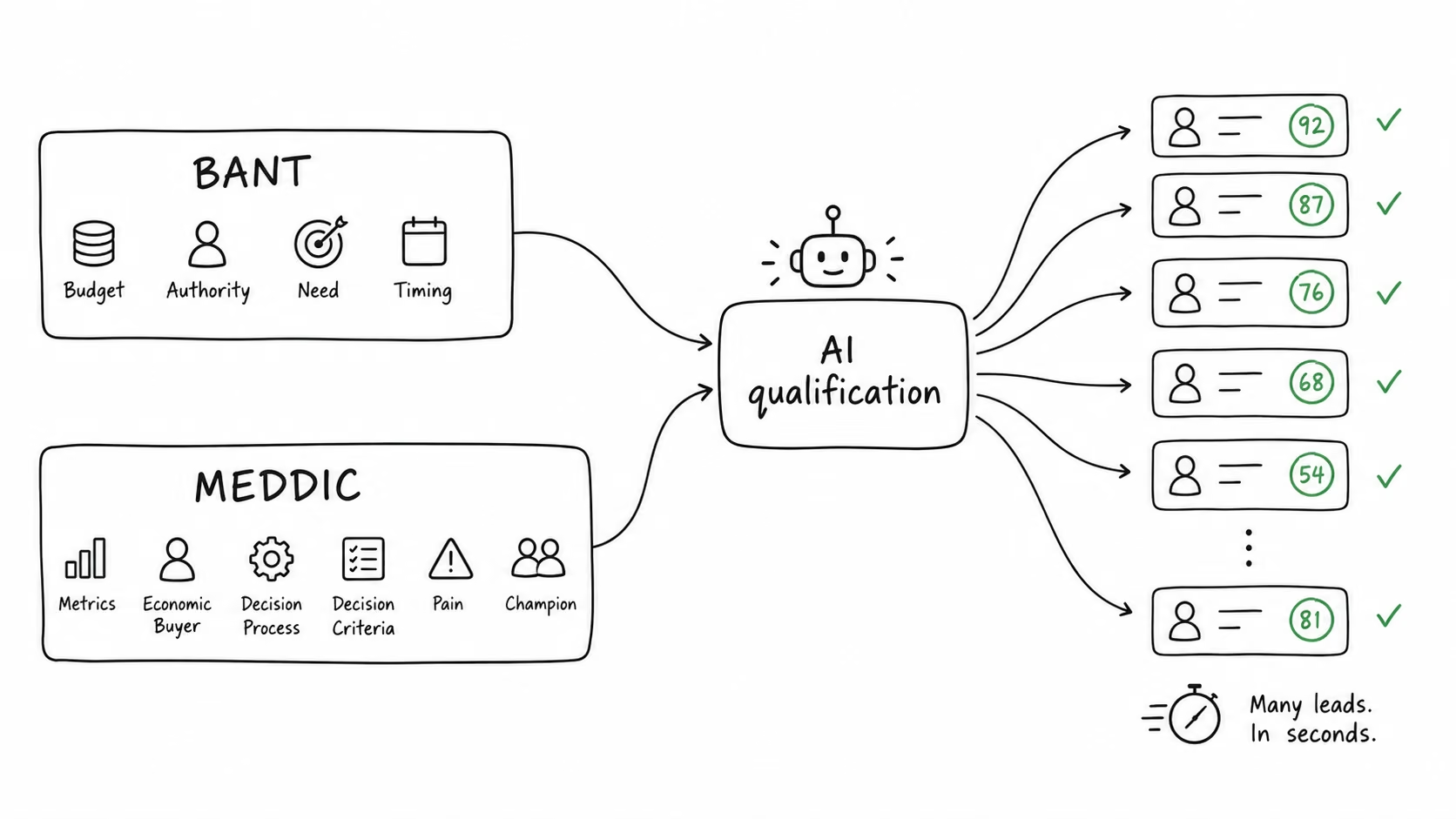
Real AI lead scoring adapts. It weighs firmographic fit and behavior together and learns which combinations predicted a closed deal in your own pipeline. The score keeps updating as new information comes in, never freezing the moment someone signs up. To check your own tool, watch whether the score moves after signup. A score that never changes points to a rules engine behind the AI label.
How AI Lead Qualification Works: Four Ways AI Does the Job
AI lead qualification breaks into four distinct jobs once you set the marketing language aside. Some platforms handle all four. A team's real channel mix and budget usually decide which two or three get stitched together.
Method 1: Instant Data Enrichment
A lead submits a form or picks up a call. The moment that happens, an enrichment engine pulls details that fill in the blanks a short form never asked for:
- Company size
- Industry
- Revenue band
- Tech stack
Clay is a good example of how this works under the hood. It runs what it calls a waterfall enrichment, checking a lead against dozens of data sources in a marketplace of 150-plus vendors until it finds a match. A nearly empty form field gets populated automatically within seconds.
Its own published case study with OpenAI's GTM team puts real numbers on what that waterfall approach delivered.
The switch from a single-provider process to Clay's multi-source model took inbound lead enrichment coverage from the low 40% range to the high 80% range, more than doubling it, and the team logged over 8,500 enrichment runs in total.
Enrichment builds on whatever is already in your CRM (customer relationship management system). A cleanup pass alone, no new tool required, changes how well enrichment works.
Feed a clean list of unique, current contacts into an enrichment engine, and it spends its credits on records worth having. Feed it a list full of duplicates and dead company records, and it burns credits confirming things you already knew were wrong.
The intake step still has to work first, or none of the above has anything to enrich. An enrichment engine can only work with what your lead generation website or form captures. If that first field never asks for a work email or a company name, the enrichment engine has less to work from later.
An Emergent case study on a lead-qualifying quote widget shows another intake pattern: qualify intent from project details first, then ask for contact information.
Method 2: Real-Time Predictive Scoring
A predictive scoring model weighs signals in combination. A mid-size company with a buying title and three visits to the pricing page ranks differently than either signal alone, and differently from what fixed points-per-action scoring (five for an email open, 10 for a demo request) would give it.
When I built my own scoring test, the lesson showed up almost immediately.
I fed the dashboard a batch of test contacts that included one who hadn't opened an email in three years, the scenario from the opening. It scored high because the model only had firmographic data to work with (the right company size, the right budget range). It had no signal telling it that silence is data too.
A scoring model is only as good as what you feed it. Forgetting to weight recency is how a dead contact ends up at the top of a live queue.
My own build split the score into three clean, visible bands. A single opaque number would have hidden the same picture:
- 70 or above: Priority queue
- 40 to 69: Nurture
- Under 40: Archived automatically, with a note explaining why
The card view made the miss easy to trace after the fact. Each contact's detail page listed the inputs behind the number, from company size and budget range to the manual behavioral flag I'd added by hand.
On the three-year-silent contact, both firmographic inputs still read as strong matches, while the behavioral field sat empty, leaving nothing in the record to flag the dead air. The scoring calculation had no field at all for how long it had been since the last real touch, so nothing in the math docked points for three years of silence.
To fix it, I asked Emergent to rework the scoring formula and add a recency penalty the first version never had. That's the part a vendor-built model hides from you: watching which input drove a bad score.
Method 3: Omnichannel Engagement
A rep working through a queue might not call back for hours. Once a lead is scored, an AI voice or chat agent can reach out within seconds across phone, text, WhatsApp, or email instead.
If you're deciding between the two, this AI agent vs chatbot comparison explains when you need an agent that can take action and when a chatbot is enough. Either way, an AI agent builder lets you set the qualifying questions and the transfer rules yourself instead of accepting a vendor's script.
Bland AI is built specifically around this job. A voice agent fires the moment a lead comes in through a webhook and asks a defined set of qualifying questions.
It scores the answers against a rubric in real time, then warm-transfers the ones that clear the bar. Its case study with the insurance company Kin Insurance reports an 18.7% lift in qualified transfer rate over human agents. Bland's lead qualification page puts the same result at a 70.5% transfer rate across the 7,802 leads it qualified. The case study's own numbers table shows a rival AI vendor hit that same 70.5% rate.
Bland picks up within seconds, while a rep might take hours to call back and find the lead's interest has cooled.

Scale Beyond One Case Study
Bland publishes at least six customer stories alongside Kin Insurance, including MyPlanAdvocate, whose agent converts at a 200% higher rate than the human agents who used to run the same qualification calls. Those agents moved to selling rather than leaving. Bland also states its platform handles more than 1M calls a day across its full customer base, a scale figure that tells a different story than one company's conversion lift.
A voice agent that sounds sharp on a handful of calls can still fall apart at that volume if the qualifying questions start to read as scripted or the warm-transfer logic breaks under load. Bland's rubric-based scoring exists to keep every call consistent, asking the same defined set of questions the same way on the 10,000th call as on the first.
For a team fielding a high volume of inbound leads, a queue alone can't deliver that consistency.
For a chat-first version of the same workflow, see our comparison of no-code chatbot builders, which includes tools that can capture details, ask qualification questions, and route high-intent leads.
Method 4: Automated Routing and Disqualification
The last job draws the least attention, and it's the easiest one to leave broken without noticing. It means sending a scored lead to the right place, and gracefully closing the door on the ones that don't qualify.
A team can build an accurate scoring model and still lose deals. A rule sending "hot leads in the Northeast" to a specific rep gets written while that rep still works there. Eight months after they leave, hot leads are still routing to an inbox nobody checks.
Building in an Audit Trail
My own test build logs an audit trail for that reason. Every time a lead's score or queue changes, it gets a timestamp and a reason. If a routing rule goes stale, you can see it in the log. That beats finding out from a lead who never got a call back.
The routing logic in that build stayed tied to the same score bands the dashboard already used, so a lead crossing from 69 to 70 flipped queues the moment the score recalculated, with nothing else to update by hand. The log entry captured the old queue and the new one next to the timestamp, so a card moving for the wrong reason left a trail behind it.
Without that trail, a routing failure looks like a card sitting in the wrong queue with nothing on screen to explain how it got there. I watched that log across a handful of test submissions. The failure mode was easy to catch early because the log showed why the card moved.
Which Method Should You Choose?
You don't need all four jobs running at once, and trying to stand them all up at the same time is how a rollout stalls.
If you're running low-volume, high-touch B2B sales (a handful of enterprise deals a quarter), enrichment and scoring carry most of the value. You've got time for the actual conversation once a lead clears the bar. A voice agent adds less value there than clean data and an accurate score do.
You might be fielding hundreds of inbound leads a day, more than reps can get to fast enough. In that case, omnichannel engagement and automated routing carry more of the weight. Speed to first contact becomes more important at that volume.
If you're running qualification for more than one client or business unit at once, the calculus changes again. An agency handling qualification for several clients needs tooling that can keep each client's rubric and routing rules separate.
That's a different setup than what one in-house team needs. If that's your situation, look at the wider stack of AI tools for agencies alongside the qualification layer itself.
Popular AI Lead Qualification Tools to Know
HubSpot, Clay, and Bland AI each cover a different piece of the job described above.
If the CRM layer is still undecided, these CRM system examples compare how major platforms handle day-to-day sales workflows.
HubSpot
HubSpot builds AI-assisted lead scoring straight into its CRM and Marketing Hub. It runs through HubSpot's Agent Hub, which holds a lineup of agents including prospecting, customer, data, campaign and nurture, reachable from Breeze Assistant wherever your team works.
A team whose qualification work already lives inside a HubSpot CRM gets the most out of this path. Lead scoring needs Marketing Hub or Sales Hub Professional at minimum. HubSpot's entry paid tier doesn't include it, and building a score with AI specifically is gated to Marketing Hub Enterprise.

On the Marketing Hub side, Starter runs $10/month per seat ($7/month, billed annually), though HubSpot flags this as a new-customer, limited-time promotion against a $20/seat list price. Professional runs $890/month ($800/month, billed annually) for three core seats plus a required $3,000 one-time onboarding fee, and Enterprise runs $3,600/month for five core seats plus a required $7,000 onboarding fee.
Sales Hub's Professional and Enterprise tiers are priced per seat rather than in Marketing Hub's bundled-seat model: Professional starts at $100/month per seat and Enterprise at $150/month per seat, with separate onboarding fees of $1,500 and $3,500.
Clay
Clay, the enrichment specialist from Method 1 above, goes beyond waterfall enrichment. It runs AI agents it calls Claygents, which research and qualify accounts against your criteria. Claygents then hand-clean, qualified data to whatever outbound or CRM tool you already run. Clay exists to fix bad records before they ever reach your scoring logic.
Clay's enrichment runs on metered Data Credits and Actions. A lookup that returns no result costs neither, and bringing your own API key skips Data Credits entirely. A successful lookup that only reconfirms a record you already had probably still draws down both meters, though Clay's own documentation only confirms the no-result case.

Pricing starts at $185/month for the Launch plan ($167/month billed annually, with 180,000 actions and 30,000 data credits a year), and $495/month for Growth ($446/month billed annually, with 480,000 actions and 72,000 data credits a year). Clay also offers a free tier and custom Enterprise pricing. Reach for it when thin or missing lead data is the bottleneck.
Bland AI
Bland AI, covered above under omnichannel engagement, is the voice-first option. An agent calls, qualifies, and routes a lead entirely on its own, before a rep ever picks up the phone.
Reaching the lead first is central to Bland's pitch here, and Bland publishes named-customer conversion numbers to back it up. Those figures come from Bland, so treat them as vendor-reported rather than independently verified.
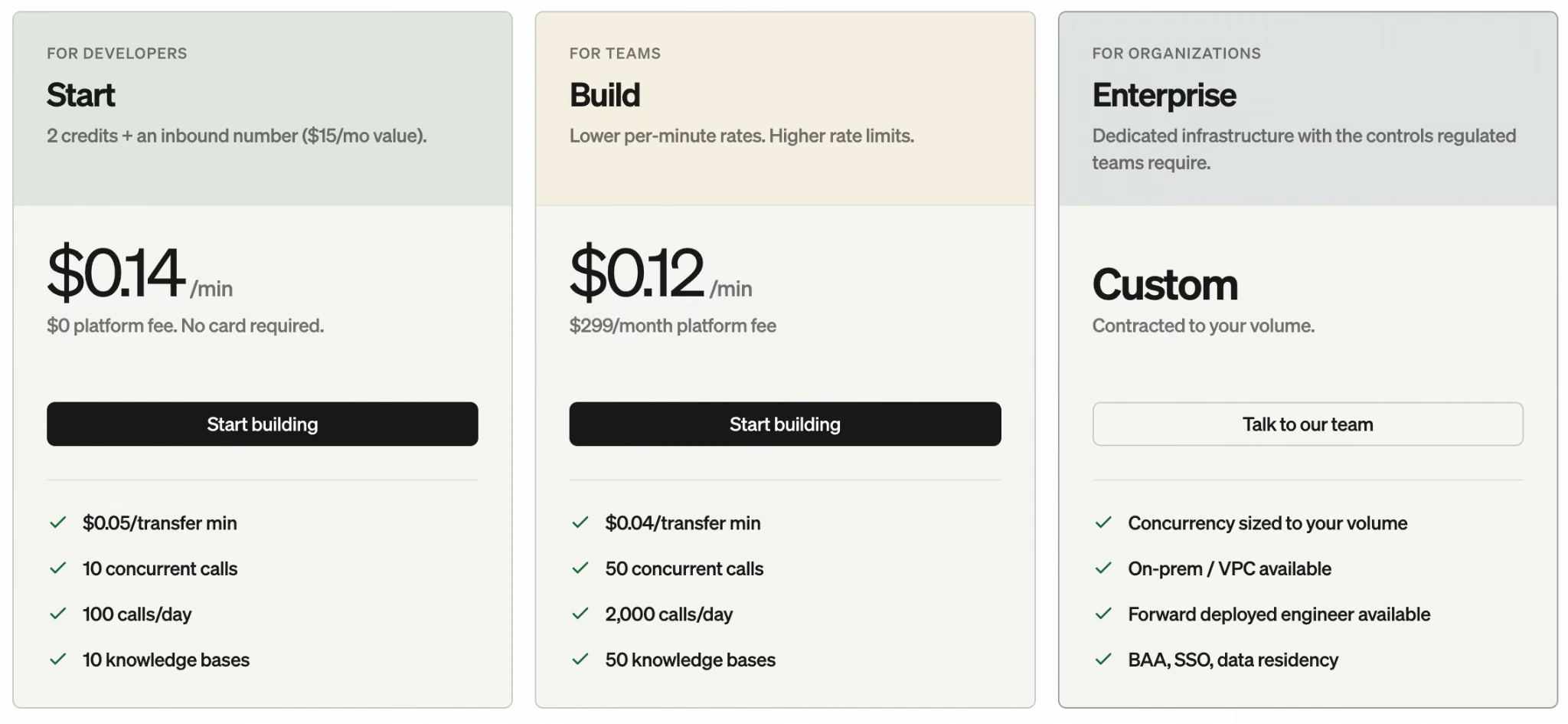
Its entry Start plan bills $0.14/min for talk time and caps out at 100 calls a day and 10 concurrent calls. More volume means Build's $299/month platform fee plus $0.12/min for talk time, or a custom Enterprise plan for anything beyond that. It fits best when inbound call volume alone is outrunning what any rep could keep up with.
The right pick depends on which of the four jobs above is slowing you down.
Best Practices for AI Lead Qualification
Five practices that head off the failures above:
- Audit your CRM first: Check for duplicates and orphaned records before you turn anything on. Duplicate contacts or company records with zero linked contacts mean the CRM needs cleanup before automation. Enrichment, scoring, and routing can repeat the same mess on top of it. Fix this first, since every downstream step depends on it.
- Review routing rules on a schedule: A rule written for a 12-person team doesn't automatically update itself when the team grows to 40 or a rep leaves. Put a date on the calendar (quarterly is reasonable) to check who a "hot lead" rule is pointing at.
- Define "qualified" once, across teams: Marketing and sales need to agree on one definition and write it down. The same disconnect that breaks a shared sales dashboard breaks lead qualification. Marketing might count a form fill as qualified while sales only counts a demo request. Any scoring model built on top of that disagreement ends up measuring two different things at once.
- Reserve human review for edge cases: Set the thresholds so the large majority (obviously hot, obviously not) routes automatically and the ambiguous minority goes to a person for a second look. That catches the kind of misfire an automated score can't see coming.
- Build compliance into qualification itself: Automated calls and texts fall under the TCPA in the US, and stored lead data falls under the GDPR or CCPA depending on where your leads live and whether your business falls in scope. Build consent and opt-out handling into the workflow before a lead ever gets routed.
Common Mistakes to Avoid
Five mistakes to check your own setup against:
- Enriching duplicate contacts as if they were separate leads, which doubles your enrichment spend and inflates your lead count with the same person counted twice.
- Scoring personal email domains as business leads because nobody excluded gmail.com and yahoo.com addresses from the "Business" contact type.
- Letting lifecycle stages rot, so contacts sit in "Lead" for over a year and a model reading stage instead of last activity treats them as live pipeline.
- Routing on score alone, with no owner on the rule, so nobody notices when a queue stops being worked.
- Skipping a real recency signal in the scoring model, so firmographic fit alone decides who reaches a rep first.
How Emergent Helps You Build and Own Your Lead-Qualification Logic

The tools above hand you enrichment, scoring, and routing as settings you configure inside their platform. I wanted to build that logic from scratch and see what it takes to own it. The dashboard behind the sections above was a working internal app I built on Emergent called Lead Triage. It ran on test contacts and never went out to a sales team.
The brief I gave it was specific on purpose, since a vague prompt gives it less to work with. One piece of it, quoted directly: "If the same contact submits the form again, update their existing record and re-score it instead of creating a second entry." That single line was a deliberate trap, built straight from the duplicate-contact problem described earlier.
The first version came together in about nine minutes and 13 credits, with:
- An intake form that also captured how the lead arrived (organic search, referral, paid ad, or event), feeding a 0-to-100 scoring calculation off company size and budget range.
- A manual field for one behavioral signal, set to add a fixed amount to the score. Logging "visited the pricing page twice" on one test contact pushed it from the nurture band into priority.
- Three queues (priority, nurture, and archived) sitting side by side on a dashboard, with the score itself visible on each card.
- A card-level breakdown showing why each contact scored the way it did, which is more useful than the number itself.
It failed the trap on the first pass. I submitted the same contact twice, and the second submission created a duplicate entry, leaving the original untouched, exactly the duplicate-record problem this whole build was designed to test for.
A short follow-up prompt fixed it in three more credits and about two minutes, after which the second submission started updating the existing record and re-scoring it, with no new clone created.
It's a clean way to watch the scoring-and-routing mechanics from the inside, with a working database and a dashboard, built from a plain-language brief. The same approach can be used to build your own CRM with AI around a broader sales workflow. A one-person test like this can't speak to Bland's call volume or Clay's data marketplace.
Its value is narrower: owning the logic yourself. It also means catching a broken rule (like a duplicate bug or a routing rule pointing at nobody) before it costs you a deal. If you'd rather not build the logic yourself, Emergent's lead qualification chatbot handles the same scoring and routing out of the box.
Emergent Pricing
On pricing, Emergent offers:

- Free plan: $0/month for 10 credits, enough to get a feel for the builder. Lead Triage's initial build plus the duplicate-contact follow-up fix ran 16 credits total, more than the Free plan allows in a month (the separate scoring-formula rework described earlier isn't included in that figure).
- Standard plan: $20/month ($17/month, billed annually) for 100 credits a month.
- Pro plan: $200/month ($167/month, billed annually) for 750 credits a month.
- Business and Enterprise: Custom pricing for heavier workloads.
Emergent's AI CRM Builder covers day-to-day pipeline tracking, and an AI sales dashboard reports on the results afterward.
As with Lead Triage, describe the logic in plain language, and Emergent generates a working app you can open and test. Emergent also offers an MCP connector that lets you start and manage builds like this one directly from Claude or ChatGPT.
Most AI app builders stop at prototypes. Emergent creates production-ready apps you can actually launch.
- Production-ready apps
- Web & mobile apps
- Deploy in minutes
Most AI app builders stop at prototypes. Emergent creates production-ready apps you can actually launch.
- Production-ready apps
- Web & mobile apps
- Deploy in minutes