



An event plan can change before you finish the email explaining the last change. One late keynote speaker can touch your agenda, audio-visual crew, room turnover, lunch, attendee updates, and the next six sessions.
I tested six AI tools for event planners on one fictional 250-person summit in Austin. I asked each one to do a job I could hand off during a real event: build an operations app, repair a delayed schedule, create campaign artwork, organize event data, make an event page, or research venues. Emergent is our own product, so it goes first for that reason. I still tracked its build time, credits, output, and problems the same way I tracked the other hands-on tests.
I also researched six more tools for jobs the hands-on group didn't cover. By the end, you'll know where each one fits, what I'd check myself, and which tools gave me extra work after the AI finished.
Where AI Helps Event Planners
AI earns its place in event planning when the job has a clear input and output. Draft this email. Clean this guest list. Compare these venues. Move this session. Turn these notes into tasks.
I read an r/EventProduction discussion before starting my tests. The strongest real-world examples centered on content, registration cleanup, attendee communication, research, summaries, and repetitive admin. One planner described AI as a “handful of interns” for research and first drafts.
The same discussion carried a useful warning. One planner recalled venue research returning bad capacity and square-footage figures. Another spent around 30 to 45 minutes trying to get AI to highlight six agenda sessions correctly and still needed to repair the result.
That gave me one question for every test.
My testing question: How much useful work could the tool take off my plate before I had to step back in?
That framing works across other day-to-day work too.
Also read our best AI productivity tools guide for the general tools worth adding alongside these.
The Core Difference Between These AI Event Tools
These 12 products sit in a few different groups. Knowing the group makes choosing much easier.
General AI assistants: ChatGPT helps you draft and reason through a task. Perplexity leans toward web research with sources.
Creative AI: Canva turns a brief into visual options you can edit.
Work and automation tools: Airtable, ClickUp, Otter.ai, and Zapier help you structure information, track work, capture calls, or pass data between apps.
Dedicated event platforms: eventpage.ai, Cvent, Jotform AI Agents, and Whova start with event jobs such as registration, ticketing, guest communication, check-in, or networking.
Custom app building: Emergent lets you describe the event software you want and build that workflow around your own process. Its AI app builder covers the wider job, while the event management app builder focuses on event workflows such as tickets, vendors, timelines, and guest registration.
You probably need tools from one or two of those groups. Buying one from every group creates another stack to manage.
How I Researched and Tested These AI Tools for Event Planning
I kept one fictional event at the center of the six hands-on tests.
The event: Future of Work Summit 2026 was a one-day conference in Austin on October 22, 2026. The brief had 250 attendees, a $75,000 working budget, eight speakers, 12 sponsors or vendors, one keynote, six breakout sessions, and an evening networking reception.
Each tool got the job it was built to handle. Emergent built the operations app. ChatGPT handled the plan and a late speaker. Canva made the campaign graphic. Airtable structured event records. eventpage.ai built the public event page. Perplexity researched real venues.
I kept the event facts fixed across those tests. That gave me a common baseline while still letting each product do useful work.
I tracked five things:
- Time to useful output: How long did it take before I had something worth reviewing?
- Accuracy: Did dates, times, capacities, names, and fixed constraints survive the process?
- Cleanup: How much work was left for me?
- Usefulness: Did the output help me finish a real planning job or make a decision?
- Human review: Which details would I still check before sending, booking, publishing, or relying on the result?
The six research-based tools later in the guide cover other jobs. I checked their current official product and pricing information and kept those sections shorter.
12 AI Tools for Event Planners: Quick Comparison
Quick comparison:
Pricing note: eventpage.ai charges in euros. At the September 8, 2026 exchange rate, €59/month is about $69/month and €53/month billed annually is about $62/month.
6 AI Tools I Tested Hands-On
1. Emergent for Custom Event Operations
I gave Emergent the biggest job in the test: build the event operations system itself.
I wanted to see how far one event brief could get me using our own product before I started steering the build myself.
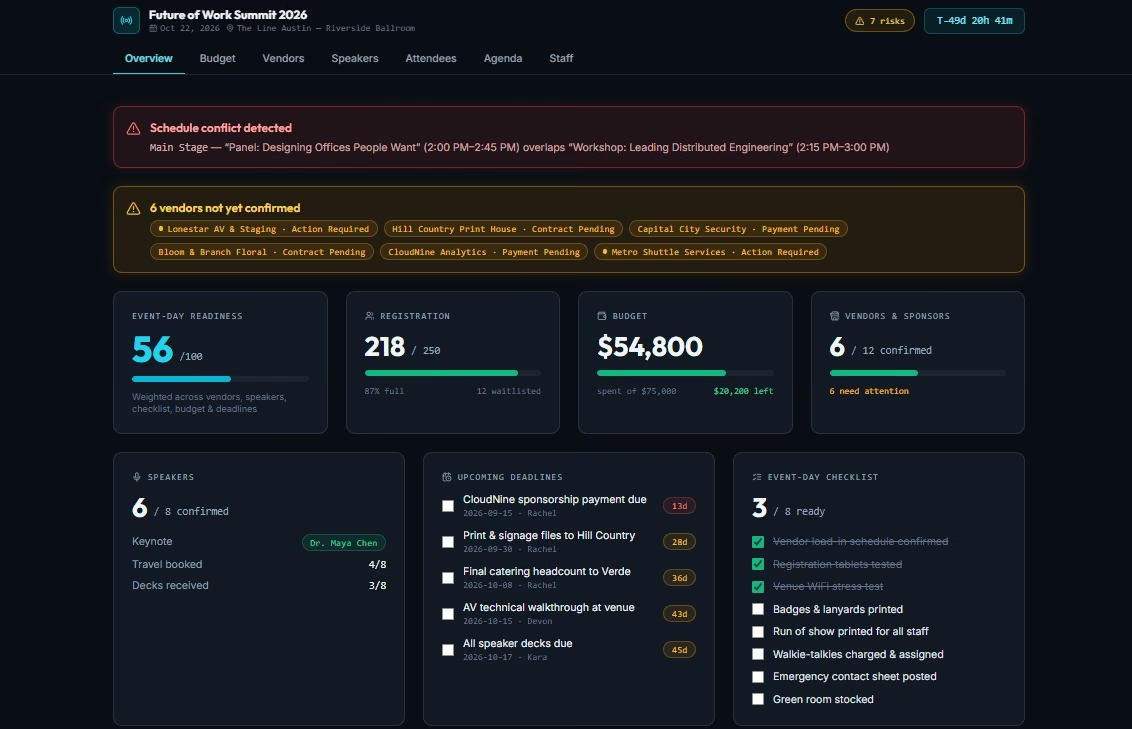
I asked for an operations app for Future of Work Summit 2026. The home screen needed registration progress, budget status, vendor confirmations, speakers, deadlines, and event-day readiness. I also asked for separate Budget, Vendors, Speakers, Attendees, Agenda, and Staff areas.
Prompt I used:
Build an event operations web app for an event planner managing Future of Work Summit 2026 in Austin on October 22, 2026.
The event has 250 attendees, a $75,000 working budget, 8 speakers, 12 sponsors/vendors, 1 keynote, 6 breakout sessions, registration at 8:30 a.m., programming from 9:30 a.m. to 5:00 p.m., and a networking reception from 5:15 to 6:30 p.m.
Create a main dashboard showing registration progress, budget spent versus remaining, vendor confirmation status, speaker status, upcoming deadlines, and event-day readiness.
Add separate sections for Budget, Vendors, Speakers, Attendees, Agenda/Run of Show, and Staff. Let me add and edit records. Flag vendors that are still unconfirmed close to event day and highlight schedule conflicts. Preload realistic sample data so I can test the app immediately.
Keep the dashboard useful for an event planner, not a developer. Prioritize the information I would need to make decisions quickly.
Emergent's agents asked four questions before building. I chose a single-user open dashboard, full data persistence, a planner-friendly design, and a printable run-of-show.
My first preview took 18 minutes and 10 credits.
The screen gave me enough information to start making decisions. It showed 218 of 250 registrations, $54,800 of the $75,000 budget spent, six of 12 vendors confirmed, six of eight speakers confirmed, and a 56/100 readiness score.
It also found a schedule conflict. Another alert called out six vendors that still needed attention. That was the first point where the build felt specific to event operations. The conflict flag and vendor alert were both things I would otherwise have had to build myself in a spreadsheet.
If you're starting with a rougher idea than I had, Emergent now has a built-in chat assistant called Emmy. Emmy can ask follow-up questions and turn a rough description into a build-ready prompt. It is free, uses no credits, and is web-only right now.
There's also a useful real event-business example here. Jean-Christophe Arnaud runs Malorian, a five-person event agency in France. Arnaud says he had looked at “between 10 and 40” project management, CRM, and accounting products before deciding to build his own system.
He used Emergent to create an operations platform for a one-time €1,000 cost. The system now handles projects, quotes, invoices, contacts, staff, and financial tracking. That cut the company's annual software spend by 50%. The full event-agency case study walks through what he built.
If you want to recreate the workflow from my test, the event management dashboard guide goes deeper on metrics, roles, alerts, prompts, and testing.
Pros:
- Custom workflow: You decide what belongs on the dashboard and how the event records should work.
- Useful first-pass warnings: My first preview caught a schedule clash and brought vendor issues to the top.
- Real editable app: This test went beyond generating a document or one static dashboard image.
Cons:
- More build time: 18 minutes was far longer than the text and research tools in my tests.
- Test it before it holds real data: I would click through record edits, printing, alerts, and data persistence before this app touched a paid ticket, a real attendee list, or anything with compliance requirements.
- The Free plan covered one build: My test used all 10 monthly credits. Another build of similar size in the same month would move me past the free allowance.
Pricing
Free is $0/month with 10 monthly credits. Standard is $20/month ($17/month billed annually) with 100 monthly credits. Pro is $200/month ($167/month billed annually) with 750 monthly credits. Business and Enterprise use custom pricing. Business adds role-based access control, single sign-on, shared team workspaces, and real-time co-editing.
My 10-credit test used the Free plan's full monthly allowance. Another build of similar size in the same month would push me beyond the free credit limit.
My take: Pick Emergent when the software itself has become the problem. It fits event agencies and operations teams that keep rebuilding the same tracker because the off-the-shelf options don't match the way they work.
2. ChatGPT for Run-of-Show Changes and Event Writing
ChatGPT gave me the most useful text output for the least effort.
I gave it four normal event-planning jobs at once. It had to make a planning checklist, a run-of-show, a short audio-visual (AV) vendor request for proposal (RFP), and a speaker confirmation email.
Then I broke the schedule.
The keynote speaker would arrive 20 minutes late. Lunch had to stay at 12:30 p.m. The networking reception had to stay at 5:15 p.m.
Prompt I used:
I'm planning a fictional event called Future of Work Summit 2026.
- Location: Austin, Texas
- Date: October 22, 2026
- Expected attendance: 250 people
- Working budget: $75,000
- Speakers: 8
- Sponsors/vendors: 12
- Program: 1 keynote and 6 breakout sessions
- Registration opens: 8:30 a.m.
- Programming runs: 9:30 a.m. to 5:00 p.m.
- Networking reception: 5:15 to 6:30 p.m.
- Venue requirements: theater capacity for at least 300 people, AV support, sponsor space, accessible entry, vegan and gluten-free catering options, and a separate networking area
Using only the information above, create a practical planning checklist, a run-of-show, a short AV vendor RFP, and a speaker confirmation email of approximately 120 words.
Then simulate this last-minute problem.
The keynote speaker will arrive 20 minutes late. Lunch must remain at 12:30 p.m., and the networking reception must still begin at 5:15 p.m.
Revise the run-of-show so the delay is handled without silently creating scheduling conflicts.
- What changed
- Assumptions I made
- Needs human confirmation
Do not invent venue names, addresses, prices, vendor details, or speaker names.
The full answer arrived in about 3 minutes.
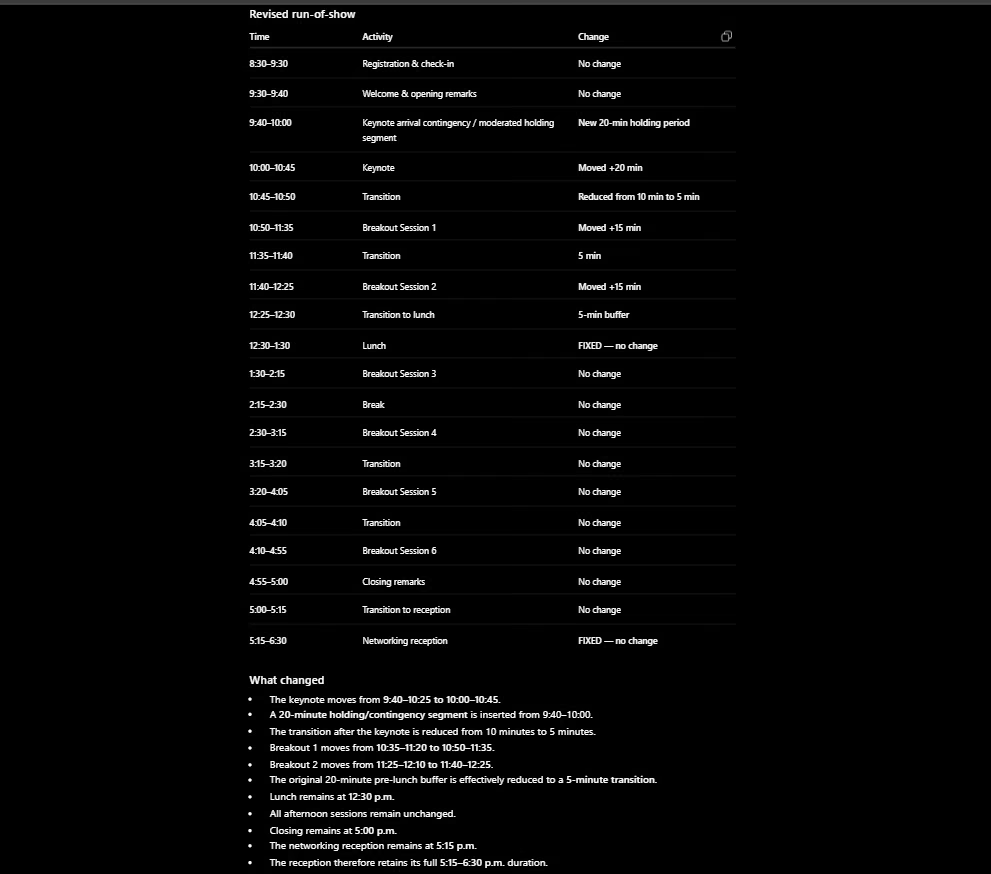
ChatGPT put a 20-minute holding segment before the keynote. It moved the keynote to 10:00 to 10:45, cut the next transition to 5 minutes, and moved the first two breakout sessions.
Both fixed times survived. Lunch remained at 12:30 p.m. The reception remained at 5:15 p.m. I found zero obvious schedule clashes in the revised version.
It also told me where it had filled in missing information. It assumed 45-minute breakout sessions and assumed the keynote speaker could start at 10:00. Both would need a real planner's sign-off.
That assumption list was one of the strongest parts of the response. It gave me a checklist for reviewing the AI's work instead of forcing me to hunt through the whole agenda for hidden guesses.
The first time I tried this test, I referenced an “event brief above” that wasn't present in that ChatGPT conversation. It asked me for the missing brief instead of filling the gaps itself. I restarted with the full event information and used the three-minute run for my timing.
For a planner, I see ChatGPT as a workbench for drafts and changes. You can keep the event context in one conversation, then move between speaker emails, vendor briefs, schedule fixes, attendee copy, checklists, and debrief notes.
If you're trying to keep the first version of your stack inexpensive, these free AI tools give you more options to test before adding another subscription.
Pros:
- Strong schedule repair: It handled the 20-minute delay without breaking the two fixed times.
- Clear assumptions: It told me which session lengths and timing details came from its own working plan.
- Broad event writing: One conversation can cover plans, RFPs, emails, agendas, and follow-up copy.
Cons:
- Context has to be supplied: A missing event brief stopped my first attempt.
- Operational facts still need you: Walking time, catering service, speaker arrival, room resets, and vendor commitments depend on the real event.
Pricing
Free is $0/month. Go is $8/month in the US, and Plus is $20/month. Pro has $100/month and $200/month usage tiers, with no annual option for Go, Plus, or Pro.
Business Standard seats are $25/user/month ($20/user/month billed annually), while Premium seats are $125/user/month ($100/user/month billed annually). Enterprise pricing is custom.
My take: ChatGPT is the easiest tool on this list to put to work today. Give it the full event context and treat the output as a working planning draft.
3. Canva for Event Creative
Two minutes after I pasted the brief, Canva handed me four visual directions.
The task was a LinkedIn announcement for Future of Work Summit 2026. I asked for navy and cream, one warm accent, an editorial feel, clear date and location, and plenty of open space.
I also wanted to avoid the visual shortcuts that make AI event art easy to spot.
Prompt I used:
Create a polished LinkedIn event announcement for Future of Work Summit 2026.
Location: Austin, Texas
Date: October 22, 2026
Audience: Operations leaders, marketers, consultants, and business owners.
Style: Premium, modern, confident, editorial. Avoid cliché robot imagery, glowing AI brains, neon sci-fi visuals, or generic corporate stock photography.
Use a clean hierarchy with the event name as the main focal point, followed by Austin, Texas and October 22, 2026. Use navy and cream with one warm accent color. Leave enough negative space that the design doesn't feel crowded.
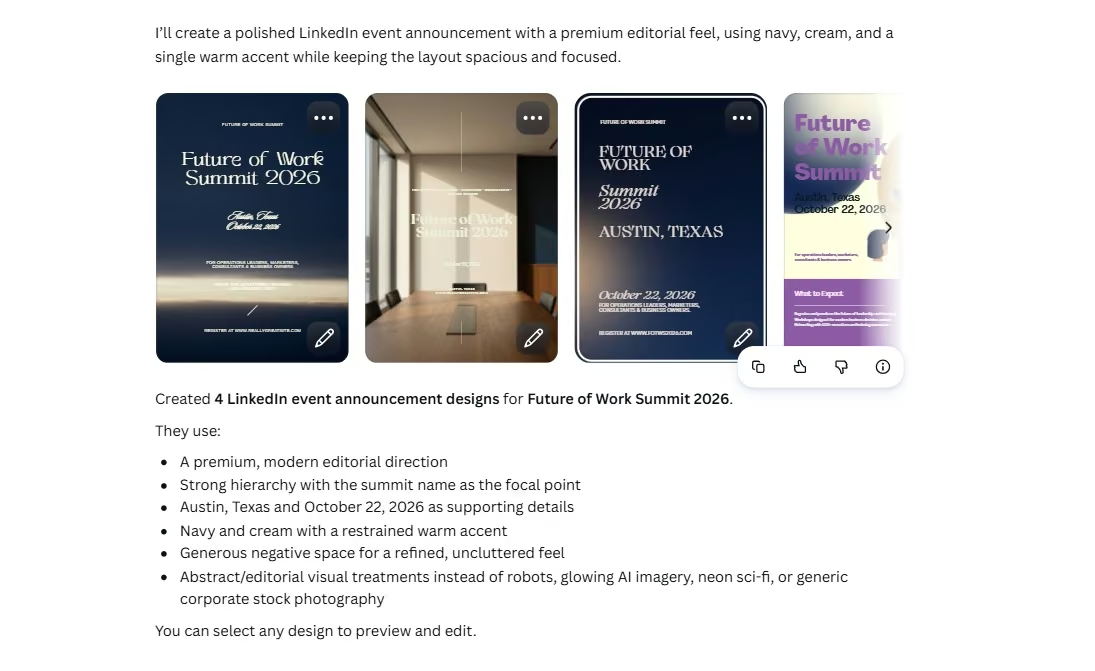
Canva returned four options.
The third one was my clear pick. I could read the event name, city, and date almost immediately. It also stayed closest to the navy and cream direction from the brief.
The second design put white copy over a photo, which hurt readability. The fourth leaned purple and felt much busier. The first had a decent overall look, though its smaller copy needed work.
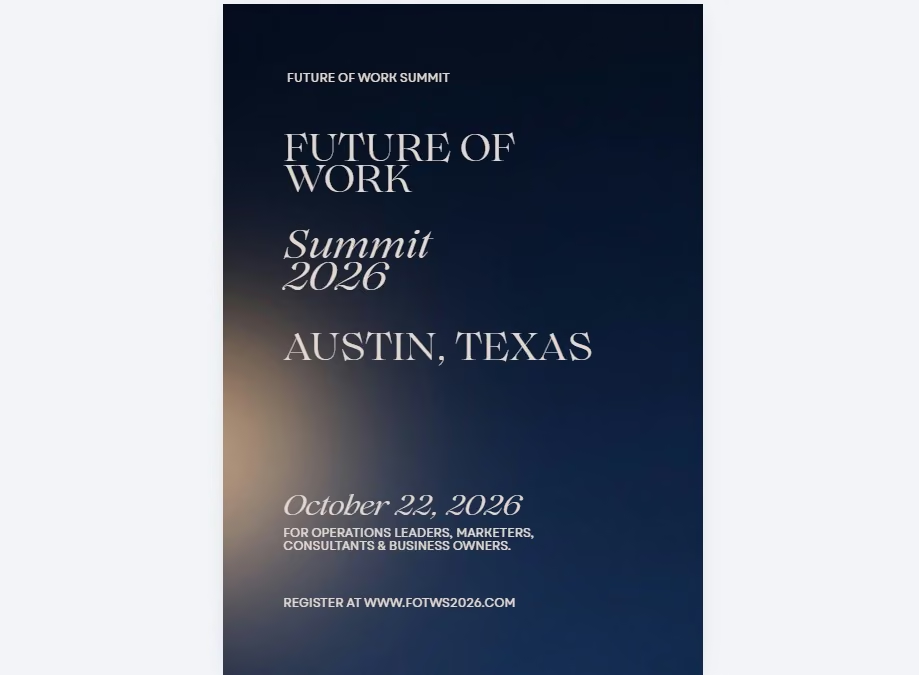
The selected poster looked polished enough to keep working on. It also showed why visual AI still needs a close read.
Canva invented a registration URL, www.fotws2026.com. I never gave it that website.
That tiny line would be easy to miss when you are reviewing the overall design. On a real event graphic, an invented registration link is a serious publishing error.
That is how I'd use Canva for events. Give it the design direction, choose from several options, and review every line before export. It can help with social posts, agenda slides, signage, sponsor graphics, speaker cards, and presentation assets from the same visual direction.
Canva's current Free plan includes an AI allowance. Pro increases the AI allowance and adds premium design tools and content.
Pros:
- Very fast visual options: Four concepts gave me a useful starting set in about 2 minutes.
- Easy selection and editing: I could choose one direction and keep working in the same editor.
- Good brief retention: The strongest result preserved the real date and city.
Cons:
- Small copy needs a close review: My chosen design invented a website.
- Quality varied across the four results: I would have rejected three for this brief.
Pricing
Free is $0. Pro is $18/month ($15/month billed annually at $180/year). Business is $25/person/month ($20.83/person/month billed annually at $250/year), and Enterprise uses custom pricing.
My take: Canva is the quickest visual tool I tested. Use it to create options, then give the details the same attention you'd give the event date on a printed invitation.
4. Airtable for Attendee and Vendor Operations
Airtable started by turning my brief into a short build plan, which I approved without changes.
I started with Omni, Airtable's AI assistant. I asked it for connected areas covering attendees, speakers, vendors, sponsors, and tasks.
The attendee data needed company, job title, attendee type, dietary requirements, registration status, VIP status, and notes. Vendor records needed costs, confirmation status, payment status, deadlines, and risk.
Prompt I used:
Build an event operations workspace for a fictional event called Future of Work Summit 2026 in Austin, Texas on October 22, 2026.
Create connected tables for Attendees, Speakers, Vendors, Sponsors, and Tasks.
For attendees, include name, company, job title, attendee type, dietary requirements, registration status, VIP status, and notes.
For vendors, include category, contact, quoted cost, confirmation status, payment status, deadline, and risk level.
Generate 20 realistic fictional attendee records and 8 fictional vendor records so I can test the workflow.
- VIP attendees
- Registrations still incomplete
- Vendors still pending
- Vendors at risk
- Tasks due in the next seven days
Then summarize the three issues an event planner should pay attention to first.
Omni returned a build plan after about 2 minutes. It grouped the work into attendee registration, vendors and sponsors, and event tasks.
I accepted that plan without changes.
The first workspace arrived 4 minutes later, giving me a total of about 6 minutes from prompt to preview.
The workspace opened with Attendees, Speakers, Vendors, Sponsors, and Tasks across the top. The attendee table already had fictional names, companies, roles, registration states, and dietary requirements such as vegetarian, vegan, gluten-free, halal, and nut allergy.
That sample data made the result easier to judge. I could see what the workspace would feel like with event records in it instead of staring at an empty structure.
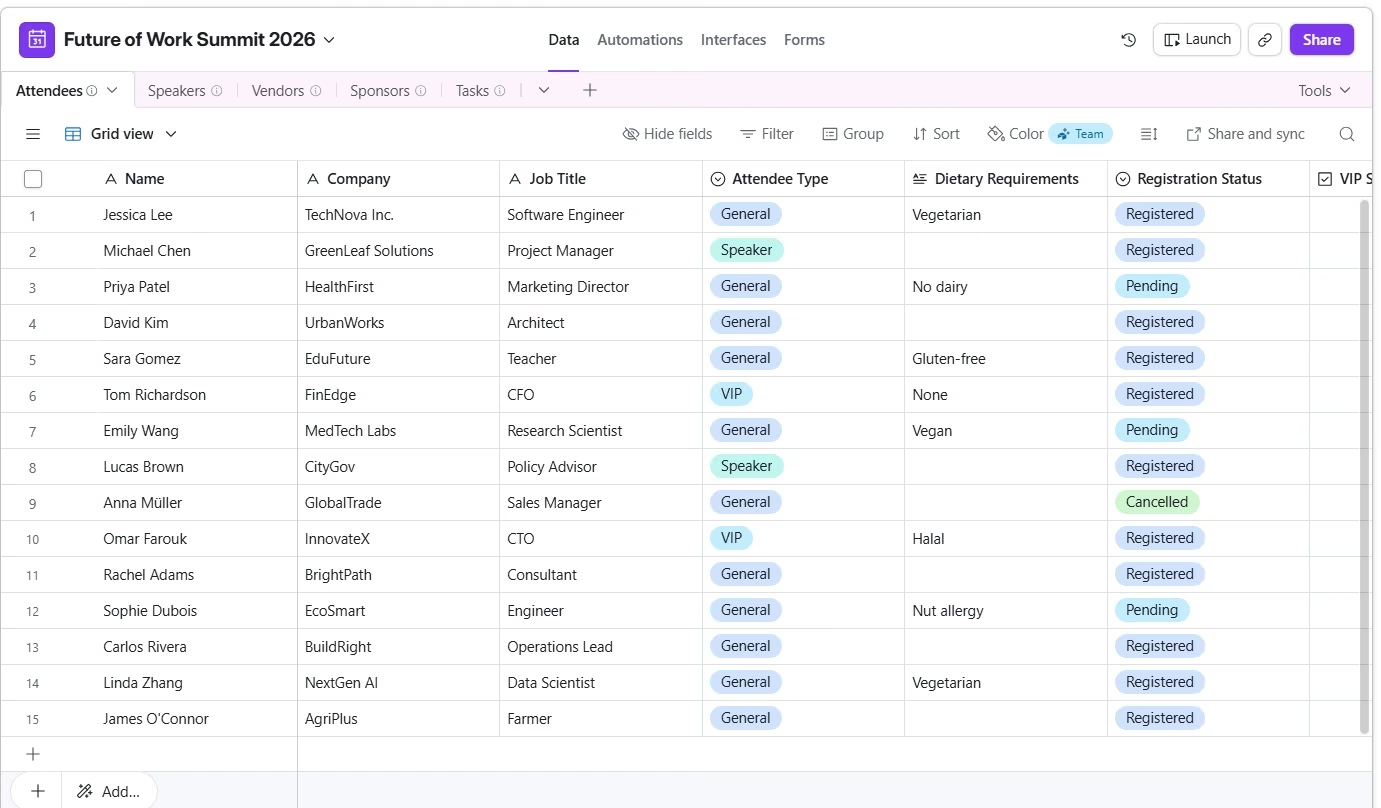
One part of my request was less clear in the final response. I had asked for the three issues the planner should look at first. The completion message described the workspace, yet that three-item risk summary wasn't clearly surfaced.
That is the kind of follow-up I'd make next. The base itself was useful. The AI analysis layer needed another pass.
Pros:
- Fast structured workspace: The main event record types were in place in 6 minutes.
- Useful sample data: I could judge fields and statuses before importing anything real.
- Good fit for changing information: Attendees, dietary needs, tasks, and vendor status all make sense as structured records.
Cons:
- One requested summary was easy to lose: I would prompt Omni again for the three priority issues.
- Real data needs a privacy review: Dietary requirements and accessibility requests can contain sensitive personal data. Check field permissions, sharing links, and automations before importing a real attendee list, and load only the fields the job needs.
Pricing
Free is $0. Team is $24/seat/month ($20/seat/month billed annually). Business is $54/seat/month ($45/seat/month billed annually), while Enterprise Scale uses custom pricing. Airtable bases billing on permission level, so read-only viewers, form submissions, and shared links don't add a charge.
My take: Airtable fits planners who already think in spreadsheets and want cleaner records, views, and workflows around the same information.
5. eventpage.ai for Event Pages, Ticketing, and Check-In
eventpage.ai was the test that needed the most cleanup. I spent about 25 minutes getting from the initial prompt to a page I could work with.
I started with its AI event creation flow. The brief was simple enough on paper. I supplied the event name, date, Austin location, audience, 250-person attendance target, keynote, six breakout sessions, sponsor exhibits, and reception times.
Prompt I used:
Create an event page for Future of Work Summit 2026, a one-day professional conference in Austin, Texas on October 22, 2026.
The event is for operations leaders, marketers, consultants, founders, and business owners interested in how work is changing.
Expected attendance is 250.
The day includes one keynote, six breakout sessions, sponsor exhibits, and a networking reception.
Registration begins at 8:30 a.m., programming runs from 9:30 a.m. to 5:00 p.m., and the networking reception runs from 5:15 to 6:30 p.m.
Write clear, professional event copy with a confident tone. Create a clean event structure that makes the date, location, agenda, registration, speakers, and networking opportunity easy to find.
The setup started drifting early. It repeatedly referred to the conference as a “party.” One creative direction followed that language and gave me disco-ball imagery for a professional Future of Work conference.
At another point, a long block of setup instructions appeared directly on the event page as content.
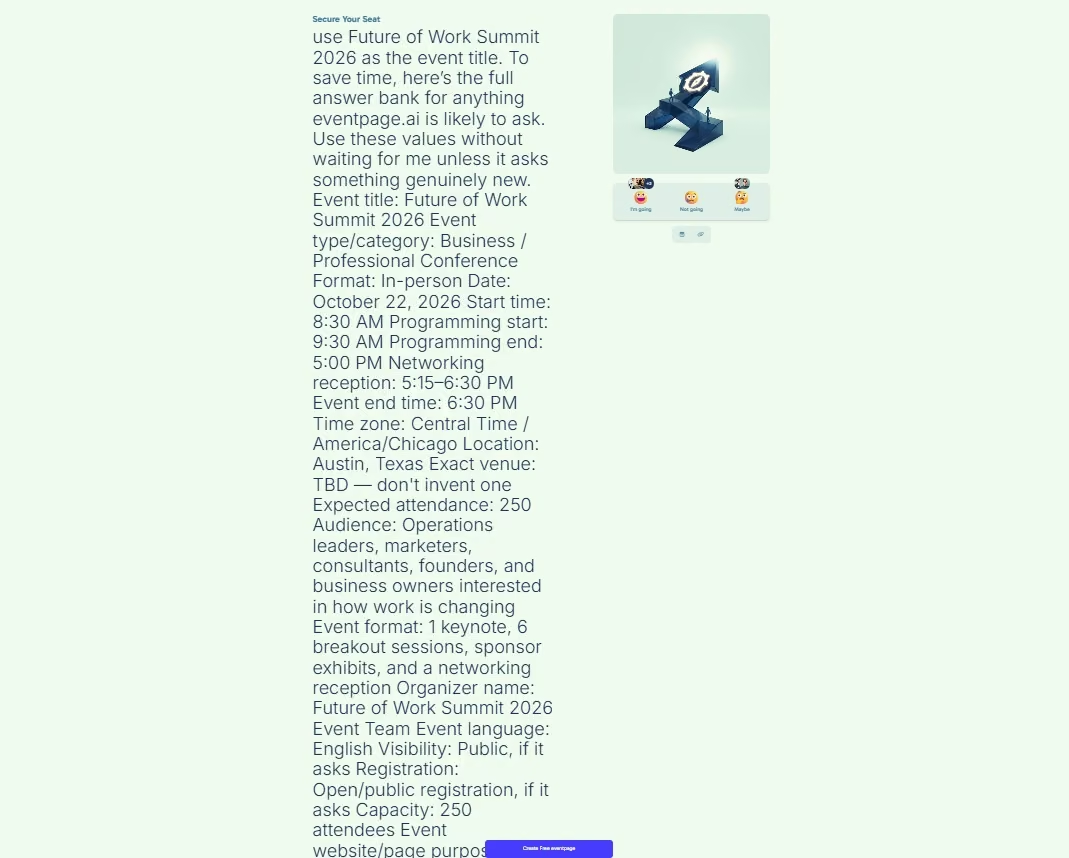
I backed out of the AI design route and opened the template browser.
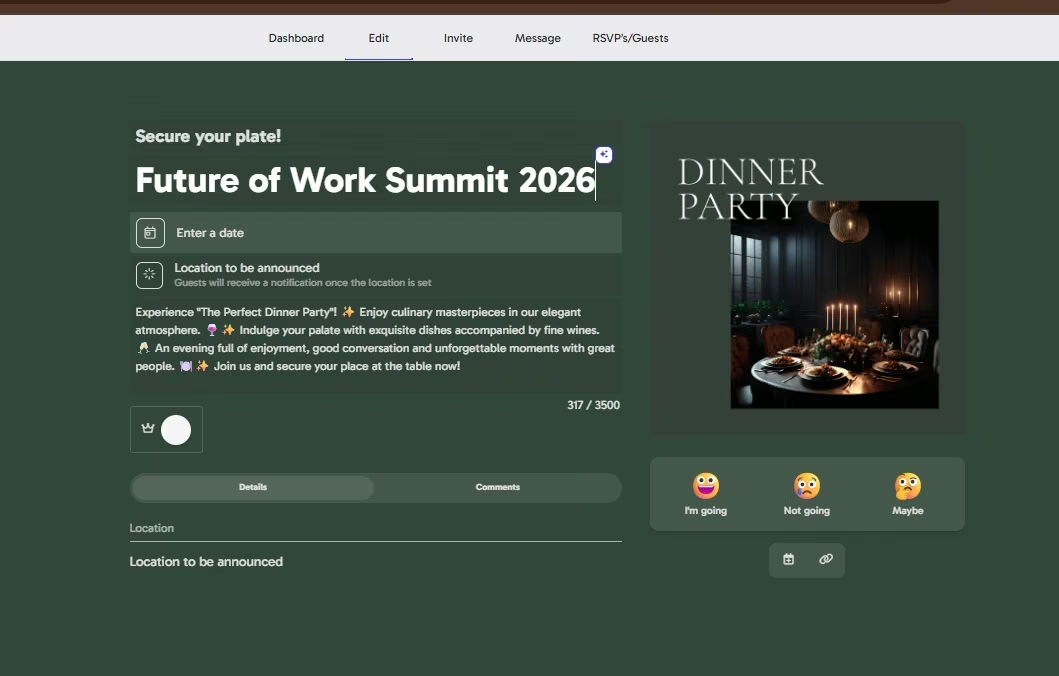
That added another strange turn. One template came through as a dinner-party page with “Secure your plate!” copy and a dinner image. I had to rework the page from there.
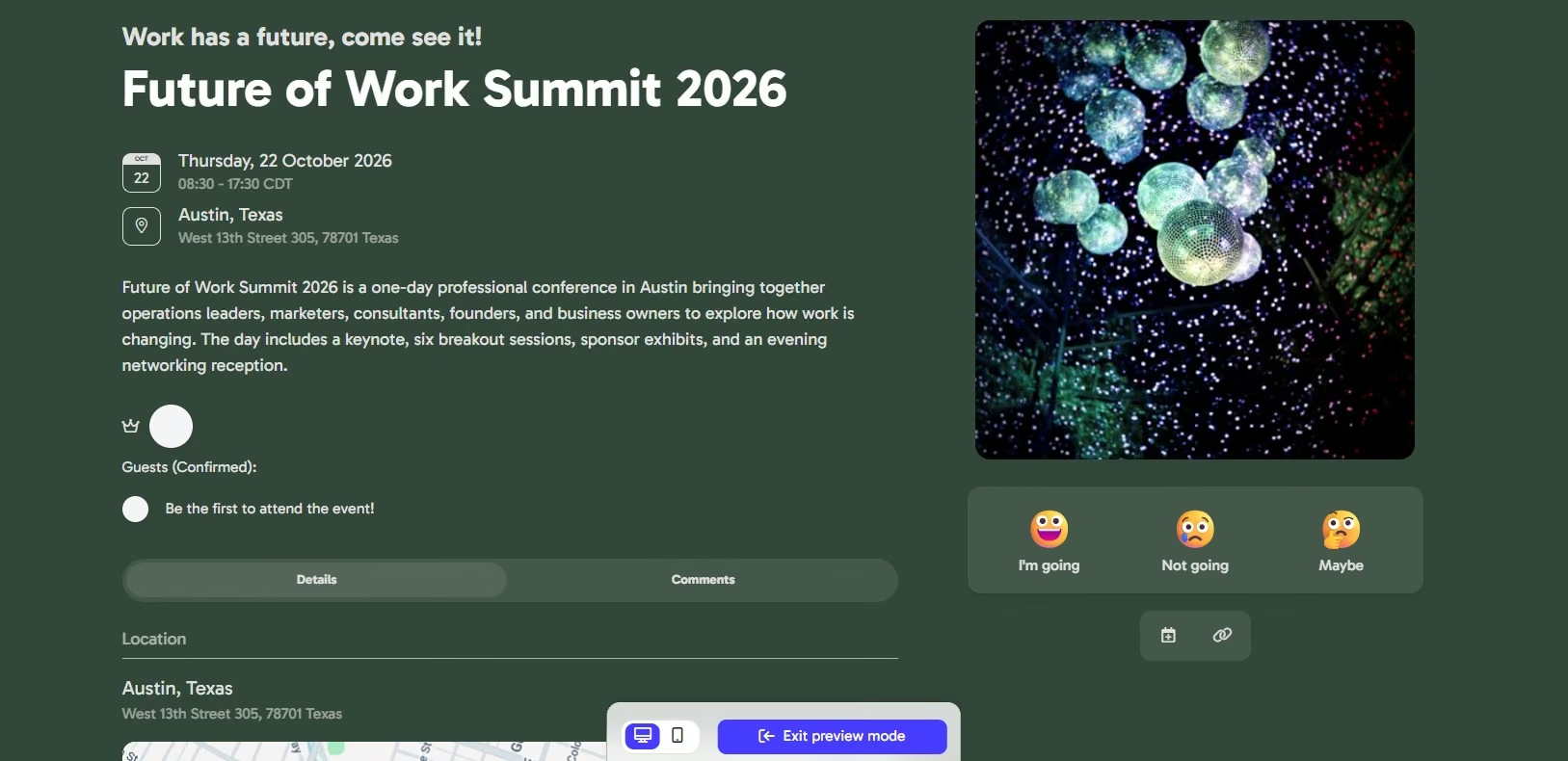
The cleaned-up version looked much closer to an event page I could use. Two factual errors remained visible.
The page invented “West 13th Street 305, 78701 Texas” as the address, even though I had supplied only Austin and had left the exact venue undecided.
It also displayed 08:30 to 17:30 CDT. My brief had the networking reception ending at 6:30 p.m.
The platform itself covers useful event jobs. The Free plan includes one active event, unlimited guests, AI event creation, 100-plus templates, guest lists, Quick Response (QR) code check-in, automated notifications, and ticketing with a 3% platform fee charged on top of Stripe or PayPal payment processing.
Basic adds unlimited events and guests, custom branding, badge printing, customer relationship management integration, and a reduced 1.5% ticketing fee. Pro removes the platform fee entirely.
Pros:
- Event-specific tools live together: Page creation, guests, ticketing, messages, and check-in share one product.
- Templates gave me a recovery route: I could leave the weak AI design and rebuild from a different starting point.
Cons:
- The first usable result took work: I spent around 25 minutes and made substantial manual edits.
- Two factual errors survived: The address was invented and the end time was wrong.
- The creative direction wandered: Party and dinner imagery kept appearing during a professional conference build.
Pricing
Forever Free is $0/month and charges a 3% platform fee on paid tickets, on top of payment-processing fees. Basic is about $68/month ($61/month billed annually) converted from Euros, and cuts the platform fee to 1.5%. Pro is about $115/month ($103/month billed annually) with a 0% platform fee, while Enterprise uses custom pricing.
My take: eventpage.ai gives you a lot of event-specific pieces in one account. My test also gave me the clearest reason in this roundup to review every generated field before guests see the page.
6. Perplexity for Fast Venue Research
Venue research was the quickest test. Perplexity returned five Austin options in about 2 minutes.
I gave it the summit size, city, and venue requirements. It had to find five real Austin venues with room for at least 300 people in theater seating, space for a 250-person reception, AV support, accessible entry, and sponsor space.
I also asked for published capacities and official sources.
Prompt I used:
I'm planning a fictional professional conference called Future of Work Summit 2026 in Austin, Texas, on October 22, 2026. Expected attendance is 250 people.
Find five real venues in Austin, Texas that could plausibly host the event.
- Theater seating for at least 300 people
- A separate space suitable for a 250-person networking reception
- AV or event-production support
- Accessible entry
- Space suitable for sponsors or exhibitors
For each venue, give me the venue name, address, relevant room, published theater capacity, reception capacity, evidence for those capacities, whether public pricing is available, and the official source.
Use each venue's official website as the preferred source. Do not estimate unpublished pricing. Do not invent availability for October 22, 2026. Label anything you cannot verify as “Not verified.”
The first response arrived in about 2 minutes.
It gave me Austin Convention Center, Fairmont Austin, Hilton Austin, The LINE Austin, and Brazos Hall. I then made one follow-up request to put the same information in a table.
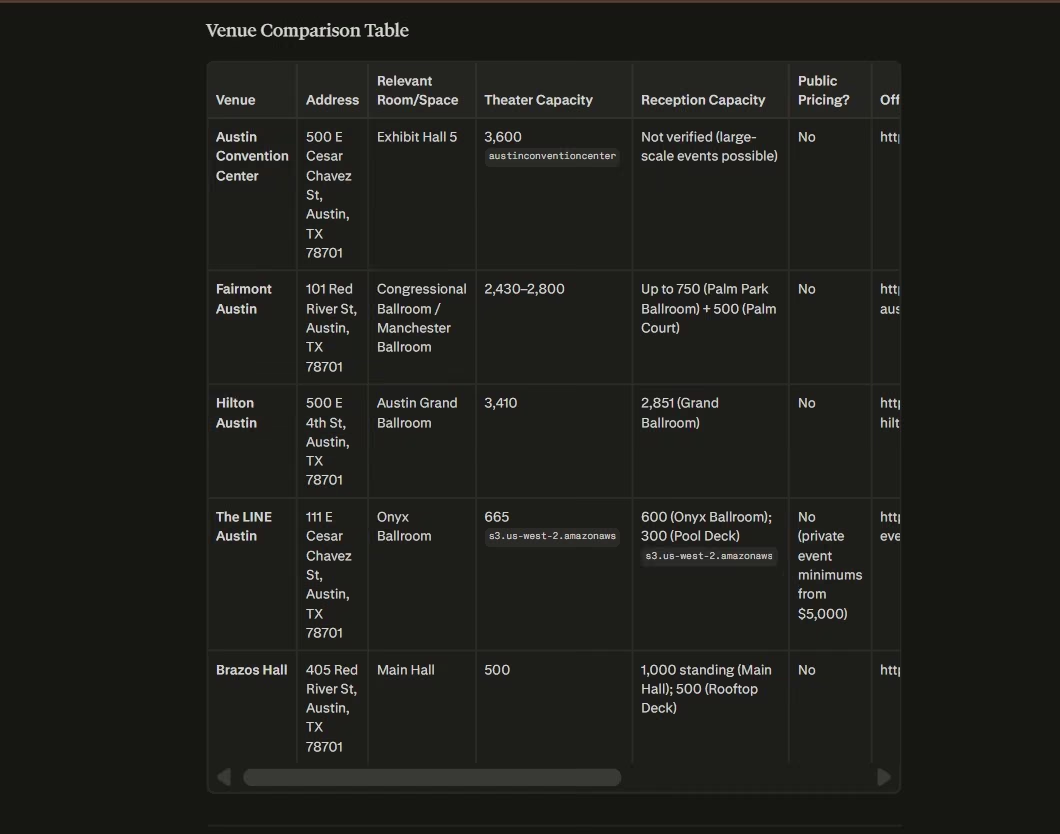
The speed was excellent. My source checks changed the story.
Austin Convention Center was a bad recommendation for an October 2026 event. The Austin Convention Center is closed for construction and is currently accepting proposals and bookings for 2029 and beyond.
Fairmont Austin was a real candidate, though one capacity was wrong. Perplexity gave the Manchester Ballroom a 2,800-person theater capacity. Fairmont Austin's own capacity chart puts that theater setup at 3,240.
Hilton Austin checked out better on theater capacity. Perplexity gave the Austin Grand Ballroom a 3,410-person theater capacity, which matches Hilton's published event information. I couldn't confirm the 2,851 reception figure from the current public page, so I wouldn't use that number as a verified figure here.
The LINE Austin also needed another look. Perplexity showed 665 for theater seating in Onyx Ballroom. The LINE's own event page describes Onyx as a 6,000-square-foot ballroom for up to 600 people.
The useful result was a shortlist that still needed verification. Perplexity got me from an empty search to five leads in around 2 minutes. I could then spend my time checking a small set of venue pages instead of starting from zero.
Pros:
- Fast discovery: No other research test came close to 2 minutes.
- Useful source trail: The links gave me somewhere specific to verify each venue.
- Good shortlist format: The follow-up table was easy to scan.
Cons:
- Freshness failed on a major detail: A venue closed throughout 2026 appeared in the shortlist.
- Capacity figures needed checking: Fairmont and The LINE showed why the source page still deserves a click.
Pricing
Free plan available. Pro is $20/month ($16.67/month billed annually at $200/year). Max is $200/month ($166.67 billed annually), Enterprise Pro is $40/seat/month ($33.33 billed annually), and Enterprise Max is $325/seat/month ($270.83 billed annually).
My take: Use Perplexity to shrink the research pile. Open the primary venue pages before putting capacities, availability, or pricing into a client document.
6 More AI Tools for Event Planners I Researched but Did Not Test
The next six cover jobs outside my hands-on experiments. I researched their current event use cases and official pricing so you can decide whether one belongs beside the tools above.
7. Cvent for Larger Event Programs and Venue Sourcing
Large and repeat event programs are where Cvent starts to make sense. It covers jobs such as registration, speaker management, onsite activity, reporting, and venue sourcing across larger event programs.
Its Supplier Network is the easiest place to understand the difference. A planner can search nearly 340,000 hotels and venues, filter the results, send one RFP to several properties, and use AI search to narrow the list. The basic Supplier Network is free for planners.
That can remove a lot of manual venue outreach if sourcing is a big part of your week. Cvent also has dedicated speaker-management and event-reporting tools for teams that need those records to carry across a larger program.
Cvent fits when:
- You run several large events: Shared reporting and repeat event processes become more useful.
- Venue sourcing takes hours: The free Supplier Network gives that job its own workflow.
- You need dedicated event operations: Registration, speakers, onsite work, and reporting can live inside the same product family.
Watch for: The main event-management packages use sales-led pricing, so you'll need a quote to compare the full cost with a smaller event stack.
Pricing
Cvent Supplier Network is free for planners. The broader event-management platform uses custom pricing.
8. ClickUp for Event Timelines and Task Ownership
A three-month event plan can turn into a wall of deadlines fast. ClickUp gives that work a project structure.
Its Event Planning template starts with List, Board, and Calendar views. You can organize work by stage, owner, date, facility, budget, or event area. A separate event-planner checklist template also supports dependency warnings and views such as Gantt and Workload.
Picture a three-month conference plan. Venue contract first. Speaker outreach next. Sponsor artwork depends on confirmed sponsor details. Badge printing depends on the final guest list. ClickUp gives those relationships a visible home.
That is a different job from Airtable. Airtable is strongest when the records themselves are the center of the work. ClickUp puts more emphasis on who owns the work and when it has to happen.
ClickUp makes sense if:
- Several people own the event: Tasks and deadlines need clear names beside them.
- One delay affects other work: Dependencies help you see the knock-on effect.
- You already manage client work in ClickUp: The event can sit beside the rest of the team's projects.
- Your plan runs for months: A 3-month build-up is easier to hold in a Gantt view than in a flat task list.
Watch for: Event templates arrive with fields and statuses you probably don't need, so cut them back before the team starts using the space. A cluttered event list gets ignored fast.
Pricing
Free Forever is $0. Unlimited is $10/user/month ($7/user/month billed annually).
9. Otter.ai for Vendor and Planning Calls
Someone says an important thing on a production call, then 3 days later nobody remembers the exact wording. Otter.ai is built for that gap.
Otter records and transcribes Zoom, Microsoft Teams, and Google Meet calls. It can identify speakers, search across meetings, and run AI meeting workflows. Its free Basic plan includes 300 transcription minutes per user each month, with a 30-minute limit on any single conversation. Pro raises that to 1,200 monthly minutes and up to 90 minutes per meeting.
For events, I'd use that on production calls, venue conversations, sponsor meetings, speaker briefings, and post-event debriefs.
A searchable transcript can help when a vendor asks, “When did we agree on that delivery time?” You can go back to the call instead of rebuilding the conversation from someone's notes.
Otter.ai earns its place when:
- Calls create action items: You want the conversation available after everyone hangs up.
- Several people need the same record: Searchable notes cut down on different versions of the decision and you run frequent debriefs.
Watch for: Tell everyone on the call that it is being recorded, because consent rules vary by state and country. Names, venue terms, dollar figures, and overlapping speakers also deserve a transcript check before you turn them into a commitment.
Pricing
Basic is free. Pro is $16.99/user/month ($8.33/user/month billed annually). Business is $30/user/month ($19.99/user/month billed annually), while Enterprise uses custom pricing.
10. Zapier for Registration and Follow-Up Automation
Registration data often has to move through several apps before the job is finished. Zapier handles those handoffs.
Take a normal registration flow. Someone submits a form. Their details go into Airtable. A confirmation email goes out. The event team gets a Slack alert. A follow-up task gets created.
Zapier can connect those steps into one workflow. The current Free plan includes 100 tasks each month and two-step workflows. Professional adds multi-step workflows, premium apps, webhooks, AI fields, and conditional form logic.
Here, the difference between automation and an agent becomes useful. Automation follows a defined path. An agent can make decisions inside a wider task. If you're deciding how far to push that approach, this guide to AI agents for business gives you a wider set of real examples.
If the workflow needs an agent that can make decisions across several steps, an AI agent builder gives you another route for creating that logic around your own process.
Zapier fits a workflow where:
- You copy the same information between apps: Registration is a common place to start.
- A form always triggers the same next steps: Confirmation, notifications, and record creation are good candidates.
- Your team already likes its current apps: Zapier can connect the workflow around them.
Watch for: Test every path with fake event data first. A broken registration automation can quietly create missing records or missed messages.
Pricing
Free is $0/month. Professional starts at $29.99/month ($19.99/month billed annually).
11. Jotform AI Agents for Attendee Questions and Registration
Repeat attendee questions are the clearest reason to look at Jotform AI Agents.
Its Event Coordinator agent can gather event requirements, vendor information, schedules, registration details, and feedback through a chat-style exchange. Jotform also has an Event Registration agent that collects attendee details and can use connected forms.
You can train an agent with frequently asked questions, URLs, and documents. The event-planner category currently has 720 templates, so you can start from an event-specific agent instead of an empty workflow.
This could work well for a conference where attendees keep asking the same questions about registration, guest policies, parking, session times, or what to bring.
You can take the same idea further with an AI chatbot builder if you want the attendee conversation and its rules to live inside a custom experience.
Jotform AI Agents work well if:
- Repeat questions are piling up: Give attendees one place to ask.
- Registration needs a conversation: The agent can collect information through connected forms.
- You want several contact channels: Jotform supports formats including chat, voice, phone, SMS, WhatsApp, Instagram, and Gmail.
Watch for: Give the agent final event information and deliberately test questions whose answers are missing. You want it to hand those gaps back to your team.
Pricing
Starter is free, with up to 100 AI Agent conversations a month. Bronze is $39/month ($34/month billed annually) and raises the AI conversation allowance to 1,000.
12. Whova for Attendee Networking and Conference Engagement
Whova carries the event experience further into the attendee side of a conference, especially networking and session engagement.
Its event-management platform covers registration, agendas, speakers, check-in, badges, forms, announcements, and post-event analytics. Its event app adds attendee profiles, messaging, matchmaking, meet-up scheduling, polls, and other networking tools.
That makes Whova a useful option when the event's value comes from who attendees meet as much as what happens on stage.
For example, Whova's Attendee Matchmaking surfaces people with similar backgrounds and lets attendees schedule meetings with them.
Whova fits conference teams when:
- Networking drives ticket value: Attendees need an easier way to find relevant people.
- Your agenda has many sessions: Web and mobile agendas can update from one place.
- Check-in and attendee communication belong together: Registration data can flow into event-app and onsite tools.
Watch for: Whova uses quote-based organizer pricing, so you'll need your event size and required features before you can compare cost cleanly.
Pricing
Whova uses custom organizer pricing based on your event and selected features. Organizers can book a demo and receive a trial.
Which AI Tool Should You Choose for Event Planning?
Start with the job that's taking the most time. That keeps your stack smaller and gives you a clear way to judge whether the tool is helping.
Then check the three things that can decide the purchase on site: whether it connects to your registration platform through a native integration, API, sync, or CSV import/export; whether check-in still works offline when the venue Wi-Fi buckles at 8:45 a.m.; and where attendee data actually lives once you upload it.
- Emergent earns its place when you keep wishing your event software worked differently. You can build the internal operations app around your process, then use an AI website builder when the public event site needs the same level of control.
- Reach for ChatGPT when your week is full of schedules, drafts, RFPs, emails, checklists, and last-minute wording changes.
- Canva is the answer when visual production is slowing down event marketing.
- Airtable fits when the problem is structured information such as attendees, vendors, dietary requirements, sponsors, and status fields.
- eventpage.ai fits planners who want an event-specific page, guests, ticketing, and check-in together. Give the generated content a careful review before publishing.
- Perplexity is useful when venue or supplier discovery is taking too long. Treat its sources as a trail back to the primary pages.
- For larger or repeat programs, Cvent brings venue sourcing and dedicated event operations together.
- ClickUp fits events with many owners, deadlines, and task dependencies.
- Otter.ai is worth it once planning decisions keep disappearing into calls.
- Use Zapier when the apps are already right and the data handoffs are the problem.
- Jotform AI Agents suits events where repeat attendee questions are consuming staff time.
- Whova fits conferences where networking, agendas, check-in, and attendee engagement carry a lot of the ticket value.
If you're planning events on your own, deadline pressure changes what earns a place in your stack. The same principle shows up in these AI tools for freelancers: pick tools that remove a repeated job you can name.
Most event planners are running a small business alongside the events. Our AI tools for small business guide covers that side.
Final Takeaway for AI Tools for Event Planners
The useful AI tools for event planners solve different parts of the same event.
My fastest result came from Perplexity at around 2 minutes. That shortlist still needed source checks. Canva also gave me four visual options in about 2 minutes, and the design I chose contained an invented website.
ChatGPT repaired a late-keynote schedule in about 3 minutes. Airtable built the first event workspace in about six. Emergent took 18 minutes and 10 credits, then gave me the deepest custom operations build. eventpage.ai took around 25 minutes and needed the most manual cleanup.
Those tests changed how I'd build an event AI stack. Time saved during generation is only one part of the result. Cleanup, verification, and fit with your event are just as important.
Start with one painful job. Test the output on a fake event or low-risk task. Keep the tools that give you useful work back.
If the problem is that your current event software doesn't match your process, you can start building with Emergent.

Most AI app builders stop at prototypes. Emergent creates production-ready apps you can actually launch.
- Production-ready apps
- Web & mobile apps
- Deploy in minutes







