



TL;DR
- Mashvisor: Best for weighing a property as a long-term rental against its Airbnb potential without running two separate calculators.
- PropStream: Best for pulling comps, ARV, and rehab estimates before you make an offer.
- Emergent: Best for building a custom deal tracker or dashboard no packaged tool matches.
- Revamp365: Best for free MLS and off-market sourcing, all in one platform.
- Realastat: Best for underwriting straight from a listing screenshot, without manual data entry.
- PropLab: Best for AI-driven underwriting: ARV, rehab cost, and max offer in about a minute.
- Baselane: Best for tracking rental income, expenses, and portfolio-level performance.
- Claude: Best for reading leases, rent rolls, and purchase agreements, and sanity-checking assumptions.
You open a listing thinking you'll spend five minutes deciding whether it's worth pursuing. Thirty minutes later, you've bounced between Zillow, county records, rent estimates, spreadsheets, and calculators, and you still don't know whether the deal makes sense.
AI promises to collapse all of that into a single answer: upload a listing, ask a question, and get an investment recommendation.
But that answer is only useful if you can trust how it was produced.
So I spent a week testing the AI tools for real estate investors that promise to do exactly that. I looked beyond the marketing claims and tested what each tool does well and where it falls short.
I ran real investment scenarios through these platforms, compared their results, and paid close attention to the assumptions behind their recommendations.
The biggest takeaway: there is no single AI tool that replaces the entire investing workflow. Some help you analyze deals faster. Some uncover opportunities. Some automate the tedious work after you acquire a property. And some let you build the custom tools you wish already existed.
The right choice depends on where AI can remove the most friction from your process.
If you're an agent, not an investor, see our 7 Best AI Tools for Real Estate Agents instead.
How I Researched & Tested These AI Tools for Investors
I spent a week testing tools against real properties, prioritizing free plans and trials where they existed. For the deal-analysis tools, I used the same Cleveland property wherever possible so I could compare how each platform handled the same inputs rather than judging each result in isolation.
I evaluated each tool based on five things:
- Free tier depth: Whether the free plan or trial provides a usable experience or only a locked preview of the product.
- Assumption transparency: Whether the tool clearly shows the numbers behind its analysis, such as purchase price, rent, and expenses, or quietly fills gaps with its own assumptions.
- Performance on a real property: How each tool handled the same property data and whether its output changed based on the inputs provided.
- AI depth: Whether the AI adapts its reasoning to the specific situation or simply applies preset rules and labels.
- Real user feedback: What verified users say on platforms like G2, Trustpilot, Capterra, and Reddit, including complaints and limitations.
Testing these tools side by side revealed the biggest lesson from my testing: a confident AI answer is only useful when you understand the assumptions behind it. The best output usually came from the tools that made their reasoning easiest to verify.
8 Best AI Tools for Real Estate Investors: Quick Comparison
| Tool | Strengths | Best For |
|---|---|---|
| Mashvisor | Accurate dual-strategy analysis, uses the real listing price automatically | Comparing long-term rental vs. Airbnb potential on the same property |
| PropStream | Deep property data, fast AI first-pass reads | A quick read on any deal, once you supply your own numbers |
| Emergent | Builds a working app from one prompt | The one tool nothing else on this list covers |
| Revamp365 | Free sourcing, comps, and outreach in one login | Investors who want an all-in-one platform |
| Realastat | Underwrites straight from a listing screenshot | Skipping manual data entry |
| PropLab | States its assumptions before showing a verdict | A transparent, fast underwriting check |
| Baselane | Genuinely free banking and bookkeeping | Landlords who don't need AI categorization yet |
| Claude | Catches bad assumptions other tools' numbers rely on | A second opinion before you trust a number |
Where AI Still Gets Real Estate Numbers Wrong
Every tool here can be confidently wrong. On a real estate decision, that costs real money.
Test the same property across three separate AI tools, as I did, and you get three different pictures of the same deal.
- A confident answer still needs a second look before you rely on it. Every tool tested here will finish an analysis even when a core input, purchase price, rent, taxes, is missing or wrong. Nothing on the page tells you which.
- AVMs and ARV estimates drift, and sometimes disappear entirely. On one ordinary, non-distressed property, one tool returned a confident $116,000 valuation while another returned nothing at all, same address, same day.
- Vendor-reported accuracy figures are marketing copy. A claim like "98% accuracy" is an internal benchmark. Useful context, but it tells you nothing about your specific property.
- General-purpose AI can generate plausible numbers that aren't real: asked directly for a cap rate without real data, a tool like Claude will produce something plausible-sounding based on training patterns, not a live lookup.
So keep using the numbers. Just treat each one as a first draft, and give it one manual cross-check before it goes into a real decision.
Getting the Numbers Right
Before you make an offer, you need to know whether the numbers work. These tools help you evaluate a property’s value, estimate potential returns, and decide whether a listing is worth pursuing.
Mashvisor
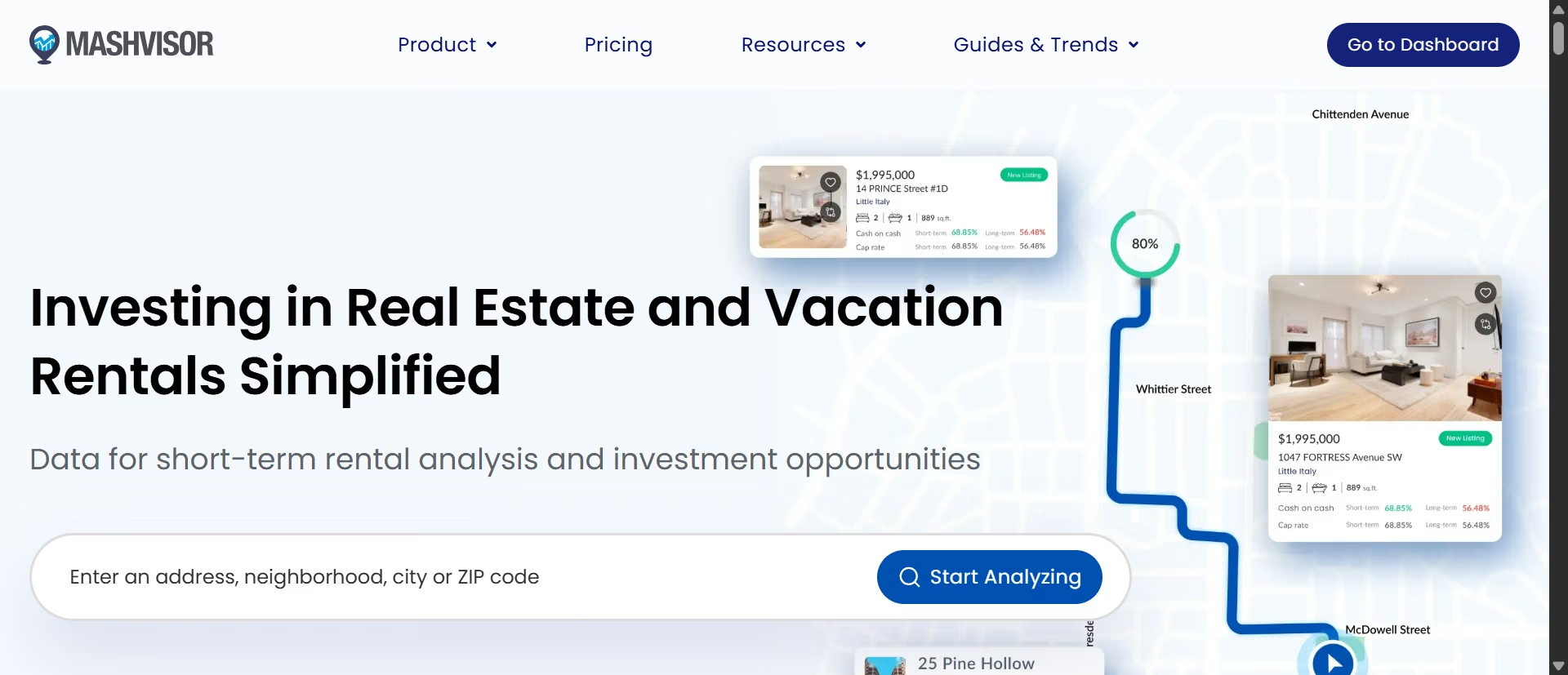
What it does: Mashvisor analyzes cash flow, cap rate, and cash-on-cash return for both traditional and Airbnb rental strategies, using MLS, Zillow, and Airbnb data pulled into a single property page.
Best for: Investors who want to weigh a property as a long-term rental against its Airbnb potential without running two separate calculators.
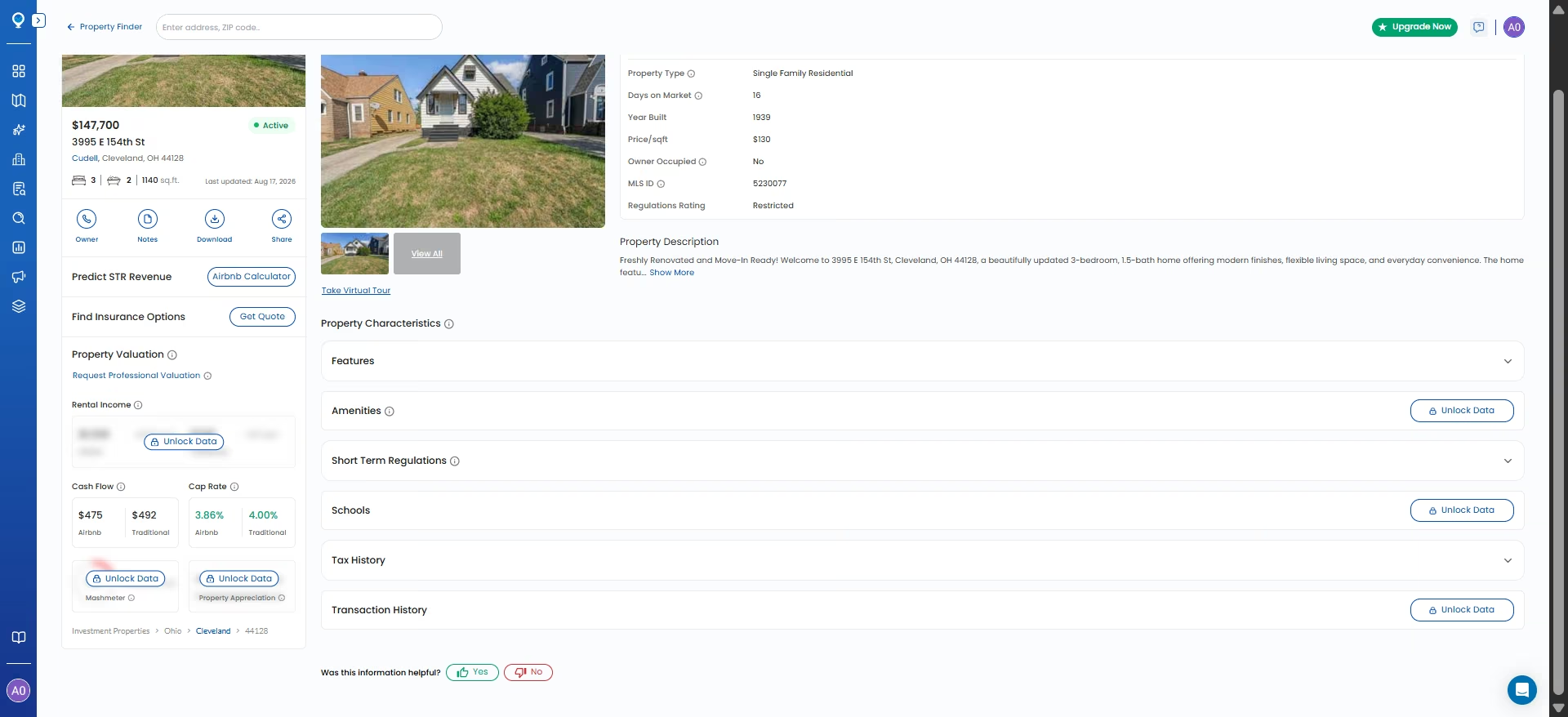
Mashvisor pulled up our test property with the correct $147,700 price already filled in, so I didn't have to fix anything manually. That stood out against PropStream, which silently carried over a stale $50,000 sale price and turned a loss into a fabricated $47,639 “profit.”
Mashvisor's address-verification step also pulled in the correct bed count, square footage, lot size, and 2026 tax bill without any manual input.

The property analysis held up just as well. On the traditional rental side, Mashvisor calculated $492 in monthly cash flow and a 4.00% cap rate. Its Airbnb analysis returned $475 in monthly cash flow and a 3.86% cap rate. I checked both against the property's actual $147,700 purchase price, and the figures matched.
That accuracy made Mashvisor's new AI assistant, MashGPT, more interesting to test. Launched in May 2026, MashGPT answers investment questions in natural language. I asked for the cash-on-cash return on the same property as a long-term rental.
It gave me an answer, but it didn't use the property's actual purchase price. Instead, it estimated a price of $105,000 to $115,000 “based on neighborhood averages,” even though Mashvisor had the correct $147,700 price in its own database two clicks away.

The calculation itself made sense. Its 7.1% cash-on-cash return followed from the purchase price, down payment, and financing terms it had assumed. But because it started with the wrong purchase price, the final return didn't describe our test property. I tried correcting the price, but the daily token limit cut off our retest before I could see whether it would use the corrected figure.
So Mashvisor's core property analysis is some of the most accurate we tested, built on real, verified inputs. Its new AI layer isn't there yet. If you use MashGPT, don't take its price assumptions at face value. Check them against the property page it's supposedly reading from.
Key Features
- Dual-strategy analysis: Every property gets both a traditional rental and an Airbnb projection side by side, so you don't need a separate tool to compare strategies
- Address-level auto-fill: Verified property details, including price, populate automatically from listing data during search, reducing manual entry errors
- Short-term rental regulation lookup: Flags STR restrictions for 500+ cities directly on the property page
- MashGPT AI assistant: A conversational layer for asking investment questions in plain English, though it doesn't reliably pull from the platform's own verified data yet
- Neighborhood heatmaps: Color-coded maps surfacing cash-on-cash return and rental income by area, available on Standard plan and above
Pros
- Correctly used the real listing price without any manual correction
- Cash flow and cap rate estimates checked out arithmetically against the actual purchase price
- STR regulation data adds a layer most competitors skip
Cons
- Core analytics are locked on neighborhood-level search, only unlocked through a precise address lookup
- MashGPT defaulted to a self-generated price estimate instead of the platform's own verified listing
- No permanent free tier, only a trial gated behind billing details
What Users Say
“This platform offers investors many of the proprty metrics for an easy at-a-glance read instead of the old way of penciling out the metrics ourselves for each propert. It's a great platform.” - J.Canchola, Trustpilot

“Mash visor keeps charging my card even though I unsubscribed over a year ago. Never sends a confirmation email but likes to send plenty of spam.” - David Herzog, Trustpilot

Pricing
Lite runs $39.99/month billed annually, covering single-property analysis. Standard runs $74.99/month annually and adds nationwide market search and heatmaps. Professional runs $99.99/month annually and adds multifamily and foreclosure filters, per Mashvisor's official pricing page.
Bottom Line
Mashvisor got the fundamentals right where it mattered most, using the real purchase price without prompting. But its new AI assistant undercuts that trust by guessing at the one number the rest of the platform already had correct.
PropStream
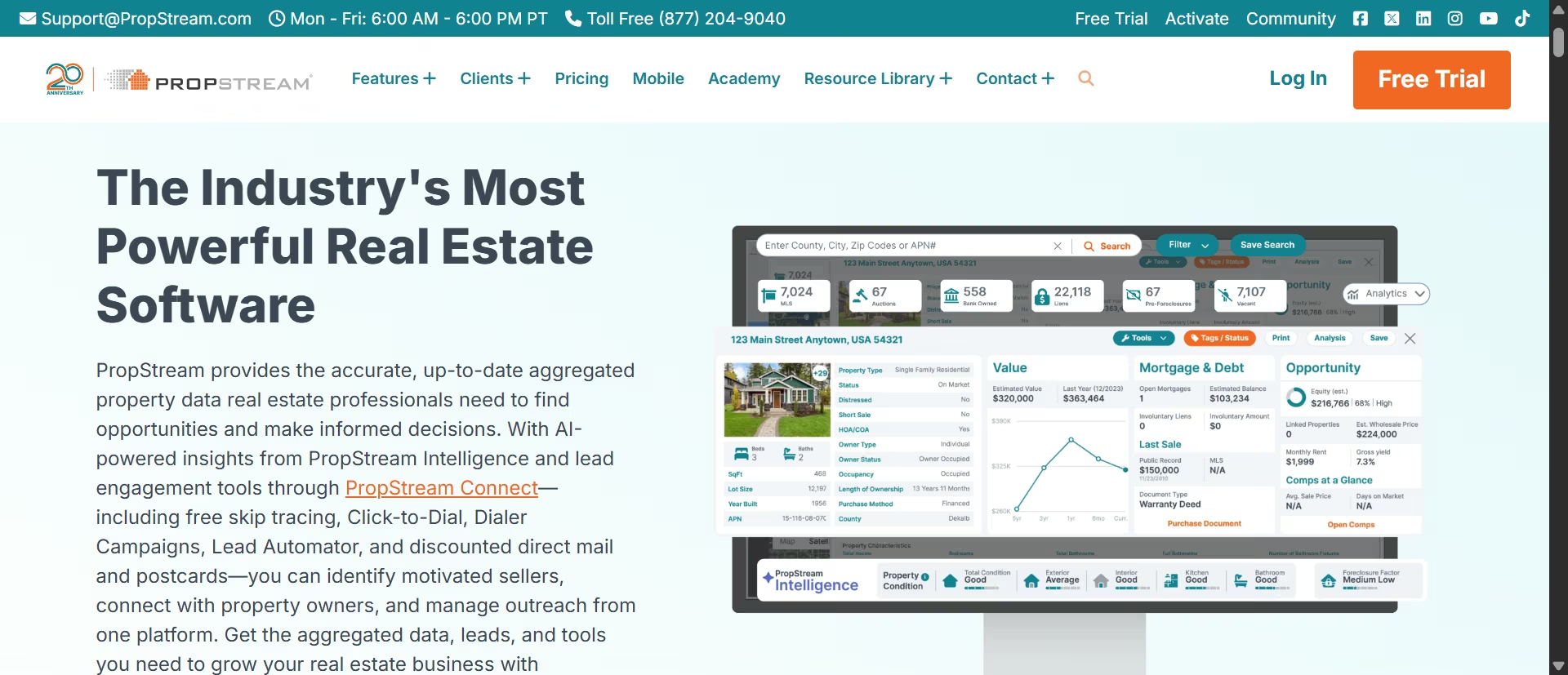
What it does: Pulls property records, comparable sales, and AI-assisted investment analysis from MLS listings and county records.
Best for: Investors who want a second opinion on a property's value before making an offer.
If you've invested in real estate for any length of time, you've probably heard of PropStream. It's one of the industry's most established property data platforms.
Its newest addition is the PropStream Intelligence (PSI) Assistant, which lets you ask questions in plain English rather than manually pulling comps or filling out investment calculators yourself. It can estimate ARV, analyze rental cash flow, surface liens, and even populate PropStream's built-in deal analyzers automatically.
So I put the numbers to the test.
To find out, I chose an MLS listing in Cleveland and asked PSI:
"What's the estimated ARV and cash flow on this property at 20% down and current market rent?"
I deliberately didn't specify a purchase price. That's a realistic scenario because most investors evaluate a listing before they've decided what to offer.
PSI answered anyway, but it quietly supplied its own assumptions.
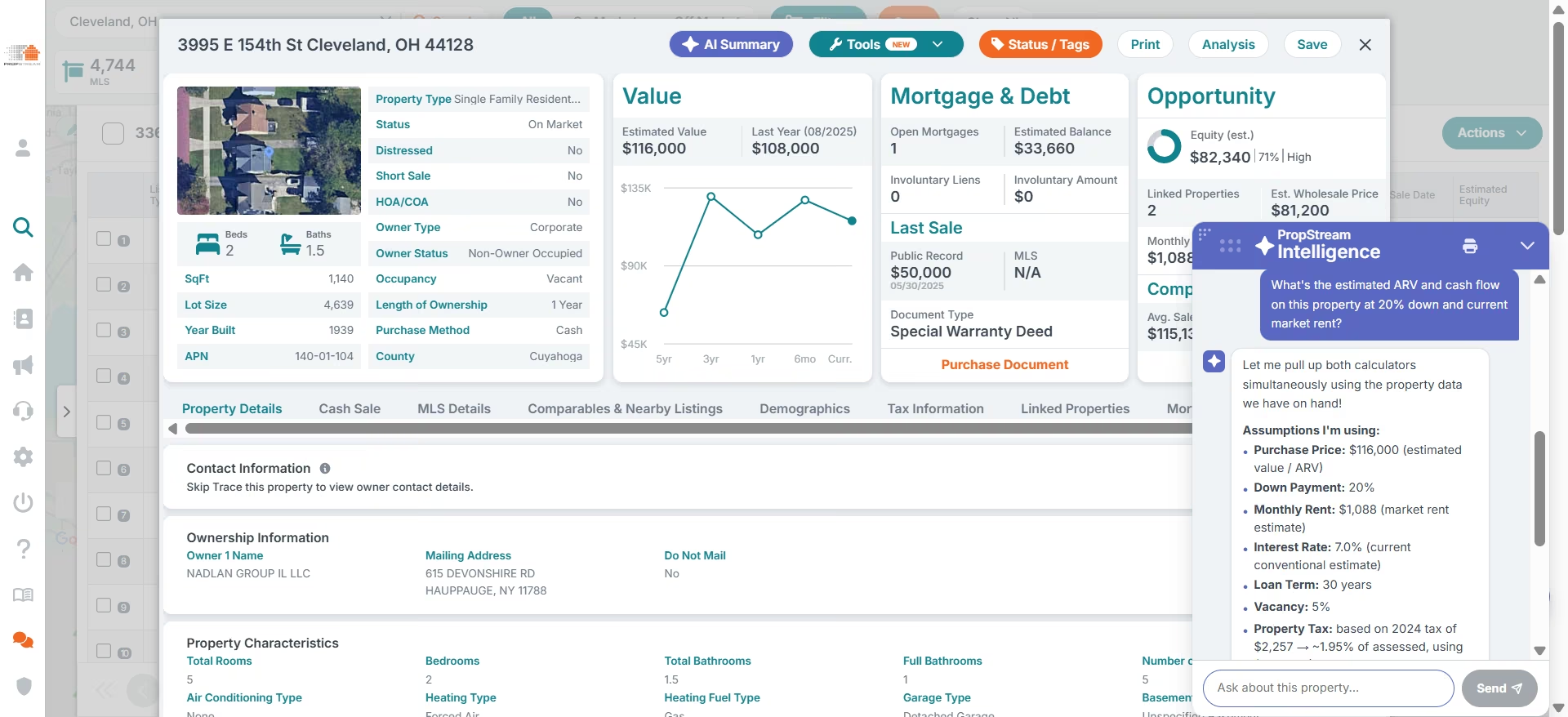
For the rental analysis, it treated its $116,000 estimated property value as the purchase price rather than the listing price of $147,700, even though that figure appeared elsewhere on the property's page. When I opened the Fix & Flip Analyzer, it went further and used the property's previous sale price of $50,000 as the acquisition cost.
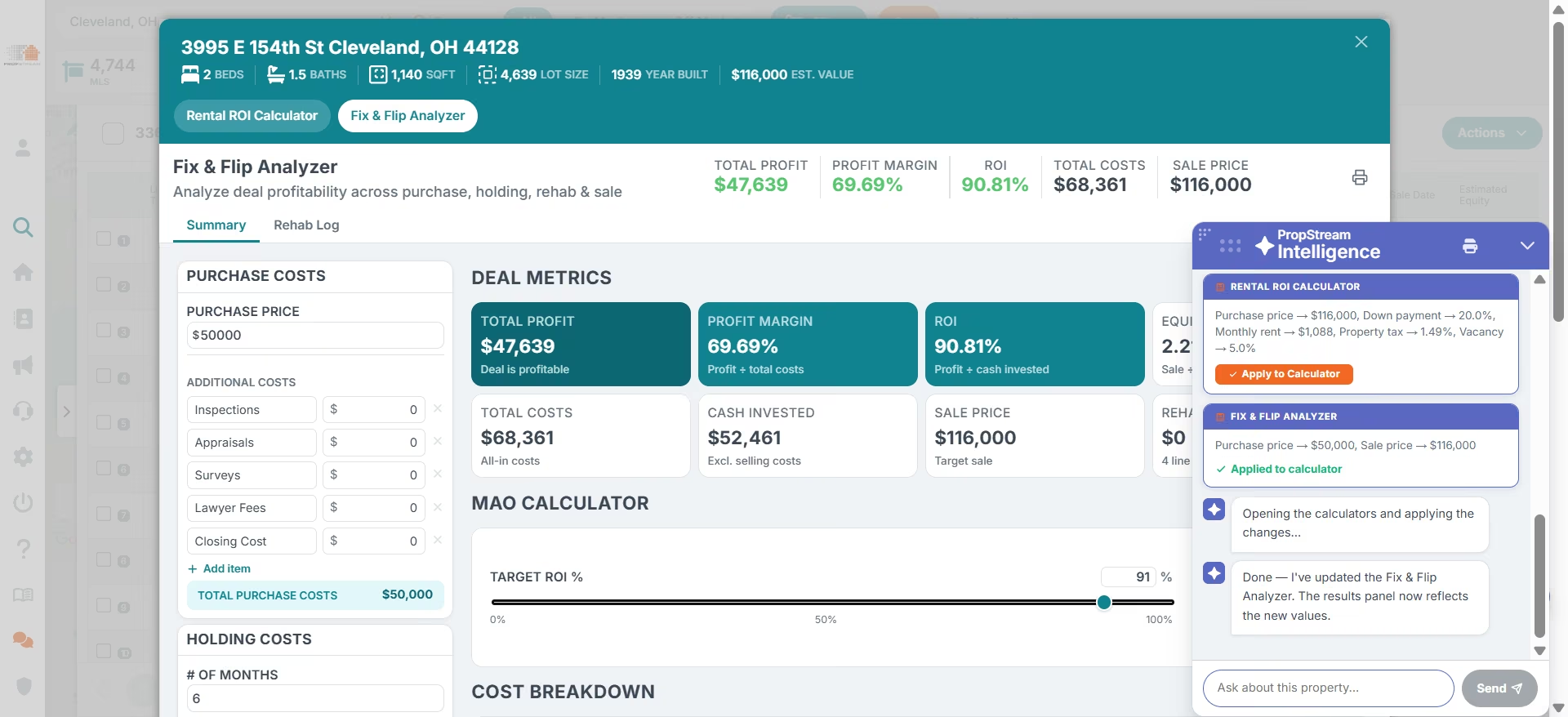
Those assumptions completely changed the outcome.
Using the lower numbers, PropStream projected $47,639 in profit, a 69.69% profit margin, and a 90.8% ROI, finishing with a green "Deal is profitable" label. Replacing those assumptions with the actual listing price turned the same deal into one that was roughly $50,000 underwater.
Interestingly, PropStream's own documentation makes a similar recommendation. The company describes PSI as a way to speed up property research, not replace due diligence, and advises investors to verify purchase prices, rental income, expenses, and other assumptions before making investment decisions.
Key Features
- PropStream Intelligence (PSI): A chat assistant on every property's detail page that answers plain-language questions about value, cash flow, and profit, and can populate the platform's calculators directly from the conversation
- Rental ROI calculator and fix and flip analyzer: Built-in deal calculators, either filled in manually or by PSI, that produce a cash flow or profit projection you can act on immediately
- Nationwide property database: Over 160 million public records from MLS, county recordings, and private data sources, with 165+ search filters for building a whole lead list in one pass
- Skip tracing and direct mail: Built-in tools to find owner contact info and launch postcard or email campaigns against a filtered list, without leaving the platform
Pros
- The core data underneath it (equity, mortgage balance, tax and sale history, comps) is deep, and it's the reason PropStream built its reputation before AI was ever part of the product
- One subscription covers sourcing, comps, and deal analysis in one place
Cons
- Left unspecified, PSI will pick a purchase price for you, and in testing it picked a stale or unrelated number both times, without flagging that as a meaningful assumption rather than a fact
- Data accuracy is regionally inconsistent. Some users report strong results, others report unreliable coverage in their specific market
- Skip tracing quality is a recurring weak point in user feedback, separate from the core property data
- Learning curve is real given how many features and filters are packed into one platform
What Users Say
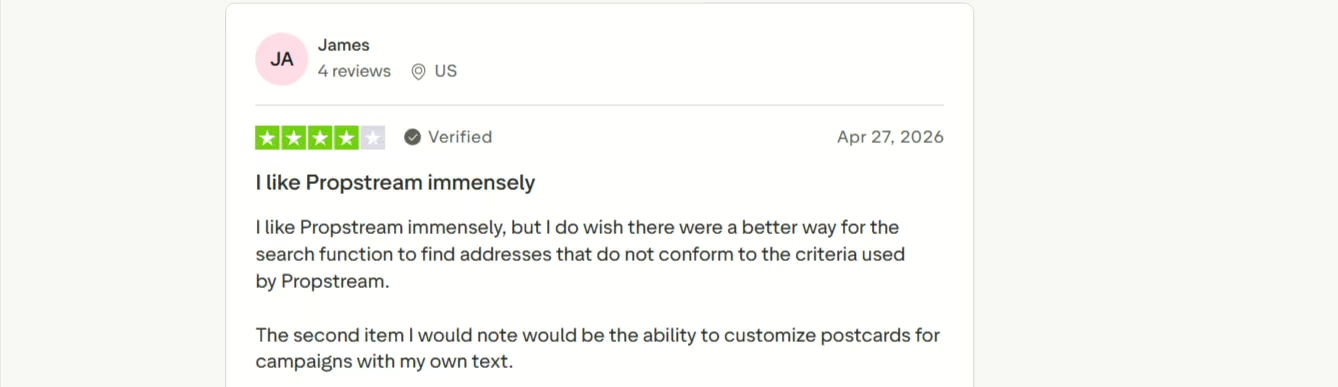
“I like Propstream immensely, but I do wish there were a better way for the search function to find addresses that do not conform to the criteria used by Propstream. The second item I would note would be the ability to customize postcards for campaigns with my own text.” - James, Trustpilot.
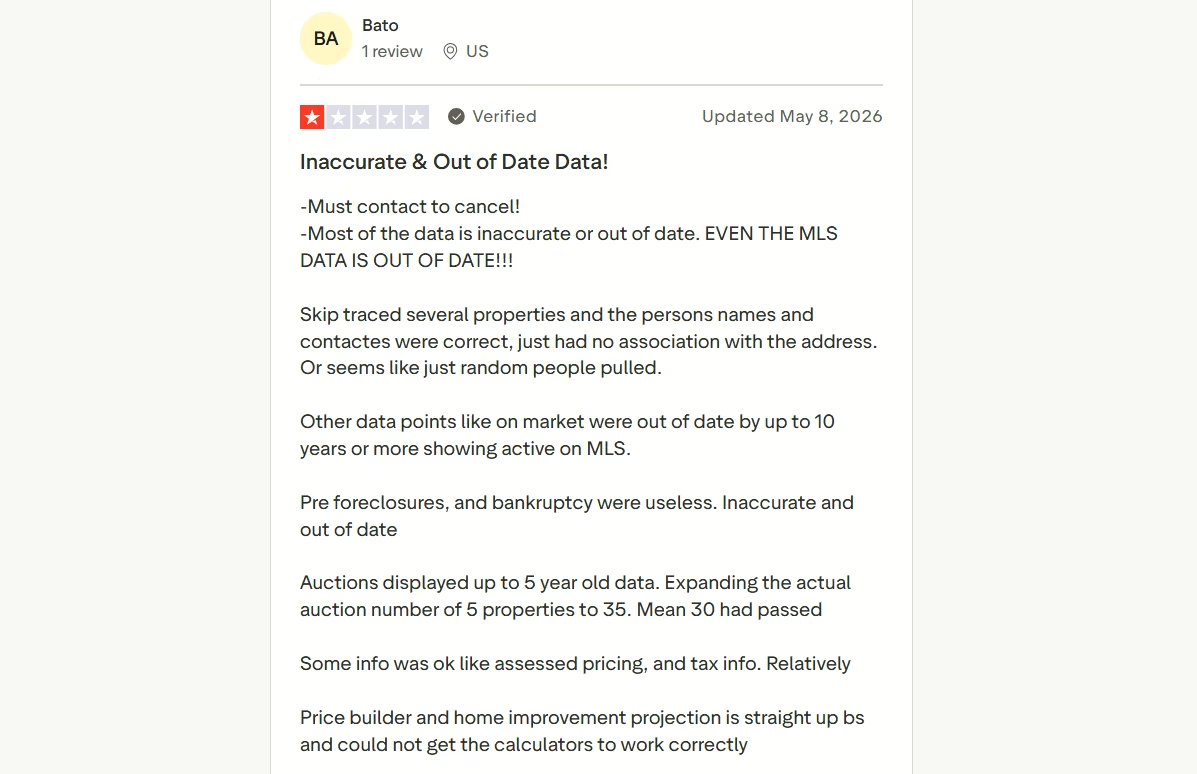
“Most of the data is inaccurate or out of date. EVEN THE MLS DATA IS OUT OF DATE!!! Skip traced several properties and the persons names and contactes were correct, just had no association with the address. Or seems like just random people pulled. Other data points like on market were out of date by up to 10 years or more showing active on MLS.” - Bato, Trustpilot
Pricing
A 7-day free trial is available, though it requires credit card details upfront. Essentials runs $99/month ($81/month billed annually). Pro runs $199/month ($165/month billed annually), adding two team members (up to five total) and free skip tracing through the included PropStream Connect.
Elite runs $699/month ($583/month annually) for teams up to nine with 100,000 monthly saves and exports.
Bottom Line
PSI speeds up a first pass, but it will quietly pick a stale purchase price if you don't give it one, and hand you a "profitable" verdict regardless. Always supply your own purchase price. Never take its number as the final answer.
Emergent

What it does: Turns plain-language descriptions into working applications using a multi-agent AI system that handles planning, design, development, and integrations at once.
Best for: Investors who need a custom workflow that existing real estate software does not provide and want to build it without starting from scratch.
Emergent isn't a real estate investing tool, but it earned a place on this list for those times when you can't find a tool that fits the way you work. That was the problem I wanted to test.
While reviewing these tools I ended up with numbers I couldn't line up: PropStream's own $116,000 valuation, the $147,700 listing price Realastat and PropLab both worked from, and nothing at all from Revamp365.
There was no simple way to compare those estimates side by side on the same property, and no packaged tool to do it. So I decided to build a real estate app of my own.
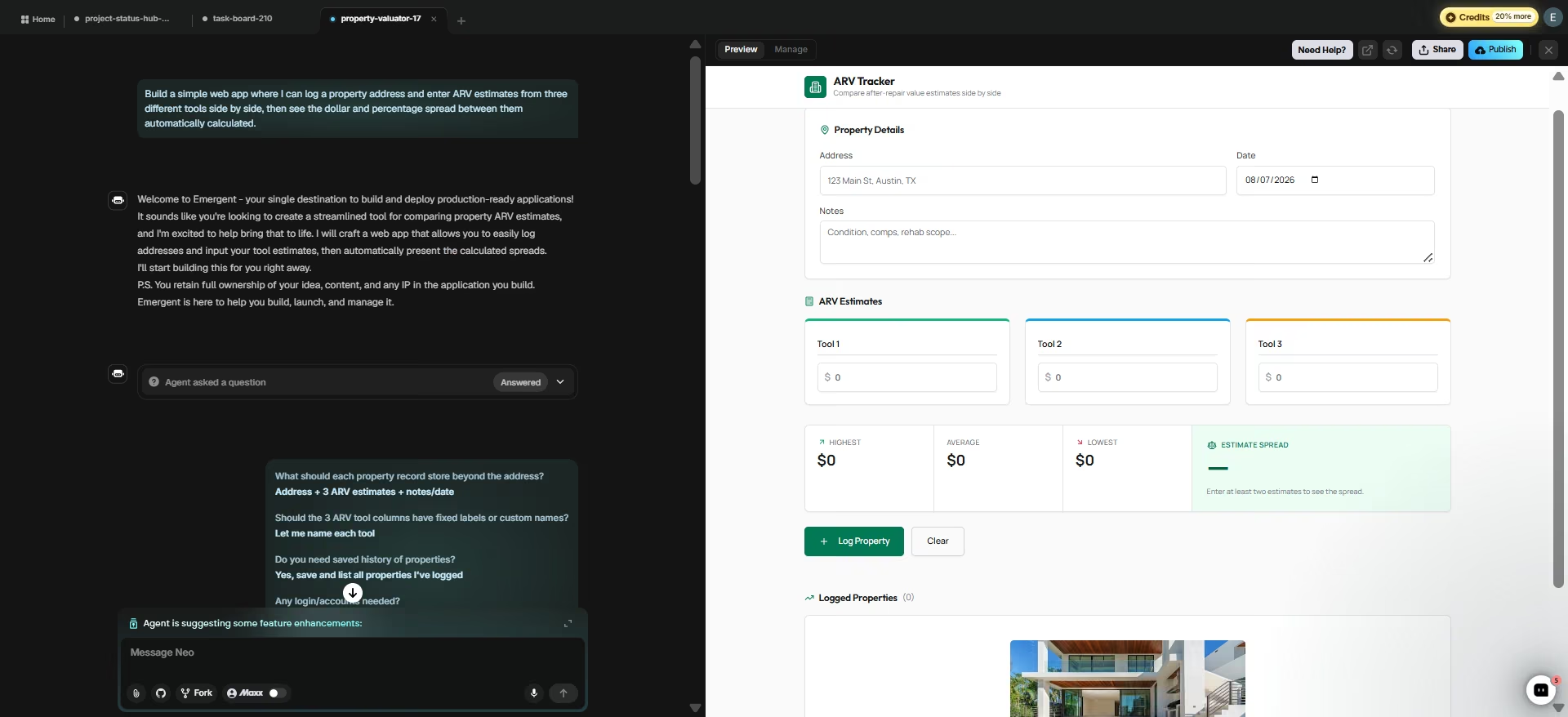
So I asked Emergent to build the missing workflow:
"Build a simple web app where I can log a property address and enter ARV estimates from three different tools side by side, then see the dollar and percentage spread between them automatically calculated."
Emergent stopped and asked me five questions first: what each property record should store, whether tool names needed to be customizable, whether I wanted saved history, whether users needed accounts, and what design style I preferred.
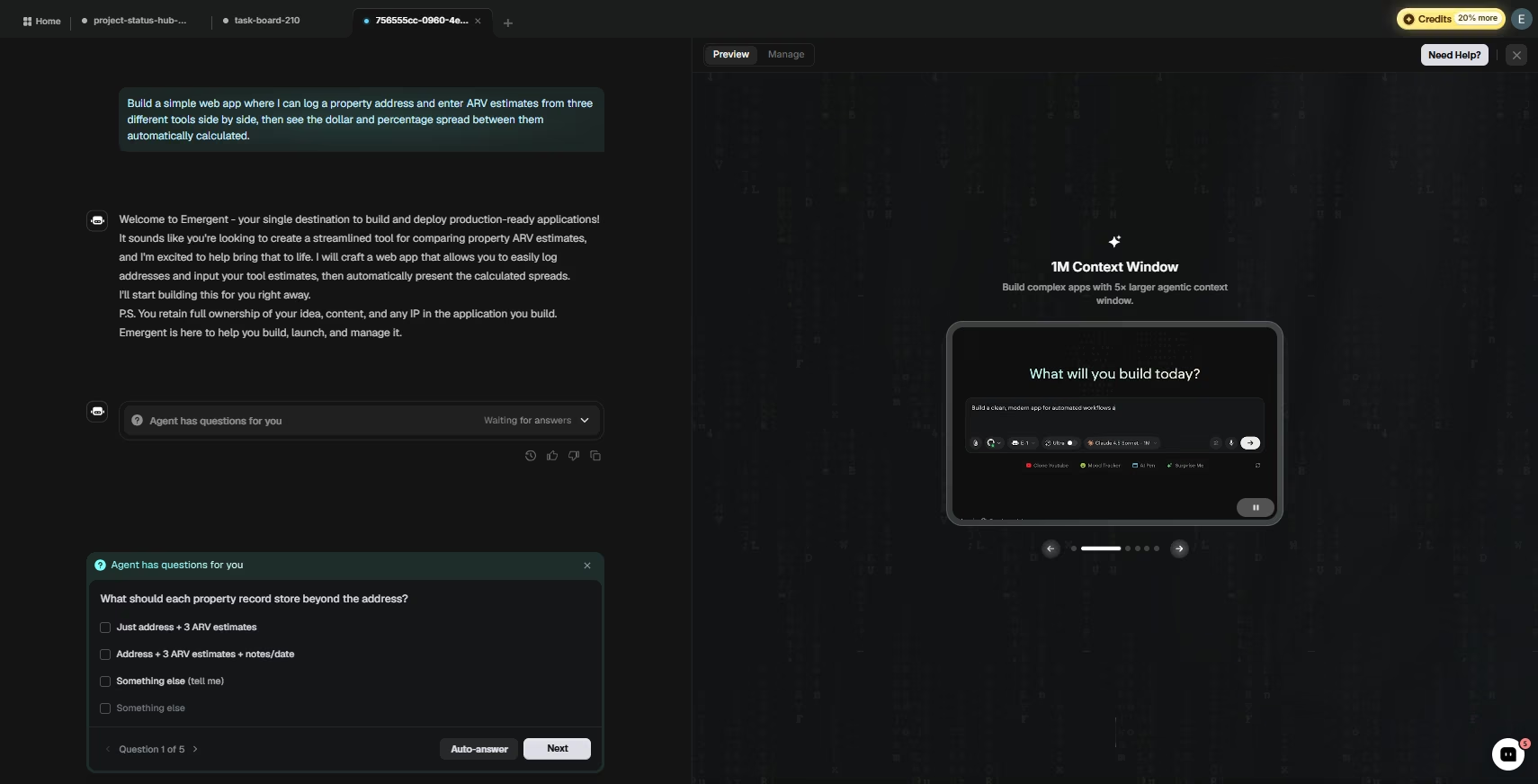
This planning stage uncovers requirements you may not have considered.
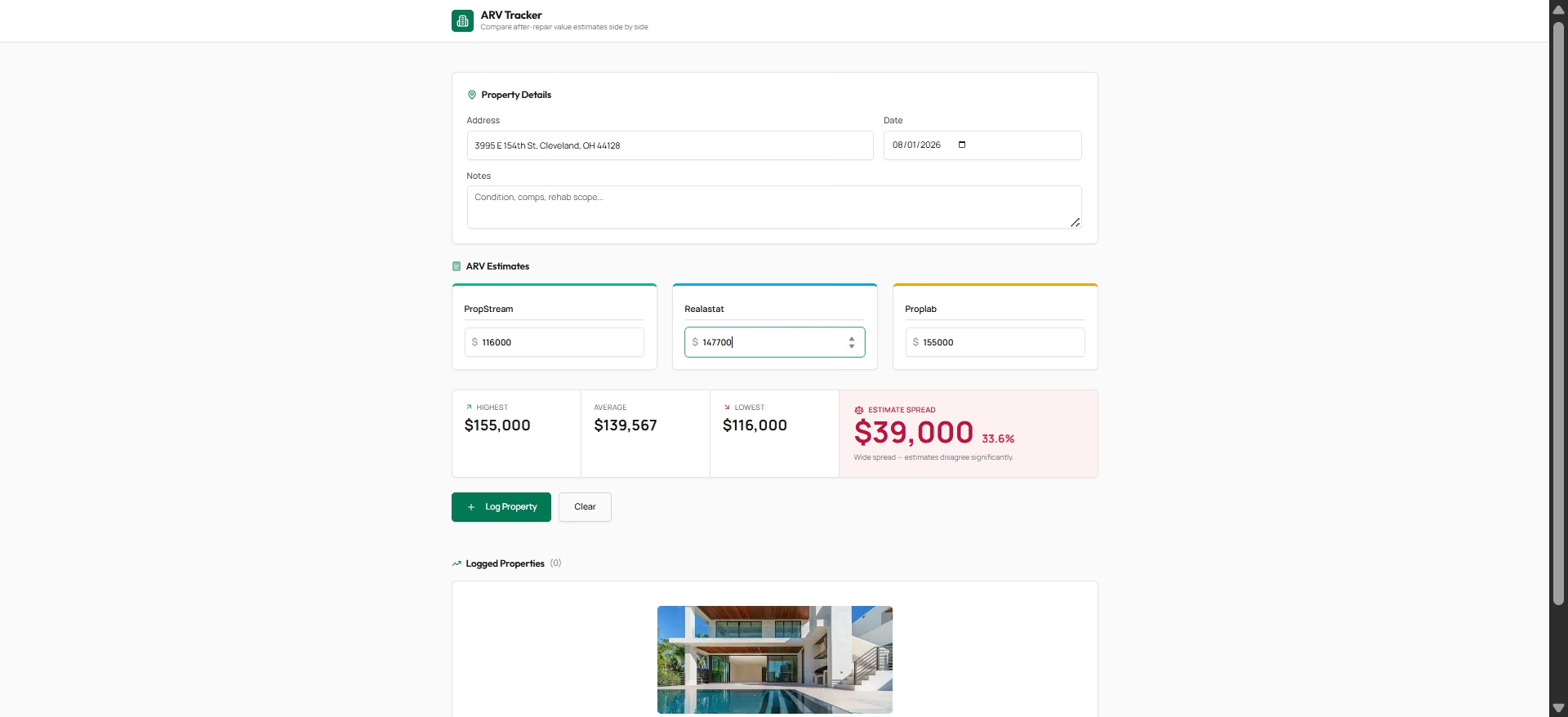
The first version took about six minutes to build and used 7.8 of the 10 free credits available. The tool looked polished with features designed around the workflow I described: structured dashboard, separate sections for property details and valuation estimates, tool-specific columns, and a property log.
Then I tested it with the actual valuation numbers from the valuation tools in this article. The app calculated the results correctly, and even though I hadn't asked for that interpretation,
it added a recommendation:
"Wide spread — estimates disagree significantly." That made the output more useful for decision-making.
I stopped there, but you don't have to. Keep building on it: add features, change the workflow, or pull in other data sources until the tracker matches how you actually work.
Key Features
- Natural-language app building: Describe an app and Emergent's multi-agent system builds the screens people use, the logic behind them, and the place your data lives
- Clarifying questions before building: Asks about scope, data fields, and design preferences upfront rather than guessing, reducing the odds of a mismatched first build
- Full code ownership: The generated code is yours and exports to GitHub
- Mobile app generation: Produces mobile apps from the same prompt that created the web version.
Pros
- Correctly built a working, accurately-calculating app on the first attempt, no follow-up fix needed in testing
- Asking clarifying questions before building is a meaningfully better default than silently guessing at scope
- Solves the "no tool fits my exact workflow" problem every other tool in this article ran into eventually
- The app went live and stayed live with no hosting setup on my end
Cons
- Credit burn is the most consistent complaint across independent reviews, and reviewers report getting stuck mid-build needing to buy more credits to finish
- Trustpilot sentiment is heavily split, 40% five-star against 47% one-star across 605 reviews, with output quality praised and pricing unpredictability criticized side by side
What Users Say
“This is one of the greatest companies, their ai agent is really worth it and their support is the best, I’ve never had better support experience in my life.” Chahine Geudri, Trustpilot

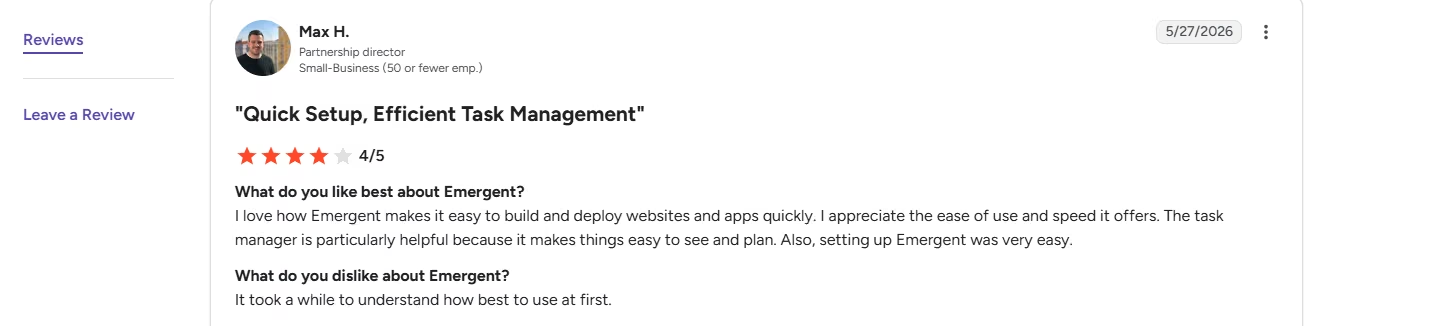
“It took a while to understand how best to use it at first.” Max H., G2
Pricing
Free tier: $0/month, 10 credits, no card required. Standard: $20/month ($17/month billed annually), 100 credits. Pro: $200/month ($167/month billed annually), 750 credits. Enterprise: custom pricing.
Bottom Line
If you've tried to force your workflow into a packaged tool and kept hitting its edges, this is the release valve. You get small, purpose-built tools that fit the way you actually analyze deals, built in the time it takes to describe them. If you want something built specifically for tracking tenants, units, and portfolio data rather than a generic dashboard, see how you can build a dedicated real estate management app builder with Emergent.
Revamp365

What it does: Combines MLS and off-market property search, comps, ARV estimates, skip tracing, a CRM, and an AI calling agent in one platform.
Best for: Investors who want one platform for finding off-market deals, analyzing properties, and contacting motivated sellers.
Revamp365 tags every property with a set of Intelligence labels: Ownership, Equity, Market, Condition, Risk, and Distress. I tested it on the same Cleveland property I used in PropStream.
The first result exposed a limitation before I could evaluate the AI.
The property page returned N/A across AVM, ARV, confidence score, equity, wholesale price, rent, and gross yield, on the same address where PropStream had returned a confident $116,000 valuation. That gap alone is a reason to check more than one tool before settling on a number.
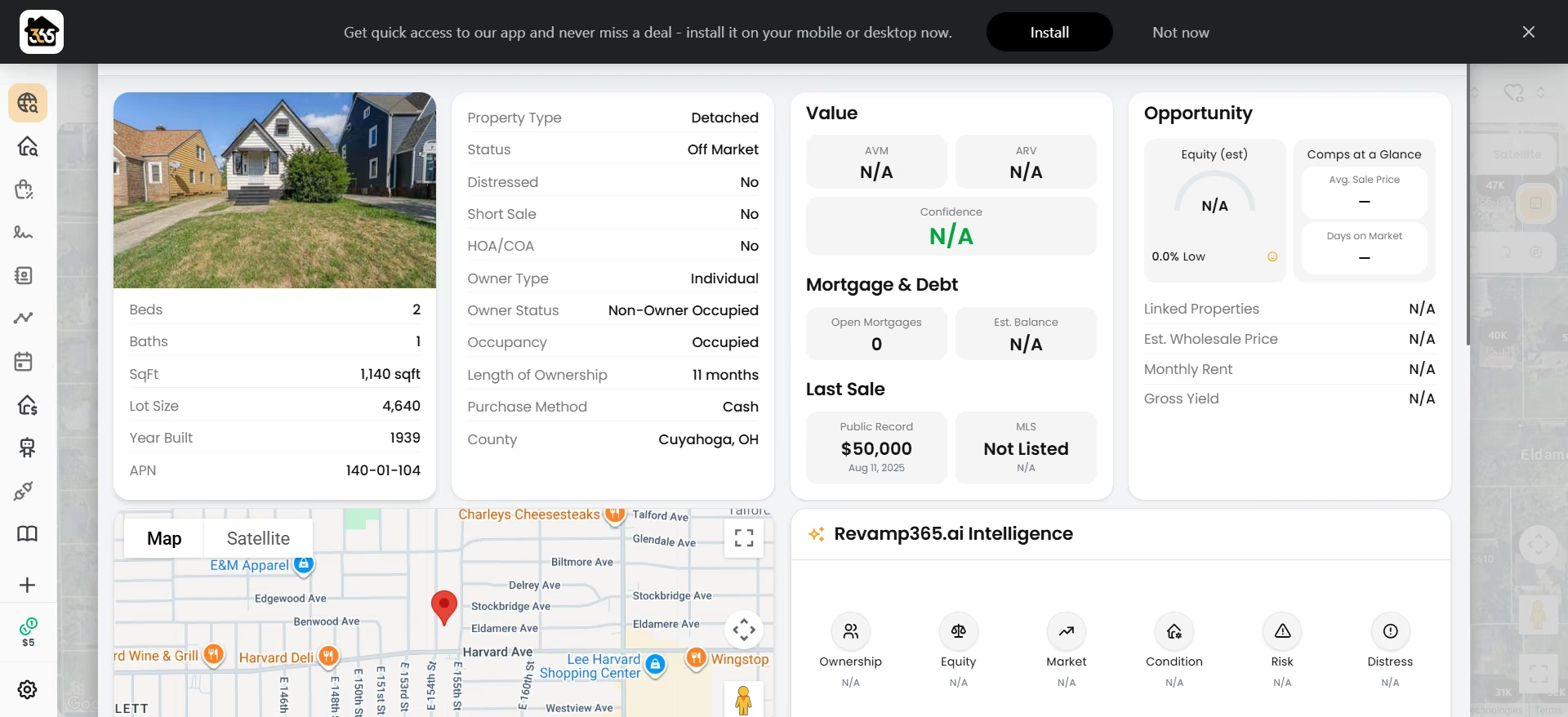
With no underlying estimates available, the Intelligence panel couldn't generate any meaningful analysis. To see the Intelligence Engine in action, I switched to a neighboring property with complete records.
The Intelligence tab displayed the six categories Revamp365 tags in-app: Ownership, Equity, Market, Condition, Risk, and Distress. Each category included a priority level and a short explanation.
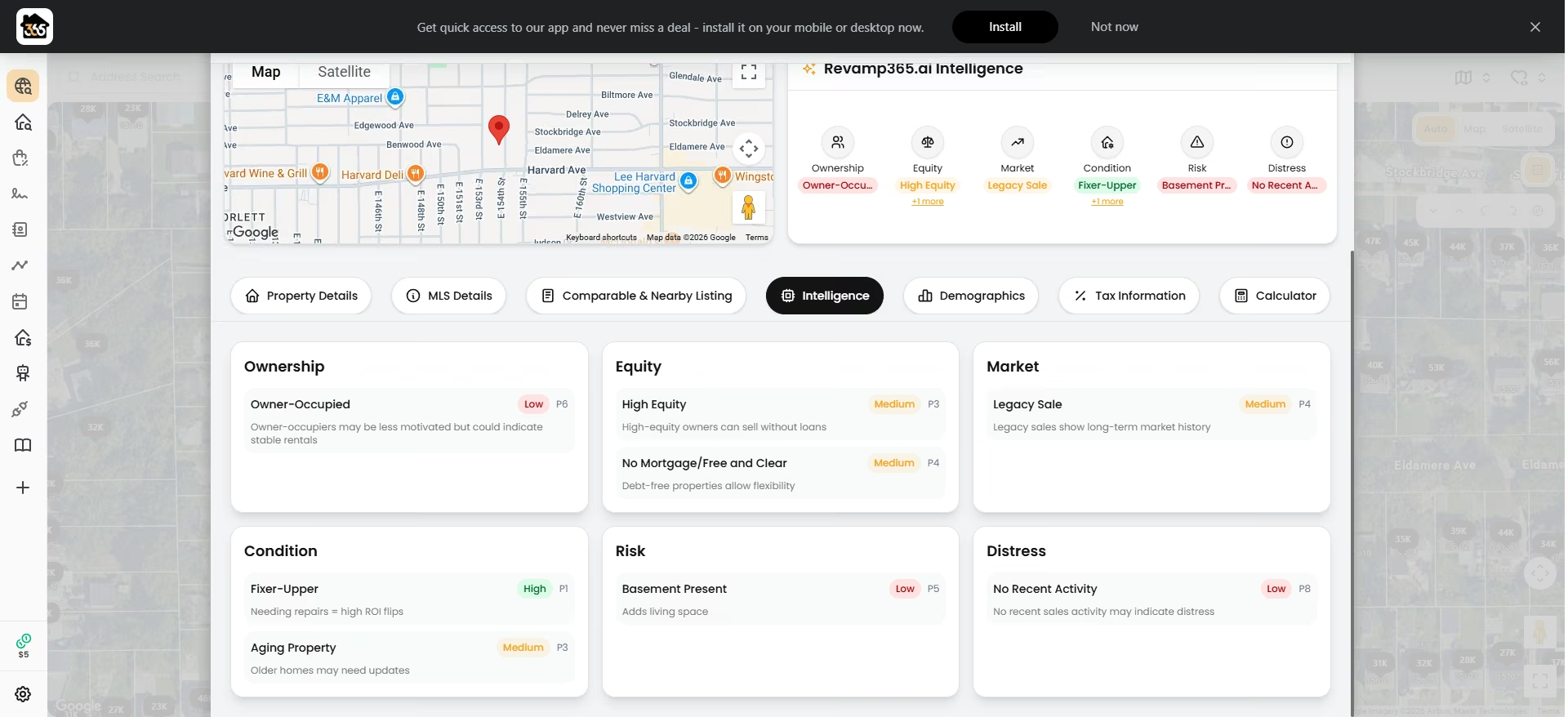
If you're using these tags to decide which sellers to contact first, here's the catch: every explanation read as a fixed, generic sentence tied to a single public-record fact.
"High Equity" just means the estimated equity is high relative to value, and the note attached to it would be identical on any property with that one flag, anywhere in the country.
The Intelligence tags are a quick way to sort through a large list of properties and decide which ones deserve a closer look. I just wouldn't treat them as evidence that one owner is significantly more motivated than another without doing additional research.
One feature that clearly uses generative AI is Revamp365's AI calling agent. Its AI Voice Agents can place outbound calls, hold conversations with property owners, and update the CRM with what they learn.

Revamp365's subprocessors documentation confirms that it uses AI providers including Anthropic Claude, OpenAI ChatGPT, and Google Gemini for AI-generated responses, summaries, and workflow outputs across enabled features.
Key Features
- Six-dimensional intelligence engine: Tags a property across Ownership, Equity, Market, Condition, Risk, and Distress with a priority ranking, tagged in-app as a 200+ variable analysis
- MLS Deal Finder and off-market search: Buy-box criteria matched against both listed and off-market inventory by county
- AI voice calling agent: Autonomous outbound calling with a natural-language script, qualifies sellers and logs call summaries automatically
- Deal Marketplace: Post a deal and get matched against a database of cash buyers automatically
Pros
- One login covers sourcing, comps, skip tracing, and outreach
- Transparent tech stack disclosure (OpenAI, Anthropic, MLS Direct, public records) listed on the homepage
- Intelligence tags, when populated, are easy to scan at a glance for a large lead list
Cons
- Intelligence tag explanations read as generic, single-fact templates rather than visible multi-variable analysis, don't treat them as a weighted ranking
- No independent reviews found on G2, Trustpilot, Capterra, or BiggerPockets, so there's no third-party track record to check the platform's claims against
What Users Say
No independent user reviews for Revamp365 were found on G2, Trustpilot, Capterra, or BiggerPockets at the time of writing. The platform's own site cites "1,200+ investors switched" to it, a company-reported figure; however, there’s no independent source to confirm their claims.
Pricing
Free to start, with $5 in credit and no card required. Pro+ is $197/month, or $164.17/year billed annually (about two months free), and Dealmaker Syndicate costs $1,000/month, plus an implementation fee. Revamp365 doesn't publish an annual rate for the Syndicate tier.
Bottom Line
Revamp365 impressed me more as an all-in-one platform for finding and managing investment opportunities than as an AI property analysis tool. The Intelligence Engine is useful for organizing and prioritizing properties.
Realastat
What it does: Uses AI to extract property details from listing screenshots, MLS sheets, and PDFs, then feeds those inputs into an underwriting engine that calculates cash flow, cap rate, DSCR, cash-on-cash return, and 10-year projections.
Best for: Investors who already have a property listing and want a fast first-pass analysis without manually entering every number into a spreadsheet.
Realastat's AI does the tedious part first: it reads a property document and turns the information into structured investment inputs. The underwriting calculations that follow are useful, but they are only as reliable as the numbers going into them.
I tested it with a Zillow listing screenshot for a Cleveland property. The output was detailed and looked like a complete investment report. Realastat correctly extracted the purchase price ($147,700) and basic property details, along with a 10-year projection and exit analysis.
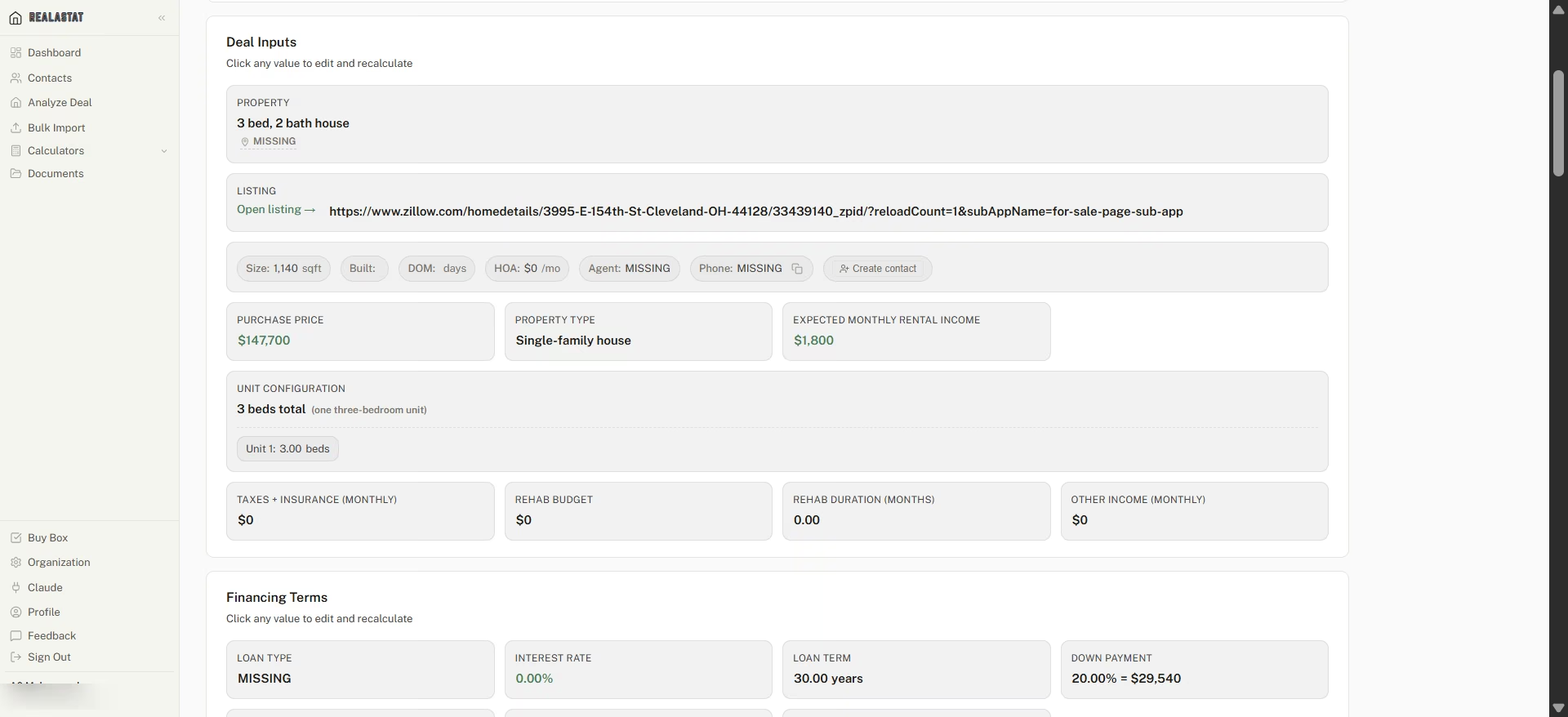
However, the listing did not include Zillow's Zestimate (its automated home value estimate) or a rental estimate because Zillow had no rent data available.
But rather than flagging that missing information, Realastat filled Expected Monthly Rental Income with $0, ran the analysis anyway, and threw red warnings on Monthly Cash Flow, Cash-on-Cash Return, and DSCR.
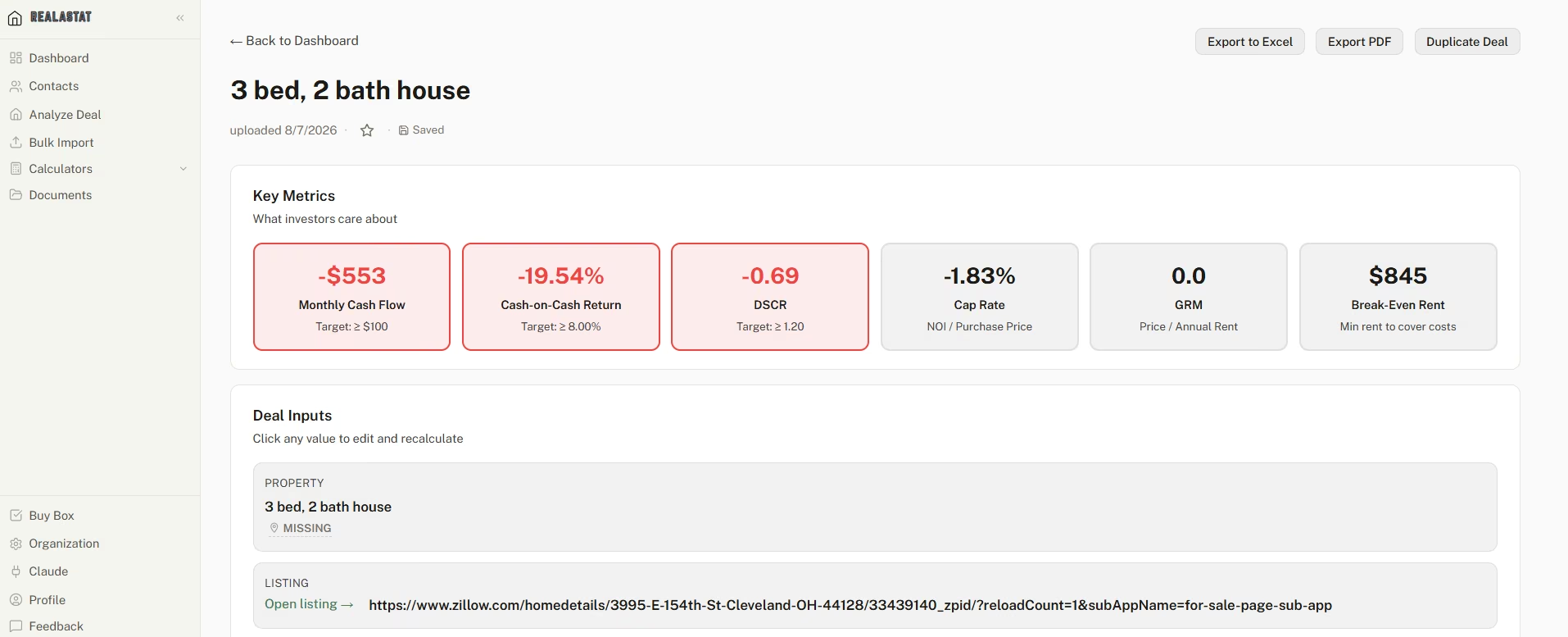
While Realastat calculated the numbers it had, I would have wanted the AI to recognize that a critical input was missing before passing the property to the underwriting engine. It could have flagged the missing rent estimate and asked me to provide one, or at least warned me that the analysis was running with $0 rental income.
Without that check, the red "fails target" results make the property look like a bad deal when the analysis is really telling me that it doesn't have enough information yet.
To test the underwriting itself, I added a realistic market rent estimate manually. The results updated immediately: monthly cash flow moved to +$626, cash-on-cash return increased to 22.11%, DSCR improved to 2.91, and the ROE field, which had been showing an error where a number should be, resolved to a clean 14.0% annualized ROE.
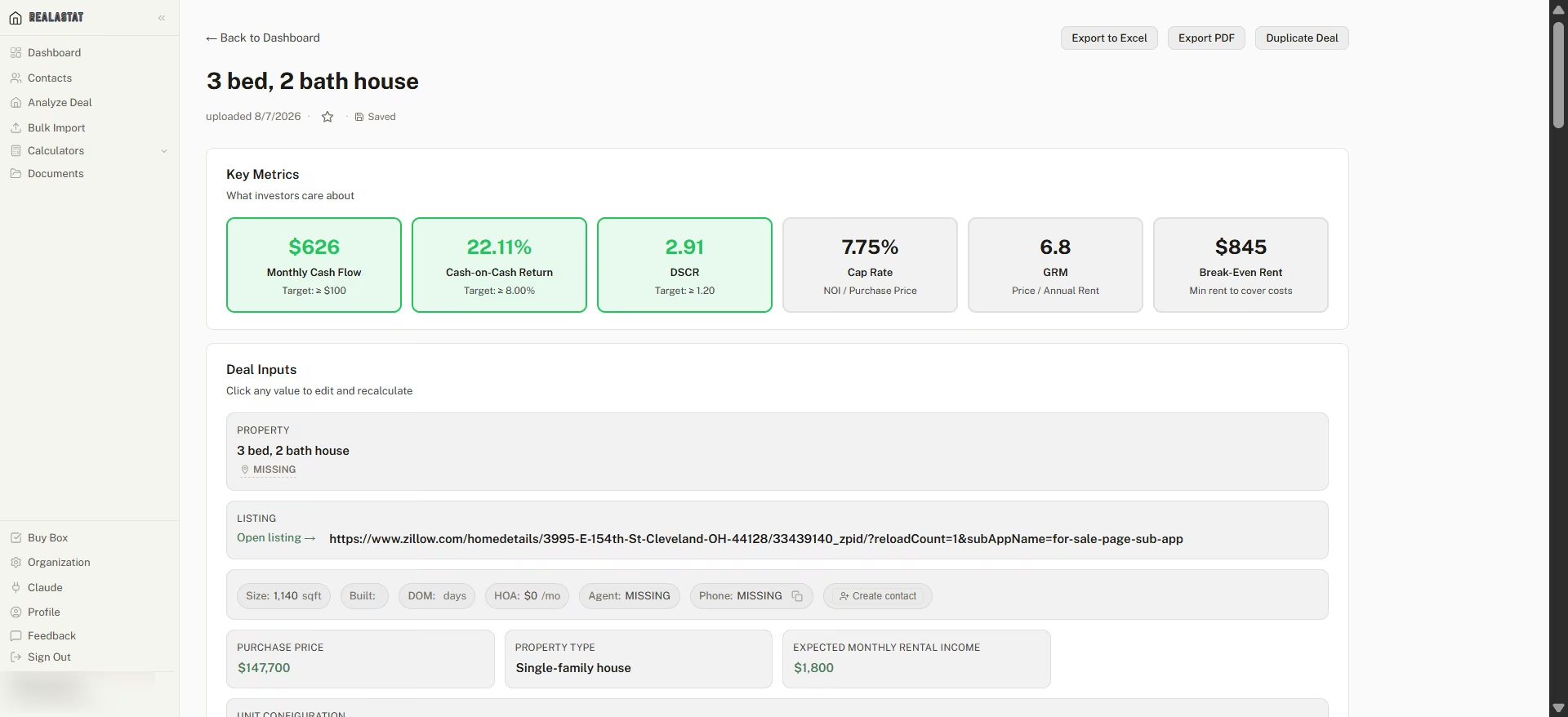
Realastat's math holds up once every input is real. The weak spot is the handoff from reading the document to running the underwriting.
Key Features
- Screenshot and PDF underwriting: Upload a listing image or document and get purchase price, specs, and a full deal analysis without manual data entry
- Editable Deal Inputs panel: Every extracted or assumed number (rent, taxes, financing terms, vacancy rate, closing costs) is click-to-edit and recalculates the full analysis live
- Max Offer Analysis: Calculates the maximum purchase price that would still hit a break-even cash flow target
- 10-year cash flow projection and exit analysis: Models rent growth, appreciation, equity buildup, and a full sale scenario with agent fees and remaining loan balance factored in
Pros
- Correctly extracted purchase price and property specs from a real listing screenshot in testing
- Every input is editable and the entire analysis recalculates instantly and accurately once corrected
- Free tier (3 analyses, no card) is enough to sanity-check a few real deals before deciding to pay
- Full export options make it easy to hand a finished analysis to someone else
Cons
- Missing inputs (rent, taxes, insurance) silently default to $0 and the tool still produces a complete, confidently-styled verdict rather than flagging the gap
- No independent reviews found on G2, Trustpilot, or Capterra at the time of writing, so there's no third-party track record to weigh its accuracy claims against
- Depends entirely on what the source listing includes. A listing with no Zestimate or rent estimate gives Realastat nothing to extract beyond price and specs
What Users Say
That's the same gap I ran into with Revamp365, and worth knowing before you treat any of its output as validated by outside users.
Pricing
Free to start with 3 analyses, no card required. Beyond the free tier, Realastat's $39/month Pro plan includes 250 analyses a month, and Team is $69 per seat a month; annual billing takes roughly 30% off.
Bottom Line
The extraction and math are genuinely solid once every input is real. Don't trust a red or green verdict at face value. Open the Deal Inputs panel first and check for any $0 sitting where a real number should be.
PropLab
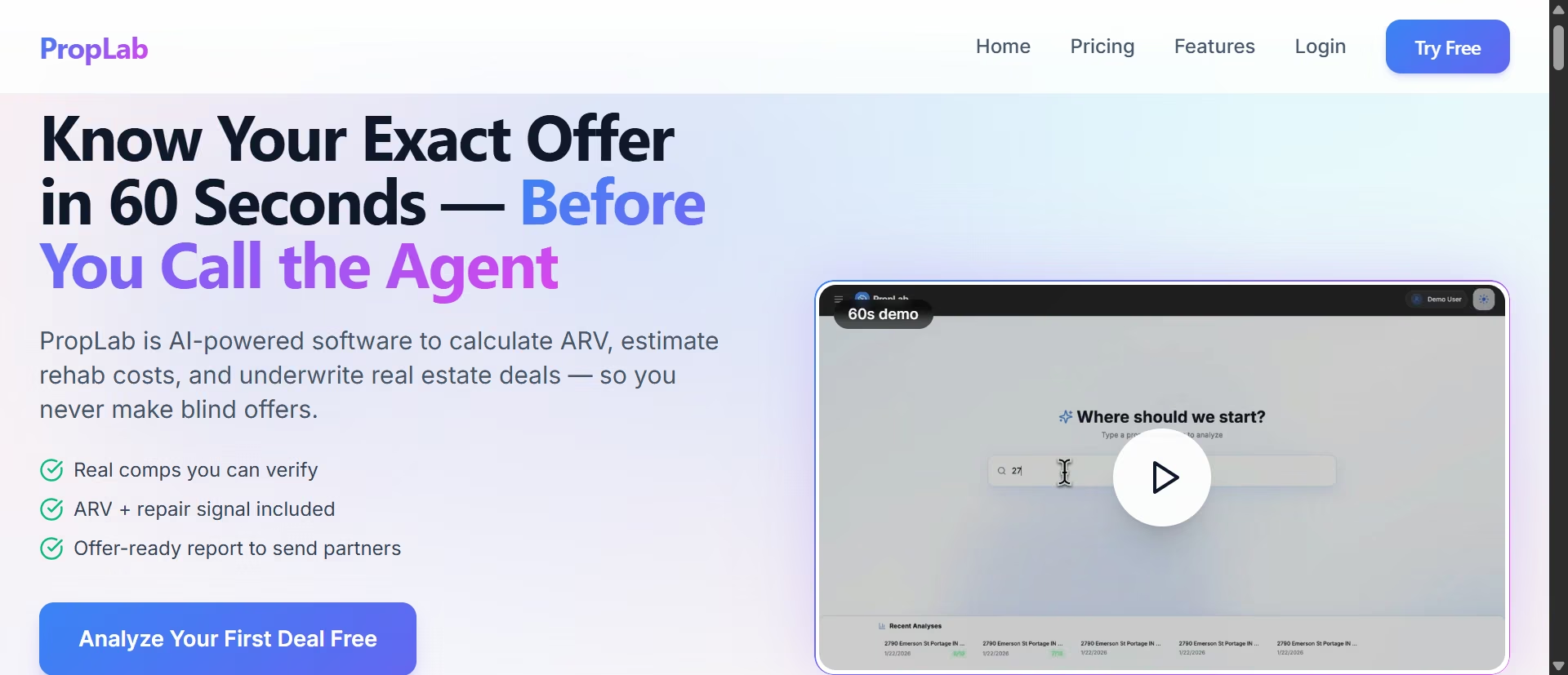
What it does: Upload a property address, and PropLab pulls property details, comparable sales, and estimated values before running an investment analysis using the rent and expense assumptions you provide.
Best for: Investors who want to quickly sanity-check a deal and prefer controlling the assumptions rather than relying on automatically generated estimates.
PropLab stood out in my testing for one reason: it made me confirm the numbers going into the analysis before giving me a verdict.
I searched the same Cleveland property I’ve been using and added a note in the Additional Instructions field:
"Use a monthly rent of $1,088 and annual property taxes of $2,257. Confirm what purchase price you're using before running the analysis."

I used the same rent and tax figures that PropStream's AI had applied earlier so the comparison would focus on how each tool handled the same assumptions.
Before showing any calculations, PropLab stated:
"Based on your provided figures of $1,088 monthly rent and $2,257 annual taxes at a purchase price of $147,700."
Showing its work up front is the whole reason PropLab earned a spot here.
The analysis that followed matched those inputs: Annual Gross Income of $13,056, Operating Expenses of $6,163, NOI of $6,893, Cap Rate of 4.67%, and ROI of 5.00%. PropLab also flagged the investment as "Below Market Average" and its AI Recommendation concluded that, at this rent level, the property produced negative cash flow and was a "No-Go."
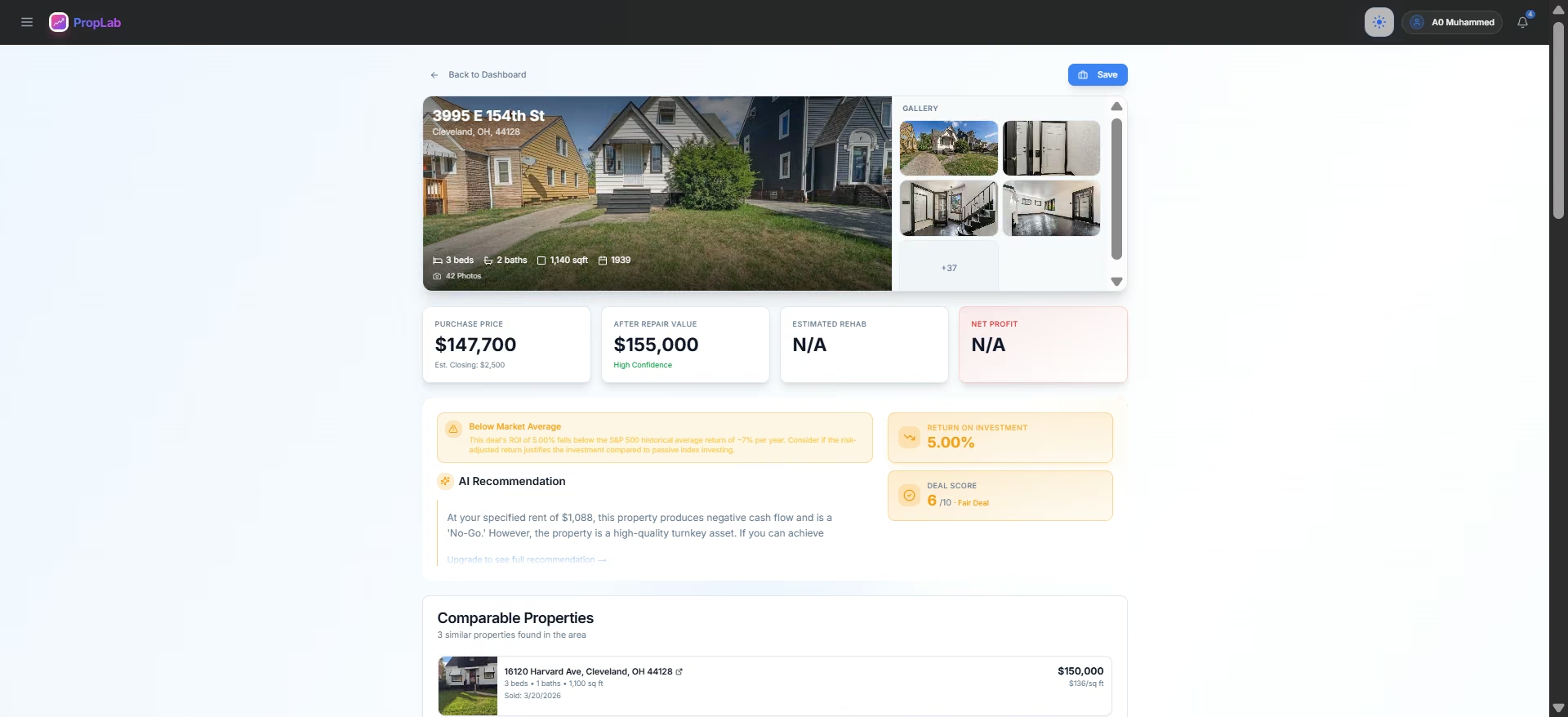
The takeaway is transparency: PropLab showed exactly why it reached its conclusion. Same property, same assumptions, but a clearer chain between the inputs and the recommendation.
Key Features
- Address-based underwriting: Searches a property directly and pulls purchase price, specs, and comps without requiring a manual screenshot upload
- Deal score and AI recommendation: A 1-10 score plus a plain-language go/no-go verdict tied directly to the numbers supplied
- Comp search radius control: Choice between a fixed custom radius or an adaptive search that expands until 50+ comparables are found
Pros
- Explicitly confirms the exact assumptions it used before presenting results, the strongest transparency behavior of any tool tested in this category
- Gave an honest "No-Go" recommendation on a deal that didn't actually work at the specified rent, rather than defaulting to an optimistic read
- The Additional Instructions field takes a real plain-English prompt and acts on it
Cons
- In testing, only one of the three comparable properties was visible before hitting a paywall
- AI chat for follow-up questions is fully locked on the free tier, zero free questions
- No independent reviews found on G2, Trustpilot, or Capterra at the time of writing
What Users Say
The company's own blog content includes an unverified, self-reported ARV accuracy claim, worth knowing before weighing it as validated performance.
Pricing
Free tier includes three analyses; no card required. Paid tiers: Basic $19.95/month (20 analyses), Plus $49.95/month (50 analyses), Pro $99/month (150 analyses, unlimited deal saving, contract generation, API access).
Bottom Line
PropLab is the tool I’d trust most for a quick sanity check because it makes its assumptions visible before giving you a verdict. If you’re an investor who would rather control the assumptions than blindly accept an AI-generated valuation, that transparency is important.
Running the Portfolio
Once a deal closes, the job shifts from finding and pricing to tracking and operating: the money side and the people side.
Baselane

What it does: Combines landlord banking, rent collection, and bookkeeping in one platform, with AI-powered transaction categorization available on its paid Smart plan.
Best for: Landlords who want their property finances, rent collection, and bookkeeping in one place and are willing to pay for automated categorization.
The feature I tested was Baselane's AI Auto-Tag Assistant, which promises to categorize transactions automatically into Schedule E tax categories. I then imported a CSV with 16 realistic landlord transactions, including rent deposits, mortgage payments, repairs, insurance, property taxes, and a few ambiguous expenses.
The import worked smoothly. Baselane automatically mapped the Date, Description, and Amount columns to the correct fields, so I didn't have to do any manual mapping. But the category and property row showed "Select category." There were no AI suggestions or automatic tags.
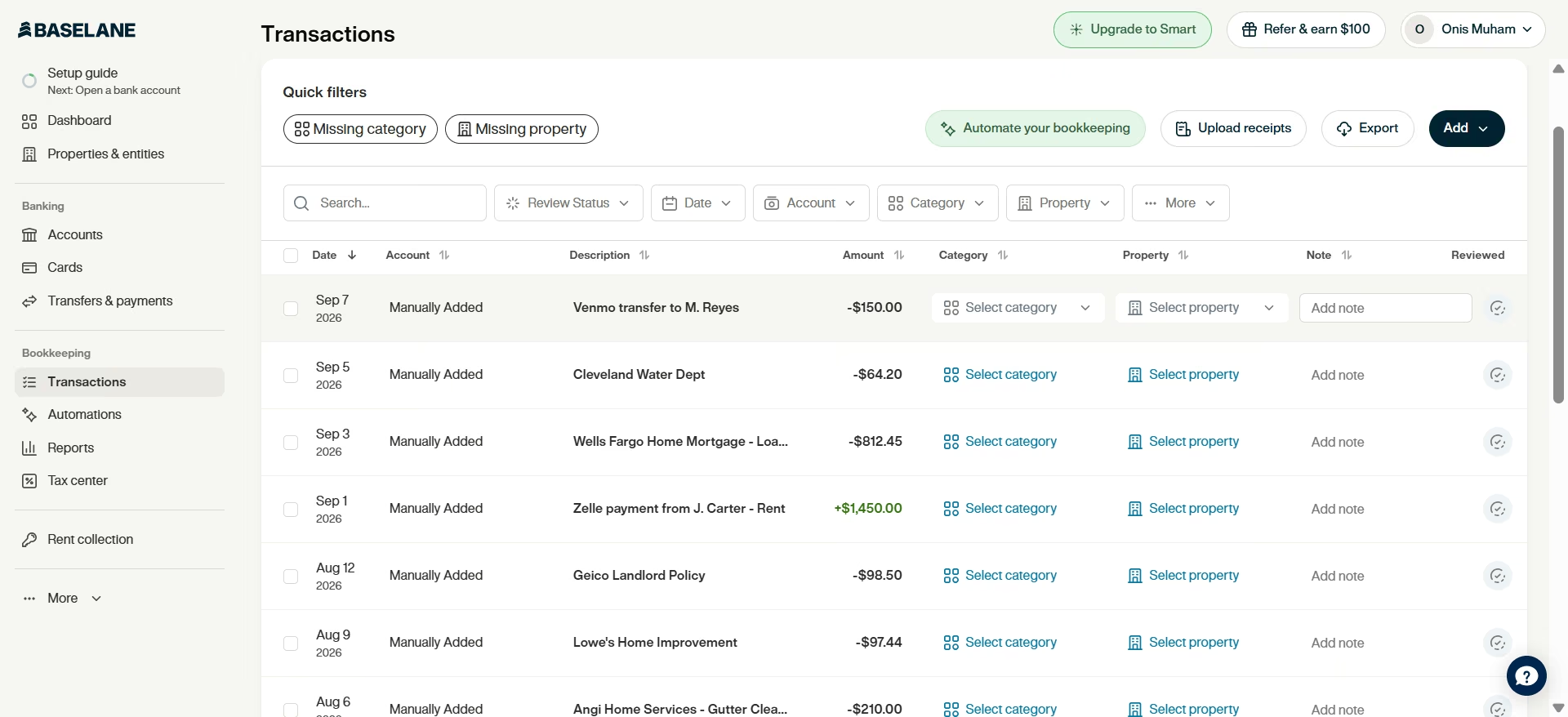
The reason became clear after checking Baselane's plan details: the Auto-Tag Assistant is not included in the free Core plan. It is a Smart-tier feature priced at $20/month.
So the free plan is a bookkeeping tool, not the AI bookkeeping tool the marketing suggests. Budget for Smart if categorization is why you're here.
The feature itself is useful. Categorizing expenses for multiple rental properties is tedious, and automating that process could save you significant time during tax season.
However, because the AI categorization feature is newer and limited to paid users, there is less long-term user feedback available on how accurately it handles real-world landlord expenses.
Key Features
- Auto-Tag Assistant (Smart tier only): AI categorization of transactions into 120+ categories, mapped to Schedule E lines, with a "Needs review" queue so you can confirm or correct each AI-applied tag
- Free banking and rent collection (Core tier): Unlimited checking and savings accounts per entity, no monthly fees or minimum balances, with rent payments syncing directly into the bookkeeping system
- Portfolio and property-level reporting: Income statements, cash flow, and tax packages, generated at both the individual property and full-portfolio level
- Advanced tagging rules (Smart tier): Manually defined rules that auto-assign category and property based on account, recipient, description, or amount, a rules-based alternative or supplement to the AI assistant
Pros
- Core banking and bookkeeping are free forever
- Unlimited entity-level accounts without needing a separate traditional bank relationship
- Reports are formatted to hand straight to your accountant
- The "Needs review" queue on the Smart tier keeps a human in the loop on every AI tag rather than applying changes silently
Cons
- The advertised AI categorization is not available on the free tier at all
- At least one Trustpilot reviewer reports friction opening additional entity accounts under an existing LLC, with repeated identity verification loops even when nothing about the entity changed
What Users Say
“This platform is really great for landlords. It allows you to open virtual bank accounts (both savings and checking) and virtual visa debit cards. It allows you to link your outside bank and credit cards so you can manage your transactions and books on their platform similar to quickbooks. They also pay interest on savings account. Highly recommend!” Jim S., Trustpilot

“Baselane closed my account without any information on why. They reserve the right to do so but it was exactly after we transferred our first months rent collection and reserves to the account. Now we have to wait for a check to be sent to us in 30-60 days.” Kerry Hermann, Trustpilot

Pricing
Core banking, rent collection, and reporting are free with no monthly fee or minimum balance. Baselane Smart, which adds the AI Auto-Tag Assistant, faster deposits, and advanced automation, runs $20/month, with a 30-day free trial available.
Bottom Line
The free banking and reporting alone justify moving off a spreadsheet. Don't sign up expecting the AI to do the categorizing for you unless you're on Smart. On the free tier you get the same "Select category" dropdown a plain bank account would give you.
Filling the Gaps
These two don't compete with anything above. They cover jobs none of the packaged tools quite do.
Claude

What it does: Analyzes documents, numbers, and written instructions, identifies inconsistencies, and explains its reasoning rather than simply returning a number.
Best for: Sanity-checking calculations from other real estate tools and reviewing leases, contracts, or other documents for issues worth a closer look.
After seeing AI real estate tools produce conflicting numbers, I wanted to see whether a general-purpose AI could catch problems in an analysis without being told where to look.
I gave Claude the discrepancy I had encountered earlier with PropStream, where it reported $47,639 in profit and a 69.69% margin on a flip. The analysis used a $50,000 purchase price, even though the property was currently listed for $147,700, and calculated total costs of $68,361.
I didn't tell it which number I suspected was wrong. I simply asked whether the analysis made sense.

It caught the purchase-price substitution immediately, pointing out that the $50,000 figure was likely an old sale price rather than the property's current acquisition cost. It also caught a second problem I hadn't asked about: the reported 69.69% "margin" was actually profit divided by cost, an ROI-style calculation, not a conventional profit margin.
Using the $147,700 purchase price, Claude recalculated the total cost at $166,061. Against the assumed $116,000 sale value, that turned the apparent $47,639 profit into a loss of roughly $50,000.
I then tested Claude on a real residential lease containing a deliberately tricky utility clause. The lease kept the water account in the landlord's name but required the tenant to reimburse the landlord for actual usage after receiving a copy of the quarterly bill. I asked who was ultimately responsible for the water bill.

Claude correctly separated the two responsibilities: the landlord remains responsible for the account, while the tenant bears the cost through reimbursement.
It also spotted three drafting gaps I hadn't asked it to look for: the lease didn't specify how the bill should be delivered, didn't state a late fee for overdue reimbursement, and didn't explain how to handle a dispute over the usage amount.
Claude won't find you a better valuation or fresh comps. What it does well is pressure-test the reasoning behind the numbers and documents you already have.
Key Features
- Document review: Reads and summarizes leases, purchase agreements, and rent rolls, flagging specific clauses and drafting gaps worth a second look
- Underwriting sanity-checks: Reasons through numbers you supply, catches unstated assumptions and mislabeled formulas rather than just restating the inputs
- Large context window: Can hold a full transaction file or lengthy document set in one conversation
- Research and drafting: Drafts partner or lender-facing deal summaries once you've got numbers you trust
Pros
- The free tier handles real document review and sanity checks
- Correctly parsed a deliberately ambiguous lease clause and flagged real drafting risk beyond the literal question asked
- Sits alongside every other tool in this article and adds a check on top
Cons
- Not a real estate data source. It has no live access to MLS or comps unless you supply them
- Numbers generated from general knowledge, rather than a supplied document or figure, should never be trusted as authoritative
- One G2 reviewer reported that it can fabricate content when asked to summarize a raw link rather than an uploaded document, a reminder to feed it source material directly rather than a URL
What Users Say
“What I like best is that I can actually get things done, not just chat. Give me a document, a messy question, or a task with several steps, and I can search, read files, write code, and build a real output. I also try to be honest, even when honesty means pointing out a mistake or disagreeing. And I remember context across a conversation, so I don't need everything repeated.” Anish R., G2

“One drawback is that Claude can sometimes be overly cautious or verbose when answering certain questions. There are situations where a more direct response would be helpful, but the explanation ends up being longer than necessary. I have also noticed that, like any AI tool, it can occasionally misunderstand context or provide information that needs to be double-checked, especially on more specialized topics.” Muzammil M., G2

Pricing
Free tier available, no card required. Claude Pro runs $20/month ($17/month billed annually). Claude Max scales to $100/month (5x Pro's usage) or $200/month (20x Pro's usage) for heavy daily use. Enterprise pricing is available separately.
Bottom Line
Use Claude as a second pair of eyes. Hand it the numbers, assumptions, or documents you already have and ask it to find what doesn't add up.
How to Test Any of These Before You Pay
For Mashvisor, search a precise address you already know the list price for, since neighborhood search alone won't unlock the analytics. Then ask MashGPT for the return on that property and check the price it used against the property page; a neighborhood estimate means the answer isn't about your house.
For PropStream, pull an address you've already comped by hand and ask PSI for cash flow without specifying a purchase price. See what it assumes, then check that assumption against the property's real list price before trusting the verdict.
For Revamp365, search for a real county you invest in rather than a demo market, and check whether AVM and ARV populate. Coverage varies by property; confirm it works where you invest before relying on it.
For Realastat, upload a real listing screenshot and check the Deal Inputs panel before reading the verdict. If rent or taxes show $0, fix them first; the recalculated result is the one worth trusting.
For PropLab, run one property you've already underwritten manually, and state your rent and tax figures explicitly in the Additional Instructions field. Confirm it restates your numbers back to you before showing a result.
For Baselane, import a small batch of real transactions and see what the free Core tier does with them. If categorization matters to you, confirm it's a Smart-tier feature before assuming it's included.
For Emergent, bring one small, specific problem, a single tracker or calculator, and write out the exact prompt beforehand. Note the credits it costs before deciding whether the free tier covers what you need.
For Claude, give it a real discrepancy you already have, two numbers that don't agree, and ask it to explain what's going on without telling it which one is wrong. That's a better test than asking it to generate a number from scratch.
Which AI Tool Should You Choose?
Most of these solve different problems, so the real decision is which stage of the job you need help with most, and how much you're willing to double-check before you trust a number.
Choose Mashvisor if you:
- Want to compare a property as a long-term rental against its Airbnb potential without running two separate calculators
- Don't fully trust MashGPT yet and are willing to double-check its price assumptions against the property page it's supposedly reading from
Choose PropStream if you:
- Want the deepest property data on this list and a fast AI first-pass read on a deal
- Are disciplined about supplying your own purchase price every time, since PSI will default to a stale one if you don't
Choose Revamp365 if you:
- Want one free login covering sourcing, comps, skip tracing, and outreach
- Are comfortable treating its Intelligence tags as a coarse first filter
Choose Realastat if you:
- Already have a listing screenshot and want underwriting without manual data entry
- Will check the Deal Inputs panel for a stray $0 before trusting the result
Choose PropLab if you:
- Want an underwriting tool that tells you exactly what numbers it used before showing a verdict
- Don't mind that rehab estimates, full comps, and AI chat sit behind a paywall
Choose Baselane if you:
- Want free landlord banking and bookkeeping and don't need AI categorization yet
- Are willing to pay $20/month for Auto-Tag once your transaction volume makes manual tagging painful
Choose Emergent if you:
- Have a workflow none of the packaged tools quite fit
- Can budget for credit cost. A single simple app burned nearly 80% of the free tier in testing
Choose Claude if you:
- Want a second opinion before trusting a number another tool gave you
- Need to review a lease or purchase agreement for a clause worth a second look
Skip this category entirely if: You're doing fewer than one or two deals a year. A spreadsheet, a good local agent, and a free MLS search will outperform any AI subscription on cost.
Final Verdict
None of these AI tools for real estate investors covers the whole job. For most residential investors, start with Revamp365 for sourcing and PropStream for the deepest comps and first-pass numbers, then run both through Claude before you act on either.
Add Baselane once you own more than a unit or two and are still tracking income by hand. The banking and bookkeeping cost nothing. AI categorization is the one piece that needs the $20/month Smart plan.
If you find yourself wishing one of these tools just worked a certain way, build exactly what you want with Emergent. I built a working, accurate comparison tool from a single prompt in six minutes. Sign up for free now and build yours, too.

Most AI app builders stop at prototypes. Emergent creates production-ready apps you can actually launch.
- Production-ready apps
- Web & mobile apps
- Deploy in minutes







