



TL;DR
Here's a breakdown of Budibase pricing across its five tiers:
| Plan | Price | Best For |
|---|---|---|
| Open Source (Self-Host) | Free | Technical teams who can host it and handle their own updates |
| Pro | $23/month ($19/month, billed annually) | Solo builders and small internal tools |
| Premium | $59/month ($49/month, billed annually) | Teams needing SSO, backups, and more actions |
| Business | $359/month ($299/month, billed annually) | Larger teams with heavy automation |
| Enterprise | Custom (contact sales) | Orgs needing audit logs, SCIM, and SLAs |
Budibase lists five tiers, some action counts, and a self-host option with "free" next to it. The real price of each one only shows up once you build on it, so that's exactly what I did.
I spent a week and a half finding out what the page doesn’t show. I built a test app, a content-request intake tracker inside Budibase, ran it across the tool’s plans, and stood up the self-hosted open-source version to see what building your own infrastructure actually means. Then I stress-tested the parts that pricing pages tend to smooth over.
Here is what I found, starting with what each plan actually costs before the rest of the math enters the picture.
Plans Breakdown
The Open Source, Pro, and Premium sections reflect what I encountered while building the intake tracker. The Business and Enterprise sections use the documented-limit modeling described above.
Open Source (Self-Host): Free
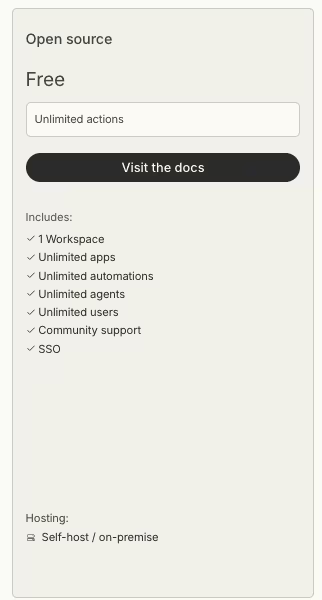
What's included: The full open-source app builder, unlimited apps, unlimited automations, unlimited users, one workspace, SSO, and community support, all running on your own server.
Best for: Technical teams or developers comfortable running their own infrastructure and handling its updates and patching.
When I set up and tested the self-hosted version, I found that SSO was included in the open-source tier.
Self-hosting still caps you at one workspace. Every app, automation, and user account lives there, while Premium and higher Cloud plans support multiple workspaces.
The current pricing page's "unlimited users" label does not show the earlier limit. Budibase's own November 2023 pricing update capped self-hosted free installs at 20 users.
Budibase later replaced the 20-user cap with the single-workspace limit. Its team announced on GitHub that restricting open-source installs to one workspace allowed it to remove the user cap, so the current version supports unlimited users within one workspace.
Setting up the self-hosted version required pulling the container, connecting it to a database, and setting environment variables before I could log in and build. Budibase did not automate those deployment steps.
Once it was running, the self-hosted version used the Cloud version's drag-and-drop designer and automation editor. I still had to patch and back up the infrastructure myself.
For a team that can run it, self-hosting has the lowest listed price in this comparison. You still handle hosting, updates, security, and backups, so the ongoing cost shifts to your team's time.
Self-hosted installs default to a 1-day log retention window, compared with 365 days on Enterprise, according to Budibase's plan comparison. You need to build your own solution for an audit trail longer than one day.
Pros: No usage metering, unlimited users, and complete control of your data.
Cons: You own all the hosting, maintenance, and security work.
Pro: $23/month ($19/month, billed annually)
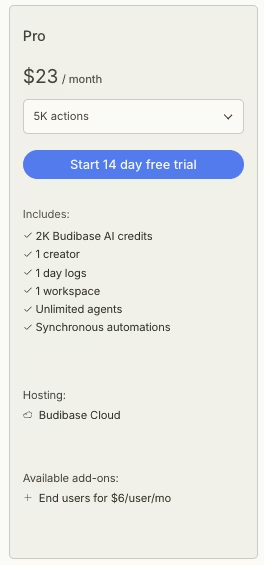
What's included: 5,000 automation actions per month (10,000 if billed annually), 2,000 Budibase AI credits, one creator, 50,000 database rows, one workspace, and a 14-day free trial.
Best for: A solo builder or a small, low-automation internal app.
Pro is where Budibase's metered model first bit me. I gave Budibase's builder a plain instruction:
"Build me an internal tracker where my team can submit content requests, set a status, and get notified when it changes."
It generated a working CRUD app fast, with a table for requests, a status field, and a submission form. I added an automation that fired a notification on every status change, then tested it the way an actual team would, updating a handful of rows to watch the notification land.
Also read our guide on how to generate a CRUD app with AI for a step-by-step walkthrough of the exact workflow Budibase handled here.
Then I pushed the automation on purpose by running it on a loop. Budibase gives every workspace an Account > Usage tab, where I watched the counter rise because triggers, individual steps in a multi-step automation, and scheduled runs all draw from the same monthly pool.
The 5,000-action limit (10,000 if billed annually) is a hard ceiling, and Budibase doesn’t warn you before you hit it or offer an overage option afterward. After I left the loop running for a few days, the Usage tab showed that most of the monthly allowance was already gone.
Pro includes exactly one creator seat. Pro's single creator seat can't be expanded; a second builder means upgrading to Premium. That limit makes Pro too restrictive for teams with more than one builder.
Pros: Cheap entry point, a full database included, and AI credits to start.
Cons: Looping or multi-step automations can consume the 5,000-action allowance (10,000 if billed annually) quickly, and the plan includes only one creator.
Premium: $59/month ($49/month, billed annually)
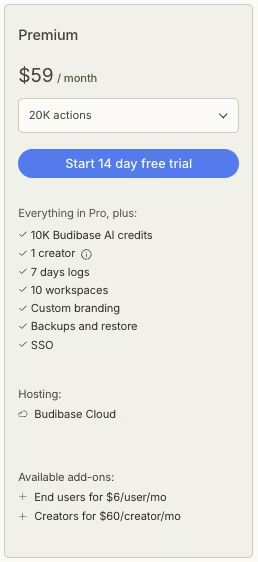
What's included: 20,000 actions per month (50,000 if billed annually), 10,000 AI credits, one creator, 250,000 database rows, 10 workspaces, custom branding, backups and restore, and SSO.
Best for: A team that needs SSO, more automation headroom, and room for more data.
Premium is the tier I would recommend for most small teams on Cloud. The action allowance rises from Pro's 5,000 (10,000 annually) to 20,000 per month (50,000 annually), and I ran my intake tracker for the rest of the test without monitoring the Usage counter as closely as I did on Pro.
I configured SSO by connecting Budibase to an identity provider and mapping two test accounts. After setup, both accounts logged in without a separate Budibase password.
Backups and restore were the second thing I tested directly. I triggered a manual backup, changed the intake tracker's schema, and restored from the earlier snapshot to confirm the data came back intact. It did, and having that safety net changed how comfortable I felt experimenting with schema changes on a build I cared about.
Premium also includes custom branding and 10 workspaces. My single app used one workspace, while teams running several apps can separate them across the higher limit.
Premium includes one creator. The true-cost section below explains how each additional builder or end user changes the total.
Pros: 20,000 monthly actions (50,000 if billed annually), SSO, and backups and restores.
Cons: One creator is included, and every additional builder requires a paid creator seat.
Business: $359/month ($299/month, billed annually)
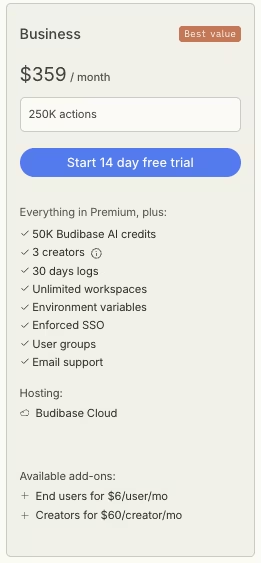
What's included: 250,000 actions per month, 50,000 AI credits, three creators, 500,000 database rows, unlimited workspaces, enforced SSO, user groups, environment variables, and email support.
Best for: Larger teams running heavy automation across several apps.
Business is based on Budibase's documented limits. Its three-creator allowance and automation volume sit well above the single-app pilot I ran, so this section reports the published specifications.
The plan raises the monthly action allowance to 250,000, and the included creator count to three. Enforced SSO and user groups give larger organizations centralized access controls.
A Premium team with two extra creators pays $59 plus $120 per month, still below Business at $359.
Business becomes relevant when the same team also needs the 250,000-action allowance, enforced SSO, or user groups.
It extends log retention beyond Pro's 1 day to 30 days. Enterprise extends it to 365 days.
The plan moves support from the community forum used by Pro and Premium to a named email queue with no guaranteed response time. At $359/month, the plan adds automation capacity and governance features. Enterprise adds priority routing and an SLA response commitment.
Business also adds environment variables. You can keep separate settings for a test version and a live version of an app, so each connects to the right data without pasting sensitive keys into the app itself.
Unlimited workspaces give teams additional space to separate their apps and workflows, compared with Premium's limit of 10.
Pros: 250,000 monthly actions, three creators, enforced SSO, and user groups.
Cons: The price rises from Premium's $59/month to $359/month, and Cloud automation remains capped.
Enterprise: Custom Pricing
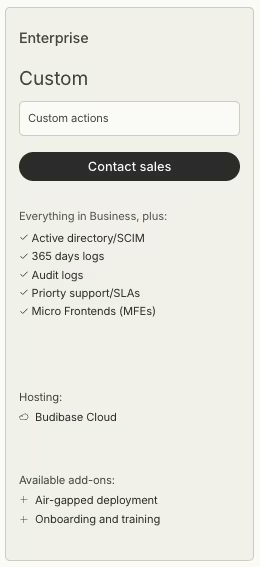
What's included: Everything in Business plus Active Directory and SCIM, 365-day log retention, audit logs, priority support with SLAs, and Micro Frontends (MFEs). Air-gapped self-host deployment is available as a separate add-on.
Best for: Regulated or large organizations with compliance and security requirements.
I did not test Enterprise because it is sales-gated and has no public number. The plan targets procurement and compliance needs such as audit logs, SCIM provisioning, and air-gapped hosting, with pricing set through a sales conversation.
Business caps actions at 250,000 per month and includes three creators. Enterprise sets action volume and creator counts through the contract. For a ten-person build team, that contract determines creator access and pricing.
Enterprise has no fixed monthly AI-credit cap, compared with Business's 50,000 credits, and it removes Business's 500,000-row database ceiling.
Only Enterprise offers Micro Frontends and access to an air-gapped deployment add-on. Air-gapped deployment runs Budibase without an internet connection, a requirement in some defense, healthcare, and finance environments.
Teams without those requirements may not gain enough from Enterprise to justify moving from Business's fixed $359/month to a negotiated contract.
Enterprise priority support includes a 2-business-day SLA response window, a dedicated account manager, and tailored onboarding. Business uses a shared email queue with no response-time commitment.
Pros: Audit logs, SCIM, 365-day log retention, and SLA-backed support.
Cons: No public pricing, and you have to talk to sales.
Which Budibase Plan Should You Choose?
The right Budibase plan depends on who's building, how much you automate, and whether you can host it yourself.
Choose Open Source (Self-Host) if you:
- Have someone who can run a server and handle its patching and backups.
- Want unlimited users and no metering, and will trade time for that.
Choose Pro if you:
- Are one person building a light in-house tool.
- Can keep automation runs under a few thousand a month.
Choose Premium if you:
- Run a small team that needs SSO and backups.
- Automate enough that Pro's 5,000 actions (10,000 if billed annually) feel tight.
Choose Business if you:
- Have three or more builders and heavy automation.
- Need user groups, enforced SSO, and environment variables.
Choose Enterprise if you:
- Answer to compliance, audit, or air-gapped requirements.
- Need SLAs and provisioning through Active Directory or SCIM.
Is Budibase Worth the Cost?
Budibase can be cost-effective when the plan matches your team size and automation volume. The built-in database is included, and self-hosting removes platform usage fees. On Cloud, add-on seats increase the bill, and automation volume determines the required tier.
Where Budibase's True Costs Add Up
Budibase's total cost depends on its automation limits, per-seat add-ons, and the infrastructure required for self-hosting.
Automation volume can force a plan upgrade. Pro includes 5,000 actions per month (10,000 if billed annually), Premium 20,000 (50,000 if billed annually), and Business 250,000. When I looped the status-change notification, I watched Pro's allowance drop quickly, showing how a busy app with multi-step automations can reach a hard cap with no paid overage option.
Pro and Premium include one creator, Business includes three, and Enterprise uses a negotiated creator count. Each creator beyond the included number on the Premium and Business plans costs $60/creator/month ($50/creator/month, billed annually), while extra end users cost $6/user/month ($5/user/month, billed annually).
A four-builder Premium team pays for the base plan plus three creator add-ons.
Self-hosting removes Budibase's action cap and creator fees and supports unlimited users without a Budibase subscription charge. Your team still pays for and manages hosting, updates, security, and backups, so the total shifts from software fees to infrastructure and staff time.
Budibase is worth it if you:
- Have a clear, bounded team size and predictable automation volume.
- Value the built-in database and want Budibase to handle hosting.
Skip Budibase if you:
- Need many builders on a budget and can't self-host.
- Run automation-heavy apps that would repeatedly hit the monthly action caps.
Budibase Alternatives & Pricing Comparison
Once you've hit an action cap or run the add-on math, see how the Budibase alternatives price out. The starting prices below are for each tool's cheapest paid plan.
| Tool | Starting Price | Best For |
|---|---|---|
| Budibase | $23/month ($19/month, billed annually) | Internal tools with a built-in database or self-hosting |
| Emergent | $20/month ($17/month, billed annually) | Custom apps generated from a description |
| Retool | $12/month ($10/month, billed annually) | Developer-heavy tools priced per builder |
Emergent vs Budibase: Which Should You Choose?
These two solve overlapping problems with different pricing logic. Budibase meters automation actions and charges per creator on Cloud, while its self-hosted version removes those platform fees and leaves hosting and upkeep to your team.
Emergent runs on a credit model, starting at $20/month ($17/month, billed annually) for its Standard plan, with hosting managed for you.
In my Budibase test, I spent time tracking action usage and deciding whether self-hosting justified the maintenance work. Those checks added work beyond building the app.
Emergent is better for: Teams who'd rather describe and get a custom business app built around exactly what they asked for.
Budibase is better for: Teams who want a built-in database, 15+ data source connectors, or the ability to self-host for free and keep full control.
Use both if: You self-host a stable ops app on Budibase and use Emergent for a separate idea that needs a generated custom app.
Want to see the difference yourself? You can try Emergent free before you commit to either tools.
When Emergent Makes More Sense
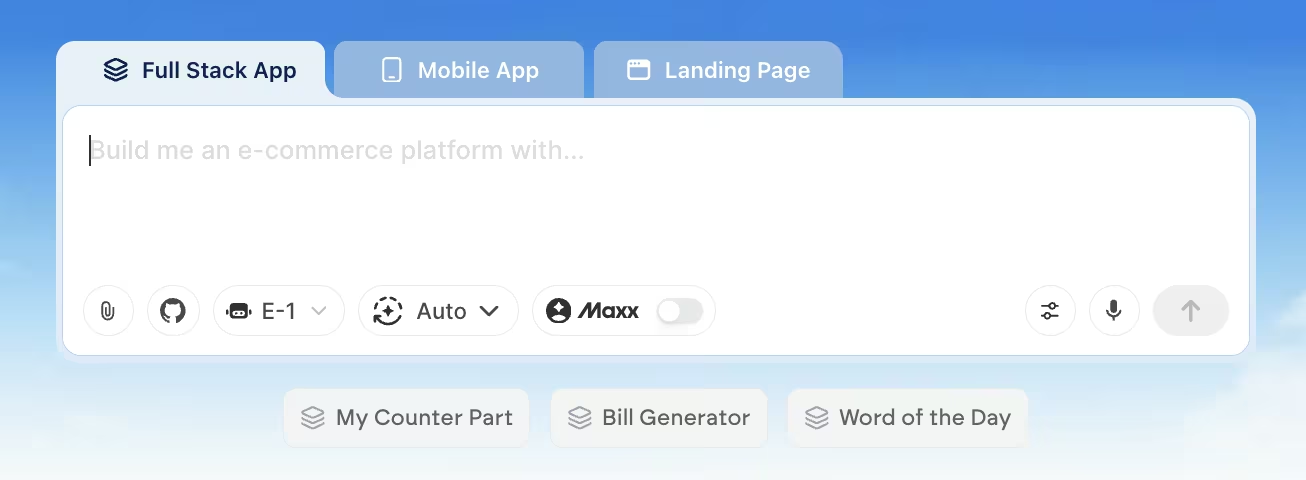
Emergent becomes the better option once an internal app outgrows Budibase's included creator count or approaches its automation cap. Budibase's free self-hosted option avoids those limits, but it requires your team to run its own server.
Emergent addresses that pricing problem by building the internal tool you describe, including its database, logins, and application logic, with hosting included. Instead of per-creator seats and Budibase's per-action caps, Emergent uses a monthly credit allowance, with hosting included in the plan. You can also start the build from Claude or ChatGPT through Emergent's MCP Connector.
Budibase still fits teams that want its self-hosted option and direct control over their data. Teams concerned about metered actions or added seat fees can use Emergent to build a hosted internal app without those two charges.
My Bottom Line on Budibase Pricing
Whichever tool you land on, the Budibase math itself is straightforward once you know the two levers. After a week and a half of testing Cloud and self-hosted Budibase, I found that automation volume determined the Cloud tier I needed. Creator count then changed the monthly total through included seats and add-ons.
If you can self-host, the open-source version offers the lowest listed cost as long as you include hosting and maintenance time in the calculation. Cloud teams should choose a plan based on expected action volume, then add any creator and end-user fees to the base price.

Most AI app builders stop at prototypes. Emergent creates production-ready apps you can actually launch.
- Production-ready apps
- Web & mobile apps
- Deploy in minutes







