




Every ecommerce pricing page tells you a different number, and figuring out your real ecommerce website cost from any single one of them is nearly impossible. A $20 subscription, a cut of every sale, and an hourly agency rate you won't see until the invoice arrives can all describe what sounds like the same store.
None of them measure the same thing, and the page rarely says which.
I spent two weeks finding out where the real number lands. I built a working store, Fieldnote Leather, on an AI website builder to see if it could handle real inventory logic (sizes, colors, a hold on the last unit in stock, a discount code that should only ever fire once per customer).
Then I checked live prices on Shopify, Wix, BigCommerce, and WooCommerce myself, and pulled one industry benchmark for what a custom developer or agency build typically runs.
By the end, you'll know what each build route (AI builder, SaaS subscription, self-hosted WordPress, or custom developer) costs once the plan page stops telling the whole story, and which one fits what you're building.
Ecommerce Website Cost by Build Route: At a Glance
This piece zeroes in on ecommerce specifically. If you want the same breakdown for a website that isn't a store, I priced building a website by every route.
The routes below range from online website builders with fixed plan pricing to fully custom, scoped agency work.
How the four routes compare:
Ecommerce Website Cost by Build Route, Breakdown
DIY / AI Website Builder (Emergent)
I built Fieldnote Leather, a small test store for handmade leather goods, on Emergent's dedicated ecommerce builder. I wanted to see what an AI-built store costs once inventory logic gets involved.
Building Fieldnote Leather
Sized to fit inside a two-week testing window, the catalog was small on purpose, with a Weekender Tote, a Slim Bifold Wallet, and a Two-Loop Belt.
I wrote the brief the way a first-time store owner would, spelling out every rule I wanted enforced. Here's the exact prompt I used:
"Build me a small online store called Fieldnote Leather that sells three handmade leather goods: a Weekender Tote, a Slim Bifold Wallet, and a Two-Loop Belt. The tote and wallet each come in two colors, cognac and black. The belt comes in cognac and black too, plus three sizes: small, medium, and large, and the price should go up by four dollars for each size step above the base price of thirty-eight dollars.
Every product needs its own photo, a short description, and a live inventory count for each color and size combination. When someone adds an item to their cart, hold that unit for them until checkout finishes or the hold expires, so two customers can never both buy the last belt in a size that only has one left. Calculate sales tax by the shipping state and shipping cost by order weight, and show the same estimated total on the cart page and the final checkout page; they should never disagree.
Add a discount code, FIRSTORDER, worth fifteen percent off, but only on a customer's first order ever, and block it from applying again if that same customer checks out a second time. When it's done, I need to be able to export every order, customer name, items purchased, and totals, as a CSV file, and I should be the only login the store needs for now."
That work added up to 31 minutes of hands-on prompting time total, split across three passes. Here's how each pass broke down:
- Pass one (15 credits): Got the catalog, cart, and checkout flow running, but missed one thing. The inventory hold on the belt's last size-medium unit didn't lock, so two open browser tabs could both reach checkout with the same one-of-a-kind item. I caught it by opening two tabs myself and racing them to checkout.
- Pass two (19 credits): Named the hold requirement explicitly and fixed it.
- Pass three (23 credits): Tightened the discount code exception and the CSV export.
Here's the store that Emergent built:

All told, that's 57 credits, a little over half of what the Standard plan hands you in a month. That tells you this build asked for more than a landing page.
On Emergent, preview and production always run on separate databases, starting from the first deploy. Your test store and your live store never share the same data. A redeploy updates the code while keeping everything already in production, but preview data doesn't automatically migrate to production.
I only deployed Fieldnote Leather once, so it never bit me here.
For a first storefront, an AI ecommerce website builder can be the fastest route from a detailed brief to something you can stress-test, and Emergent took 31 minutes of prompting to get there. That speed let me focus on proving out the inventory and checkout logic instead of the build itself.
It's not the right tool yet for a catalog running into the hundreds of stock-keeping units (SKUs) across multiple warehouses, and I wouldn't pretend otherwise.
Emergent Pricing and Plans
What's included:
- Free: $0/month, with a 10-credit monthly allotment, enough to test the basics.
- Standard: $20/month ($17/month, billed annually), the plan this build ran on, with a 100-credit monthly allotment.
- Pro: $200/month ($167/month, billed annually), with a 750-credit monthly allotment, a 1M-token context window, and custom AI agents for bigger builds.
- Business: No public price; contact sales. Includes role-based access control, single sign-on, shared team workspaces, and real-time co-editing.
- Enterprise: No public price; contact sales. Includes user-level credit limits, audit logs, self-hosted database support, and priority SLA.
Hosting a live build costs a further 50 credits a month, per deployed app, drawn from whichever paid plan you're on, on top of whatever the build itself costs. This test build didn't draw on it, since I never kept Fieldnote Leather hosted live past testing, but an ongoing store should budget for both draws against the same allotment.
Best for: A small, new catalog that needs inventory and checkout logic proven fast, before you spend platform-subscription or agency money.
Pros:
- Goes from a written brief to a working checkout flow in 31 minutes of hands-on prompting.
- Ships with a working database and inventory logic already wired in, ready to run without a rebuild.
- Exports every order, customer, and total as a CSV whenever you need it.
- Every credit spent shows up in the build log, so you watch the cost tick up as it happens, without guessing at it later.
Cons:
- Your test data doesn't follow you to the live store, so a catalog that changes often needs a plan for keeping the two in sync.
- The Free plan offers no way to go live at all, so an ongoing store needs at least the Standard plan.
- Standard and Pro support one login, so a second team member means sharing that account.
SaaS Platform Subscription (Shopify, Wix, BigCommerce)
A SaaS platform subscription puts the store, the hosting, and the security under one company's roof. You pay monthly for that.
Shopify
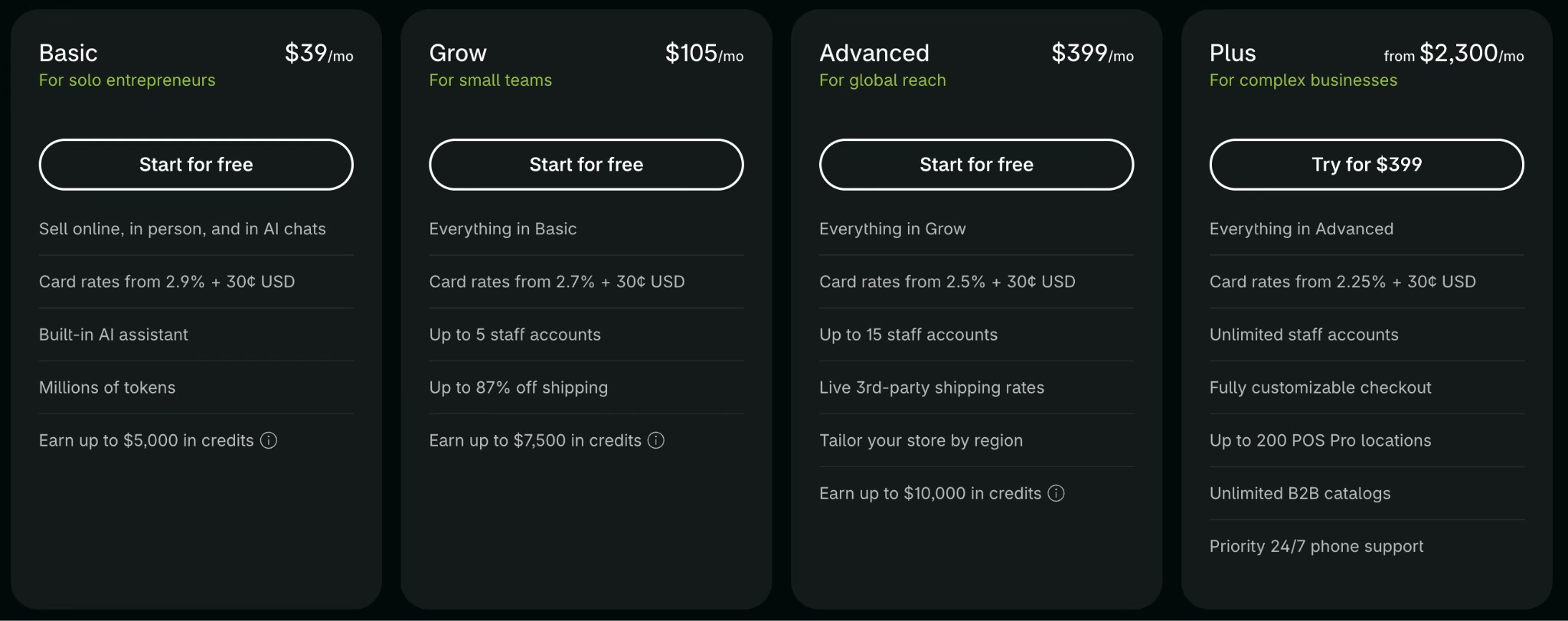
Shopify is one of the largest ecommerce platforms. Its Basic plan runs $39/month ($29/month, billed annually), with card processing starting at 2.9% plus 30 cents a transaction.
Grow costs $105/month ($79/month, billed annually) and drops card rates to 2.7% plus 30 cents. Advanced runs $399/month ($299/month, billed annually), with rates down to 2.5% plus 30 cents.
Shopify also sells an Agentic plan at $0/month, pay-per-sale, aimed at selling through AI shopping channels, separate from running your own storefront.
Shopify Plus starts at $2,300 a month on a three-year term. That's an enterprise-level jump, built for stores doing enough revenue that a lower processing rate and negotiated terms outweigh the higher subscription. Card rates for Plus start at 2.25% plus 30 cents, a step down from Advanced's 2.5%.
Wix
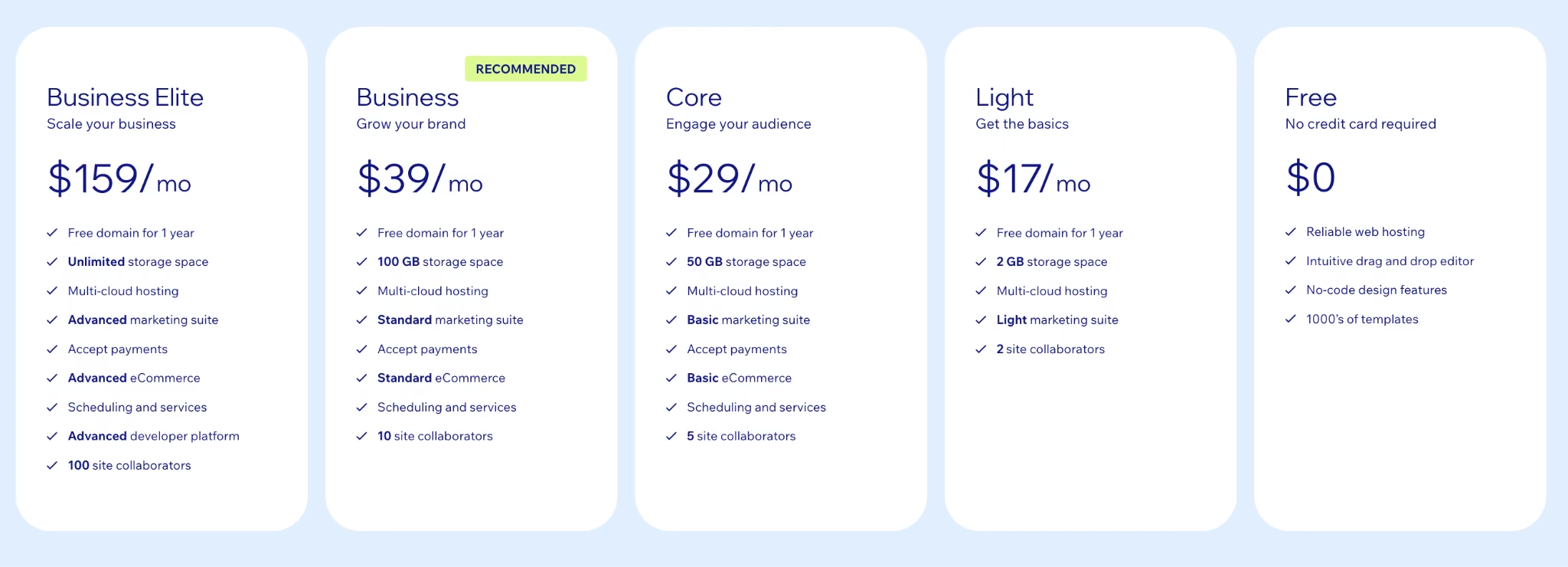
Wix's free plan doesn't support selling at all.
Its Core plan, the cheapest ecommerce-capable tier, runs $29/month, billed annually. The pricing page only displays annual figures, but Wix does offer month-to-month billing at checkout, without the free-domain voucher yearly plans include.
Business runs $39/month billed annually, and Business Elite runs $159/month billed annually. Wix Payments charges 2.9% plus 30 cents per transaction, the same rate as Shopify Basic.
BigCommerce
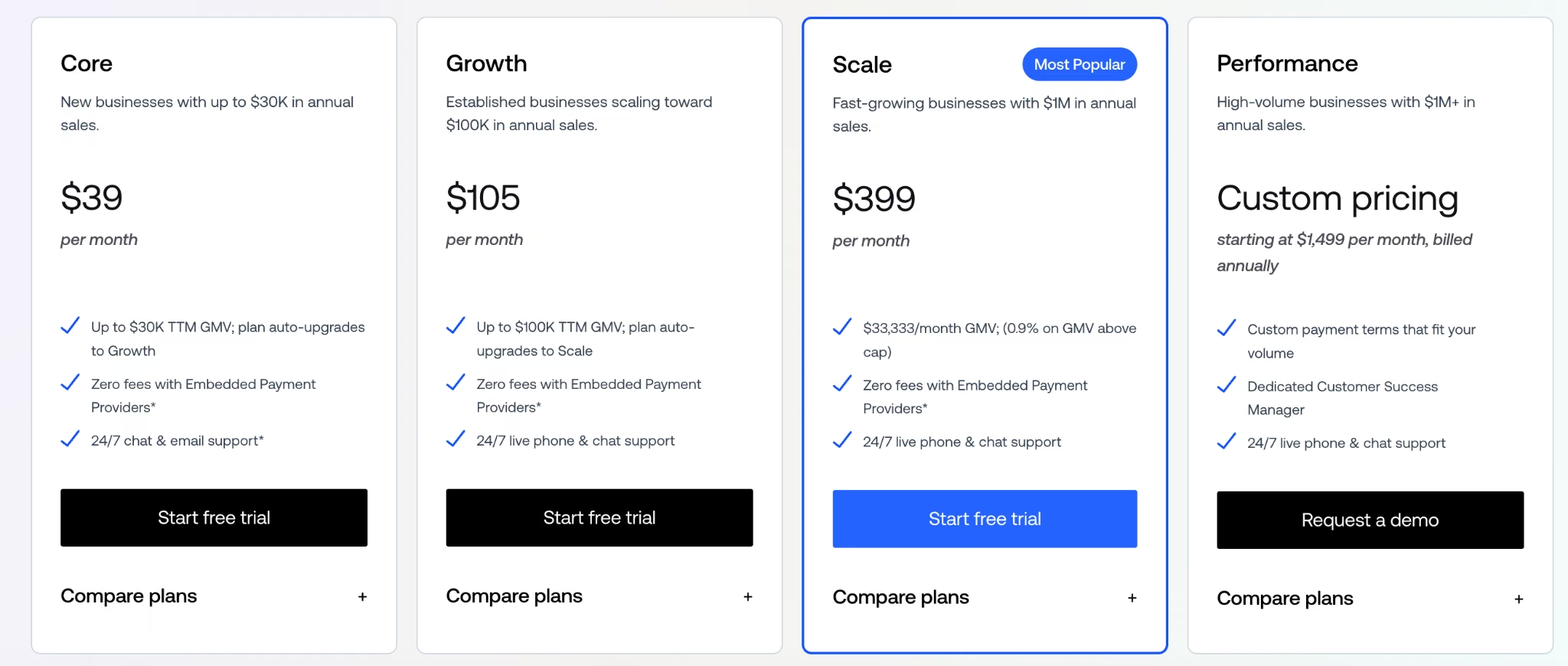
BigCommerce's Core plan runs $39/month ($29/month, billed annually), capped at $30,000 in trailing 12-month GMV. Cross that cap, and you're pushed to Growth at $105/month ($79/month, billed annually), which raises the GMV ceiling to $100,000.
Scale runs $399/month ($299/month, billed annually) and switches the cap to a monthly measure: $33,333 in GMV per month, with a 0.9% overage fee above that.
Performance starts at $1,499/month, billed annually, for the highest-volume stores. Card processing runs from 2.89% plus 29 cents.
Between the three, plan limits usually count more than the sticker price does. BigCommerce's caps force an upgrade based on GMV alone, regardless of how simple the store stays.
Shopify's app ecosystem is the deepest of the three, so it tends to win once you need a specific integration. Wix's templates make it the strongest starting point for a design-first store with a small catalog.
What's included: Hosting, security, and uptime handled by the platform, plus a theme and app marketplace, built-in checkout and payment processing, and standard ecommerce tooling (product catalog, cart, discounts) on the ecommerce-capable plans compared here. The ceiling on staff accounts, B2B catalogs, and shipping-rate options rises with the plan you pick.
Best for: An established brand that wants hosting, security, and a big app store handled by someone else.
Pros:
- Hosting, server-level security, and uptime stay off your plate entirely, freeing you to focus on the store, though compliance and fraud prevention remain the owner's job.
- A deep library of themes and add-ons covers reviews, search, and email without custom work.
- Plans scale up as revenue grows, so you're not rebuilding the store to add capacity.
Cons:
- The advertised plan price is only the floor once paid apps for reviews, search, and email start pushing the real bill higher.
- Payment processing fees rise with transaction volume, so a small-looking percentage adds up fast at scale.
- BigCommerce's tiers are capped by GMV as well as features, so growth alone can force an upgrade you didn't plan for.
Self-Hosted WordPress + WooCommerce
WooCommerce's core plugin has no license fee, platform fee, or revenue share, a structural difference that sits at the center of the WooCommerce vs Shopify comparison. Real costs still show up in hosting and extensions.
Add it up, and a WooCommerce store costs:
- Domain: $10 to $20 a year for a standard .com, more for shorter or newer extensions like .io or .co, and a separate purchase from hosting.
- Hosting: $25 to $350 a month, depending on the host and the traffic you expect. That cost isn't optional, since WooCommerce is only a plugin and hosting is a separate purchase you still have to make.
- Extensions: $29 to $299 annually each for genuine functionality like advanced shipping rules or subscription billing, and using more than one raises the total accordingly.
- Payment processing: WooPayments runs about 2.50% to 2.90% plus 30 cents a transaction, in the same range as the SaaS platforms above.
With four paid extensions, that's $35 to $450 a month before you've sold a single item, all for a platform whose own homepage advertises itself as free.
What's included: The free WooCommerce core plugin (product catalog, cart, and checkout logic), plus whatever hosting, paid extensions, and payment gateway you choose and connect yourself. None of those three come bundled with the plugin.
Best for: Store owners who want full control over the code and the data, and don't mind managing hosting and security themselves.
Pros:
- No platform fee or revenue share on any sale, ever, so a strong sales month never raises what you owe the platform itself.
- Full control over the code, the design, and every piece of data the store collects.
- A library of extensions covers shipping rules, subscription billing, and other features a SaaS platform would otherwise gate behind a higher tier.
Cons:
- Hosting is self-selected and variable, so a bad choice can cost more than a SaaS subscription would have.
- Extensions are a la carte, and the costs add up the same way SaaS apps do.
- Security, maintenance, patches, backups, and uptime all become the store owner's job.
Custom Developer or Agency Build
Custom developer and agency pricing is usually scoped to the project, which makes direct budgeting harder than it is for routes with fixed plan pricing.
One industry benchmark puts the typical range at $5,000 to $50,000 for most ecommerce builds, with a typical timeline of eight to 28 weeks.
Agency quotes for custom work run higher than that headline figure. Wix puts a custom or agency-built store at $5,000 to $25,000 or more, and OuterBox prices an established retailer's custom-template build at $25,000 to $150,000, short of enterprise scale.
A highly custom, enterprise-scale build can run well beyond that. GoodFirms' broader survey puts enterprise-level web projects as high as $200,000 to $500,000. Enterprise resource planning (ERP) integrations, multi-warehouse inventory, or advanced security requirements are usually what pushes a project into that range.
Hourly rates break down by location:
- $50 to $100 an hour in the US, UK, or Canada
- $100 to $150 an hour in Australia
That spread helps explain why two agencies can quote wildly different totals for what looks like the same project on paper. The hourly rate and the hours estimated both vary, and neither is visible from outside the quote.
Getting one quote isn't enough to know the real number. The gap between the cheapest and most expensive bid for a similar-looking build often comes down to how clearly the scope was defined going in.
What's included: The full engagement, requirements gathering, design, development, and testing, built around your catalog and workflow from day one. Ongoing site management can be folded into the same agreement, on terms that vary by agency.
Best for: A large or highly custom catalog that no off-the-shelf platform can handle cleanly.
Pros:
- It's the route built entirely around your exact requirements, with no platform limitations to design around.
- Ongoing site management can be included in the initial contract, so support may not require a separate subscription.
Cons:
- Pricing is scoped per project, so every quote takes time to gather and compare.
- The typical eight-to-28 week timeline requires a much longer planning window than the smaller SaaS or AI-builder projects described here.
- A vague scope can raise the quote before a single line of work starts.
AI builders price on usage rather than a monthly plan, which changes the math. Our best AI ecommerce website builders guide covers that route.
Why the Advertised Price Is Rarely the Real Price
Most routes in this piece show a headline figure, but that figure can leave out apps, processing, hosting, or extensions.
A custom build is quoted from its scope instead.
- The extension math: WooCommerce's own extensions run $29 to $299 annually each (the same figures behind the $35-to-$450-a-month range above). Each one renews on its own date, so the bill doesn't land as one predictable number. It shows up in pieces throughout the year.
- The processing math: Payment fees scale with sales volume, so a 2.9% card fee that looks small on a $50 order reaches $1,450 every month on $50,000 in monthly sales. That cost doesn't show up anywhere near the plan price you compared when you picked a platform.
- The term-length math: Shopify Plus starts at $2,300 a month, but only on a three-year commitment. The plan page shows the monthly figure; the three-year total is left for you to calculate. A shorter commitment quotes higher still.
- The dispute math: A customer chargeback costs $15 the moment it's filed, on top of the sale you're now refunding. It's a per-incident cost that never shows up until it happens.
For a high-volume store, a higher subscription can cost less overall than staying on a cheaper plan and paying a higher percentage on every sale. For a store that isn't there yet, it's a bigger bill for the same problem.
A monthly plan price is rarely the whole answer. Budgeting off that number alone is how a $39 plan turns into a few hundred dollars a month, without anyone deciding it should.
Which Build Route Should You Choose?
A three-product test store and a 500-SKU warehouse operation don't belong on the same route. Match yours against these four.
Choose DIY/AI Website Builder if you:
- Want a working store live in days, to test whether the product sells before spending more.
- Have a small catalog, under a few dozen products, and don't need multi-warehouse inventory yet.
- Are comfortable being the only login the store needs, at least for now.
Choose SaaS Platform Subscription if you:
- Want hosting, security, and uptime handled by someone else.
- Plan to lean on paid add-ons for features you'd otherwise have to build yourself.
- Expect steady, predictable revenue that can absorb a rising monthly bill as apps and fees accumulate.
Choose Self-Hosted WordPress + WooCommerce if you:
- Want to own the code and the data outright, and are ready to handle hosting and security on your own.
- Already run other things on WordPress and want the store in the same place.
- Can budget $35 to $450 a month for hosting and extensions on top of the free plugin.
Choose Custom Developer or Agency if you:
- Have a catalog or workflow too complex for any off-the-shelf platform to handle cleanly.
- Can define your scope clearly enough to compare quotes on the same requirements.
- Have the typical 8- to 28-week timeline and a budget ceiling to match.
How to Lower Your Ecommerce Website Cost
Every route in this piece has room to spend less without downgrading the store itself.
Five ways to cut the cost without cutting the store:
- Pay annually where it's offered. Emergent's Standard plan drops from $20 to $17 a month, Shopify Basic from $39 to $29, and BigCommerce Core from $39 to $29, all for the same features.
- Hold off on paid apps and extensions until you actually need them. Each one adds its own monthly or yearly charge on top of the plan price, whether it's a Shopify app or a WooCommerce extension.
- Test the idea on the cheapest route first. Proving out inventory and checkout logic on a DIY AI builder costs a fraction of a custom build, and the lessons carry over if you outgrow it later.
- Get more than one agency quote before committing. Write the scope down first, in the same words for every agency, then compare each bid against that document.
- Buy the tier your current GMV needs. Platforms like BigCommerce move you up automatically once you cross a threshold, so paying for headroom early buys nothing you're using yet.
Is Building Your Own Ecommerce Website Worth the Cost?
Building your own ecommerce website is worth it once you have something specific to sell and a way to get people to the store. That could be an audience, an ad budget, or a product nobody else carries close by. It's a much harder case if you're still deciding what to sell in the first place.
It's worth building now if you:
- Already have a product, a supplier, or inventory ready to list.
- Have some way to bring buyers to the store, whether that's an existing audience, paid ads, or search traffic you can realistically earn.
- Can commit to at least a small monthly budget for hosting, apps, or credits, on top of the one-time setup cost.
Wait if you:
- Are still testing whether the product itself will sell. That question is cheaper to answer another way before you build a full store around it.
- Don't have a plan for driving traffic yet, since even the cheapest route still needs buyers to find it.
- Haven't budgeted for the ongoing cost, apps, hosting, or processing fees, on top of whatever the platform's plan page advertises.
Ecommerce Platform Pricing Compared
These five platforms cover almost every route above. Here's how the costs used above line up side by side.
How the five platforms compare on price:
Emergent vs. Building the Traditional Way: Which Should You Choose?
Fieldnote Leather was a working store by the time Emergent finished building it, built out enough that no developer needed to finish it. It had a database behind its inventory, checkout logic that held up, and a discount system that enforced its own rules.
The traditional routes above earn their place too, whether that means more scale, more customization, or a team already invested in a specific platform.
Who each route fits:
- Emergent is better for: A small, new catalog where you want the inventory, tax, and checkout logic proven out first. It's a fit if you don't mind being the store's sole login for now.
- The traditional routes are better for: A SaaS platform fits a brand that depends on one specific add-on it can't lose. A custom build fits a catalog with hundreds of SKUs across multiple warehouses. Self-hosted WooCommerce is the pick if you want the code and the customer data in your own hands and don't mind running the hosting yourself.
- Use both if: You want to prove the concept fast on an AI-built store, then extend or migrate once the catalog and revenue justify it. If you're already on Shopify, a Shopify integration with Emergent can add custom workflows around products, orders, customers, and inventory without replacing the store.
If you want to see the mechanics up close, here's what building an ecommerce app in under an hour looks like. There's also a full step-by-step walkthrough of building a store website.
From there, running your own version is simple. If your catalog is close to Fieldnote Leather's size, you can try the same brief on Emergent and see where your own numbers land.
My Bottom Line on Ecommerce Website Costs
The real ecommerce website cost comes down to which build route you pick, more than any single number on a plan page.
A DIY AI builder gets a small catalog live and tested from $20 a month. The SaaS subscription route hands hosting and security off to someone else, and the bill grows with your app list.
WooCommerce trades that convenience for full control, at the price of doing the assembly yourself. A custom build gets you exactly what you asked for, provided you can define what that is.
For Fieldnote Leather's size, three products, one owner, no warehouse, the AI builder route made the most sense. The brief became a functioning storefront in 31 minutes of my own prompting time, and the plan it ran on costs less than Shopify Basic does in a single month.
I wouldn't run a 500-SKU multi-warehouse catalog on it yet. I'd tell anyone building one of those to start pricing out the custom route instead. For a store this size, the advertised $20 a month covered the build itself.
Keep it hosted live in the same month, and the 50-credit hosting draw pushes you past Standard's 100 credits, so budget a second month or the Pro plan if you want to build and launch inside one billing cycle.
What Ecommerce Website Costs Are Ongoing?
Once a store's upkeep is the owner's job rather than the platform's, GoDaddy's maintenance benchmarks put the average at $300 to $1,000 a month, covering everything from hosting to payment gateway management.
Hosting costs vary widely by tier: $5 to $15 a month for shared hosting, $20 to $80 a month for VPS, and $80 to $300 or more a month for dedicated hosting.
An SSL certificate can be free with many hosting plans, or run $10 to $100 a year for a standard certificate and $100 to $300 or more a year for an EV or wildcard certificate.
Domain renewal adds another $10 to $20 a year for most standard extensions.
WooCommerce's own hosting range runs higher than the general benchmark above, $25 to $350 a month, since ecommerce traffic and checkout logic demand more from a host than a basic site does.
Ecommerce-specific upkeep adds inventory and product management tools ($0 to $100 or more per month) and PCI compliance ($10 to $100 or more per month) on top of that.
Payment processing adds its own ongoing cost: 2.5% to 2.9% plus 30 cents per transaction on most platforms, scaling with sales volume instead of showing up as a flat fee (see "Why the Advertised Price Is Rarely the Real Price" above for what that looks like at scale).
A DIY builder or a SaaS subscription already includes most of that in the plan price. A self-hosted WooCommerce store pays each piece separately, on top of whatever extensions it's already running.

Most AI app builders stop at prototypes. Emergent creates production-ready apps you can actually launch.
- Production-ready apps
- Web & mobile apps
- Deploy in minutes







