



Framer vs Squarespace: TL;DR
Framer is a design-first website builder. It gives you a near-blank canvas, pixel-level control, animation, and a fast React site served from a global content delivery network (CDN). It suits design-led marketing sites, but its native commerce lacks a shared cart and other tools needed for a multi-product store.
Squarespace is an all-in-one business platform. One subscription bundles a website, a native store, blogging, scheduling, memberships, and email marketing. A beginner can launch the whole thing without code. The trade is the design ceiling. Custom looks push you into code.
- Choose Framer if: you care most about a distinctive, animated, fast marketing site, portfolio, or landing page, and you don't need a real store.
- Choose Squarespace if: you need to sell products, blog seriously, take bookings, or run a business site, and you'd rather never touch code.
If you're also weighing Wix, WordPress, or Webflow, this piece stays on Framer and Squarespace, since that's the head-to-head I actually built.
Every website builder looks great in a five-minute demo. Framer's canvas makes editing feel like using an actual design tool, all pixel control and custom motion, while Squarespace's templates feel like a business that's already half set up. Neither impression tells you what happens three weeks into a real project.
I built the same site in both to find out. It's a marketing site for a small coffee-roasting brand, with a homepage and about page, a blog for brewing guides, a three-product merch shop, and a newsletter signup.
I started each build from the platform's own AI generator, Framer's Wireframer and Squarespace's Blueprint AI. Then I spent about two weeks taking over by hand, on and off.
Both tools got the easy part done the same way, with a homepage and an about page built within minutes. The hard part came later, once the site had to sell, schedule, and scale. That's where each one held up, where it broke, and what it means for the site you're building.
Meet Framer: Features & Highlights
Framer started life as a design tool, and it shows. I kicked off with Wireframer, its AI page generator, and typed in my coffee-brand brief. About two minutes later, I had a full homepage skeleton, hero, and sections and all.

The canvas felt sluggish once I started customizing the layout by hand.
The draw is design freedom. You work on a canvas with pixel control, custom scroll animation, and manual interactions.
The output ships as a React single-page app on a global CDN, so it's fast. Framer also gives you control over metadata, redirects, and sitemaps. My build scored in the 90s on PageSpeed.
The cost is the learning curve. Framer hands you a desktop canvas, then makes responsiveness your job across every breakpoint. Templates help, and there are a lot of them. They're cheaper than Squarespace's and editable right in the canvas. Framer has a real free tier too, though paid usage is credit-metered.
Getting the desktop layout to handle phone and tablet cost me most of a workday of manual tuning before I was happy with it. Basic pricing starts at $15/month ($10/month, billed annually) once you outgrow the free tier.
The gaps show up once the site needs more than design control. Blogging works for a handful of posts, but adding fields feels clunkier, and Framer cannot schedule posts for later publication. Commerce becomes a bigger limit when customers need to combine products in one order.
Each product uses a separate Stripe checkout button, with no shared cart tying items together. That works for a portfolio, marketing page, or isolated purchase, but it cannot support a cart containing several products.
Meet Squarespace: Features & Highlights
Squarespace comes at the problem from the opposite side. I fed the same brief to Blueprint AI, its setup tool that turns a few brand descriptors into a full multi-page site. A few minutes later, I had a polished, near-launch draft, closer to done than Framer's first pass.
This build came together faster than Framer's because Blueprint AI's draft needed less manual cleanup before it was ready to publish. It's the one I'd hand to someone who had never built a website before.
The story here is everything in one box. One subscription covers a native store with inventory, shipping, and taxes. It adds scheduling through Acuity, memberships, courses, invoicing, and built-in email marketing. The content management system (CMS) has more field types and post scheduling, and email support runs 24/7.
Standing up the shop took less than an hour with zero code. In the blog section, the tool also gave me a scheduling option.
Ease is the headline. The template-first editor protects your layout, so a beginner is unlikely to break anything. The ceiling is custom design. When I wanted one specific hover animation, Squarespace pushed me toward code injection.
There's no permanent free plan here, only a 14-day trial. Basic pricing picks up from there at $25/month ($19/month, billed annually), and my build's PageSpeed score was in the 50s, lower than Framer's, with mobile pulling the average down the most.
Framer vs Squarespace: at a Glance
Here's how Framer and Squarespace stack up at a glance:
| Feature | Framer | Squarespace |
|---|---|---|
| Best For | Design-led marketing sites, portfolios, landing pages | All-in-one business sites, stores, blogs |
| Pricing | $15/month ($10/month, billed annually) | $25/month ($19/month, billed annually) |
| Key Strength | Design freedom, animation, speed | Ease of use, native commerce, all-in-one |
| Main Weakness | No shared cart or native store tools, steep learning curve | Limited custom design without code |
| Ideal Team Size | Solo designers to small teams and agencies | Solo to small business teams |
The prices above are each platform's cheapest paid plan. Framer also gives you a free plan you can stay on. Squarespace's cheapest way in is a 14-day trial only.
Framer vs Squarespace: Feature-by-Feature Comparison
I fed both AI website builders the exact same brief, then built out the same four things by hand in each:
"Build a clean, modern marketing site for a small independent coffee-roasting brand: a bold homepage with a hero and smooth scroll animation, an about page, a blog for brewing guides, a small shop for three bags of beans, and a newsletter signup."
Editor & Ease of Use
Framer's direct canvas rewarded my familiarity with layers and constraints, but it would frustrate a first-timer.
A loading indicator flashed on nearly every element I dropped onto the canvas. Making the desktop layout behave across phone and tablet took me the better part of a day of hand-tuning.
Squarespace never let me break anything. The template-first editor keeps you inside a structure, so you swap some freedom for a site that stays coherent while you work. Blueprint AI had a presentable multi-page draft standing in a few minutes, and I got to a shippable site fastest here.
The gap comes down to experience. Framer suits people who enjoy granular control, while Squarespace is easier for a non-designer to finish.
Winner: Squarespace.
Design Flexibility & Templates
Framer gives you more direct design control than Squarespace. The canvas includes pixel control, custom scroll and hover motion, and manual breakpoints. A distinctive, animated look is fully in reach.
Its template library is larger and cheaper than Squarespace's. You edit templates directly inside that same visual canvas, with no separate locked-down theme to work around.
Squarespace templates are fewer but more polished and curated, which works if you want a safe, professional look fast. Custom effects have tighter limits. When I tried to add one specific button hover animation, Squarespace required code injection, which marked the limit of visual customization.
If a bold, motion-heavy look is the whole point, Framer wins, and it isn't close. Squarespace gets you a clean, on-brand site, but it keeps you inside the lines.
Winner: Framer.
CMS & Blogging
Both can serve as blog website builders, but one is built for a handful of posts and the other for a full content calendar. I set up the brewing-guides blog in each, with categories, an author, and a cover image.
Framer's blog preview looked nicer. It has fewer field types and an awkward flow for adding fields between blocks. Those limits suit a small blog better than a full content calendar.
Squarespace's CMS did more of the work. It offers more field types, richer post options, and post scheduling. If content is a core part of the site, that structure adds up fast.
Winner: Squarespace.
E-commerce
This is where the two split hardest, and it's the category most likely to make the decision by itself. The test was small on purpose, covering three bags of beans, one with size variants, a cart, and a checkout.
Framer hit a wall at product number two. Each product uses a separate Stripe "Buy" flow, so every item gets its own isolated checkout with no shared cart, and no native inventory, variants engine, or shipping and tax handling.
Selling one thing, a print or a single digital product, works fine here. An actual shop is a different story, and it isn't in the running yet.
The newsletter signup told the same story. I wired the form to an outside email tool by hand, because there's no built-in list to capture contacts.
Squarespace stood the whole store up in under an hour with zero code. It handled three products, size variants on one, flat-rate shipping, and a working cart and checkout. Inventory, discounts, and order tracking come baked in.
The newsletter signup fed a native email list with no setup, so a visitor turns into a contact without a third-party tool. This is the clearest gap in the entire comparison.
Winner: Squarespace.
Also read our best AI eCommerce website builders guide for what else is worth trying when a full store is the priority.
SEO & Performance
Speed and search control were closer than I expected, but they lean opposite ways. I ran both builds through PageSpeed.
Framer came out ahead. Its React build on a global CDN scored in the 90s, and it gives you technical control over custom metadata, redirects, and sitemaps you can shape yourself. If you care about Core Web Vitals and want to tune things, Framer hands you the levers.
Squarespace handles titles, descriptions, and sitemaps sensibly out of the box, reducing setup work for beginners. Its pages were heavier in my test. My Squarespace build in preview scored in the 50s, with mobile producing the weakest result.
Winner: Framer.
Pricing & Value
Framer has the lower entry price, while Squarespace bundles more business tools.
Framer is cheaper to start, and its free tier doesn't expire. Paid plans run $15/month ($10/month, billed annually) for Basic and $45/month ($30/month, billed annually) for Pro, with Enterprise sold through sales.
Framer's paid plans run on monthly AI credits, so heavy AI use scales what you pay. Extra editor seats are billed on top.
Squarespace has no free plan, only a 14-day trial, and it starts higher. Basic is $25/month ($19/month, billed annually) and Core is $39/month ($29/month, billed annually). Plus runs $65/month ($49/month, billed annually), and Advanced tops out at $139/month ($99/month, billed annually).
But that price buys the whole business toolkit, from a store to email marketing, scheduling, and 24/7 support. The store transaction fee also drops as you climb tiers.
So the cheaper sticker doesn't win the value question by itself. Framer is the better deal for a simple, design-led, or personal site, especially if the free tier covers you. Squarespace is the better deal when you'd otherwise pay for a store, an email tool, and a booking system separately.
Winner: Depends on the job. Framer for simple marketing and personal sites, Squarespace for all-in-one business value.
Want the full breakdown of what each Squarespace plan actually covers? Read our Squarespace pricing guide before you commit.
Customer Support
Neither build hit a problem serious enough to open a ticket, so I tested each platform's self-serve support instead. I focused on the help center and community I would use before contacting live support.
Framer's contact page routes you to live chat with a product expert and a separate emergency-support channel when your site or editor goes down. Its Expert marketplace connects you with freelancers and agencies.
Dedicated, priority support is an Enterprise-plan perk. Everyone else uses the same chat, contact form, and help center.
Squarespace backs it with a broader spread of channels, 24/7 email support, live chat on weekdays from 4 AM to 8 PM ET (shorter windows for French and German), a community forum, and around-the-clock replies on X and Facebook Messenger. Neither platform offers a phone line.
Winner: Squarespace. More channels cover more hours in aggregate, even with live chat itself capped to a weekday window.
Integrations & Plugins
Framer's plugin marketplace covers forms, analytics, cookie consent, and ecommerce connectors that route orders to Shopify. Framer uses a separate "Buy" button for each item in its own checkout, so these connectors handle broader store needs outside the platform.
On domains, a free custom domain comes with any yearly paid plan for the first year. Monthly billing and the free tier don't include one.
Squarespace's own integrations guide lists native connections across commerce (Stripe, PayPal), marketing (Google Analytics, Mailchimp), and productivity (Google Workspace, Zapier). A vetted Extensions marketplace covers one-click installs for more, beyond those native connections.
Its free domain works the same way as Framer's. It's free for one year on an annual plan, then it renews at the standard rate.
Both also ship native analytics (visitor counts, page views, and traffic sources for Framer; those plus ecommerce revenue and conversion data for Squarespace), so you can skip a separate analytics tool if the built-in numbers are enough.
Winner: Squarespace. Its native integrations and Extensions marketplace cover more ground than Framer's still-developing plugin catalog.
Migrating Between Framer and Squarespace
If you're weighing the two, you're probably also wondering how hard it is to switch later. There's no one-click move in either direction, so budget time for a full rebuild.
Blog posts and product data can move through comma-separated values (CSV) files or copy-paste. The design, layout, and interactions require a manual rebuild because the platforms store pages differently.
Your domain is the easy part. Both are domain registrars and hosts, so you can point or transfer a custom domain either way. Redirects are the part that's easy to miss. Map your old URLs to the new ones and set up 301 redirects before you switch. Otherwise, you'll hand back the search rankings you worked for.
What Real Users are Saying
Framer
Pros:
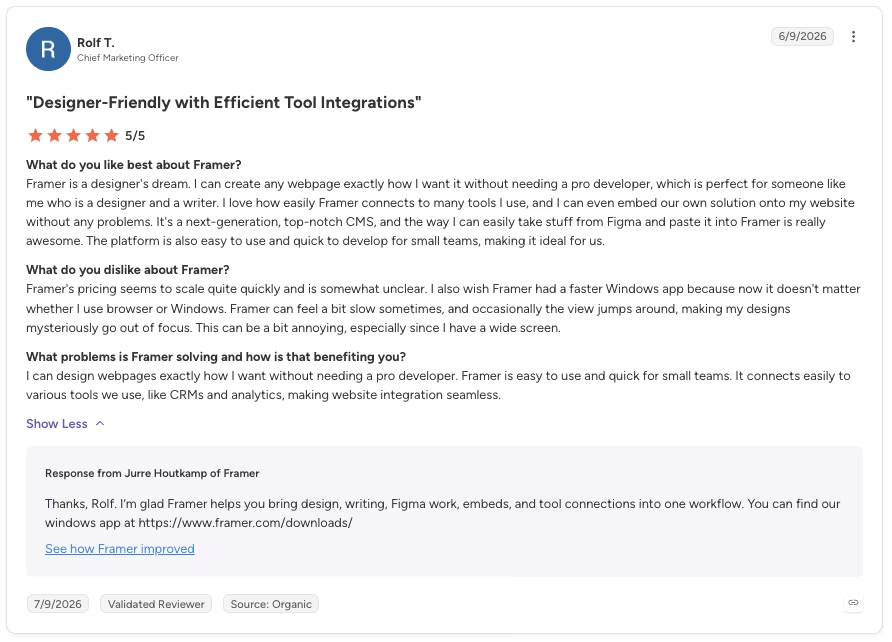
“I love how easily Framer connects to many tools I use, and I can even embed our own solution onto my website without any problems.” - Rolf T., G2
Cons:
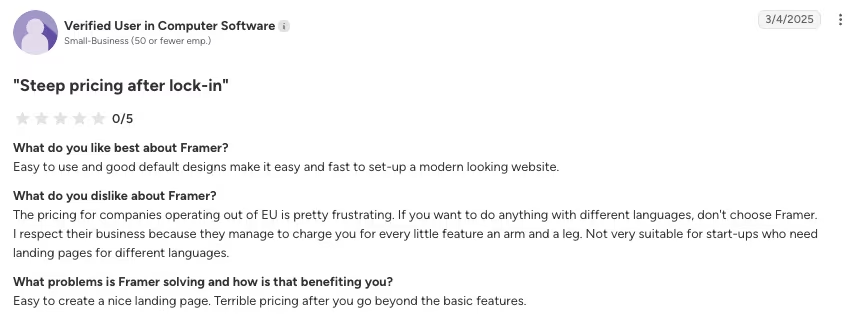
“Not very suitable for start-ups who need landing pages for different languages.” - Anonymous, G2
Squarespace
Pros:
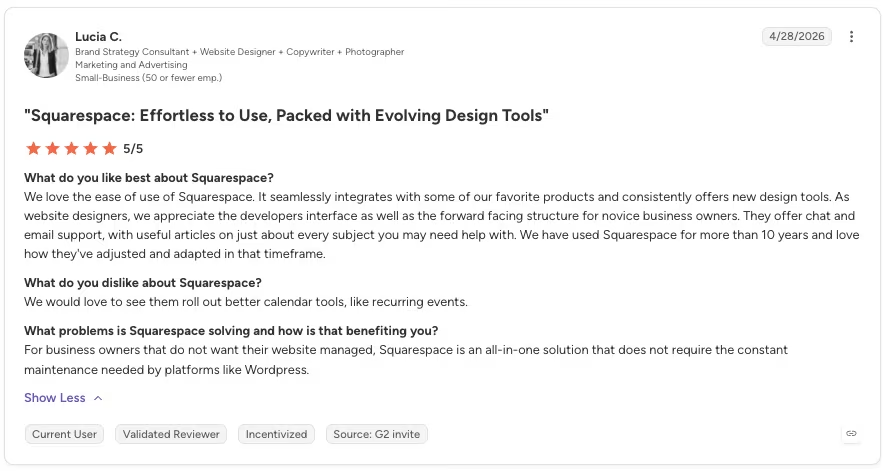
“We love the ease of use of Squarespace. It seamlessly integrates with some of our favorite products and consistently offers new design tools.” - Lucia C., G2
Cons:
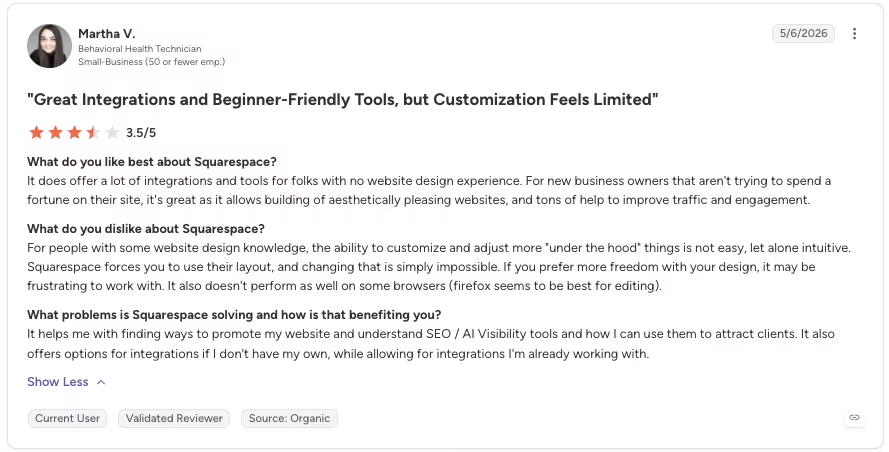
“Squarespace forces you to use their layout, and changing that is simply impossible. If you prefer more freedom with your design, it may be frustrating to work with.” - Martha V., G2
How to Make Your Choice
After two weeks in both, the site's job decided my pick, since Framer and Squarespace are strong at almost opposite things.
Framer is Better For:
- Designers and agencies: People who think in layouts and want pixel-level control over every screen.
- Marketing sites and portfolios: Landing pages, product sites, and portfolios where a distinctive, animated look is the point.
- Speed-sensitive projects: Sites where load time and technical SEO control decide rankings.
Squarespace is Better For:
- Small businesses and retail: Anyone who needs a real store with a cart, inventory, and shipping.
- Service providers and creators: People taking bookings, running memberships, or selling courses and digital products.
- Beginners who want all-in-one: Owners who'd rather run the whole site, blog, and email from one place without code.
Everything above splits along one line: the e-commerce test. That's the factor that decided it for me. If the site has to run a real store, the choice isn't close, and Squarespace wins before design ever enters the conversation. If it doesn't, Framer's edge on look and speed is the deciding factor.
Also read our best Squarespace alternatives guide for what else is worth trying when the all-in-one approach reaches its limits.
Next Steps: Try Framer or Squarespace
Both let you test before you commit. Start a free Framer project and push the layout as far as you can. Or spin up the Squarespace 14-day trial and try to stand up a working cart. Whichever one stops fighting you first is your answer.
How Emergent Helps When Your Site Needs to Become a Real App
Both builders hit a limit in my tests, which is usually the point when teams start deciding whether to turn a website into an app.
Framer's store wall showed up at product number two, a single Stripe checkout with no cart. Squarespace required code injection for one custom hover animation. Both are just the edge of what page builders are meant to do.
Projects such as member portals, custom booking systems, or stores with unique pricing rules require application logic beyond these page builders. They may need accounts, permissions, dashboards, or workflows that the templates do not support.
That's the gap Emergent is built for. Describe the finished app, including customer logins and payments.
Its system of agents scopes, builds, and tests the project, producing a deployable web or mobile app after a site builder reaches its limit.
Emergent fits applications with custom logic. Framer remains the better choice for advanced animation, while Squarespace offers a stronger ready-made store.

Most AI app builders stop at prototypes. Emergent creates production-ready apps you can actually launch.
- Production-ready apps
- Web & mobile apps
- Deploy in minutes







