
Gemini 4 Neon’s reasoning model outperforms most published frontier models, but it requires more tokens and time to achieve its best performance. It scores 61 on the Artificial Analysis Intelligence Index at xhigh. It outperforms Claude Opus 5.5 and GPT-6.2 Sol on 16 of the 19 benchmarks listed by Google. Users, including non-coders, can get the best results if they have enough time and budget.
This article focuses on the Gemini 4 Neon Benchmarks. It details what each test measures, where Neon succeeds, where Neon fails and concludes with speed, price and effort-level advice.
What Is Gemini 4 Neon?
Gemini 4 Neon is a complex coding, analytical reasoning, and enterprise workflow Google reasoning model. It was released by Google on November 18, 2026.
Neon is a modification of Carbon from Gemini 4. Google assigns Carbon to work on the hard, long term projects and Hydrogen for everyday work. In between are the middle of the roaders, who want a mix of depth and efficiency, and Neon is here to offer that.
The model can take text, image, audio, and video inputs and output text. It is proprietary, and Google has not disclosed its parameter count. It's available on Google's Gemini app, API, Google AI Studio, Google Antigravity, and Gemini for Business.
Gemini 4 Neon Benchmarks at a Glance
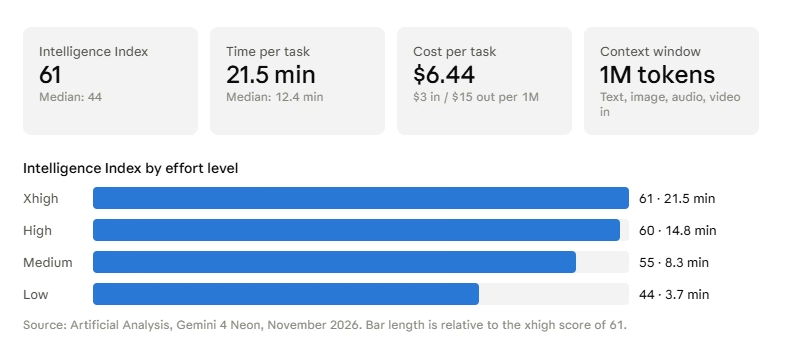
When compared at the xhigh effort setting, Gemini 4 Neon ranks 6th of 95 models in its comparison class for intelligence, but its speed, cost, and verbosity are low. The table below summarizes the Artificial Analysis data for the xhigh setting.
Artificial Analysis Intelligence Index Score
The Artificial Analysis Intelligence Index for Gemini 4 Neon ranges from 44 to 61 across varying effort levels. These numbers aren’t from Google; they’re reported by Artificial Analysis.
This is the combined version of AA-Briefcase v1.1, AutomationBench-AA, Terminal-Bench 4.0, FrontierCode-AA 2.0, AA-Omniscience v1.1, GDP.pdf, HLE-Diamond, CritPt v2 (Hard Subset), and Terminal-Bench-Science 0.1. Together, they cover knowledge work, coding, science, and general knowledge.
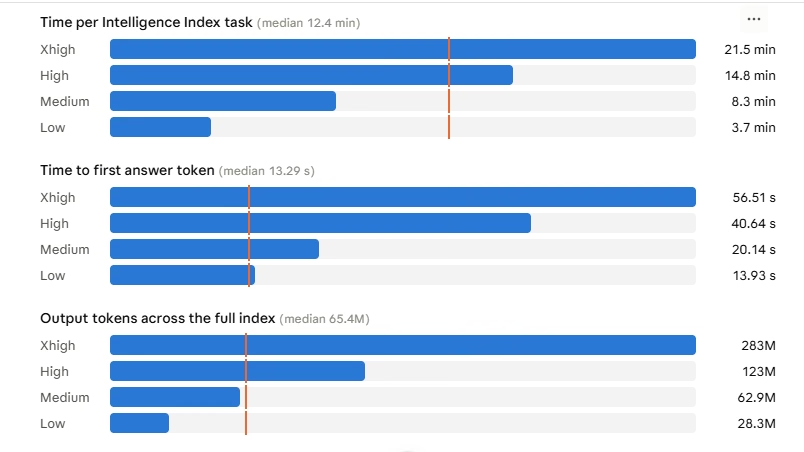
The more effort you put in, the more accurate the output, but the longer it takes. Changing from low to xhigh yields a 17 point increase in the index. It also increases task time by nearly six times and the number of output tokens by 10 times.
The low setting is equivalent to the comparison medium of 44. By default, the medium level earns 11 points more than the low setting. Artificial Analysis also ranks Gemini 4 Carbon one point lower than Neon's xhigh score, at 60. The Artificial Analysis Intelligence Index scores for Gemini 4 Hydrogen and Gemini 4 Argon are 54 and 50, respectively.
For how Neon's two siblings score test by test, see our Gemini 4 Hydrogen benchmarks and Gemini 4 Argon benchmarks guides.
Google's Benchmarks vs Claude Opus 5.5 and GPT-6.2 Sol
Google's model card reveals that Gemini 4 Neon beats both Claude Opus 5.5 and GPT-6.2 Sol in 16 out of 19 benchmark tests. These are Google's results, and the models used for comparison were their own, so consider the results as direction, not value. The independent check is provided by Artificial Analysis.
AA Index v5.0.1 is also included on the model card, with Neon scoring 61, Opus 5.5 scoring 59, and GPT-6.2 Sol scoring 57.
For how the two rivals score on their own, see our Claude Opus 5.5 benchmarks and GPT-6.2 Sol benchmarks guides.
Agentic coding benchmarks
While Claude Opus 5.5 leads Gemini 4 Neon on two terminal and code benchmarks, it has fallen behind on repository-style testing. Agentic coding tasks require a model to independently plan, edit, execute tools and correct errors in code.
The largest gap is in SWE-sweep with the provider harness, with Neon's score at 39.0% compared to 10.1% and 8.3%. The Terminal-bench 4.1 and FrontierCode 2.0 gaps are less than 1.5 points apart and are close calls. To test Neon on a coding task of your own, a coding agent builder lets you set the steps, the tests, and where a person reviews.
Knowledge work benchmarks
The largest margin for Gemini 4 Neon is in the knowledge work category, with a 13.8 point lead on AutomationBench. These tests quantify how well a model can complete business tasks, like multi-step SaaS workflows.
The largest gap is AutomationBench. The Vals Index is within one point of Opus 5.5.
Science, math, and reasoning benchmarks
In Google's table, Gemini 4 Neon has the highest scores on all three science and reasoning tests. These tests assess difficult mathematical problems, scientific research exercises and expert-level questions.
HLE Diamond is 7.3 points ahead of GPT 6.2 Sol. The RiemannBench lead is four points ahead of both opponents.
Multimodal and long-context benchmarks
Gemini 4 Neon does well on video and long context tests, but performs poorly on chart reading. Multimodal tests measure a model's knowledge of images and video. Long context tests test recall over large inputs.
The highlight is GraphWalks. At 256k to 1M tokens, Neon scores 95.2%, while the two rivals score 66.8% and 80.1%.
Also Read: Gemini 4 Carbon benchmarks for the parent model's GraphWalks and cybersecurity scores.
Cybersecurity benchmarks
When Google lists a competitor's score, Gemini 4 Neon outpaces them on all tests. These tests assess vulnerability-finding and exploit skills.
Google lists some defensive applications of this power: Secure Code Generation, Penetration Testing, Vulnerability Discovery, Vulnerability Verification and Vulnerability Patching.
Speed, Latency, and Verbosity
At xhigh, Gemini 4 Neon will be slow and chatty, but that's all it takes to make it that way at lower effort levels. According to Artificial Analysis, the xhigh setting is quite slow and very verbose compared with similarly named models.
At the xhigh setting, it outputs 110 tokens per second and takes 56.51 seconds. The median time to produce the first token is 12.69 seconds, compared with 13.29 seconds. This delay is caused by the time spent thinking before the model begins its answer.
The long task times are caused by verbosity. Neon produced 283M output tokens on the Intelligence Index, while the median was 65.4M. Medium produced 62.9M, below the median.
Gemini 4 Neon Pricing and Cost per Task
The price of Gemini 4 Neon is above the medians of $3.00/1M input tokens and $15.00/1M output tokens. The medians are $2.00 and $10.00, respectively. Artificial Analysis considers both prices “somewhat expensive.”
Input is discounted by 95% when cached. The blended price, calculated using a 7:2:1 cache-hit-to-input-to-output token ratio, is $2.21/1M tokens. This blended price is the same across all effort levels.
The actual cost depends on the number of tokens the model generates. Artificial Analysis includes reasoning and answer tokens in its per-task cost. On average, Intelligence Index tasks cost $6.44 at xhigh. The lower the effort level, the fewer tokens are generated, and thus the lower the cost per task.
Also Read: Gemini 4 Carbon pricing for how Google's frontier tier prices the same tokens.
Context Window and Modalities
Gemini 4 Neon has a limit of 1M tokens, or about 1,500 A4 pages in 12-point Arial. The window is used for both input and output.
There will be separate output limits. By default, Google supports up to 64K tokens of synchronous output and up to 1M tokens via background long decode.
The model can read text, images, audio, and video. It can only write text. The strong GraphWalks score indicates that the long window would be usable in practice, not just on paper.
Limitations and Safety Notes
While Gemini 4 Neon may experience hallucinations, its training knowledge is capped at March 2026. Google claims that some domains can be less up to date than that.
There are a few additional points to consider before you use it:
- Single provider: According to Artificial Analysis, there is one API provider: Google.
- Safety report pending: According to Google, the entire Safety and Security Report is on the way. The model card has been tweaked to show 3.00 fewer points for unjustified refusals than Gemini 4 Hydrogen.
- Cyber risk: There is a high risk of increased security risk in the context of Google's Frontier Safety Framework. Google inherited this risk from Gemini 4 Argon and reports that it is mitigating it.
Which Gemini 4 Neon Effort Level Should You Pick?
When accuracy is most important, use xhigh; when speed is most important, use medium or low; and otherwise, use high. This division is supported by the Artificial Analysis data.
Xhigh scores 61, while we have 60. It finishes in 14.8 minutes instead of 21.5 and writes less than half the output tokens (123M vs 283M). That deal is good for most teams.
Also Read: Gemini 4 Hydrogen vs Gemini 3.8 Flash for how Google's cheaper tier trades speed against depth.
Conclusion
The reasoning model is very good, with most tests being benchmarked by Gemini 4 Neon, and it has significant time, token and price costs at its top setting. Work with high effort; do not commit to work for which no benchmark scores exist (usually not a perfect match).
Benchmarks show what a model is capable of. Apps demonstrate how it can benefit you.
But what if you could create apps from a plain-language prompt without writing code with Emergent, an app builder. What if your idea could speak for itself? Emergent can help users create a working application, bringing everything together in one place, including customized designs. No coding is necessary, and you don't have to wait for a developer to take care of your business. Communicate your needs and begin building with Emergent today.
Describe it. Build it. Launch it.
- End-to-End Creation
- No Code Needed
- Live in Minutes
Most AI app builders stop at prototypes. Emergent creates production-ready apps you can actually launch.
- Production-ready apps
- Web & mobile apps
- Deploy in minutes