TL;DR
- GPT-6.2 Sol is OpenAI's general-purpose AI model, designed for reasoning, coding, research, and multi-step workflows.
- Improved performance: OpenAI reports a 5.3-percentage-point improvement on GDPval v2 over GPT-6.1 Sol, indicating stronger performance on professional tasks.
- Large context window: The model supports up to 1.05 million tokens of context and 128,000 output tokens, making it suitable for lengthy documents and complex projects.
- API pricing: Standard rates start at $2 per million input tokens and $10 per million output tokens, unchanged from GPT-6.1 Sol.
- Availability: GPT-6.2 Sol is accessible through ChatGPT Work, Codex, and the OpenAI API, subject to applicable access requirements.
- Our hands-on results: In ChatGPT Work with High reasoning effort, Sol built a functional expense tracker on its first attempt. All three basic functionality checks passed without corrections or follow-up prompts.
GPT-6.2 Sol builds on its predecessor with improved professional task performance, greater output-token efficiency, and unchanged standard API pricing. But how much of that translates into practical results?
OpenAI released GPT-6.2 Sol on November 17, 2026, alongside GPT-6.2 Astra. The new model focuses on everyday work, coding, and tasks that involve multiple steps and tools.
But what is GPT-6.2 Sol, and how much better is it than its predecessor? OpenAI says the model delivers stronger results while using fewer output tokens, helping users complete more work within their usage limits.
This guide covers GPT-6.2 Sol's features, performance, specifications, pricing, and availability, along with where it makes sense to use it.
What Is GPT-6.2 Sol?
GPT-6.2 Sol is an AI model developed by OpenAI for everyday work, coding, and tasks that involve multiple steps. Released on November 17, 2026, alongside GPT-6.2 Astra, it focuses on balancing performance, speed, and cost.
OpenAI positions GPT-6.2 Sol as its go-to model for everyday work, including coding, research, and tasks involving multiple steps. It is designed for users who need capable AI assistance across different types of professional assignments.
GPT-6.2 Sol accepts text and images as input and generates text. It can also work with supported tools, including web search, computer use, and code execution, when these capabilities are available and configured in the application.
The model has a 1.05-million-token context window and supports up to 128,000 output tokens. It is available through the OpenAI API, ChatGPT Work, and Codex, making it useful for both individual professionals and developers building AI-powered applications.
Key Features of GPT-6.2 Sol
GPT-6.2 Sol combines reasoning, coding, multimodal understanding, and tool use. OpenAI designed it to handle everyday work and multi-step tasks without the higher cost of its flagship Astra model.
Advanced Reasoning and Problem-Solving
GPT-6.2 Sol can tackle problems that involve several steps, such as comparing financial scenarios, analyzing research findings, or working through a technical issue. Instead of responding to each step separately, it can help users work toward a complete solution.
The API offers five reasoning effort levels: low, medium, high, xhigh, and max. Users can adjust the effort based on the task's complexity, balancing response quality, speed, and cost.
For how effort changes cost and results on the earlier model, see GPT-6.1 Sol high vs low effort.
Coding and Software Development
GPT-6.2 Sol can help developers write, review, debug, and improve code. It supports tasks ranging from fixing individual errors to making changes across existing software projects.
Developers can also use the model with coding tools and automated workflows to test changes, identify problems, and refine applications. This makes it useful for routine development work and projects involving multiple coding steps.
Multistep Agentic Workflows
GPT-6.2 Sol can handle tasks that require several connected actions. For example, it can help gather information from approved sources, organize the findings, and prepare a report within the same workflow when the necessary tools are available.
Through OpenAI's Responses API, developers can connect the model to tools such as web search, file search, and computer use. It also supports delegating work to subagents through the Multi-agent beta.
Vision and Multimodal Understanding
GPT-6.2 Sol accepts both text and image inputs. Users can provide screenshots, charts, or other visual material alongside written instructions.
The model can analyze visual information and respond in text, but image generation is not a native output capability of GPT-6.2 Sol. Creating images requires a separate supported image-generation tool or model.
Efficient Performance and Natural Writing
GPT-6.2 Sol is designed to handle routine professional tasks efficiently, from summarizing documents to preparing structured reports. Its usefulness extends beyond technical work to everyday writing, analysis, and collaboration.
What Makes GPT-6.2 Sol Different?
GPT-6.2 Sol builds on GPT-6.1 Sol with improvements in task completion, efficiency, and everyday usability. Three changes stand out.
Better Results on Professional Tasks
OpenAI reports a 5.3-percentage-point improvement over GPT-6.1 Sol on GDPval v2, its internal benchmark for complex professional work.
GDPval v2 evaluates complex, multistep professional workflows based on real-world projects, including consulting, finance, and design. The reported improvement suggests stronger performance on these evaluated tasks, although results may vary across actual workloads.
More Work Within the Same Budget
GPT-6.2 Sol retains the same standard API token prices as GPT-6.1 Sol. However, OpenAI says the newer model delivers better results using fewer output tokens.
For developers, using fewer output tokens may reduce the cost of certain tasks even when per-token prices remain unchanged. Paid ChatGPT users may also be able to complete more work within their usage limits, depending on the tasks and settings used.
Actual savings depend on the workload and the number of tokens consumed.
More Natural Collaboration
OpenAI describes GPT-6.2 Sol as easier to collaborate with, particularly for tasks that involve several steps.
It focuses on clear, natural writing and can work across technical and nontechnical assignments. This makes it useful for professionals who need help moving from an initial request to a practical result, rather than simply generating a quick response.
What Can You Use GPT-6.2 Sol For?
GPT-6.2 Sol is useful for software development, research, document creation, and workflow automation. Its reasoning and tool-use capabilities help users complete tasks that involve more than generating a single response.
Building and Debugging Software
Developers can use GPT-6.2 Sol to write code, troubleshoot errors, and improve existing applications. For example, a developer can provide an error message and relevant code files, then ask the model to identify the problem and suggest a fix.
When connected to coding tools, the model can also help test changes and refine the results.
Also Read: Best AI models for coding for how Sol compares with other coding models.
Research and Data Analysis
GPT-6.2 Sol can help users organize research, compare information, and analyze data. A financial analyst, for example, could use it to examine financial statements, identify trends, and prepare a summary of the findings.
For research involving current information, web search tools can help retrieve relevant sources. Important figures and conclusions should still be checked against the original material.
Creating Documents and Reports
The model can assist with drafting reports, preparing presentations, summarizing lengthy documents, and organizing information into structured formats.
Users can provide source material and specify the intended audience, format, and level of detail. This makes it useful for preparing initial drafts and refining existing work.
Automating Everyday Workflows
Developers can integrate GPT-6.2 Sol into applications that perform multiple connected tasks.
For example, an automated workflow could collect information from approved sources, organize the results, and prepare a report for human review. The model handles reasoning and text generation, while connected tools perform the necessary actions.
GPT-6.2 Sol: Our Hands-On Testing
To evaluate GPT-6.2 Sol beyond its published specifications, we tested its ability to build a simple web application using ChatGPT Work with High reasoning effort.
We gave the model a single prompt to create an expense tracker where users could add expenses, view transaction history, calculate total spending, and delete entries. We also requested a clean interface with amounts displayed in Indian rupees (₹).
To run a test like this on your own project, a coding agent builder lets you set the steps, the checks it must pass, and where a person reviews the result.
GPT-6.2 Sol generated the application on its first attempt, without requiring corrections or follow-up prompts. The resulting interface included an expense entry form, a running total, and an expense history section.

Initial expense tracker interface generated by GPT-6.2 Sol from a single natural-language prompt. Source: Original hands-on testing, November 18, 2026.
Testing the Expense Tracker
We performed three simple checks to see whether the application worked as requested.
Test 1: Adding the first expense
We entered ₹500 under Groceries. The application added the transaction to the expense history and displayed a total of ₹500.
Test 2: Adding another expense
Next, we entered ₹200 under Transport. Both transactions appeared in the expense history, and the total automatically updated to ₹700.
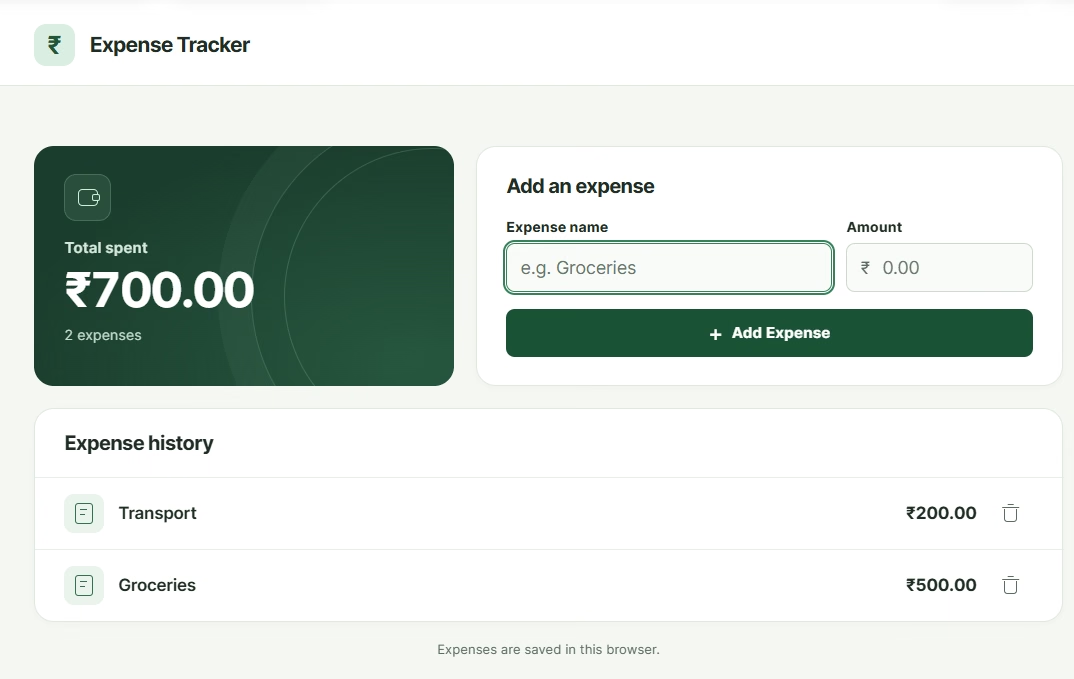
The expense tracker displays grocery and transport expenses totaling ₹700, confirming that multiple entries were added and calculated correctly. Source: Original hands-on testing, November 18, 2026.
Test 3: Deleting an expense
Finally, we deleted the ₹500 grocery entry. The application removed it from the expense history and recalculated the total to ₹200, leaving only the transport expense.
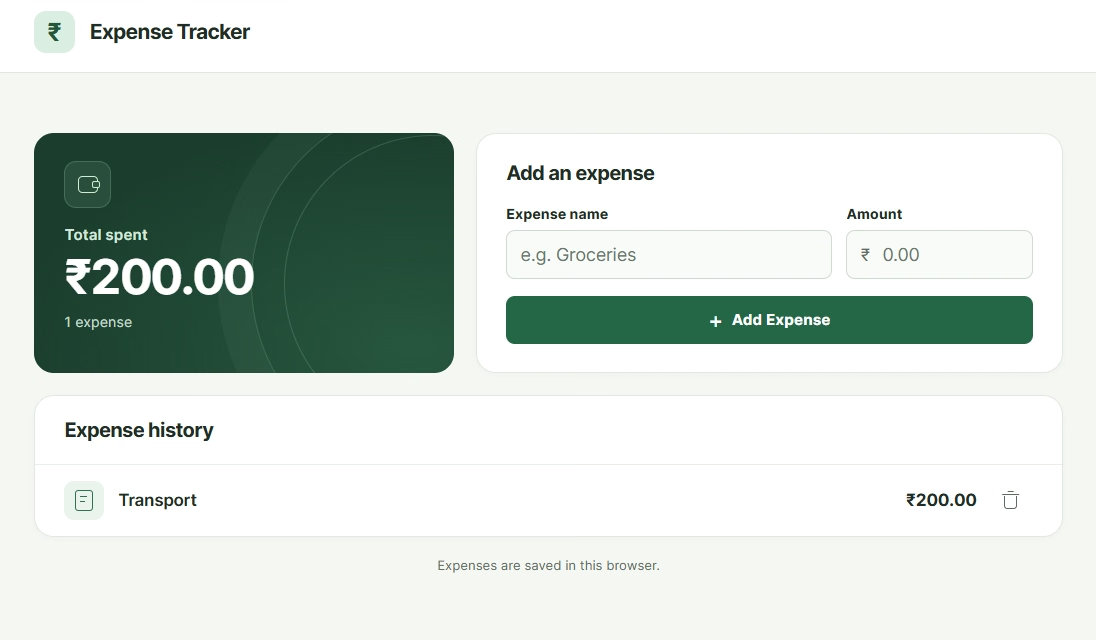
After deleting the grocery expense, the application correctly recalculated the total to ₹200 while retaining the transport entry. Source: Original hands-on testing, November 18, 2026.
Our Takeaway
GPT-6.2 Sol successfully created a functional expense tracker from a single prompt. All three checks passed, and the application handled basic expense management and calculations correctly without additional instructions.
This was a limited test of a straightforward application, not a comprehensive coding benchmark. More complex projects would require further testing to assess the model's reliability.
If you want a tracker with logins and a database behind it, an web app builder turns the same kind of description into a hosted app.
GPT-6.2 Sol Specifications
GPT-6.2 Sol supports text and image inputs, a 1.05-million-token context window, and multiple reasoning effort levels. The table summarizes its core specifications.
| Specification | Details |
|---|---|
| Developer | OpenAI |
| Release date | November 17, 2026 |
| API model ID | gpt-6.2-sol |
| Context window | 1,050,000 tokens |
| Maximum input | 922,000 tokens |
| Maximum output | 128,000 tokens |
| Input and output | Text and images in; text out |
| Reasoning effort | Low, medium, high, xhigh, max |
| Knowledge cutoff | June 1, 2026 |
| Function calling | Supported through the Responses API |
| Structured outputs | Supported |
| Fine-tuning | Not supported |
GPT-6.2 Sol Technical Specifications. Overview of the model's context window, input and output limits, reasoning capabilities, and supported features.
The large context window allows developers to provide lengthy documents, code files, or extensive instructions in a single request. However, the maximum input limit is lower than the total context window because space is reserved for output.
GPT-6.2 Sol Pricing
GPT-6.2 Sol costs $2 per million input tokens and $10 per million output tokens at standard API rates. OpenAI has retained the same token prices as GPT-6.1 Sol.
The table shows the main pricing options for requests containing up to 272,000 input tokens.
| Pricing category | Cost (USD per million tokens) |
|---|---|
| Standard input | $2.00 |
| Standard output | $10.00 |
| Cached input | $0.10 |
| Cache write (30 minutes) | $2.50 |
| Cache write (12 hours) | $5.00 |
| Batch API input | $1.00 |
| Batch API output | $5.00 |
| Fast mode input | $4.00 |
| Fast mode output | $20.00 |
GPT-6.2 Sol API Pricing. Standard, cached, Batch API, and Fast mode rates for requests with up to 272,000 input tokens.
For requests exceeding 272,000 input tokens, input and cache rates double, while output rates increase by 50%. These higher rates apply to all tokens in the request, not just those above the threshold.
For example, a standard API request using 100,000 input tokens and generating 10,000 output tokens costs $0.30: $0.20 for input and $0.10 for output. The same workload costs $0.15 through the Batch API, excluding any additional tool charges.
Also Read: GPT-6.1 Terra pricing for how a cheaper tier in the same family prices caching, Batch, and Fast mode.
Safeguards and Data Rules
OpenAI has introduced additional safety measures for GPT-6.2 Sol, particularly for cybersecurity and biological research. According to OpenAI's GPT-6.2 System Card, the model meets the Critical capability threshold for cybersecurity and the High threshold for biological and chemical capabilities.
These ratings describe potential risks, not unrestricted access. OpenAI has strengthened safeguards, including restrictions on high-risk requests and monitoring of potentially harmful activity.
For API users, OpenAI does not use submitted data to train its models by default. Standard abuse-monitoring logs may be retained for up to 30 days, with exceptions. Eligible organizations can request additional data retention controls, including Zero Data Retention.
These policies depend on the service, endpoint, and approved account settings. Developers handling sensitive information should review the applicable data controls before deploying the model.
GPT-6.2 Sol vs GPT-6.1 Sol
GPT-6.2 Sol improves on GPT-6.1 Sol in professional task performance and efficiency while retaining the same standard API pricing.
OpenAI reports a 5.3-percentage-point improvement on GDPval v2, its internal evaluation of complex professional workflows. The newer model is also designed to complete more work within the same usage limits.
| Metric | GPT-6.1 Sol | GPT-6.2 Sol |
|---|---|---|
| Standard input price (per 1M tokens) | $2 | $2 |
| Standard output price (per 1M tokens) | $10 | $10 |
| Cached input price (per 1M tokens) | $0.10 | $0.10 |
| Context window | 1.05M tokens | 1.05M tokens |
| Maximum output | 128K tokens | 128K tokens |
| Professional task performance | Baseline | +5.3 percentage points on GDPval v2 |
| Output-token efficiency | Previous generation | OpenAI reports improved efficiency |
GPT-6.1 Sol vs GPT-6.2 Sol. Comparison of standard API pricing, technical specifications, and OpenAI-reported improvements in professional task performance.
For developers already using GPT-6.1 Sol, the newer model offers a potential performance improvement without higher standard per-token rates. However, actual costs depend on token consumption, reasoning effort, and the tasks being performed.
Also Read: GPT-6.1 Terra vs GPT-6.1 Sol for how the 6.1 generation compared on price, coding, and computer use.
How to Access and Use GPT-6.2 Sol
GPT-6.2 Sol is available through ChatGPT Work, Codex, and the OpenAI API. Access depends on your subscription, workspace settings, and rollout status.
- ChatGPT Work: GPT-6.2 Sol is available to eligible Plus, Pro, Business, Enterprise, and Edu users. Enterprise and Edu administrators must enable access for their workspaces.
- Codex: Developers can select Sol in the Codex app or CLI for coding, debugging, and reviewing software changes.
- OpenAI API: Developers can use the model ID gpt-6.2-sol through the Responses API or Chat Completions. Tool calling, including web search and computer use, requires the Responses API.
- Ultrafast mode: Eligible Pro subscribers can access faster generation. Pro $200 subscribers can use Ultrafast with Sol, while Pro $500 subscribers can use it with either GPT-6.2 model. API users can also access Ultrafast at additional cost.
GPT-6.2 Sol is not currently available as a selectable model in regular ChatGPT conversations. Users who want to try it within ChatGPT should open Work and choose Sol from the model picker.
Developers can start with the API model documentation to review supported tools, reasoning settings, and pricing before integrating it into an application.
Tips for Better Results with GPT-6.2 Sol
GPT-6.2 Sol can handle complex instructions, but clear prompts and appropriate reasoning settings help users get more useful results.
- Define the outcome: Explain what you want the model to produce, whether it is a report, code change, or research summary.
- Provide relevant context: Include the necessary documents, data, or project details instead of expecting the model to infer missing information.
- Choose the right reasoning effort: Use lower effort for straightforward tasks and higher effort for problems requiring deeper analysis. Test different settings to find the right balance.
- Break down large assignments: Specify important milestones, deliverables, and acceptance criteria for multi-step work.
- Use tools when needed: Connect supported tools for tasks involving current information, code execution, or external actions.
- Verify important outputs: Review calculations, citations, and generated code before relying on them in business decisions.
For developers, testing the model on representative workloads is more useful than assuming that the highest reasoning setting will always produce the best result.
Conclusion
GPT-6.2 Sol builds on its predecessor with stronger professional task performance, improved efficiency, and the same standard API token pricing. Its combination of reasoning, coding, and tool-use capabilities makes it a practical choice for everyday work and multistep applications.
The right model depends on what you need to accomplish. GPT-6.2 Sol is worth considering for everyday coding, research, document creation, and multistep tasks. Before switching, test it on a representative assignment and compare the quality, time required, and actual usage costs.
Want to turn an idea into a working application? With Emergent, you can describe what you want to build in plain English and let AI agents handle the coding, testing, and deployment. You can then refine the application through conversation, without writing code from scratch.

Describe it. Build it. Launch it.
- End-to-End Creation
- No Code Needed
- Live in Minutes

Most AI app builders stop at prototypes. Emergent creates production-ready apps you can actually launch.
- Production-ready apps
- Web & mobile apps
- Deploy in minutes