




The 5 Best GoodBarber Alternatives: TL;DR
Short on time? These are the five picks in order, with the job each one is built for.
- FlutterFlow: Best for total code ownership and advanced visual design, with downloadable Flutter source you keep.
- Emergent: Best for describing an app in plain English instead of assembling it screen by screen.
- Adalo: Best for founders who want a simple MVP live on both stores fast.
- BuildFire: Best for businesses and agencies that need custom plugins, deep content management, and room to scale.
- Appy Pie: Best for solo creators spinning up a basic app on the cheapest paid tier available.
Most people start hunting for GoodBarber alternatives when the invoice stops matching the app. The entry plan is web-only, native iOS and Android sit a tier up, and sign-in, chat, and paid memberships each carry their own monthly line item on top of that.
Then there's the part that surprises people later. GoodBarber apps run on GoodBarber's servers, and the company states plainly that a canceled subscription stops your app from functioning. No source code leaves with you.
I ran the same app idea through all five of these platforms to see which one you actually own at the end. You'll see the tier that really ships to the stores, where each falls short, and which reason for leaving it answers.
Why Look for GoodBarber Alternatives?
GoodBarber has been building apps since 2011, and design quality is its strongest card. The templates look good out of the box, the design system keeps things consistent across screens, and the apps compile to Swift and Kotlin instead of wrapping a website. For a content app or a small store, it works.
The friction shows up in four places.
Native publishing starts a tier up: The Content Standard plan runs $36/month ($30/month billed annually) and delivers a Progressive Web App only, with no App Store or Google Play listing. Native iOS and Android begin on Premium at $70/month ($55/month billed annually). On the eCommerce side, the same jump goes from $50/month to $90/month.
Core features are priced as add-ons: On Content Premium, user sign-in costs an extra $12/month and paid memberships another $49/month. A membership app with logins lands at $131/month before you've sold anything. In-app chat adds $20/month on top.
One subscription covers one project: A second app means a second subscription or a jump to Agency at $280/month ($215/month billed annually). Agencies and consultants hit this wall quickly.
Canceling turns the app off: GoodBarber's pricing FAQ confirms that a canceled subscription means the app no longer functions. With no source code export, five years of work lives entirely inside someone else's account.
What Switching Away From GoodBarber Actually Costs You
Switching costs more than the price gap between two plans, and almost no comparison article says so. Budget for three things before you commit.
Your content doesn't move: GoodBarber's content manager holds your articles, products, and media inside its own structure. Nothing exports cleanly into FlutterFlow or Adalo, so a catalog of any size means a manual rebuild or a spreadsheet import on the new platform.
Your store listing restarts: A rebuilt app is a new binary submitted under your own developer account. Ratings can carry over if you replace the existing listing, but push notification subscribers generally don't, so you're re-earning opt-ins from scratch.
Apple reads template-built apps carefully: Guideline 4.2.6 of Apple's App Review Guidelines says apps built from a commercialized template or app generation service get rejected unless the content owner submits them directly. Every platform below can clear that bar. A lightly customized template with your logo dropped in is the exact pattern reviewers push back on, so plan for customization.
Which Option Should You Choose?
The right pick depends on why you're leaving, so match the reason to the tool.
- Choose FlutterFlow if you want to own the code outright and control design down to the pixel. The trade-off is a learning curve, plus paying for and managing your own data storage on top of the subscription.
- Choose Emergent if you'd sooner describe the app you want and review what comes back than drag components onto a canvas. Costs run on credits, so a project with heavy revisions costs more than a simple one.
- Choose Adalo if you want the shortest path from idea to a listing on both stores without learning a development tool. Complex logic will hit a ceiling.
- Choose BuildFire if you're running a business app for a sizable audience and need custom plugins, deep analytics, and vendor support. Pricing starts high, and every plan routes through a sales call.
- Choose Appy Pie if you need something basic and cheap, and Android is enough for now. iOS costs considerably more.
- Stick with GoodBarber if design quality is the whole point and your app fits its content or commerce templates. A publisher or local retailer running one polished app, backed by a human support team, has a perfectly good deal at $70/month.
The Five Picks at a Glance
With the reasons sorted, this is how the five compare on the numbers that decide most switches:
| Platform | Best for | Starting price | Main limitation |
|---|---|---|---|
| FlutterFlow | Code ownership, design control | $39/month ($29/month billed annually) | Steep learning curve |
| Emergent | Building by description | $20/month ($17/month billed annually) | Credit costs vary by project |
| Adalo | Fast, simple MVPs | $45/month ($36/month billed annually) | Limits on complex logic |
| BuildFire | Scale, plugins, support | $209/month ($165/month billed annually) | Sales call to sign up |
| Appy Pie | Cheap basic apps | $32/month ($16/month billed annually) | iOS needs the top tier |
Every Pick, Reviewed in Depth
Each section below covers what the platform does well, where it disappoints, and what it costs at the tier that actually publishes an app.
1. FlutterFlow: Best for Total Code Ownership and Advanced Visual Design
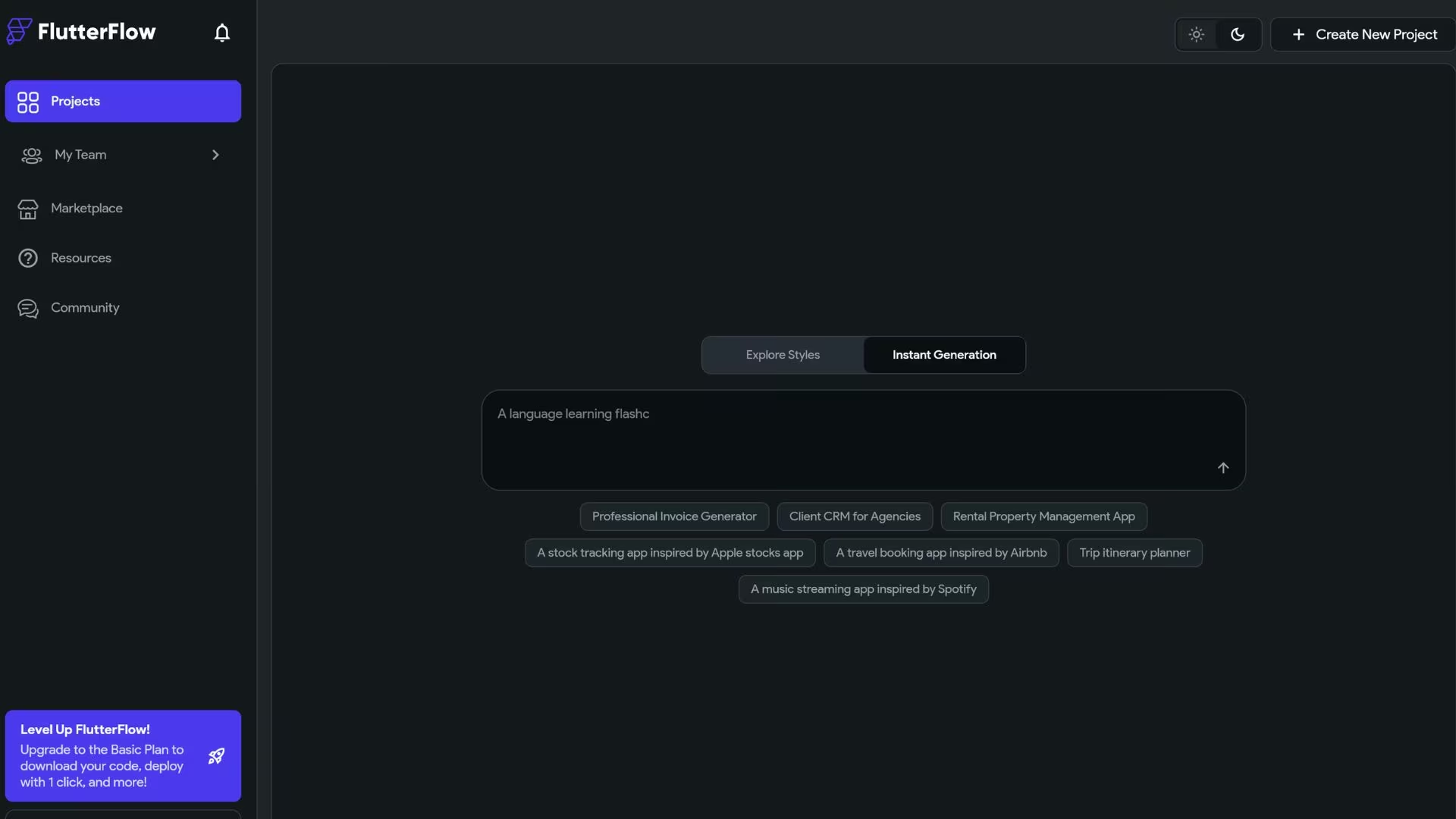
FlutterFlow answers the thing that pushed me off GoodBarber: you never get to keep anything. I downloaded the Flutter project on my second day and opened it in VS Code that same afternoon.
That single capability changes the whole calculation: a GoodBarber app is a lease; a FlutterFlow app is an asset any Flutter developer can pick up years later, on hosting you control.
Design control is the other draw. GoodBarber's design system gives you tasteful presets to customize inside. FlutterFlow hands you the underlying layout engine, so you can arrange widgets, set constraints, and build animations directly. Designers can import a Figma theme instead of rebuilding a brand from scratch.
It's also the most demanding tool here. FlutterFlow doesn't include data storage, so you connect Firebase or Supabase yourself and pay those bills separately. The free plan caps you at two projects and blocks both code download and store publishing, which makes it a trial and not a launch path.
If the learning curve or separate data storage costs are a concern, our best FlutterFlow alternatives guide covers what else is worth trying.
Key features
- Code download: Take the full Flutter and Dart source with you and hand it to any developer.
- One-click store deployment: Push to the App Store and Google Play from inside the builder.
- Figma frame import: Bring existing designs across instead of rebuilding them by hand.
- GitHub integration: Sync your project to a code repository under your own account.
Pros
- You own and can export the code, so there's no platform lock-in.
- The design ceiling is far higher than any template-based builder here.
- One project publishes to iOS, Android, and web.
- A large enough community that most problems you hit already have a forum answer or a YouTube walkthrough.
Cons
- The learning curve stops plenty of non-technical users cold.
- Data storage is your problem and your bill, on top of the subscription.
- Team collaboration gets expensive once you add more than one editor.
Best for
- Founders who want an asset they can hand to a developer later.
- Design-led brands that have outgrown template customization.
- Freelancers and studios building client apps they'll maintain long-term.
Also read our FlutterFlow Review for a closer look at how the pros and cons play out in real testing.
Pricing
The free plan covers two projects, with no code download and no store publishing. The first plan that ships an app is Basic at $39/month ($29/month billed annually), unlocking code download, custom domains, and one-click store deployment.
Growth is $80/month ($60/month billed annually) for the first seat, and Business is $150/month ($112.50/month billed annually) for the first seat. Firebase or Supabase costs sit outside all of these.
Want the full breakdown of what each plan actually covers? Read our FlutterFlow pricing guide before you commit.
2. Emergent: Best for Describing an App Instead of Building It Screen by Screen
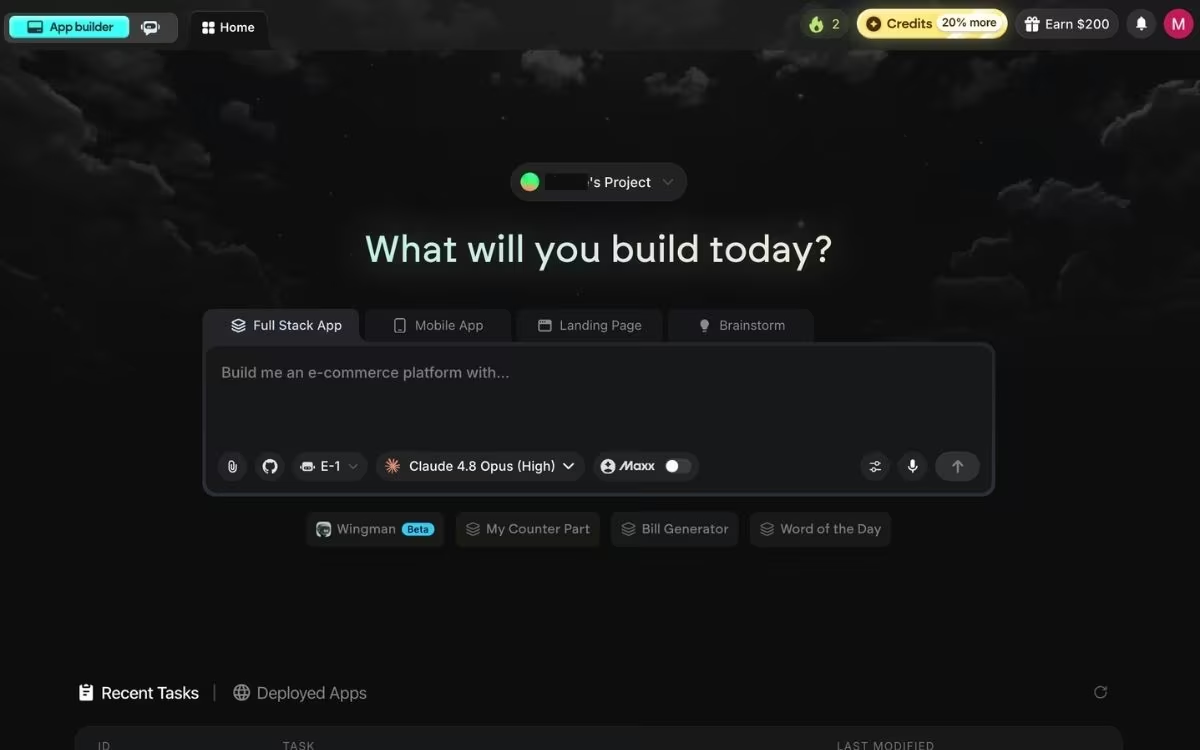
Emergent stands out because there's no canvas to arrange. It's an AI app-building platform built for vibe coding: you describe the app you want in plain English, and a coordinated system of AI agents turns that description into a complete, deployable app.
The agents divide the work. Some shape the screens, others wire up the logic and the connections to tools you already use, and testing agents check the result end-to-end.
For someone leaving GoodBarber, the appeal is skipping the editor entirely. You type what you want and get something you can open and click through.
Here's a sample prompt I used: "Build a booking app for a dental practice. Patients pick a service, see which hygienists are free that week, and pay a deposit with Stripe. Staff get an admin view to block out time."
Ninety seconds later, I had screens I could click through, and refining it took one more sentence in the same box.
That removes the constraint defining template builders. GoodBarber can build what its templates and 190+ extensions support. Emergent isn't drawing from a fixed catalog, so an odd requirement with no extension behind it stops being a dead end. It handles operational software well, where GoodBarber's content and commerce archetypes run thin.
Publishing is a deliberate step. You click the Deploy button and the app goes live on an emergent.host address roughly 10 to 15 minutes later. For a custom web address, you can buy a domain through the built-in IONOS integration or point a domain you already own at the app, both covered in Emergent's domain guide.
The limitation worth knowing upfront is cost predictability. Credits burn on every action, so a clear, detailed first prompt costs far less than a vague one you correct ten times. Credits stretch much further on a simple page than a full app with payments and logins.
Key features
- Plain-English building: Describe the app and review what comes back instead of assembling screens.
- Multi-agent architecture: A coordinated system of specialized agents works in parallel, so no single model grinds through the whole build in sequence.
- Web and mobile from one description: Ship both without maintaining separate projects.
- Code ownership: Export the project and run it on the hosting you choose.
Pros
- No builder to learn, which removes the barrier that stops most GoodBarber refugees.
- Custom requirements don't depend on an extension existing.
- You own the code and can move it elsewhere.
- The free plan includes 10 monthly credits, enough to judge the output before paying.
Cons
- Credit costs vary with how much work you ask for, so budgeting takes a few projects.
- Each deployed app costs 50 credits per month to keep live, which is half the Standard plan's allowance.
- Prompt quality drives output quality more than most people expect at first.
- Not a fit for PDF-heavy reporting, video games, or Apple Watch and iPad apps, which it can code but can't publish yet.
Best for
- Small business operators replacing spreadsheets with custom internal software.
- Solo founders who want to launch a product instead of learning a builder.
- Agencies delivering client apps on tighter timelines.
Pricing
Emergent has a free plan with 10 monthly credits. Standard runs $20/month ($17/month billed annually) for 100 credits, private project hosting, and GitHub integration. Pro is $200/month ($167/month billed annually) for 750 credits, a 1M context window, and custom AI agents. Business and Enterprise plans are quoted by the sales team.
3. Adalo: Best for Non-Technical Founders Launching a Simple MVP
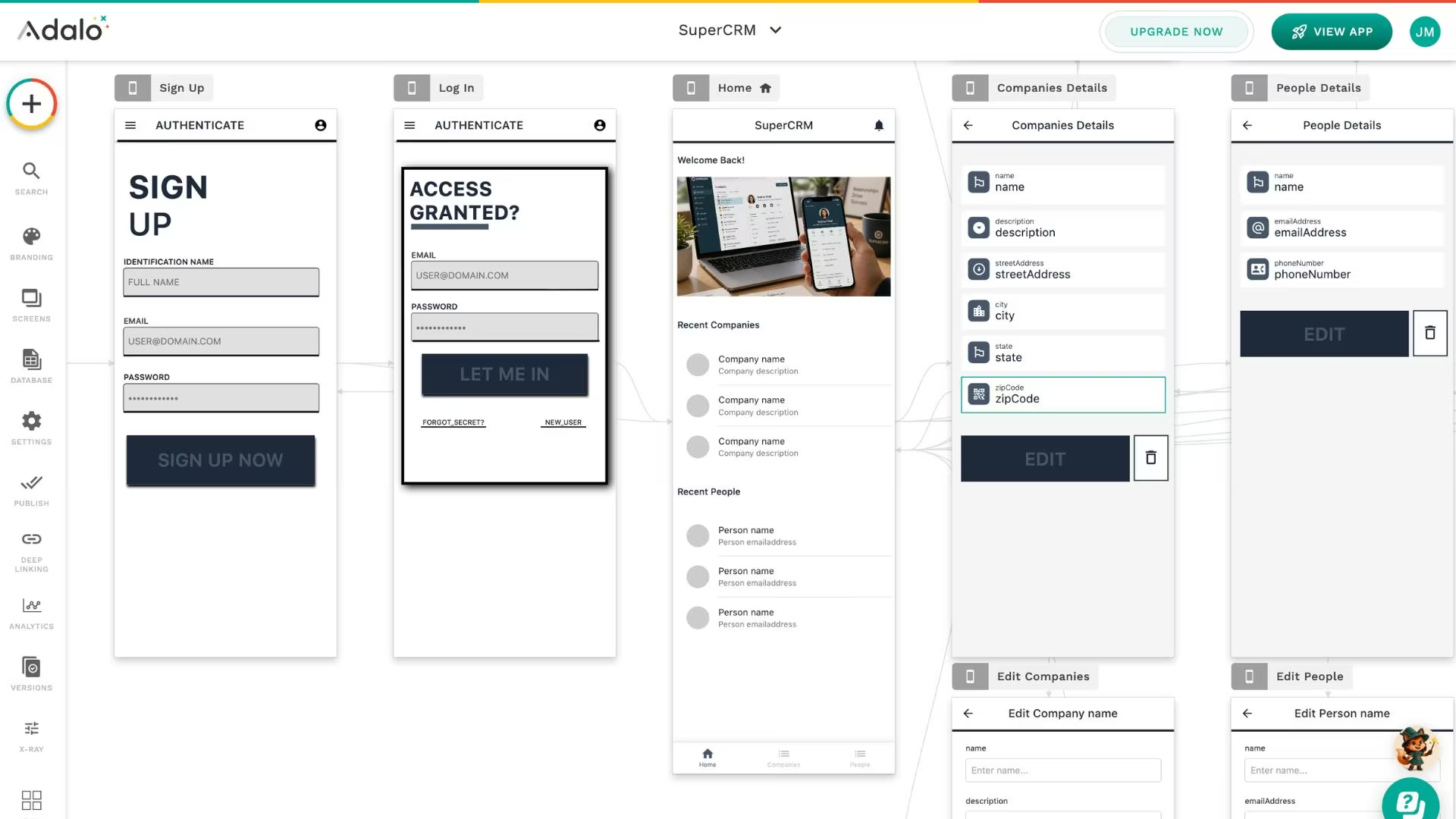
Adalo comes closest to GoodBarber's ease of use with the platform gate removed. It's a drag-and-drop builder with a relational database included, and it publishes one project as a web app, a native iOS app, and a native Android app.
The multi-screen canvas is the part people notice first. Instead of editing one screen at a time, you see the whole app laid out and drag connections between screens. For a founder mapping a marketplace or a fitness app, that's a faster mental model than clicking through a settings tree.
Data storage is included, which matters more than it sounds against FlutterFlow. Every plan carries a hosted Postgres database, so there's no second service and second bill to store user accounts. Adalo also bundles an AI assistant called Ada across all tiers, which generates a first version from a description and edits it on request.
Where it runs out of room is complexity. Adalo suits straightforward create-read-update-delete apps, and intricate conditional logic or unusual integrations push you toward workarounds or an external service like Xano. The free plan caps at 500 records per app and can't publish at all, so it validates an idea instead of running one.
If the record limits or conditional logic ceiling become a constraint, our Adalo alternatives guide covers what else is worth trying.
Key features
- Multi-screen canvas: See and connect every screen in one view.
- Built-in Postgres database: Store users and content without a second subscription.
- Automated store publishing: Submit to the App Store and Google Play from inside Adalo.
- Flat pricing: No usage-based charges or per-action metering on paid plans.
Pros
- Genuinely easy for someone who has never built software.
- One project covers web, iOS, and Android.
- Predictable monthly cost with no overage surprises.
- 200+ prebuilt components cover most common app patterns.
Cons
- Complex logic hits a ceiling that workarounds only partly solve.
- The free plan can't publish, so evaluating the finished experience means paying.
- Push notifications and Stripe payments require moving up from the entry tier.
Best for
- First-time founders validating an idea with paying customers.
- Community, booking, and directory apps with straightforward data.
- Anyone who wants app store presence without touching a development tool.
Pricing
The free plan covers 500 records per app for testing, with no publishing. Starter runs $45/month ($36/month billed annually) for one published app, a custom domain, and automated store publishing.
Professional is $65/month ($52/month billed annually) and adds push notifications, custom actions, and a second published app. Team is $200/month ($160/month billed annually). Apple's $99/year developer program and Google's $25 one-time fee apply on top, as they do everywhere.
Also read our Adalo Review for a closer look at how the multi-screen canvas and built-in database hold up in real testing.
4. BuildFire: Best for Businesses and Agencies That Need Deep Scalability
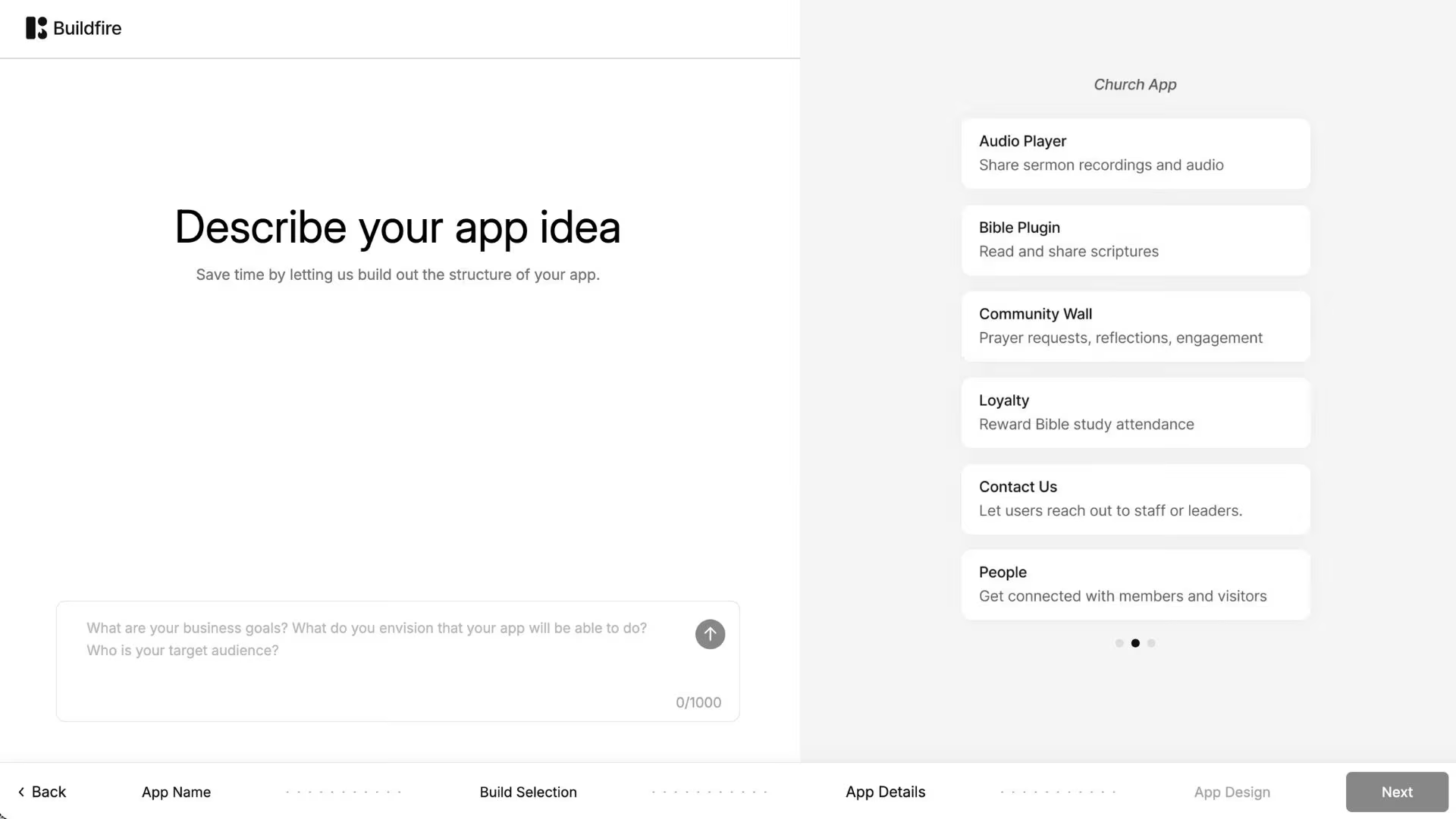
BuildFire is the only pick here aimed squarely at organizations. It's a managed mobile app platform with a plugin marketplace, targeting the businesses GoodBarber's Agency tier is chasing, with more infrastructure behind it.
The plugin model is the differentiator. BuildFire ships a developer SDK, so anything the marketplace doesn't cover can be built as a custom plugin and dropped in alongside the standard ones. When a GoodBarber extension doesn't exist for what you need, the answer is a custom development quote. With BuildFire, a developer builds it inside the platform you already pay for.
Scale is built into the plan structure instead of sold as an add-on. Push notification allowances run from 100,000 to 300,000 per month, storage from 5GB to 50GB, and the top tier adds single sign-on and enterprise deployment. A church with 20,000 members or a franchise pushing daily updates to staff will find those numbers sized correctly.
The catch is the entry point, in two ways. Standard starts at $209/month ($165 billed annually), more than double GoodBarber's native tier, and every plan on the pricing page routes to a "Book a Demo" button. There's no self-serve trial and no way to try the builder before talking to sales. For a solo founder testing an idea on a weekend, that's a hard stop.
Key features
- Custom plugin SDK: Build the feature the marketplace doesn't have, inside the platform.
- Publishing support: BuildFire's team helps get the app through both store reviews.
- Advanced push notifications: Geofenced, deep-linked, and segmented sends on higher plans.
- White label reseller program: Agencies manage multiple client apps from one dashboard.
Pros
- The plugin SDK removes the ceiling that stops template builders.
- Push, storage, and admin allowances are sized for large audiences.
- SOC 2 Type II certified, which matters to regulated buyers.
- Hands-on publishing support included on every plan.
Cons
- Entry pricing is the highest here by a wide margin.
- Every plan requires a sales conversation, with no self-serve signup.
- Heavier than most small businesses need for a single simple app.
Best for
- Established businesses running an app for thousands of users.
- Agencies and resellers managing several client apps at once.
- Organizations with SSO, compliance, or enterprise deployment requirements.
Pricing
Standard starts at $209/month ($165/month billed annually) with 100,000 monthly push notifications, 5GB of storage, and one admin seat. Growth is $389/month ($315/month billed annually) and adds in-app purchases and an account manager. Scale is $549/month ($440/month billed annually) with unlimited in-app purchases and 50GB of storage.
5. Appy Pie: Best for Solo Creators Spinning Up a Basic App
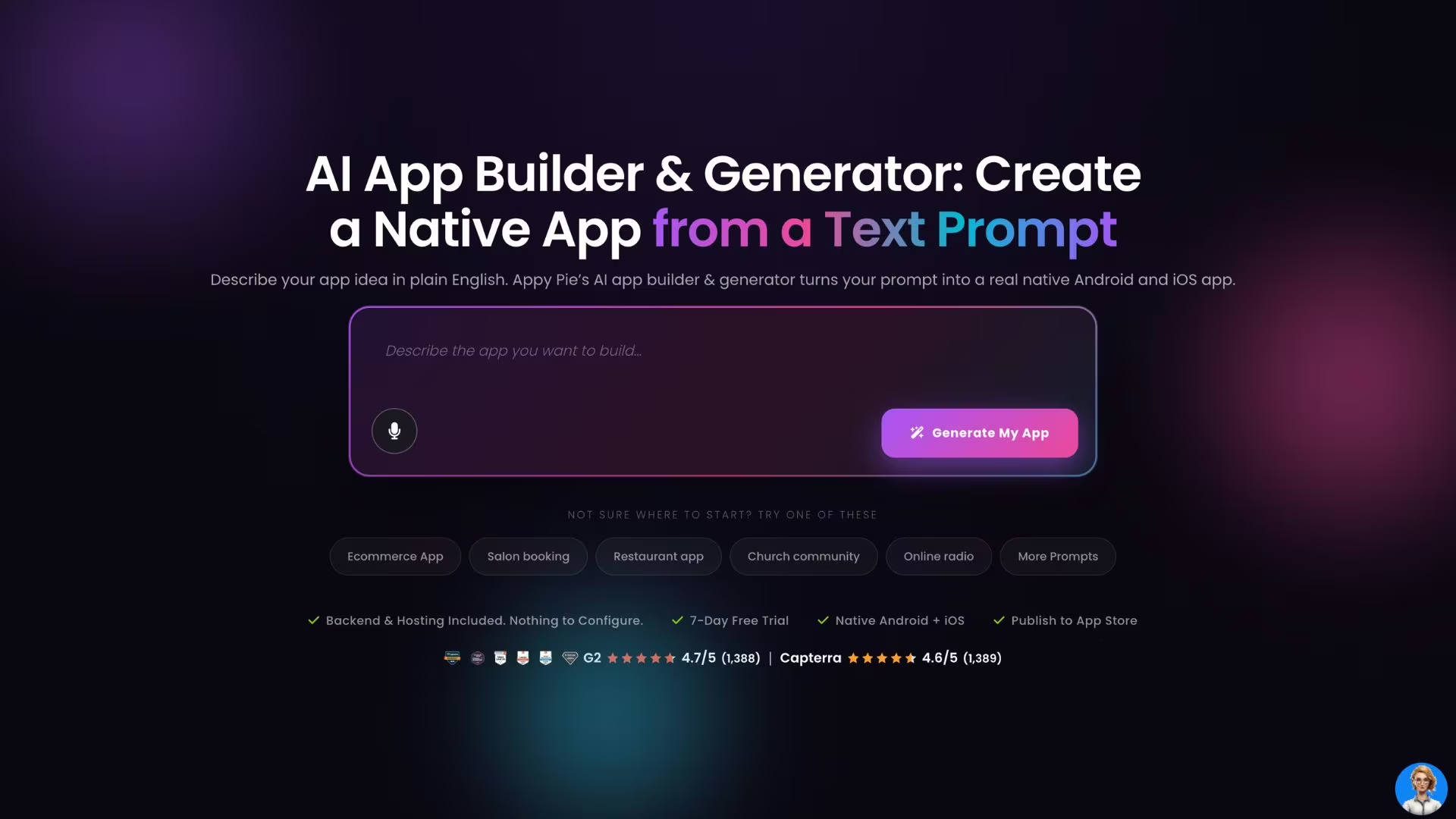
Appy Pie is the cheapest way onto this shortlist, with the caveats that price implies. It's a template-driven builder that generates a first draft from a text prompt, then hands you a straightforward editor to adjust it.
The prompt-to-draft flow is the closest Appy Pie gets to the AI builders above, though it works differently in practice. You describe the app, pick from a large library of industry templates, and get a starting point you refine by hand. For a coach who needs a class schedule and a booking button, that's a reasonable Saturday afternoon.
The pricing structure is where the sticker price gets misleading. Plans are per app, not per account, so a second app means a second subscription. Basic and Gold are Android-only, and iOS support starts on Platinum at $120/month, which puts it above GoodBarber's native Content tier. Removing Appy Pie branding requires an add-on package costing twice your plan price.
Download caps are the other thing to check. Basic allows 500 downloads per month, Gold 1,000, and Platinum 2,000, with overages billed at $0.009 per download. An app that catches on costs more than the plan suggests. Canceling also locks the app, so the ownership problem you left hasn't gone anywhere.
Key features
- Prompt-based first draft: Describe the app and get a starting template to refine.
- Large template library: Industry-specific starting points across dozens of categories.
- Google Play publishing on the entry plan: Android goes live from the cheapest paid tier.
- Monetization tools: In-app ads and purchases available across paid plans.
Pros
- The lowest entry price of any option here.
- Fast from signup to a workable Android draft.
- Templates cover a wide range of small-business categories.
- Submission support is included on the first publish.
Cons
- iOS support only arrives on the $120/month Platinum plan.
- Monthly download caps trigger per-download overage charges.
- Pricing is per app, so a second project doubles the bill.
- Canceling the subscription locks the app, exactly like GoodBarber.
Best for
- Solo creators testing whether an app is worth building at all.
- Android-first audiences where iOS can wait.
- Simple information, schedule, or menu apps with modest download volume.
Pricing
Basic runs $32/month for an Android app with 500 downloads a month. Gold is $72/month with 1,000 downloads. Platinum, the first plan with iOS, is $120/month with 2,000 downloads. Extra downloads cost $0.009 each, and white labeling requires an add-on priced at twice your plan.
Also read our best Appy Pie alternatives guide for what else is worth trying when the per-app pricing or download caps become a constraint.
How to Evaluate an App Builder Before You Commit
Comparison tables won't tell you which of these fits, so work through five questions before you subscribe to anything.
- What happens if you stop paying? Ask this first. FlutterFlow and Emergent both let you export the code and run it elsewhere. GoodBarber, Appy Pie, and to a large extent Adalo and BuildFire keep the app tied to an active subscription. If your business depends on the app, ownership is worth paying for.
- Which tier actually publishes to both stores? Advertised starting prices frequently cover only a web app. Find the cheapest plan that publishes native iOS and Android, then compare those numbers. That's how GoodBarber's $36 becomes $70, and Appy Pie's $32 becomes $120.
- What's the true monthly total? Add the add-ons you'll use, the data storage bill if the platform doesn't include one, Apple's $99/year, and Google's $25. Sign-in, chat, memberships, and push notifications are the four features most often priced separately.
- Can the platform do the one unusual thing your app needs? Every builder handles the common patterns. The question is what happens at the edge. Template platforms answer with an extension if one exists and a custom quote if it doesn't. Code-generating and prompt-driven platforms have no such boundary.
- How much do you want to learn? This is the trade-off nobody escapes. FlutterFlow rewards the time you invest with genuine control. Adalo and Appy Pie ask almost nothing and give you a lower ceiling. Emergent removes the builder entirely and moves the skill to writing clear descriptions.
The Two Picks That Fix the Ownership Problem
The GoodBarber problem comes down to ownership. You're renting an app you can't take with you, at a price that climbs every time you add something users expect. That's the thing worth fixing when you switch, and only two options here actually fix it.
FlutterFlow is the pick if you'll learn a development tool in exchange for source code that's permanently yours. Emergent is the pick if the builder itself was always the obstacle and describing what you want beats assembling it. Adalo sits between them for speed, BuildFire for organizations with budget and scale, and Appy Pie for testing an idea cheaply on Android.
If none of the four pain points above describes your situation, staying put is a defensible answer. A single well-designed content app, supported by a responsive human team, is exactly what GoodBarber is good at. Switching platforms costs weeks you may not need to spend.
Just know what you're choosing. Every month on a platform without code export is another month of work you can't take anywhere.
Build Your Next App by Describing It
If the builder was always the part slowing you down, Emergent lets you describe the app instead and keep the code when you're done. The free plan's 10 credits are enough to build a first app and judge it for yourself. Try building your first app on Emergent.

Every alternative has trade-offs. Emergent just builds production-ready apps from one prompt.
- Production-ready apps
- Web & mobile apps
- Deploy in minutes







