




I was eight pages into a ten-page allowance when the risk of running out stopped being theoretical. The build was a two-page registration funnel for a one-time webinar called "The 20-Minute Content Sprint." It had gone up in 22 minutes without a fight.
Then I sketched a fourth headline variant and counted the pages it would need. The tier underneath me was going to run out before the campaign did.
Over nine days, I put Landingi and seven Landingi alternatives through that same two-page funnel, building it by hand in every one of them. I tracked how long a build took, where it needed a workaround, and what happened when a question the brief asked couldn't be answered.
Here's which of these seven Landingi alternatives, split across four groups, solves which problem, because they don't all solve the same one. I'll say plainly where that stops being useful.
Why Look for Landingi Alternatives?
Landingi is good, and it's good at the thing most people buy it for.
The 22-minute build ran start to finish without a snag. I described the webinar, picked a template, and swapped the copy. The four-field form worked on the first save, and the countdown timer took under a minute.
Nothing about it felt like fighting software, and that ease alone is worth staying on Landingi for.
It's also priced to be forgiving. Landingi comes in under the premium tier on cost while giving you a page builder that holds up when a page gets heavy. Move up to Optimize, and Smart Sections becomes a time-saver once you're past a handful of pages, because you update one section and it syncs everywhere that section appears.
Even so, the reason to look elsewhere comes down to the tier you're on:
- Page and visit caps arrive earlier than you expect. Landingi's entry Build plan carries 10 active landing pages and 2,000 visits per month. A single two-page funnel is fine. The original plus three headline variants is eight pages. And if you're pointing paid social at a webinar, 2,000 visits burns through in a week. The traffic cap usually bites first, and it bites without warning, because building the page tells you nothing about it.
- The testing tools live one tier up. A/B testing and Smart Sections both start on the Optimize plan. That's a defensible way to price a product, and it's the exact moment a marketer starts pricing out alternatives. If you bought a landing page tool to prove which headline wins, and proving it costs an upgrade, you'll look at what that money buys elsewhere.
- Native forms stop short of qualification logic. I checked for this specifically on Landingi and Unbounce, and both came back the same way. The moment a form needs conditional logic, a scoring rule, or de-duplication against an existing record, the native builder runs out of room. Landingi's own form builder was a clear example. It captured my four fields fine but produced two separate leads from a single repeat email, with no merge into the existing record.
Landingi has a ceiling, same as every tool below.
How I Tested These Landingi Alternatives
I started with a shortlist of 18 tools. Seven made it into this piece as real alternatives, and I built the same funnel by hand in every one of them, plus Landingi itself for the baseline. The other eleven were cut before any of that. The whole run took nine days.
The build was a two-page registration funnel for a one-time webinar, "The 20-Minute Content Sprint." Page one takes the signup; page two confirms it. Every tool got the identical brief, pasted as written:
"I'm running a one-time webinar called 'The 20-Minute Content Sprint' and I need a two-page registration funnel built inside your editor, with nothing bolted on from outside. Page one is the registration page: a headline, three bullet points on what the webinar covers, a countdown to the live date, and a form that captures only first name, work email, company size, and how they heard about us, nothing more. Anyone who lands on the page from a paid social link needs to see a different headline than someone who lands on it from an organic search or an email link, and that swapped headline has to reuse the exact three words from my ad copy, 'stop guessing, start.' If the same email registers twice, update their existing record instead of creating a second lead. Page two is the confirmation page: a calendar-add link, a note that the replay gets emailed out, and a one-line summary that echoes back whichever headline variant they saw on page one. I also want to split-test two versions of the page-one headline against each other and see real numbers, not a guess. Before I commit to a plan, tell me plainly where the registrant records live once this is built, whether I can export the full list as a CSV whenever I want it, and what happens to this funnel and its data the month after the webinar runs if I stop paying."
What Each Tool Was Measured On
Five things in that brief are designed to make tools diverge. Each one gets measured the same way every time:
- The form field cap is a pass or fail. The brief says four fields and nothing more. A builder that slips in a phone field or a consent checkbox has missed it, and I count that.
- The duplicate-email rule is the trap. I submitted the same work email twice on purpose, then opened the lead table to count rows. One row is a pass. Two rows is a fail, and it only shows up if you go looking.
- The headline swap has to survive across both pages. Changing the page-one headline by traffic source isn't enough. The page-two summary line has to echo the same variant back, so a tool that personalizes one page but drops the value gets marked down.
- The split test has to produce a real number the platform reports itself, past publishing two versions and eyeballing which one looks better. I looked for whether it reports the split, and on which plan.
- The exit question is the one nobody likes answering. Where do the records live? Can I pull a CSV on demand? What happens to the funnel a month later if I stop paying? I looked for a plain CSV export I could reach on my own, because getting your list out on demand tells you whether your data is yours.
The Eleven Tools That Didn't Make the List
The eleven that didn't make the list are worth naming, though two of them share the same story.
Why each one didn't make the cut:
- LanderLab and Flint: Both looked promising on paper, but every specific claim about either one traces back to its own marketing copy, with nothing independent behind the features that made them interesting.
- Webflow: A landing page is one output among many, on a website and CMS platform with a much wider scope.
- HubSpot: Its page builder is a minor feature bolted onto a full CRM suite.
- Mutiny: Turned out to be an AI sales assistant that builds buyer-facing decks, proposals, and deal rooms from your calls and CRM data, a different job than editing a standalone landing page.
- Builder.io: A visual development tool built for engineers, and swapping a headline before lunch isn't what it exists for.
- Pagemaker: Had a single thin listing behind it and nothing I could build an assessment on.
- Carrd: A one-page site builder with no campaign tooling around it.
- Kit: An email and creator platform where the landing page is a supporting feature.
- Zapier Forms: The form is the product here, and the page comes attached to it.
- involve.me: The quiz drives the structure, and the page exists to hold it.
Every one of them is a reasonable pick for the job it was built for. This funnel isn't that job.
7 Landingi Alternatives: At a Glance
How these seven stack up, grouped by the problem each one solves:
Every price above reflects each platform's published rate as of September 2026.
If the Registration Page Is the Front Door to Something Bigger
This is the one for a registration page that's about to become something bigger, a member area, a portal, or a piece of software with its own login. Emergent answers the question that starts once the landing page has done its job: where the registrants log in, and what they log in to. The six tools below are all built for the page itself.
1. Emergent: Best for Turning the Page Into the Real Product
Emergent is the pick when the registration page is the smallest part of what you're building.
I tried building this with Emergent, our own AI app builder. The webinar brief pushed it in both directions.
The brief asked for a funnel “built inside your editor, with nothing bolted on from outside.” You describe what you want, and a system of specialized agents builds it and tests the result. That's a different starting point than the other six tools on this list, which all put you in a canvas to drag things around in.
Thirty-one minutes later, I had both pages, a registrant table, and a preview link. That's slower than Leadpages and quicker than Unbounce. Most of that time went to reading what came back and asking for changes.
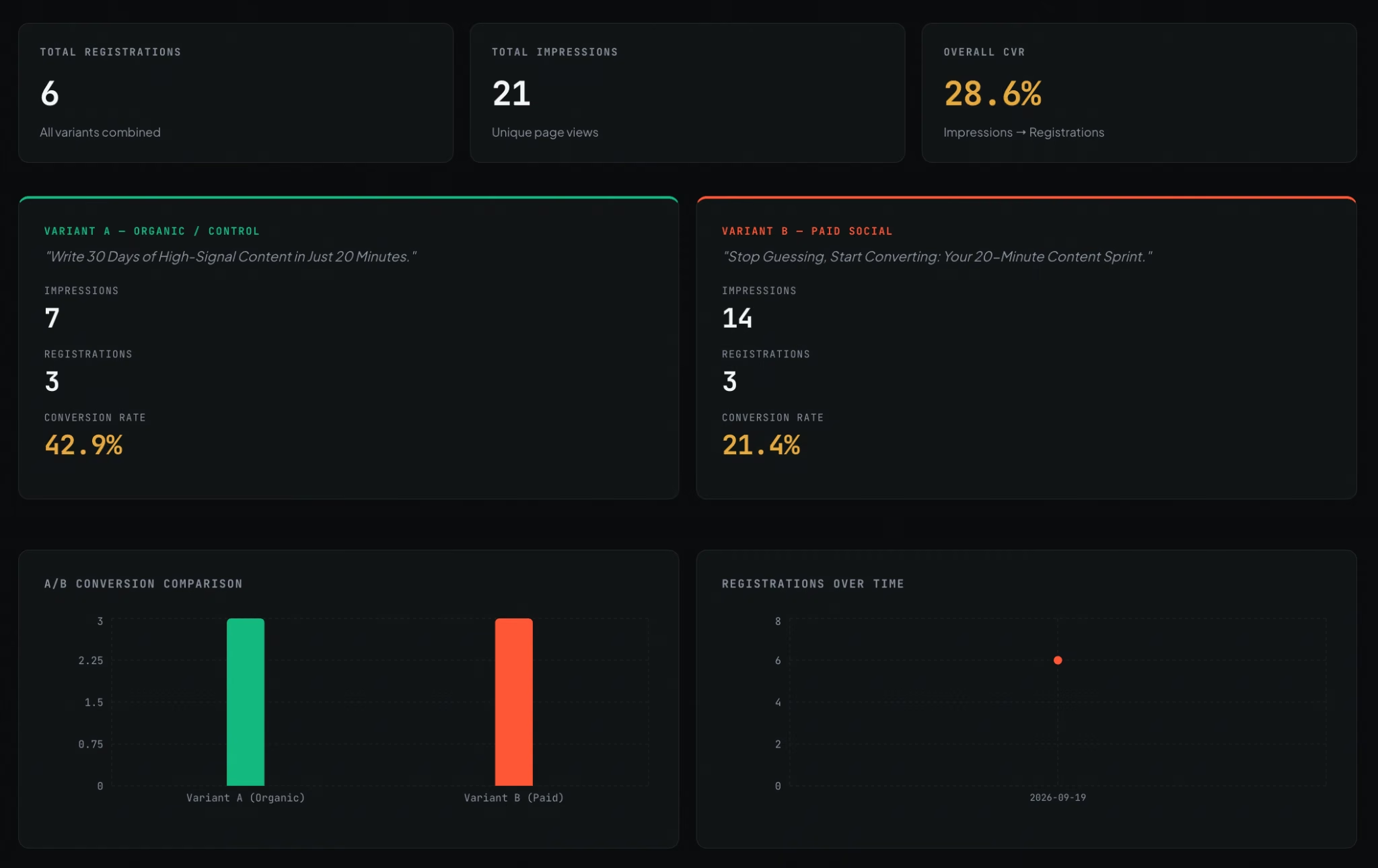
Admin Portal Stats

The traffic-source headline rule worked on page one on the first pass. The confirmation page echoed the default headline, losing the variant the visitor had seen. That's the cross-page consistency the brief was built to break, and it took two rounds of follow-up prompting to fix.
The duplicate-email trap went the other way. I asked for a matching email to update the existing record, submitted the same work address twice, then opened the table. One row. De-duplication here comes from a rule written into the brief, since the registrant records sit in a database and can be checked against each other. The whole build cost 19 credits.
What Emergent doesn't give you is the conversion toolkit the rest of this list is built around. It skips a conversion-tested template library, a one-click Dynamic Text Replacement toggle, and a packaged split-test report with confidence intervals.
The headline swap I got was written to order. It works, and changing it next month means writing another prompt, since there's no dropdown a teammate could find and use.
If the webinar page is the whole job this quarter, buy one of the six below. Emergent belongs on this list for the build after that one, when the funnel stops being a page and becomes software.
Key Features
- Description-driven builds: Describe the project and a system of specialized agents builds it, then tests the result before handing it back.
- A database behind the form: Registrant records land in a database with the rules you asked for, not a separate settings panel.
- Direct integrations: Connects to Stripe, Supabase, Calendly, Resend, SendGrid, and GitHub, so the pieces around a registration flow wire together in one project.
Pros
- Handled the duplicate-email rule the brief's trap was built around
- Registrant records are queryable and exportable, and the generated code is yours through GitHub from the Standard plan up
- The calendar link and the replay email needed no separate tool, since the integrations connected directly
- A free tier at 10 credits a month, enough to try the builder, though the funnel here costs 19 credits and publishing needs a paid plan
Cons
- No conversion-tested template library, so page one starts from a written description you build up yourself
- The headline swap is something you build, so changing it later takes another prompt, with no dropdown to click
- No split-test reporting product, so you get a custom implementation without built-in traffic allocation or confidence intervals
Best For
- Marketers whose lead-gen page is the front door to an application with logins and a member area
- Teams who need lead records in a database they can query and export, beyond what a form table alone offers
- Anyone whose next build is the system the form feeds into, beyond the landing page itself
Pricing
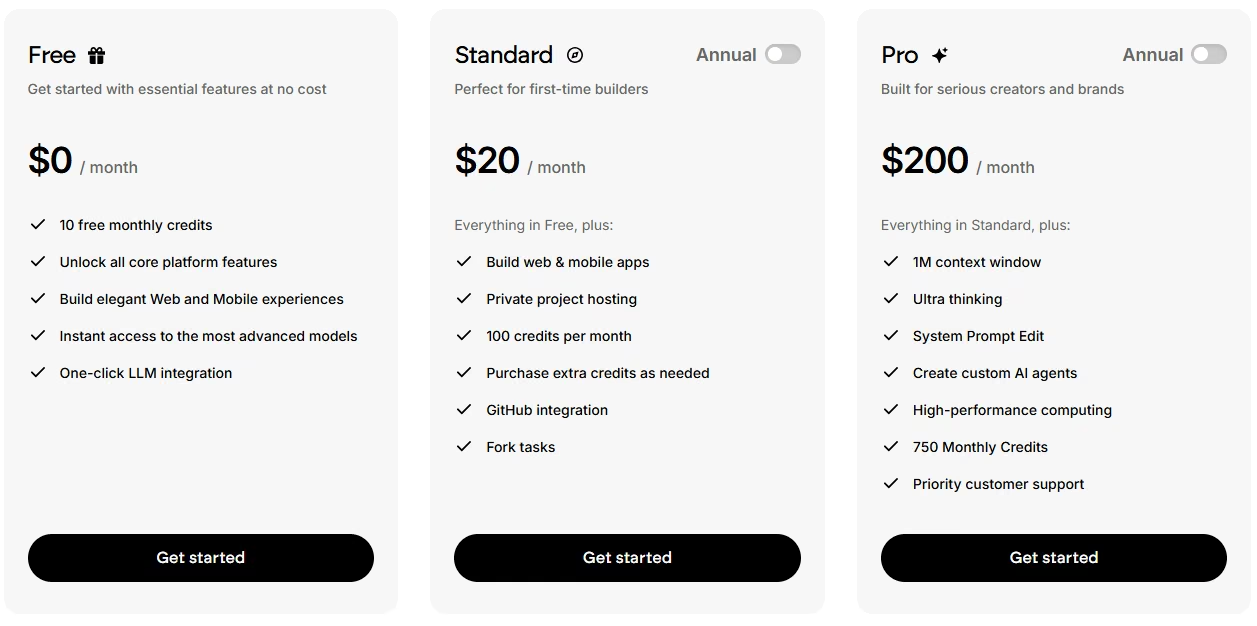
Emergent publishes three plans plus two custom-priced tiers, all on a monthly credit allowance:
- Free at $0/month: 10 credits a month, with access to the core platform and one-click model integration
- Standard at $20/month ($17/month, billed annually): 100 credits a month, private project hosting, GitHub integration, fork tasks, and the option to buy extra credits
- Pro at $200/month ($167/month, billed annually): 750 credits a month, a 1M context window, Ultra thinking, system prompt editing, custom AI agents, high-performance computing, and priority support
- Business: No public price, contact sales; adds role-based access control, single sign-on, shared team workspaces, and real-time co-editing
- Enterprise: No public price, contact sales; adds user-level credit limits, audit logs, self-hosted database support, a priority SLA, and hosting apps in your own cloud
Every live app costs 50 credits a month on top of your plan's allowance.
If You Want More Built-In Conversion Tooling Than Landingi's Editor Gives You
These two are the answer when a missing feature is pushing you to look elsewhere. Both are built for teams running paid traffic at scale. A headline that matches the ad and a split test with numbers behind it are the product here.
The extra monthly cost is smaller than the media budget it protects. If you're weighing this category more broadly, our roundup of AI landing page builders covers how the AI-assisted side of it has moved.
2. Unbounce: Best for Ad-Matched Headlines
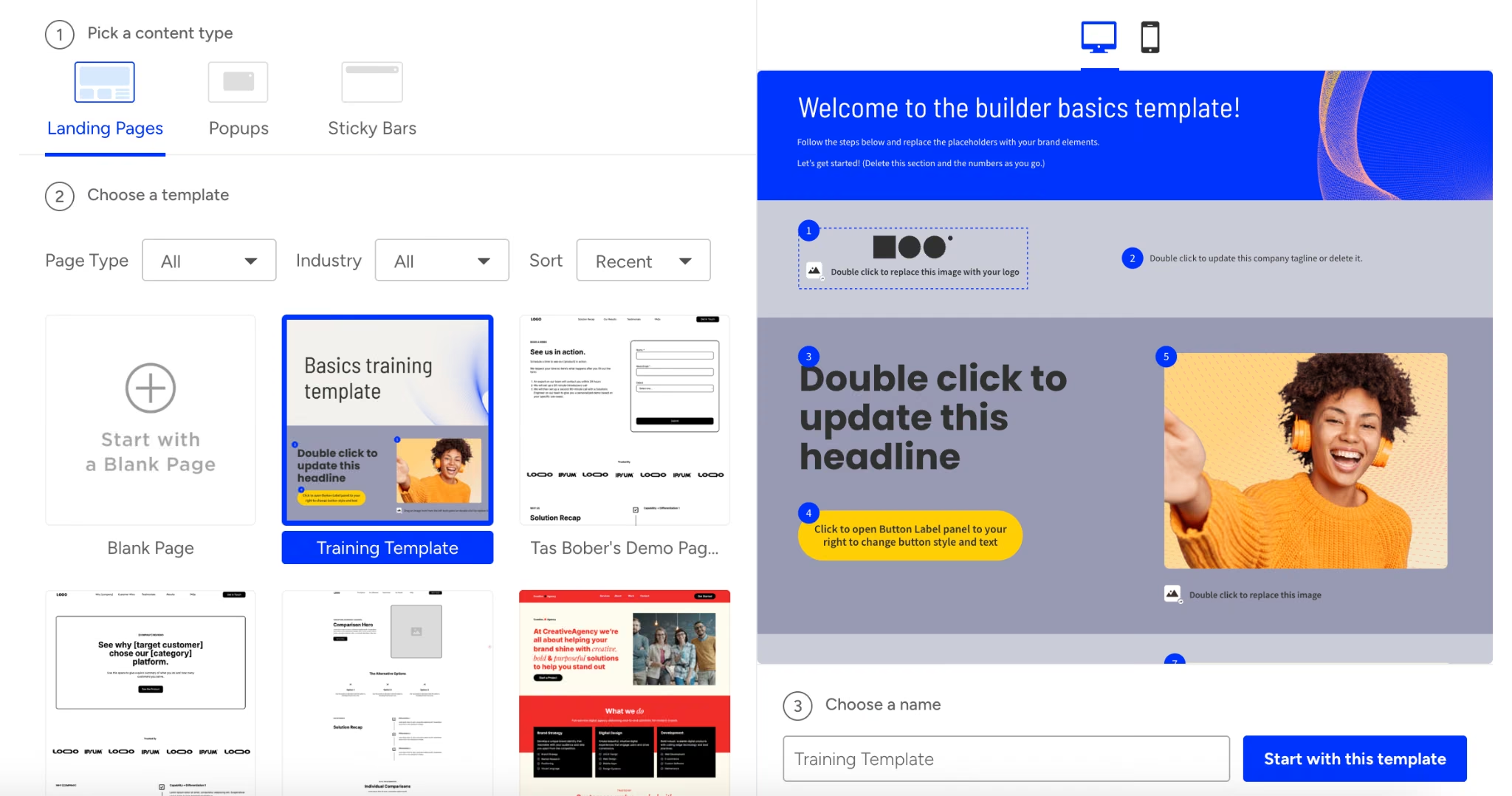
Unbounce is the pick when you're leaving Landingi over the headline swap.
Making the page react to the ad that sent the visitor is what it's built around. The funnel build backed that up, eventually.
The 46 minutes it took me was the second-longest of the eight hands-on builds, behind only ClickFunnels. Almost none of that was building. The page itself came together fast, and the countdown, the four-field form, and the confirmation page with its calendar link were all finished well before the halfway mark. The form respected the field cap without adding anything I had to delete.
The rest of the time went to hunting. The brief says the swapped headline "has to reuse the exact three words from my ad copy." That means Dynamic Text Replacement, and it took me three separate attempts to find where it lives. I looked in the page editor, then in the campaign settings, and finally found it in the page's own settings panel, keyed off URL parameters.
Once I had it, the paid-social variant and the organic variant both fired correctly. The page-two summary line picked up the same value and carried it forward. That cross-page consistency is the part that's easy to lose, and it held.
The split test was the same story in reverse. It works, reports numbers, and sits on Unbounce's Experiment plan at $149/month. So does Dynamic Text Replacement.
The Starter plan at $29/month gives you five pages and 500 visits a month, which is a trial tier wearing a price tag. If you're switching for the swap, you're switching to Experiment, and pricing it any other way will disappoint you.
The duplicate-email rule was the one thing it couldn't do on its own, the same gap I'd already found on Landingi. Two submissions, two rows, no built-in merge.
I'd pick Unbounce for this job without hesitating. It cleared every part of the brief the platform is meant to cover. The three attempts it took me to find the swap say more about the menu structure than about the feature.
Key Features
- Dynamic Text Replacement: Swaps headline and body copy based on URL parameters, so the page can echo the ad that sent the visitor.
- Unlimited A/B testing: Runs unlimited variants with manual traffic allocation and confidence intervals, so a split test comes back with a statistically confident winner.
- Smart Traffic: Unbounce's AI feature that routes visitors toward the variant they're most likely to convert on, without waiting for a test to reach significance.
Pros
- Dynamic Text Replacement carried the variant across both pages correctly
- The split test reported numbers when I ran it on the Experiment plan
- Unlimited pages from the $99/month Build plan up
- Popups and sticky bars included from Build, with no separate tool
Cons
- Both the headline swap and the split test are gated to the $149/month Experiment plan
- The Starter plan's five pages and 500 monthly visits are trial-sized, too thin for a live campaign
- Features are scattered enough that finding one took three attempts
Best For
- Paid-ads teams whose landing page has to mirror ad copy automatically
- Marketers who need a split test that produces a defensible number
- Agencies running the same page structure across several client campaigns
Pricing
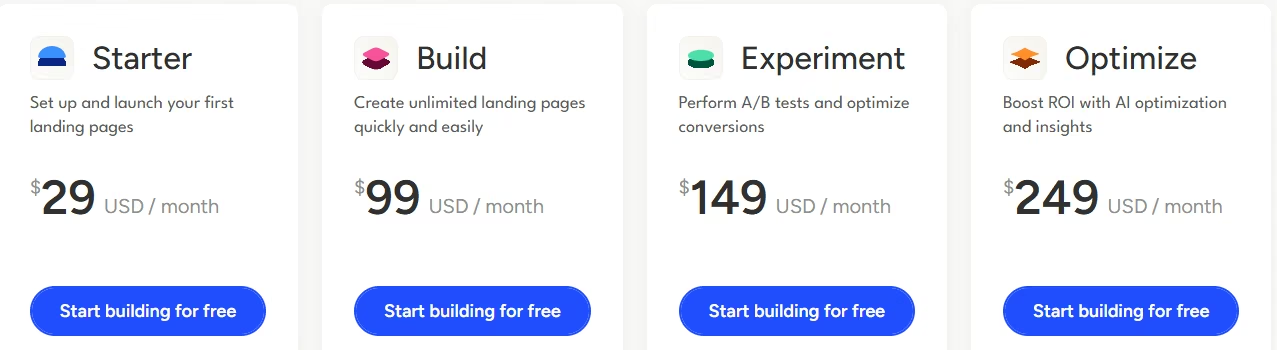
Unbounce's lineup runs four priced plans plus two sales-priced tiers on top:
- $29/month ($22/month, billed annually) for Starter: five pages, up to 500 visits a month, one user, one root domain
- $99/month ($74/month, billed annually) for Build: unlimited pages, up to 20,000 visits, one user, one root domain
- $149/month ($112/month, billed annually) for Experiment: unlimited A/B testing, Dynamic Text Replacement, conversion reporting, up to 30,000 visits, three users, two root domains
- $249/month ($187/month, billed annually) for Optimize: Smart Traffic AI-based routing, up to 50,000 visits, five users, three root domains
- Concierge and Agency: no public price; contact sales, starting at 100,000 visits with 15 users on the Concierge tier
3. Instapage: Best for Teams Reviewing Pages Together

Instapage is built for the team around the page, and that shapes everything about it.
It's the tool people reach for when several people touch a campaign. The funnel build showed why that's true, and why its entry plan is a trap.
At 29 minutes, most of that time went into the first page. The editor is precise in a way the others aren't, with alignment and distribution controls.
The reusable blocks meant my confirmation page took about four minutes to complete because I saved the header from page one and dropped it straight in. If you build more than one page a week, that compounding is worth something.
Then I got to the part of the brief that says "a paid social link needs to see a different headline," and stopped. Two of the five things the brief asks for sit above the plan I was on.
Dynamic Text Replacement and server-side A/B testing both live on the Optimize plan at $199/month. The Create plan at $99/month has neither. Full ad-to-page personalization sits higher still, on the sales-priced Convert plan, as does AdMap, the tool that maps each ad to its own landing page.
Instapage is expensive against the field, and its pricing is shaped around larger teams. The features that make it worth the money aren't in the door price.
What I could test, I liked. The four-field form held. The collaboration tooling is the strongest of the eight hands-on-tested tools by a distance. Comments pin directly to the page element under discussion, so the conversation stays with the page.
Skip Instapage at the Create plan if personalization by traffic source is why you're leaving Landingi. Create doesn't include the feature you're switching for. At Optimize, it's a serious tool, and I'd recommend it for a team of five reviewing pages together.
Key Features
- Reusable blocks and forms: Saves any page section to a shared library and reuses it, which cuts my second page down to about four minutes.
- Real-time visual collaboration: Pins comments to the element being discussed, so page reviews resolve inside the page.
- Server-side A/B testing (Optimize plan): Splits traffic without the flicker that gives a variant away, with a customizable split between variants.
Pros
- The most precise editor of the tools I hand-built, with alignment and grid controls
- Unlimited pages, conversions, and contacts on every plan
Cons
- Dynamic Text Replacement and A/B testing both require jumping from the $99/month Create plan to the $199/month Optimize plan, a $100 monthly jump
- Ad-to-page personalization is gated to a sales-priced tier
- The highest published entry price of the six, at $99/month
Best For
- Marketing teams where several people review a page before it ships
- Agencies reusing custom blocks and forms across multiple client accounts
- Teams whose media budget makes a $199/month tool a rounding error
Pricing
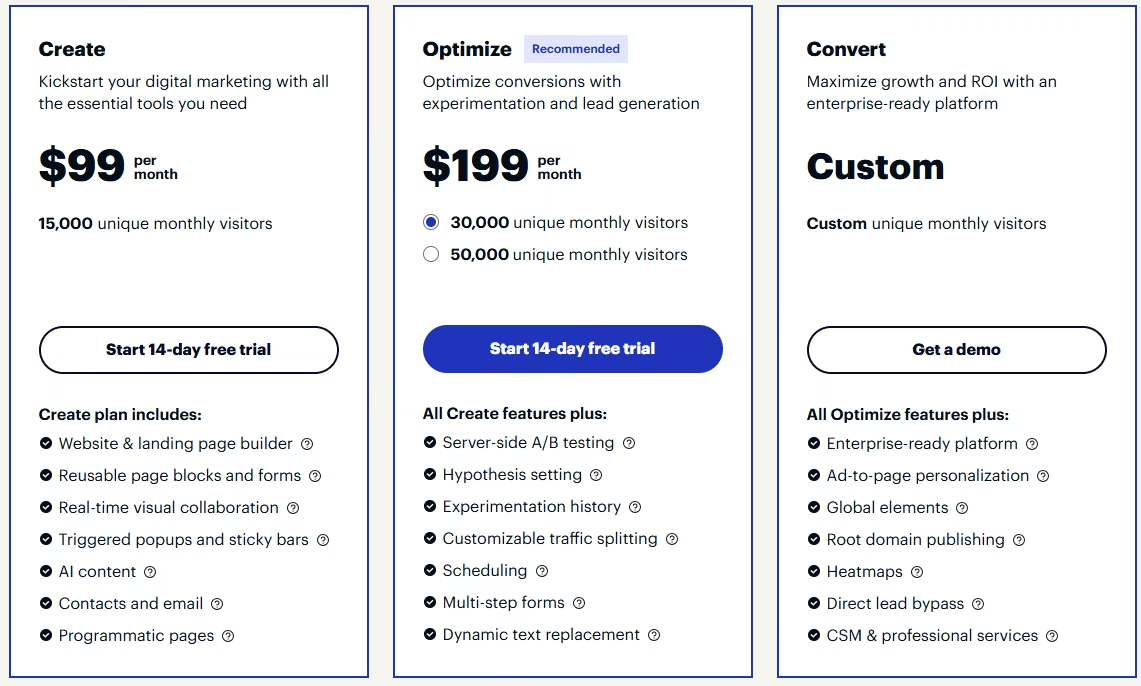
Instapage publishes two plans and one sales-priced tier, and every plan includes unlimited pages, conversions, and contacts:
- $99/month ($79/month, billed annually) for Create: 15,000 unique monthly visitors, the builder, reusable blocks, triggered popups, AI content, contacts, and email
- $199/month ($159/month, billed annually) for Optimize at 30,000 unique monthly visitors, with a separately priced 50,000 tier above it: server-side A/B testing, hypothesis setting, experimentation history, scheduling, multi-step forms, Dynamic Text Replacement
- Convert: No public price; contact sales, adds ad-to-page personalization, global elements, root domain publishing, heatmaps, and a dedicated customer success manager
If You've Outgrown Landingi's Page or Traffic Caps
Page and traffic caps are the more common reason people move, and they have nothing to do with features. You're building the same pages you built last quarter. There are more of them now. The tier that fit fine in January doesn't fit in August.
Both tools here are priced for that problem specifically. If your budget is closer to zero than to a monthly subscription, our list of free landing page builders is a better starting point than either one.
4. Leadpages: Best for Publishing Pages Fast

Leadpages has the lowest paid entry price of the six, and it splits its product in two to get there.
That split is the first thing to understand, because it decides whether this tool solves your problem.
The build took 21 minutes, among the quickest of the builds I put together by hand. Leadpages doesn't ask you many questions. Template, copy, form, publish.
The four-field form was clean, the countdown worked, and the confirmation page took under five minutes. For a marketer whose job is getting a page live before a campaign starts, this is a well-judged tool.
It couldn't fulfill the brief's request to "split-test two versions of the page-one headline against each other and see real numbers." On the publishing tiers, there's no native A/B test at all. The standard workaround is publishing two variants manually and splitting traffic at the ad platform, which works, but it moves the measurement out of the page tool entirely.
That's a question of which plan line you're on. Leadpages now ships as two separate product lines:
- HTML Pub by Leadpages: The publishing tiers, running from $10/month to $49/month
- Leadpages proper: The optimization tiers, starting at $99/month
A/B testing starts on that $99/month Grow plan, with up to four variants per test from day one. Dynamic text replacement starts on the same plan, cheaper than the tier where Unbounce and Instapage first offer the same feature, though Zoho LandingPage and Swipe Pages both get there for less.
So the calculus is unusual. Leadpages is either the cheapest of the six or a mid-priced tool, depending entirely on which half of the product you need. At $10/month for five pages, you're buying a publishing tool. At $99/month you're buying a testing tool that also publishes.
For the funnel I was building, the entry tiers were the fair comparison, and on those the split test isn't there. I'd still take Leadpages over most of this list if publishing speed is the job. I'd move straight to Grow if proving a headline is.
Key Features
- Two product lines: Separates publishing from optimization, so you pay for testing tools only when you need them.
- Dynamic text replacement from the Grow plan: Matches page copy to ad copy.
- Built-in pop-ups and alert bars: Adds opt-in pop-ups and sticky alert bars on the publishing tiers, no separate tool needed for a secondary offer on the same page.
- Unlimited traffic on every plan, unlimited pages from the optimization tiers: Removes the visit-cap question entirely, and the page-count question once you're on the Grow plan up.
Pros
- The cheapest paid entry point of the six, at $10/month
- One of the quickest hands-on builds of the group, at 21 minutes
Cons
- No native A/B testing on the publishing tiers at all, so proving a winner means splitting traffic manually at the ad platform
Best For
- Solo marketers whose bottleneck is publishing speed
- Small teams whose page count keeps growing but whose budget doesn't
- Anyone who wants ad-matched copy without a premium-tier price
Pricing
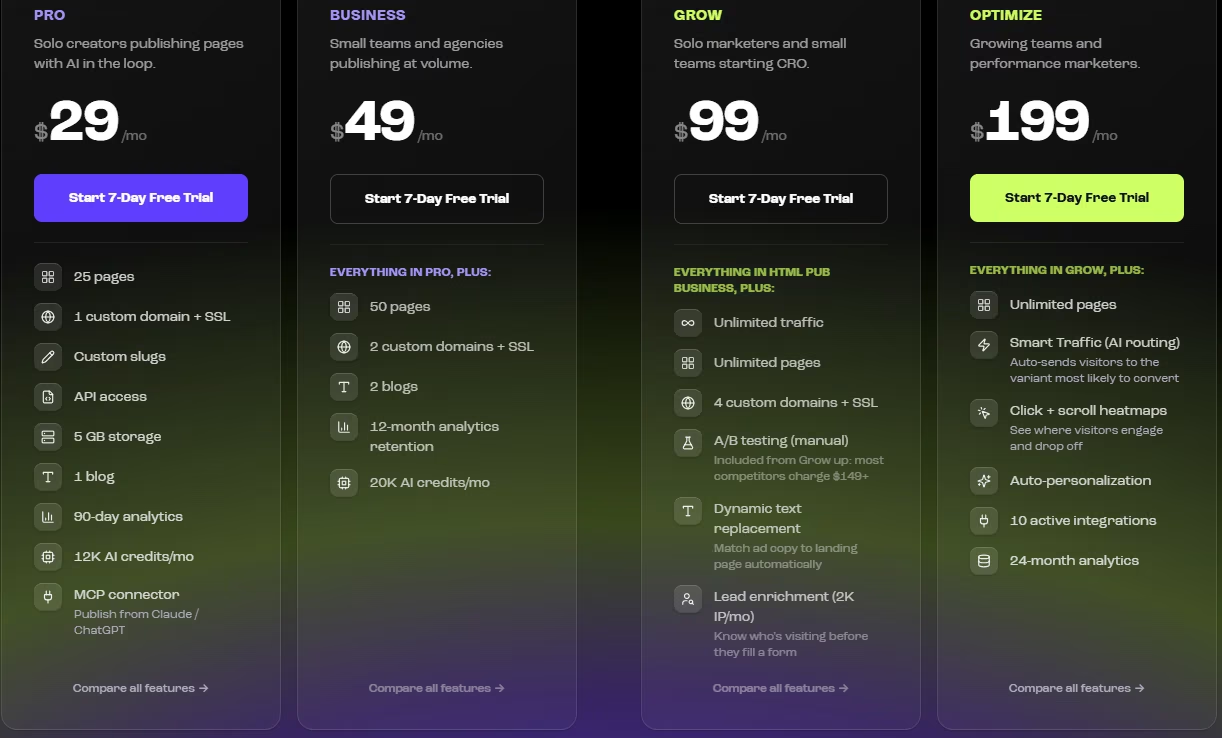
Leadpages splits seven total plans across its two product lines, and switching its billing toggle to Annual trims 20% off the rate.
HTML Pub by Leadpages:
- $0/forever for Free: five pages to build and preview, 100 MB storage, 5,000 AI credits to start, publishing requires a paid plan
- $10/month ($8/month, billed annually) for Starter: five pages, unlimited traffic, one custom domain, 4,000 AI credits a month
- $29/month ($23/month, billed annually) for Pro: 25 pages, unlimited traffic, programmatic access, 5 GB storage, 12,000 AI credits
- $49/month ($39/month, billed annually) for Business: 50 pages, unlimited traffic, two custom domains, 20,000 AI credits
Leadpages proper (the optimization tiers):
- $99/month ($79/month, billed annually) for Grow: unlimited traffic, unlimited pages, manual A/B testing, dynamic text replacement, lead enrichment
- $199/month ($159/month, billed annually) for Optimize: AI traffic routing, click and scroll heatmaps, auto-personalization
- $399/month ($319/month, billed annually) for Scale: full auto-optimization, team seats, workspaces, a dedicated customer success manager
5. Zoho LandingPage: Best for Escaping a Page-Count Cap

Zoho LandingPage removes the page-count question and replaces it with a visitor one.
The brief's headline-swap clause asks page one to show a different headline to anyone arriving from a paid social link than to someone arriving "from an organic search or an email link." Zoho LandingPage has no native dynamic-text engine on its Free tier to swap that headline on one URL.
So I built two pages: one for the paid-ad variant, one for the organic-and-email traffic. Each page swaps to its own confirmation message inline after the form submits, without redirecting to a separate URL.
That's a departure from the brief, which asked for a standalone page two. On the Free tier, delivering both the variant split and a separate confirmation page for each source would have needed four of the five pages available.
It's a manual workaround, and it cost real time. The whole build (both pages, the shared registration form, and the confirmation logic behind them) took 27 minutes, with the second page and its duplicate copy accounting for the bulk of that.
Keeping both versions in sync afterward is its own quiet tax. Any copy change to the offer has to be made twice, once per page, with no shared block linking them, so a typo caught on one variant doesn't automatically fix itself on the other.
Two of the brief's clauses got a harder answer than the page count did. The split test needed A/B testing, which starts on Professional, so it was never attempted on the Free tier.
The duplicate-email trap I could attempt, and Zoho LandingPage's lead table has no de-duplication of its own. The same email twice meant two rows, not one; the same result I got on Landingi, Unbounce, and Swipe Pages.
The free plan is thicker than it looks. Zoho LandingPage's free tier covers five pages and 5,000 monthly visitors, enough to run both variants of this test with room left over.
The visitor cap is the real constraint. A campaign that gets picked up by a paid channel will clear 5,000 visits before the month is out, and that's the number worth watching.
If page count is the reason you're leaving Landingi, Zoho LandingPage solves that, though it trades one ceiling (pages) for a different one (visitors).
Key Features
- No page-count wall on the Free tier: Five pages and 5,000 visitors a month.
- Testing tools start on Professional: Dynamic Text Replacement, A/B testing, and heatmaps all require leaving the Free tier.
- Part of the Zoho product family: Landing pages connect to Zoho CRM, Zoho Campaigns, and Zoho Meeting, alongside the rest of Zoho's suite.
- Data retention scales by tier: Free keeps lead data for one month, Professional for nine months, Enterprise for 12 months.
Pros
- The workaround needed two of the Free tier's five pages, leaving the visitor allowance untouched at this scale.
- Page count stops being a constraint from the Professional plan up, where Zoho goes unlimited.
Cons
- No personalization engine on the Free tier. Traffic-source variants mean two pages kept in sync by hand, each edited separately since neither links to the other.
- Professional's Dynamic Text Replacement swaps by URL parameter, not by traffic source. Per-visitor personalization by traffic source only comes with Enterprise.
- The visitor cap sits well below what a successful paid campaign will use in a month.
Best For
- Anyone hitting Landingi's page cap well before they come anywhere near a visitor limit.
- A team that doesn't need per-visitor personalization on a single URL, or is ready to pay for Enterprise to get it by traffic source.
- Someone already inside the Zoho ecosystem who'd rather keep landing pages in the same account.
Pricing
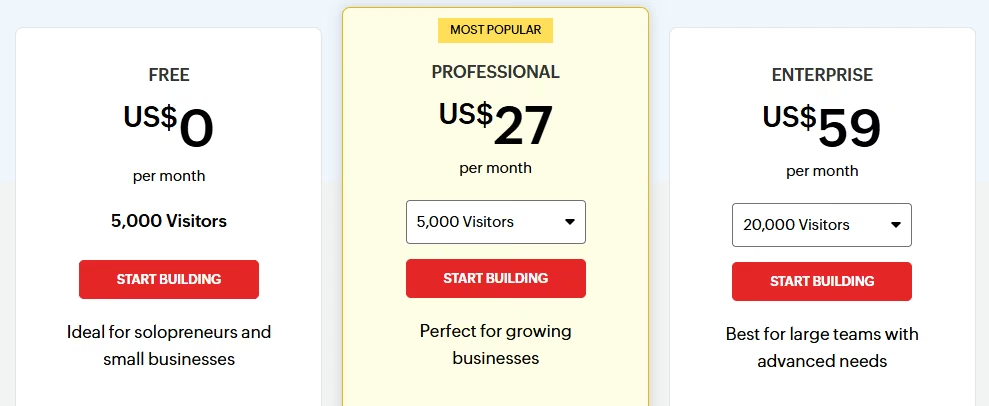
Zoho LandingPage's pricing spans three plans, with a Monthly and Yearly toggle advertising 33% off yearly billing, and prices that vary by the visitor band you select:
- Free: one user, five landing pages, unlimited popups and conversions, one custom domain, one workspace, 5,000 visitors
- $27/month ($18/month, billed annually) for Professional at the 5,000-visitor band: five users, unlimited landing pages, three custom domains, three workspaces, nine months of data retention, plus saved sections, A/B testing, heatmaps, scroll and attention maps, Dynamic Text Replacement, SEO insights, form analytics, webhooks
- $59/month ($39/month, billed annually) for Enterprise at the 20,000-visitor band: 10 users, unlimited pages, five custom domains, five workspaces, 12 months of retention, plus lead enrichment and personalization
Domains, workspaces, and extra users are available as $50 a year add-ons on any paid tier.
If You Need Something More Specialized Than a General Landing Page Editor
These last two serve narrower jobs. One is built around a single technical priority; the other around a job bigger than a landing page.
Both are right for a specific reader and wrong for everyone else. Neither of them, and none of the five above, replaces a full AI website builder if what you need is a site.
6. Swipe Pages: Best for Mobile Load Speed
Swipe Pages got a working funnel up in 18 minutes.
Both pages (the mobile-optimized registration page and the confirmation page behind it) went up in that window, with the confirmation page alone taking six minutes once the registration page's structure was already in place. For a tool built around mobile-first paid-traffic pages, that's the one claim that has to hold up, and it did.
I built on the 14-day trial, which opens every feature regardless of plan. That's why Dynamic Text Replacement and server-side A/B testing were available on this build at all.
I opened the registration page on my own phone in preview before touching anything else, since fast mobile load is the entire reason to reach for a tool like this. It rendered without the lazy-loading stutter or font-swap flicker that makes a visitor wait, and I adjusted no settings to get there.
Swipe Pages failed the brief's trap clause outright. It asks that "if the same email registers twice, update their existing record instead of creating a second lead." I ran the same test email through the registration form twice on purpose, and Swipe Pages didn't catch it.
I opened the leads table afterward and found two duplicate rows, same email and same name. Nothing merged them, and nothing flagged the second submission as a repeat.
That's the thinnest lead-record logic of anything in this test. A real campaign that runs for more than a day or two will see the same visitor register twice, whether they lost their confirmation email or forgot they signed up already, and Swipe Pages will hand you two leads for one person every time it happens.
Once a paid plan's traffic cap is used up, extra visits bill in 5K blocks rather than forcing a tier upgrade. That's a fair structure if the page is converting, but it adds up fast on a campaign that's working.
Swipe Pages is the one I'd pick when the audience is mobile and paid, with the duplicate problem handled downstream.
Key Features
- Speed-first build flow: The editor and templates are built around finishing a page fast, over deep customization options.
- Unlimited pages and funnels on every tier: Even Startup, the entry plan, has no cap on how many pages or funnels you build.
- Server-side A/B testing and Dynamic Text Replacement start on Marketer: Neither is available on the entry Startup plan.
- Pay-as-you-grow visitor overage: Extra traffic past the plan's allotment bills at $5 per 5,000 visits, with no forced tier upgrade.
Pros
- One of the quickest builds in this test, 18 minutes for both pages.
- The confirmation page alone took six minutes once the registration page was in place.
- Mobile preview loaded instantly, with no lazy-loading or font-swap stutter.
Cons
- No de-duplication on repeat submissions. The same email registering twice created two separate lead rows, with no record ever updated.
- A real, ongoing campaign will need to export and de-duplicate the leads table by hand.
- Startup, the cheapest paid plan, still lacks server-side A/B testing and Dynamic Text Replacement, both Marketer-tier features.
Best For
- Paid-traffic campaigns where most of the audience is on mobile.
- A short, single-run campaign where duplicate resubmissions are unlikely to pile up.
- Someone who wants the fastest possible page built and is willing to manage the leads list manually.
Pricing
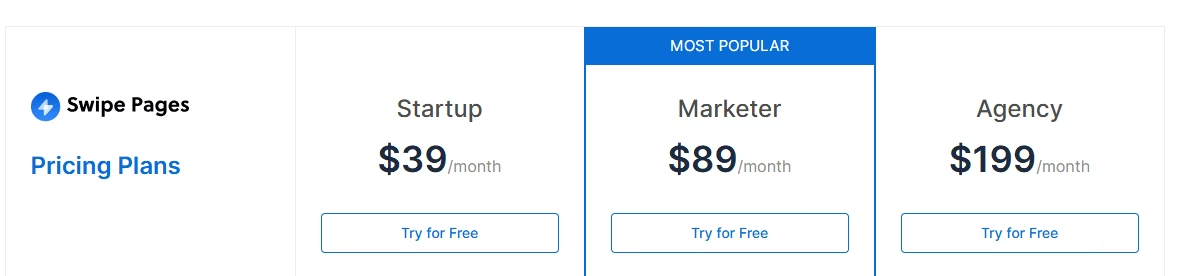
There's no permanent free plan, only a 14-day free trial with no card required:
- $39/month ($29/month, billed annually) for Startup: 20,000 visits a month, one custom domain, unlimited landing pages, funnels, and conversions
- $89/month ($69/month, billed annually) for Marketer: 50,000 visits, five custom domains, five client subaccounts, five team members
- $199/month ($149/month, billed annually) for Agency: 500,000 visits, unlimited custom domains, unlimited subaccounts and team members, 50 global blocks, unlimited global scripts and webhooks
7. ClickFunnels: Best for the Checkout, the Upsell, and the Email Sequence
ClickFunnels took 54 minutes, slower than every other build I put together by hand. Most of that was navigating a product built for a bigger job.
Whether that counts against the tool depends entirely on what you're building.
The funnel itself was never in doubt. ClickFunnels builds registration pages competently; the four-field form behaved, and the calendar link on the confirmation page caused no trouble. The time went into screens that assume you're building a sales sequence.
I kept passing order bumps, upsell steps, and email automation on the way to my two pages. Each of those is a feature somebody else is paying for.
The clearest example was the brief's exit question about "whether I can export the full list as a CSV whenever I want it." The answer is yes, and it's a standard export:
- Go to Customers
- Then Contacts
- Run the bulk action that hands you a download link
Registrants aren't buried inside the funnel's own reporting the way the rest of the platform might suggest.
The real surprise was the ceiling above that list. The Launch plan I was testing on caps out at 10,000 contacts, a number a webinar funnel with any reach can hit before the quarter is over.
The headline swap worked, and so did the split test. The friction was scale mismatch. This is a platform for someone selling a course, a coaching program, or a physical product. The registration page is step one of five, and the money arrives at step four.
ClickFunnels fits campaigns that continue past a two-page funnel into checkout, order bumps, and a follow-up sequence. The price reflects the bigger product, so a $97/month registration-page build also pays for checkout, order bumps, upsells, and email automation even when the campaign does not need them.
Key Features
- Full funnel building: Chains registration, checkout, order bumps, upsells, and follow-up email into one flow.
- Funnel template library: Ships pre-built templates for webinars, launches, and sales sequences, giving a funnel a proven starting shape.
- Funnel-level analytics: Reports on the whole sequence, so you can see where people leave the journey.
Pros
- Built around the full registration-to-purchase sequence more completely than anything else on this list
- Unlimited funnels from the entry Launch plan
Cons
- The slowest hands-on build of the group, at 54 minutes
- Contacts cap out at 10,000 on the entry Launch plan, with no unlimited-contact tier the way Instapage offers
- ClickFunnels marks its own "unlimited funnels" plan feature as a limited-time offer on its current pricing page
- One of the priciest entry points in this field at $97/month, behind only Instapage's $99/month
Best For
- Marketers whose registration page leads to a paid offer
- Course and coaching businesses running checkout and upsell sequences
- Teams who want one platform for the pages, the cart, and the emails, budgeting for Scale at $197/month once more than two people need access
Pricing
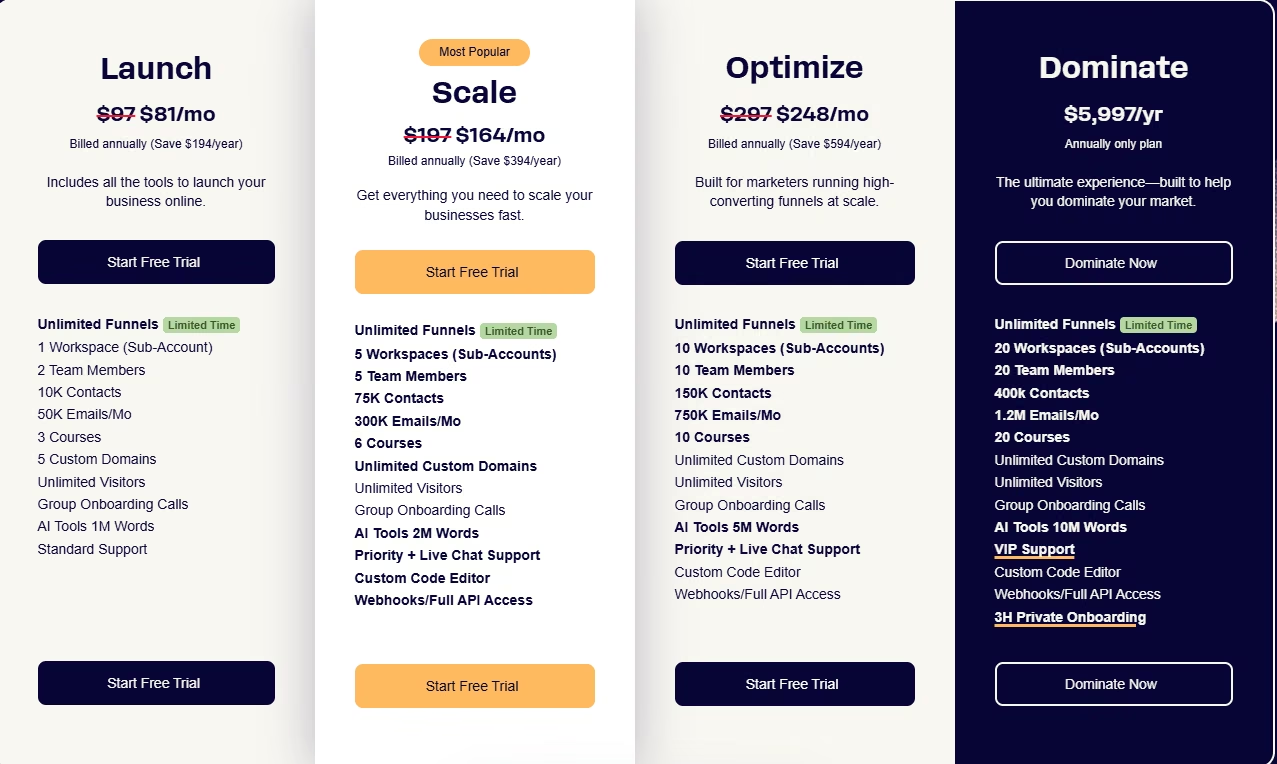
ClickFunnels prices out across four plans, with an Annual Discount and Monthly Plans toggle:
- $97/month ($81/month, billed annually) for Launch: unlimited funnels, one brand workspace, a 10,000-contact cap, AI tools with a 1 million word allowance, standard support
- $197/month ($164/month, billed annually) for Scale: five brand workspaces, a 75,000-contact cap, live chat support, a custom code editor, webhooks, full programmatic access, a 2 million word AI allowance
- $297/month ($248/month, billed annually) for Optimize: 10 brand workspaces, a 150,000-contact cap, the same developer tooling as Scale
- $5,997/year, billed annually only, for Dominate, about $499.75 a month: 20 brand workspaces, a 400,000-contact cap, plus three hours of private onboarding
Which Landingi Alternative Should You Choose?
Who each tool is for, and what you give up to get it:
- Choose Emergent if the registration page is step one of an application, and what you need next is the member area, the logins, and the lead database behind it. There's no built-in A/B testing panel or heatmap tool waiting for you here.
- Choose Unbounce if you're running paid ads and need the page headline to match the ad copy automatically. Budget for the Experiment plan, because the swap and the split test both live there.
- Choose Instapage if you have a team that reviews pages together and personalization by traffic source is why you're moving. Its entry plan won't get you there, so price the Optimize plan instead.
- Choose Leadpages if the entry price is blocking you and you mostly need to publish. You'll trade away split-testing until you move up to its optimization tiers.
- Choose Zoho LandingPage if the page count is your problem. Check the visitor cap on the tier you can afford, because that number is Zoho's own ceiling.
- Choose Swipe Pages if most of your traffic is mobile and load speed is the number you're judged on. I registered the same email twice and got two separate lead rows, so plan on cleaning duplicates.
- Choose ClickFunnels if the registration page is step one of something that ends in a purchase. For a page and a thank-you screen, it's more than you need.
- Stick with Landingi if you haven't hit a cap yet and the editor isn't slowing you down. Nothing below will feel meaningfully easier to build in, and several will cost more.
How to Evaluate Landingi Alternatives
Four questions decide this, and none is about which editor looks nicest.
Check the tier you can afford: Does it include the feature you're switching for? This is the one that catches people. Feature lists are written at the top tier, and budgets are set at the bottom one.
Unbounce's swap and split test are on its third plan. Instapage's are on its second. Leadpages has no A/B testing at all on its publishing line.
Write down the single feature that made you start looking. Then find the cheapest plan that contains it. That number is the real one to compare, and it's rarely the headline price.
Check how the tool proves a winner: Can you settle a headline argument, or only guess at one? There's a wide gap between publishing two versions and having the platform split the traffic and report which won. Both get described as testing.
Only one settles an argument. Check how many variants a test allows on the plan you'd pay for, since "A/B testing" on a feature list can mean either one.
Check what happens to your data: Where do the leads live if you stop paying? Ask before you build.
You want a plain CSV export you can reach in a couple of clicks. You want a clear answer on how long submissions are retained, and on what happens when a subscription lapses.
Zoho LandingPage states its own numbers plainly: after cancellation, your data stays on its servers for 90 days (a separate figure from the 9-month data retention that applies while you're subscribed), and you can revive it by reactivating within that 90-day window. Not every tool publishes a figure that clear.
Check the job the tool is built for: Does it match yours? A funnel platform will build you a landing page, but a landing page tool has no checkout to give you. The bigger machine costs you money and time on every build, while the smaller one defers that cost to a migration six months down the line. Decide which mistake you'd rather make, then buy that.
Our Landingi review covers what works and what doesn't, which is worth reading before you commit to moving.
Every Landingi Alternative Here Has Its Own Ceiling
Nine days and eight hands-on builds later, the surprise was how little the tools differed at building a page. The differences arrive at the moment you outgrow the plan you're on.
The ceiling, tool by tool:
- Unbounce and Zoho: Unbounce's entry tier stops at five pages and 500 visits. Zoho's free tier stops at five pages and 5,000 visitors, though its paid Professional plan lifts the page cap and leaves the visitor band as the ceiling.
- Leadpages: the cheapest plan caps out at five pages, though traffic itself is unlimited on every tier.
- Instapage: the entry plan draws the line at 15,000 visitors.
- Swipe Pages: charges $5 for every extra 5,000 visits once its own allowance runs out.
- ClickFunnels: the entry plan maxes out at 10,000 contacts.
- Emergent: the Standard plan carries 100 credits a month, and every live app takes 50 of them.
- Landingi: the Build plan stops at 10 pages and 2,000 visits.
Every one of those is a ceiling, and every one of them is somebody's reason to go looking. So ask which ceiling you're about to hit before you migrate. Then ask which of these Landingi alternatives prices what's above it in a way you can live with.
Move for a cap you've measured or a feature you've priced, and you'll be fine. Chase a feature list that looked impressive on its own, and you'll be shopping for a replacement again next year.
How Emergent Helps When a Lead-Gen Page Needs to Become a Real Product
A landing page tool's job ends once it collects an email. What comes after belongs to different software entirely.
The webinar registrant becomes a customer who needs a login. The gated PDF turns into a resource library that has to know who's allowed in. The lead list turns from a spreadsheet you export every Monday into something you want to query, segment, and act on.
At that point you're describing an application, and a landing page editor has no answer for it. ClickFunnels comes closest of the six, with its own membership-site login gate, built to protect a course. Running the database logic behind a real member portal is a different, larger job.
Emergent is what you reach for when the page needs to become that application, beyond the specific build already covered in its entry above. You describe what you want. Specialized agents scope the build, put together the working software end to end, and check the result before it ships.
The database, the logins, the payment handling, and the hosting come wired together.
So the page you already built can become more:
- A registration page can become a member area with accounts
- A lead list can become a searchable database with the segmentation rules your team keeps asking for, one of the internal tools Emergent builds for small business owners
Emergent's paid tier starts at $20/month for 100 credits, a smaller line item than what several of the plans covered in this piece already cost for page-building alone, with 50 credits a month going to keeping one app live.
The meter here is credits spent building and iterating, so the cost tracks how much the app changes over time.
It isn't a replacement for what Unbounce or Instapage do. If your job this quarter is proving which headline converts on paid social, buy the tool built for that. If your job is the thing the form feeds into, that's a different build, and our guide to lead-generation sites covers where the line between the two usually falls.

Most AI app builders stop at prototypes. Emergent creates production-ready apps you can actually launch.
- Production-ready apps
- Web & mobile apps
- Deploy in minutes







