




Three minutes after I clicked Generate, I had a landing page I would have been happy to keep working on. The design looked polished, the seven sections I requested were there, and Lunar had followed some fairly picky instructions about tone and fake customer proof.
The last stretch took more work. I changed the hero, replaced proof placeholders, configured the form myself, checked mobile, and published the page. The live form then hit a reCAPTCHA validation error when I tried to submit it.
For this Landingi review, I wanted to know how far the platform could take a real campaign before I had to step in. Here’s what worked, what slowed me down, and where I think the price makes sense.
Landingi Review Results From My Test
I built a landing page for Sunset Ridge Roofing, a fictional Austin roofing company. Its goal was simple. Get homeowners who suspect storm or hail damage to request a free roof inspection.
My original prompt included:
- One clear conversion goal: Generate free roof-inspection requests.
- Seven sections: Hero, benefits, roof services, a three-step process, proof, FAQs, and a lead form.
- A defined audience: Austin-area homeowners ages 35 to 65.
- A visual direction: Charcoal, warm white, and muted orange.
- A strict proof rule: Lunar couldn't invent reviews, awards, certifications, years in business, guarantees, or statistics.
Lunar first created the visual direction in a DESIGN.md file. It chose colors, fonts, spacing, and other page styles.
Then it prepared a full page plan for approval.
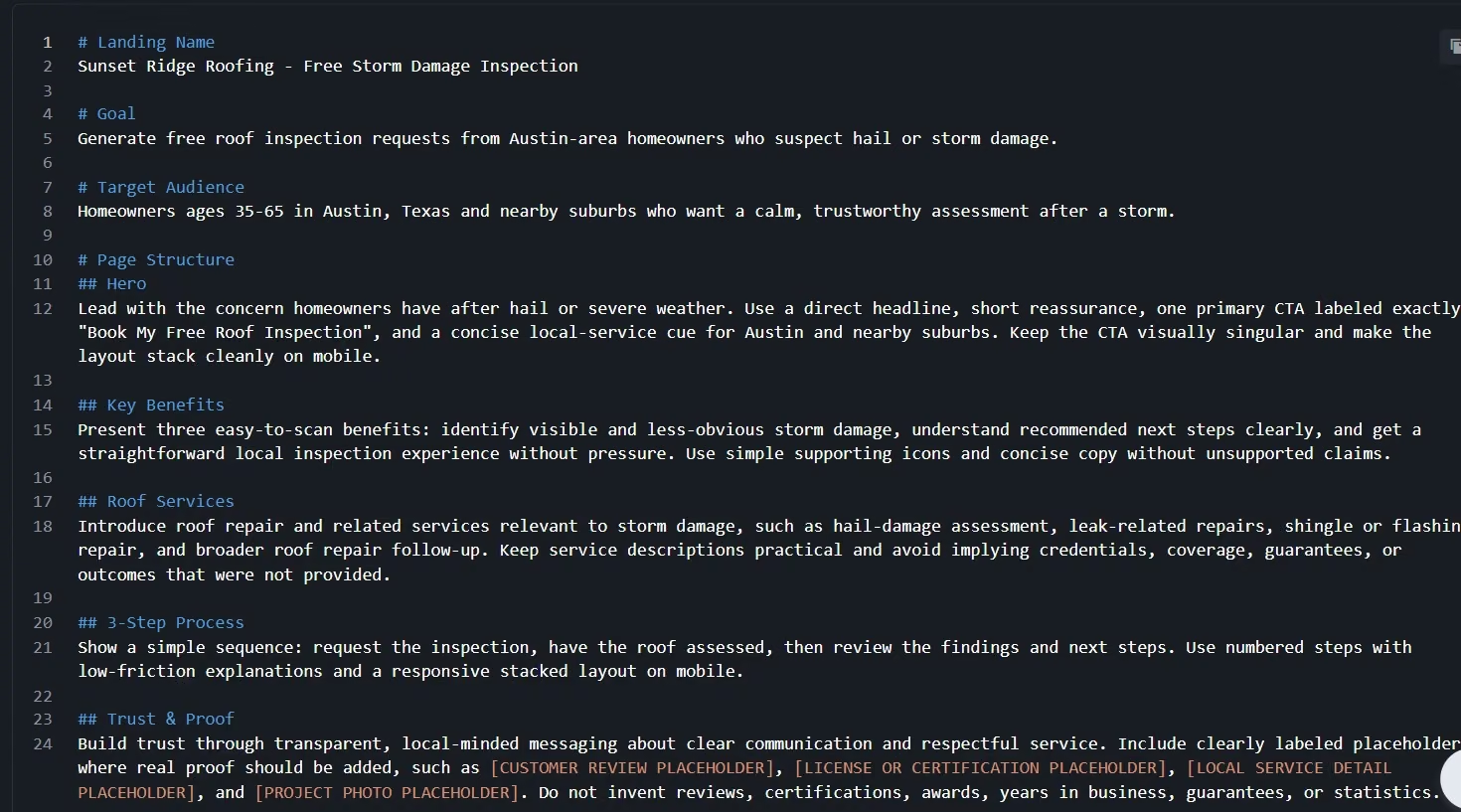
That plan included all seven sections. Lunar also added a thank-you step to the planned form flow, even though I hadn't asked for one.
I approved the plan and timed the generation. The full first draft took about three minutes.
The result looked polished. Every requested section appeared. The hero headline was larger than I wanted, so I used another prompt to rewrite the hero and add three short benefits.
That update took about two minutes.
I then asked Lunar to add a more detailed inspection form. It finished that change in about one minute.
From there, I checked the mobile layout, replaced the remaining proof placeholders with clearly labeled fictional examples, configured the form action manually, and published the page.
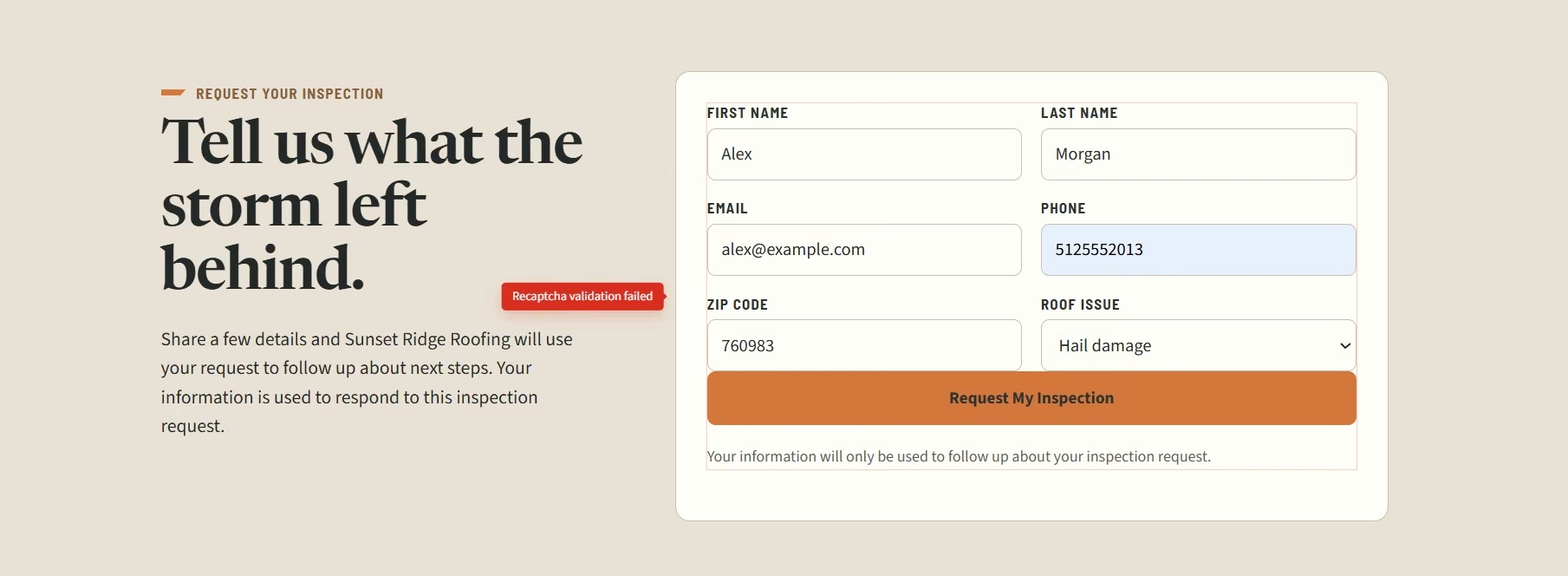
The live form correctly stopped me when required fields were empty. Once I filled every field and submitted it, I got a “reCAPTCHA validation failed” message. I couldn't verify the thank-you confirmation or a completed lead submission.
That failure became one of the most useful parts of the test. Page creation was quick. A real launch still needed me to check each interactive part myself.
What Is Landingi?
Landingi is a landing-page platform for creating, publishing, managing, and improving campaign pages. You can build with its Lunar AI generator, start from one of 400+ templates, or work directly in its visual editor.
The core idea is easy to understand. You can launch campaign pages without asking a developer to make every copy, design, form, or publishing change.
That makes Landingi a good fit for paid campaigns, lead generation, promotions, product launches, and similar jobs where one page has one clear goal.
Landingi's Main Features
Lunar AI Page Generation and Editing
Landingi's Lunar AI was the strongest part of my test. You start with a campaign brief. Lunar turns it into a proposed page plan, and you can approve or revise that plan before generation. After the page appears, you can keep editing through chat or switch to manual Edit Mode.
I liked the planning step because it gave me a chance to catch problems before the build started.
My plan covered every section I requested. It also followed my instruction to avoid made-up proof. Lunar used placeholders where real customer evidence would normally go.
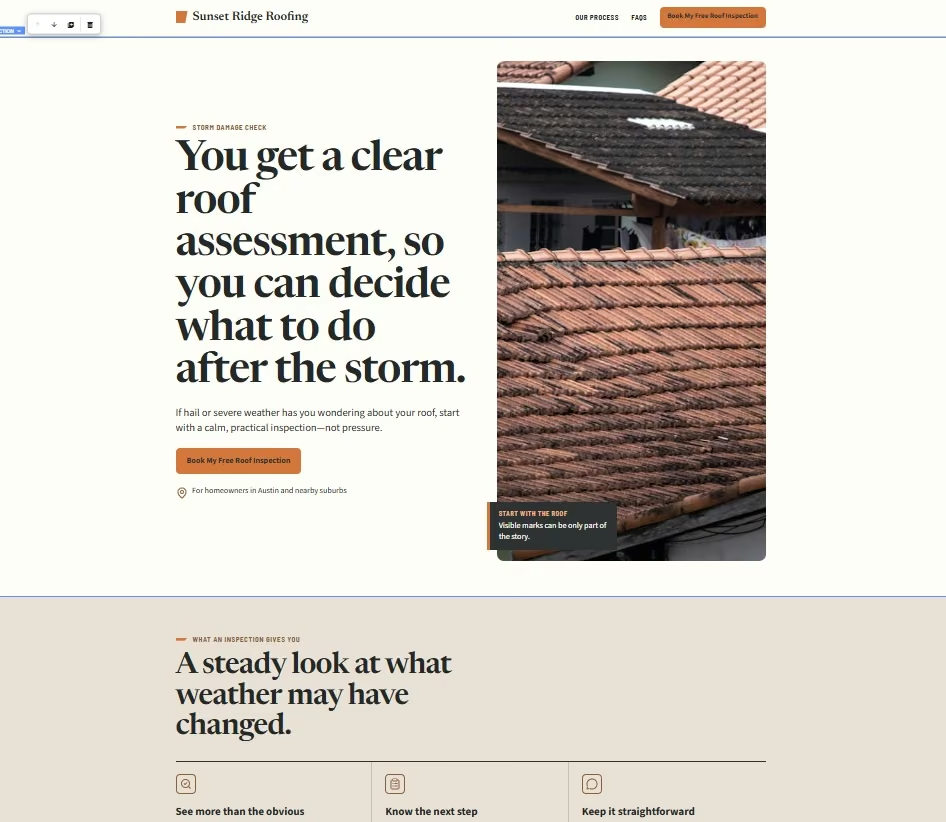
The first result was useful enough to keep. I didn't need to throw it away and start again.
My main design complaint was the hero. The type felt too large.
I gave Lunar a narrow revision request. I asked it to make the hero more specific to hail damage, shorten the subheading, add three benefits, and keep the rest of the page intact.
The rewrite took about two minutes.
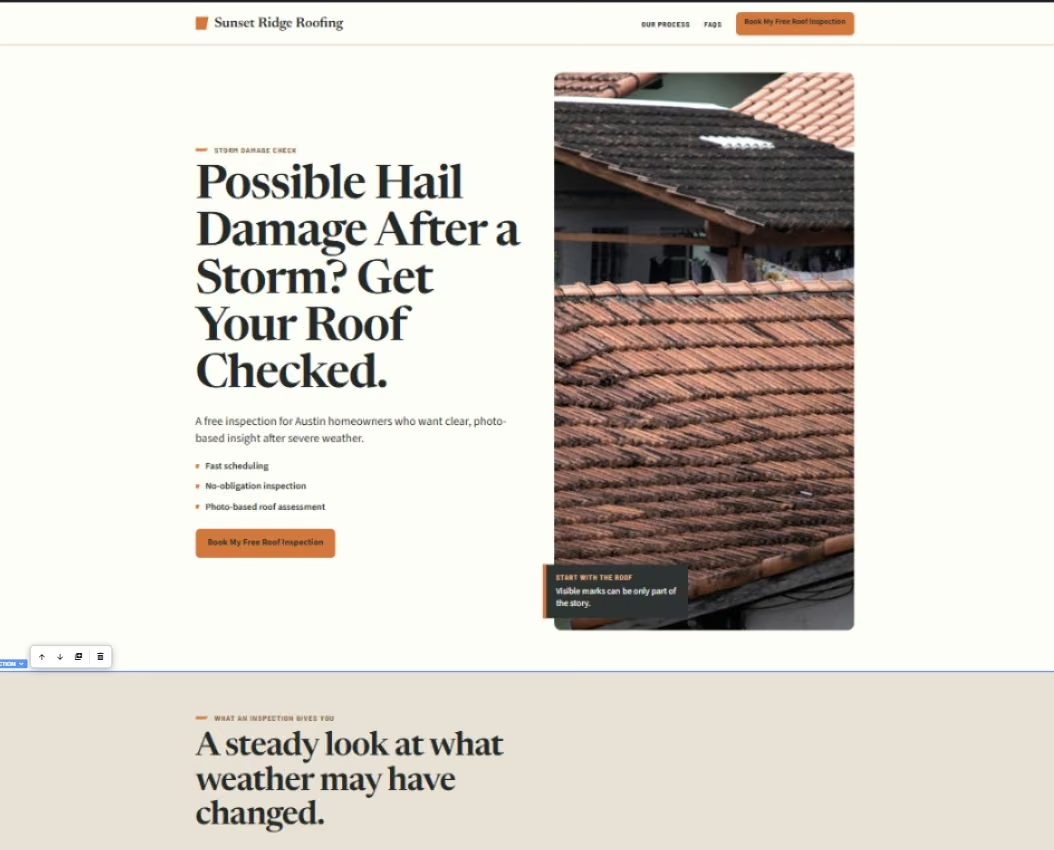
Landingi also gives you direct editing controls. Text, images, button links, position, and element order can be changed manually. Those manual changes save automatically and don't use Lunar credits.
That combination worked well for me. I used AI for larger changes and direct controls for smaller ones.
Mobile Editing
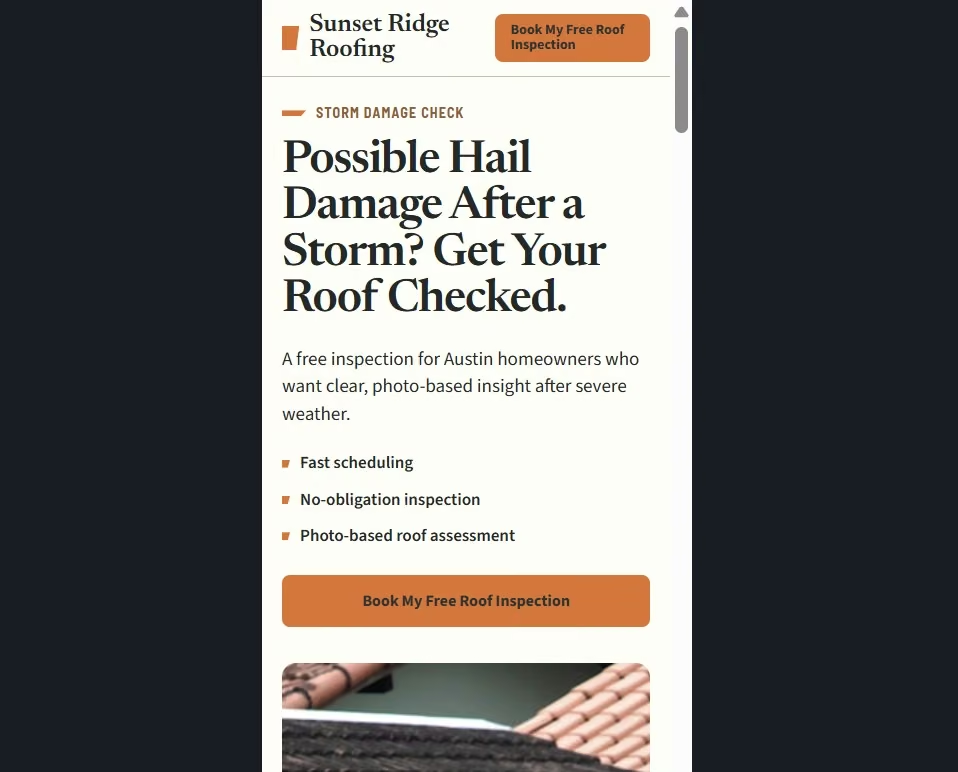
Landingi gave me a clean mobile result on my first pass. The hero stacked properly. The CTA fit the screen. The benefit points were readable, and I didn't see overlapping elements.
I expected to spend time moving things around. I didn't need to.
Your result can vary with the design. Landingi creates the mobile view from the desktop version, and individual elements can require manual adjustment. You can fix the mobile layout separately without changing the desktop arrangement.
That matches comments in G2's Landingi reviews. A January 2026 reviewer liked the free-position editor and reusable Smart Sections, then called out the extra work that mobile layouts can require.
My page landed on the easier side of that experience. I got a usable phone layout without doing a separate mobile redesign.
Forms and Lead Capture
Landingi made the form itself quickly. Getting the complete submission flow working took more effort.
I asked Lunar for first name, last name, email, phone, ZIP code, a roof-issue menu, and a “Request My Inspection” button. About a minute later, the form was there and looked right.
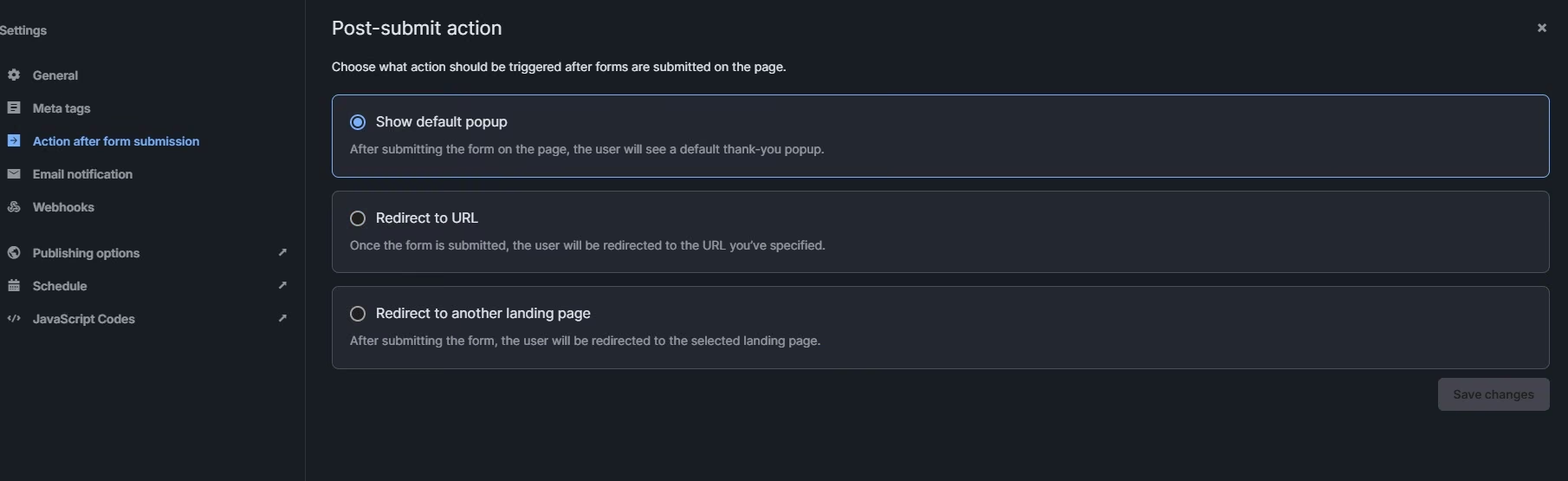
I couldn't get the post-submit behavior working through the AI changes alone, so I configured the next action myself. Landingi lets you show its default thank-you pop-up, redirect to another URL, or send the visitor to another landing page after submission.
Publishing changed part of the experience. The live page correctly enforced its required fields. Empty fields stopped the submission. A completed submission produced a reCAPTCHA validation error.
Landingi supports reCAPTCHA v3 across landing pages and reCAPTCHA v2 on individual forms. The v2 option requires site and secret keys from Google.
So I wouldn't describe Landingi's forms as broken. The accurate result from my test is narrower. I configured the form, published it, confirmed field validation, and then hit a reCAPTCHA error before I could verify a successful lead or thank-you action.
If lead capture is central to your campaign, test the published form yourself before you send traffic to it.
A/B Testing and Visitor Tracking
Landingi includes Server-Side A/B Testing from the Optimize plan upward. You can create different versions of a page, split traffic between them, and compare visits, leads, and conversion rates.
I tried to reach the A/B testing area from the roofing page I built. My trial workspace showed Overview, Events, JavaScript Code, Schedule, and Settings, with no Optimization option. Landingi currently puts Server-Side A/B Testing on Optimize and higher plans, while Build includes Basic Analytics, so I couldn't create a second variant in the workspace I had.
I could still see basic page-performance data, including visits and conversions. Some of the deeper options were locked.
That lines up with the current plan structure. Build includes Basic Analytics, while Optimize adds Server-Side A/B Testing, EventTracker, Solis AI Insights, and Smart Sections.
If split testing is one of the main reasons you're considering Landingi, I'd budget for Optimize rather than judging the platform by the entry plan. A meaningful A/B result needs enough real traffic and conversions to compare the variants, so my fictional campaign wasn't a useful place to judge conversion performance.
Templates, Reusable Sections, and Integrations
Landingi gives you a route that skips AI entirely when you'd rather build the page yourself. The platform has more than 400 templates. Its classic builder lets you position and edit elements directly.
Smart Sections become useful when the same block appears across several campaigns. You can reuse a section, update the shared version, and apply changes to pages that use it. Smart Sections are included from Optimize upward on the current plans.
The platform also connects with lead, email, analytics, payment, and automation tools. Current official product information puts the integration count above 170.
For an agency, that can cut repeat work. You can reuse the same offer block or footer and send leads into tools your team already works with.
If what you need is a full site rather than campaign pages, our best online website builders guide covers that category instead.
Landingi Pricing
Landingi has four paid plans and a 14-day trial capped at 200 visits. There is no permanent free plan.
Build starts at $29/month ($24/month billed annually). Optimize costs $149/month ($119/month billed annually). Scale starts at $299/month ($229/month billed annually). Enterprise starts at $1,499/month ($1,199/month billed annually).
Build gives you 10 active landing pages, 2,000 monthly visits, one custom domain, five users, and 2,500 monthly credits. Optimize raises that to 100 active pages, 30,000 monthly visits, three custom domains, 10 users, and 10,000 monthly credits.
Scale includes unlimited active pages, 10 custom domains, 20,000 monthly credits, and 100,000 to 500,000 monthly visits depending on configuration. Enterprise supports 1 million or more monthly visits, 100 custom domains, and 60,000 monthly credits.
Extra domains cost $5/month. Pay-as-you-go credit packs cost $15 for 5,000 credits, $25 for 10,000 credits, and $40 for 20,000 credits.
The price jump I'd look at hardest is Build to Optimize. Monthly billing rises from $29 to $149. Optimize is where Server-Side A/B Testing, EventTracker, Smart Sections, Multi-lang Personalization, and Solis AI Insights enter the plan.
If you run tests regularly and use visitor-behavior data, Optimize has a clear job. If you mainly create and publish a few campaign pages, I'd start with Build.
Before committing to a plan, it's worth seeing how far a free tool gets you. Our best free landing page builders guide covers the field.
Landingi Reviews From Real Customers
Landingi gets strong overall scores from customers. As of September 2026, Landingi has 4.5/5 from 387 G2 reviews, 4.8/5 from 206 Capterra reviews, and 4.1/5 from 52 Trustpilot reviews.
The individual reviews are more useful than the averages. They show a clear split. People like how quickly they can build and update campaign pages. Mobile editing, advanced forms, pricing, and billing are where more of the frustration shows up.
Pros
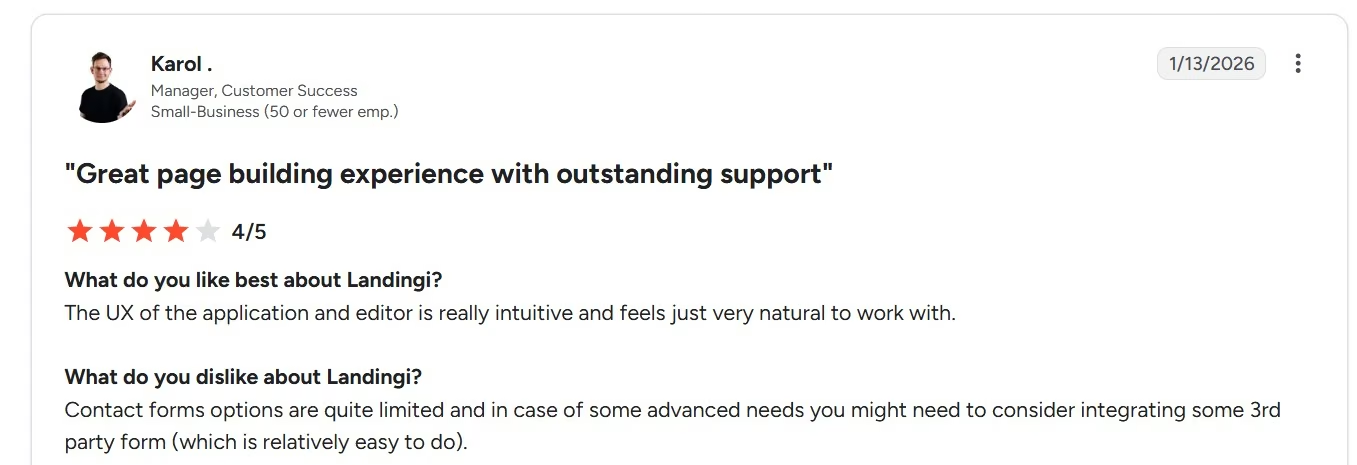
The editor is easy to pick up: Karol, a customer success manager who rated Landingi 4/5 in January 2026, described the editor as intuitive and natural to work with. That matched my experience. I could move from a long campaign brief to a usable page without learning the editor first.
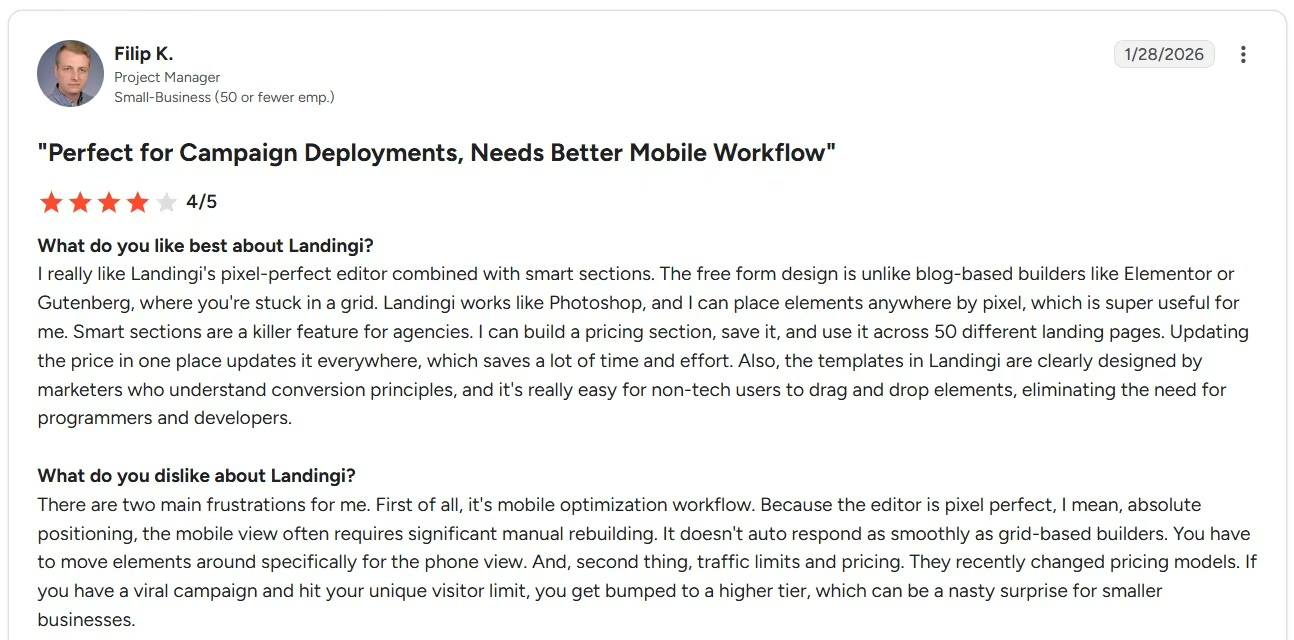
Reusable sections save repeat work (reported, not tested): Smart Sections sit on Optimize, which my trial workspace couldn't access. Filip K., a project manager, described reusing one pricing section across 50 landing pages and updating it from one place. If you manage several campaign pages, that can remove a lot of repetitive edits.
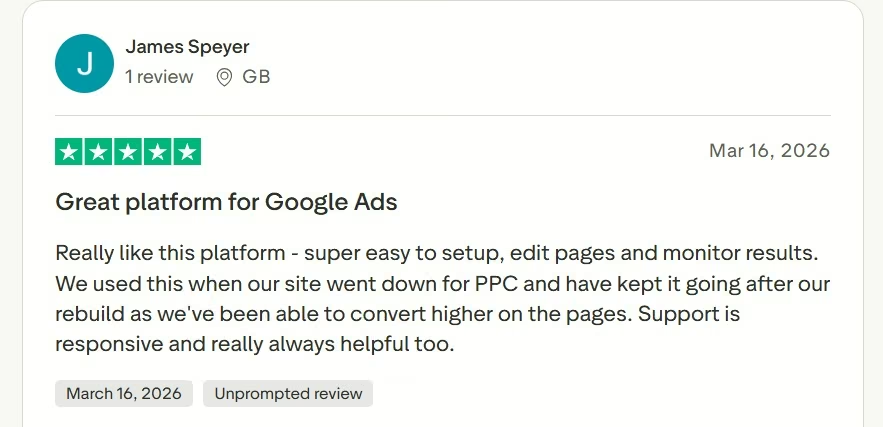
Campaign pages can be launched and changed quickly: James Speyer gave Landingi 5/5 in March 2026 after using it for Google Ads campaigns. He praised how quickly he could set up and edit pages, monitor results, and get help from support.
Cons
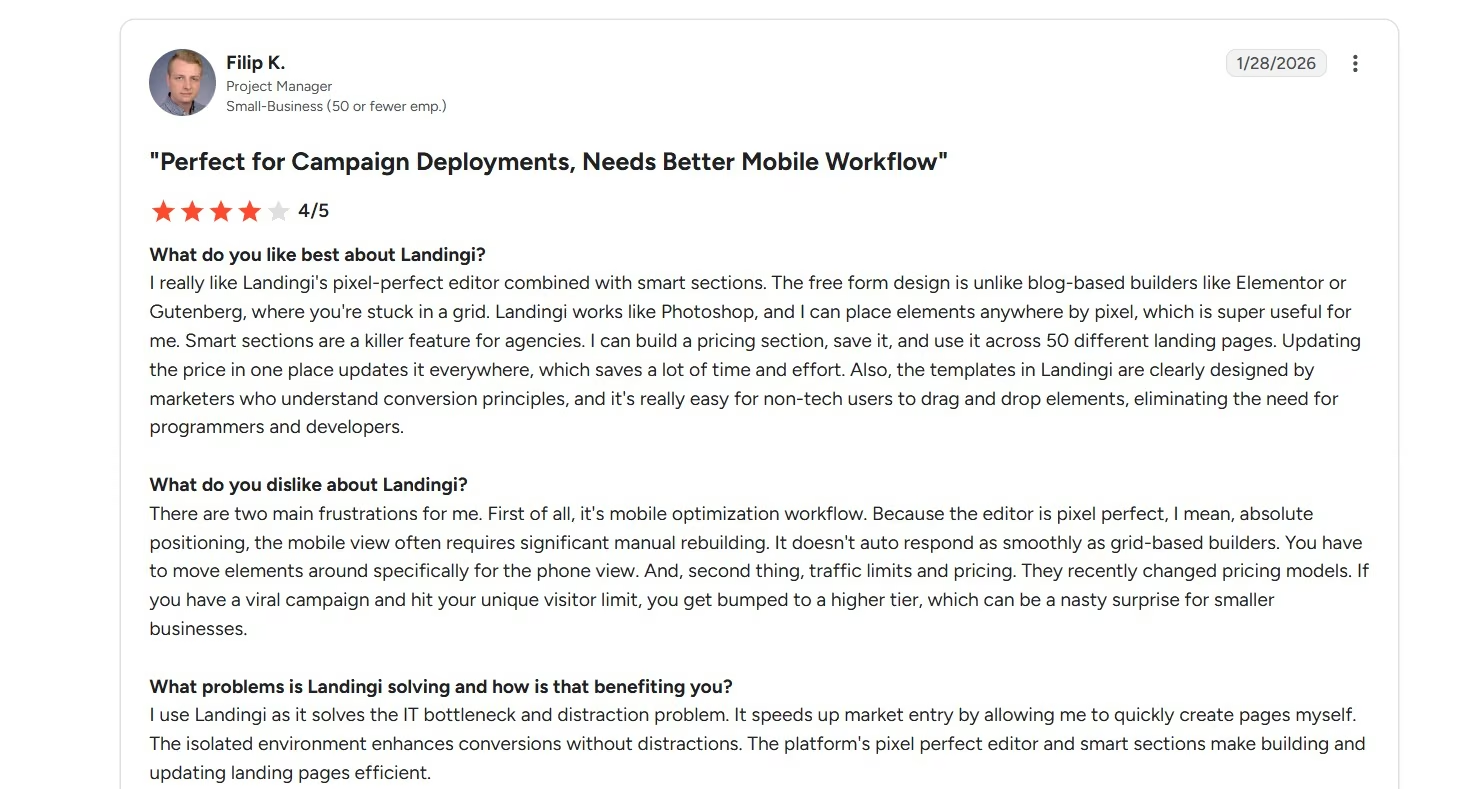
Mobile editing can add another round of work: Filip K. liked the freedom of the visual editor, then called mobile optimization one of his main frustrations. He found that some designs required substantial repositioning for the phone view. My page behaved better. I didn't need a separate mobile cleanup pass, so this seems to depend on the layout you're building.
Advanced forms can feel limited: Karol specifically called out the contact-form options. He said more advanced needs could require a third-party form. My problem was different, though it led me to the same practical advice. Test your complete form after publishing. My required fields worked on the live page, then the completed submission stopped at a reCAPTCHA error.
Pricing can rise quickly once your needs grow: Filip also pointed to traffic limits and pricing as a concern for smaller businesses. G2's wider review summary shows pricing among the recurring complaints, with reviewers also mentioning feature limits and paid upgrades.
That concern makes sense when you compare the $29/month Build plan with the $149/month Optimize plan.
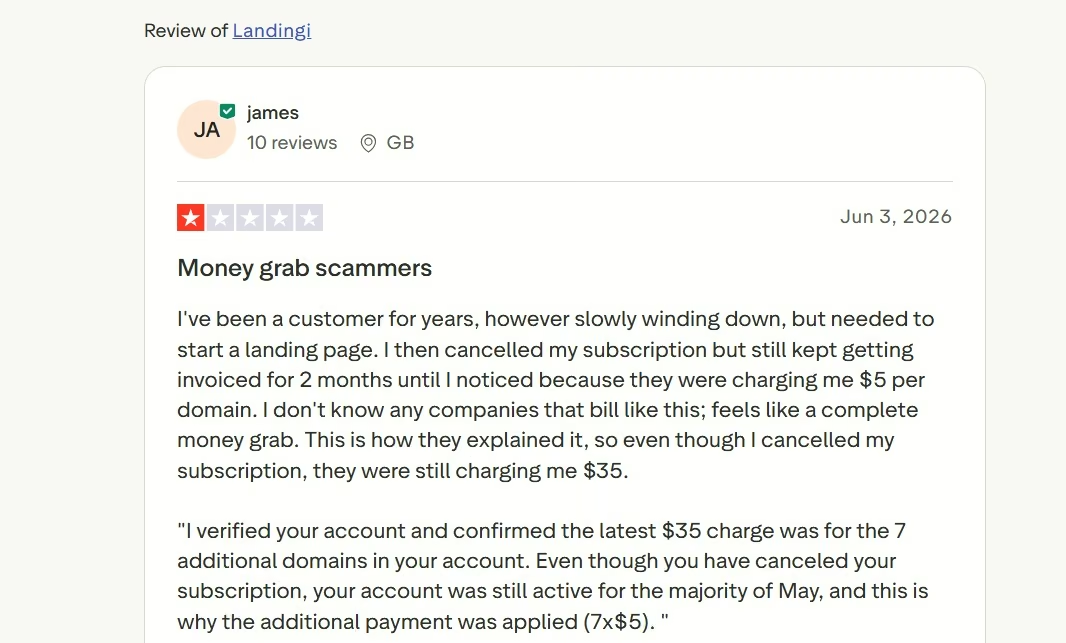
Check active add-ons when you cancel: A separate Trustpilot reviewer, James, gave Landingi 1/5 in June 2026 after seeing charges for seven additional domains while his canceled subscription was still active through its paid period.
Landingi replied that cancellation stops the next renewal while the account stays active until its expiration date, so the domain fees still applied during that period. His experience is one review, though it gives you a good reason to check active domain add-ons before your account reaches its end date.
My read from the reviews: Customer feedback supports what I saw during testing. Landingi gets you from idea to a polished campaign page quickly. The friction tends to show up later, when you start dealing with mobile adjustments, deeper form needs, higher plan requirements, or account settings.
My Take on Landingi
Landingi won me over the fastest during the first few minutes. I gave Lunar a fairly specific brief, and it handled it well. The page plan made sense. All seven sections appeared. The design felt deliberate instead of looking like seven unrelated blocks stuck together.
One part I appreciated was how Lunar handled proof. I told it not to invent reviews, credentials, awards, business history, or statistics, and it left clear placeholders instead.
Those placeholders still needed cleanup. I was happy to do that because the alternative would have been made-up proof presented as real.
The hero still needed work. The first headline was too large, and a focused AI edit fixed the message in about two minutes. I could still change individual elements myself when chat felt unnecessary.
The phone preview came out clean on my first pass. The layout stacked properly, the button fit the screen, and the benefits stayed easy to read.
The form took more work. Lunar created the fields quickly, and I had to configure the next action myself. Once the page was live, required-field checks worked, then the completed submission stopped at reCAPTCHA.
I couldn't confirm whether the error came from Landingi's form handling or my reCAPTCHA setup. The builder didn't tell me which, so I'd test the live form myself before paying for traffic.
Landingi gets you to a strong first page fast. You still need to treat the published page like a real campaign asset and test every action before paying for traffic.
I'd choose Build when I mainly need to create and publish pages. I'd move to Optimize when A/B testing, EventTracker, Smart Sections, and higher traffic limits are part of my regular work.
Is Landingi Right for You?
Landingi is a good choice when landing pages are a regular part of your marketing work.
Choose Landingi If You…
- Run focused campaigns: You can build a page around one offer, publish it, and keep the campaign work in one place.
- Want AI to handle the first draft: Lunar's page plan lets you approve the structure before anything is built.
- Like having direct control after generation: You can use chat for larger edits and the visual controls for small ones.
- Reuse the same sections across several pages: Smart Sections help agencies and marketers avoid editing the same block again and again.
Skip Landingi If You…
- Need a permanent free plan: Landingi offers a 14-day trial capped at 200 visits, then you'll need a paid plan.
- Have a small testing budget: Built-in A/B testing and EventTracker start on the $149/month Optimize plan.
- Need advanced form workflows from day one: My basic form was quick to build, and the live submission still needed troubleshooting.
- Are building software around the page: User accounts, dashboards, saved records, custom business logic, and larger workflows point toward an app-building product.
When to Use Emergent Instead of Landingi
Unbounce, Instapage, and Leadpages are closer alternatives if you want another dedicated landing-page platform. Emergent belongs in the conversation when the page needs to grow into a custom app or business workflow.
Landingi gives you a focused place to create and improve marketing landing pages.
Emergent is a vibe coding platform that lets you build landing pages from plain-language prompts. That difference becomes useful when your campaign starts asking the page to do more work.
Take my roofing example.
If Sunset Ridge Roofing needs a page where homeowners read an offer and request an inspection, Landingi fits that job.
If the company wants customers to create accounts, upload roof photos, choose available appointments, follow job status, and see personalized updates, Emergent fits that larger build.
The staff could also have its own dashboard for managing inspection requests. That type of workflow goes beyond a standard campaign page.
If you've never written a build prompt before, Emmy, Emergent's free in-app assistant, can ask you a few questions and turn your answers into a build-ready prompt.
Landingi is the stronger choice when the job is campaign creation and conversion testing.
Emergent is the stronger choice when the page needs to become working software around your business process.
Final Verdict
Landingi is worth paying for when landing pages are a regular part of how you market.
My seven-section first draft took about three minutes. Lunar followed the brief closely; the page looked polished, and mobile came out clean on my first pass.
The final launch needed more attention. I rewrote the hero, removed proof placeholders, and configured the form action. The published form then hit a reCAPTCHA error, and I couldn't confirm whether the cause was Landingi's form handling or my reCAPTCHA setup.
That gives me a clear recommendation from this Landingi review.
Choose Landingi for focused campaign pages that you want to build, publish, and improve quickly. Start with Build if page creation is your main need. Pay for Optimize when its testing and tracking tools are part of your regular workflow.
Choose Emergent when the page is becoming the front end of a custom app or business workflow.

Most AI app builders stop at prototypes. Emergent creates production-ready apps you can actually launch.
- Production-ready apps
- Web & mobile apps
- Deploy in minutes







