



Manus AI pricing starts at $20 a month, and the top tier's slider runs to millions of credits a month. Two of the three paid tiers are credit sliders, so the headline price marks where each tier begins, and your final cost depends on the credit tier you select.
I went through Manus's pricing page, billing docs, and help center to map out what each plan includes. The sliders help, but the no-rollover policy is what makes the credit math stop working in your favor.
Manus AI Pricing Plans at a Glance
Here's how Manus's paid plans compare at their starting configuration:
| Plan | Starting Price | Credits Included | Best For |
|---|---|---|---|
| Free | $0/month | 300daily refresh credits, capped at1,500/month | Testing Manus on light tasks |
| Standard | $20/month | 4,000/month | Occasional research and one-off builds |
| Customizable | $40/month | 8,000/month | Steady weekly use with room to adjust |
| Extended | $200/month | 40,000/month | Heavy, sustained agent workloads |
| Teams & Businesses | From $20 per seat/month | Shared pool | Teams needing admin controls and shared billing |
Teams pricing is per seat, while the individual plans are flat monthly rates. Annual billing cuts 17% off every paid tier, bringing Standard to about $17 a month.
How Manus Credits Work
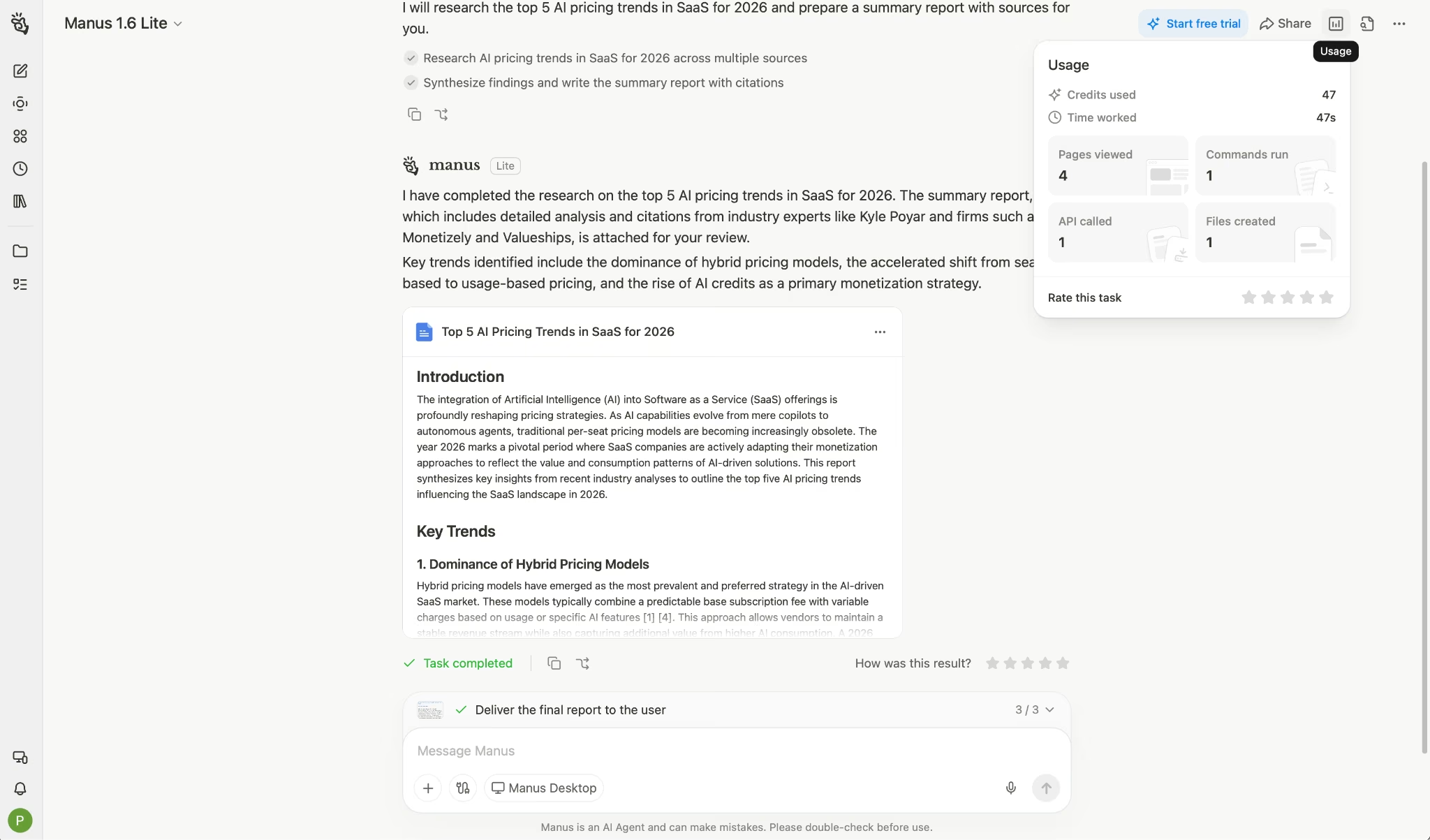
Manus AI pricing runs on credits, and those credits get consumed by three things. LLM tokens cover planning and output, virtual machines handle browser automation and code execution, and third-party APIs pull in external data.
Because those three add up differently on every job, a task's cost depends on how involved it is and how long it runs.
Credits are only consumed while a task is actively processing. Completed tasks and stored outputs cost nothing, so deleting old work won't save you any credits.
Total usage is what usually catches people off guard on cost. Manus publishes no fixed per-task prices, and community reports put a simple chat exchange in the single digits, while a deep research run that spins up a VM and writes a long report can climb into the hundreds.
Treat these as rough ranges, not published rates, since Manus itself does not commit to per-task numbers.
A Standard plan has 4,000 credits a month, which as few as four heavy research runs can burn through.
Here's what drains your balance:
- Deep research tasks: The heaviest draw on your balance, since they combine LLM tokens, browser automation, and long runtimes.
- Wide Research: Task scaling across dozens of parallel subtasks multiplies credit use.
- Website builds: Building and editing sites draws from your credit pool.
- Third-party data access: Financial data and professional database calls bill through to your credits.
- Failed direction changes: Any task you redirect mid-run has already spent credits on the abandoned path.
And here's what protects it:
- Failed tasks get refunded. Manus issues a full credit refund for tasks that fail due to technical problems on their end.
- Scope the request first. Manus's own documentation recommends "Research the top 5 AI trends in healthcare for 2024 and create a summary report" over "Research AI," because vague prompts cause extra iterations.
- Use Chat mode for simple questions. The full autonomous agent costs more than a quick query needs.
- Check the dashboard estimate. Manus shows a credit estimate before a task starts, along with usage history for past tasks.
- Batch-related work. Combining connected requests into one task reduces overhead.
Three rules to check before you subscribe:
- Monthly credits do not roll over. Unused credits are cleared at the start of each cycle on both monthly and annual plans. Buy 4,000 credits, use 1,200, and the remaining 2,800 will disappear on your renewal date.
- On the free plan, daily refresh credits only work with Manus 1.6 Lite, capped at 1,500 a month. Paid users have no cap on the daily pool.
- Your balance can go negative. Manus deducts each action's cost at the start of the next action, so a final step can overshoot your remaining balance. You can't start new tasks until the next refresh clears it.
Manus AI Pricing Plans Breakdown
Free: $0
What's included:
- 300 daily refresh credits, capped at 1,500 credits per month.
- Daily credits work only with Manus 1.6 Lite, not the full agent.
- 1 concurrent task and 2 scheduled tasks, versus 20 of each on the paid plans.
- Access to core capabilities for evaluation.
Best for: Finding out whether an AI task assistant suits how you work before paying anything.
Pros:
- No credit card needed to start.
- 1,500 monthly credits covers a decent run of light work.
Cons:
- Restricted to Manus 1.6 Lite, so you never see the full agent that the paid plans sell.
- 1,500 credits buys about two deep research runs, which leaves little room to evaluate.
Standard: $20/Month ($17/Month Billed Annually)
What's included:
- 4,000 credits per month, plus 300 daily refresh credits with no monthly cap.
- In-depth research for everyday tasks.
- Professional websites for standard output.
- Slides for regular content.
- Task scaling with Wide Research.
- Early access to beta features.
- 20 concurrent tasks and 20 scheduled tasks.
Best for: Solo users who run a handful of substantial tasks a month and lean on the daily refresh for everything smaller.
Pros:
- Opens up the full agent, which the free plan never exposes.
- The uncapped daily refresh carries the plan, since 300 credits a day adds up to more than the monthly credit grant over a full month.
- Same concurrent task limit as the $200 tier, which keeps parallel work open to you.
Cons:
- 4,000 monthly credits covers four to eight deep research tasks, depending on how involved each one is.
- Unused credits vanish at renewal. A light month is money spent for nothing.
- Fixed allocation with no slider, unlike the tiers above it.
Customizable: From $40/Month
What's included:
- A credit slider that starts at 8,000 credits per month for $40 and steps up to 12,000, 16,000, or 20,000, with the price rising at each step.
- 300 daily refresh credits.
- In-depth research with self-set usage.
- Websites for changing needs and slides for steady creation.
- Wide Research scaled to your chosen allocation.
- 20 concurrent tasks and 20 scheduled tasks.
Best for: People whose workload changes month to month and who want to size their credit budget instead of jumping a whole tier.
Pros:
- The slider gives you room to match spend to use, and it rarely shows up in write-ups of the plans.
- The four steps let you dial credits up for a busy month and back down for a slow one.
- You can adjust up or down without leaving the tier.
Cons:
- The slider changes how many credits you get, not what the plan can do. The feature set is nearly identical to Standard.
- The per-credit rate holds steady as you move up the slider, so buying more credits earns you no discount.
- Still no rollover. Oversizing your allocation wastes money every month.
Extended: From $200/Month
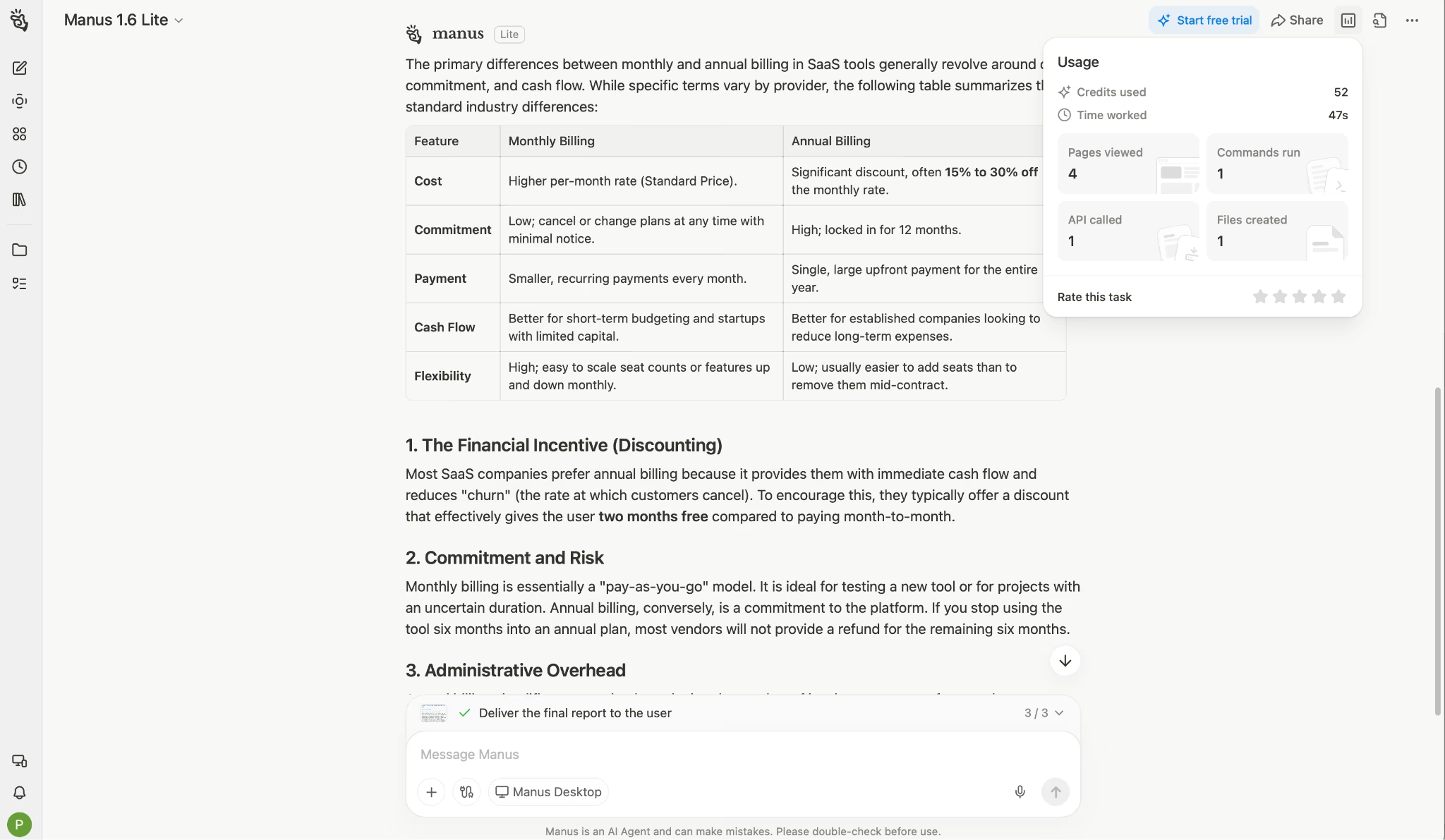
What's included:
- A credit slider that starts at 40,000 credits per month for $200 and climbs to 5,000,000, with the price rising as you move up.
- Free Cloud Computer, which is exclusive to this tier.
- 300 daily refresh credits.
- In-depth research for large-scale tasks.
- Websites with data analytics and slides for batch production.
- Wide Research for sustained heavy use.
- 20 concurrent tasks and 20 scheduled tasks.
Best for: Teams or individuals running agent work daily rather than weekly, where running out of credits is the real limit.
Pros:
- Free Cloud Computer comes with this tier alone, useful if you run persistent workloads.
- The slider tops out at 5,000,000 credits a month, far beyond what any other tier offers.
- Few individual users are likely to reach the top of that range.
Cons:
- Concurrency stays at 20 tasks, matching the $20 plan. Ten times the base price gets you a bigger credit pool, not faster parallel work.
- You're paying for a much bigger credit pool, so weigh it against how many credits you actually burn.
- Pushed to its upper range, this tier reaches enterprise spending levels without enterprise controls attached.
Teams & Businesses: From $20 per Seat/Month
What's included:
- Shared team credit pools that all members draw from.
- Admin controls and centralized billing.
- Priority support.
- SOC 2 Type II, ISO 27001, and ISO 27701 certification.
Best for: Organizations that need shared billing, access controls, or a compliance review before adoption.
Pros:
- A shared pool solves the biggest individual-plan problem, since one person's light month covers another's heavy one.
- SOC 2 Type II, ISO 27001, and ISO 27701 clear the usual procurement checklists.
Cons:
- The Team plan starts at $20 per seat/month, but volume pricing still runs through a sales conversation.
- Manus publishes little detail about what the team tier includes beyond the shared pool.
Which Manus AI Plan Should You Choose?
The right plan mostly comes down to how much you run each month. Here's the quick filter.
Choose Free if you:
- Want to test Manus before spending anything.
- Only need light tasks that Manus 1.6 Lite can handle.
- Are comparing several agents and need a baseline.
Choose Standard if you:
- Run a few substantial tasks a month rather than daily work.
- Can lean on the 300 daily refresh credits for smaller jobs.
- Want full agent access at the lowest paid entry point.
Choose Customizable if you:
- Hit the Standard ceiling in a typical month but don't need 40,000 credits.
- Have a workload that moves around, and want to resize without changing tiers.
- Would rather tune your credit budget than overbuy.
Choose Extended if you:
- Run agent tasks daily and treat credits as an operating cost.
- Need the Free Cloud Computer for persistent workloads.
- Have usage high enough that the slider's upper range is relevant.
Choose Teams if you:
- Need shared credits across several people.
- Have a security review that requires SOC 2 or ISO 27001/27701 documentation.
- Want centralized billing instead of individual subscriptions.
Is Manus AI Worth the Cost?
Manus is worth the spend when you have tasks that need an autonomous agent, the kind involving multi-step research, browser work, and jobs where you'd rather hand over a goal than supervise each step.
On top of that, the 20 concurrent tasks on every paid tier mean you can run parallel work even on the $20 plan.
Set against that, Manus AI pricing is hard to predict before you commit, since credit consumption swings with each task. Manus shows an estimate before a task starts, though longer jobs swing far from it. With no rollover, an overestimate costs you as much as an underestimate.
Manus is worth it if you:
- Need multi-step autonomy that a chat assistant can't deliver.
- Use up most of your monthly credits before they expire, since unused ones don't carry over.
- Value the daily refresh credits, which are uncapped on paid plans.
- Can size your plan close to your monthly usage.
Skip Manus if you:
- Have usage that swings widely month to month, since nothing rolls over.
- Mainly need conversational help, which cheaper tools handle.
- Want to build and ship an application, where an app builder suits you better.
- Need predictable fixed monthly costs for budgeting.
Manus AI Alternatives and Pricing Comparison
Here's how Manus compares to other AI agents and builders on price and starting allocation:
| Tool | Starting Price | Best For | Key Advantage |
|---|---|---|---|
| Emergent | Free (10 credits); $20/month | Turning a description into a working, hosted app | Login and hosting come built in, and the app goes live automatically |
| Flowith | Free (300 credits); $19.90/month | High credit volume at a low entry price | 20,000 monthly credits on the Pro tier |
| Genspark | $24.99/month | Daily chat and image work | Chat and image generation currently cost zero credits (apromotionGenspark has confirmed through the end of 2026) |
| ChatGPT | Free; $8/month (ChatGPT Go) | People alreadypaying for ChatGPT | Cheapest paid ChatGPT tier |
A note on comparing credits: Credit units are not equivalent across platforms. Flowith's 20,000 credits and Manus's 4,000 credits at similar prices do not represent the same amount of work, since each platform prices its own operations differently.
Compare what a typical task costs you on each tool instead of the headline number.
Choosing an AI agent builder depends on the level of automation and control you need, and 6 Best AI Agent Builders Tested and Compared in 2026 compares the leading options.
Manus vs Emergent: Which Suits Your Work?
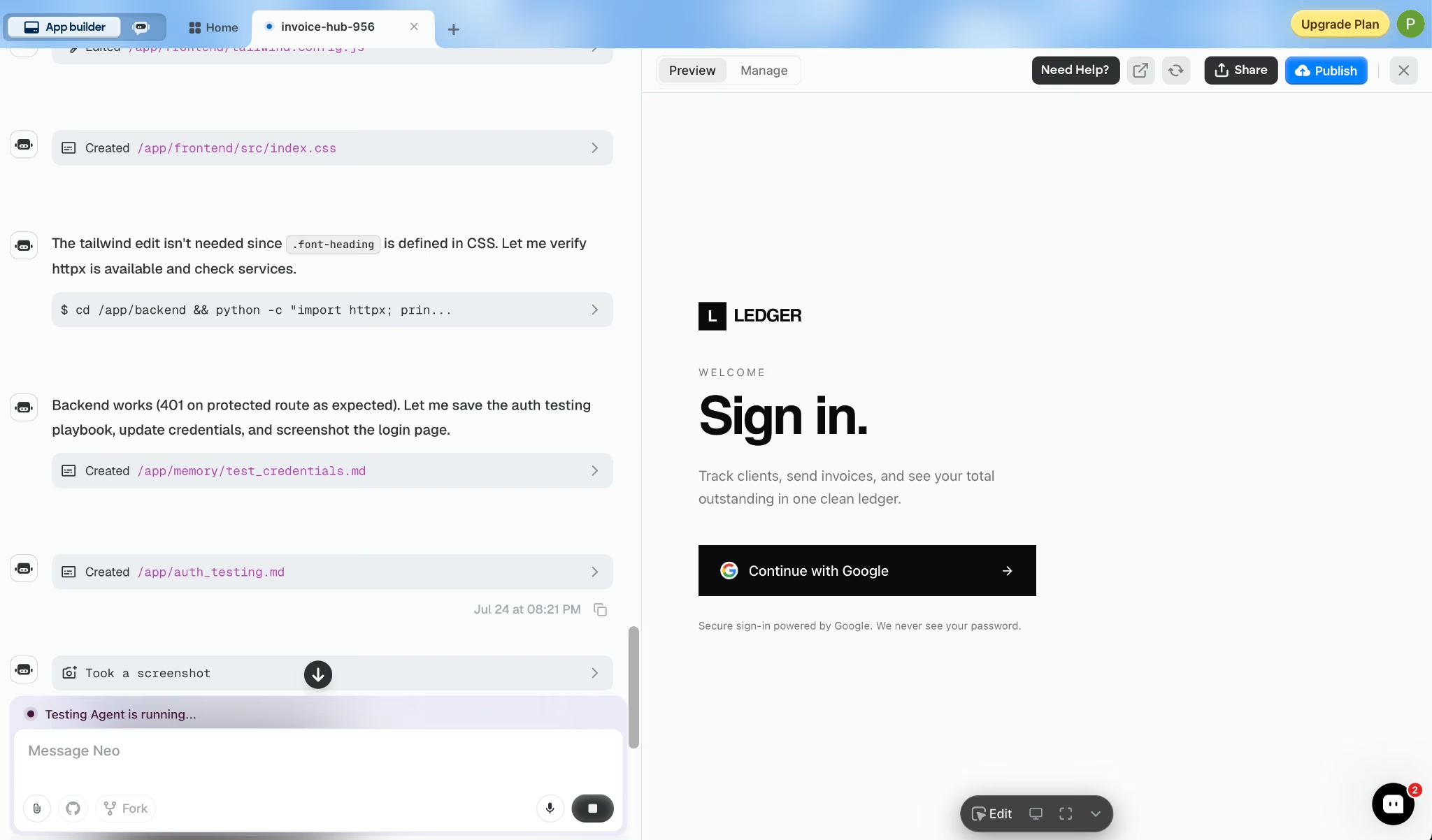
Manus and Emergent both take a description and hand back something finished, but what "finished" means splits them. Manus is a general-purpose agent: It runs research and analysis, builds slides, writes reports, and creates websites. Emergent turns your prompt into a working app.
That breadth is the point. Ask it to research a market on Monday and build the pitch deck on Tuesday, and the same tool handles both.
Emergent aims at a narrower job: producing software that runs. Behind it, Emergent splits the work across coordinated agents that plan and test each build.
Apps deploy to managed hosting automatically, and Google sign-in ships with the app, so you never have to set up a login system yourself.
Once a build is done, Emergent suggests concrete next steps, like adding email capture or connecting Stripe.
Emergent also connects to the business tools you already use:
- GitHub for version control and developer handoff.
- Stripe for payments, subscriptions, and checkout flows.
- Slack for team alerts and approvals.
- HubSpot for CRM and lead management.
Pick Manus for varied knowledge work, and pick Emergent when the output needs to be software that runs.
The Bottom Line on Manus AI Pricing
Manus AI pricing is more flexible than the three headline numbers suggest. The sliders on the two upper tiers let you size your credit budget precisely.
The base rate sits underneath all that flexibility. Credits work out to $5 per thousand on the $20 Standard plan, and the upper tiers stay close to that rate as the slider climbs. Moving up a tier buys you a bigger credit pool, not extra features or speed.
Add the no-rollover policy on top of that base rate, and a good estimate saves you money while a high one just burns credits you never use.
Manus makes sense when your work is varied, and your monthly volume is steady enough to size a plan around. Track your first month's consumption in the dashboard before you settle on a tier.
If what you're building is an application, the calculation changes. Build your app on Emergent.

Most AI app builders stop at prototypes. Emergent creates production-ready apps you can actually launch.
- Production-ready apps
- Web & mobile apps
- Deploy in minutes







