




TL;DR
- Restaurant website template: Best when you already like the design and don't mind editing the details yourself. I found a Wix template in about 2 to 5 minutes, and the finished homepage, menu, and contact sections took about 30 minutes.
- AI website builder: Best when you want the site built around your restaurant from the first prompt. Emergent produced my first Juniper & Smoke version in about 7 minutes for roughly 3 credits, then handled later changes through written instructions.
A restaurant website template can get you looking at a polished restaurant site within minutes. The work starts when every piece of that template has to become your restaurant.
I built the same fictional Austin restaurant, Juniper & Smoke, through both routes. With Wix, I customized an existing restaurant template. With Emergent, our AI website builder, I started from a detailed restaurant brief. The difference showed up in the editing, cleanup, mobile experience, and final checks before publishing.
Wix came out ahead for choosing a visual starting point, while Emergent performed better in the editing and launch-check stages.
By the end, I had two usable restaurant sites and a clear answer on which approach I'd choose when time is tight.
Restaurant Website Template vs. AI: What's the Difference?
A restaurant website template gives you a pre-designed site. You choose a layout you like, then replace its restaurant name, menu, photos, colors, opening hours, contact details, and other content.
That's useful if you're comfortable building your own website through a visual editor. Your main job is turning an existing design into your own site.
An AI website builder starts from your instructions. You describe the restaurant, style, pages, menu, and functions you want. The builder creates the first version around those requirements.
The same decision comes up when you build a website for a business. You can start from somebody else's structure, or start from your own requirements.
The core difference: A template asks you to customize what already exists. An AI builder asks you to describe what should exist.
How I Compared the Two Approaches
I used Juniper & Smoke for both builds. It's a fictional Austin restaurant with a warm design, nine original menu items, opening hours, an address, a phone number, an About section, and a menu call to action.
With Emergent, I entered all of that in one opening prompt. The first version appeared in about 7 minutes and used roughly 3 credits. Later, I asked it to change the menu button, move the menu, update one price, and add Peach Iced Tea for $5.
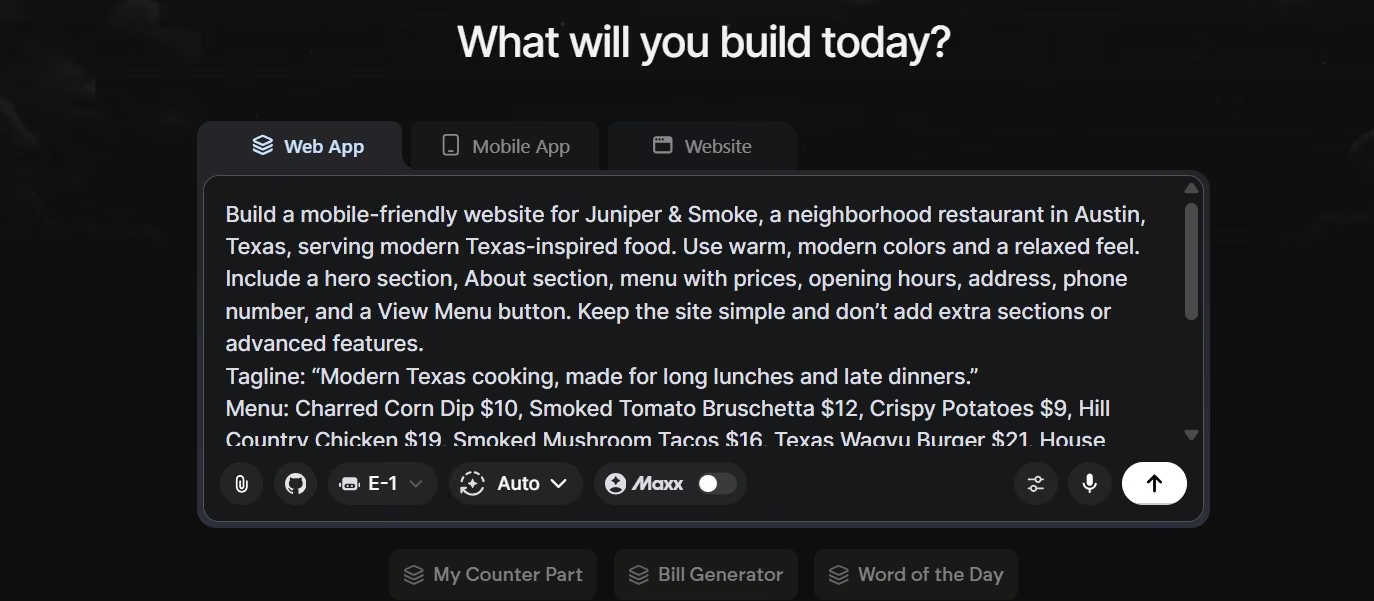
If writing a detailed first prompt feels unfamiliar, Emmy can help turn a rough idea into a usable build prompt. Emmy is Emergent's built-in chat assistant. It can help scope an idea, draft a prompt, explain controls, and guide you through publishing.
With Wix, I deliberately skipped its AI website generator. I wanted to test the traditional restaurant website template route. Choosing and opening a template took about 2 to 5 minutes.
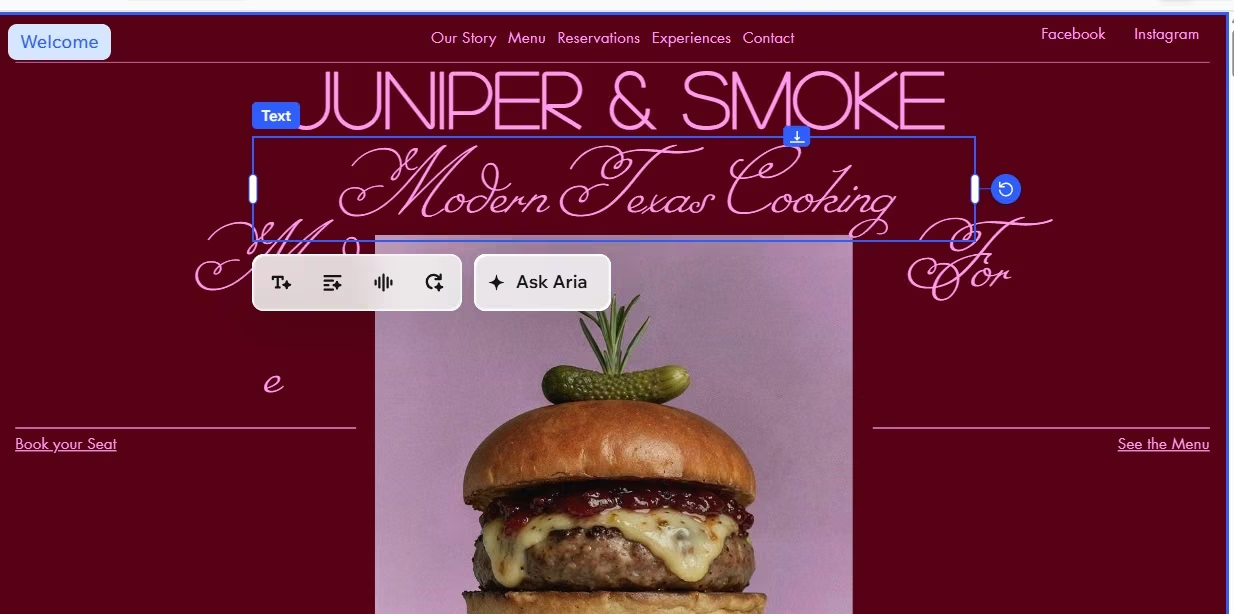
I then replaced the homepage text, menu, prices, hours, address, phone number, and other template content. I also changed fonts and moved sections. That brought the total to about 30 minutes.
Those numbers aren't identical benchmarks. 7 minutes was Emergent's first generated version. 30 minutes was the point where I had finished the main Wix pages I wanted. I use them here to show where the time went, not to claim one method was four times faster.
Restaurant Website Template vs. AI: Feature-by-Feature Comparison
Getting Started
Wix gave me the easier opening 5 minutes. I could browse restaurant designs, find one with the warm look I wanted, and start editing immediately. Wix has a large template library and restaurant-specific tools for menus, orders, and reservations.
If design is the part slowing you down, that's a strong advantage. You don't have to describe a visual direction and wait to see how the builder interprets it.
Emergent required more thought up front because my first prompt carried the restaurant details. Once I sent it, the first site was already about Juniper & Smoke. I didn't have another restaurant's name, menu, and copy to replace.
Winner: Wix for choosing a visual starting point. Emergent for reaching a restaurant-specific first version.
Editing and Customization
Wix became more demanding once I started editing. Changing even the font size took more effort than I expected. Moving the menu section was a drag, and the editor lagged while I was trying to reposition sections.
There was also a lot to replace. I eventually left some of the original template photos because they still suited the restaurant. Replacing every suitable image would have added work without improving the test.
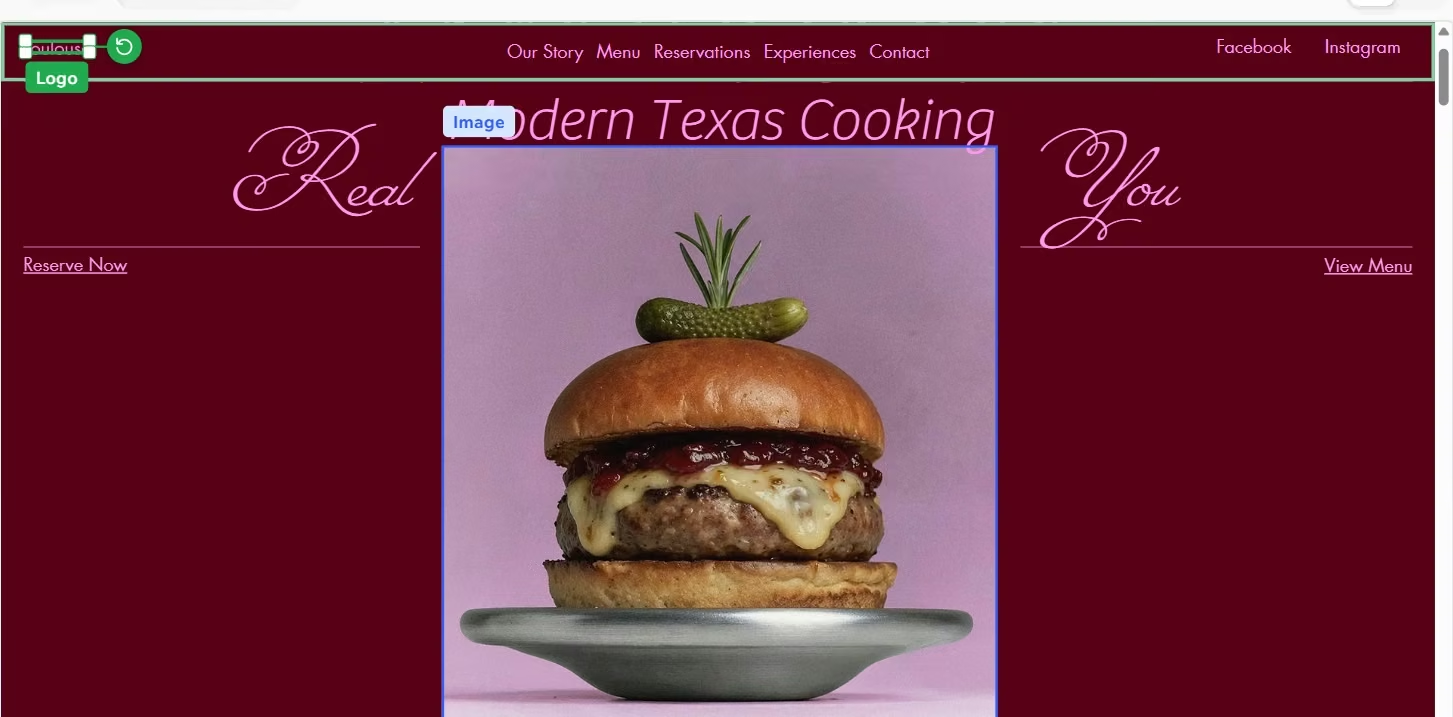
Then I spotted something right before publishing.
The original template was called Toulouse, and its old logo was still on my Juniper & Smoke site. I had changed the restaurant name, menu, hours, contact details, and most of the visible content. That small template leftover almost slipped through.
Emergent handled my follow-up edits through one written request. I changed four details together and checked the result afterward. That suited the way I prefer to work because I could describe the outcome instead of locating and moving each element myself.
This is also where the wider website-building process affects your choice. Think about how you prefer to make changes after the first page appears.
Winner: Emergent for quick content and structure changes. Wix gives you stronger hands-on visual editing when you enjoy working directly on the page.
Mobile Experience
Wix did well here. The mobile version of my customized template looked good without another long editing session. That matched Wix's current focus on responsive restaurant templates.
Emergent also gave me a mobile-friendly Juniper & Smoke site from the original brief. I checked menu readability, buttons, hours, contact details, and sideways scrolling before launch.
Winner: Tie. Both routes gave me a usable mobile restaurant site.
Final Checks Before Publishing
This was the clearest workflow difference for me.
With Wix, I reviewed the site myself. That review is how I caught the leftover Toulouse logo. A template can look finished while still carrying small pieces of the original brand.
With Emergent, I asked for a pre-launch review. It checked the restaurant details and found that the browser tab still said "Emergent | Fullstack App." It changed that to the Juniper & Smoke title before publishing. The later health check also found a contact-message issue and fixed it.
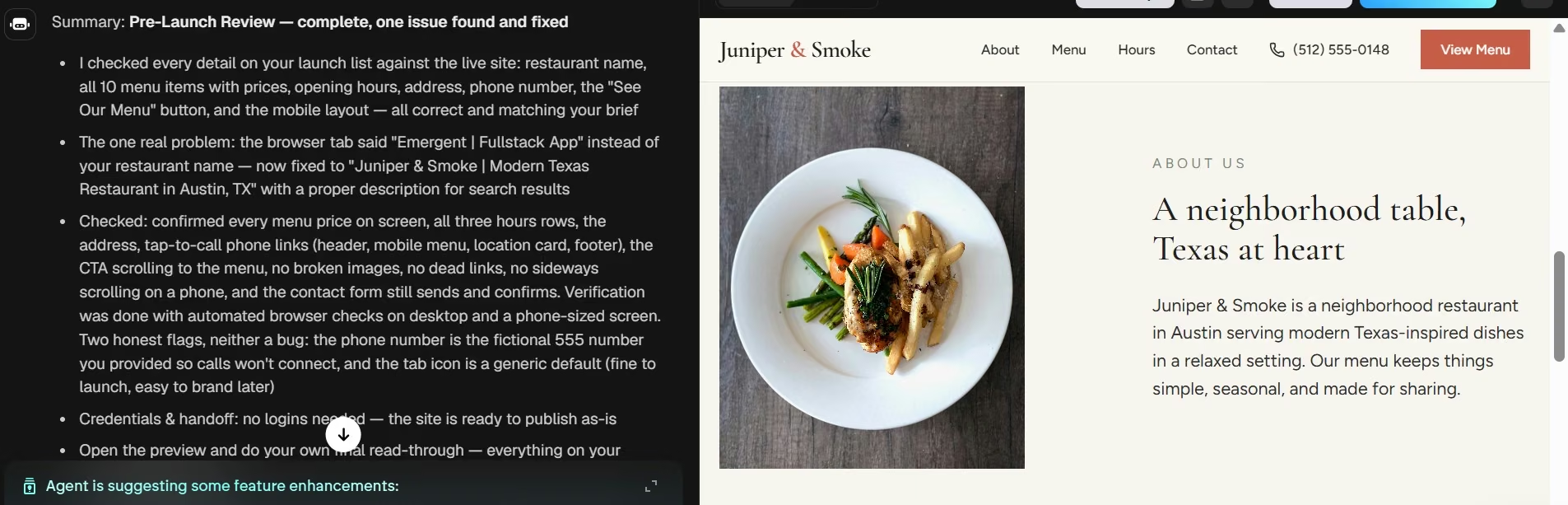
Winner: Emergent. The automated review added another check between editing and publishing.
We recommend our best restaurant website builders guide if online ordering is the deciding factor rather than the build method.
Restaurant Website Template vs. AI at a Glance
Quick comparison:
| Wix template | EmergentAI build | |
|---|---|---|
| Best for | Ready-made design | Brief-first building |
| Starting point | Existing template | Written requirements |
| My test | ~30 min customized | ~7 min first version |
| Mobile | Good | Good |
| Main workload | Manual editing | Prompting and review |
| Free plan | $0 | $0, 10 credits |
| Starter paid plan | $24/month($17/month billed annually) | $20/month($17/month billed annually) |
Timing note: The Wix figure is the time I spent reaching my customized main pages. The Emergent figure is the time to its first generated version. They aren't equivalent completion times.
Pricing
Wix Pricing
Wix has a Free plan at $0. Light costs $24/month ($17/month billed annually), Core costs $36/month ($29/month billed annually), Business costs $46/month ($39/month billed annually), and Business Elite costs $172/month ($159/month billed annually).
If you're looking for restaurant website templates free of charge, the Free plan lets you build and publish with Wix branding and a Wix web address.
Emergent Pricing
Emergent has a Free plan at $0 with 10 monthly credits. Standard costs $20/month ($17/month billed annually) with 100 monthly credits. Pro costs $200/month ($167/month billed annually) with 750 monthly credits.
Credit use changes with the size of the build, so the subscription price isn't the whole cost picture.
What Other Users Say
My Wix editing experience isn't unique. In recent r/WIX discussions, people describe the editor as user-friendly once learned, while others report lag and slow responses during editing.
For Emergent, the current G2 product page has only one review. The reviewer, Swathi B,, praises the user-friendly prompt workflow and quick performance, so I’d treat it as a small signal rather than broad user consensus.
How to Make Your Choice
Choose a restaurant website template when you've already found a design that feels close to your brand. It's also a good route if you like visual editing and want direct control over each element.
Choose AI when you already know what the restaurant should say and do. For a busy or non-technical owner, I found it easier to start from the restaurant requirements and review the result afterward.
My recommendation: Use a template for light customization. Use an AI restaurant website builder when you want the starting site shaped around your restaurant from the first brief.
If the AI route is the one you're leaning toward, we recommend our how to build a website with AI guide for what that build looks like step by step.
My Verdict
For Juniper & Smoke, I preferred the Emergent route based on the editing and final-check results from the test.
Wix gave me a polished design almost immediately, and its mobile output held up well. The editing stage took the most energy. After about 30 minutes of replacing content and adjusting the design, I still found an old template logo right before publishing.
Emergent made me define the restaurant properly at the start. That work paid off in a first version that already belonged to Juniper & Smoke. Prompt-based edits and the launch checks also suited a fast build better for me.
If you're comfortable designing page by page, a template remains a useful option. If you're trying to get a custom restaurant website online quickly and want guidance along the way, I'd start with Emergent.
Start building with Emergent.

Most AI app builders stop at prototypes. Emergent creates production-ready apps you can actually launch.
- Production-ready apps
- Web & mobile apps
- Deploy in minutes





