


TL;DR
- A real filter beats a long list: these app ideas survived two gates, demand shown across independent sources and buildability on a current AI app builder, cutting just over 200 candidates down to 15.
- What breaks is the edges, not the core: features kept inside each app worked on the first prompt, while both failures hit boundaries, a booking app that double-booked a slot and a PDF export that split a table row mid-page.
- Manual-entry ideas ship fastest: the habit tracker reached a working first version in 7 credits and six minutes with zero follow-up prompts, because it only logs and displays typed data instead of interpreting it.
- Budget extra time for any export: the invoice builder came together in 14 credits and 18 minutes, but its PDF export split a line-item row across two pages, a limit that recurs on multi-page documents.
- Small-business tools have the clearest path to revenue: they replace software an owner already pays for badly, while the Neighborhood Services Exchange, appearing in the most sources, carried the strongest demand signal of the 15.
You open a blank prompt box, ready to build something, and freeze. You look up ideas online, but find sources listing over 50 options.
Fifty app ideas on a page sound impressive, until half of them turn out to need a developer, a compliance lawyer, and six months you don't have.
I didn't want to hand you another wish list. I cross-checked demand signals across five areas, from small-business tooling through to the client-facing work creators and freelancers do, and landed on these 15.
Then I picked three of them and built working versions inside an AI app builder to see what held up under a real prompt.
This list groups the 15 app ideas into five categories, three ideas each, with the small-business ideas in a separate section. It openly skips anything that needs heavy regulatory approval, licensed data, or a type of build an AI app builder still struggles with today.
Here's the full list, plus what happened when I stopped filtering and started prompting.
How I Vetted These 15 App Ideas (and What Didn't Make the Cut)
15 app ideas made this list only after passing two filters.
The first filter was demand. I checked every idea against real inspiration sources covering small-business tooling, productivity, health, local community apps, and creator and client-facing work.
Priority was given to any idea that appeared in more than one independent source. I kept a small number of single-source ideas as experiments when they mapped tightly onto a specific, real need.
An idea that only sounded fun got cut if nothing outside my own head suggested anyone wanted it.
The second filter was buildability, based on what an AI app builder can ship well right now. I dropped anything that needs heavy regulatory or compliance work, like financial licensing or blockchain-based concepts.
I dropped ideas that depend on an automated live data feed somebody else owns, like a real-time transit or flight schedule, a licensed map layer, or prices scraped off other people's sites. Wiring up somebody else's live data is a different and harder build than most of what's on this list.
That exclusion is narrower than it sounds, and the difference is who types the information in.
An organizer posting an event to a shared calendar, a shop owner adding a stamp to a customer's card, or a client approving a draft never touches an outside feed, so those ideas stayed in. The event calendar later in this list works that way, with entries submitted by the people running the events.
Generic beginner exercises went too, like a plain converter or timer, because they don't add anything new. So did ideas that lean on capabilities that still trip up an AI app builder today, like multi-page PDF reporting, native Apple Watch or iPad builds, and complex real-time game mechanics.
The PDF-reporting exclusion needs the same narrowing as the data feed. A single short document, one invoice or one case study, is a different job from a report that runs to pages of tables, so ideas ending in one short export stayed in, with the caveat that the invoice spot-check below turned up.
Nothing needing licensed data, a paginated report, a watch build, or a game engine shows up anywhere in the 15 below.
That's six whole kinds of idea off the board before a single one got scored on its own merits.
The starting pool ran to just over 200 candidate ideas across the sources I screened, and 15 made it through both filters.
Three ordinary, buildable categories are missing for a plainer reason. Finance and money management, study and exam-prep tools, and niche marketplaces and directories never went through the demand filter at all, because they sit outside the five areas I screened above. Scope is the only reason they're missing.
The filtering only tells you so much, so I picked three ideas and built quick versions inside Emergent, one of the best AI app builders made for quick results. Two of the three came from the category this list leans on hardest.
The whole test ran over about two weeks, with the AI generating each first version in minutes and the rest of the time spent testing and trying to break it. This is what people mean by vibe coding. You say what you want the finished thing to do, and the tool handles the technical build.

The first spot-check tested the small-business category. Here's the exact prompt I used:
"Build me a booking app for a small service business. Clients pick a service, pick an available time slot, and fill out a short intake form before the booking confirms. I need to see a simple calendar of upcoming bookings."
A working version came together in 11 credits and 12 minutes. It looked finished until I had two people pick the same slot within a minute of each other, and the app booked them both anyway. One follow-up prompt asking for a conflict check fixed it. That bug stays invisible until real people collide on a calendar.

The second spot-check tested invoicing, a different problem inside that same small-business category. I prompted for this:
"Build me a tool where I can add line items with a description, quantity, and rate, see a running total, and export the result as a PDF invoice."
The app itself worked cleanly on the first pass, at 14 credits and 18 minutes. The PDF export was the weak spot. The one invoice I exported broke a line-item table across two pages, splitting it mid-row. The result suggested a recurring limitation in how the platform handles PDF exports.

Health and wellness got the third spot-check. This was the prompt:
"Build me a simple habit tracker where I can log a daily check-in for a few habits, see a streak count, and invite one other person to see my progress."
This one came together in 7 credits and six minutes, with zero follow-up prompts needed.
Three other platform limits shaped the filter beyond what the spot-checks turned up. Complex, real-time graphics and full video-game mechanics are still a weak spot for an AI app builder, which is why nothing resembling a game made the final 15.
Database behavior can also drift after several rounds of pushing updates to an app, and resource limits show up once traffic gets heavy. Neither one changed anything for a quick feasibility test. Both come back into play the moment you take one of these 15 ideas past that stage.
An invoicing tool with PDF export is the one place on this list I'd budget extra time before calling it done.
15 App Ideas Worth Building in 2026, by Category
I grouped these 15 app ideas into five categories. A habit tracker and an invoice builder don't compete for the same reader or solve the same problem. Jump to the category that matches what you're building, or read the whole list for a sense of what's realistically possible right now.
Productivity & Work Tools
Meetings, inboxes, and long documents eat hours every single week. Microsoft's own workplace research puts a number on the damage.
Among the top 20% of Microsoft 365 users by ping volume, employees receive 275 meeting, email, and chat interruptions a day, with a ping arriving about every two minutes during an eight-hour workday.
AI already handles the grunt work of turning that mess into a clean summary or checklist.
Two of the three ideas below, the meeting follow-up tool and the content summarizer, showed up independently in more than one of the sources I checked. That gives both ideas a stronger demand signal than a single-source mention. The internal knowledge base came from a single source, but its value grows as the team adds more searchable answers.
I didn't build a first version in this category, so I'm not going to pretend I have credit counts for it. The three builds I did run still made one pattern obvious.
Only one of the three builds needed a follow-up prompt: the booking app. Its problem was missing conflict logic when two people selected the same slot, while the other two stored and displayed the information they received.
Both AI-driven ideas may need extra prompts because they have to make sense of messy input, which is harder than simply storing and displaying it. A meeting follow-up tool has to decide what counts as an action item. A summarizer has to decide what's worth keeping. Those judgment calls may require extra prompts, so leave room for iteration.
One possible version uses a transcript box, a step that identifies commitments, and a checklist with names and dates. This category never got a version of its own, but two of those three pieces would likely be ordinary to build.
The middle step is the one most likely to need extra prompts, spent getting the tool to agree with you about what a commitment sounds like. That definition belongs in your first instruction. Say what a commitment looks like in your own words, with an example, the way you'd brief a new assistant.
The draw here is a first build with a small surface area and an output that you can judge in 10 seconds by reading it. A bad first result stays contained because the output is a summary or checklist.
If I could keep only one idea out of the three, it'd be the internal knowledge base, single source and all. The meeting follow-up tool is the one to skip if you're building for yourself alone. A checklist of your own commitments is a to-do list you already have, and that app only earns its keep once other people are reading what it produces.
- Meeting Follow-Up Automator: Records or transcribes a meeting and pulls out the action items into a clean checklist, so nothing said out loud gets lost by the next morning. It works best for teams that meet often but rarely write anything down afterward.
- Smart Content Summarizer: Takes a long article, video link, or document and turns it into short, bulleted notes, built for anyone who needs the gist without the full read. A researcher or student juggling a stack of sources gets the most out of this one.
- Internal Knowledge Base Builder: A searchable wiki for a small team that needs something simpler than a heavyweight tool built for a much bigger company. It fits any team that's watched the same answer get retyped into a chat thread for the third time this month because it doesn't live anywhere searchable.
Small Business & Service Operations Tools
If you came here looking for app ideas for small business owners specifically, read this section twice. All three ideas below solve an operational headache for a service business. That's where one scrappy internal tool beats a five-tool stack of not-quite-right software.
It's also the only category where two of the three spot-checks landed. The appointment booking spot-check is the first idea below, and it worked cleanly at 11 credits and 12 minutes until I deliberately tried to break it with a double-booked slot.
The invoice builder is the second idea below, and its PDF export is the one limit to plan around. The build came in at 14 credits and 18 minutes, and the export split a line-item row down the middle when the table ran onto a second page.
The two spot-checks exposed different failure points, and each is worth watching for on the third idea here and anything else you build for a business like this.
Everything that stayed inside the app came back right on the first attempt, including the calendar view, the intake form, the line-item math, and the running total. The booking app mishandled simultaneous bookings, though one follow-up prompt fixed that. The invoice app broke a table during PDF export.
These results point to two areas worth testing in this category: simultaneous updates and anything exported or sent outside the app. For the client progress tracker, test what happens when two people update the same milestone and when its data connects to existing accounting software.
Build the inside-the-app part first, then test the two failure points these builds exposed: simultaneous updates and exported files. That's where the surprises are.
Those extra requirements are also where the temptation to widen the app shows up, and widening can turn a narrow tool into a much larger build. A tracker carrying only the fields one veterinary clinic or one small brewery uses stays narrow enough for a small first version.
The same tracker can grow into a CRM once it has fields for every type of business. You then have to build a broad software category, far beyond the narrow tool the business needed.
This is the category to start from if you run a business and need one useful business app this month.
- Appointment Booking with Intake Forms: Lets clients pick a time and fill out a short intake form before the booking confirms, cutting the back-and-forth of a phone-tag scheduling call down to one link. Salons, clinics, and consultants already use versions of this workflow.
- Quote and Invoice Builder: Turns line items into a sendable quote or invoice with a running total and tax calculation. Generic invoicing tools force a standardized format that doesn't match how every service business quotes a job, so test your own PDF export before you send one to a paying customer.
- Client Progress Tracker: A simple, logged-in timeline where a client can check exactly where their project stands without scheduling a call to ask. Agencies and contractors can lean on this to reduce status-update calls, and the version worth building is the one shaped around a single trade's stages.
Health, Wellness & Habit Tracking
The habit tracker reached a working first version faster than the other two builds. Its core is a form, a list, and a streak count, though the accountability feature still shares one person's data with another account.
The habit tracker spot-check earlier shows it. That build took 7 credits and six minutes, zero follow-up prompts needed to fix anything, and the piece I'd have bet on breaking held up. The accountability partner, one other person seeing your streak, is the single feature in that prompt that touches another user's account at all.
That lightness is also the ceiling. What these apps ask of the software is small, so what comes back is small. A daily readiness score is arithmetic on numbers you typed in yourself. A mood-based grocery list is a lookup.
That same smallness is what makes them the right first build. You find out inside a week whether you'd keep opening the thing, and you've spent little build time finding out.
One caution decides how hard your build gets. Everything in this category logs what a person types. The recovery tracker asks for soreness and sleep as manual entries. The build becomes much harder once the app reads data from a device, and the cost and time numbers above no longer apply.
If you're only going to build one, make it the one you'd personally open tomorrow morning.
A streak, a chart, or a photo from a month ago gives the app something useful to show when you return.
- Habit Tracker with Accountability Partners: Logs a daily check-in for a few habits and shares progress with one other person for accountability, the exact idea tested in the spot-check above. The accountability piece is what separates it from a plain streak counter.
- Recovery Tracker for Athletes: Logs muscle soreness and sleep to produce a simple readiness score that helps an athlete review recent recovery patterns. It can also suit weekend athletes who want to track soreness and sleep.
- Mood-Based Meal Planner: Asks how you're feeling and turns that into a quick, realistic grocery list, aimed at someone who wants to eat well without committing to a rigid meal plan. It's built around a real week, imperfect days included, and of the three here it's the only one I found in a single place, so treat it as the experiment.
Local & Community Apps
Neighborhood Services Exchange is the single strongest idea on this entire list. It turned up in more of the sources I checked than anything else here, the clearest demand signal among these 15 ideas.
The idea also lines up with a gap somebody has already measured. Pew Research Center found in a March 2025 survey that only 26% of U.S. adults know all or most of their neighbors, while 44% say they trust all or most of the people living around them.
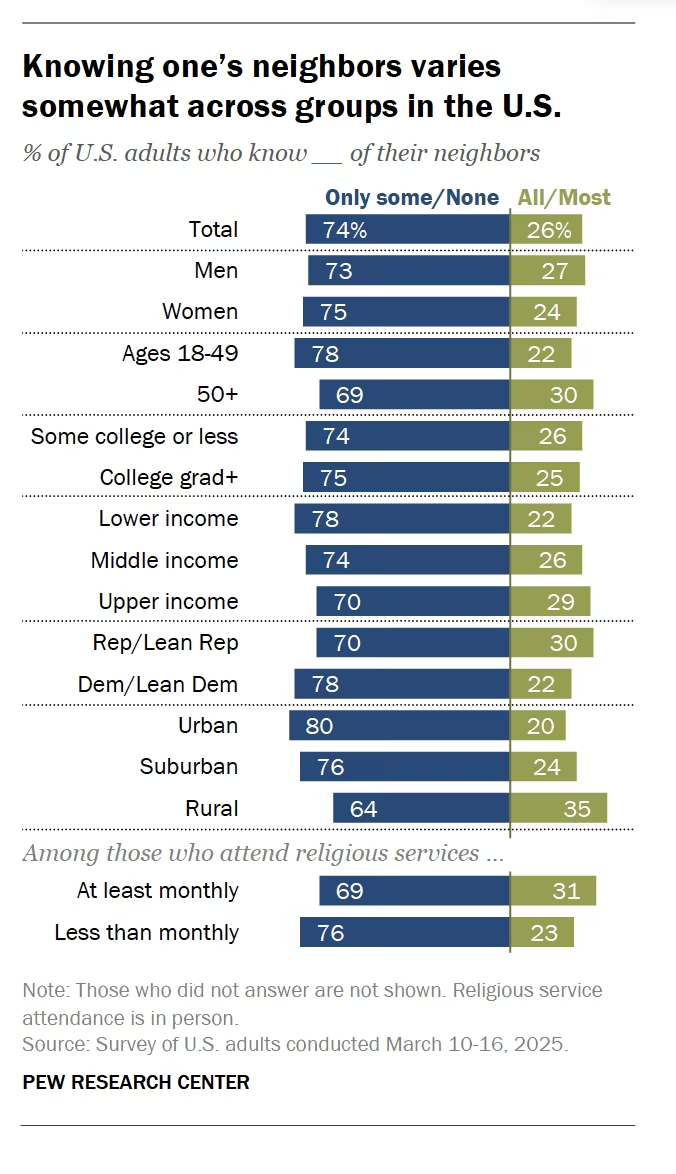
The figures show that trust and familiarity do not overlap completely. A services exchange could test whether that gap creates demand for easier local connections.
All three depend on a small local user base, but they solve different problems.
The other two are apps built for one neighborhood or one city. That small, hyper-local scope is also what keeps these ideas realistic to test. You don't need thousands of users before you learn whether the idea works, only the handful of neighbors or local business owners it's built for.
The services exchange is the one worth breaking down in detail, since it's the strongest idea here. What follows is a plan for how it would come together.
Broken into parts, the services exchange is a login, a post form with a category and a neighborhood attached, a browse list filtered by that neighborhood, and a way for two people to message each other.
The booking build covered forms and list-based views. Neighborhood filtering and direct messaging remained untested.
The part with no software answer is the first few listings. An empty board gives early users little reason to post, so the first few listings may need to be added by hand.
Every idea here also runs on entries people type in themselves, which is deliberate and is what keeps them buildable.
The event calendar relies on organizers and neighbors posting what's happening, one submission at a time. The punch card is a shop owner marking a visit that happened in front of them. Swap either one for a scraped listing feed or a licensed map layer, and you've moved it into the pile I cut in the first place.
Skip this category if you were hoping the app itself would find your first users, because it won't. Recruiting the first users may take more work than building the initial version, though this category never got a version of its own. What makes the rest doable is a group you can name and physically reach, such as your block, your downtown strip, or the shops on one street.
- Neighborhood Services Exchange: Lets local residents post small tasks or offer specific skills to neighbors, filling the gap between a formal gig app and asking a group chat for a favor. Its small scope lets you test whether neighbors will post and respond within a defined area.
- Local Loyalty Punch Card: Replaces a stack of separate paper or app-based loyalty cards with one simple digital punch card for a handful of nearby small businesses. It's an easy pitch to any shop owner tired of printing paper cards.
- Local Event Aggregator: One calendar where organizers and residents post events happening in a city or neighborhood, bringing listings from several scattered pages into one place. Every listing is submitted by the person running the event, so it solves the problem of a city's real activity being scattered across a dozen sources without scraping or licensing a single one of them.
Creator & Client-Facing Content Tools
Every idea in this category shares information between the person creating something and the person reviewing, approving, or using it.
A post waits on a yes. Somebody has to confirm you're allowed to name a client before the case study can go out. A course module sits there while the learner who signed up in January still hasn't opened it.
That shape is why these three sit together, though the size of the demand behind them is harder to pin down than a single stat can show. Around one in four U.S. skilled knowledge workers now works independently, according to Upwork. That figure indicates the size of the independent-work audience but provides no data on client approval frequency.
The course tracker has the most accurate numbers. A study of open online courses put the median completion rate at 12.6%, with individual courses landing anywhere from under 1% to a little over half.
That spread gives creators a reason to inspect where learners stop. Seeing the module where learners quit gives a creator something specific to fix, while a signup count alone cannot show where the drop-off happened.
Each option below uses a list of items with statuses and a second view for the client or learner. The booking build tested forms and calendar views, while the approval and learner-view setup remained untested.
The booking build exposed a conflict when two people selected the same time slot. That makes simultaneous updates worth testing here, such as a client rejecting a post while you're editing it.
A case study exported as a multipage PDF could face the same table-layout problem found in the invoice test, so check that export before using it.
This category can give you a day-one tester when you already have a client or learner waiting on the work. The app becomes useful once it contains real work for a client or learner to review.
Of the three, the content calendar is the one I'd build first and the case study builder is the one I'd expect to abandon at the halfway mark. Writing the case studies is the hard work. The app only organizes that work into fields, and prompting cannot replace the difficult middle paragraph.
- Content Calendar with Client Approval: A calendar grid where every scheduled post carries its draft, a preview, and an approve-or-reject button for whoever signs off, so feedback lands in one place, which beats chasing it across three email threads. This problem becomes more visible as the number of client accounts grows.
- Portfolio and Case Study Builder: Turns raw project notes into structured case studies on a public page, so a folder of screenshots nobody can find turns into one link you can send. It can also display a testimonial requested the week a project wraps, shown beside the case study it supports. The same structure gives a job candidate more detail than a single line on a resume.
- Course Completion Tracker: Shows a learner how far through a course they are and shows the creator exactly which module people stop at. The progress bar is what the learner turns up for. The drop-off view is the part that changes what you build next.
Which of These App Ideas Are Easiest to Build First?
The five categories aren't equally hard to build, and only two of them got an actual build out of the three I ran. The other three categories follow that same pattern by inference, without a build of their own to confirm it.
The habit tracker was the easiest of the three tested builds because it logged and displayed manual input. Productivity tools may need more iteration because the software has to classify messy input, but this category was never built.
Creator and client-facing tools were not built, so their build difficulty remains untested. Local and community ideas also have an adoption challenge because their first listings have to come from you.
The two small-business builds exposed the most issues in this test, but they also made up two of the three builds, so the sample doesn't establish that the category is the hardest. The booking conflict took exactly one follow-up prompt to resolve.
If you're building to learn, start one rung below where you think you should. A finished small build teaches you more than an ambitious one that stalls, and every idea on this list has a smaller version hiding inside it.
A habit tracker comes before a recovery score, a one-client progress page before a tracker built for a whole trade, a summarizer that handles one pasted article before one that handles a video link.
The same goes if you're building something to show an employer or put in a portfolio. The piece worth showing is a finished one that you can walk somebody through. Say what you asked for, what came back wrong, and what you did about it. The double-booking bug in my build makes a better story than any feature list would have.
How to Pick the Right App Idea for You
With 15 ideas on the table, pick based on where you are right now and what you have time to build this month.
Choose a Small Business & Service Operations idea if: You already run a business and want something useful this month. Booking, invoicing, or a client progress page all qualify. You don't want a side project you'll set aside in a week. The two spot-checks above show how fast that build comes together, and where it hits a real limit.
Choose a Productivity idea if: You want a small first build with an output you can read and judge on the spot. It teaches you what an AI app builder can do before you commit time to a bigger idea. Nobody's calendar or invoice depends on it working perfectly on day one.
Choose a Health, Wellness, or Habit Tracking idea if: You want a simple, contained first project with an obvious daily-use test built in. You'll know within a week whether you'll keep using it yourself. That's the bar any of these 15 ideas should clear before you build a second version of it.
Choose a Local & Community idea if: You're building for a small, defined group of neighbors or nearby businesses. You can test the idea there before trying to expand. Go in ready to do the slower work of getting the first real people in yourself.
Choose a Creator & Client-Facing idea if: Your week already runs on sending drafts, updates, or lessons to somebody and waiting for a response. You have a tester lined up before you write the first prompt. Skip it if the content itself is the bottleneck, because a better calendar won't write the posts.
More than one situation may fit, so let the idea itself break the tie.
Once you've picked one, resist the urge to build the whole feature list on day one. Get the smallest version working first, your minimum viable product (MVP), then add the rest once real people show you they want it.
That's the same order the three builds followed. Each one started from a single prompt covering its core workflow, with follow-up fixes added only after testing exposed a gap.
Which of These App Ideas Can Make Money?
Demand and buildability were my two filters. Revenue is a third filter to run yourself, because it sorts this list differently than difficulty does.
The small business ideas have the most obvious path to getting paid. A booking tool, a quote builder, or a client progress page replaces something an owner is already paying for badly somewhere else, which means the money is already moving, and you're offering a tighter fit for one narrow trade. Charging one salon owner or one contractor comes down to a conversation.
Local and community ideas have a real path too, and it's slower. A loyalty punch card sells to shop owners, so your buyers are a handful of businesses on one street. A neighborhood exchange needs enough active listings that people would miss it, and reaching that point requires direct outreach.
Creator and client-facing tools sit between the two. The buyer depends on the idea. A freelancer or studio may already pay for a calendar or portfolio host, while a course creator may pay for a course platform. The pitch depends on the specific workflow the app replaces.
Health and productivity ideas can still be useful, but free alternatives make them harder to charge for. A habit tracker competes with many free options and with the notes app already on the phone. Build those to learn the tool or to fix your own problem. If you want the idea to pay for itself, start where somebody is already writing a check.
Also read our guide on how do apps make money to understand which revenue models fit each type of app before you start building.
Best Practices for Validating an App Idea Before You Build It
Before you spend time on any of these 15 ideas, or one of your own, run it through these checks first.
- Check for real demand first: Look for user requests, active products with paying customers, or direct conversations with people asking for the same thing. A competitor's idea list can inspire the search, but it does not establish demand. Don't assume anybody else wants it until you've checked. Repeated demand provides stronger evidence than a single hunch.
- Check the idea against a real platform limit: A PDF-heavy, real-time, or regulatory-heavy idea costs more build time than it looks like on paper. Know your AI app builder's limit before you commit hours to it. The invoice-builder spot-check above is where I ran into mine.
- Start with the smallest testable version: Build the one core action the idea needs to prove itself, whether that's a booking confirmation, a single tracked habit, or a working invoice export. Add the rest of your feature list only after that core action works. Every extra feature you add before testing the core idea is a feature you might have to rebuild anyway.
- A quick test beats a plan on paper: An idea that sounds solid in your head can fall apart the moment you try to build it. A rough version can expose problems before you invest in the full build. The booking and invoice spot-checks exposed problems that planning alone would have missed.
- Revisit the idea after the first build: What you learn from hands-on testing, like the double-booking bug or broken PDF export in this piece, tells you more about whether an idea is worth finishing. Planning can't give you that answer.
These checks take less time than building a full version, while skipping them can lead to avoidable rework.
How Emergent Helps You Turn Any of These Ideas Into a Working App
Picking the idea can take real time on its own, but the build is usually where it stalls, waiting on a developer, a co-founder, or a budget that doesn't exist yet.
That's the point where I reached for Emergent on the three spot-checks above.
For the appointment-booking idea, I gave Emergent one prompt quoted earlier. That turned into a working version, faster than the invoice build. One follow-up prompt caught and fixed the double-booking bug.
The invoice build took longer than the booking build, so I would reserve extra testing time for any idea that ends in an export.
I built these three versions without writing code. What I typed was the finished result I wanted, in ordinary sentences.
Emergent runs that through a system of agents working as one unit, scoping the app, standing up the interface along with the data and logic behind it, and testing what came back. That's what turned a paragraph of instructions into a working booking calendar and an invoice tool.
The habit tracker spot-check was the cleanest proof of that, with no follow-up prompts at all for an idea that would otherwise sit on a someday list waiting for free time that never quite shows up.
If cost is what's holding you back from testing an idea of your own, start with one of the free AI app builders available today.
Emergent's own free tier is included, and its credit allowance covers a build the size of the 7-credit habit tracker. The 11- and 14-credit builds here sit above that line.
It can produce a working first version fast enough to judge whether the idea deserves more time, even when the first result needs another prompt. If one of these has been sitting in your notes for months while you wait on a developer you haven't hired, try Emergent first.
Depending on how far the idea needs to go, you may end up building the whole thing yourself without ever bringing a developer in.
Each initial version appeared within 20 minutes, but the booking app still needed another prompt, and all three required further testing. That gives you an early technical test before you spend months on the build; real users still have to validate demand.
Most builders stop at a prototype. Emergent ships real web and mobile apps, with accounts, databases, and payments included.
- Production-ready apps
- Web & mobile apps
- Deploy in minutes







