




TL;DR
- AppSheet won my same-app test. It gave me three linked tables, six maintenance requests, and a working phone form in about 25 minutes, including my checks. The first version still needed cleanup.
- Glide Classic failed during AI screen generation. I also spent about 25 minutes there, with most of that time going into finding out why the requested screens hadn't appeared.
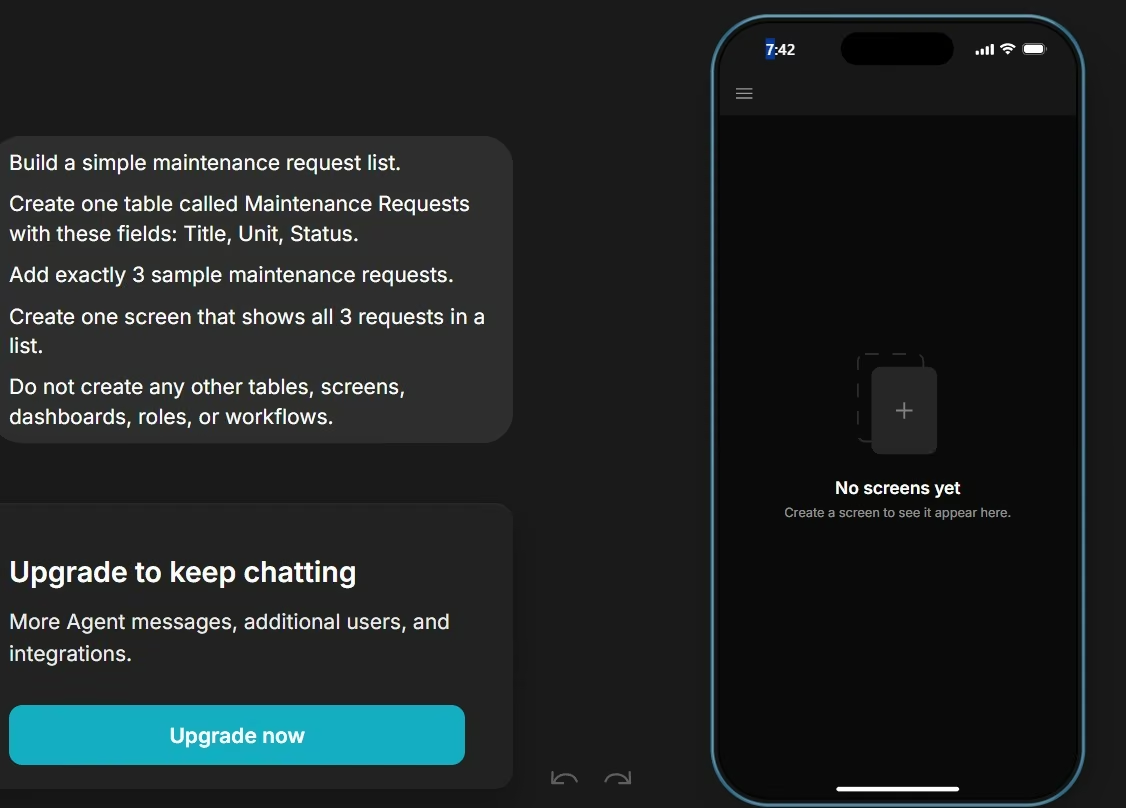
- My full Glide test still applies to Glide Classic. I also ran a stripped-down GlideOS check on the Free plan. The preview still showed “No screens yet” when my Agent allowance ran out, and Glide asked me to upgrade, so I couldn't complete a full GlideOS comparison.
- Pick AppSheet for Google Workspace, offline field work, and detailed access rules. Pick Glide when the look of the app and a quick visual build rank higher for you.
Two user roles, six maintenance requests, tenant-only access, one overdue item, a dashboard, and a phone form. That brief fits in one paragraph, and it was enough to separate these two app builders inside half an hour.
I ran the same brief through Glide Classic and AppSheet. Both sessions lasted about 25 minutes. AppSheet spent that time giving me a working first version that I could inspect. Much of my Glide time went into finding out why the AI-generated screens had failed.
That gave me a useful answer to the Glide vs AppSheet question. The products can serve similar business jobs, yet the way you build, control data, and fix the first result feels very different.
Glide vs AppSheet: What’s the Difference?
Glide is built around turning business data and work processes into polished apps. Glide Classic uses a visual builder. GlideOS adds a newer AI-first route where you can start from a spreadsheet or written prompt. GlideOS was open to the public by July 14, ahead of its August 3 launch event.
AppSheet is Google's app builder for business data and workflows. You can connect data such as Google Sheets or Microsoft Excel, or describe an app to Gemini and let it suggest the first set of tables and columns.
The plain-English difference: Glide puts a lot of attention on how quickly the finished app takes shape. AppSheet gives you a deeper editor for data rules, automation, offline work, and permissions.
Choose Glide if: you want a polished business app quickly and prefer a visual or prompt-led starting point.
Choose AppSheet if: your app relies on Google Workspace, detailed business rules, field work, or row-by-row access control.
How I Tested Glide vs AppSheet
I used one property-management app because it forced both tools to handle more than a list of rows. A tenant needed to submit a request. A manager needed to see everything. Tenants needed access to their own requests. The app also needed useful status and date logic.
I started both tools with the same maintenance portal brief so I could compare the first result fairly. I kept the prompt, timing, numbers, and screenshots so you can see what each tool actually produced.
Here is the prompt I used:
Build a maintenance request portal for a small property management company.
There are two user types: Manager and Tenant. Managers should be able to see and edit every maintenance request. Tenants should only be able to see and update requests belonging to them.
Each maintenance request should include: title, tenant, unit, category, priority, status, created date, due date, and an optional photo.
Use these statuses: New, Scheduled, In Progress, and Resolved.
Create a dashboard showing:
- Total open requests
- Urgent requests
- Overdue open requests
- The 5 most recent requests
Add a simple mobile-friendly form for submitting a new request.
Seed exactly 2 tenants and 6 realistic maintenance requests: 2 New, 1 Scheduled, 1 In Progress, and 2 Resolved. Exactly 1 unresolved request should be overdue.
Make the app usable on both desktop and phone. Do not add extra sample records.
I judged the first generated result before fixing it. I wanted to see what a non-technical owner would get after giving the platform a clear brief.
AppSheet took about 25 minutes from prompt to generated app and my checks.
Glide Classic also took about 25 minutes, and the two sessions stopped being comparable there. Most of the Glide time went into troubleshooting.
Meet Glide and What Happened in My Test
Glide Classic gave me the weaker first result in this test.
I asked it to create the screens for the maintenance portal. The build never reached the result I expected. The editor ended with "No screens yet," so I had no maintenance dashboard, request form, or useful navigation to test.
I started Glide Classic with the same full brief I gave AppSheet. After that first attempt failed, I tried a smaller diagnostic prompt to see whether the size of the brief was causing the screen problem. I still didn't get the app screens I needed.
Those 25 minutes covered an attempted build and troubleshooting. They didn't end with a working app.

The failed generation doesn't erase what Glide Classic can do through its normal builder. Glide supports business apps such as portals, dashboards, internal tools, and mobile field apps. Emergent's Glide review follows one spreadsheet-based app over 12 days and shows what that normal builder can do beyond my failed generation session.
Its Classic workflow system also supports scheduled, webhook, Slack, manual, and email triggers.
For private data, Glide uses Row Owners to control which rows a signed-in person can access. That is the feature I'd use for a tenant portal where each tenant should receive only their own records.
The AI screen-generation route I used failed on this brief in Glide Classic. I didn't test the normal Classic builder from scratch.
GlideOS is a separate product from Glide Classic, with a separate subscription and a new AI-led build flow. By July 14, you could start GlideOS with a spreadsheet or prompt, and Glide held its official launch event on August 3.
I later ran a smaller GlideOS check on the Free plan. I asked for one table, three sample records, and one screen. The preview still showed “No screens yet” when my Agent allowance ran out, and Glide prompted me to upgrade. That wasn't enough for a full AppSheet comparison, so the main hands-on result in this article still comes from Glide Classic.
Meet AppSheet and What Happened in My Test
AppSheet understood the structure of the maintenance portal much faster.
Gemini first proposed three connected tables. It created Units, Users, and Maintenance Requests. The Maintenance Requests table linked tenants back to Users and unit numbers back to Units.
That was a good read of the brief.
I left the suggested structure alone and created the app. AppSheet then generated six maintenance requests, which matched the number in my prompt. It also created Manager and Tenant role values.
I confirmed the six request records and the phone form. I didn't record a clean check of the requested 2 New, 1 Scheduled, 1 In Progress, and 2 Resolved split. The bad due date also meant I couldn't treat the overdue result as reliable. I didn't run a separate desktop-use check.
The mobile form worked. I could enter a request title, select a tenant, choose a unit and category, and continue through the other fields.

That was the first point where the two tests clearly split. After roughly the same amount of time, I had a form I could use in AppSheet and no generated screens in Glide Classic.
My prompt requested exactly two tenants and told the tool not to add extra sample records. AppSheet generated more users than that across Manager and Tenant roles, and it also seeded its own list of units.
One maintenance record had a Created Date of December 5, 2025 and a Due Date of September 16, 2020, which puts the deadline five years before the record existed. That also made the overdue logic unreliable. Google warns that Gemini-created AppSheet apps can include inaccurate sample data, and this was a good example of why you need to inspect it.
The requested dashboard was missing too. AppSheet supports dashboard views that combine tables, charts, maps, calendars, and other views on one screen. Gemini simply hadn't built the dashboard from my brief.
If dashboards are the main reason you're building the tool, a dedicated dashboard builder can also be worth comparing before you commit to a broader app platform.
The permissions check gave me the clearest warning. The Maintenance Requests Security Filter was empty.
The Users table had Manager and Tenant roles. I then went to Security Filters for Maintenance Requests.
The filter was empty. AppSheet showed "filter: none."

That meant Gemini had created the role labels and stopped there. The tenant-only access rule from my prompt still needed to be configured.
AppSheet does support this type of restriction. Security Filters can evaluate each row against the signed-in person's email. Google gives examples using USEREMAIL() and shows how managers can be allowed to see all rows while other people receive only their own.
My AppSheet verdict from the test: Gemini got me much closer to a useful app. I would still check every access rule, date, record count, and generated view before giving the app to tenants.
Also read our AppSheet alternatives guide for what else is worth trying.
Glide vs AppSheet at a Glance
Quick comparison:
| Feature | Glide | AppSheet |
|---|---|---|
| Best for | Classic: polished data-led apps. GlideOS: AI-led business apps | Process-heavy internal apps |
| AI starting point | GlideOS prompt, spreadsheet, or file | Gemini app creation |
| Free access | Glide Classic Free: $0, drafts only. GlideOS Free: $0, 0 published apps. | Build and test with up to 10 users |
| Starter paid | $25/monthfor GlideOS Basic. No annual price listed | $5/user/monthfor Starter |
| Offline work | Classic uses a web/PWA model | Mobile offline support |
| Row-level access | Row Owners (Classic) | Security Filters (Core, $10/user/month) |
| App stores | Classic PWA | Branded iOS and Android apps (Core, minimum 10 licenses) |
| My first result | No usable screen in Classic. Small GlideOS retry stopped at upgrade prompt | Working form and tables |
The table uses Glide's current GlideOS lineup.
Glide vs AppSheet Feature-by-Feature
AI App Building
AppSheet won the prompt test I ran. GlideOS is the newer Glide route for prompt-first building. My short Free-plan retry stopped too early to judge it, so this part of the comparison stays open.
GlideOS can start from a written prompt, spreadsheet, or file. Glide describes it as a separate product from Classic, so existing Classic subscriptions and apps don't move over automatically.
AppSheet uses Gemini to turn a written idea into an initial app structure. In my case, that meant three sensible tables and working links between the core records.
I prefer AppSheet's first review step for this kind of business app. Seeing the proposed data structure before the app is created gives you a chance to spot a bad foundation early.
The output still needs checking. My test found extra sample data, a missing dashboard, a date error, and an unconfigured security rule.
From my test: AppSheet got farther. It produced a working first version from the brief, while Glide Classic never produced a usable screen.
Data Sources
AppSheet gives you a wide range of business data sources.
AppSheet supports standard sources such as Google Sheets, Microsoft Excel, Airtable, Smartsheet, and Google Drive on its paid plans. BigQuery, MySQL, PostgreSQL, SQL Server, Oracle, Salesforce, and other advanced data connections require Enterprise Plus at $20/user/month.
That gives you plenty of room when your data already lives across Google services or Structured Query Language (SQL) databases.
Glide Classic supports Glide Tables and Big Tables, along with sources such as Google Sheets and other business data connections depending on the plan. Enterprise adds higher-scale sources such as SQL and BigQuery.
For a small company running a simple request portal, either product can hold the data you need.
Once your company relies heavily on Google Workspace and database connections, AppSheet gives you more paths from the same editor.
From the published plan details: AppSheet gives you more data-source options from one editor, although its database and enterprise connectors sit on the highest plan.
Automation
AppSheet gives me more control when the app needs a chain of business steps.
AppSheet automations can respond to data changes and schedules, then run processes that update records or send messages. This is useful for a maintenance portal where an urgent request might need to alert a manager and change a status.
Glide Classic also has workflows. Scheduled, webhook, Slack, manual, and email triggers were available on its paid Classic plans.
For a straightforward notification or repeated action, Glide can cover plenty of day-to-day work.
As the rules become more detailed, I find AppSheet easier to position as the operations-heavy choice because the editor exposes so much of the app's data logic.
For rule-heavy workflows: AppSheet has the stronger published toolset. I didn't run the same automation inside both products, so I treat this as a feature comparison rather than a test result.
Permissions and User Access
Glide and AppSheet both have real row-level access tools. You still need to configure them correctly.
In Glide, Row Owners can connect a record to the signed-in person's email or role. That fits a request portal where Jane should receive Jane's records and the property manager should have wider access.
In AppSheet, Security Filters decide which rows are included for each signed-in person. A filter can compare the user's email with an owner field. Google also documents a manager example where people in a Managers table can receive all records.
My test exposed the part I would check first after any AI-generated build. Gemini had created roles. The Maintenance Requests filter was blank.
The practical lesson: “Manager” and “Tenant” only show that the roles exist. Open the access settings and check what each role can actually see.
On access control: Both products support row-level rules. My AppSheet build left the Maintenance Requests Security Filter blank, while Glide Classic never produced a screen I could inspect for the same rule.
Offline and Mobile Work
AppSheet is my pick for crews who work in places with weak service.
A mobile AppSheet app can store the app definition and needed data on the device. The first launch must happen online. You can then configure offline use and sync changes when the connection returns.
Think property inspections in basements, job sites outside town, or inventory checks in a warehouse with patchy Wi-Fi.
Glide Classic uses Progressive Web App (PWA) technology. A PWA runs through the web and can be installed from a browser. Glide Classic doesn't support direct publishing to the Apple App Store or Google Play Store.
AppSheet can also create branded iOS and Android apps for app-store distribution. Google notes that store approval still comes from Apple or Google.
For offline field work: AppSheet has the clearer published advantage because it supports configured offline use and a branded app-store route.
Design and Learning Curve
Glide is the one I'd reach for when the visual result needs to look polished quickly.
Glide's own AppSheet comparison focuses heavily on ready-made design, portals, dashboards, internal tools, and mobile field apps. That matches the product's long-standing strength.
My Classic build failed before I had a generated screen, so I can't use that session as proof of Glide's design quality. The product's visual builder and app examples are the basis for this part of the comparison. Emergent's 12-day Glide review gives a longer hands-on look at that normal visual workflow.
AppSheet gave me a working phone form quickly. The editor became denser once I went looking for security and data settings.
That trade-off is easy to understand as a new builder. Glide is friendlier when you want to shape what people see. AppSheet asks you to spend more time on what the app does with data.
For visual building: Glide has the stronger product position. My failed Classic generation didn't give me a screen to judge, so this part comes from Glide's visual builder and published examples rather than my generated result.
Glide vs AppSheet Pricing
The pricing models are quite different. Glide charges based on plans, usage, and product limits. AppSheet mainly charges per person who uses the app.
Glide Pricing
GlideOS now has five current plans. Free is $0/month. Basic starts at $25/month, Plus at $50/month, Pro at $125/month, and Enterprise uses custom pricing. Glide's public GlideOS page currently lists monthly prices only.
Current GlideOS plans:
- Free: $0/month. Two team members, limited credits, and 0 published apps.
- Basic: $25/month. Two team members, 100 credits, and 2 published apps.
- Plus: $50/month. Three team members, 250 credits, and 5 published apps.
- Pro: $125/month. Starts at five team members, with unlimited published apps and workflows.
- Enterprise: Custom pricing.
Glide renamed its plans on September 1. At launch, the $25 and $125 steps were called Solo and Team. The current names are Basic and Pro, with Plus now sitting between them.
Glide Classic has separate pricing:
- Free: $0/month.
- Explorer: $25/month ($19/month billed annually).
- Maker: $60/month ($49/month billed annually).
- Business: $249/month ($199/month billed annually).
- Enterprise: Custom pricing.
Business includes 30 users and 5,000 monthly updates. Extra users cost $6 each on monthly billing or $5 each when billed annually. Extra updates cost $0.02 each.
Want the full breakdown of what each plan actually covers? Read our Glide pricing guide before you commit.
AppSheet Pricing
AppSheet lets you build and test with up to 10 people at no cost. Starter begins at $5/user/month. Core costs $10/user/month, Enterprise Plus costs $20/user/month, and Publisher Pro costs $50/app/month for public apps that don't require sign-in or Security Filters.
The current plans:
- Starter: $5/user/month.
- Core: $10/user/month.
- Enterprise Plus: $20/user/month.
- Publisher Pro: $50/app/month.
- Free testing: Up to 10 test users while building.
Google supports monthly and annual billing, although its public pricing page does not publish a lower annual monthly-equivalent price for Starter, Core, Enterprise Plus, or Publisher Pro.
Many paid Google Workspace editions already include AppSheet Core, so readers should check their Workspace plan before purchasing a separate Core license.
What This Costs at 5, 20, and 50 Users
For this maintenance portal, AppSheet Core is the fairer AppSheet price to use because Security Filters start at Core, not Starter. Core costs $10 per user per month.
For Glide Classic users signing in with business email addresses, Business costs $249/month or $199/month billed annually. It includes 30 users. Extra users cost $6/month on monthly billing or $5/month when billed annually.
| Users | Glide Classic Business | AppSheet Core |
|---|---|---|
| 5 | $249/month ($199/month billed annually) | $50/month |
| 20 | $249/month ($199/month billed annually) | $200/month |
| 50 | $369/month ($299/month billed annually) | $500/month |
At the published monthly rates, AppSheet Core costs less at 5 and 20 users. Around 25 users, Glide Classic Business catches up because its base price already includes 30 users. At 50 users, Glide Classic Business is $369/month while AppSheet Core is $500/month.
GlideOS uses a different pricing model based on plans and team size, so I wouldn't reuse these user-count calculations for GlideOS. Its public pricing page doesn't publish a per-app-user rate.
What Glide and AppSheet Users Say
I also looked at people who had lived with these tools long enough to hit their edges.
What Glide Users Say
In a 2024 Reddit discussion "Glide App to Appsheet," the original poster said Glide had been their entry into app building. Changes and pricing had pushed them toward AppSheet.
One commenter had rebuilt a once-a-year Glide event app in AppSheet after Glide became too expensive for that use pattern. They also found AppSheet's logic easier to follow and liked having an explicit save step that gave them a chance to revert accidental edits.
Another commenter praised AppSheet's workflow controls and role handling. Those are individual experiences, so I wouldn't use them as proof that every Glide migration will go the same way.
They do point to a useful buying question. Think about how often the app runs, who needs it, and how its cost changes after launch.
What AppSheet Users Say
A 2025 Google Developer forum discussion, “A Honest Reflection on AppSheet's Direction (and Why We're Getting Frustrated),” is much more divided.
The original poster said they had trained thousands of people and built hundreds of management solutions. They still used AppSheet for adding and editing records, user permissions, and lightweight Google Workspace processes.
Their frustrations centered on the interface, bugs, automation, customization, and what they saw as slow product development compared with competitors. They also wanted stronger AI capabilities.
Another experienced commenter pushed back. After trying other app builders, they said AppSheet still came out on top for their work. Their main complaint was Gemini's AppSheet guidance.
That mixed feedback lines up with my own test better than a simple positive or negative review.
AppSheet gave me a useful first version. It also gave me several places where I had to check its work.
How to Choose Between Glide and AppSheet
I would choose based on the job people need to complete after you publish the app.
Pick Glide When You Want a Faster Visual Start
Glide is a good fit when:
- The finished look is a priority: You want a polished portal, internal tool, or field app with fewer design decisions.
- You want a prompt-first starting point: GlideOS lets you start from a written request, spreadsheet, or file.
- Your access model is straightforward: Row Owners map well to common "show each person their own records" use cases.
- Your app will live mainly on the web: Glide Classic PWAs are easy to share through a browser.
- You want to shape the screens visually: Glide Classic's visual builder gives you direct control over screens and components after the app structure is in place.
If you're choosing Glide mainly for a customer or client portal, the deeper question is often whether you want a general app builder or a portal-first product. The Softr vs Glide comparison is useful at that point.
Pick AppSheet When the Process Has More Rules
AppSheet is a strong fit when:
- You already use Google Workspace: Sheets, Drive, Forms, Calendar, and other Google services can sit close to the app.
- People work offline: You can configure mobile offline use and sync later.
- Permissions need close control: Security Filters give you row-by-row rules tied to signed-in people.
- Automation drives the app: AppSheet gives you room to build multi-step processes around business data.
- You want an app-store route: Branded AppSheet apps can be prepared for iOS and Android stores.
For my maintenance portal, these needs pushed me toward AppSheet.
Describe the Portal Instead of Configuring It With Emergent
Emergent takes a prompt-first route to app building. You describe the business process and let the platform create the app, then refine the result through conversation.
That can be useful if the main thing slowing you down is translating an idea into screens, data, roles, and workflows. Emergent's AI app builder is built around that workflow.
Emergent also includes Emmy, a free in-product assistant that can turn a rough idea such as “I need a maintenance portal for my tenants” into a clearer build brief.
That is useful for the exact kind of brief I used here. If you write "I need a maintenance portal for my tenants," Emmy can help you work through who uses it, what belongs in the first version, and what the main prompt needs to say.
It is a third route worth considering if you want to start with the whole business idea in plain English.
Final Verdict on Glide vs AppSheet
AppSheet wins my maintenance-portal test. In about 25 minutes, including the time I spent inspecting it, AppSheet gave me three linked tables, six request records, and a usable mobile form. The dashboard was missing. The sample data needed cleanup. The tenant Security Filter was blank.
I still had something real to work with. My Glide Classic session also ran for about 25 minutes. Most of that time went into troubleshooting after the AI screen-generation attempt failed.
For your own app, I would choose AppSheet when offline use, Google Workspace, detailed workflow rules, and data permissions sit near the top of your list.
I would choose Glide when you care more about getting a polished business app on screen quickly. I also gave GlideOS a stripped-down Free plan check. That test stopped at the upgrade prompt before a screen appeared, so a full paid GlideOS run would still be needed for a like-for-like result.
The fastest way to decide between Glide vs AppSheet: give both tools the same real business brief and inspect the first result before you fix anything.

Most AI app builders stop at prototypes. Emergent creates production-ready apps you can actually launch.
- Production-ready apps
- Web & mobile apps
- Deploy in minutes





