



6 Best No-Code SaaS Tools: TL;DR
- Emergent: best overall for non-technical founders who want AI agents to help build, troubleshoot, and launch a complete web or mobile product.
- Bubble: best for complex web SaaS products that need detailed visual workflows, databases, and design control.
- Lovable: best for turning a prompt, document, or screenshot into a polished web MVP quickly.
- Base44: best for fast, all-in-one AI builds with the database, authentication, payments, and integrations included.
- Adalo: best for straightforward native iOS and Android SaaS products with predictable flat pricing.
- Softr: best for client portals, directories, and data-backed SaaS products built around Airtable, Sheets, or SQL data.
A no-code SaaS tool can build a polished login screen in an afternoon. Subscriptions, permissions, customer data, mobile publishing, and the changes you’ll need six months later are where these tools start to pull apart.
I researched the leading options through their current product documentation, pricing pages, and recent independent reviews. I compared how far each platform takes you from an idea to a live product, what you pay as usage grows, and how much technical work remains after the first version appears.
The list covers six distinct jobs. You’ll find a conversational builder, a visual platform for complex workflows, two prompt-led web app tools, a native mobile builder, and a portal builder for products that already have structured data.
What to Check Before You Pick a No-Code SaaS Tool
Most of these tools build a first screen fast. Where they separate is everything customers depend on next: separate accounts, paid plans, permissions, reliable data, emails, refunds, and actions that run in the right order.
Pure no-code tools can also hit a wall once the application needs deeper workflows or unusual logic.
When you compare platforms, focus on five questions:
- Can it build the product you’re selling? A marketing website builder and a SaaS builder are different tools, even when their demos look alike.
- Where does your data live? Some platforms include a database. Others expect you to connect Airtable, Supabase, Xano, or another service.
- How are you charged? Credits, workload units, users, records, and workflow actions can all raise the real price.
- Can you leave later? GitHub synchronization or code export gives you more options than a closed visual system.
- What does “mobile” mean? A responsive browser app is different from a native application submitted to Apple and Google.
No-code development still requires product planning. You need to define the data, user roles, rules, payments, and failure states before the platform can build them well. Emergent’s no-code guide makes the same distinction: screens move quickly, while data relationships and application logic create most of the hard work.
How I Researched These No-Code SaaS Tools
I reviewed the official product pages, documentation, and pricing available on July 15, 2026. I compared the same practical requirements across all six tools:
- Customer accounts and permissions
- Database and workflow support
- Payments and outside integrations
- Web or native mobile publishing
- Hosting and launch support
- Code ownership or export options
- Free-plan limits and the first paid plan
- Costs that change with credits, usage, users, or records
I also spent some time using the builders. Where possible, I entered the same ClientFlow brief to see how each platform handled the setup and to capture original screenshots. Emergent, Lovable, and Base44 produced dashboard previews, while Bubble reached the feature blueprint before asking me to upgrade.
For Adalo and Softr, I reviewed the builder interface and official product examples rather than completing full builds.
I then checked recent G2 reviews for Bubble, Lovable, Adalo, and Softr. For Emergent and Base44, I used TechRadar’s hands-on reviews, which applied the same cryptocurrency-calculator prompt to several AI app builders.
This was not a full technical test. I did not verify every generated feature or assess performance, security, scalability, or production reliability.
Tools That Didn’t Make the Final Six
- FlutterFlow: Choose it when you want stronger technical control, Flutter code export, and a developer-friendly native mobile workflow. Adalo fits this article’s non-technical founder better.
- Glide: Use it for spreadsheet-backed internal apps and lightweight data products. Softr offers a clearer route to customer portals and membership products.
- Webflow: Use it for a SaaS marketing site. It isn’t the right primary platform for accounts, application data, and deeper product logic.
- Replit: Use it when you’re comfortable entering a developer environment and working closer to the generated code.
- Knack: Use it for database-heavy business applications. It offers less of the prompt-led product-building experience covered here.
6 Best No-Code SaaS Tools: Quick Comparison
| Tool | Best For | Free Plan and Starter | Main Tradeoff |
|---|---|---|---|
| Emergent | Complete conversational builds | Free; Standard $20 ($17 annually) | Credit-based cost |
| Bubble | Complex web SaaS | Free; Web + Mobile Starter $69 ($59 annually, including native mobile) | Steeper learning curve |
| Lovable | Polished web MVPs | Free; Pro $25 ($21 annually) | Credits disappear quickly |
| Base44 | Bundled AI app building | Free; Starter $20 ($16 annually) | Can drift from the brief |
| Adalo | Native mobile SaaS | Free; Starter $45 ($36 annually) | Lower customization ceiling |
| Softr | Portals and data apps | Free; Basic $25 ($19 annually) | User and workflow limits |
Pricing and included usage vary sharply. Bubble meters workload; Emergent and Lovable use build credits; Base44 separates message and integration credits; and Softr limits app users, database records, and workflow actions. Adalo is the exception here because its paid plans use flat pricing without action or token charges.
1. Emergent: Best Overall for Building a Complete SaaS Through Conversation
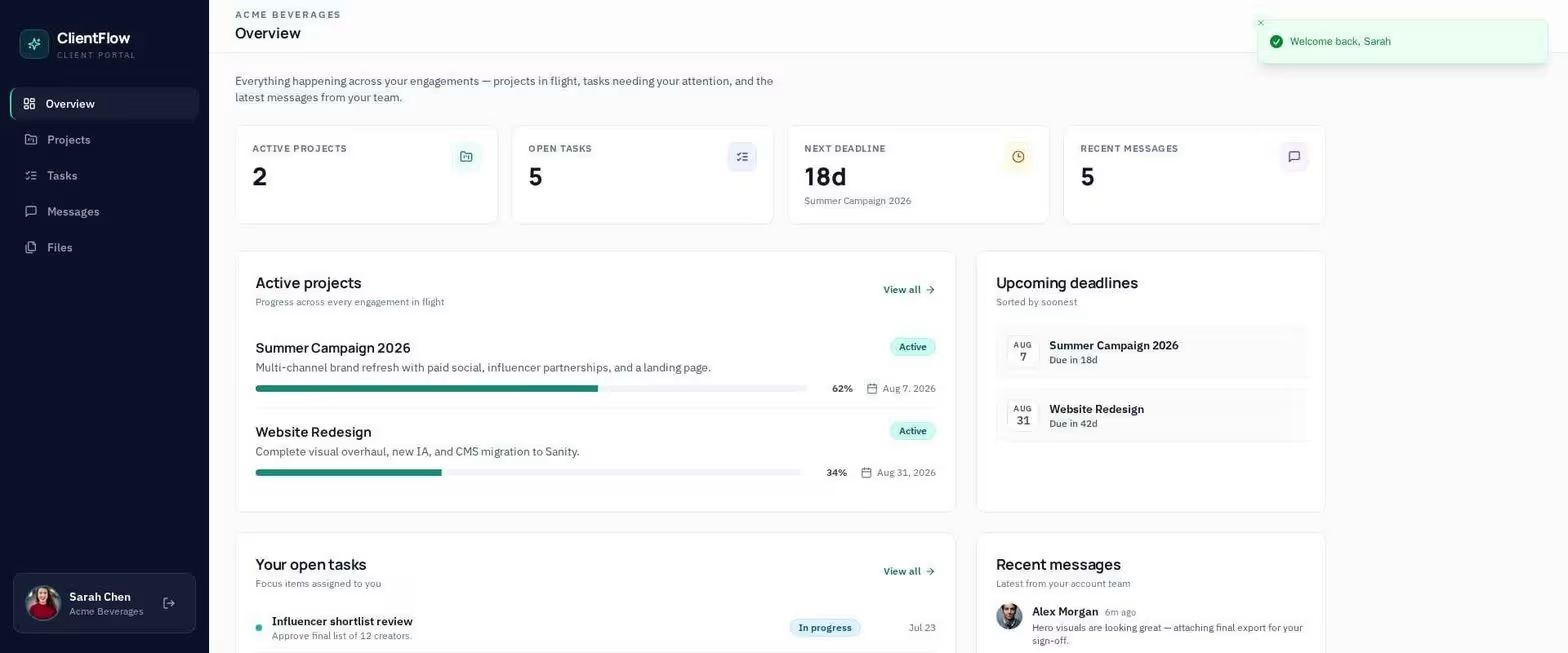
What It Does: Emergent saas builder uses a coordinated agent system to help design, build, test, integrate, troubleshoot, and launch web and mobile applications.
Best For: Non-technical founders who can describe their product clearly but don’t want to assemble the database, interface, integrations, hosting, and launch workflow themselves.
Emergent takes a product brief and carries it into a working web or mobile application through conversation. It suits founders who understand the customer problem and workflow they want to build but do not want to piece together the interface, database, integrations, hosting, and launch process themselves.
The Standard plan includes web and mobile app building, private project hosting, 100 monthly credits, and GitHub integration. That makes it more suitable for a real SaaS project than a tool that stops at interface mockups. The generated code can also move into GitHub when a developer needs to review or extend it.
Its main limitation is cost predictability. Emergent charges credits according to the work its agents complete. A small landing page and a multi-role subscription platform won’t consume the same amount. The Free plan is enough to inspect the workflow, but 10 monthly credits won’t support a serious build for long.
For my screenshot build above, I asked Emergent to create a sample project called ClientFlow, a portal with two user roles and six client-facing areas: projects, progress, deadlines, tasks, messages, and files.
Emergent asked whether to seed demo data and whether the file area should use simulated records or real uploads. I chose seeded data and simulated files, and the preview returned a populated dashboard with project progress, deadlines, tasks, and messages.
It took about 20 minutes, however, which was slower than some of the other platforms, and creating this single project exhausted more credits than I had anticipated.
A Client Scenario: Building Plate OS on Emergent
A meal-prep founder used Emergent to build Plate OS, a multi-tenant operations product, over six months. Emergent’s case study reports that the platform processes 600 to 700 orders per day and cost roughly $10,000 to build, compared with the founder’s estimated $200,000 custom-development alternative.
Treat those numbers as a customer-reported case study rather than an independent benchmark.
The scenario fits this category because Plate OS is a full operations product. It connects ordering, labels, delivery routing, subscriptions, customer self-service, and multiple business accounts. It shows the type of founder-led SaaS project Emergent targets when the founder understands the workflow but doesn’t write the code.
Key Features
- Conversational refinement: Follow-up questions help clarify missing product and design decisions before the build continues.
- Web and mobile support: You can create browser-based products and mobile experiences from the same platform.
- Managed launch path: Hosting and launch tools reduce the number of outside services you must configure.
- GitHub integration: Eligible plans let you move the project into a standard code-review and version-control workflow.
- Agent-led troubleshooting: You can ask the platform to inspect and correct problems instead of finding every affected file yourself.
Pros and Cons
Pros
- Handles more of the journey from initial prompt to launch.
- Uses clarifying questions to surface missing product and design decisions.
- Supports web and mobile applications.
- Includes GitHub integration on Standard and higher plans.
- Fits founders who think in workflows and customer outcomes rather than code files.
Cons
- Credit use makes the final build cost hard to predict.
- The Free plan’s 10 monthly credits are restrictive.
- Independent testing found it slower than several competing prompt-led builders.
- Payments, permissions, sensitive information, and production data still need human review.
What Reviewers Say
In its Emergent no-code review, TechRadar recorded the crypto-calculator build from 12:22 p.m. to 12:39 p.m. The reviewer called the result attractive and usable, confirmed that it worked across mobile screen sizes, and noted that free deployment was limited to temporary links.
Pricing
Free: $0/month. Standard: $20/month ($17/month billed annually); Pro: $200/month ($167/month billed annually).
Business: custom; Enterprise: custom. Standard includes 100 monthly credits, while Pro includes 750.
Bottom Line
For founders who want one conversation to carry the build from product brief to launch, Emergent is the strongest fit, provided credit use is part of the budget.
With more AI app builders available than ever, 5 Best AI App Builders in 2026 helps you compare the options based on features, capabilities, and use cases.
2. Bubble: Best for Complex Web SaaS Products
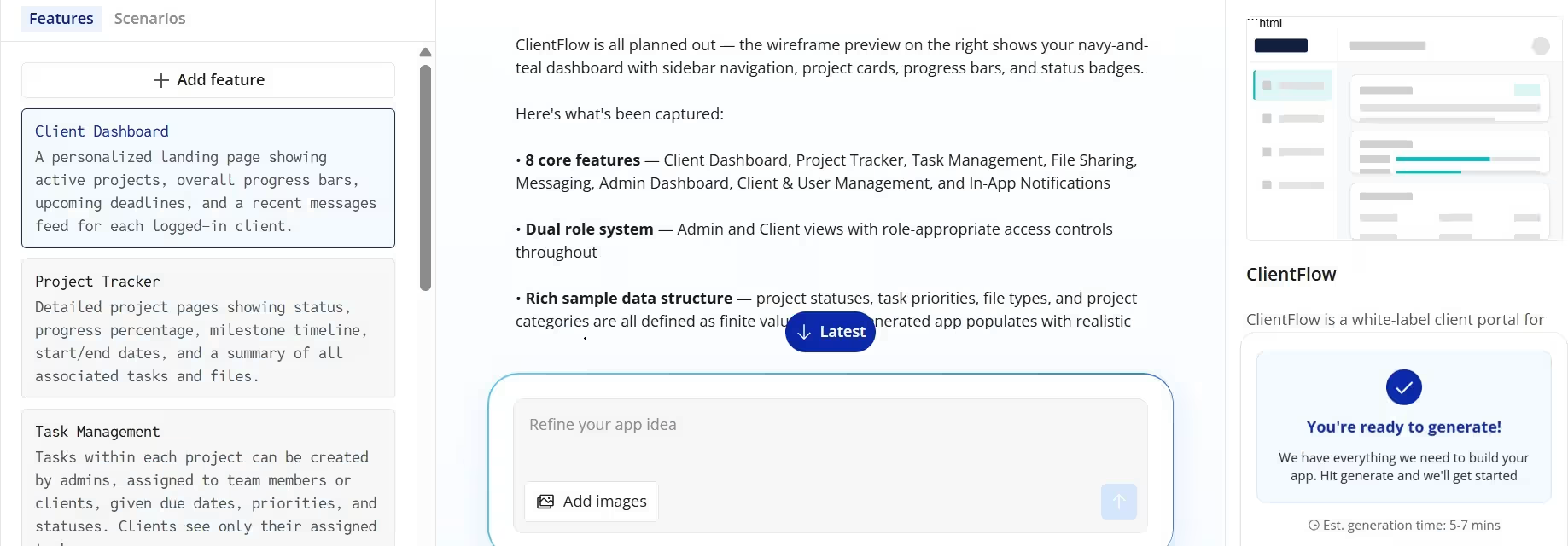
What It Does: Bubble combines AI prompting with a visual editor for building web and native mobile applications, including data, workflows, accounts, hosting, and outside services.
Best For: Founders who need detailed workflows and want direct visual control over how each screen, data type, and action works.
Bubble fits SaaS products that depend on detailed workflows, connected data, and rules that change by user or action. Marketplaces, membership products, dashboards, and other complex web applications are where its depth becomes useful.
Bubble’s AI tools can create the starting structure, after which the visual editor handles the interface, database, and workflows. Its plugin marketplace and API Connector give you routes into services such as Stripe and Google Maps, while its native mobile builder can publish iOS and Android applications.
That control comes with homework. Bubble asks for real ramp-up time. You’ll learn its approach to data, responsive design, expressions, and workflows before the platform feels fast.
Bubble’s pricing also deserves close attention. It measures the server work your app performs in workload units. Web and mobile activity in the same project shares that allowance, and you can buy more workload or pay overages once the included amount runs out.
I entered the same ClientFlow brief into Bubble’s AI setup. Bubble returned an eight-feature blueprint and a dashboard wireframe within five to seven minutes.
The full generation step required a paid plan, so I evaluated the planning flow rather than a completed application.
Key Features
- Visual workflow editor: Create triggers, conditions, database changes, and multi-step actions without typing code.
- Built-in database: Keep accounts, products, subscriptions, messages, and other records inside the platform.
- Large plugin marketplace: Extend the product without building every connection yourself.
- Web and native mobile: Paid projects can combine a live website with iOS and Android applications that share data and workflows.
- Usage controls: Bubble lets you disable workload overages if you need a firm spending ceiling.
Pros and Cons
Pros
- Gives you detailed control over product logic and design.
- Supports complex databases and multi-step workflows.
- Includes web, iOS, and Android options.
- Has a mature template, plugin, education, and expert community.
- Lets you cap workload overages.
Cons
- Takes longer to learn than prompt-only builders.
- Workload pricing can complicate forecasting.
- Complex projects need disciplined data and workflow organization.
- Moving a mature product away from Bubble can require a rebuild.
Not every project needs the same balance of visual building, customization, and technical control. 10 Best Bubble Alternatives and Competitors in 2026 explores the alternatives for different development needs.
What Reviewers Say
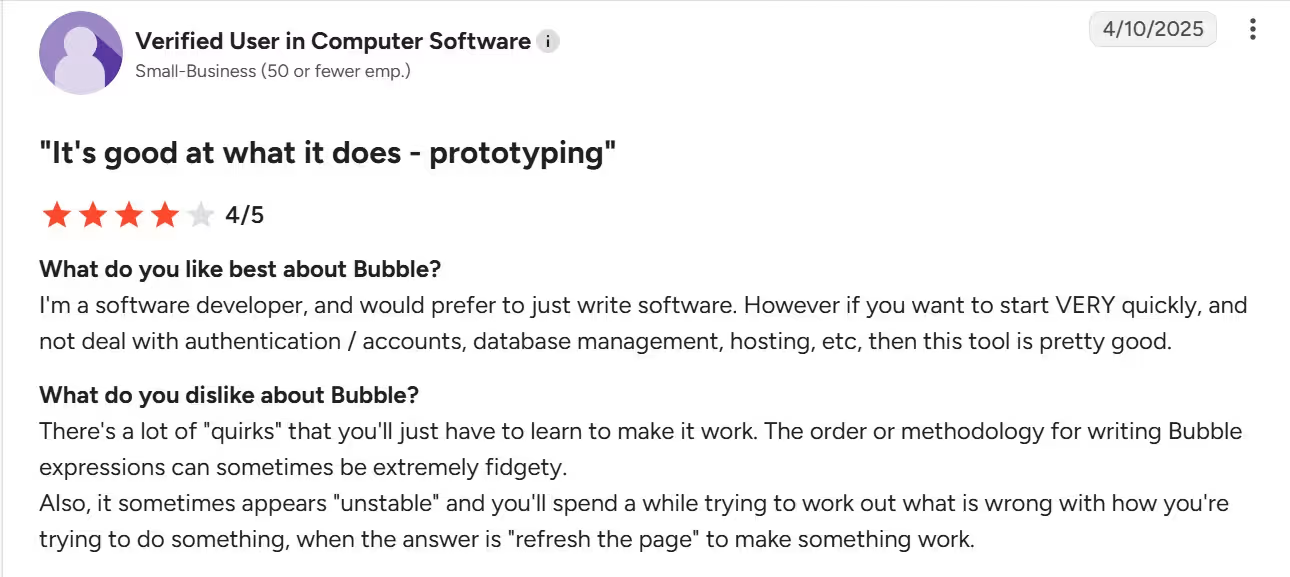
In the G2 review, “It’s good at what it does - prototyping,” a software developer said Bubble helped the team start quickly without setting up authentication, accounts, database management, or hosting.
The reviewer also said Bubble has quirks users must learn and described its expressions as “extremely fidgety.” G2’s broader review summary identifies learning curve and pricing as recurring concerns.
Pricing
Free: $0/month. Web + Mobile Starter: $69/month ($59/month billed annually); Growth: $249/month ($209/month billed annually). Team: $649/month ($549/month billed annually); Enterprise: custom.
Bottom Line
Complex workflows and precise visual control are where Bubble earns its learning curve and workload-based pricing.
3. Lovable: Best for Polished Web MVPs
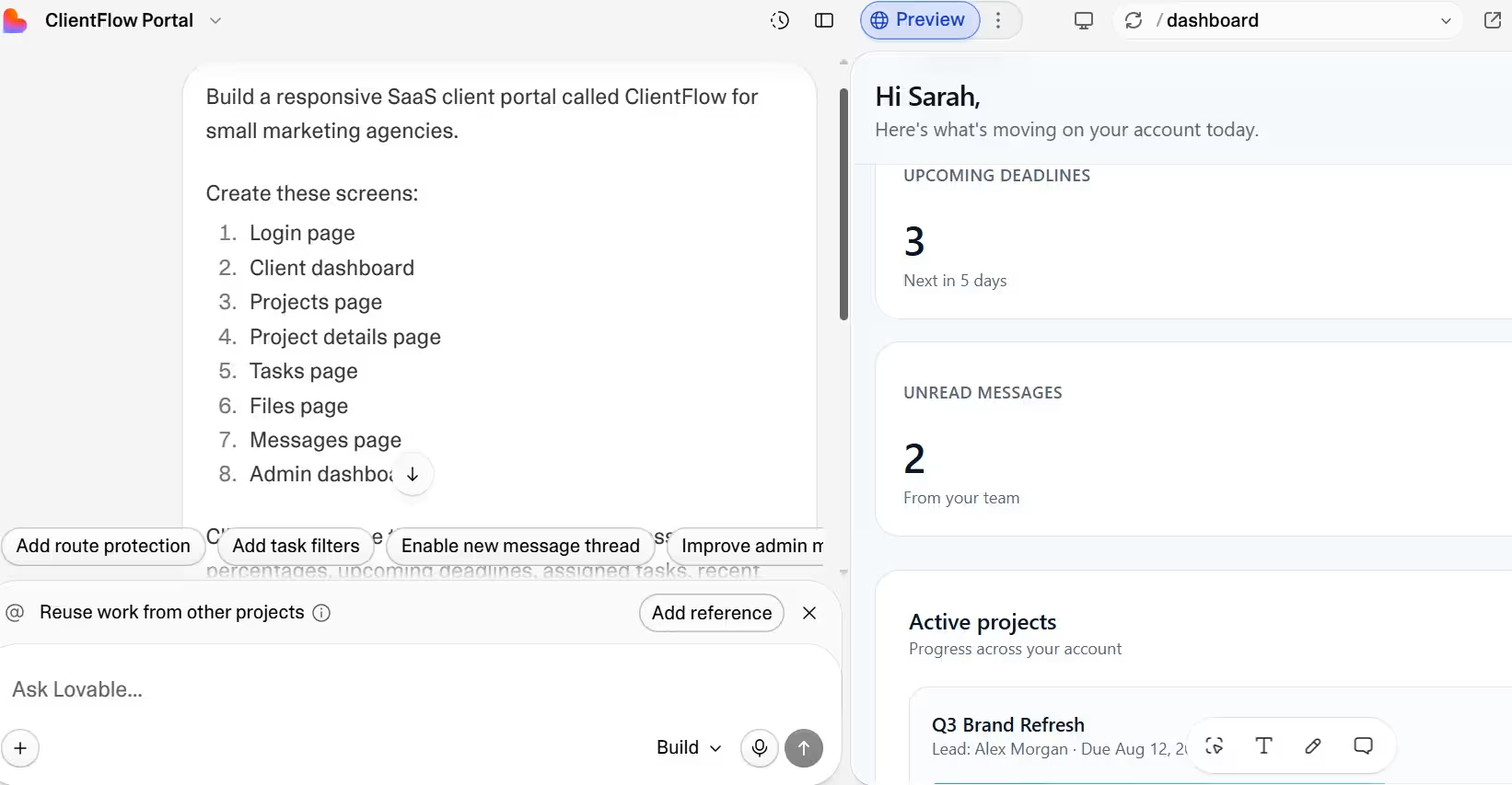
What It Does: Lovable turns prompts, screenshots, and documents into working web applications that you can refine through conversation and deploy.
Best For: Founders who want a presentable web MVP, customer demo, or early SaaS product without starting inside a complex visual workflow editor.
Lovable gives you one of the shortest routes from a written product idea to an attractive web application. Describe the product, attach reference material, watch the first version appear, and continue refining it with plain-language feedback.
It fits front-end-heavy SaaS products particularly well. A founder building a dashboard, directory, marketplace interface, or customer-facing AI tool can get a convincing first version quickly. GitHub synchronization and editable code also give a developer somewhere to continue once the product grows beyond prompt-based changes.
The weakness is the credit model. Build credits pay for AI work, so repeated design changes, debugging, or large feature requests can raise the effective monthly Lovable price. Recent G2 reviewers consistently praise the speed and interface while warning that intensive use consumes credits quickly.
Lovable is the better call than Bubble when visual polish and early validation matter more than granular visual workflow control. Bubble wins when you already know the application will need complicated rules and extensive point-and-click customization.
For my ClientFlow build, I gave Lovable an eight-screen brief covering login, client and admin dashboards, projects, tasks, files, and messages.
The first preview was ready in about 10 minutes and showed three upcoming deadlines, two unread messages, and an active project.
Lovable’s result was one of the easiest to assess, and I did this without opening every screen.
Key Features
- Prompt, document, and screenshot input: Give Lovable more context than a one-line product description.
- Live application preview: See the product take shape while the AI builds.
- Conversational editing: Request layout, feature, and behavior changes in plain language.
- One-click deployment: Put the early version online without arranging a separate deployment workflow.
- GitHub workflow: Move the generated project into a developer-led code process when needed.
Pros and Cons
Pros
- Produces polished web interfaces quickly.
- Accepts screenshots and documents as product context.
- Supports an easy prompt-and-refine workflow.
- Gives technical collaborators a GitHub path.
- Strong for demos, MVPs, and early customer validation.
Cons
- Frequent iteration can consume credits quickly.
- Complex generated applications still need debugging and security review.
- Less suitable than Adalo for native app-store products.
- A polished first version can hide incomplete logic or edge cases.
If you need more control over the code, a different deployment workflow, or broader development options, 9 Best Lovable Alternatives and Competitors in 2026 compares the platforms worth considering.
What Reviewers Say
G2 rates Lovable 4.6 out of 5 from 269 reviews at the time checked. Its review summary highlights ease of use and fast movement from an idea to a functional prototype. The credit system is the most frequently reported limitation, particularly for larger projects and extended building sessions.
Pricing
Free is $0/month. Pro starts at $25/month for 100 monthly credits ($21/month billed annually). Business starts at $50/month for 100 monthly credits ($42/month billed annually) and adds advanced team controls. Enterprise uses volume-based custom pricing. Higher credit allowances are available through the pricing selector.
Bottom Line
A polished web MVP for a customer demonstration is Lovable’s clearest win.
4. Base44: Best for Bundled AI App Building
What It Does: Base44 generates applications from plain-language instructions and includes services such as data storage, authentication, payments, hosting, analytics, and integrations.
Best For: Founders who want to minimize outside setup and keep most of an early SaaS product inside one platform.
Base44 is attractive because many of the pieces a founder normally connects are already present. Its official product pages cover the interface, database, authentication, payments, hosting, integrations, analytics, and GitHub synchronization.
That bundled approach is useful when your product has common SaaS needs, but you don’t want separate accounts for every underlying service. Build a customer portal, back-office system, workflow tool, or paid web product without first setting up a separate server and database.
For Base44 pricing, two credit types are used. Message credits cover AI build requests, while integration credits cover actions that communicate with outside services. That makes the Starter plan affordable, but you need to estimate both building activity and live application activity.
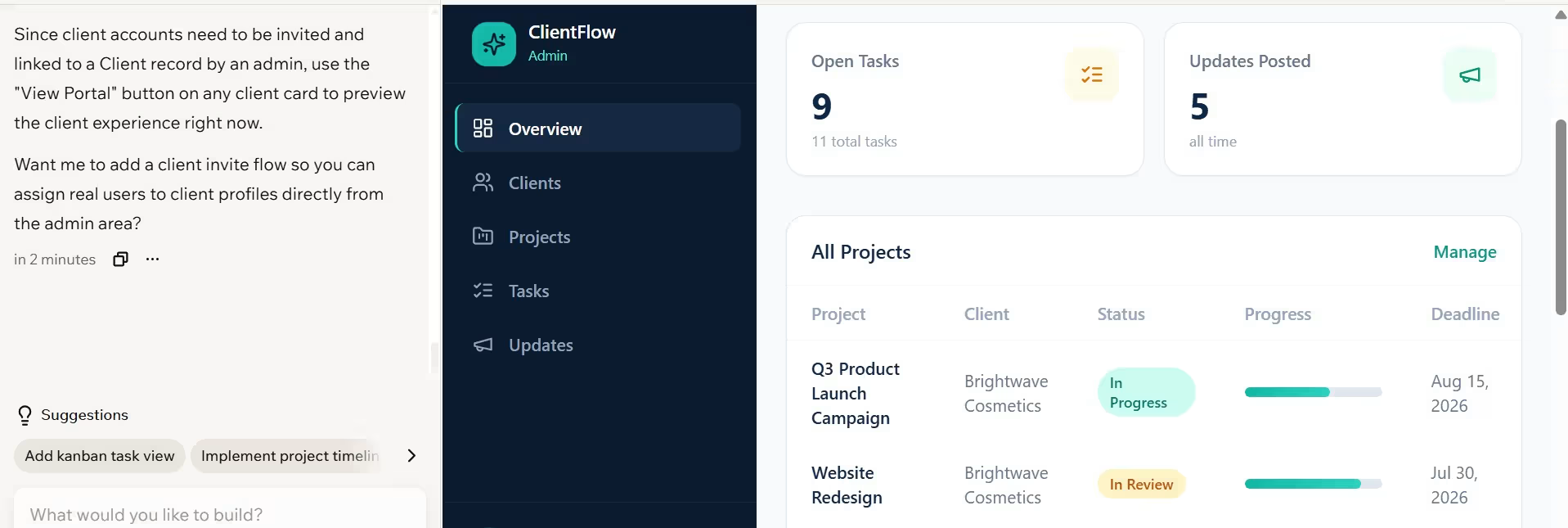
For my ClientFlow build, Base44 created a dashboard with nine open tasks and five posted updates using my brief.
It took about 30 minutes to finish, which was slower than the other tools I tried. Once it appeared, I reviewed the extra fields and workflows to make sure they matched what I had asked for, and they did.
Key Features
- Included application services: Database, authentication, payments, hosting, and analytics reduce setup work.
- Plain-language building: Describe the product and continue refining it through prompts.
- Integrations: Connect the application to common work and data tools.
- GitHub synchronization: Builder and higher plans give you an exit route into a normal repository.
- Unlimited applications on paid plans: You can spread the plan across experiments or related products, subject to the credit allowance.
Pros and Cons
Pros
- Includes most common SaaS building blocks.
- Starts at a competitive paid price.
- Offers two-way GitHub synchronization on eligible plans.
- Supports in-app code edits and backend functions on paid tiers.
- Works well for common portals, dashboards, and workflow products.
Cons
- Requires tracking message credits and integration credits.
- Generated work can expand beyond the requested scope.
- Larger builds may need repeated correction prompts.
- Third-party services such as Stripe or email providers can add separate charges.
What Reviewers Say
In its Base44 no-code review, TechRadar reported that the crypto-calculator build needed three attempts, with one attempt stalled for three hours. The finished application added nine currencies beyond the three requested. The reviewer still praised Base44’s interface, mobile support, and documentation.
Pricing
Free: $0/month. Starter: $20/month ($16/month billed annually); Builder: $50/month ($40/month billed annually).
Pro: $100/month ($80/month billed annually); Elite: $200/month ($160/month billed annually); Enterprise: custom.
Bottom Line
Bundled services and a low entry price make Base44 a practical first platform, with every generated field and workflow reviewed against the original brief.
5. Adalo: Best for Straightforward Native Mobile SaaS
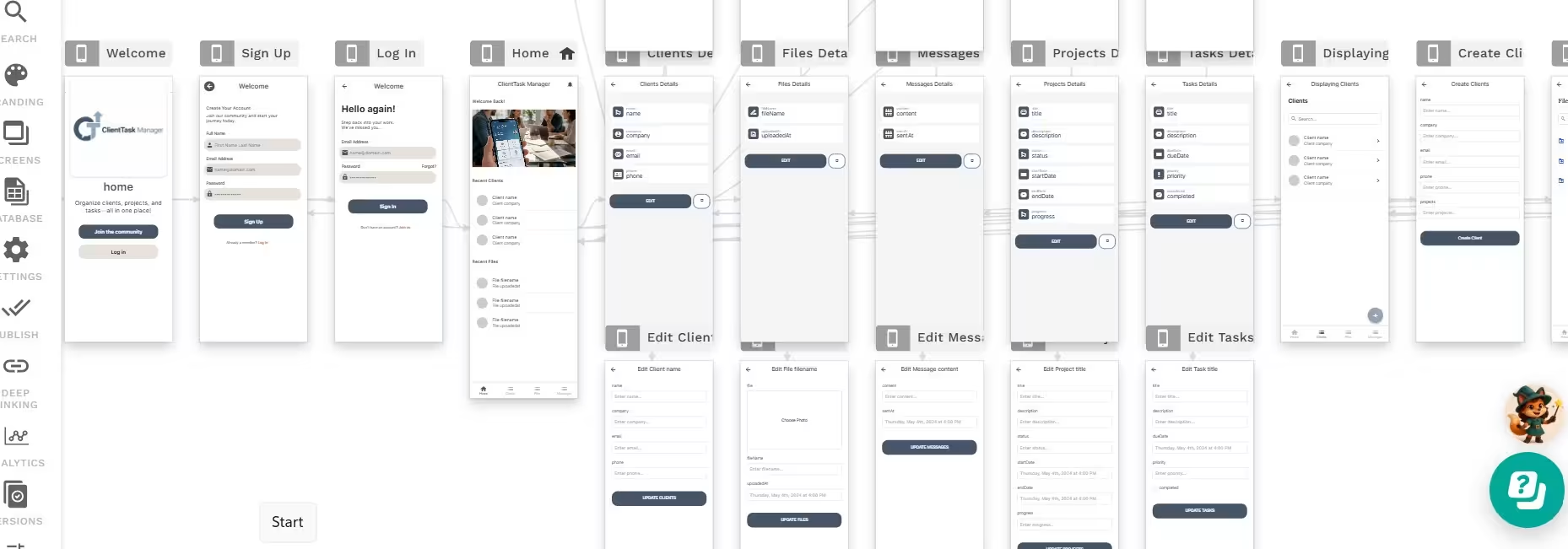
What It Does: Adalo lets you build one database-driven product and publish it as a responsive web app plus native iOS and Android applications.
Best For: Founders whose SaaS product depends on app-store distribution, push notifications, location features, or regular phone use.
Adalo puts mobile use at the center of the product. Its visual canvas, hosted database, account tools, and cross-platform setup let you manage one project for the web, iOS, and Android.
Adalo’s pricing model is another advantage. It doesn’t charge per workflow action, AI token, or application user on its public plans. That gives you a more predictable platform bill than a credit or workload model, although Apple and Google developer fees still apply when you publish to their stores.
Adalo works best when the product follows familiar mobile patterns: memberships, directories, delivery tools, bookings, marketplaces, and customer communities. It becomes a weaker choice when the product depends on unusual background processing, advanced native device features, very large datasets, or extensive custom code.
Code portability is also limited. A 2026 G2 reviewer praised the ease of building and shipping MVPs but identified the lack of source-code export as the main drawback. Another review warned about performance and scaling once the application reached a larger user base.
Key Features
- Native mobile publishing: Submit applications to Apple’s App Store and Google Play.
- One cross-platform project: Maintain web, iOS, and Android versions from one visual build.
- Built-in hosted database: Store application records without paying for a mandatory outside database.
- Unlimited application actions: Public paid plans don’t meter every click or workflow.
- Mobile features: Higher plans add push notifications, geolocation, analytics, and outside integrations.
Pros and Cons
Pros
- Publishes real native iOS and Android applications.
- Uses flat pricing without token or action charges.
- Includes a hosted database.
- Gives you a clear visual map of application screens.
- Lets you build and test unlimited applications on the Free plan.
Cons
- Doesn’t offer a standard source-code export path.
- Complex or data-heavy products can reach the platform’s ceiling.
- App-store publishing still requires Apple and Google developer accounts.
- Advanced mobile behavior may need a more technical platform.
What Reviewers Say
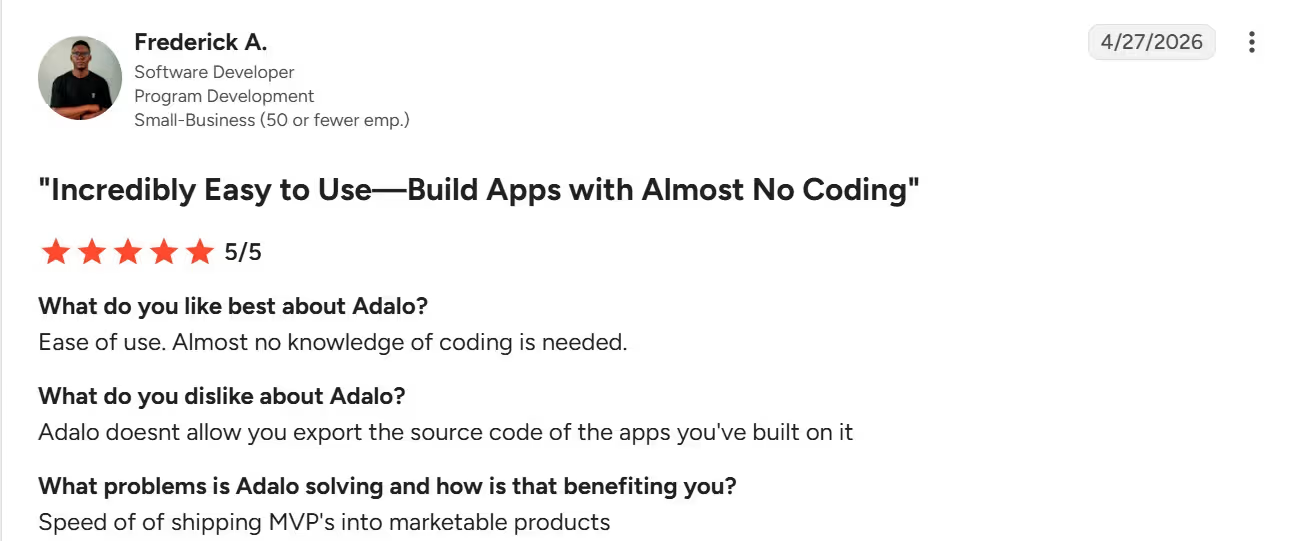
In the April 27, 2026, G2 review, “Incredibly Easy to Use—Build Apps with Almost No Coding,” software developer Frederick A. praised Adalo’s ease of use and the speed of moving MVPs toward marketable products. His main complaint was the lack of source-code export.
Pricing
Free: $0/month. Starter: $45/month ($36/month billed annually); Professional: $65/month ($52/month billed annually).
Team: $200/month ($160/month billed annually); Adalo Blue Enterprise: custom. App-store publication also requires an Apple Developer account at $99 per year and a Google Play account with a $25 one-time fee.
Bottom Line
App-store distribution is Adalo’s lane, especially for straightforward mobile products that do not require source-code export.
6. Softr: Best for Client Portals and Data-Backed SaaS
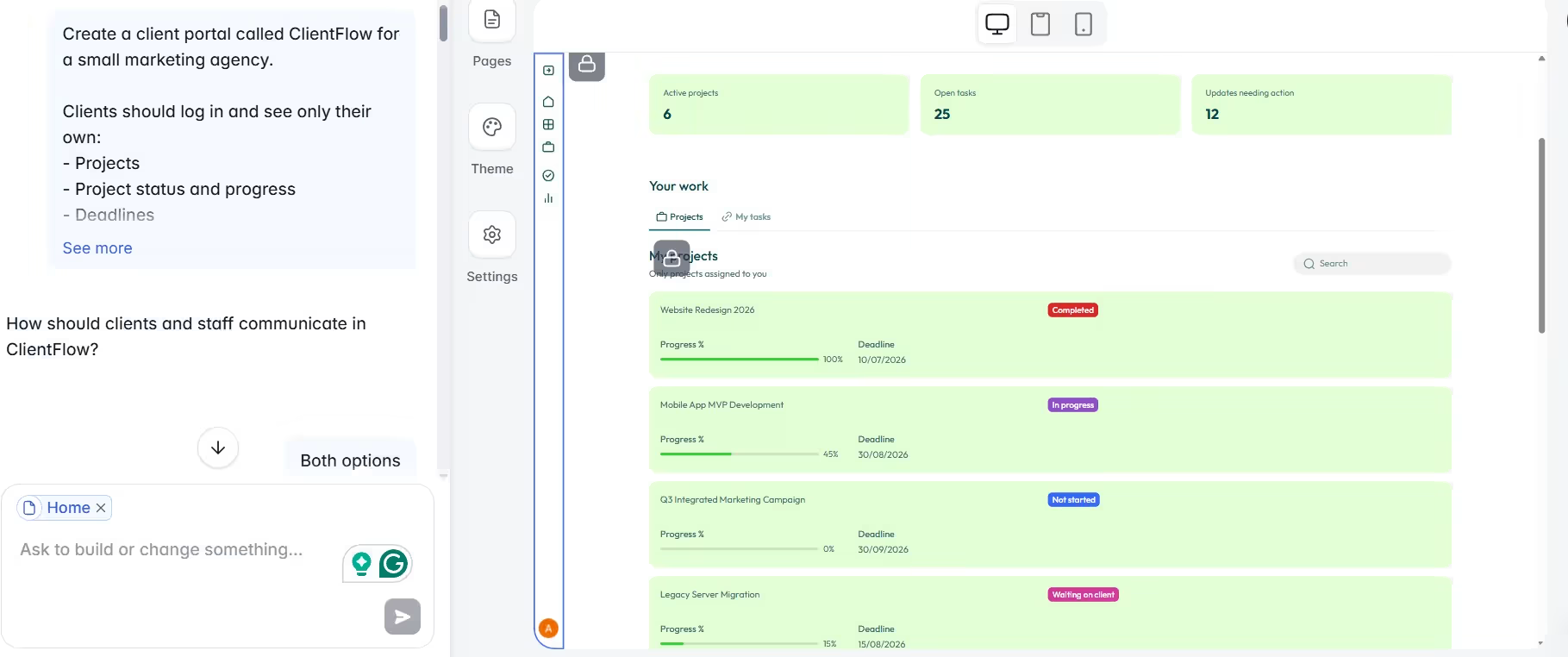
What It Does: Softr turns structured business data into portals, directories, dashboards, internal tools, and membership applications.
Best For: Founders who already have product data in Airtable, Google Sheets, Notion, SmartSuite, Supabase, or an SQL database.
Softr works best when the product is mainly about showing each user the right records. That makes it a natural fit for client portals, supplier directories, paid resource libraries, member dashboards, and reporting tools built around logins, filters, forms, and permissions.
The platform includes its own database and connects to outside sources. The Free plan supports 5 app users and up to 3 builders, but it does not include a custom domain, which starts at Basic.
Those user caps are Softr's main weakness as a SaaS platform. Basic includes 5 team users and 5 client users with no option to add more, so a customer-facing product outgrows it almost immediately. Pro is the first tier built for outside customers, with 50 client users included and headroom to 250 through paid add-ons. Business raises that to 100 included client users and a ceiling of 500. Past a plan's maximum, new users can still be created but stay deactivated until you upgrade.
Softr gives you less design and workflow freedom than Bubble. That constraint is useful when you want to ship a standard portal quickly. It becomes frustrating when a unique interface or complicated product behavior is the reason customers will pay you.
Key Features
- Portal-ready blocks: Build lists, forms, profiles, charts, dashboards, and directories from prepared components.
- User permissions: Control which records and pages each customer or role can see.
- Multiple data sources: Connect common spreadsheet, no-code database, and SQL tools.
- Built-in workflows and forms: Handle common updates, submissions, and notifications.
- Unlimited applications and collaborators: Public plans focus their limits on users, records, actions, and advanced features.
Pros and Cons
Pros
- Excellent for client and membership portals.
- Connects quickly to existing business data.
- Includes authentication, permissions, forms, and workflows.
- The Free plan supports a custom domain and unlimited applications.
- Easier to learn than a general-purpose application builder.
Cons
- Entry plans have low app-user limits.
- Complex product logic can exceed the block-based model.
- Deep design customization is more limited than Bubble.
- Costs rise sharply when you need Professional or Business limits.
What Reviewers Say
G2 rates Softr 4.7 out of 5 from 685 reviews at the time of this writing.
Its review summary highlights ease of use and Airtable integration, while limited customization is the most consistent drawback. One April 2026 reviewer reported building a customer portal with permissions and custom workflows in a couple of days, but still wanted a better connection for customer reporting dashboards.
Pricing
Free: $0/month. Basic: $25/month ($19/month billed annually); Pro: $119/month ($99/month billed annually).
Business: $395/month ($329/month billed annually); Enterprise: custom. Softr’s annual option charges for 10 months and includes two months free.
Bottom Line
Softr is the fastest way to stand up a portal or directory on data you already keep in Airtable, Sheets, or SQL.
Which No-Code SaaS Tool Should You Choose?
Choose Emergent if you:
- Want to describe the product instead of learning a visual programming system.
- Need more help across the build, troubleshooting, integrations, and launch.
- Want a GitHub route for later developer review.
Choose Bubble if you:
- Need complex web workflows and database rules.
- Want detailed visual control.
- Can invest time in learning the platform.
Choose Lovable if you:
- Need a polished web MVP for customer validation.
- Want to work from prompts, documents, or screenshots.
- Expect a developer to continue through GitHub later.
Choose Base44 if you:
- Want the database, accounts, payments, hosting, and common integrations included.
- Prefer a low starter price.
- Can closely review the generated scope.
Choose Adalo if you:
- Need native iOS and Android distribution.
- Prefer a predictable platform bill.
- Have a straightforward mobile product.
Choose Softr if you:
- Already store the product’s data in a supported system.
- Need a portal, directory, or membership dashboard.
- Can work within a block-based interface.
No-code and vibe coding now overlap, but they give you different levels of control, portability, and responsibility. Traditional visual tools keep you inside tighter platform rules. Prompt-led systems generate more of the application for you, which increases speed but makes testing and code review more important.
When You Should Bring in a Developer
Bring in an experienced developer or security specialist before launch when your SaaS includes:
- Payments, subscriptions, refunds, or invoices
- Health, financial, legal, child-related, or other sensitive information
- Complicated account roles or permissions
- Actions that send messages, spend money, or alter outside records
- High traffic, strict uptime requirements, or unusual performance demands
- A production database that can’t tolerate lost or duplicated records
- Native features your selected platform doesn’t support
- Regulatory or contractual security requirements
Generated software is real software, but it still needs testing before it touches payments, customer data, or regulated workflows. Give it the same review you would give any launch.
A 2026 benchmark study, SWE-WebDevBench, evaluated six AI application-building platforms and found recurring problems with specification handling, connections between interfaces and backend logic, production readiness, and security.
The study’s sample was limited, and the authors said larger-scale replication was needed. Still, its findings support a simple rule: never assume an attractive first version is ready for customer data or payments.
Final Verdict
Emergent's saas builder is the best overall pick in this roundup for non-technical founders who want more of the complete build handled through conversation.
Unlike the pure no-code tools here, it also hands you real, exportable code the day you outgrow the guardrails. It covers web and mobile application building, managed hosting, integrations, troubleshooting, and a GitHub path on eligible plans.
Bubble is the strongest choice for detailed visual control. Lovable wins for polished web MVPs. Base44 gives you a useful all-in-one bundle at a lower starting price. Adalo is the clearest native mobile option, while Softr is the fastest route to a customer portal built around existing data.
Your tool won’t create the business model for you. Start with one painful problem, one clear customer, and the smallest paid workflow that proves people care. Then choose the platform that handles that workflow without forcing you to rebuild it immediately after launch.
If you’re turning a software idea into a business, How to Start a SaaS Business in 2026: Founder’s Guide walks through the key steps from validating the idea to launching and growing it.

Most AI app builders stop at prototypes. Emergent creates production-ready apps you can actually launch.
- Production-ready apps
- Web & mobile apps
- Deploy in minutes







