



TL;DR
- Noloco: My pick for client portals and structured business tools where dashboards, user roles, and controlled data access are central to the app.
- Glide: A strong choice for spreadsheet-led business apps and phone-friendly workflows. Glide now has two separate products, Glide Classic and the newer AI-first GlideOS.
A property management portal has to show each tenant the right records from the day it goes live.
I tested Noloco vs Glide with the same maintenance portal brief, then checked the records, dashboard, mobile form, and tenant access myself. Noloco produced a usable app with one serious permission issue. Glide Classic never reached a usable screen in my session.
This comparison keeps Glide’s two products separate so you know which findings came from my test and which come from current product research.
By the end, you’ll know which option fits a client portal, internal app, phone-led workflow, or more custom build.
Noloco vs Glide: What’s the Difference?
The core difference is how you start and control the app. Noloco centers the build on records, roles, and client access. Glide Classic starts from structured data and turns it into a responsive business app. GlideOS starts from a prompt, spreadsheet, or file and lets AI lead more of the build.
The practical split:
- Pick Noloco when: You need a client portal, operations hub, or dashboard where different people should see different records.
- Pick Glide Classic when: Your app starts from structured business data and your team will use it heavily on phones.
- Pick GlideOS when: You want Glide’s newer prompt-first build flow, current integrations, and AI-led workflows.
Why GlideOS Changes This Comparison in 2026
GlideOS opened public access in July 2026, with its official launch event held on August 3. Glide then changed its GlideOS plans on September 1. The current lineup is Free, Basic, Plus, Pro, and Enterprise.
A current Glide buying decision can therefore lead you to two different products, depending on how you want to build.
Noloco changed its pricing in August 2026. Its current plans are Free, Build, and Enterprise. The same update introduced Canvas, which lets Nola create custom pages and components inside an existing Noloco app.
That timing is easy to miss. Several comparisons published earlier in 2026 use plan names and prices that have since changed. The prices below are current as of September 2026.
How I Tested Noloco vs Glide
I used one business scenario for both tools. I built a maintenance request portal for a small property management company.
The portal needed two user types, six sample requests, four statuses, three dashboard counts, five recent requests, and a phone-friendly request form. Each tenant had to see only the requests linked to them.
I started from a fresh app in both tools. I skipped Airtable and spreadsheet imports so each builder had to create the starting structure itself. I judged the generated result before doing any manual rescue.
Here’s the exact prompt I used:
Build a maintenance request portal for a small property management company.
There are two user types: Manager and Tenant. Managers should be able to see and edit every maintenance request. Tenants should only be able to see and update requests belonging to them.
Each maintenance request should include: title, tenant, unit, category, priority, status, created date, due date, and an optional photo.
Use these statuses: New, Scheduled, In Progress, and Resolved.
Create a dashboard showing:
Total open requests Urgent requests Overdue open requests The 5 most recent requests
Add a simple mobile-friendly form for submitting a new request.
Seed exactly 2 tenants and 6 realistic maintenance requests: 2 New, 1 Scheduled, 1 In Progress, and 2 Resolved. Exactly 1 unresolved request should be overdue.
Make the app usable on both desktop and phone. Do not add extra sample records.
I planned to check four outcomes in each build: record counts, dashboard totals, form behavior, and tenant access. Noloco reached all four. Glide Classic never produced a screen I could test against those checks, which became a finding in itself.
Noloco asked me two clarification questions before it built. Glide asked me seven follow-up questions in the full run, including six rounds of dashboard recovery choices.
The full Noloco run took me about 20 minutes and used roughly five free credits. Glide ran for about 25 minutes before I stopped it. That Glide figure includes retries and didn’t end in a completed build, so I don’t treat the two times as a speed comparison.
Noloco vs Glide at a Glance
The quick comparison:
| Feature | Noloco | Glide |
|---|---|---|
| Best for | Client portals | Classic: data-first apps; GlideOS: AI-led internal apps |
| Free plan | $0/month | $0/month; GlideOS Free publishes 0 apps |
| Starter paid | $79/month($65/month billed annually; 10 team seats included) | $25/month(GlideOS Basic) |
| Mobile format | PWA | Classic: PWA; GlideOS: responsive app |
| Permission style | Record + field rules | Classic: Roles + Row Owners; GlideOS Pro: org-level roles |
| My test result | Usable portal | No usable screen (Classic) |
GlideOS Free currently has zero published apps, while Basic has two.
Meet Noloco: What Happened in My Test
Noloco started with two questions that were easy to answer. Nola asked whether the unit should be a simple text field or its own Units table. I chose text because that matched the brief.
It then asked which repair categories I wanted. I accepted Plumbing, Electrical, HVAC, Appliance, and General.
After that, Nola worked through a nine-step plan. It created the maintenance request table, roles, permission rules, board view, form, workflow, dashboard, two tenant records, and six requests. The plan ended at 9 of 9 complete.
The first publish attempt paused with an error. I used Noloco’s own “Fix with Nola” action. After a reload, the editor preview showed a missing-page message. Full View opened the app correctly.
The dashboard was the strongest part of the build. It showed 4 open requests and 1 overdue open request, both matching the six seeded records exactly. It also counted 2 urgent requests, which the brief left to Noloco’s judgment.
Before I submitted my test request, the board also had the requested split: 2 New, 1 Scheduled, 1 In Progress, and 2 Resolved.

It also displayed the five most recent requests with the tenant, unit, status, priority, and due date.
I tested the phone form next. It included the requested title, category, priority, unit, and photo fields.
I submitted a leaking kitchen faucet request. The request board moved from six records to seven, so the form was writing real data.
The phone layout needed a quick visual fix. The top branding overlapped at the narrow width I tested. The form itself still worked, and I could complete every visible field without awkward side-scrolling.
Jamie Lee and Corey Simmons were linked to maintenance requests in the admin view. When I switched into Jamie’s tenant view, every dashboard count showed 0 and no requests appeared. Corey’s view did the same.

Noloco has record-level permission rules for controlling which rows people can access. It also has field-level controls for read and edit access. Its own permission guide recommends using “View as User” after you configure a role, which is exactly where I found the issue.
The same guide calls out the user’s role and the relationship between that user and the record as core parts of the access model.
My read after this build is simple: Nola got me close to a useful portal fast. I’d put role testing near the top of the launch checklist before inviting real clients.
For this specific prompt, Noloco handled the data and interface far better than Glide Classic did.
Noloco Pricing
Noloco has three current plans. Free is $0/month. Build costs $79/month ($65/month billed annually), and Enterprise uses custom pricing.
Build includes 250 AI credits per month, 10 team seats, 1,000 active clients, and 25,000 records. Extra team seats cost $6/month ($5/month billed annually), and each extra 25,000 records costs $25. For more than 1,000 client seats, Noloco requires a custom quote. The Noloco pricing guide covers how costs scale as records, seats, and clients grow.
Read More: Noloco vs Softr vs Emergent: I Built the Same App in All Three
Meet Glide: What Happened in My Test
Glide gave me a very different session. My hands-on test used Glide Classic, the established visual builder.
The first question was straightforward. Glide asked whether I wanted sample data or my own data. I chose sample data because that followed the brief.
The trouble started when Glide tried to create the dashboard. It offered a simpler list or a separate metrics table. I chose the metrics route so the AI could keep trying to build what I asked for.
That was the first of six dashboard recovery choices.
Each attempt led to another choice about how it should work around the screen problem.
The final recommendation was to build the dashboard manually from the Layout tab. I stopped the automated run there because I wanted to judge what Glide could produce from the original brief.
When I opened the app preview, I saw User Profile and a blank state that read “No screens yet.”

I wanted to rule out an overloaded prompt, so I ran a smaller diagnostic in a fresh Glide app.
This time, I asked for one Maintenance Requests table, six simple fields, exactly three sample requests, one list screen, and one form.
Glide created and renamed tables, tried several screen actions, then reported another screen-creation issue.
That result applies to this test session. Glide Classic has hundreds of positive current reviews, so I wouldn’t stretch one failed session into a claim about every Glide build.
Across both runs, Glide Classic’s AI screen generation never produced a usable screen.
GlideOS is a separate AI-first platform built around app creation from prompts, spreadsheets, and files. It now connects to more than 1,000 services, and its current plans are separate from Glide Classic.
If prompt-first building is the reason you’re choosing Glide in September 2026, GlideOS is the Glide product I’d evaluate next.
Glide Pricing
GlideOS has five current plans. Free is $0/month. Basic starts at $25/month, Plus starts at $50/month, Pro starts at $125/month, and Enterprise uses custom pricing. Glide Classic has a separate lineup.
Free is $0/month. Explorer costs $25/month ($19/month billed annually), Maker costs $60/month ($49/month billed annually), Business costs $249/month ($199/month billed annually), and Enterprise uses custom pricing.
If you’re comparing Classic plans, the Glide pricing guide goes deeper into update allowances and the costs that can sit above the plan price.
Read More: Glide Pricing 2026: Plans, Costs, & Update Overages
Noloco vs Glide: Feature-by-Feature Comparison
Client Portals and Permissions
Noloco gives you record-level rules for deciding which rows a person can access. Field-level rules control what that person can read or edit inside each record.
That structure fits client portals well. A property manager can have access to every request while each tenant gets a smaller slice of the same data.
My test showed why you should run the role check yourself before launch.
Glide Classic uses Roles and Row Owners for secure access. Row Owners control which rows reach a signed-in person. Roles can also work with Row Owners when different groups need different access.
GlideOS includes organization-level roles and permissions on Pro, which starts at $125/month.
Winner: Noloco for client portals with several access levels.
Data, Dashboards, and Forms
Noloco got the core data work right in my build. It created exactly two tenants and six starting requests. The dashboard totals matched those records, and the form created a real seventh request.
That gave me something useful to check straight away. I could compare the dashboard against the rows instead of trusting the labels.
If dashboards are a big part of your project, this dashboard builder comparison gives you a wider shortlist beyond these two tools.
If you'd rather build the dashboard yourself, an AI dashboard builder can generate one from a plain-language description.
Glide Classic has years of use as a data-first builder. Current Classic plans support Glide Tables, with outside data sources opening up as you move through the tiers.
GlideOS now lets you start from a spreadsheet, prompt, or file. If your business already runs a process in Sheets, that route is worth testing directly.
Winner: Noloco for the dashboard-led portal I built.
Mobile Use
A Progressive Web App (PWA) is a web app you can install from a browser so it opens more like an app on your phone.
Noloco supports PWAs across its plans. My generated request form worked at phone width and created a real record. The overlapping header told me I’d still give the mobile layout a visual pass before sharing it.
Glide Classic also uses PWA technology. Current Glide reviews still praise its phone experience.
GlideOS builds apps for different screen sizes as part of its newer AI-first product.
Winner: Glide Classic for phone-heavy internal work.
If you’d rather build an installable app yourself, a progressive web app builder can generate one from a plain-language description.
Workflows and Integrations
Noloco keeps workflow actions close to your app data. Its current Build plan can connect to sources such as Airtable, Google Sheets, Xano, SmartSuite, Postgres, Supabase, HubSpot, and MySQL.
That suits work like assigning a request, changing a status, or sending a notice after a form submission.
GlideOS has the broader current connection library. It now connects to more than 1,000 services. Workflows can use those connections as triggers or actions.
Winner: GlideOS for connection breadth, based on Glide’s published integration count rather than my hands-on build.
Building Style
Noloco gives you a guided AI start through Nola, then leaves the visual builder available for edits. Canvas adds another route when a standard page or dashboard layout feels too fixed.
That combination worked well in my test because I could inspect the finished structure after Nola built it.
Glide splits the experience across two products. Glide Classic gives you the established visual builder. GlideOS moves the build into an AI-first workspace where prompts, data, apps, and workflows live together.
Winner: Noloco if you want AI help with a visual editor close at hand. GlideOS is the Glide path to test if you want AI to lead the build.
What This Costs as You Grow
Client count changes the bill very differently in Noloco and Glide Classic. Noloco Build includes up to 1,000 active clients at the base plan price. Glide Classic Business includes 30 users, then charges $6 per additional user on monthly billing or $5 per additional user when billed annually.
For a paid client portal using business-email accounts:
| Client users | Noloco Build | Glide Classic Business |
|---|---|---|
| 10 | $79/month($65/month billed annually) | $249/month($199/month billed annually) |
| 100 | $79/month($65/month billed annually) | $669/month($549/month billed annually) |
| 500 | $79/month($65/month billed annually) | $3,069/month($2,549/month billed annually) |
Glide Classic prices differently when your app uses only personal-email users. Explorer includes 100 personal users, while Maker allows unlimited personal users. GlideOS doesn’t publish per-client-user overage pricing on its current pricing page, so I wouldn’t invent a 10-, 100-, or 500-client estimate for it.
What Real Users Are Saying
Noloco has a 4.8 out of 5 G2 rating from 36 reviews as of September 2026. Reviewers commonly praise ease of use, quick setup, support, and role-based business apps. G2’s review summary also flags missing features, limited customization, price, and the learning curve.

In May, G2 reviewer Robb D. specifically praised role-based management and customer access. That gives useful context next to my own result, where the generated tenant access needed more work.
Glide has a much larger review base. G2 shows more than 840 reviews across its two profiles, most of them for Glide Classic. The combined seller rating is 4.7 out of 5.
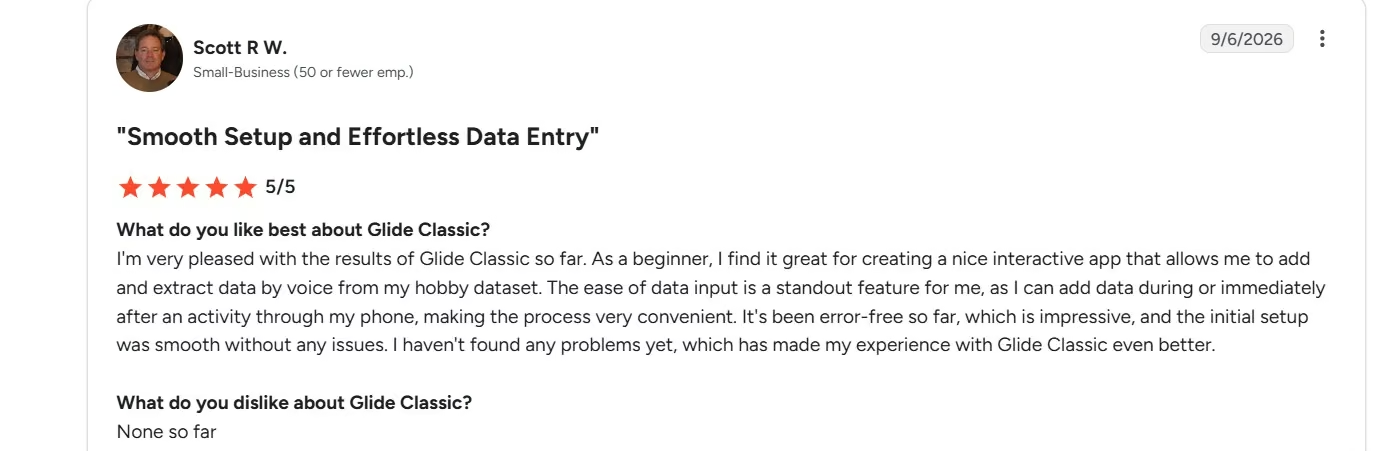
Recent Glide Classic reviews praise phone-based data entry. In September, Scott R W. praised smooth setup and easy data entry, and described adding data during or right after an activity from his phone.

There are tradeoffs in the reviews too. Glide Classic reviewer Christian B. said the fixed app structure can limit design choices.
I also read the Reddit discussion “Most professional front end builder?” One commenter who had used Glide, Noloco, Bubble, FlutterFlow, and Softr described Glide as a good fit for quick internal apps and Noloco as appealing for its AI builder.

The thread predates GlideOS, so I use it as background on how people have compared the two builders over time.
How to Make Your Choice
I’d choose based on the person who will open the app every day.
Noloco Fits Best When:
- You’re building a client portal: Clients, tenants, vendors, or partners need separate access to their own records.
- Your app depends on linked records: Properties have requests, clients have projects, or cases have documents.
- You need a dashboard for staff: Your team spends real time in tables, records, filters, and status views.
- You want AI help plus a visual editor: Nola can create the first version, and you can inspect or change the structure afterward.
- You expect lots of external clients: Build includes 1,000 active clients. Above that, Noloco moves you to custom pricing.
Glide Fits Best When:
- Your team works from phones: Field updates, inspections, stock checks, and quick status changes are natural use cases.
- Your process already lives in a spreadsheet: Glide Classic and GlideOS both have data-first paths, with different build styles.
- You want the current Glide AI experience: GlideOS is the product to evaluate for prompt-first building in 2026.
- You need a wide connection library: GlideOS now supports more than 1,000 services.
- You already run Glide Classic apps: Glide says Classic and GlideOS are separate, co-existing platforms.
Also read: best Glide alternatives, for what else handles phone-heavy internal tools.
Emergent: A Third Option I’d Look At
Emergent is the third option I’d look at when your portal starts turning into custom software.
Its AI app builder lets you describe the screens, data, user flows, and logic in plain language, then build and publish from the same project.
A client portal is a good example. A renovation contractor with no in-house development team used Emergent to build Homestead with separate contractor and homeowner views, a five-stage job timeline, and shared documents.
The published client portal case study reports about six hours per week saved on document handling across 50 active jobs.
If writing the first prompt is what slows you down, Emmy can help before the main build starts.
Emmy is a free chat assistant built into Emergent. It asks follow-up questions and turns a rough idea into a build-ready prompt, which is the same work I did by hand to write the maintenance portal brief above.
I’d look at Emergent when you need more custom control over the app’s screens and logic than a structured portal builder gives you. I’d still test accounts, permissions, payments, and any business-critical action before launch.
My Verdict on Noloco vs Glide
Noloco wins my hands-on Noloco vs Glide test.
The same full maintenance brief produced a real Noloco portal with six seeded requests, correct dashboard counts, and a working phone form.
The tenant test was the warning sign. Both tenant views showed zero requests even though the admin view linked records to them. That pushes role testing to the top of my checklist for any client-facing Noloco app.
Glide Classic never reached a usable screen in my session. The stripped-down retry failed at screen creation too.
If you’re choosing Glide for AI-first building today, GlideOS is the current product I’d test next.
My picks are straightforward:
- Client portal with several user roles: Noloco.
- Operations dashboard tied to client records: Noloco.
- Phone-heavy internal tool: Glide.
- Prompt-first Glide build: GlideOS.
- App that needs more custom logic and screens: Emergent.

Most AI app builders stop at prototypes. Emergent creates production-ready apps you can actually launch.
- Production-ready apps
- Web & mobile apps
- Deploy in minutes







