




TL;DR
- Claude for Small Business is my top overall pick for owners who want help across finance, customer follow-up, sales, and weekly admin.
- Lindy makes the most sense when your inbox, meetings, scheduling, and follow-up are eating the workday.
- AI by Zapier is the strongest pick when one process has to move through several business apps.
- Tidio Lyro is my customer support pick because it stays focused on answering questions, taking supported actions, and handing conversations to people.
- Relevance AI gives you more control when you want to build several specialized agents around your own business process.
Small-business work has a habit of arriving in threes. A late invoice needs chasing, a customer wants an answer, and tomorrow’s meeting still needs prep.
A useful AI agent for small business should take one of those jobs further than “here’s a draft” and get it closer to “this is ready for your approval.” The trick is finding one that saves time without quietly creating a second job called “watch the AI.”
To see how these tools handled real small-business work, I used the same fictional company, Northstar Home Services, across my hands-on attempts. I completed the full task in Claude and Relevance AI, and I also worked through setup in Lindy, AI by Zapier, and Tidio. Where a test stopped before I could reach the final output, I kept my firsthand comments to what I actually experienced and used official documentation and individual user reviews for the rest.
The part I watched most closely was control. An agent saving you ten minutes is useful. An agent sending the wrong thing to a customer is another story. Later in this guide, I use a simple handoff framework to show which jobs I’d let run, which I’d review first, and which I’d still keep human-owned.
Where an AI Agent Helps a Small Business Most
An AI agent can work toward a goal, use connected tools, and carry a task through several steps. In a small business, that could mean finding overdue invoices, preparing reminders, showing them to you for approval, and updating a record after you decide what happens next.
That is a bigger job than asking a chatbot to write one email. A single-purpose AI tool for small business can still be useful, but an agent earns its place when the work has a clear starting point, several actions, and a result you can check.
I wouldn't choose an agent because its feature page is the longest. Nobody running a small company needs another impressive-looking dashboard that creates more work. Start with the repetitive job you would happily stop doing tomorrow, then choose the agent closest to that job.
A consultant might start with meeting prep and client follow-up.
A service business could begin with appointments and lead handling. A growing online store may get much more value from customer-support automation than from a general operations agent.
How I Tested and Compared These AI Agents
I used Northstar Home Services, a fictional four-person maintenance company, as the test business and gave each tool a task that matched what it is built to do. I recorded setup friction, what the tool produced, where I had to step in, and whether I could keep customer-facing actions behind approval.
These were short practical tests, not weeks-long benchmarks. I completed the full workflow in Claude and Relevance AI. My Lindy, Zapier, and Tidio attempts stopped earlier in setup, so I do not claim to have tested output I never reached. I paired those observations with current official documentation, August 2026 pricing, and individual user reviews.
I compared each tool across five areas:
- Useful action: How far can the agent carry a real job before the work lands back on you?
- Setup load: How much configuration stands between signing up and getting useful work done?
- Business connections: Can it work with the email, calendar, customer, finance, and operations tools that already hold your information?
- Approval control: Can customer-facing, money-related, or record-changing actions stop for your review?
- Cost clarity: Is it easy to understand the subscription plus the usage units that can raise the bill?
I also looked beyond general-purpose assistants. The wider category of AI agents for business now covers support agents, cross-app automation, multi-agent workforces, and custom business software.
That is why the five tools below shouldn't be judged as if they are trying to do the same job.
Quick Comparison at a Glance
Quick comparison:
| Tool | Best For | Free Plan | Starter Paid Plan | Main Limitation |
|---|---|---|---|---|
| Claude for Small Business | Cross-functional owner work | Free tier, but not the Small Business plugin | $20/month($17/month billed annually) | Runs through Cowork desktop |
| Lindy | Inbox, meetings, follow-up | No permanent free plan; 7-day Slack trial | $29.99/month | Credit-based usage |
| AI by Zapier | Cross-app workflows | Free tier; AI by Zapier can be previewed but requires a paid plan to publish | $29.99/month($19.99/month billed annually) | Setup can get technical |
| Tidio AI Lyro | Customer support | Free plan + 50 one-time Lyro conversations | $39/month($32.50/month billed annually) | Conversation-based usage |
| Relevance AI | Custom agent teams | Yes | $29/month($19/month billed annually) | More setup decisions |
These prices reflect the vendors’ current public pricing as of August 2026. Lindy still uses a credit-based model, while AI by Zapier requires Professional, Team, or Enterprise for published AI workflows with agentic tool use.
1. Claude for Small Business for Cross-Functional Owner Work
Claude for Small Business gets my top spot because it starts with jobs a business owner already recognizes. You can use it for work around payroll prep, overdue invoices, month-end close, customer follow-up, lead triage, campaigns, hiring, and weekly business briefs.
That makes the first few minutes easier to picture. You aren't staring at an empty agent builder wondering what to create.
You can connect tools such as QuickBooks, PayPal, HubSpot, Canva, DocuSign, Google Workspace, Microsoft 365, and Slack, then run the workflow through Claude Cowork.
The part I like most is the control over what happens next. Claude can work through several steps while still letting you approve actions, and the Small Business examples repeatedly bring the final customer or business decision back to you.
Its invoice follow-up workflow, for example, can help review overdue invoices and prepare reminders before you decide what gets sent.
That balance feels right for a small company. Saving ten minutes is useful. Sending the wrong payment reminder to a good customer is the sort of shortcut nobody asked for.
The limitation is access. Claude for Small Business runs through Cowork in the desktop app, so the experience is tied to that environment rather than acting as an always-running automation layer across every system.
What it does: Claude for Small Business handles multi-step business work using connected finance, customer, productivity, and communication tools.
Best for: Owners who handle several functions themselves and want one assistant covering more than a single department.
My Take
Test prompt: “Review these invoices, tell me which customer I should follow up with first and why, then draft a separate payment reminder for each one. Do not send anything without my approval.”
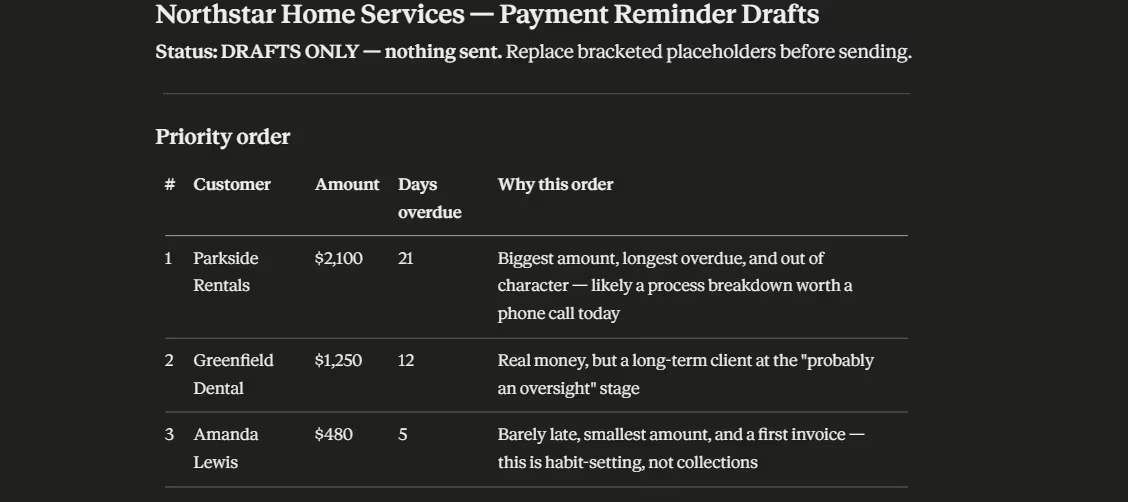
I gave Claude three overdue invoices from Northstar Home Services and asked it to decide who needed attention first, explain why, and draft a different reminder for each customer. Setup took me about three minutes.
What I liked was that Claude didn’t simply sort the invoices by dollar value and give me three versions of the same message.
It treated a normally reliable client who was 21 days late differently from a first-time customer who was only five days overdue, and the tone changed with the situation. It also respected my instruction to keep everything in draft form. I’d still review the final email before sending, but the first pass was thoughtful enough to save real time.
Key Features
- Ready-made business workflows: Start with recognizable jobs such as invoice follow-up, month-end work, campaigns, and weekly briefs instead of designing every process yourself.
- Connected business context: Pull information from the systems where your customer, payment, calendar, and business records already live.
- Owner approval: Keep a person involved when a workflow reaches an action you want to check before it goes through.
Pros and Cons
Pros:
- Broad business coverage: One setup can support several parts of an owner-led company.
- Good approval model: You can keep sensitive actions visible instead of handing over unlimited authority.
- Straightforward starting point: Existing workflows reduce the amount of agent design you have to do yourself.
Cons:
- Desktop dependency: The Small Business solution runs in Claude Cowork on desktop.
- Connections shape the value: Cross-business workflows are more useful when Claude can reach the systems holding the information it needs.
What Users Say
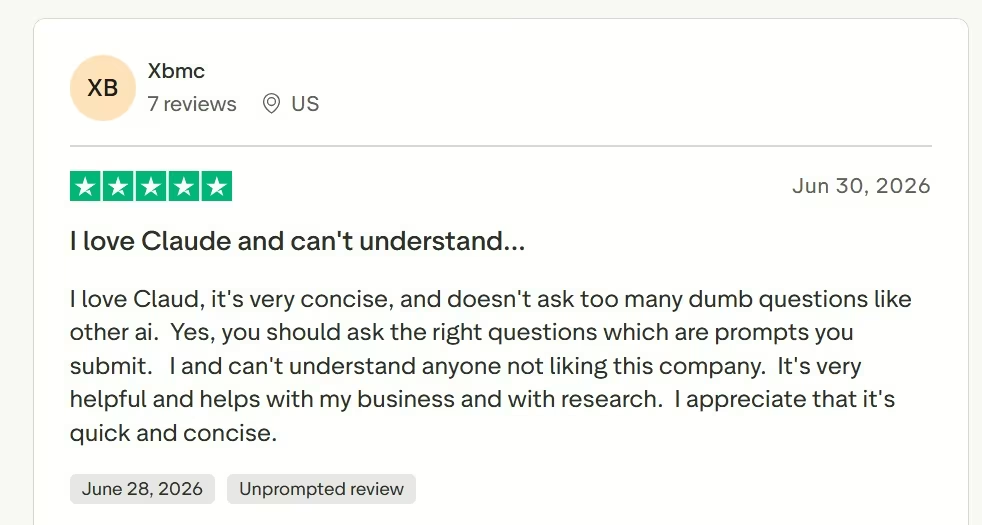
Xbmc gave Claude five stars in June 2026 and highlighted its concise responses plus its usefulness for business and research.
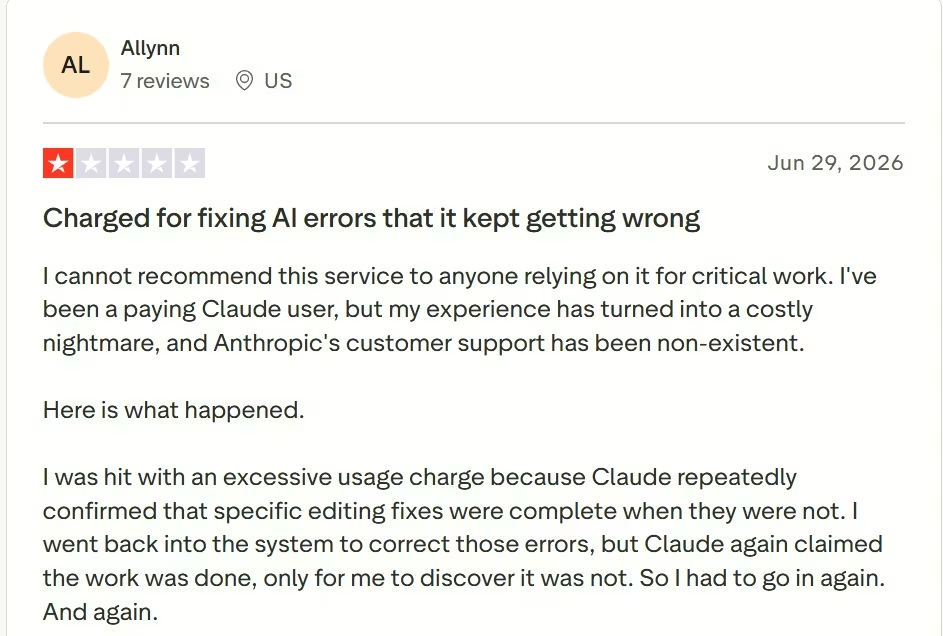
Allynn had a very different experience and described repeatedly checking editing work after Claude reported fixes as complete when they weren't.
That second review is the useful warning here. Claude's Small Business workflows are built around keeping you involved in decisions, and I would use that control rather than treating completed AI work as automatically checked.
Pricing
Free is $0/month. Pro is $20/month ($17/month billed annually). Max 5x is $100/month and Max 20x is $200/month; both Max tiers are billed monthly only.
Team Standard is $25/seat/month ($20/seat/month billed annually), and Team Premium is $125/seat/month ($100/seat/month billed annually). Enterprise starts at $20/seat/month plus usage at API rates and is billed annually.
Bottom Line
Claude for Small Business is where I would start if you are wearing several hats in the company. Its biggest advantage is that it can follow work across finance, customers, sales, and admin without asking you to design an agent system before you get anything useful back.
2. Lindy for Inbox, Meetings, and Follow-Up
Lindy is easier to understand if your inbox has quietly become your second office.
Its AI assistant is built around email, meetings, calendars, and follow-up. It can manage inbox work, prepare drafts, schedule and prepare for meetings, and record notes.
It also handles post-meeting tasks and works through connected services such as Gmail, Google Calendar, Slack, Notion, HubSpot, and Salesforce.
That focus is what puts it second for me. A small agency or consultant doesn't always need an elaborate collection of agents. Getting the pile of "reply to this, schedule that, send the notes, follow up tomorrow" work under control is already a useful win.
Lindy can prepare email drafts without immediately sending them, which gives you a practical checkpoint for client-facing communication. Its human-in-the-loop guidance also supports review around higher-impact actions.
The tradeoff is usage. Lindy is still credit-based, with Plus including 3,000 credits per user each month, Pro 15,000, and Max 35,000. Credits are spent when Lindy does work, so a heavy week uses more of the allowance than a quiet one, and unused plan credits do not roll over.
That is why I would buy Lindy around a narrow workload first. Give it the inbox and meetings before deciding it needs half the business.
What it does: Lindy takes recurring communication and coordination work off your plate.
Best for: Consultants, agencies, recruiters, founders, and small teams that spend too much time moving between email and meetings.
My Take
Test brief: Turn a set of client meeting notes into a follow-up email, an action list, and deadline reminders, without sending anything before approval.
Lindy took more setup work than Claude before I could reach the actual task.
I had to set up the workspace and work through its connected-tool flow, and I wasn’t able to complete the full meeting follow-up workflow during my test session because Lindy required card details to move further.
I can say firsthand that the starting setup was more involved than Claude’s, but I’m not using an unfinished run to judge Lindy’s output quality. The capability details below therefore come from Lindy’s current documentation and user feedback.
Key Features
- Inbox help: Triage messages and prepare replies so your day starts with decisions instead of an untouched inbox.
- Meeting follow-through: Keep preparation, scheduling, recording, notes, and follow-up in the same assistant.
- Connected work: Use information from the business applications that sit around those communication workflows.
Pros and Cons
Pros:
- Easy first use case: Inbox and meeting work gives you an obvious place to start.
- Less jumping between tools: Preparation and follow-up stay connected to the same assistant.
- Built for repeated work: Routine tasks can keep running without you rebuilding the process each time.
Cons:
- Usage still needs watching: Higher workloads push you toward higher plans.
- Complex jobs take more configuration: The experience becomes less plug-and-play once you move far beyond its core assistant workflows.
What Users Say
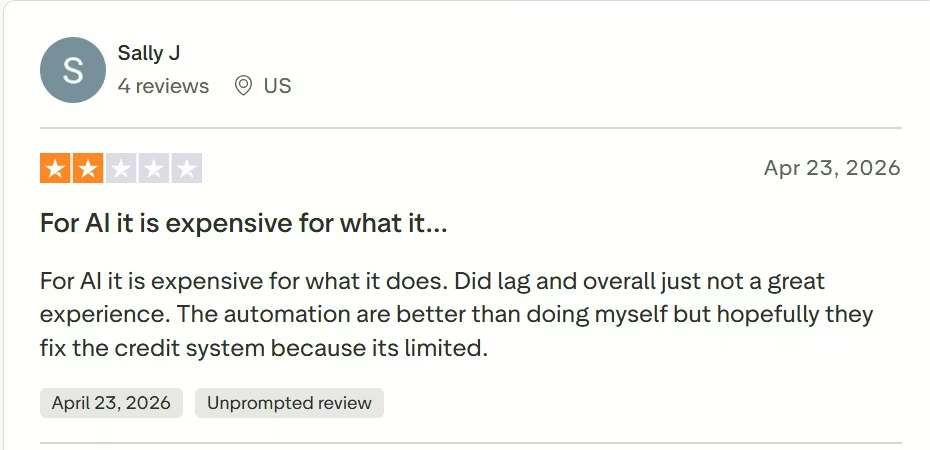
Sally J. managed to capture both sides in one review. She liked the automation more than doing the work manually, while criticizing lag, pricing, and the credit system she was using at the time.
Her April 2026 review came before the current plan prices, but her point about the credit system still applies because that is still how Lindy bills. The practical lesson holds: useful automation has to save enough work to justify both the subscription and the credits it uses.
Pricing
Plus is $29.99/user/month with 3,000 credits per user, Pro is $99.99/user/month with 15,000 credits, and Max is $199.99/user/month with 35,000 credits. Enterprise uses custom pricing.
Lindy’s current pricing page does not publish annual equivalents for these self-serve plans.
Bottom Line
Lindy is my choice when communication is the bottleneck. If you regularly finish a meeting and immediately inherit five more little jobs from it, this is exactly the kind of workload Lindy is built around.
3. AI by Zapier for Workflows Across Several Apps
AI by Zapier is the plumbing pick on this list. That isn't glamorous, but plumbing is useful when five different systems need to work together without you carrying information between them.
Zapier is moving its standalone Agents experience into AI by Zapier. Agentic tool calling, AI reasoning, and autonomous task execution can now sit inside a Zap alongside ordinary triggers, actions, filters, and other predictable automation steps.
That mix is the real advantage. Imagine a new lead comes through a form. A normal automation can capture it, an AI step can inspect the information and decide what it needs, another action can update your customer relationship management (CRM) system, and a customer-facing step can wait for your approval.
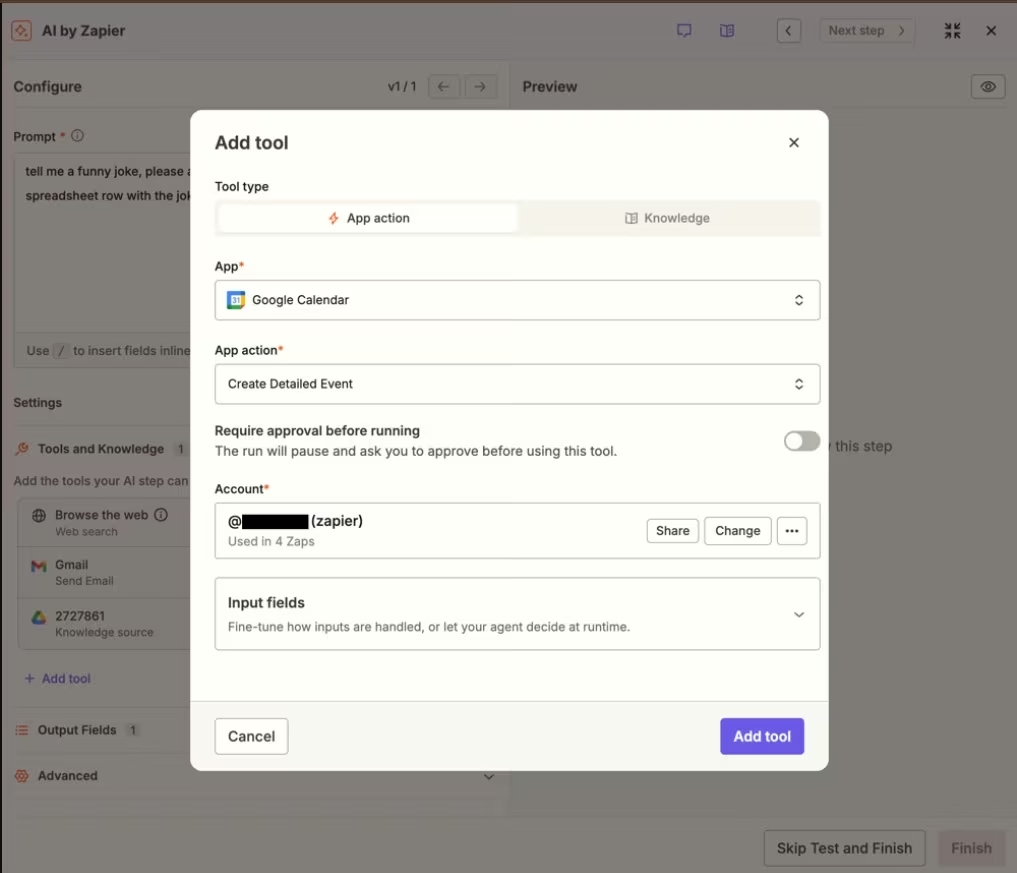
AI by Zapier lets you turn on "Require approval before running" for specific tools. It is off by default, so you need to choose where the workflow should stop. Zapier specifically recommends using it for actions that create, update, or delete data.
As of August 2026, AI by Zapier uses a 1x task multiplier for Standard models, 3x for Advanced, and 5x for Premium, with tool calls adding tasks at the same rate. If one AI step reaches 75 tasks in a single run, Zapier pauses it for review before continuing.
This is the tool I would pick when the business problem sounds like, "Every time X happens in one app, someone has to check three other apps and do four things."
What it does: AI by Zapier puts agent-style reasoning and tool use inside workflows that connect several applications.
Best for: Businesses whose repetitive processes already move across several cloud tools.
Also read our best Zapier alternatives for workflow automation guide for what else is worth trying when the task multiplier or multi-app complexity becomes a concern.
My Take
Test brief: Qualify a $2,000/month property-management lead, assign it High, Medium, or Low priority, draft the follow-up, and keep the customer email behind owner approval.
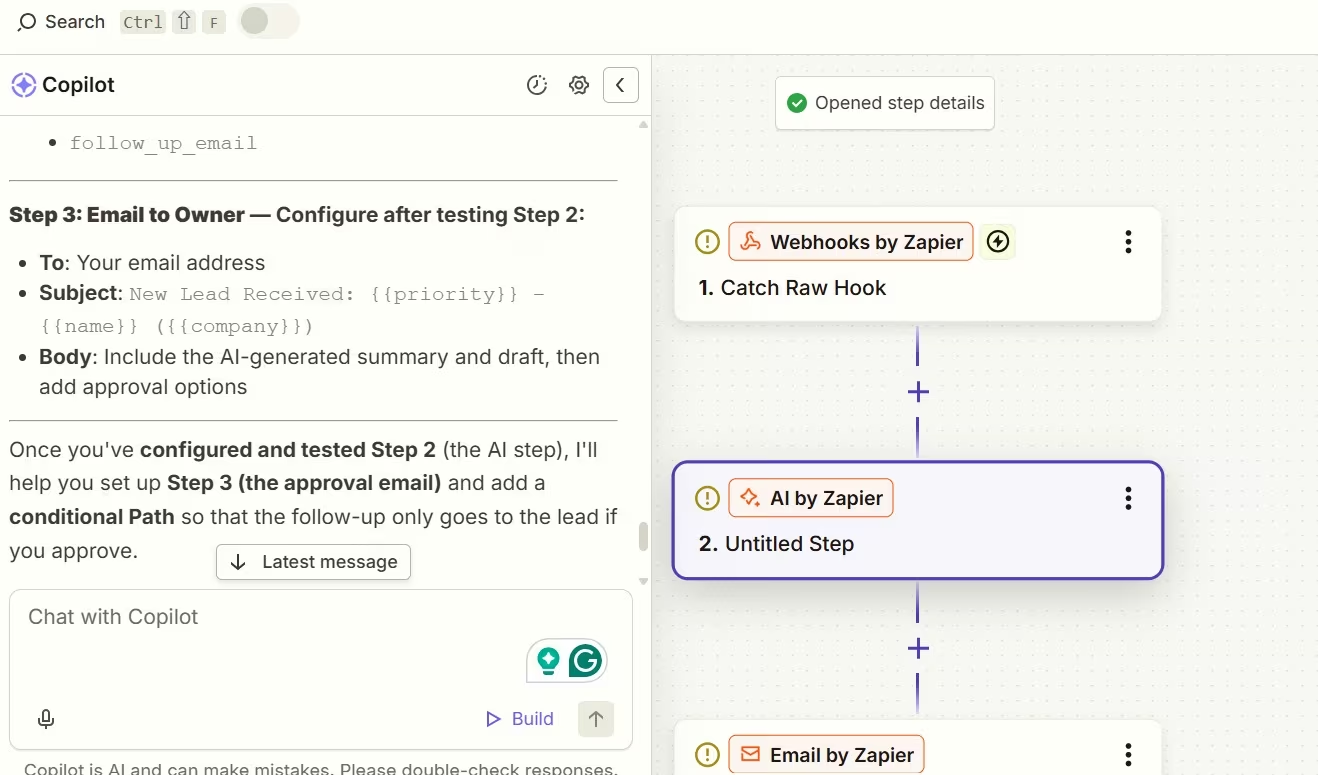
Zapier Copilot understood the workflow I wanted surprisingly well. It proposed a lead trigger, an AI by Zapier analysis step, an owner-review email, and a conditional path that would send the customer message only after approval.
The friction showed up when I tried to turn that plan into a working Zap. The generated workflow still needed its webhook tested and its fields mapped correctly, and my AI step would not validate before I reached the final lead result.
So I can vouch for Copilot’s workflow planning from this test, but not the final AI-generated lead output. For someone new to Zapier, the setup can get technical quickly.
Key Features
- AI inside structured automation: Use predictable steps where rules work and AI reasoning where the workflow needs judgment.
- Approval by tool: Stop selected actions before AI changes data or performs another sensitive step.
- Usage guardrail: A single AI step pauses at 75 tasks so you can decide whether the run should continue.
Pros and Cons
Pros:
- Excellent cross-app fit: This is the strongest option here when one job stretches across several systems.
- Useful mix of rules and AI: You don't have to hand the entire workflow to an agent.
- Fine-grained approval: Sensitive tools can stop while low-risk work keeps moving.
Cons:
- AI by Zapier needs a paid plan: It is available on Professional, Team, and Enterprise.
- AI-heavy workflows consume tasks faster: Standard, Advanced, and Premium model tiers use 1x, 3x, and 5x multipliers, with tool calls adding more tasks.
What Users Say
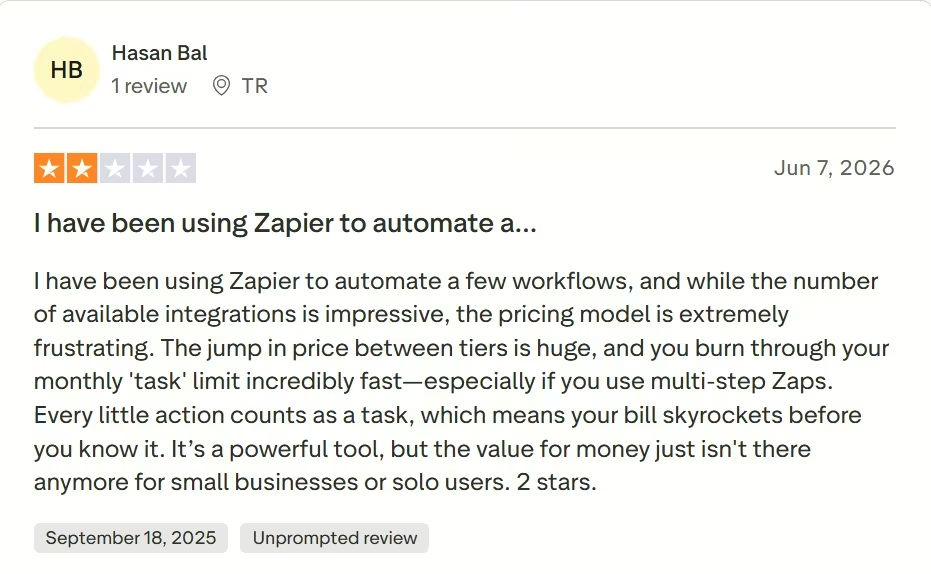
Hasan Bal praised Zapier's large integration selection while criticizing how quickly multi-step Zaps could consume his monthly task limit. His review gave the platform two stars.
That is a fair buying warning for Zapier. The integrations are the reason to choose it, but a workflow with several paid actions needs a task budget before you scale it.
Want the full picture of what users are saying? Read our Zapier Review for a closer look at what real users actually ran into.
Pricing
Free is $0/month, although published AI by Zapier workflows require a paid plan. Professional is $29.99/month ($19.99/month billed annually).
Team is $103.50/month ($69/month billed annually), and Enterprise uses custom pricing.
Want the full breakdown of what each plan actually covers? Read our Zapier pricing guide before you commit.
Bottom Line
AI by Zapier is the one I would choose when the problem is the space between your apps. If information keeps moving from a form to a spreadsheet to a CRM to email, this is where Zapier earns the extra setup.
4. Tidio Lyro for Customer Support
Tidio Lyro stays in its lane, and I mean that as a compliment.
Lyro is built for customer conversations. You give it support information; it uses that knowledge to answer questions, and it can pass the conversation to a person when the answer is outside its available data or your handoff rules say a human should take over.
That makes the job easier to control. Instead of asking an open-ended business agent to speak for the company, you can start with repeat questions whose answers already exist. Shipping, product availability, order status, opening hours, service details, and straightforward policies are sensible examples.
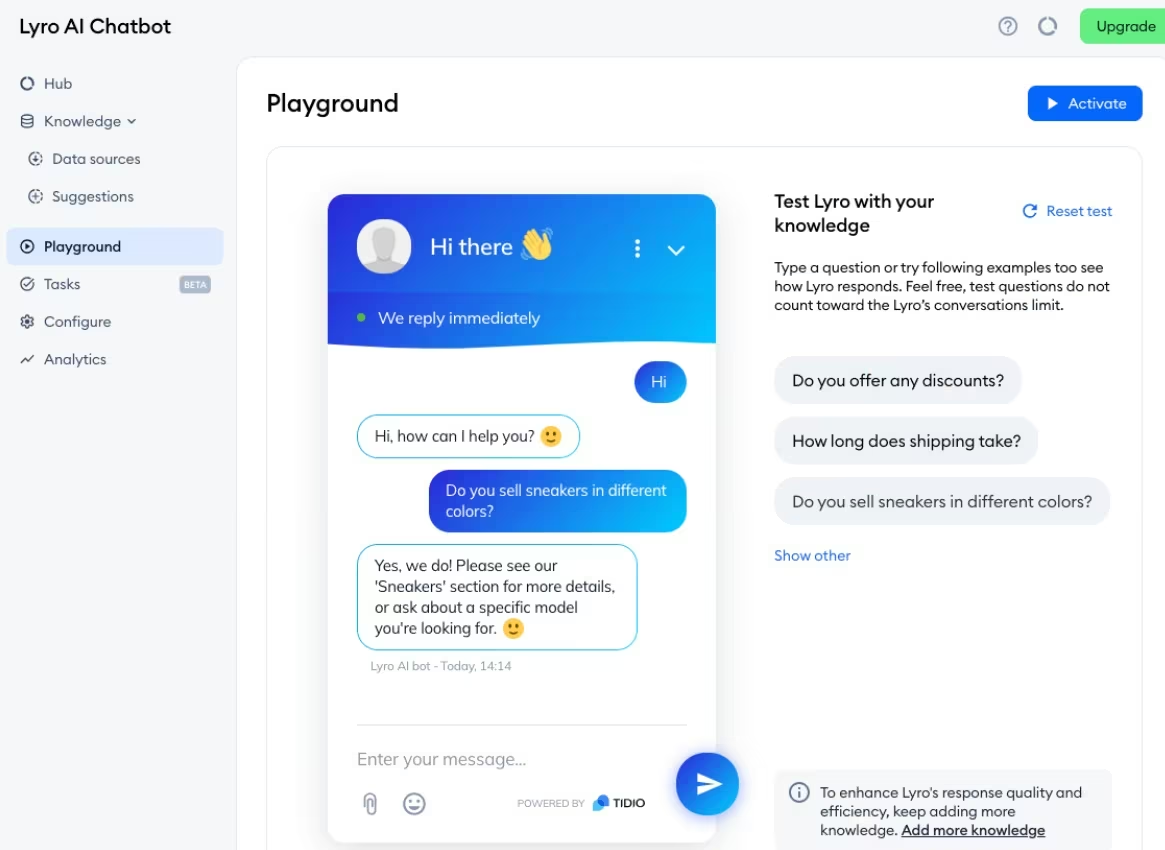
Lyro also has a Playground where you can check how it responds before putting those answers in front of customers. Its Guidance settings let you control communication style and escalation rules, while the Handoff section lets you define what happens when the customer asks for a person, or Lyro can't answer.
That is why customer support is one of the better chatbot use cases for business. The work is repetitive, the knowledge can be defined, and there is a clear point where the conversation should leave the AI.
Support is a narrower job than the work Relevance AI can handle, but that is partly why I rank Lyro higher for a general small-business reader. Repetitive customer questions are easier to define, measure, and hand back to a person than a custom multi-agent workflow you still have to design.
What it does: Tidio Lyro answers customer questions from your business knowledge and routes conversations to people when needed.
Best for: Small businesses that want customer support to be the first workflow they hand to an AI agent.
My Take
I planned to test Lyro against a small support knowledge base with questions about appointment length, rescheduling, and a refund request that should go to a person.
I wasn’t able to complete the hands-on run during my test session due to a recurring error message that could've been a short-lived account problem on my end. So I’m not scoring Lyro on an output I never reached.
For this section, I kept my assessment of Lyro’s responses, Playground, and handoff behavior grounded in Tidio’s current documentation and the individual user review below.
Key Features
- Business-grounded replies: Base answers on the support sources and information you add to Lyro.
- Human handoff: Define when a customer or ticket should move to your team.
- Pre-launch checking: Use the Playground to see how Lyro responds and fill gaps in its knowledge before relying on it with customers.
Pros and Cons
Pros:
- A clear first job: Customer questions are easier to define and review than a vague "run my business" instruction.
- Human takeover is part of the workflow: Difficult conversations don't have to stay with the agent.
- You can try it with 50 conversations: Every account starts with a one-time free Lyro allowance.
Cons:
- Its focus is narrow: Lyro isn't designed to run finance, meetings, or general owner admin.
- AI usage grows with conversations: Paid Lyro quotas refresh monthly and rise with support volume.
What Users Say
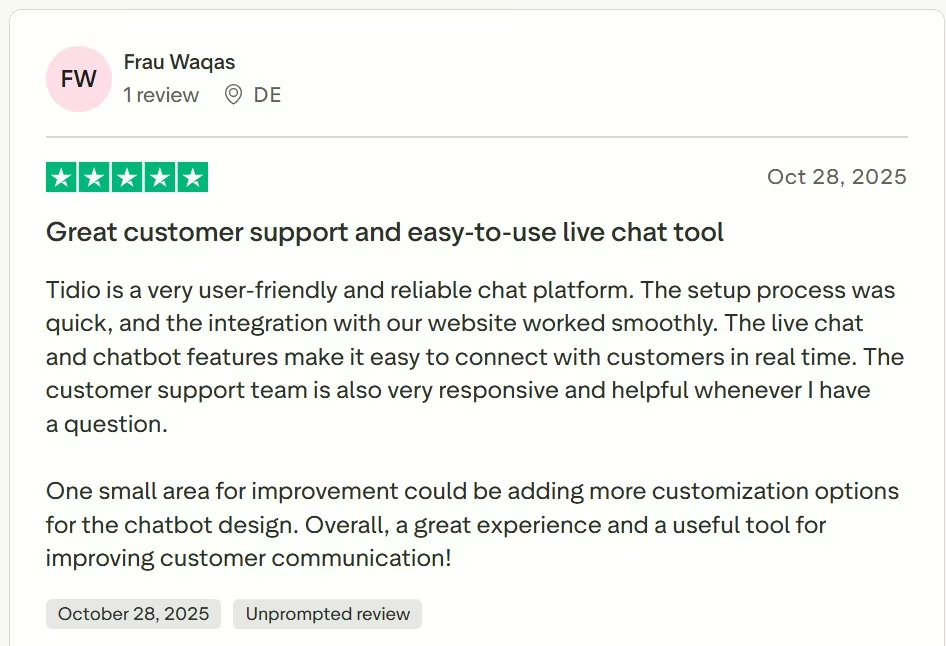
Frau Waqas described Tidio as quick to set up, easy to connect to a website, and useful for live customer communication. Her improvement request was more control over chatbot design.
That review covers Tidio more broadly rather than Lyro alone, so I would use the screenshot as product-level context.
The practical takeaway is still useful. Setup looks approachable, while businesses with strict visual requirements should check the available customization before rollout.
Pricing
A free plan is available and includes 50 one-time Lyro AI conversations. The standalone Lyro AI Agent starts at $39/month ($32.50/month billed annually) for 50 monthly AI conversations.
Tidio Starter is $29/month ($24.17/month billed annually), Growth is $59/month ($49.17/month billed annually), Plus starts at $300/month plus usage, and Premium uses custom pricing.
Bottom Line
Tidio Lyro is the easiest recommendation here when support is the job you want AI to own first. It has a narrower job than the tools above it, but that narrower job also makes the boundaries much easier to explain to your team.
5. Relevance AI for Custom Agent Teams
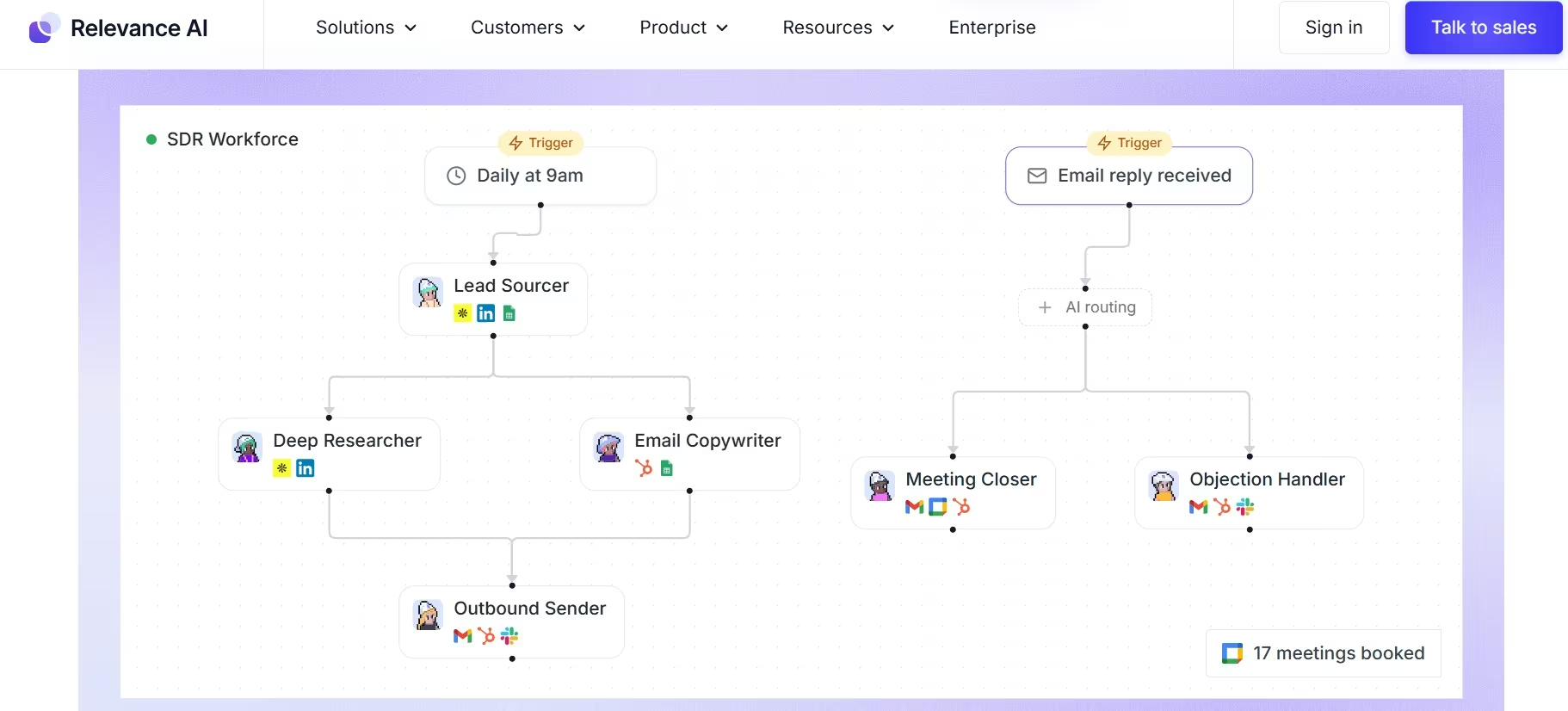
Relevance AI is where the list starts to feel more like building an AI workforce than hiring one assistant.
You can create specialized agents, connect them to tools, and group them into Workforces. That gives you room to separate jobs such as prospect research, lead qualification, account preparation, and follow-up instead of trying to cram every instruction into one agent.
The approval controls are especially useful. Relevance AI lets each connection use Auto Run, Approval Required, or Let Agent Decide. Approval Required makes the agent prepare its intended action and wait for a person before moving forward. Let Agent Decide allows it to request help when context or confidence is too low.
I would start new business workflows with the stricter option. Relevance AI recommends beginning with higher oversight and relaxing approval requirements as you get more confidence in a specific process.
That is the sensible order for any small company handing real work to an agent.
The downside is that you have more knobs to turn. You decide what each agent owns, which tools it can use, how the agents pass work between one another, and what should happen when something goes sideways.
That is why Relevance AI sits fifth for a general small-business reader. If you already know the workflow you want to recreate, that flexibility is useful. If you mainly want tomorrow morning's inbox to stop looking terrifying, there are easier places to start.
What it does: Relevance AI lets you design specialized AI agents and organize them into multi-agent Workforces.
Best for: Businesses that already understand the repeatable process they want agents to take over.
My Take
Test brief: Review a property-management lead, identify the three strongest reasons to pursue it, then use those findings to draft a short outreach email.

Relevance AI gave me the quickest successful setup of the tools I tested. I was working on the free account, and it took about two minutes to get from setup to a usable result.
What I liked was that the second step actually carried the first step’s reasoning forward. It identified the six-property portfolio, recurring monthly work, and $2,000 budget as the strongest signals, then worked those specifics into the email instead of producing generic sales copy.
I would still edit the message before sending it. I also did not test the Approval Required mode in this short run, so my comments on that feature come from Relevance AI’s documentation rather than my own test.
Key Features
- Multi-agent Workforces: Divide a larger process across agents with different jobs.
- Approval modes: Choose automatic execution, mandatory approval, or an agent-decided handoff for individual connections.
- Escalation paths: Route work to email, Slack, or another human process when the agent reaches something outside its scope.
Pros and Cons
Pros:
- More control over agent roles: This works well when your process already has clear handoffs.
- Approval can vary by action: Routine jobs and higher-risk steps don't have to share the same autonomy.
- The Free plan is useful for learning: It includes 200 Actions, unlimited agents and tools, and one Workforce.
Cons:
- Setup asks more from you: You have to make more decisions before the system starts doing useful work.
- Usage has two units: Actions and Vendor Credits both affect how you plan paid use.
What Users Say
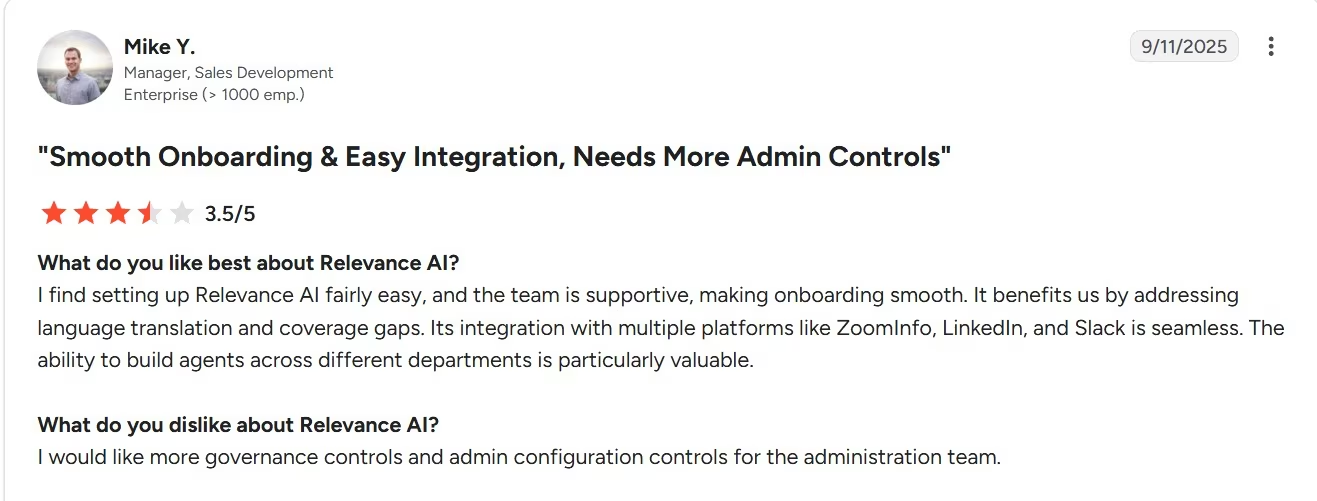
Mike Y. liked the relatively easy setup, support, integrations, and ability to build agents across departments. His main criticism was wanting stronger governance and administrator controls.
Mike works at an enterprise-sized company, so I wouldn't treat his experience as proof of small-business fit. It is still useful product feedback because it captures the central tradeoff with Relevance AI. You get flexibility, which makes oversight design more important.
Pricing
Free is $0/month. Pro is $29/month ($19/month billed annually), and Team is $349/month ($234/month billed annually).
Enterprise uses custom pricing.
Bottom Line
Relevance AI is the tool I would choose once "I need an AI agent" has turned into "I need three agents with different jobs and clear handoffs." That is a more specific problem, which is why it belongs lower on a general small-business list and higher on an agent-builder list.
Also read our best AI agent builders guide for what else is worth trying when you need more than one agent with clear handoffs.
The Small-Business Agent Handoff Test
The easiest mistake with AI agents is treating autonomy as the goal. I think control is the better goal.
A good first agent has a job you can describe, an outcome you can check, and a clear point where a person takes over.
A simple handoff framework:
| Handoff Level | Good Starting Jobs | Your Role |
|---|---|---|
| Let It Run | Internal summaries, classification, research, routine data gathering | Check samples and exceptions |
| Review First | Customer emails, CRM updates, scheduling changes, invoice reminders, public content | Approve before action |
| Keep Human-Owned | Moving money, binding commitments, major refunds, permanent deletion, sensitive employment decisions | Make the final decision |
This is my framework for choosing a first workflow rather than a claim about every vendor's default settings.
Claude for Small Business lets you keep yourself in the process and review work before sensitive steps. AI by Zapier can pause specific tools for approval. Relevance AI lets you assign different approval behavior to individual handoffs. Tidio Lyro gives a customer conversation a route back to a person.
My rule is simple. Give an agent more freedom after you've seen how that specific workflow behaves in ordinary and unusual cases. An internal Monday summary can earn more freedom much faster than a refund, payment, or customer promise.
Other Tools Worth Checking Out
- HubSpot Customer Agent is a strong option when your customer records and support operation already live in HubSpot. It costs $0.50 per resolved conversation, but that close tie to the HubSpot ecosystem makes it a more specific buying decision than the five tools above.
- Gumloop is another flexible option for building agent-driven workflows. Its entry paid plan starts at $37/month, but I kept Relevance AI in the main five because Relevance's explicit approval modes fit the control and handoff question in this article more directly.
When Building Your Own AI Agent Makes More Sense
Emergent’s AI agent builder for small businesses fits when an off-the-shelf agent gets close to your workflow but still asks you to work around its rules. Instead of choosing from a fixed set of tasks, you can describe the job you want the agent to handle, connect the tools and data it needs, and set the points where a person should step in.
That could mean building an agent that follows up with new leads, researches prospects, prepares recurring reports, handles routine customer questions, or coordinates work across the systems your team already uses.
Emergent’s AI agent builder supports connected tools and business data, human approval points, and deployment as a standalone app or inside an existing product.
The distinction is useful for a small business with a workflow that does not fit neatly into Claude, Lindy, Zapier, Tidio, or Relevance AI. Instead of adapting the process to a general-purpose agent, you can build the agent around the process you already have.
The same build-around-your-process idea shows up in an Emergent maintenance case study. The company built a recurring job tracker around client records, schedules, due dates, completion history, overdue work, and automatic rollover.
It reported 90% fewer missed or late jobs, about five hours saved each week, and more than 25 active clients managed through the tool. Those are that customer’s results rather than a promise for every business.
Emergent Pricing
Free is $0/month. Standard is $20/month ($17/month billed annually), and Pro is $200/month ($167/month billed annually). Business and Enterprise use custom pricing.
Also read our guide on how to create a business app in an afternoon to see how fast you can go from idea to a working business tool.
Which AI Agent Should You Choose?
Choose Claude for Small Business if:
- You handle several parts of the company yourself.
- You want finance, sales, customer, and admin work inside one assistant.
- You want to review important actions before they go through.
Choose Lindy if:
- Your inbox and calendar eat a large part of the week.
- Meeting prep, notes, and follow-up keep creating extra admin.
- You want a focused work assistant rather than an agent-building platform.
Choose AI by Zapier if:
- Your workflow already crosses several apps.
- You want rules for predictable steps and AI for the parts that need judgment.
- You need approval on selected data-changing actions.
Choose Tidio Lyro if:
- Repeated customer questions are the first queue you want to shrink.
- Your support answers already exist in documentation or website content.
- You want a clear handoff from AI to a person.
Choose Relevance AI if:
- You can already describe several agent roles.
- You want different agents handling different stages of a workflow.
- You want different levels of approval for different actions.
Build your own agent with Emergent if:
- The job needs rules, tools, data, or approval steps that off-the-shelf agents do not fit well.
- You want the agent built around your existing business process rather than adapting the process to another tool.
- You want to deploy a custom agent for your team or customers without building the underlying system from scratch.
Final Verdict
For most owner-led companies, Claude for Small Business is still my first pick for an AI agent for small business work. In my invoice-follow-up test, it took about three minutes to turn three overdue accounts into a sensible priority order and three different customer drafts, while keeping everything in draft form as requested.
Lindy remains the specialist pick for inbox and meeting work. AI by Zapier is stronger when the process has to cross several apps, although my setup attempt showed how quickly the configuration can become technical. Tidio Lyro stays focused on support, while Relevance AI gave me the fastest successful setup in my test and is the stronger choice when you want to design agent roles yourself.
I would still start small. Give the agent one boring, repeatable job with a clear finish line. If it handles that well, give it another. That is a safer way to build trust than handing over half the company because the demo looked impressive.

Most AI app builders stop at prototypes. Emergent creates production-ready apps you can actually launch.
- Production-ready apps
- Web & mobile apps
- Deploy in minutes







