



Appsmith gave me enough control to build an internal tool, and my first run also showed why you might start comparing alternatives. I spent about 20 minutes learning the editor and working with its data-first flow before the screen felt useful.
I tested six of these Appsmith alternatives hands-on, using real internal-tool builds and first-use sessions to see how quickly I could get from a blank project to something useful.
I couldn’t run the same timed build in every product. Superblocks required billing details, Power Apps never delivered the access code I needed to sign in, DronaHQ’s Google sign-in flow stalled, and I couldn’t finish the NocoBase build within its demo period. I’d also exhausted the available free AI credits in WeWeb, Glide, Softr, and Zite at the time I tested them.
For these eight, I used current product documentation and pricing.
ToolJet came closest to Appsmith's open-source internal-tool model. Retool got me to a usable order dashboard fastest in my timed test. UI Bakery had the easiest guided start. The rest earn their places for specific jobs such as self-hosting, mobile work, Microsoft-based operations, and customer-facing apps.
Why Look for Appsmith Alternatives?
Appsmith is still a capable internal-tool builder. Its editor gives you prebuilt widgets, database connections, queries, JavaScript, Git version control, and self-hosting. Business includes Workflows, and Appsmith 2.3 brought Ask AI to Community Edition in August 2026. Older comparisons that call it weak on workflows or AI are now out of date.
Price is the sharpest reason to compare alternatives: Appsmith Business costs $15 per user/month for up to 99 users, and Enterprise starts at $2,500/month for 100 users. How you prefer to build and what kind of software you’re shipping are the other two.
The first is how you want to build. My Appsmith baseline started from data and components. In that 20-minute session, I generated a CRUD-style page from sample data, learned where the controls lived, and changed table headers.
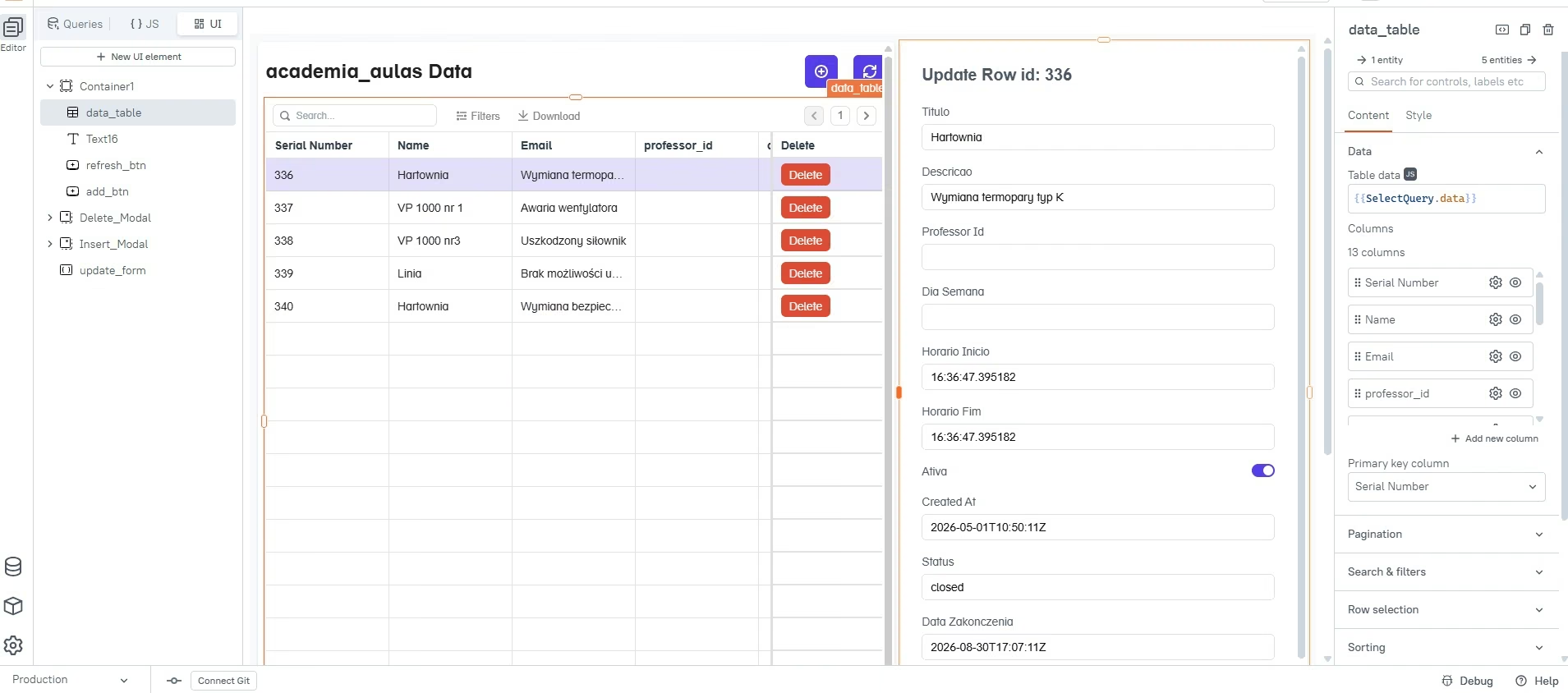
That workflow can suit you perfectly if you like knowing exactly how the screen connects to the underlying data. A prompt-led builder can feel easier when you'd rather describe the finished dashboard first.
Price can change the decision too. Appsmith Business currently costs $15 per user/month for up to 99 users. Enterprise starts at $2,500 per month for 100 users. A company with many people opening a simple internal dashboard may prefer a builder-based, app-based, or flat-price model.
The final question is what you're building. Appsmith's core strength is internal software such as dashboards, admin panels, approval apps, and database interfaces. A customer portal, public product, or field app can push you toward a different kind of builder.
Which Appsmith Alternative Should You Choose?
You can shorten this list quickly once you know why Appsmith isn't fitting your project.
- Closest Appsmith-style choice: Start with ToolJet if open source, self-hosting, internal apps, and AI generation all sit high on your list.
- Fast internal app generation: Try Retool. I had a usable preview in about two minutes and the fuller dashboard in 5.
- Easiest guided start: Look at UI Bakery. Its AI asked useful questions, produced a plan, and waited for my approval before building.
- Self-hosted data apps: Compare Budibase, Lowcoder, and NocoBase based on how much control your technical team wants.
- Broader custom business software: Consider Emergent when you want to describe the app in plain English and have the platform carry more of the build.
- Microsoft-heavy company: Power Apps makes the most sense when your data and daily work already live inside Microsoft products.
- Field and mobile work: DronaHQ deserves a closer look when staff need mobile access and offline use.
If you still have three or four candidates after that, build one real workflow in each. 30 minutes with your own data shape will settle it.
How I Tested and Compared These Appsmith Alternatives
I used Appsmith as the baseline and kept it outside the 14 alternatives.
For ToolJet and Retool, I used the same fictional Northstar Supply order-management brief. The goal was simple enough to finish quickly and detailed enough to expose whether the AI understood tables, filters, forms, editing, and a chart.
Here is the prompt I used:
Build a simple internal order management dashboard for a fictional company called Northstar Supply.
Use realistic fictional sample data for at least 15 orders, and use fictional data only.
The dashboard should include:
- three KPI cards showing Total Orders, Open Orders, and Total Revenue
- an orders table with customer name, order number, order value, order date, and status
- search by customer or order number
- a filter for order status
- a form for adding a new order
- the ability to change an existing order's status
- a simple chart showing orders by status
Use these statuses: New, Processing, Shipped, and Canceled.
Keep the interface clean and practical, like an operations dashboard someone would use every day. Prioritize getting the functionality working over adding extra features.
UI Bakery got a closely related lead-tracker build with 12 sample leads. Budibase was useful for testing AI-assisted table creation. Lowcoder gave me a clear look at the manual component-building experience.
For Emergent, I used a previous client-portal project that went further than the Northstar dashboard. That gave me better evidence for how the platform feels once an app has roles, project screens, files, and revision requests.
I watched for four practical outcomes during those sessions:
- Time to something useful: I timed how long it took to see a working screen.
- How much the tool understood: I checked whether the requested search, filters, editing, forms, and data appeared without me rebuilding the brief piece by piece.
- How much work remained: A good first screen loses its advantage if you then spend an hour wiring every interaction.
- How easy it was to find the next action: I paid attention to the editor itself, especially when I was seeing it for the first time.
I compared the remaining eight against their current product pages, documentation, and pricing, and I’ve kept build times out of those sections.
14 Best Appsmith Alternatives at a Glance
Here’s how the 14 options compare on fit and starting price:
Prices were checked against current product sources in September 2026. Vendors change plans often, so verify the final number before purchasing.
Appsmith Alternatives I Tested Hands-On
1. Emergent for Building a Broader Custom Business App Through Chat
Emergent belongs here for a different reason. I used it on a broader client-portal build that went beyond the admin-dashboard scope of my Northstar test.
I had already used it for a more involved client portal, so I used that project to judge what happens once you move beyond a small admin screen.
The fictional project was a client portal for LEUT Coffee Co. It needed separate client and admin experiences, project views, files, revision requests, sample data, and permission-aware workflows.
That gave me a different kind of test from Northstar. Here I described the business experience I wanted and kept refining it through conversation until the screens matched.
The finished portal included multiple projects and dates, including a LEUT Rebrand 2026 project and a Seasonal Packaging Line project. I could see how the product translated a wider business brief into screens people could move through.
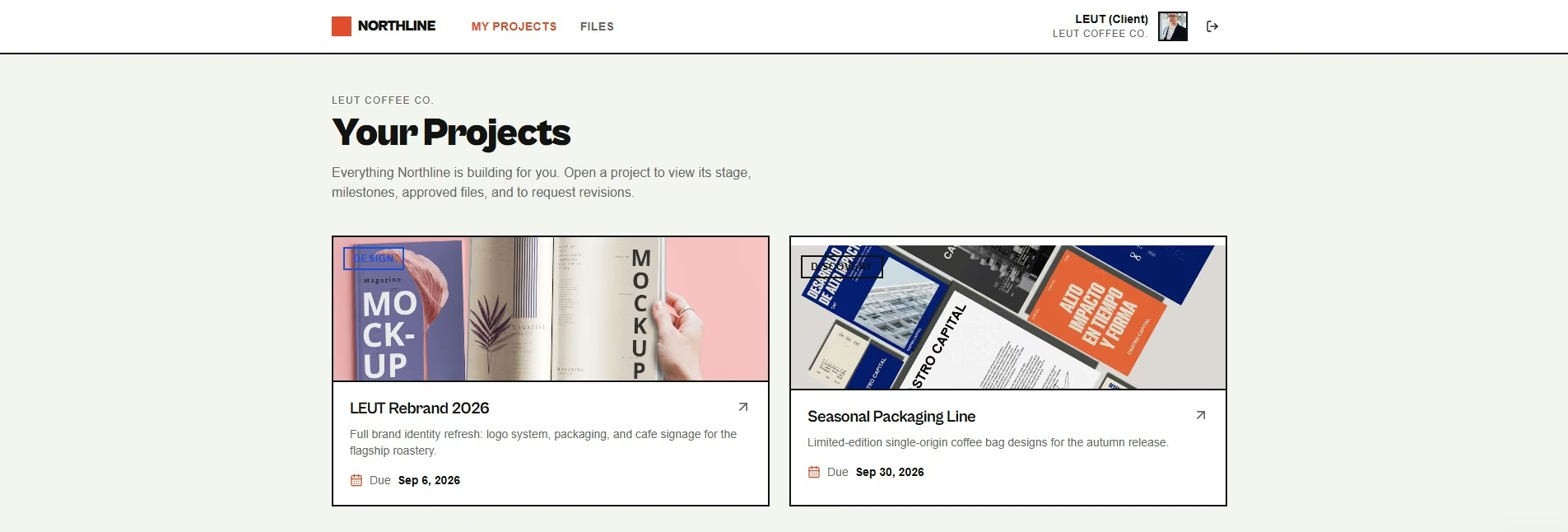
That distinction is useful if you're comparing it with Appsmith. Appsmith gives you a visual internal-tool workspace tied closely to data and components. Emergent starts from the description of the software you want to create.
For readers who find the blank prompt itself difficult, Emergent now includes the Emmy assistant. Emmy can ask follow-up questions, turn a rough idea into a build-ready prompt, accept screenshots, and help you understand your remaining credits. It is currently free to use and consumes no credits. Emmy is web-only at the time of writing.
That's a sensible place for the assistant because prompt quality affects everything that follows. You can work through what the app needs before spending build credits.
Emergent also splits a build across specialized agents. Different agents handle parts of the build and testing process, including automated checks before the result is returned. That structure suited my portal project because client views, admin views, files, and revision flows all had to work together.
Pros:
- Plain-language building: You can describe the business workflow rather than beginning with a component canvas.
- Useful for wider app scope: My portal test covered roles, projects, files, and revision requests rather than a single CRUD screen.
- Emmy helps with the starting brief: The assistant can turn a rough idea into a build-ready prompt without using build credits.
Cons:
- Emmy only works in a browser: The assistant that helps you shape the starting prompt isn’t available on mobile web or in the mobile app yet.
- Reworking a build spends credits too: Changes and refinements draw from the same monthly credit allowance you use for the original build.
Best for: Founders, operators, agencies, and small teams that want to describe custom business software in plain language and refine it through conversation.
Pricing: Free includes 10 monthly credits. Standard is $20/month ($17/month on annual billing) and includes 100 monthly credits. Pro is $200/month ($167/month on annual billing), with 750 monthly credits. Business and Enterprise use custom pricing.
2. ToolJet for the Closest Appsmith-Style Experience
ToolJet gave me the clearest direct comparison with Appsmith because I could hand it the Northstar Supply brief and judge an actual internal dashboard at the end.
It worked through the app structure first, then moved into the build after I approved the plan.
I had the first usable preview in about seven minutes. The brief asked for at least 15 fictional orders, and ToolJet created 18.
By the 15-minute mark, the finished screen had all three KPI cards, an orders table, search, status filtering, an Add Order flow, a way to edit an order’s status, and an orders-by-status chart. It also added a delete action I hadn’t asked for.
What impressed me was how little rebuilding I had to do before I could understand the app. I could look at it and immediately see the daily Northstar workflow I had described.
Appsmith took me about 20 minutes to learn and shape during my baseline session. Retool reached a usable preview fastest, at about two minutes, while ToolJet took about seven. Retool’s fuller dashboard was ready in five minutes, and ToolJet’s finished build took 15.
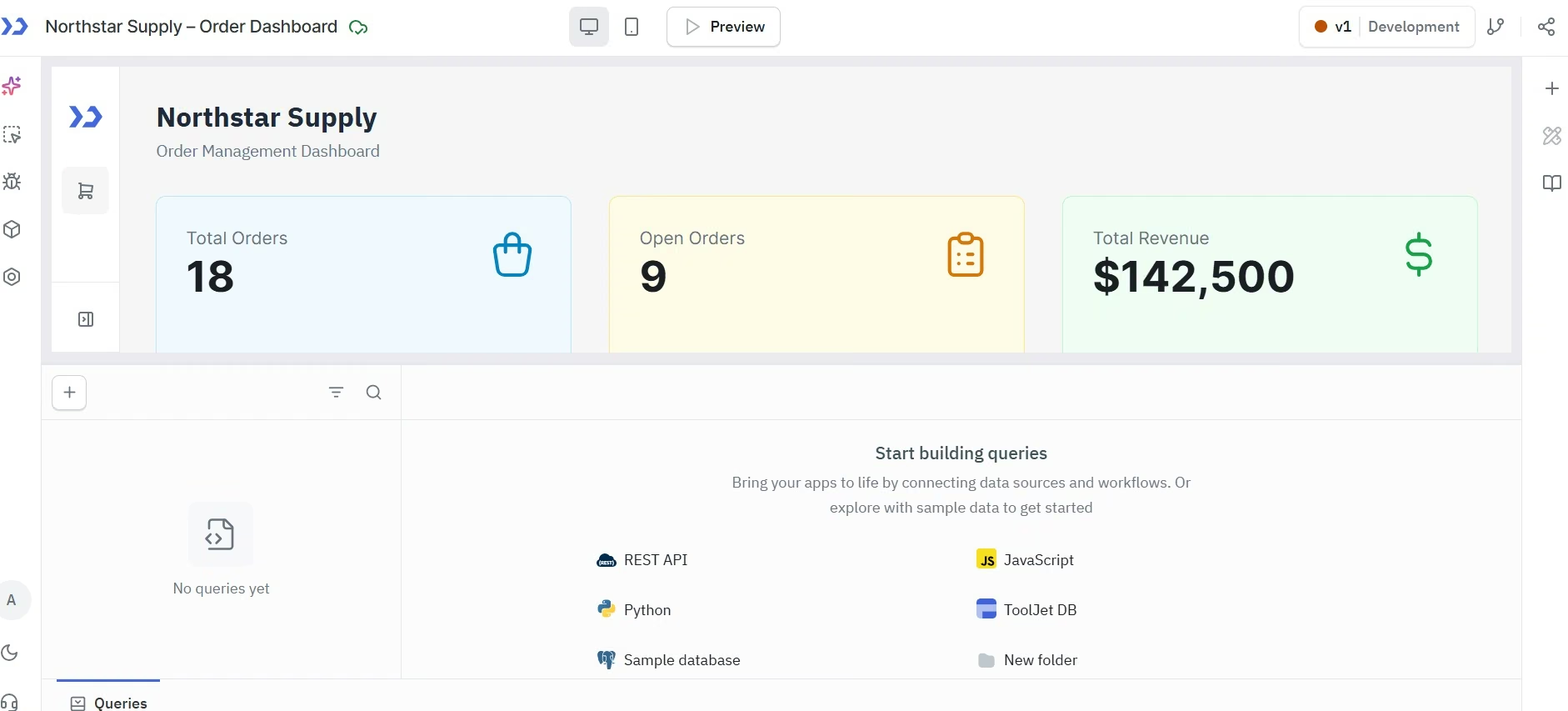
The AI credit message also gave me a useful warning. I reached the limit after the app had already been generated. ToolJet's current Free plan includes 100 AI credits, while Pro includes 2,000 AI credits per builder.
That makes ToolJet the Appsmith alternative I'd start with when you like the open-source, internal-tool idea behind Appsmith and want AI to handle more of the first pass.
Pros:
- Useful first generation: My Northstar dashboard already covered the main daily actions I asked for.
- Open-source option: You can self-host instead of committing to a cloud-only workflow.
- Builder-based paid plans: Paid cloud pricing focuses on builders rather than charging every end user the same rate.
Cons:
- AI credits need watching: My test reached the available limit after generation.
- Paid builder seats can get expensive: Pro is currently $79 per builder/month at the annual rate, and Team is higher.
Best for: Teams that want an Appsmith-like open-source internal-tool builder with a faster AI-led starting point.
Pricing: Free includes two builders, up to 50 end users, two apps, and 100 AI credits. Free. Pro $99/builder/month ($79/builder/month billed annually).
3. Retool for Getting to a Usable Internal App Fast
Retool was the quickest complete result in my Northstar test.
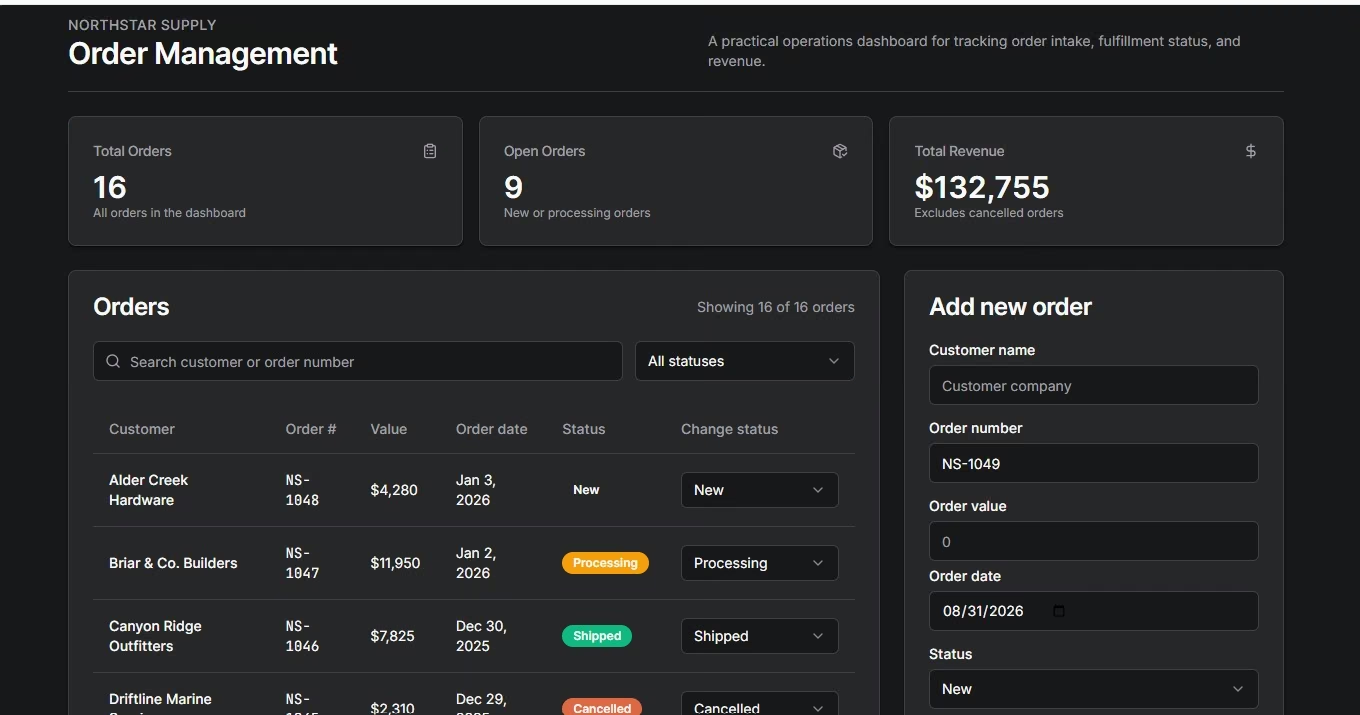
I gave Retool the same Northstar Supply order-management brief I used with ToolJet. I could see the first useful preview at around two minutes, and the fuller build was ready in about five.
The finished screen had 16 sample orders, three KPI cards, search by customer or order number, a status filter, controls for changing an order’s status, and an Add new order form.
That’s the kind of result I wanted from this test: I could understand how an operations person would use the app without first rebuilding the brief component by component.
Retool has since made AI even more central to its current builder. Its pricing page now describes an AI-native experience where you describe the app and receive a working starting point connected to your data. The same page says an AI prompt uses about 12 credits on average and a typical app takes three to six prompts.
That helps explain where I think Retool fits. Choose it when your priority is getting an internal app in front of coworkers quickly, and you still want a mature platform for workflows, permissions, mobile apps, and connected company data.
The pricing model deserves an early check if many people will use the app. Retool separates builders from internal users, so model your actual headcount instead of looking only at the builder price.
Pros:
- Fast first result: I had a usable preview in about two minutes and the fuller build in 5.
- AI is part of the main builder: Current plans include monthly AI credits rather than treating generation as a separate product.
- Web and mobile support: Current plans include unlimited web and mobile apps.
Cons:
- Pricing has multiple user types: Your monthly total depends on the number of builders and people using the internal apps.
- Real company data raises the skill bar: Someone still needs to understand permissions, data access, and the workflow behind the screen.
Best for: Teams that care about fast internal app generation and expect those apps to become part of daily company operations.
Pricing: The Free plan supports up to five users. With annual billing selected, Team starts at $12/builder/month plus $7/internal user/month ($10 and $5 billed annually).
If Retool is the obvious step up, our Retool alternatives guide covers why people move off it too.
4. UI Bakery for the Cleanest Guided Start
UI Bakery surprised me because it made the beginning of the test feel unusually clear.
Before building, it asked about my programming experience. That sounds small, yet it immediately made the product feel aware that different builders need different levels of guidance.
For my lead-tracker test, I asked for 12 realistic sample leads, summary cards, search, status filters, add and edit actions, and a detail view.
Before generating anything, UI Bakery asked how I wanted the sample data stored and how lead details should open. Then it turned the brief into a plan and asked me to approve that plan before implementation.
Six minutes after I started, I had a usable preview.
The result included three summary cards, all 12 sample leads, search, a status filter, an add/edit dialog, and a slide-over panel for the full lead record. I didn't need another prompt to make the first version useful.
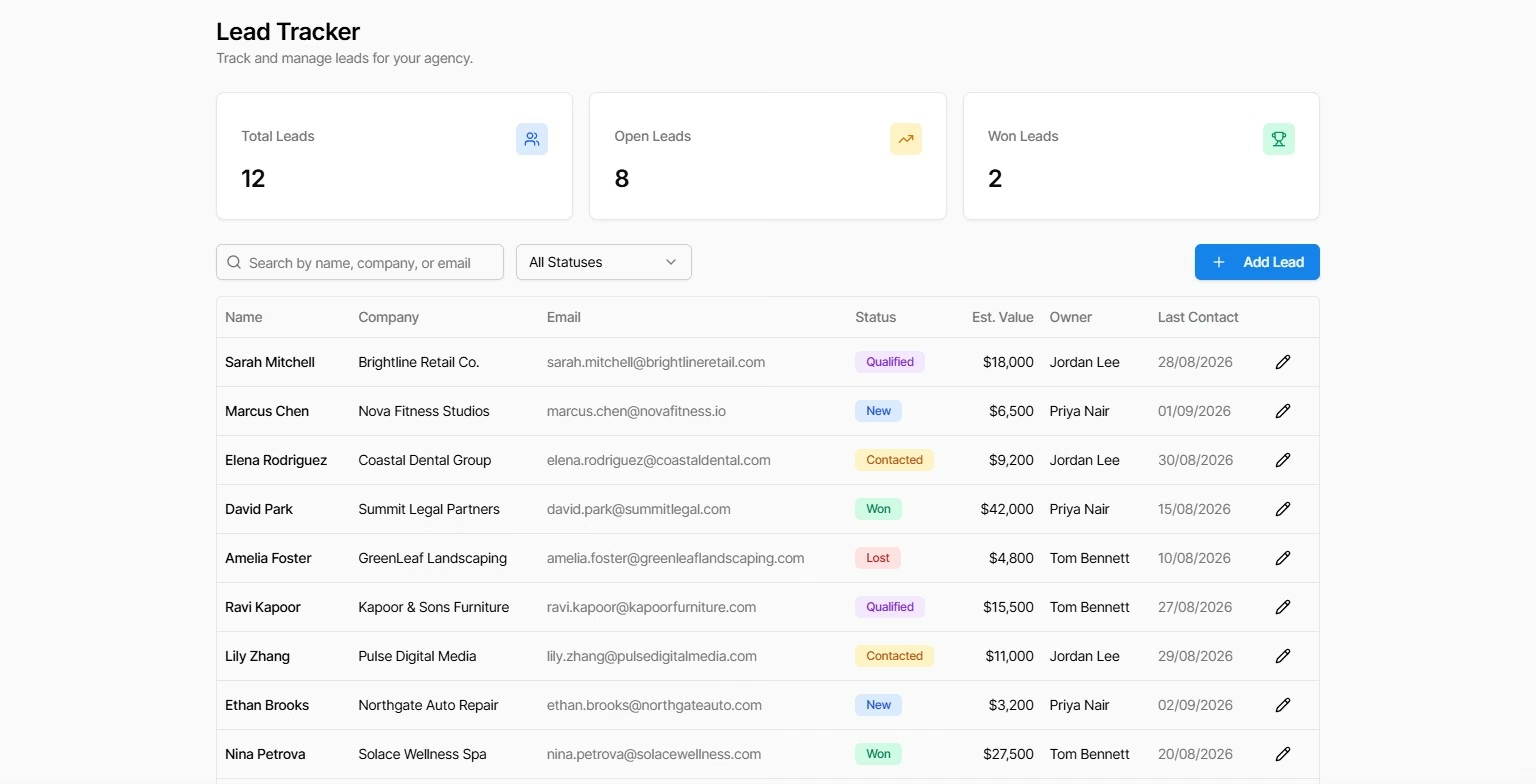
That planning step is the main reason UI Bakery stood out to me. A six-minute result is good. A six-minute result that already reflects two useful decisions about data and navigation is better.
I'd put it near the top of the list for someone who wants AI help and still likes seeing a clear plan before the tool changes the app.
Its current Free plan also gives you unlimited apps and data-source connections, plus trial AI credits. Builder adds AI usage credits, environments, app export, built-in roles, and up to 50 workspace viewer seats.
Pros:
- Excellent first-use flow: The questions and plan made the build easy to follow.
- Good first version: Search, filters, forms, cards, and detail views all appeared without a correction prompt.
- Free plan is useful for evaluation: You can build unlimited apps and connect unlimited data sources.
Cons:
- AI usage has its own allowance: Larger builds need closer attention to the included AI credits.
- Paid seats are developer-based: Your cost rises as more people need editing access.
Best for: Small teams that want AI to help plan an internal app before generating it.
Pricing: Builder costs $25 per developer/month, or $20 per developer/month with annual billing.
5. Budibase for Data-Heavy Internal Work
Budibase got me to usable sample data quickly. The AI-generated lead table was the strongest part of my first session.
Once I found and authorized the AI feature, generating the lead table took around three minutes. I had realistic rows and the fields I needed for status, value, last contact, and owner.
That was a productive start because I didn't have to type a sample dataset by hand. It also showed me where Budibase expects more involvement from you.
The next stage was visual assembly. My generated data gave me the raw material for the app, then I still had to work through how I wanted that data presented and edited in the interface.
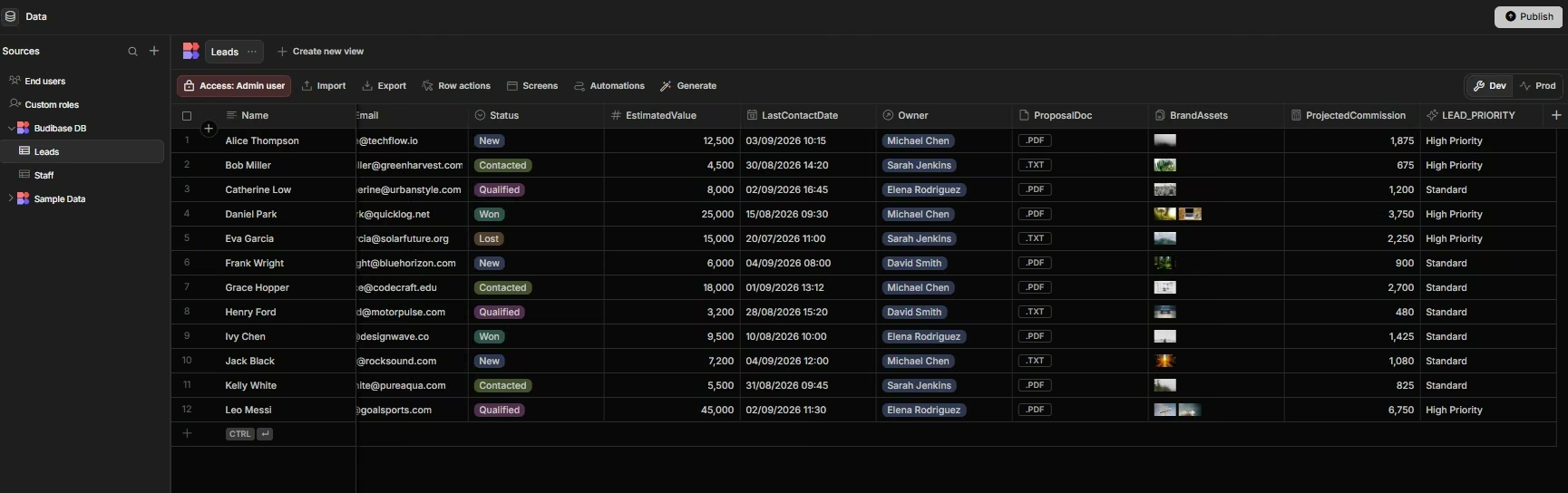
That experience puts Budibase in a different place from Retool, ToolJet, and UI Bakery for me. Those tools gave me more of the finished screen during the AI-led part of the test. Budibase made the data work feel easy first.
For an operations team with a database-centered workflow, that can be exactly the right shape. Forms, approvals, internal records, and repetitive data tasks are a natural fit.
The self-hosted option also changes the buying decision. Budibase says its open-source self-hosted plan is free indefinitely and has no software licensing fee.
That makes it worth comparing with other self-hosted app builders if keeping the software on your own infrastructure is a hard requirement.
Pros:
- Quick data generation: My leads table took about three minutes once AI was available.
- Free self-hosting: The open-source self-hosted version has no software license fee.
- Good fit for structured work: It makes sense for forms, records, approvals, and internal data apps.
Cons:
- Finding AI slowed my first session: Locating and authorizing it took longer than the table generation itself.
- The complete screen needed more manual work: After the data was generated, I still had to decide how every field was presented and edited.
Best for: Operations teams building internal tools around structured data, especially when self-hosting is important.
Pricing: Self-hosting is free. Budibase Cloud Pro starts at $22.80/month ($19/month billed annually).
Budibase is the closest comparison to Appsmith here, and it has its own exit traffic. Our Budibase alternatives guide covers why.
6. Lowcoder for Detailed Component Control
Lowcoder felt like the most traditional visual builder of the six I opened.
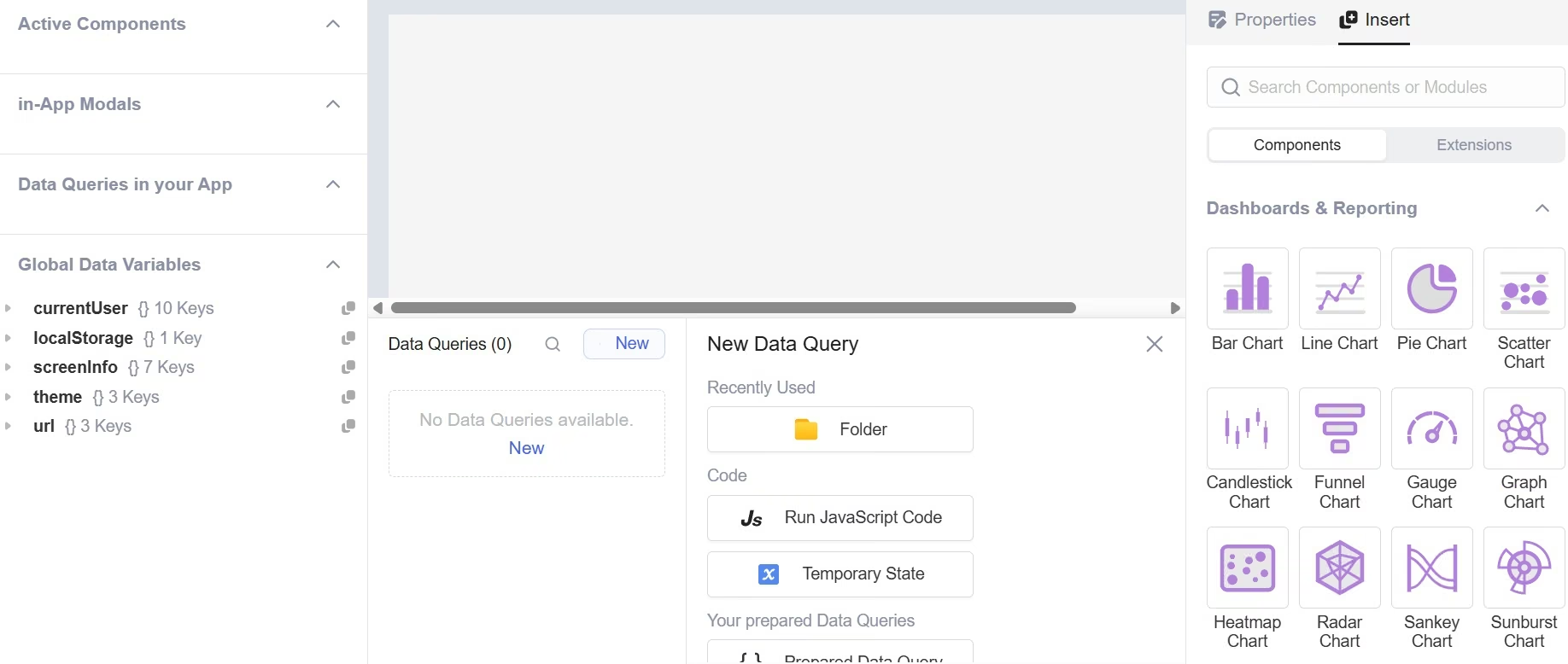
I landed in a component-heavy workspace with a large menu of tables, charts, forms, text elements, and other pieces. The Data Queries area showed zero queries at the start, so the next steps were clearly mine to define.
That made the first session slower for me than the prompt-led tools.
I had to understand the canvas, the component list, and where data queries belonged before I could think about the final order or lead workflow. I didn't complete the same Northstar benchmark here, so I'm not assigning it a fake build time.
The hands-on session was still useful. It showed me who will enjoy Lowcoder.
If you want to place components yourself and keep detailed control over what sits on the page, the editor gives you that kind of workspace. Someone who wants to type one business brief and watch most of the screen appear will probably get further, faster with ToolJet, Retool, or UI Bakery.
Lowcoder's pricing is another reason to keep it on the shortlist. Its pricing page explicitly says it doesn't charge per user. Community self-hosting is free, and the paid Enterprise path now uses instance-based or usage-based licensing.
I'd look hardest at Lowcoder when a technical team wants an open-source visual builder and expects many people to use the resulting internal apps.
Pros:
- Large component workspace: You get many building blocks for custom internal interfaces.
- Free community self-hosting: You can run the Community Edition on your own infrastructure.
- No per-user fees: Lowcoder bases paid options on instances, usage, or managed hosting instead.
Cons:
- Slower first visit for a new builder: I spent more time understanding the canvas, the component list, and where data queries belonged before I could focus on the finished workflow.
- The paid path is licensing, not seats: Skipping self-hosting means an Enterprise license rather than a small-team monthly plan.
Best for: Technical teams that want open-source visual building and detailed component control without per-user software fees.
Pricing: Community self-hosting is free. Enterprise licensing starts at $1,690 per instance, or $0.01 per API call on the usage-based model.
8 More Appsmith Alternatives I Compared
The next eight tools address common Appsmith tasks in different ways, and each section focuses on the buying decision.
7. Superblocks for Internal Apps With Stronger IT Controls
Superblocks makes the most sense when your internal app has to satisfy an IT or security team from the start.
Its current Teams plan centers on Clark AI for building internal apps and includes staging and production environments, more than 50 integrations, and one hosted app. Enterprise adds source control, secrets management, and VPC deployment options.
That positioning makes Superblocks relevant to an Appsmith buyer whose biggest problem is company governance rather than the visual editor itself.
I wouldn't buy it for a small one-off dashboard. The entry price is already aimed at organizations where internal apps touch important company systems.
Pros:
- AI-led app building: Clark can generate internal apps from natural-language instructions.
- Company controls are central: The platform gives IT teams ways to manage access, integrations, and app environments.
- Unlimited end users: Current Teams and Enterprise pricing lists unlimited end users.
Cons:
- Higher starting cost: It enters the list at a much higher monthly price than most small-team options.
- More platform than a solo builder needs: Its strengths become useful when several people and sensitive company systems are involved.
Best for: Larger teams building internal apps that need formal IT controls.
Pricing: A 14-day trial is available. Teams costs $125/month, or $100/month billed annually.
8. Microsoft Power Apps for Companies Already Using Microsoft
Microsoft Power Apps becomes much easier to justify when your organization already runs on Microsoft's business products.
The Developer Plan is free for building and testing and includes three developer environments. Power Apps Premium adds unlimited apps for the assigned user, Microsoft Dataverse capacity, connectors, and current agentic features.
The bigger advantage is familiarity around the rest of the company. Your staff may already work in Teams, Microsoft 365, Dynamics, Azure, or Dataverse. Power Apps can sit close to those existing workflows.
It also has a real mobile story. Microsoft currently supports running Power Apps on iOS, Android, and Windows through its mobile apps.
For a five-person startup with no Microsoft dependency, I'd compare the simpler options first. Inside a company already committed to Microsoft, Power Apps becomes far harder to ignore.
Pros:
- Natural Microsoft fit: Useful when your company already relies on Microsoft business data and tools.
- Free development plan: You can build and test before moving an app into paid use.
- Mobile access: Current Power Apps mobile support covers iOS and Android.
Cons:
- Licensing needs attention: Paid access is per user.
- The wider Microsoft platform takes time to learn: A new builder may need to understand Dataverse, environments, and company licensing rules.
Best for: Organizations already centered on Microsoft 365, Dataverse, Dynamics, or Azure.
Pricing: The Developer Plan is free. Power Apps Premium costs $20 per user/month, paid yearly.
9. WeWeb for Polished Customer-Facing Web Apps
WeWeb is where I'd look when Appsmith feels like the wrong shape for the app you want to ship.
It gives you a visual editor, AI generation, connections to outside data, and code export. Current paid plans are seat-based, with unlimited end users. Paid plans also include code export and self-hosting.
Those choices are useful for a client portal, SaaS product, or customer-facing operational app where appearance and ownership of the finished code rank high.
WeWeb also lets you start free and move into visual editing after AI generation. You can change individual screens and interactions directly rather than treating every edit as another complete generation.
That's a different buying question from “Which tool looks most like Appsmith?” It asks whether you still want an internal-tool builder at all.
Pros:
- Unlimited end users on paid plans: User growth doesn't create a new WeWeb seat charge for each customer.
- Code export: Paid seat plans include code export and self-hosting.
- Strong visual editing: It suits customer-facing software where appearance needs more attention.
Cons:
- Web-focused: Look elsewhere when native mobile delivery is the main job.
- More design freedom means more design decisions: A simple internal admin panel may not need this much control.
Best for: Customer-facing web apps, portals, and SaaS-style products where code ownership is useful.
Pricing: You can start free. Essential costs $25/month per builder ($20/month billed annually).
10. Glide for Simple Apps With a Guided Building Flow
Glide is appealing when you want a gentler route into business app building.
Its current GlideOS plans start with a Free tier and move into Basic, Plus, Pro, and Enterprise. Basic allows two published apps and one enabled workflow, while Pro is aimed at tools used by teams.
The value here is clarity. You can build around business data, add workflows, and publish without facing the same component-and-query learning curve I experienced during my Appsmith baseline.
I would keep Glide on the shortlist for smaller operational apps, trackers, directories, and simple staff tools. A deeply customized internal system may push you toward a builder with more technical control.
One important 2026 pricing update is worth catching. Glide's current pricing page calls the entry paid plan Basic, priced at $25 per month. Older comparisons may show different plan names or figures.
Pros:
- Guided experience: It is approachable for people who aren't trying to become internal-tool developers.
- Free starting point: You can learn the product before paying.
- Workflows are part of current plans: Paid tiers increase the number of enabled workflows and published apps.
Cons:
- Limits rise by plan: Published apps, workflows, credits, and team size change as you move up.
- Advanced custom apps can outgrow the guided model: Deep customization pushes you toward a builder with more technical control.
Best for: Small teams turning business data into simple internal or shared apps.
Pricing: Free is available. Basic starts at $25/month.
Glide gets harder to manage once approvals and routing rules pile up. Our Glide alternatives guide covers what handles that better.
11. Softr for Client Portals and Role-Based Business Apps
Softr is easiest to picture when you think about who needs to log in and what each person should see.
Client portals, partner portals, internal tools, directories, and other role-based business apps fit that model well. Softr currently combines its app builder with databases, workflows, AI generation, and user permissions.
That makes it a useful Appsmith alternative for a business user who wants to create a portal rather than design every screen around database queries.
Its pricing changed recently, which is important for a 2026 comparison. Softr announced another pricing update in August 2026, including separate Team and Client user allowances and pay-as-you-go billing when included user capacity is exceeded.
Current Softr material lists Basic at $19 per month on annual pricing.
That user model deserves more attention than the headline subscription price. Estimate how many coworkers and external clients will log in before choosing a plan.
Pros:
- Separate team and client allowances: Current plans split internal and external user capacity, which makes portal costs easier to model.
- Built-in workflows and data: You can keep common business app work inside the product.
- Free plan: You can begin with a small app before choosing a paid tier.
Cons:
- User allowances affect cost: Team and Client users need to fit the chosen plan.
- Code export isn't its main ownership path: Pick a code-exporting tool when independent hosting is a firm requirement.
Best for: Client portals, partner portals, directories, and business apps with several user roles.
Pricing: Free. Basic $25/month ($19/month billed annually).
Also read our Softr alternatives guide.
12. DronaHQ for Mobile and Offline Field Work
DronaHQ earns its place through mobile use.
The Starter plan covers unlimited apps and connectors, plus more than 100 interface components and 300 AI credits. Its Enterprise tier adds offline access for mobile apps.
That makes the tool interesting for a contractor, service company, logistics team, or field operation where the person using the app may be standing somewhere with poor reception.
Appsmith is primarily an internal web-app builder. If your team spends the working day on phones or tablets, mobile behavior should be part of your test from the beginning.
I would test the hardest field workflow here. Open the app on the actual device, interrupt the connection, save something, reconnect, and see what the worker experiences.
Pros:
- Mobile access is part of the product: Users can access apps through DronaHQ's mobile apps.
- Offline option on Enterprise: Field apps can continue working without a connection on the relevant plan.
- Unlimited apps on Starter: You aren't buying the plan for a single app slot.
Cons:
- Offline access requires Enterprise: The feature most field teams care about sits on custom pricing.
- Starter costs more than many small-team tools: Make sure mobile needs justify the price.
Best for: Field operations and mobile-first business workflows, especially where offline use is required.
Pricing: A free trial is available. Starter costs $140/month, or $100/month billed annually.
13. NocoBase for Self-Hosted Systems Built Around Data
NocoBase is one of the more interesting choices when structured data sits at the center of the project.
It is open source, self-hosted, and built around a plugin system. That lets a technical team extend the product instead of waiting for every use case to become a built-in feature.
There was also a significant 2026 licensing change. NocoBase moved from AGPL-3.0 to Apache-2.0 in February, which gives companies more flexibility around customization and commercial distribution.
The commercial model is unusual compared with most tools in this article. Standard Edition is a one-time $800 payment for lifetime use. Professional is much higher and adds features aimed at teams building for clients, advanced workflows, version control, SSO, and stronger development controls.
That makes NocoBase worth doing the long-term math on when your team can run its own software and wants to avoid another per-seat subscription.
Pros:
- Apache-2.0 open-source license: The 2026 license change gives businesses more freedom to extend the software.
- Self-hosted model: Your team can run the system in its own environment.
- Plugin approach: Technical teams can extend the system around unusual workflows.
Cons:
- You own more operational work: Hosting and maintenance become your responsibility.
- Commercial editions jump in price: Professional costs far more than Standard.
Best for: Technical organizations building long-lived internal systems around structured data.
Pricing: Community Edition is free. Standard Edition is $800 one-time for lifetime use.
14. Zite for Business Apps You Can Still See Inside
Zite is the newer option here that I’d watch if you want AI to build the first version and still be able to open the workflows and database afterward.
Its current plans include AI app generation, a database, workflow runs, integrations, and unlimited apps, users, and editors. Paid plans expand database records, workflow runs, storage, and publishing controls.
That unlimited-user line is especially relevant in an Appsmith comparison. Appsmith Business costs $15 per user/month for up to 99 users. Zite allows unlimited app users on its current Free, Pro, and Business plans.
I would still run your workflow before treating that pricing difference as a winner on its own. User count is only one part of cost. Credits, database records, workflow runs, workspaces, and app depth can become the real limits.
For a small business that wants to describe an operational app, keep the data in the same product, and let many people use it, Zite is a reasonable final entry on this list.
Pros:
- Clear usage limits: Zite publishes workspace, database-record, workflow-run, and credit caps for each public plan, so you can see where your usage moves up a tier.
- Built-in business app pieces: A visual database and visually editable workflows sit in the same product as the builder.
- Free plan: You can explore the builder before paying.
Cons:
- Credits and usage limits still exist: Unlimited users don't mean unlimited database records or workflow runs.
- Newer than the other builders here: Zite has a shorter public track record than the established platforms on this list.
Best for: Small businesses that want AI-led app building, built-in data, workflows, and a plan that doesn't charge per app user.
Pricing: Free. Pro $25/month ($20/month billed annually).
How to Evaluate Appsmith Alternatives
A long feature grid can hide the decision you need to make. I would run these six checks before moving.
Rebuild One Daily Workflow
Don't start with your largest internal system.
Take something people do every day, such as updating an order, approving an expense, or changing a lead's status. Build that flow in your top two choices.
You want to know how quickly a real coworker can complete the task.
If you still need a broader shortlist before testing, Emergent's guide to internal tool builders compares the wider category.
Price The People Who Will Actually Use It
Count builders, employees, customers, and outside partners separately.
Appsmith, Retool, Power Apps, ToolJet, WeWeb, Lowcoder, and Zite use very different pricing models. A low starting subscription can become expensive at 100 users. A high builder fee can work out well when thousands of people only consume the finished app.
Run the numbers with your real headcount.
Decide Who Should Control Hosting
Some teams are fine with vendor-hosted software. Others have a company rule requiring self-hosting or private infrastructure.
If this is a hard requirement, make it your first filter. ToolJet, Budibase, Lowcoder, and NocoBase deserve early attention.
Give the Hardest Edit to the Person Who Will Maintain the App
Building the first screen gets all the attention. Six months later, somebody needs to add a field, change a permission, fix a query, or update a workflow.
Ask that future maintainer to make one real change during the trial.
This is also where the wider category of low-code app builders can help if you want more control than a prompt-only experience gives you.
Test the App Where People Will Use It
A warehouse worker on a phone has different needs from an analyst on a 27-inch monitor.
Use the same device, connection quality, and rough conditions your users will have. For mobile or offline work, test Power Apps, Retool, and DronaHQ on the device before buying.
Check the Exit Path
Ask what happens if you leave in two years.
Can you export code? Can you keep your database? Can you self-host? How much would you have to rebuild?
You may decide platform lock-in is fine. Make that decision before the app becomes important to daily work.
When a Direct Appsmith Replacement Is the Wrong Category
Sometimes the search for an Appsmith alternative starts with the wrong question.
If you're creating an admin panel over company data, direct alternatives such as ToolJet, Retool, UI Bakery, and Budibase make sense.
A customer-facing product, custom client portal, or broader business system can call for another approach.
That's where an AI app builder becomes relevant. You describe the software and its user flows first, then let the builder create more of the application from that brief. Emergent's current AI App Builder page covers web apps, dashboards, data-driven interfaces, and mobile output built from natural-language prompts.
You can also compare broader custom business software tools if the goal has expanded beyond replacing an Appsmith dashboard.
A simple test works well here. Ask who the finished software is for.
For your own operations team, start with the direct internal-tool choices. For clients or customers using a custom product of their own, widen the category before you commit.
My Appsmith Alternatives Shortlist
If I were comparing Appsmith alternatives for a typical internal operations dashboard, ToolJet, Retool, and UI Bakery would be the first three I opened.
ToolJet gave me the closest Appsmith-style combination of open source, visual internal-tool building, and AI generation. Retool gave me the fastest recorded usable screen in my Northstar test, at about two minutes. UI Bakery gave me the clearest guided first session.
For data-heavy self-hosted work, I'd compare Budibase, Lowcoder, and NocoBase. A Microsoft-centered company should put Power Apps near the top. Field teams should test DronaHQ.
If the project has grown into a custom portal or customer-facing business app, I'd widen the search to Emergent and WeWeb rather than forcing an internal-tool builder to carry a different job.
Judge these tools on one workflow your team relies on. Build it, let the future maintainer edit it, and price it at your real user count. The right choice usually becomes much easier to see after that.

Most AI app builders stop at prototypes. Emergent creates production-ready apps you can actually launch.
- Production-ready apps
- Web & mobile apps
- Deploy in minutes







