



TL;DR
- Decide how you want to build: Choose between describing your app in a chat, approving a written plan in advance, or editing each screen in a visual editor.
- Test the app against your brief: Give it a specific instruction, like flagging late projects, and see whether the finished app applies it.
- Read the builder's report against the app: See whether its summary of the build matches the finished app.
- Price the finished build: Fixes and hosting use credits too, so compare what a finished, published app costs on each plan.
- Check that you can launch it and keep it: Find out whether publishing needs a paid plan and whether you can take the code with you.
Knowing how to choose an app builder is much easier once you've seen several of them build the same app. The real differences show up after the first build, when you sign in, open a project, and check the app against your brief.
So I gave Emergent, Lovable, and Bubble the same prompt for a project management app. I checked every result against the same list, including a dashboard that flags overdue projects, and the three apps turned out very differently.
By the end of this guide, you'll know which five factors to compare and which type of builder is right for your app.
What You'll Need Before You Choose an App Builder
- A short brief: Write one paragraph that includes the name of the app, its users, the screens it needs, and the data it should start with.
- One rule to test: Include a specific instruction, such as flagging any project with a late task, so you can check whether the tool followed it.
- Accounts on two or three tools: Emergent, Lovable, and Bubble all offer free plans for comparing how each one starts a build.
- About an hour per tool: My builds took between 5 and 13 minutes, but signing in, testing, and fixing problems took longer.
- A realistic credit budget: My Emergent build used 15.19 credits, more than the free plan's 10 per month, so a full build on Emergent needs a paid plan.
How I Tested These App Builders
I built the same project management app three times, once each in Emergent, Lovable, and Bubble. Emergent is our own tool, so it goes first here, and it got the same prompt and the same checks as the other two. I pasted this prompt into every tool word for word:
"Build a project management app for a small creative agency. Team members sign in with email. Each project has a board with three columns: To Do, In Progress, and Done. Tasks have a title, an assignee, a due date, and a status, and can be dragged between columns.
Add a dashboard that lists every project with a count of tasks by status, and flags any project that has a task past its due date. Seed it with four team members, three realistic projects, and twelve tasks spread across the columns, two of them overdue."
The overdue flag was the key test. Most of the prompt describes a standard layout, but the flag asks the tool to date two tasks in the past, find the projects they belong to, and mark only those projects on the dashboard.
For each build, I recorded the build time, the credits used, and any fixes needed. Then I signed in and checked the seeded data and whether the flags appeared on the right two projects.
I used a paid Emergent plan and free accounts for Lovable and Bubble, and I've listed what each build cost under the factors below.
| Tool | Best for | Starting price |
|---|---|---|
| Emergent | A complete first build that tests its own work | Free (10 credits a month), then $20/month |
| Lovable | The fastest first version to show someone | Free (5 credits a day), then $25/month |
| Bubble | Reviewing a written plan and editing screens yourself | 14-day trial, then $32/month |
5 Factors to Compare When Choosing an App Builder
1. How You'll Build Your App
What it is: The route from your idea to an app, whether that's a chat-based approach known as vibe coding, a plan you approve first, or a visual editor.
When to prioritize it: If you've got a clear brief, a chat-based AI app builder moves fastest. If you want the shortlist first, our roundup of the best AI app builders covers the field. If you already plan your work in ChatGPT or Claude, Emergent supports the Model Context Protocol (MCP), and its MCP connector lets you start builds from either one.
Emergent asked me one question before it started: whether I wanted a web app, a mobile app, or a landing page. Once I picked web app, its agents wrote a product requirements document into the project, saved a set of test sign-in details, and built the app in 13 minutes.
Lovable skipped questions entirely and reported a clean build five minutes after I sent the prompt.
Bubble, like most no-code app builders, comes from the visual editor side. It turned my prompt into a plan with five named features, including Overdue Task Flagging, and built the app in six minutes.
It’s easier to trust a builder that asks questions or plans first, because you can see if it understood your brief before it spends your credits. Bubble's plan was the clearest of the three.

2. Whether the App Does What You Asked
What it is: Whether the tool applies the specific rules in your brief, not just the screens.
When to prioritize it: Always, and especially if your app relies on rules like deadlines or approvals.
My prompt asked for a dashboard that "flags any project that has a task past its due date." Emergent's dashboard listed four team members, three projects, and 12 tasks. It flagged Kestrel Coffee Rebrand and Solstice App Launch and marked Meridian Editorial Vol. 03 as on track.
Lovable got the flag right too. Its app, which it named Palette, flagged Northwind Rebrand and Harbor Museum Exhibit and left Lumen App Launch clear.
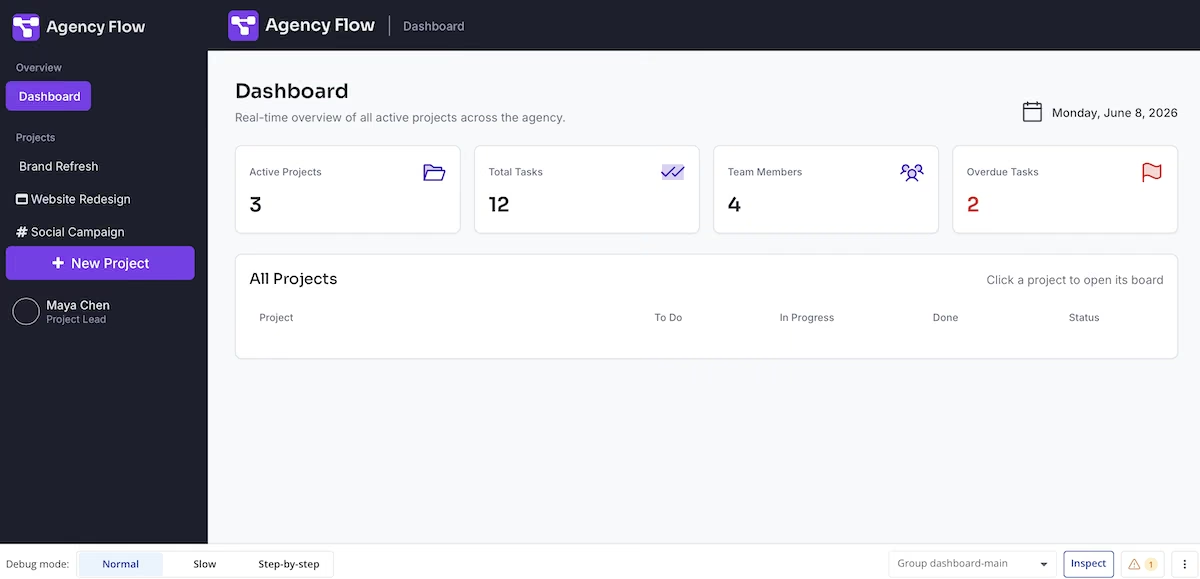
Bubble's dashboard looked right at first, with stat cards showing 12 tasks and two overdue. But in the preview, the projects table was empty and the Brand Refresh board showed zero tasks in every column. The numbers were fixed values above an empty database, so the overdue count didn't come from any task.
After this test, I'd always open at least one project before trusting a dashboard's numbers.

3. Whether You Can Trust What It Reports
What it is: How closely a builder's own summary matches what you find when you use the app.
When to prioritize it: If you aren't technical, since you'll rely on the builder's report of what's finished and what still needs fixing.
Emergent's testing agents checked the build before reporting back, and the app matched their summary. The only minor flaw was that the dashboard greeted me with "Morning, Ava" in the evening.
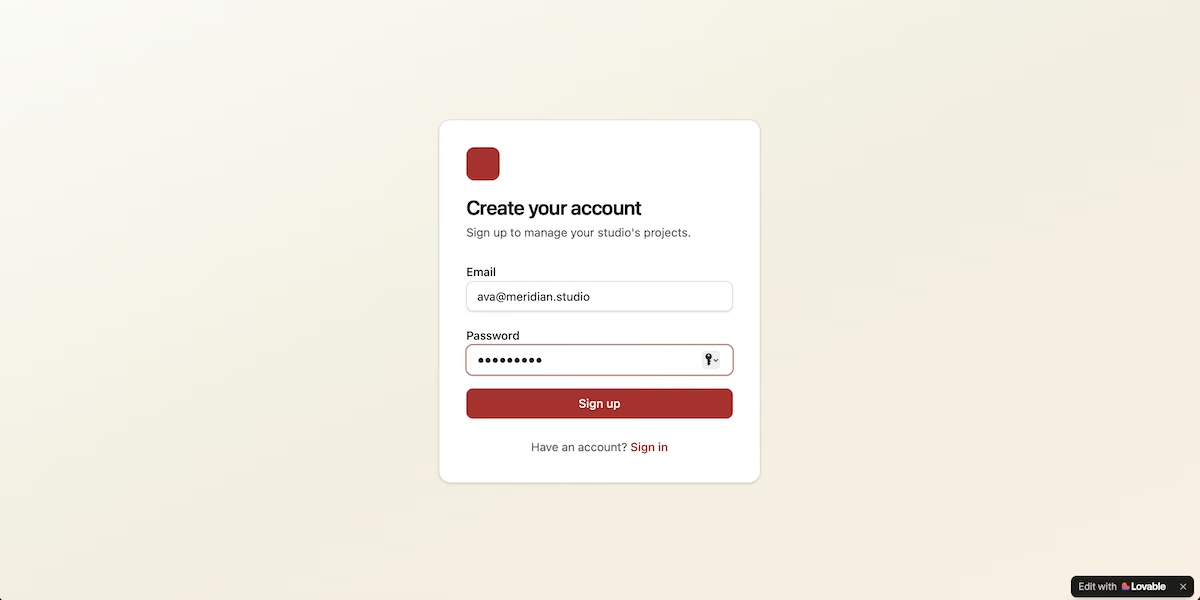
Lovable reported a clean build, but its sign-up form didn’t respond when I submitted it, with no error message and no redirect. I gave it this fix request:
"Sign up isn't doing anything. Nothing happens when I submit the form at /auth. Fix it so I can create an account and land on the dashboard with the seeded projects. Turn off email confirmation so a new account can sign in immediately without verifying an address."
Its first fix changed the sign-in settings but didn't solve the problem. On the second attempt, it reported that the sign-up was fixed, and the real cause turned out to be my password, which had appeared in a known data breach. The form had refused it without explaining why.
Bubble's editor listed three issues after generating, and the dashboard showed a date over a month earlier than the day I built it.
I'd check each screen regardless of what the builder’s summary says. Fortunately, a tool that tests its own work, as Emergent did, leaves far less for you to deal with.

4. What It Costs to Finish
What it is: The full cost of an app from prompt to launch, including fixes and hosting.
When to prioritize it: Before you commit, as free plans are for trying a builder rather than finishing an app.
Emergent's build used 15.19 credits. Emergent's pricing includes 10 free credits per month, so this build wouldn't have finished on the free plan.
The Standard plan costs $20/month for 100 credits, and each deployed app uses 50 credits per month, according to Emergent's deployment guide.
Lovable's build was cheap, but by the time the sign-up fixes were done, the counter showed zero free credits left for the day. Its free plan includes 5 build credits a day, up to 30 per month, with Pro starting at $25/month for 100 credits.
Bubble offered a 14-day trial of premium features partway through the build, which later converts into its Starter Web plan at $32/month.
I'd judge any credit plan by what fixes cost, as that's what used up my Lovable allowance.


5. How You'll Launch and Own Your App
What it is: What it takes to publish your app, and whether you keep the rights and code if you move on.
When to prioritize it: If you're building something to sell or to hand to a developer, since they'll want the code in the development tools they already use.
Bubble showed an Upgrade to Deploy button at the top of its editor, so publishing the app would have meant moving to a paid plan. Lovable publishes on any plan, including free, to a lovable.app subdomain, with custom domains reserved for paid plans. Emergent published from the Standard plan and charges 50 credits a month to keep a deployed app live.
Emergent was the only one to address ownership during the build, with a note about intellectual property (IP): "You retain full ownership of your idea, content, and any IP in the application you build."
Its Standard plan adds GitHub integration too, so you can keep a copy of the code outside the platform. Lovable syncs to a GitHub repository you control. Bubble's documentation is blunt about the difference: you own your app's design and your data, Bubble owns the underlying code, and there's no way to export an application as code.
I'd settle publishing and code export before building anything substantial. Publishing costs you money to fix later. Ownership costs you the whole build.


Which Type of App Builder Should You Choose?
Here's how I'd pick, based on what you need once the first build is done.
Choose Emergent if you:
- Want a complete app, with sign-in and real data, from one prompt.
- Prefer a builder that tests its own work before you check it.
- Want to keep a copy of your code through GitHub.
Choose Lovable if you:
- Need a clickable prototype to show investors or customers soon.
- Don't mind fixing issues across short daily sessions.
- Want the fastest first version, since Lovable reported a finished build 5 minutes after the prompt.
Choose Bubble if you:
- Want to review a written plan before the app starts building, and can wire up the data yourself afterward.
- Can handle editing each screen yourself in a visual editor.
- Are ready to pay before you publish.
Emergent Makes Building Your App Easier
Knowing how to choose an app builder comes down to five checks: how it builds, whether the result is correct, how accurate its reports are, what it costs, and what launching involves. Emergent covered most of them in one build, and it's my pick for a complete app from a single prompt.
Here's how Emergent helps you build:
- A complete first build: Specialized agents handle the screens, the data, and sign-in from one conversation.
- Checks before you look: Testing agents review the app before Emergent reports back, so fewer issues are left for you to find.
- Code you can keep: You keep the rights to your idea and content, and GitHub integration on Standard lets you take the code with you.
- Room to grow: You can add features through chat and connect tools like Stripe.
Try the five checks on your own idea. You can start on Emergent with 10 free credits per month, then move to Standard at $20/month when a full build needs more.

Most AI app builders stop at prototypes. Emergent creates production-ready apps you can actually launch.
- Production-ready apps
- Web & mobile apps
- Deploy in minutes







