



TL;DR
- Start with a problem you've seen someone have: Pick a niche where you already know how people describe the problem.
- Check that it's common: Use AI to find evidence that holds up, then read the sources yourself.
- Set your prices: Decide what you're selling and what each tier costs before anything gets built.
- Describe the whole business in one prompt: Include the pages, the payment, the customer account, and the admin area in a single brief.
- Choose your payment and email setup: Take the managed options unless you have a reason not to.
- Buy your own product: Pay with a test card and follow the customer path all the way through.
- Deliver the first order: Do the work, publish it, and confirm the customer gets it.
I know three restaurant owners with websites that are costing them money. These sites include reservation buttons that people can't find on a phone, menus saved as photographs, and different opening hours shown on three different pages. Each owner knows something is wrong, but they don't know how to fix it. So I asked Claude if I'd found a potential business idea.
Learning how to start a business with AI took 90 minutes. I picked the niche, tested the demand, set the prices, and built the site that sells and delivers the service, right through to a card clearing Stripe's checkout and the first order reaching the customer. The build took 23 minutes and used 23.09 credits on Emergent.
What You'll Need Before Starting
- An Emergent account: The free plan includes 10 credits, which won't cover a build like this one.
- A niche you know something about: You don't need to be an expert, but you do need to know how the customer describes the problem.
- Around 90 minutes: This includes the validation and pricing research.
- Roughly 25 credits for a build with payments, logins, and email: Keeping it deployed costs credits on top of that, so budget for both. That means the Standard plan at $20/month for 100 credits ($17/month billed annually), or Pro at $200/month for 750 credits ($167/month billed annually).
- No coding required: You'll be describing what you want in plain English.
How I Built This
I built a fixed-price website audit service for independent restaurants. Customers choose one of three packages, pay by card, fill in a brief about their site, and then read the finished audit once it's ready.
The actual build took 23 minutes. It was 60 minutes from an empty screen to a completed transaction, and 90 minutes end to end once you add the validation and pricing research at the front and writing and delivering the audit at the end.
The build cost 23.09 credits in total, covering one prompt, five setup questions, and fixing any errors that cropped up while self-testing. I decided not to add Emergent's suggested upgrades because each one was feature creep: printable audit downloads, external review data from Yelp and Google Maps, a search bar for the customer's order history, and a share button.
How to Start a Business With AI: Step-by-Step
Step 1: Start From a Problem You've Seen Firsthand
I already knew three restaurant owners with the same complaint, and all three described their restaurant websites in almost identical terms. Plenty of traffic arriving from Instagram, hardly anybody booking a table, and a reservation button sitting somewhere near the bottom of the page.
Knowing the customer before you know the product changes what you build. You already understand which words they use, what they've tried before, and what they'd consider a fair price. So the sales copy and the packages almost write themselves.
You can find problems and complaints in plenty of places. Examples include your last job, the trade you came out of, the questions people keep asking you at events, a subreddit you've read for years, or the recurring gripes in one-star reviews across a local industry.
Pro Tip
Pro tip: Write down the complaint in the customer's own words before you write anything else. If you can't, you're too far from the problem to sell the solution.
Step 2: Test Whether Your Sample Generalizes
Speaking to a handful of people doesn't, on its own, determine a market. So I asked Claude if what I was told was a common problem and, if so, to point me toward evidence.
Here's the prompt I used:
"I know multiple independent restaurant owners whose websites are losing them bookings. Those sites have poor mobile reservation flows, menus as photos, and the wrong hours in several places. Is this common across independent restaurants in the US, or have I just spoken to outliers? Where would I find evidence either way?"
It told me restaurants get sued when their websites don't work for people with disabilities, and that those court records stay on file. One complaint it raised repeatedly was menus posted as pictures, because a screen reader has nothing to read. All three had told me the same thing weeks earlier.
It also told me which of my three claims was the weakest. Plenty of restaurants deliberately send bookings to OpenTable or Resy, so a missing reservation flow on the website doesn't automatically indicate a problem.
Use AI to confirm or debunk any evidence you have, and then read the primary sources yourself.
Step 3: Decide on Pricing and Packaging Before You Build
Your prices define the product, and the product defines the software you need. If you have three packages, for example, you'll need three buttons, three checkout paths, and three different things to deliver.
I gave the following prompt to Claude:
"I'm selling fixed-price website audits to independent US restaurants at $149, $399, and $699. Is fixed pricing the right call over hourly for this, and are those numbers in the right range?"
It offered fixed pricing as its clear recommendation, which made sense. An audit has a defined beginning and end, which gives it an advantage over a service billed by time. If you quote a business like this by the hour, your customers will judge your hours instead of their website.
Then it pushed back on structure. WebFX's survey of 250 US businesses found that 43% pay between $101 and $750 per audit, which puts all three of my tiers inside a single bracket. In other words, my three tiers were three versions of the same cheap report at three prices, all aimed at the same buyer.
That figure comes from an agency whose own audit packages start at $8,600 a month, so the skepticism I applied to restaurant statistics applies to pricing data too. Check who benefits from a number before you build a price around it.
I kept $149, $399, and $699 anyway, because I wanted a real transaction more than a perfect ladder. On the next version of the software, I'd widen the gaps and put actual fixes into the top tier, so the customer buys an outcome rather than a second report.
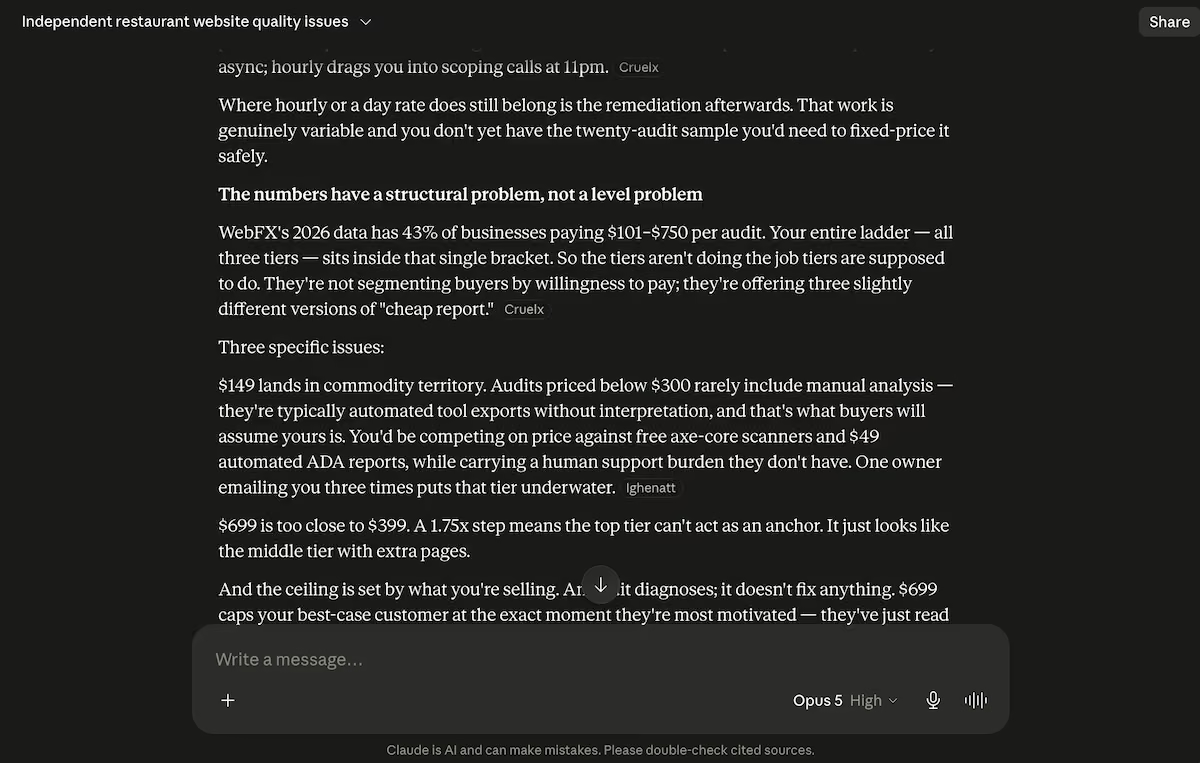
Pushback on the three-tier structure, with all three prices inside a single market bracket.
Step 4: Describe the Whole Business in One Prompt
Give Emergent everything at once. Adding features one at a time means each new instruction has to fit around what's already built, and the more of those you give it, the more chances there are for something earlier to break.
If a blank prompt box is where you stall, open Emmy from the chat icon in the bottom right and describe the business in whatever words you've got. Emmy asks the questions you'd otherwise miss and hands back a prompt you can paste. It's free, and it doesn't spend credits.
Here’s what I wrote:
"I want a website for a small business that sells fixed-price website audits to independent restaurants in the US. The site needs to sell three packages, take payment, collect a brief from the customer, and let them follow the job and read the finished audit when it's done.
The home page should explain the service and show three packages: Quick Look at $149, Full Audit at $399, and Full Audit plus a 45-minute call at $699. Each package has a short description and a Buy button.
When someone clicks Buy, they pay for that package with a card through Stripe before anything else happens. After the payment goes through, take them straight to a form that asks for their business name, website address, city, what they think isn't working on the site, and anything they want me to look at specifically.
Let them upload up to three images. Save the form against the order they just paid for.
Once they've submitted the form, create an account for them using the email they paid with and send them a confirmation email with a link back in. When they log in, they see their order: which package they bought, the date they paid, the brief they submitted, and a status that reads Received, In Progress, or Delivered.
When the audit is finished, the finished audit shows up on that same page as a formatted web page they can read in the browser, with headings, a summary at the top, and a list of recommendations. Email them when the status changes to Delivered.
I also need a private admin area only I can get into. It lists every order with the customer, the package, what they paid, the date, and the current status.
I can open an order, read the brief and their images, write the audit in a rich text editor, save it as a draft, and then publish it to the customer, which sets the status to Delivered and triggers their email. I want to be able to change a status manually as well.
Keep the design clean and plain, dark text on white, one accent color, and make it work properly on a phone. This is a real business taking real money, so the payment and the login need to actually work, not be placeholders."
That prompt includes real prices, named states for the order status, an explicit instruction that payment should happen before the form, and a line insisting that the payment and login can't be placeholders. Each one of those details correctly appeared in the finished build.
Specialized agents split the work across the build. Some shaped the interface, others wired up the payment and the email, and testing agents checked the result, with each delegation appearing in the panel. After 23 minutes, I had a home page, a packages page, a checkout, a brief form, a customer account area, and a private admin section.
It wasn't a flawless build. Around the 15-minute mark, the preview showed three red errors saying it couldn't find some of the files for the admin pages. I left it alone, and the build resolved them and continued. If you find yourself staring at a red error screen mid-build, give it a minute before you intervene.
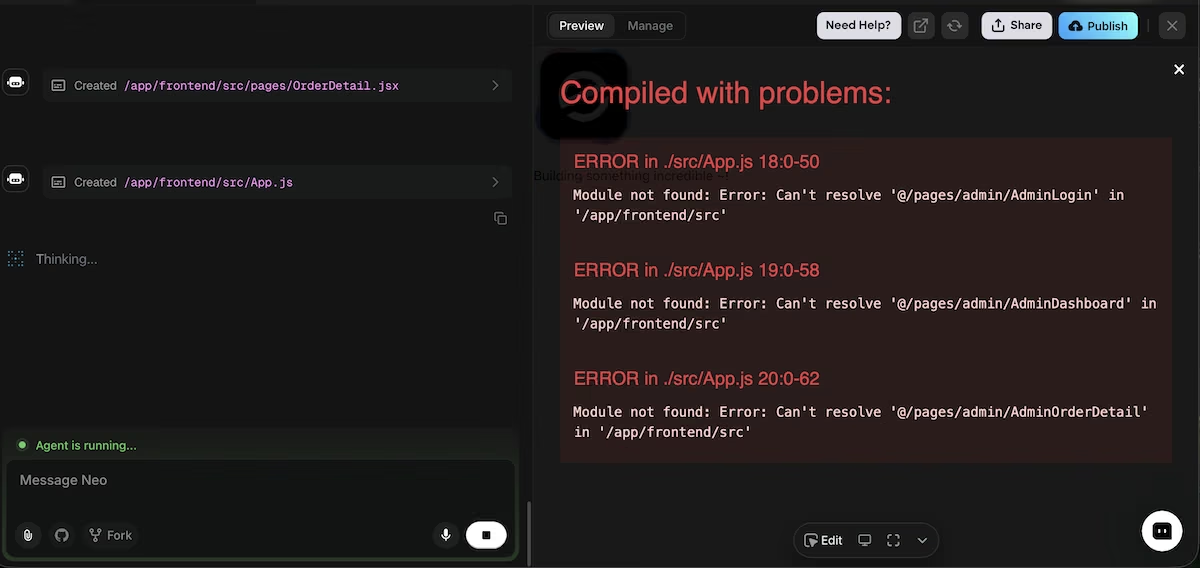
Three module-not-found errors in the preview partway through the build, which resolved on their own.
Step 5: Give Some Thought to the Setup Questions
A minute into the build, Emergent stopped to ask me five questions:
"Payment provider: confirm you'd like Stripe, or something else." I took Stripe. It never asked me for an account or keys during the build because Emergent runs its own sandbox until you claim the live account. That removed the biggest source of potential friction.
"Email delivery for confirmations and notifications: Emergent-managed Resend, or something else." I took the managed option, so there was no Resend account to open and no keys to paste. Both the confirmation email and the delivery notification went through it, and both arrived within seconds.
"Should I seed an admin login for you? If yes, which email address?" Yes, using the address I wanted the orders to come through to.
"Any preferred accent color, or shall the design agent pick one?" I chose indigo rather than leaving it open, since giving it a specific color keeps the whole site consistent.
"Is it OK to use our built-in object storage for the customer's images?" Yes, which saved configuring anything external.
Take the managed options unless you have a specific reason not to, because they remove a setup step that would otherwise cost time and credits.
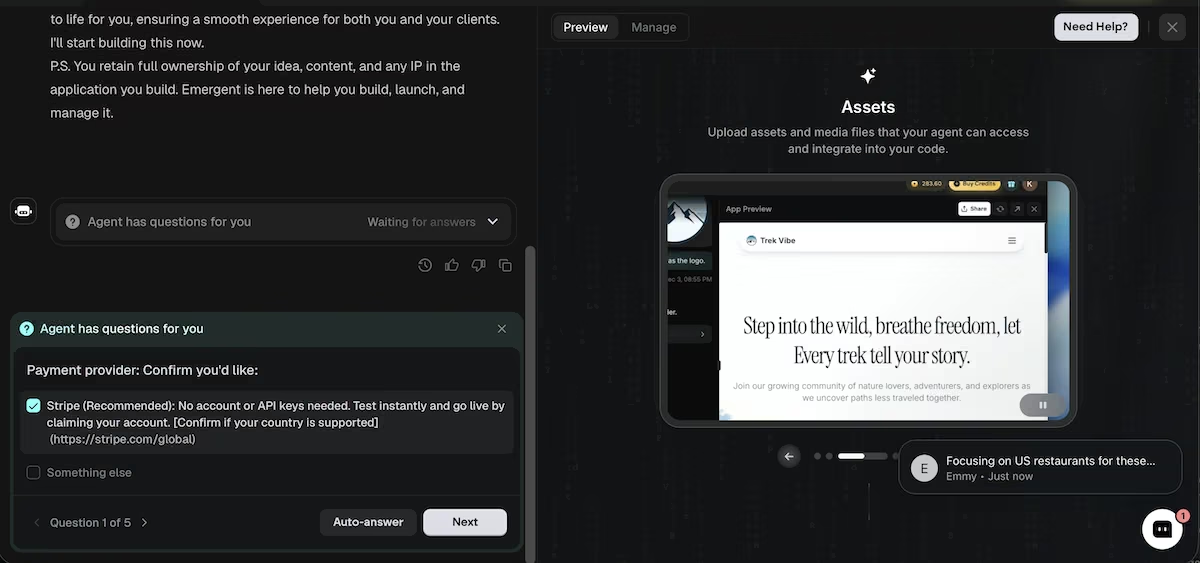
The first of five setup questions, asking which payment provider to use.
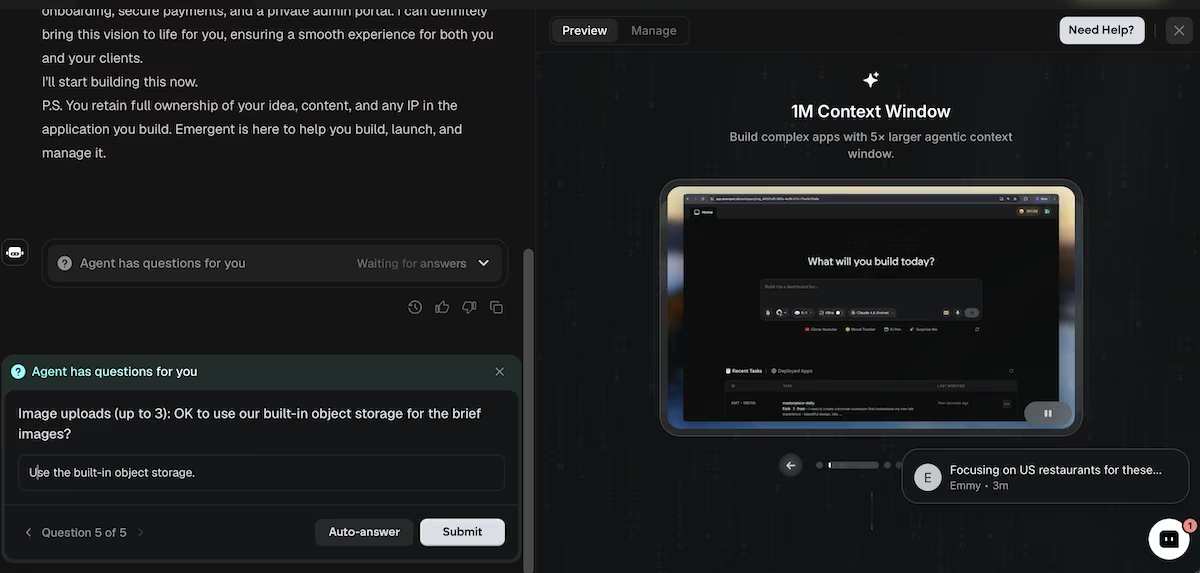
The last of the five setup questions, covering where the customer's uploaded images get stored.
Step 6: Buy Your Own Product
You should be your own first customer. Open the site, buy your product with a test card, and follow every step a real buyer would take.
The packages page showed all three tiers at the right price, with the middle one marked as the most popular. I bought the $149 Quick Look option using Stripe's test card, and the checkout appeared correctly labeled as a sandbox transaction.
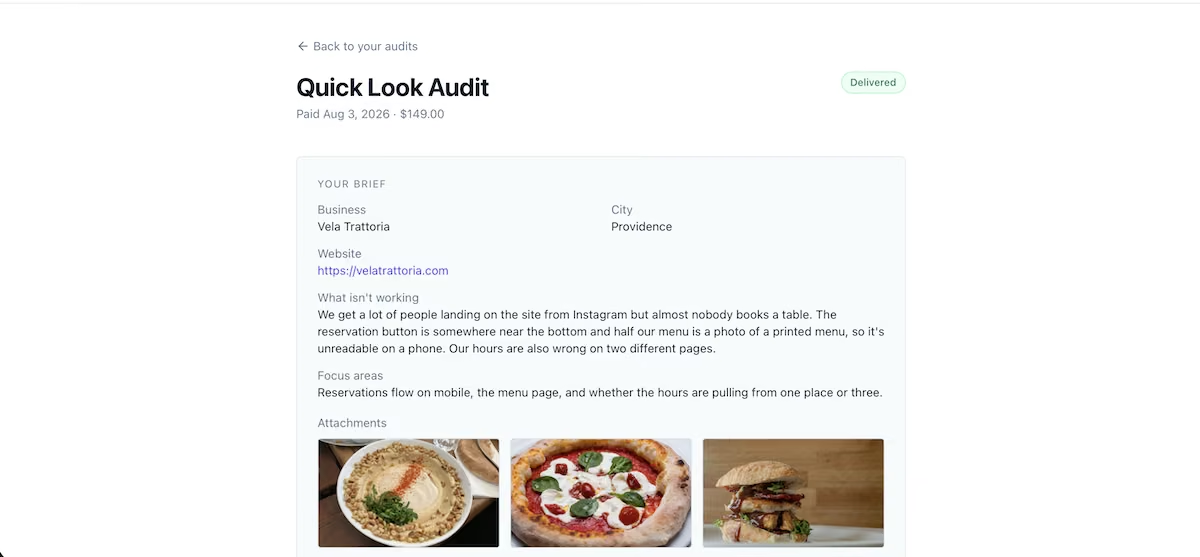
The site sent me straight to the brief form with a green banner confirming the payment, exactly as the prompt specified. I filled it in with the details of a fictional restaurant, Vela Trattoria in Providence, uploaded three images, and submitted it.
The confirmation email arrived immediately, my account existed, and the order status showed Received with no action from me on the admin side. Run that check on any build like this one, because a status you have to set by hand isn't tracking anything; it's just a label you remembered to change.
The build also added two things I wasn't expecting. There was a fourth status, Paid, covering customers who paid but hadn't submitted a brief, which was a sensible addition. There was also a counter mismatch on the admin dashboard, where the totals omitted Paid orders entirely.
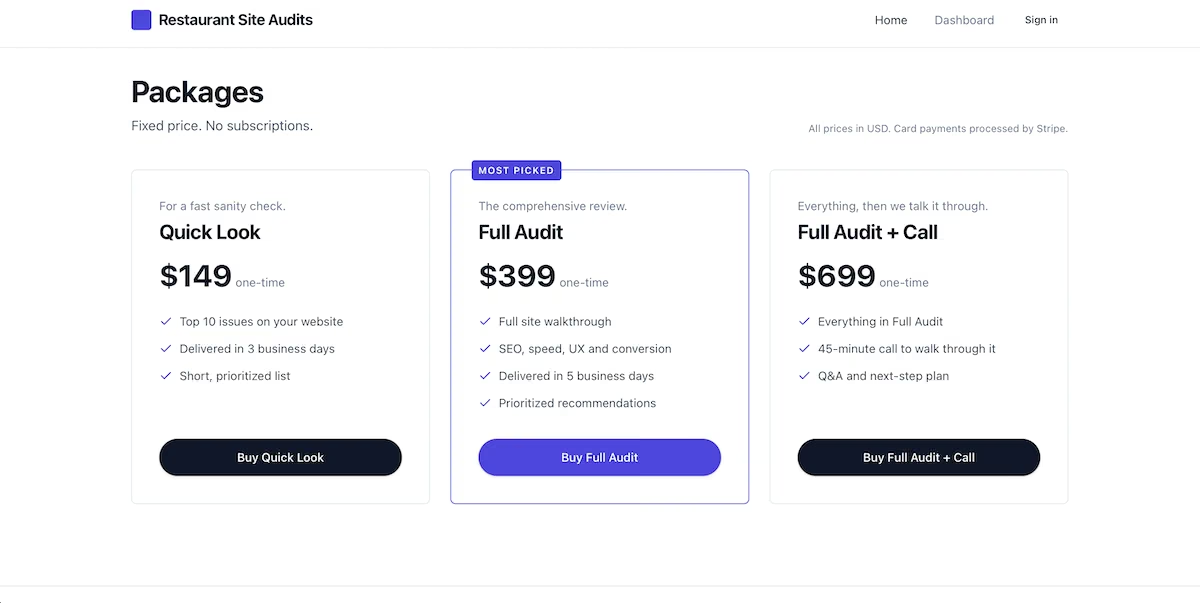
The finished packages page showing all three tiers, with the middle option marked as most popular.
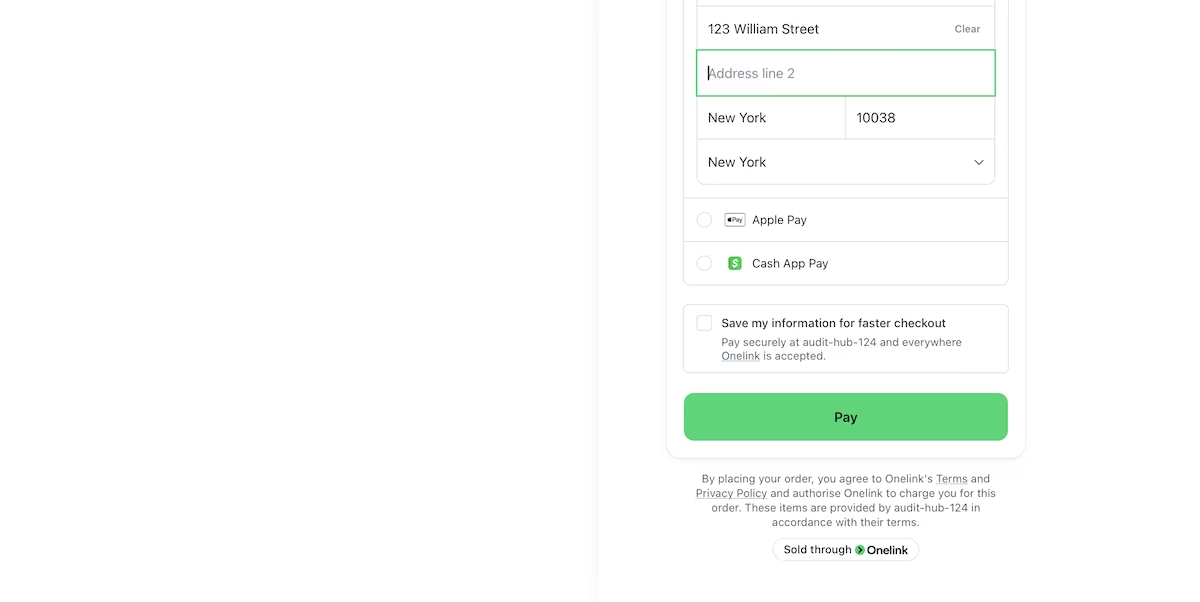
The Stripe checkout for the $149 package, running in sandbox mode.
Step 7: Deliver the First Order
The last step is doing the actual work and getting it to the customer.
The admin order view displayed the customer's brief on the left and the audit editor on the right, with a summary field, a body editor with formatting controls and a preview tab, and a repeatable list for recommendations. I wrote a short audit covering the three problems from the brief, added five recommendations, and clicked Publish & notify customer.
A confirmation appeared reading "Audit delivered, customer notified," the status flipped to Delivered on both sides, and an email arrived in my inbox with a Read my audit button linking straight back to the account.
The audit rendered on the customer's side exactly as I wrote it, headings and paragraph breaks intact.
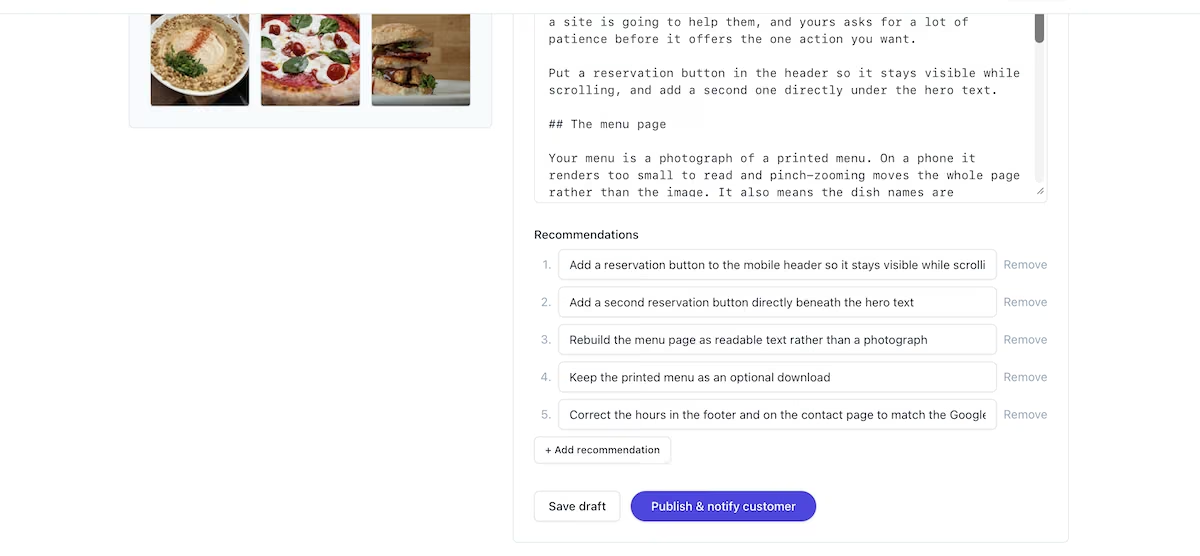
The audit editor with the summary, body, and five recommendations filled in.
The notification email arriving in the customer's inbox with a link back into their account.
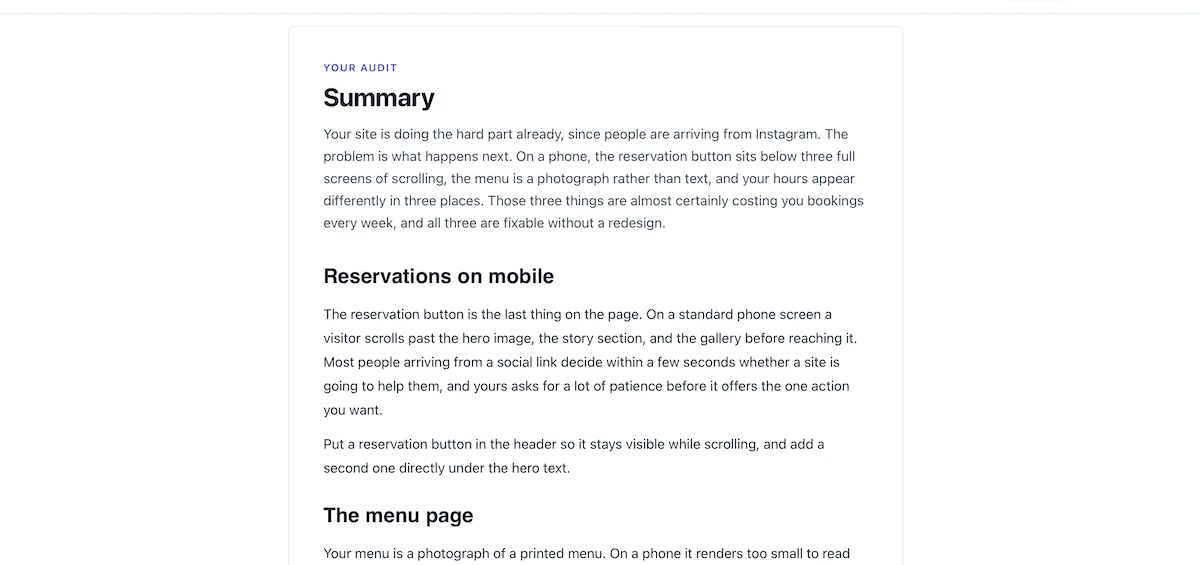
The finished audit as the customer reads it, with headings and formatting intact.
Also read our how to build a website guide for the build itself, from platform choice through going live.
Common Mistakes to Avoid
- Trusting the first statistics you find: The agency behind the $101 to $750 figure sells audit packages starting at $8,600 a month, so work out what a number is selling before you price against it.
- Building it piece by piece: Every extra instruction is another pass over what's already built, and each pass spends credits. Putting the pages, the payment, the accounts, and the admin area into one brief kept this build at 23.09.
- Skipping your own checkout: Half the issues I found in this build, including the counter mismatch, appeared only because I bought the product as a customer would.
- Clicking the wrong publish button: Emergent's Publish pushes your whole site live and spends credits, while the Publish button inside the audit editor only sends one order to one customer. Check which screen you're on before you click.
- Selling something the software can't actually do: Mine takes the payment, collects the brief, and delivers the finished audit. It doesn't write the audit for me, though; that's all me.
Where the First Customers Come From
The software was the fast part. Finding people to sell to takes far longer than 90 minutes, and AI doesn't shorten it much.
I'd start with the three owners who gave me the idea, because a warm introduction beats a cold email every time. Each of them knows other owners in the same city with the same complaints, and an introduction from someone who's already read their own audit costs nothing to ask for.
Past that, I'd work from one-star reviews in a single city. Pull the recurring gripes about a restaurant's website, screenshot the exact problem on that site, and put the price in the first message. A specific problem with a picture attached reads like help rather than a pitch.
Two channels worth testing first: the trade you came out of, and one local area you can walk into. Both give you a reason to be in touch that isn't selling an audit. Once you know which message gets replies, growing it is a matter of doing more of the same.
Taking It Further
If you spend your day in an AI chat window, Emergent MCP lets you make changes to your site from there instead of opening another tab.
The bigger opportunity is what happens after someone reads their audit. They've just been told what's wrong with their website, and they want it fixed, so the next thing to sell them is the fix.
For the website piece specifically, read our how to create a small business website guide.
Emergent Makes Starting a Business With AI Easier
Knowing how to start a business with AI largely comes down to knowing which parts to do yourself and which parts to delegate. The idea, the judgment, and the work you're selling are all on you. You can use AI to handle the website, the checkout, the customer accounts, and the emails.
Here's how Emergent helps:
- Payments without setup: Stripe runs in a sandbox from the first minute and goes live when you claim the account, so you can test a real purchase before committing to anything.
- Email that arrives: Managed delivery sends confirmations and notifications with no keys, no domain records, and nothing to configure.
- Customer accounts and admin included: Logins, a customer area, and a private admin section are produced from the same description as the rest of the site.
Two things I'd flag before you start: Output quality tracked closely with how clearly I described things, and my saved customer data got out of sync after I republished the site several times.
Ninety minutes and 23.09 credits took me from an idea to a delivered order, showing that the software side holds up end to end: the checkout takes a card, the account gets created, and the finished audit lands where the customer can read it. Whether it becomes a business worth running depends on the next 60 customers rather than the first 90 minutes.
If you want to try the same thing, start with Emergent and describe your business in one go. The same approach works for any digital business you want to test.

Most AI app builders stop at prototypes. Emergent creates production-ready apps you can actually launch.
- Production-ready apps
- Web & mobile apps
- Deploy in minutes







