



TL;DR
- Emergent: Best for building a custom month-end close, exception, or client-review workflow.
- QuickBooks with Intuit Intelligence: Best for firms whose clients already keep their books in QuickBooks.
- Xero with JAX: Best for Xero-based reconciliation with AI assistance.
- Booke AI: Best for bank-feed and document automation inside QuickBooks and Xero.
- Dext: Best for receipt and invoice capture.
- Double: Best for client questions and month-end close management.
- Docyt: Best for continuous bookkeeping and multi-client oversight.
- Digits: Best for AI-native accounting with conversational book review.
- Vic.ai: Best for higher-volume accounts payable work.
- Ramp: Best for card, expense, and spend automation.
- BILL: Best for accounts payable, accounts receivable, and payment workflows.
- ChatGPT: Best as a flexible transaction-review and analysis assistant.
The first time I tried to run the same bookkeeping test across the AI tools for bookkeepers on this list, the surprise came before the accounting did.
I compared all 12. I completed hands-on tests with four, reached the product or AI gate in four more, and checked the remaining four against current product information, pricing, and user feedback. I used a fictional Texas roofing company so no real client data entered any test.
The right tool depends on where your bookkeeping work gets stuck. Receipt capture, bank reconciliation, client chasing, spend control, close management, and one-off analysis call for very different products.
Where AI Helps Bookkeepers Most
AI already has a real place in accounting work. In Intuit's 2025 QuickBooks Accountant Technology Survey of 700 US accounting professionals, 46% said they used AI daily, and 81% said AI had improved their productivity. Automation was already common in accounts payable and receivable, payroll, data entry, and transaction processing.
I also reviewed the AI Bookkeeping discussion on r/Bookkeeping. The comments were far more cautious than most product pages. Bookkeepers talked about poor suggestions creating cleanup work, while repeated transactions with a known pattern came up as a better use of automation.
AI earns its place when the source data is clear and the decision can be checked quickly.
Mercury, a business banking platform, takes a similar approach in its AI bookkeeping guidance. AI can handle bank-feed syncing, categorization, receipt matching, recurring entries, and anomaly detection. Human reviewers still handle exceptions, corrections, tax work, and decisions that need business context.
If you're also choosing AI tools for small business, I'd use the same rule. Start with work you repeat often and can review easily.
The Core Difference Is Where the AI Works
These products can all appear under "AI bookkeeping," even though they sit in very different parts of the job.
The four main groups are:
- Core accounting systems: QuickBooks, Xero, Digits, and Docyt work directly with books, transactions, reconciliation, and financial records.
- Bookkeeping layers: Booke AI, Dext, and Double work around an existing accounting file or close process.
- Finance workflow tools: Vic.ai, Ramp, and BILL focus on invoice processing, spend, approvals, or payments.
- Flexible tools: Emergent lets you build a custom bookkeeping workflow, while ChatGPT can review exported data and help you think through exceptions.
The product category changes what a fair test looks like.
A chatbot can review a pasted CSV in minutes. A bookkeeping product may need a connected company file because its value comes from the history, documents, rules, and bank activity already inside the account.
How I Researched and Tested These AI Tools for Bookkeepers
I used a fictional US service business called Lone Star Roofing & Repairs, based in Austin, Texas.
My controlled bank file had 12 transactions and six planted issue types. I included a duplicate pair, an inter-account transfer, a restaurant charge with unclear business purpose, a customer refund, a loan payment with an unknown principal-interest split, and an ACH debit with missing payee information.
For document capture, I made two fictional receipts with known dates, references, totals, tax amounts, and card details. For custom workflow testing, I built CloseDesk, a month-end review app for a three-person bookkeeping firm managing 12 fictional clients.
Here is the testing split:
- Hands-on tested: Emergent, Dext, Digits, and ChatGPT.
- Hands-on access attempted: QuickBooks, Xero, Double, and Docyt.
- Checked through current official product information: Booke AI, Vic.ai, Ramp, and BILL.
I tracked about 70 minutes across the timed sessions, plus the Emergent build and earlier QuickBooks exploration.
Dext took about 25 minutes from first login to finishing the receipt test. Digits took about 12. I spent roughly 10 minutes each on Xero, Double, and Docyt before an account, demo, or billing gate stopped the planned test. ChatGPT returned its useful transaction review in around three minutes.
My guiding question was: How much bookkeeping work did this tool remove before I had to step back in?
For every product I could use, I looked at what happened with unclear work, how easy it was to trace a result, and how much effort came before the useful part.
Bookkeepers whose week also includes 1099 prep, sales tax filings, chart of accounts cleanup, or client write-up work may need a wider mix of AI tools for accountants.
12 AI Tools for Bookkeepers at a Glance
Quick comparison: These prices use the standard public rate instead of temporary signup discounts. Annual pricing appears where the vendor publishes a clear annual rate.
| Tool | Best For | Works With | Free Option | Starter Paid | Test Depth |
|---|---|---|---|---|---|
| Emergent | Custom workflows | Custom integrations | Free plan | $20/month($17/month billed annually) | Hands-on |
| QuickBooks | Existing QBO books | QuickBooks Online, native | 30-day trial | $38/month | Access-limited |
| Xero | Reconciliation | Xero, native | Free Trial | $25/month | Access-limited |
| Booke AI | QBO/Xero automation | QBO, Xero | None | $129/business/month | Research-based |
| Dext | Receipt capture | QBO, Xero | 14-day trial | $25.21/monthbilled annually | Hands-on |
| Double | Month-end close | QBO, Xero | Demo + trial | $10/client/month | Access-limited |
| Docyt | Continuous books | QBO; Profitbooks native ledger | Free firm plan | $99/entity/month | Access-limited |
| Digits | AI-native books | Native ledger; QBO/Xero migration paths | Trial | $65/month(Essentials) | Hands-on |
| Vic.ai | High-volume AP | QBO and other ERP/accounting integrations | Demo only | Custom pricing | Research-based |
| Ramp | Spend and expenses | QBO, Xero | Free plan | $15/user/month | Research-based |
| BILL | AP, AR, payments | QBO, Xero on Team+ | None for AP/AR | $49/user/month | Research-based |
| ChatGPT | Flexible review | File upload/export workflow | Free plan | $8/month | Hands-on |
1. Emergent for Custom Month-End Workflows
Emergent is our product, so I'm stating that relationship before getting into my test.
I used it for a job that standard accounting products often leave spread across spreadsheets, email, and task boards. I built CloseDesk, a month-end review workstation for a fictional three-person bookkeeping firm.
I started with 208 credits in the account. The fictional firm had 12 small-business clients, with Lone Star Roofing & Repairs as the main file.
This was the core prompt I used:
Build a responsive web app called CloseDesk for a three-person bookkeeping firm managing 12 small-business clients.
This is a demonstration app. Use fictional data only. Do not request or use real financial or personal information.
The main job of the app is to help bookkeepers manage month-end close and see which client files still need attention.
Create these areas:
- Dashboard
- Clients
- Month-End Close
- Exceptions
- Document Requests
- Reports
For each client, track the assigned bookkeeper, close due date, close status, bank-reconciliation status, number of uncategorized transactions, number of missing documents, number of open exceptions, and last client response.
Seed 12 fictional US small-business clients. Use Lone Star Roofing & Repairs in Austin, Texas as the main demo client.
Do not make autonomous accounting entries or tax decisions. Any suggested financial action must require human review and approval.
Before building, the agents asked three questions. I chose a light bookkeeping-style design, persistent exception and checklist data, and an open demo with no login.
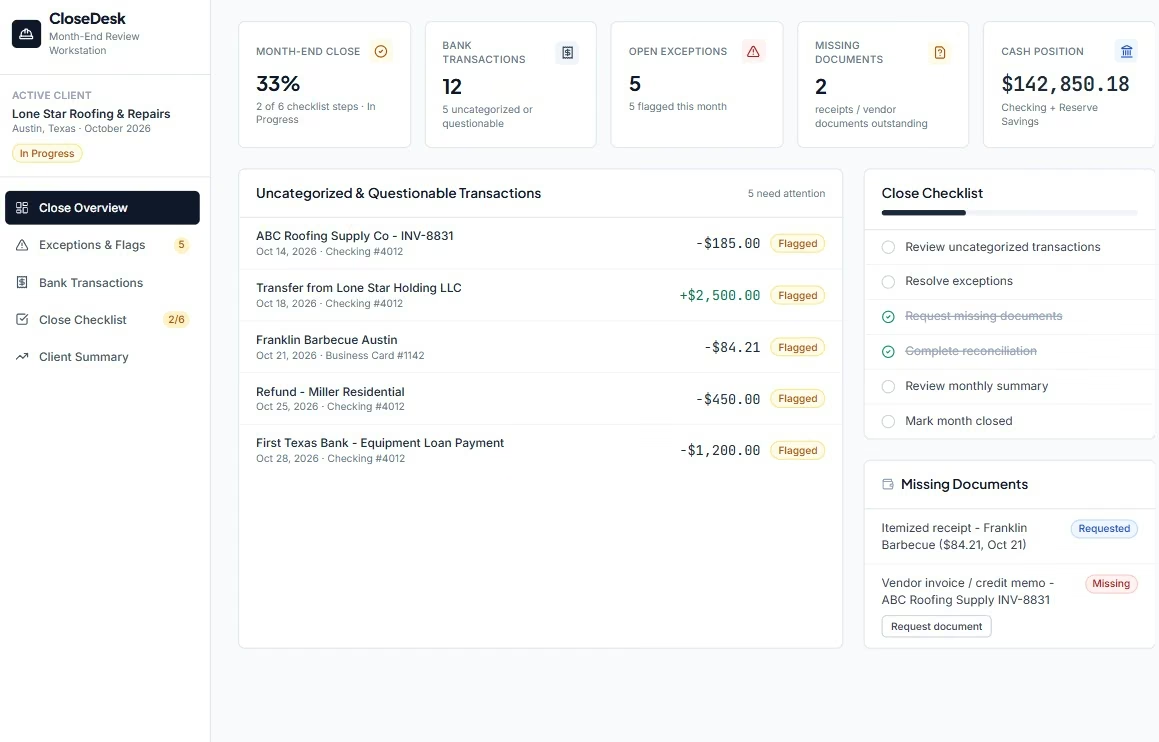
The finished CloseDesk view showed 12 bank transactions, five open exceptions, two missing documents, and 33% month-end progress. The close checklist had six steps, with two completed in the screenshot I kept.
I liked the exception view most. A $185 vendor charge, a $2,500 transfer, an $84.21 restaurant purchase, a $450 refund, and a $1,200 equipment-loan payment all sat in the same review area.
The workflow gave each item somewhere to go. A document could be requested. A close task could stay open. A questionable entry could wait for a bookkeeper.
My verdict: I would use Emergent when the problem sits around the books, especially close tracking, client requests, exception handling, or a firm-specific approval process.
Emergent is an AI app builder, so the workflow is yours to define. If you want bookkeeping-specific prompt ideas, the bookkeeping app builder gives you a useful starting point.
And if the blank prompt box slows you down, Emmy can turn a rough idea into a build-ready prompt. Emmy sits inside Emergent's web product, is free to use, and uses no credits. It can also explain controls or answer questions about the project you have open.
If you already plan workflows in ChatGPT or Claude, the Emergent MCP Connector can start an Emergent build from that chat and return a preview link.
Key Features
- Custom close workflow: Build the statuses, requests, exception queues, and approvals your firm already uses.
- Plain-language changes: Ask for a new screen, field, report, or workflow without translating the request into technical instructions.
- Web and mobile apps: Build an internal close dashboard for the web or a mobile client-request and approval flow when your bookkeeping process needs one.
- GitHub connection: Standard includes GitHub integration if you want access to the generated code later.
Pros and Cons
Pros:
- Your process can shape the app: CloseDesk followed the month-end workflow I described.
- Exceptions stay visible: Five open issues sat beside missing documents and close progress.
- The first version can grow: You can add client views, reports, or new approval steps later.
Cons:
- Credits affect cost: Extra build rounds consume more credits.
- Clear prompts help: Poorly scoped requests can create extra revision work.
- You still need an accounting system: My CloseDesk test focused on the work around the ledger.
What Users Say

Reviewers praise the ability to describe an app in plain language and get working software quickly.
The clearest criticism is around credits and cost visibility. Himanshu J. said pricing and token usage weren't always transparent enough to know whether a budget would carry a full build through to completion.
My test pointed the same way. I would decide the first version's scope before spending credits on extra screens.
Pricing
Standard: $20/month ($17/month billed annually) with 100 monthly credits. Pro costs $200/month ($167/month billed annually) with 750 monthly credits, a 1 million context window, Ultra Thinking, system prompt editing, and custom AI agents. Free includes 10 monthly credits, while Business and Enterprise use custom pricing.
Clean books are only useful if someone reads them. Our KPI dashboard guide covers turning those numbers into something a client can act on.
2. QuickBooks with Intuit Intelligence for Existing Client Books
With QuickBooks, the useful AI sits where many bookkeepers already work.
QuickBooks Online (QBO) now includes Intuit Intelligence. An active QBO subscription is required, and the assistant can work with the company's accounting data to answer questions, find information, or carry out supported tasks.
I opened QuickBooks during this test and worked through its available product environment. The controlled transaction test reached a limit once I tried to reproduce the same review I had run in ChatGPT.
The AI needed company accounting data. That makes sense for the product. It also meant I couldn't use a disconnected fictional file as a fair accuracy benchmark.
The current assistant supports prompts such as "Anything off in my books?", "What needs attention?", and "Check transactions." It can review unusual activity, help manage transactions, connect accounts, and guide accounting work.
QuickBooks' automatic categorization rules are even more useful for understanding its bookkeeping approach.
The product learns from vendors and categories you've used before. Familiar expenses can move through automatically when confidence is high.
Loans, owner draws, transfers, checks, money-in transactions, and entries without enough history stay in the review flow. That is exactly where I want those items.
The $2,500 transfer and $1,200 loan payment in my own benchmark are good examples. Both need context. A product that treats them as ordinary expenses creates cleanup later.
My verdict: Start with QuickBooks' own AI if most of your client files already live in QBO. The bookkeeping history is already there, and the review happens inside the same system you reconcile.
Key Features
- Plain-language book review: Ask about unusual transactions or items that need attention.
- Recurring categorization: Familiar transactions can move faster after QuickBooks learns your patterns.
- Accounting AI: Higher plans add deeper reconciliation, anomaly, reporting, and finance tools.
- Connected context: The assistant reads the live QBO file, so it sees the client's transaction history.
Pros and Cons
Pros:
- The data is already there: QBO firms can use AI alongside the client history they already keep.
- Context-heavy items stay visible: Transfers, loans, and weak-confidence entries remain review work.
- One accounting home: Invoices, bank feeds, reports, bills, and reconciliation sit in the same product.
Cons:
- A fair demo benchmark is difficult: The useful AI needs an active company file.
- Automatic categories still need checks: User reviews show that transfer descriptions can be misread.
What Users Say
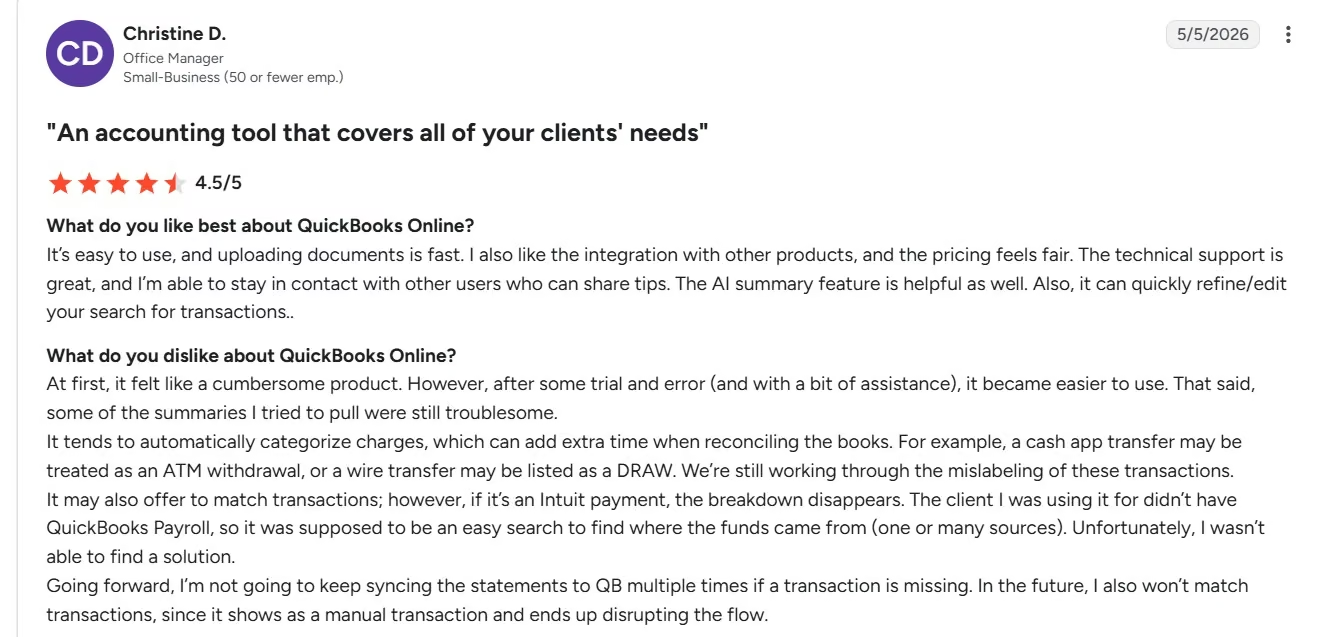
A May 2026 G2 reviewer, Christine D., praised QuickBooks for fast document uploads and useful AI summaries. She also found that Cash App and wire transfers could be mislabeled during automatic categorization, which added work during reconciliation.
Christine's experience matches the trade-off I saw. Automation can shrink routine work, and transaction context still needs a bookkeeper's eye.
Pricing
Simple Start: $38/month. Essentials costs $85/month, Plus $140/month, and Advanced $340/month. QuickBooks also offers a 10% discount for annual billing, which puts the annual equivalents at $34.20, $76.50, $126, and $306 per month.
Independent bookkeepers usually need a site as well as a toolkit. Our best website builders for accountants guide covers the options.
3. Xero with JAX for Bank Reconciliation
My Xero test got close to the AI review I wanted, then the demo restriction stopped it.
I spent about 10 minutes going through onboarding. I chose cash-flow tracking and moved into a company with example financial data.
Xero's assistant is Just Ask Xero (JAX). I opened JAX and planned to use this prompt:
Review the recent transactions in this business and tell me what needs human attention before month-end close.
Look for possible duplicates, transfers, refunds, ambiguous expenses, missing information, and anything you can't categorize confidently.
Don't guess when the available information isn't enough.
Tell me what you found and what still needs a bookkeeper.
The live organization didn't contain enough accounting history for a useful transaction review, so I switched to the fictional Demo Company.

The demo company had the history I needed.
JAX then displayed "JAX isn't available in demo organisations."
I stopped there instead of connecting a real bank account for a review article.
The product's current reconciliation approach is still worth understanding. Xero uses prior transaction behavior, rules, matches, and predictions to help with bank reconciliation. It can apply high-confidence work and leave lower-confidence matches for review.
Reconciliation is where this kind of AI makes sense. The bookkeeper can spend their time on the few entries that don't fit a familiar pattern.
My verdict: Xero is a good fit when your practice already runs on Xero and bank reconciliation takes a large part of the week. My own test also showed that you need a real organization to judge JAX properly.
Key Features
- Bank reconciliation: JAX can help match and reconcile statement lines.
- Review path: Lower-confidence work stays available for a person to check.
- Document capture: Xero can keep source documents close to the accounting record.
- No per-user plan pricing: Xero prices its US plans by organization rather than adding a separate subscription price for each user.
Pros and Cons
Pros:
- Reconciliation is central: The AI works inside a core bookkeeping task.
- Several people can work in the file: Unlimited user access is useful for firms and clients.
- The demo company is useful for learning Xero: I could explore the product with fictional books.
Cons:
- JAX was disabled in the demo: That blocked the controlled AI review.
- The useful AI needs a real organization: You need actual accounting history to judge the product fairly.
What Users Say

Xero's G2 reviews showed a 4.4/5 average across more than 1,500 reviews when I checked in September 2026. Reviewers frequently praise its reconciliation screen and ease of daily bookkeeping.
The criticism is useful too. Alys M. said her bank feed regularly disconnected and that the AI bot kept repeating the same answers.
Pricing
Early: $25/month. Growing costs $55/month, and Established costs $90/month. Xero subscriptions renew monthly. Prices rise to $27, $59, and $97 from October 1, 2026.
For the accounting side, read our AI tools for accountants guide.
4. Booke AI for QuickBooks and Xero Bank-Feed Work
I couldn't run Booke AI against the same disconnected test file, so I compared its current workflow directly with the bookkeeping problems in my benchmark.
Booke AI works inside QuickBooks Online and Xero. It works off the accounting file and bank feed you already have, so nobody rebuilds a client from scratch.
Its role is simple.
Each day, it can review new bank-feed transactions, categorize them, look for related invoices, bills, or receipts, and bring exceptions back to the team. Missing support can trigger a document request. Firms can also create thresholds for when paperwork is required.
Think about the duplicate vendor charge in my test.
A useful product should ask more than "Which category fits this?" The better workflow checks whether the supporting document exists, whether another record already matches the transaction, and whether the item needs a person.
Booke AI also keeps an audit trail and exception review. Those two pieces are useful when several bookkeepers share a client portfolio because you can see what the AI handled and what came back for review.
The strongest fit here is a firm that already likes QBO or Xero.
My verdict: Pick Booke AI when bank-feed cleanup and missing documents are eating the day. Keeping the existing accounting system makes adoption far easier for a firm with established client files.
Key Features
- Daily bank-feed work: Review and categorize transactions inside QBO or Xero.
- Document matching: Look for bills, invoices, and receipts tied to a transaction.
- Missing-document requests: Ask for support when the expected document is absent.
- Exception history: Keep review items and prior actions visible.
Pros and Cons
Pros:
- You can keep QBO or Xero: There is no need to move the whole ledger.
- It checks supporting documents: That removes work beyond category suggestions.
- Rules can reflect firm policy: You can set thresholds around required documentation.
Cons:
- Connected books are part of the workflow: A disconnected CSV isn't a useful product test.
- Firm pricing needs a quote: The public accounting-firm tier has no fixed dollar amount.
- Sales experience can vary: Trustpilot feedback includes complaints about missed demo appointments.
What Users Say

Booke AI's Trustpilot reviews are mixed. Kelvin Salem said Booke AI reduced routine clicking because the tool handled normal transactions while his team focused on exceptions.
The criticism is useful too. Steph said processing invoices and receipts was still easier than in QuickBooks Online, but reported problems with duplicates, receipt matching, currency display, and inconsistent treatment of repeat suppliers.
Thomas Job had a much worse experience, reporting repeated missed demos and saying the product added work rather than reducing it.
Pricing
AI Bookkeeper (Business): $129/business/month. Accounting Firms uses custom pricing and includes multi-client management plus a white-label option. A separate annual dollar rate isn't exposed on the current US pricing view.
5. Dext for Receipt and Invoice Capture
Dext gave me the cleanest controlled document test because I knew every correct value before I uploaded anything.
The full session took around 25 minutes as a first-time user.
About 15 minutes went into navigation. I had to work out the practice-level dashboard, create Lone Star Roofing & Repairs as a client, skip the client invitation, enter the client workspace, and find the Costs inbox.
The actual receipt test was much faster.
My first fictional receipt came from Hill Country Hardware. It showed August 2, 2026, receipt R-41082, a $194.00 net amount, $16.01 tax, a $210.01 total, and a payment card ending in 4821.
Dext got those main fields right.
The second receipt was from Sunset Fuel & Mart. It showed August 11, reference F-88217, $94.73 net, $0.66 tax, a $95.39 total, and card ending 7734.
Those values came through correctly too.
Then I uploaded the Hill Country Hardware receipt again.
Dext rejected it and told me the file already existed within the account.
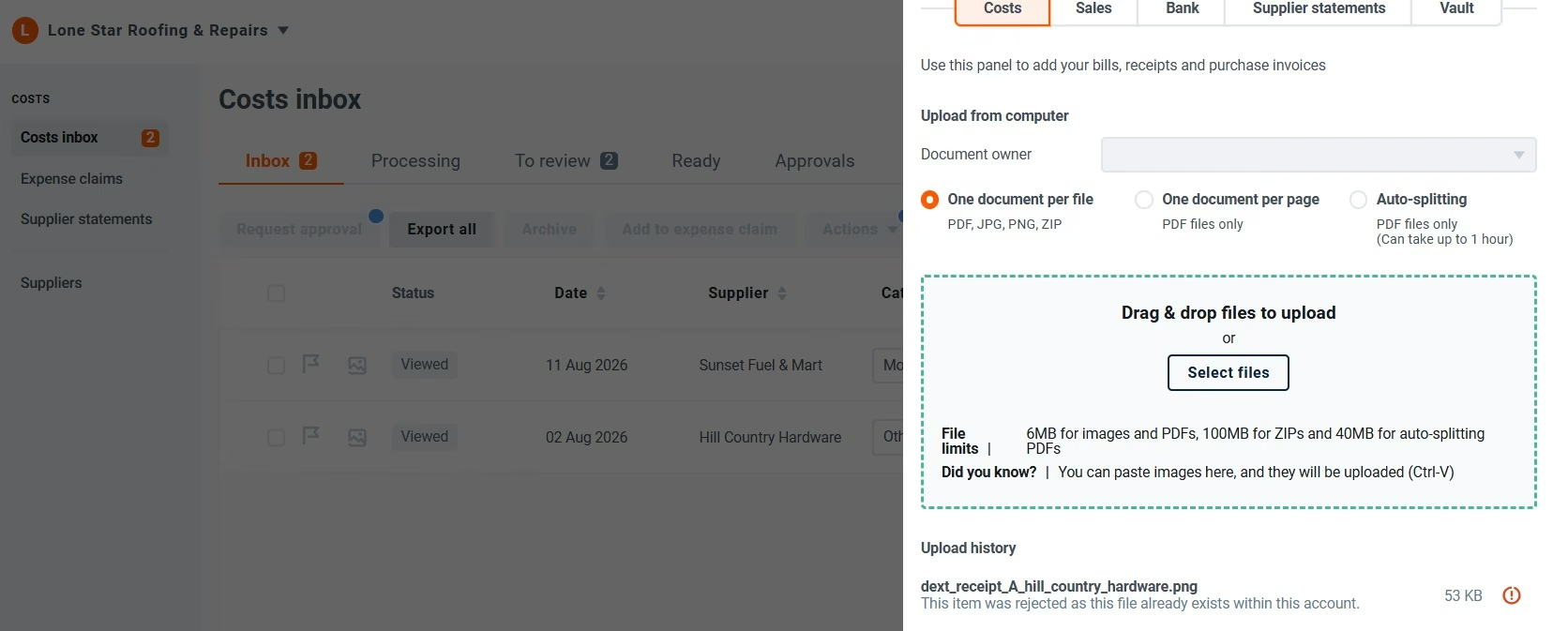
The duplicate check is small, practical, and easy to value. Duplicate documents create extra review work and can lead to duplicate processing if they move through unchecked.
Dext also supports automatic categorization and duplicate detection as part of its current bookkeeping product.
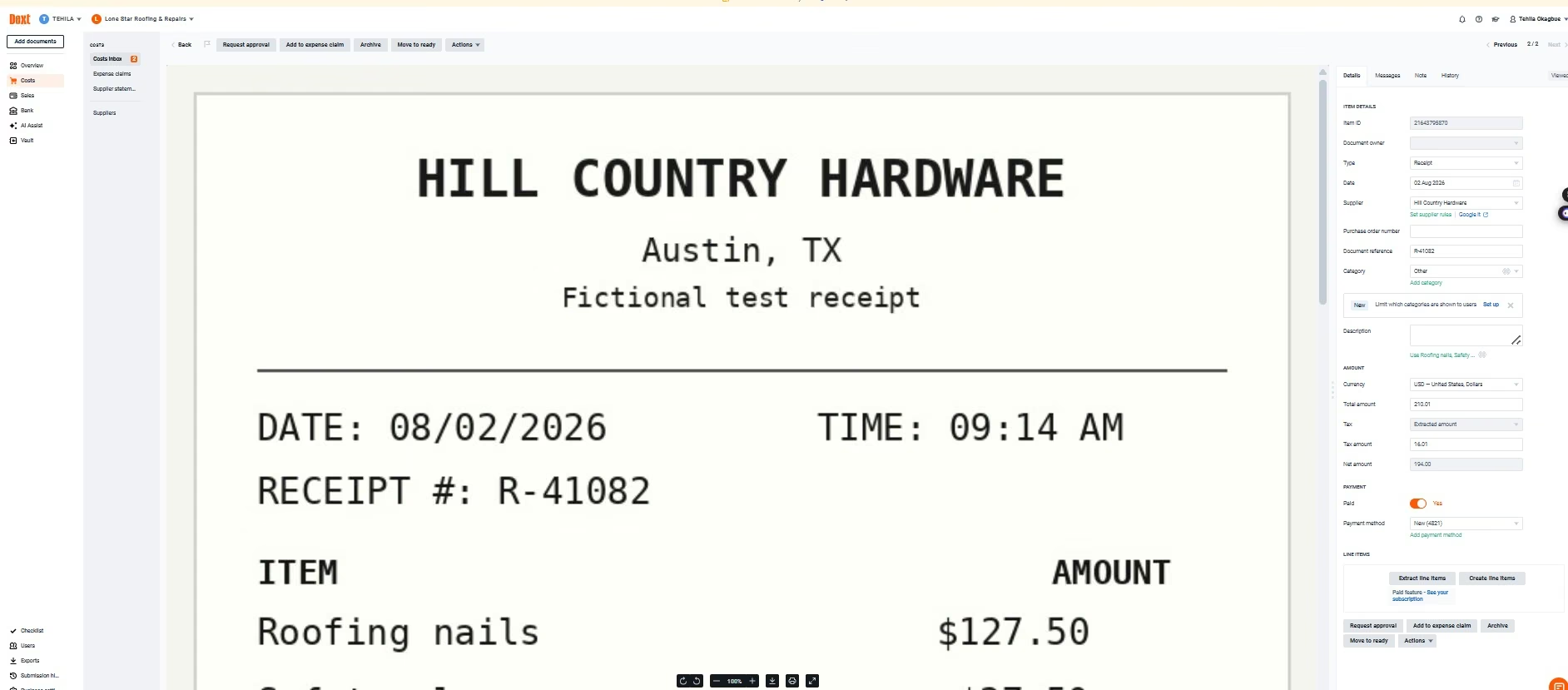
My verdict: Dext is my pick when document intake is the bottleneck. Once I reached the right client screen, the capture workflow was easy to verify.
Key Features
- Receipt and invoice capture: Upload by mobile, email, or file.
- Data extraction: Pull supplier, date, tax, total, and other bookkeeping fields from the document.
- Duplicate detection: Catch repeat uploads before they travel further.
- Accounting connections: Send reviewed data into major accounting products.
Pros and Cons
Pros:
- Both test receipts came through well: The main fields matched my source files.
- The duplicate test worked: Dext rejected the repeated receipt.
- The source stays visible: I could compare the image and extracted fields on the same screen.
Cons:
- First-time navigation took time: Most of my 25-minute session happened before the test itself.
- Document types can behave differently: Two receipts don't prove the same result for every bank statement or invoice format.
- Statement extraction is less consistent: Reviewer feedback was stronger on receipts than on bank statements.
What Users Say
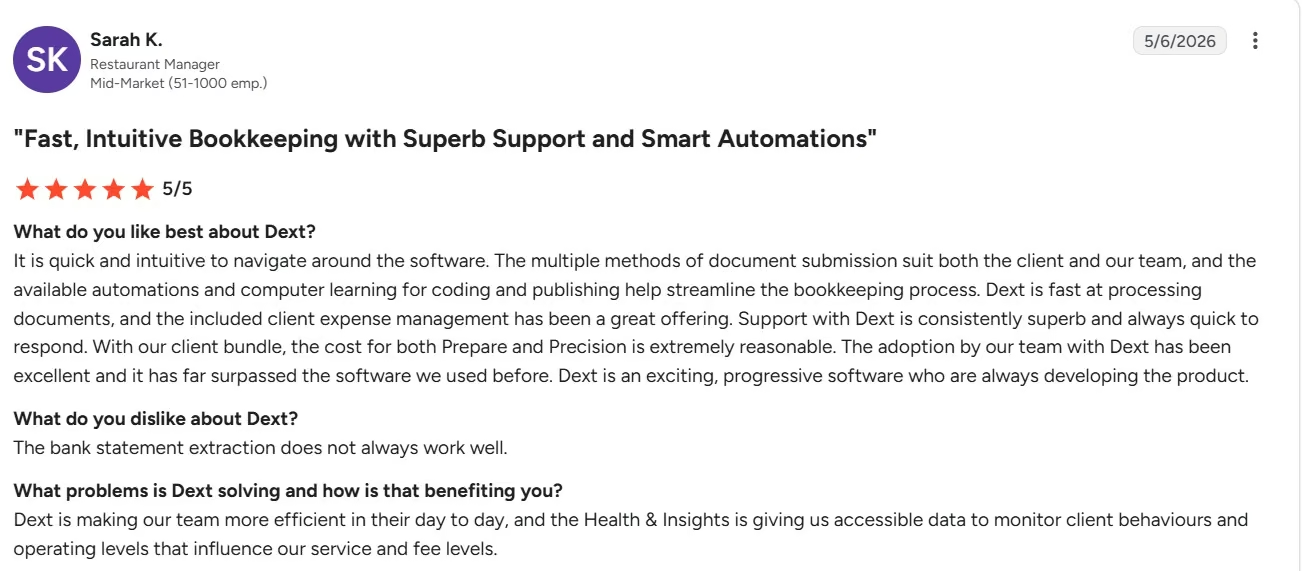
Dext's G2 reviews showed 4.5/5 across 271 reviews as of September 2026. In May 2026, Sarah K. said Dext was fast at processing documents and praised the client expense-management workflow.
She also said bank-statement extraction didn't always work well.
Pricing
Dext Business: $25.21/month on annual billing, or $302.50 billed yearly, for 250 documents per month and five users. Monthly billing is also available, and Dext advertises up to 20% savings on annual billing.
6. Double for Month-End Close and Client Questions
I gave Double about 10 minutes before the product sent me into a sales flow.
The public product looked close to the type of bookkeeping work I wanted to test. Double focuses on month-end close, bank feeds, client questions, receipt work, reporting, and accounting corrections.
I clicked Start Now.
The next useful screen asked how many bookkeeping or Client Accounting Services (CAS) clients I managed. It then explained that the following page would let me schedule a demo.
The self-serve path ended there.
I never reached Ask Double or a transaction-review surface where I could paste my 12-row benchmark.
The access gate is still important for a small bookkeeping practice. Double sells through a firm buying process, so budget for a demo call before you can evaluate it.
The product itself is designed around close management. Core covers the everyday close: a two-way ledger connection, a branded client portal, AI Bank Feeds, AI Fix this Rec, task management, firm-wide reporting, one practice email, and Ask Double.
Plus adds receipt management and one-click AI financial summaries. Scale handles the heavier accounting automation, including accruals, allocations, AI journal entries, AI bills, and AI flux analysis.
Core covers most of the everyday close work that sits around the ledger.
The client-question piece is especially useful. A month-end close often stalls because someone needs a receipt, a business-purpose note, or an answer from the client.
Putting that conversation next to the close work can save the bookkeeper from rebuilding the story later.
My verdict: Double is worth a demo when you're managing several client closes and client questions are spread across email, accounting software, and task tools.
Key Features
- Client close tracking: Run recurring close tasks across a client portfolio.
- Client portal: Collect questions, documents, and responses in the same workflow.
- AI Bank Feeds: Add AI help to transaction review.
- Ask Double: Query client accounting information inside the product.
Pros and Cons
Pros:
- Built around bookkeeping firms: The workflow matches recurring client close work.
- Client questions stay close to the work: This can cut down on email chasing.
- Per-client tiers: Firms can choose different levels for different clients.
Cons:
- My test stopped at the demo gate: I couldn't run the controlled transaction benchmark.
- Xero integrations have room to improve: Current user feedback mentions refresh and attachment-sync friction.
What Users Say
Double's G2 reviews showed a 5.0/5 average across 79 reviews, which is worth treating carefully.
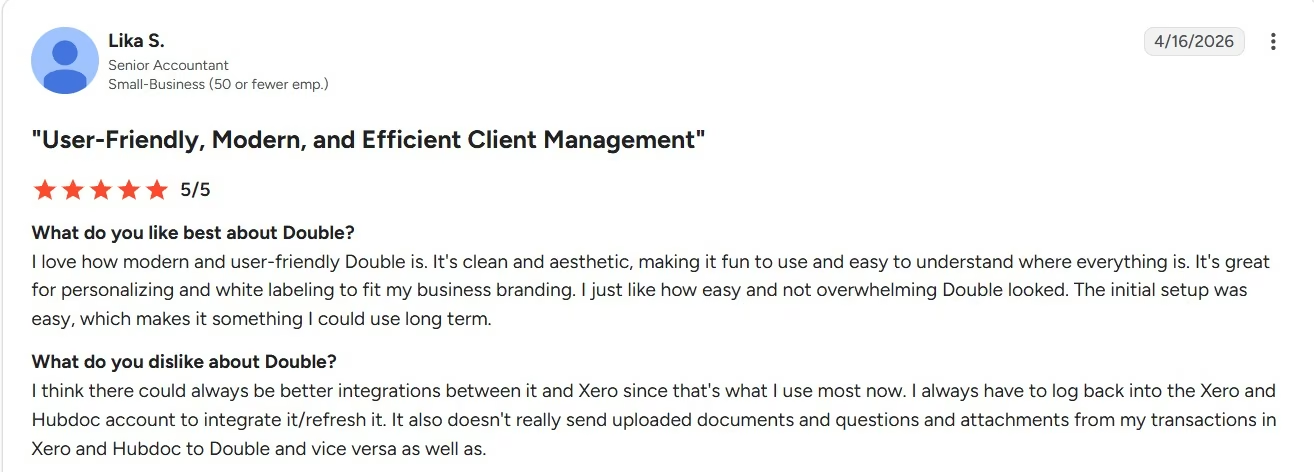
In April 2026, Lika S. praised Double's clean interface and the ability to keep client questions, documents, and bookkeeping items in one place. She also wanted stronger Xero and Hubdoc syncing and said she had to log back in to refresh those connections.
Pricing
Core: $10/client/month. Plus costs $25/client/month, and Scale costs $50/client/month. Plans bill monthly per connected client and include unlimited users.
7. Docyt for Continuous Bookkeeping
Docyt let me get deeper into onboarding than Double did.
I created Lone Star Roofing & Repairs as the fictional business. The onboarding asked for business type and industry so the product could prepare the accounting structure.
I moved through the accounting step and entered fictional bank details.
Then Docyt asked for a billing method.
I stopped there. I didn't want to add a real payment method simply to finish an article test.
My hands-on test only covers Docyt's onboarding and access path. I didn't reach the transaction-categorization or reconciliation results.
Docyt's current product line is still interesting for bookkeeping firms because it now has a free Accountant Copilot tier.
Accountant Copilot includes AI transaction categorization, bank and credit card reconciliation, month-end close automation, QBO integration, document collection, a client portal, dashboards, and task management.
Profitbooks is the self-serve business product. It includes continuous AI processing, live bank feeds, automatic transaction matching and reconciliation, financial reports, an exception dashboard, and customizable categorization policies. It can run without another accounting product.
Docyt covers a wider span of bookkeeping than a receipt tool or bank-feed assistant.
For a bookkeeping firm, the Accountant Copilot path is the one I'd look at first. You can keep QBO clients while bringing transaction work and close oversight into a central view.
My verdict: Docyt is worth a closer pilot when your firm wants one place to watch several client books. My own access ended before I could judge the accounting output.
Key Features
- Multi-client dashboard: Monitor QBO clients from a firm-level view.
- Transaction categorization: Use AI to work through routine bank and card activity.
- Reconciliation and close: Bring bank review and month-end work into the same product family.
- Exception dashboard: Keep questionable items visible for a person.
Pros and Cons
Pros:
- Accountant Copilot starts free: Firms can enter at $0 per entity.
- The product covers several bookkeeping stages: Categorization, reconciliation, documents, and close live together.
- Profitbooks can run without another ledger: That gives small businesses a different path from a QBO add-on.
Cons:
- Billing stopped my planned test: I never reached the fictional transaction review.
- Onboarding asks for several business details early: You need to give the product enough context before reaching the daily workflow.
What Users Say
Docyt's G2 reviews showed 4.7/5 from 35 reviews, a small sample. Viren P. praised how easy it was to upload invoices, make payments, and check reports.
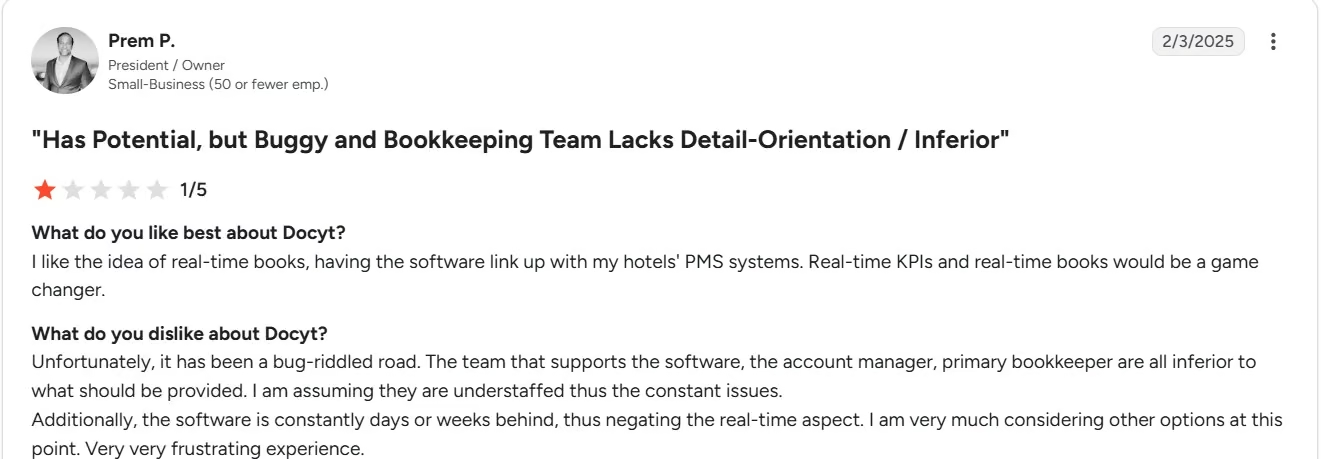
The criticism is worth reading beside that. Prem P. described the product as promising but reported bugs and bookkeeping-quality concerns.
Pricing
Accountant Copilot: $0/entity/month. Profitbooks costs $99/entity/month with month-to-month billing. Expense Management, Revenue Reconciliation, and Payroll Accounting add-ons each cost $50/entity/month. Enterprise Suite starts at $299/entity/month with annual billing, while Custom Suite uses custom pricing.
8. Digits for AI-Native Bookkeeping
The Digits demo gave me a real AI bookkeeping interaction in around 12 minutes, including onboarding.
I opened its demo firm and found Ask Digits.
Then I entered this prompt:
Review the recent transactions in this demo business and identify anything that needs human attention before month-end close.
Look for possible duplicates, transfers, refunds, ambiguous expenses, loan transactions that can't safely be categorized from the available information, and transactions with missing information.
Don't guess when the evidence isn't enough.
Tell me what you found and what still needs a bookkeeper.
Digits returned a long list of possible duplicates.
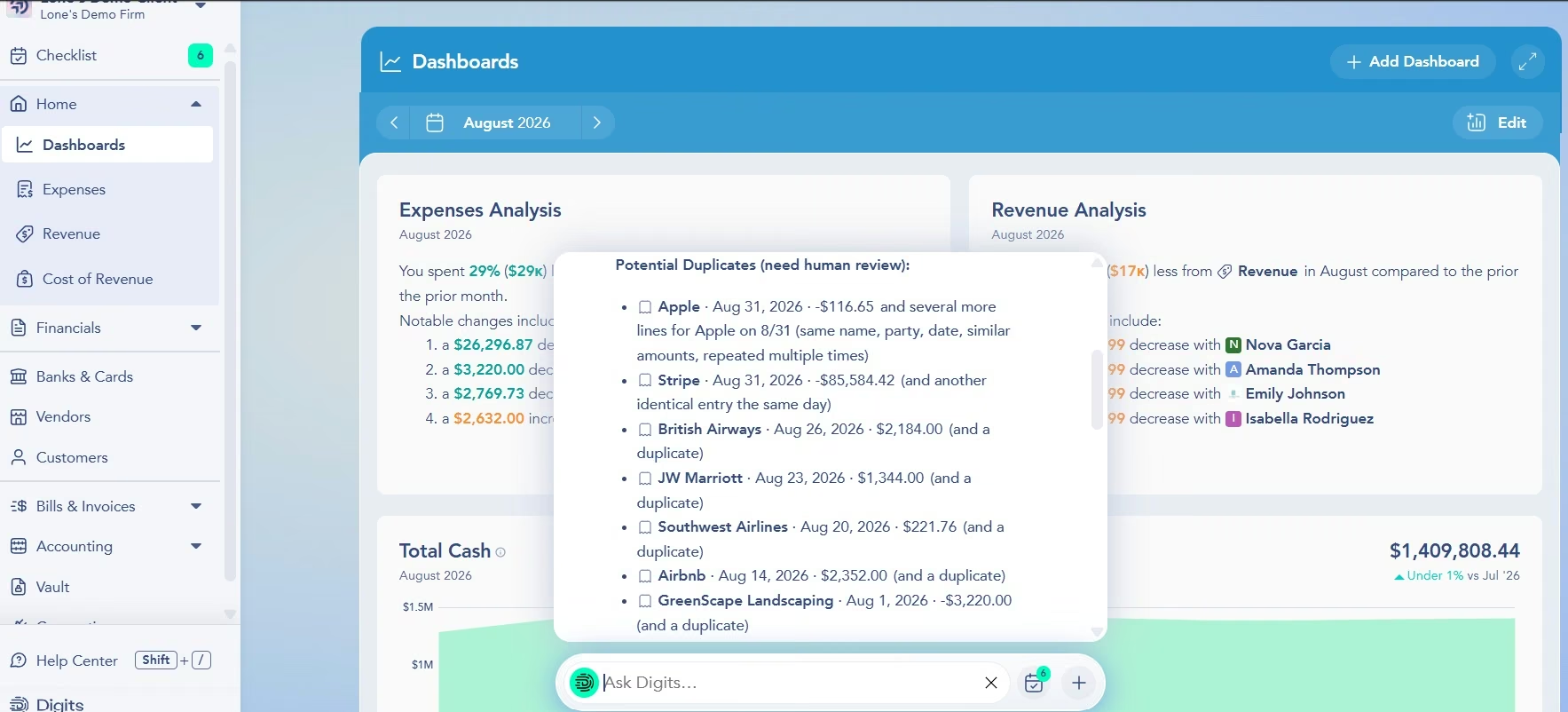
It flagged transactions from Apple, Stripe, British Airways, JW Marriott, Southwest Airlines, Airbnb, GreenScape Landscaping, and Gusto.
The answer also surfaced likely transfers, including a $85,584.42 Stripe entry, a $17,588.32 Gusto entry, and a $7,650.88 Mercury entry.
Digits also told me it found no clear refunds, unclear loans, or missing-information cases in the sample.
Digits told me it found no clear refunds, unclear loans, or missing-information cases in the sample.
The prompt mentioned those categories and Digits left them empty rather than manufacturing examples to fill every heading, which is what you want from a tool touching client books.
The results also linked back to the underlying transactions. That makes the answer easier to act on because a bookkeeper can move from the AI response into the financial record.
I couldn't score Digits against my six planted problems. Its demo company contained its own data, so I didn't know the correct hidden answer for every flagged transaction.
My verdict: Digits is the strongest fit here if you want the accounting system itself built around AI-assisted bookkeeping and plain-language book review.
Key Features
- Ask Digits: Ask questions about the books in everyday language.
- Bookkeeping agents: Every plan includes the Bookkeeper, Researcher, Reconciliation, and Quality Review agents.
- Practice management: Client-level plans, team roles, billing, and tasks are available for firms.
- Agentic Close: Mid-sized firm plans and the individual Pro tier add close-focused agents and reporting.
Pros and Cons
Pros:
- I reached useful AI quickly: The whole demo session took around 12 minutes.
- Findings linked to the books: I could move from an answer to its underlying transaction.
- The AI admitted when it found nothing: That gave me more confidence in the review style.
Cons:
- The demo had no answer key: I couldn't calculate a controlled accuracy score.
- Public user feedback is still thin: The G2 sample is tiny.
What Users Say
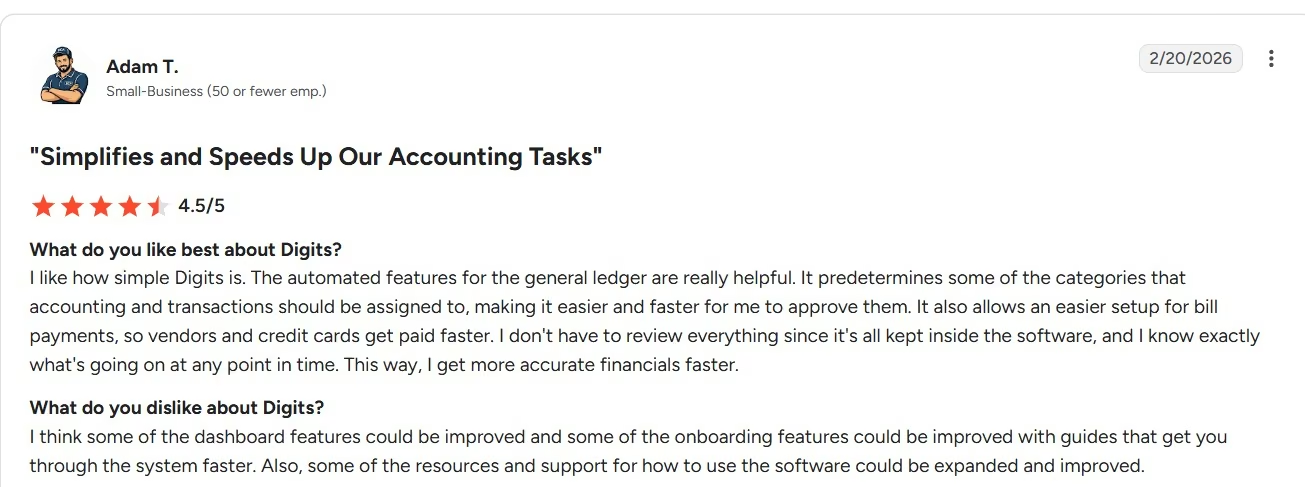
Digits' G2 reviews gave it a 4.8/5 rating from only five reviews when I checked it. Adam T. liked the simple accounting workflow and automatic general-ledger categorization.
He also wanted stronger dashboard features and better onboarding guides. With only five reviews, I give my own demo experience more weight than the rating average.
Pricing
Digits publishes three plans: Essentials at $65/month, Core at $100/month, and Pro at $250/month.
Firm pricing runs through its Accounting Partner Program, which offers partner-only plans and volume discounts rather than published per-client rates, so a practice has to apply to get its numbers.
9. Vic.ai for High-Volume Accounts Payable
I looked at Vic.ai through the lens of one specific problem: what happens when invoice processing itself becomes a serious workload.
Vic.ai focuses on accounts payable (AP). That includes invoice capture, coding, purchase order matching, approvals, payments, and analysis.
Its current August 2026 release is a good example of how deep that focus goes.
Vic.ai added more precise purchase order (PO) mismatch routing, multiple approvers inside one mismatch step, better exception filters, and line-level validation for invoice line amounts.
Those are AP-specific controls, built for the exceptions an AP clerk actually chases down.
Imagine a supplier invoice with a quantity error. The useful outcome is catching that mismatch before the invoice posts or gets paid, then sending it to the right reviewer.
Vic Assistant adds a conversational layer on top of the AP data. You can ask which invoices over a certain amount are still waiting for approval, which vendors had the highest spend, or how spending changed over a period. Results can return as text, tables, charts, or CSV exports.
Vic.ai also tells customers to review assistant output before using it for reporting, audits, or external communication. I like seeing that instruction stated clearly in a finance product.
I didn't have a public Vic.ai account for a hands-on invoice benchmark, so I kept this evaluation to its current AP workflow and real user feedback.
My verdict: Vic.ai fits a finance team with enough invoice volume to justify a specialized AP system. A small bookkeeping practice processing a modest number of bills can start with a lighter tool.
Key Features
- Invoice capture and coding: Pull financial fields from incoming supplier invoices.
- PO matching: Find mismatches before invoices continue through the workflow.
- Approval routing: Send exceptions to the right reviewer.
- Vic Assistant: Ask plain-language questions across invoice, vendor, spend, and approval data.
Pros and Cons
Pros:
- Deep invoice controls: The product targets real AP exceptions.
- Current PO validation: Quantity and unit-price errors can be caught before posting.
- Conversational AP analysis: Teams can ask questions without building another report.
Cons:
- The product has a narrow focus: It won't cover the whole bookkeeping job.
- Pricing needs a sales request: There is no standard self-serve dollar amount.
- Sales-led access: You need to talk to sales before you can fully evaluate the product.
What Users Say

Vic.ai's G2 reviews showed 4.7/5 from 26 reviews when I checked in September 2026. Reviewers frequently praise the time saved on invoice capture and routine accounts payable work.
The limitation I would watch is extraction accuracy. Steve A. said Vic.ai's invoice parsing was useful but could occasionally be incorrect and require a manual correction.
Pricing
Vic.ai: Custom pricing. Vic Assistant requires a paid Analytics package or add-on for continued access after its earlier trial period.
10. Ramp for Expenses and Spend
For Ramp, I focused on what happens before a transaction becomes month-end cleanup.
Ramp combines business cards, expenses, accounts payable, procurement, and accounting automation.
Catching context at purchase time is important because many bad month-end transactions start with missing information.
Take the $84.21 restaurant charge from my Lone Star benchmark.
When all you have is a bank line, you need to ask who spent it, whether it was business-related, and where the receipt is.
A spend platform can collect that information when the purchase happens. Ramp Free includes receipt collection and matching, invoice extraction, approval rules, bill payment, accounting rules, and QuickBooks Online and Xero connections.
Plus adds AI expense reviews, policy insights, approval recommendations, line-item coding, deeper accounting fields, and automatic syncing for routine spend. It also adds procurement features such as automated PO creation and three-way matching when that module is included.
For a bookkeeper, the outcome is cleaner source data before reconciliation starts.
You get a receipt, policy context, coding information, and an approval trail much earlier in the transaction's life.
I researched Ramp rather than running it against my fictional ledger because its strongest contribution comes from card and expense data generated inside the product.
My verdict: Choose Ramp when card spend and employee expenses create the bookkeeping mess. Choose a ledger-focused tool when reconciliation or financial reporting is the larger problem.
Key Features
- Receipt collection: Match supporting documents to company spend.
- Expense reviews: Surface policy and coding problems early.
- AP workflow: Capture invoices, code lines, route approvals, and pay bills.
- Accounting sync: Send approved spend into systems such as QBO and Xero.
Pros and Cons
Pros:
- Cleaner information reaches the books: That reduces client chasing later.
- A useful free plan exists: Small teams can start without a software subscription.
- Spend and AP can share one workflow: Card transactions and vendor bills can follow similar controls.
Cons:
- It isn't a general ledger: You still need accounting software for the books.
- Plus has another fee: A platform fee based on team size sits on top of the $15 per-user price.
What Users Say
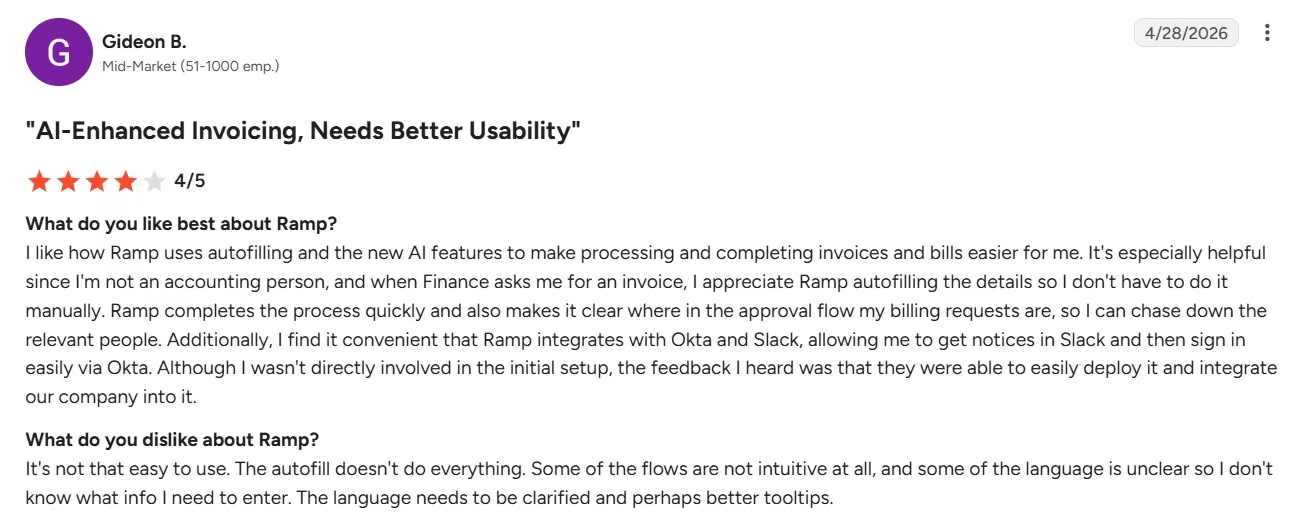
Ramp's G2 reviews show strong feedback around expense management and receipt handling. Gideon B. liked Ramp's autofill and newer AI features for processing invoices and bills.
The AI still has rough spots. Lauren F. said the AI could be a little slow or buggy and found the interface around company cards and spend accounts confusing.
Pricing
Plus: $15/user/month plus a platform fee based on team size. Annual billing saves 20%, bringing the per-user rate to $12/month before the platform fee. Ramp also has a Free plan, while Enterprise uses custom pricing.
11. BILL for AP, AR, and Payments
BILL earns its place when bills, invoices, approvals, and payments are the bookkeeping bottleneck.
Its Accounts Payable and Accounts Receivable product covers bill intake, approval workflows, vendor payments, customer invoices, reminders, and accounting connections.
At the Essentials level, BILL can collect bills, automate approval steps, make payments, manage a central bill inbox, and collect and verify W-9s. Its Invoice Coding Agent for multi-line bill coding starts on Team.
On the Accounts Receivable (AR) side, it can create invoices, track them, send reminders, and collect payments.
Team adds automatic two-way syncing with QuickBooks and Xero. Corporate extends the workflow into procurement.
The bookkeeping value comes from having the document, approval trail, payment status, and accounting connection tied together.
A bookkeeper can answer "Was this bill approved?" and "Was it paid?" without reconstructing the answer from an inbox.
The risk sits in the connection back to the ledger.
If a sync fails, the bookkeeper can end up reconciling two systems. That is why I'd add a quick BILL-to-ledger sync check to month-end rather than assuming everything moved correctly.
I didn't run BILL with the Lone Star benchmark because the test was built around bank transactions rather than a live AP workflow.
My verdict: BILL is a strong pick when your recurring pain is bill entry, approvals, payments, or invoice collection. A specialist reconciliation tool fits better when AP and AR already run well.
Key Features
- Bill capture and coding: Create structured bills from incoming documents.
- Approval rules: Route bills through the right people before payment.
- Payments: Pay vendors from the same workflow.
- AR automation: Create invoices, send reminders, and collect payments.
Pros and Cons
Pros:
- AP work stays traceable: The document, approval, and payment status live together.
- Two-way accounting sync starts on Team: That reduces duplicate entry.
- AP and AR share the same product: Firms can cover both sides of client cash movement.
Cons:
- Per-user pricing adds up: Every full seat raises the subscription cost.
- Sync problems still happen: QuickBooks connection issues show up in current user feedback.
What Users Say
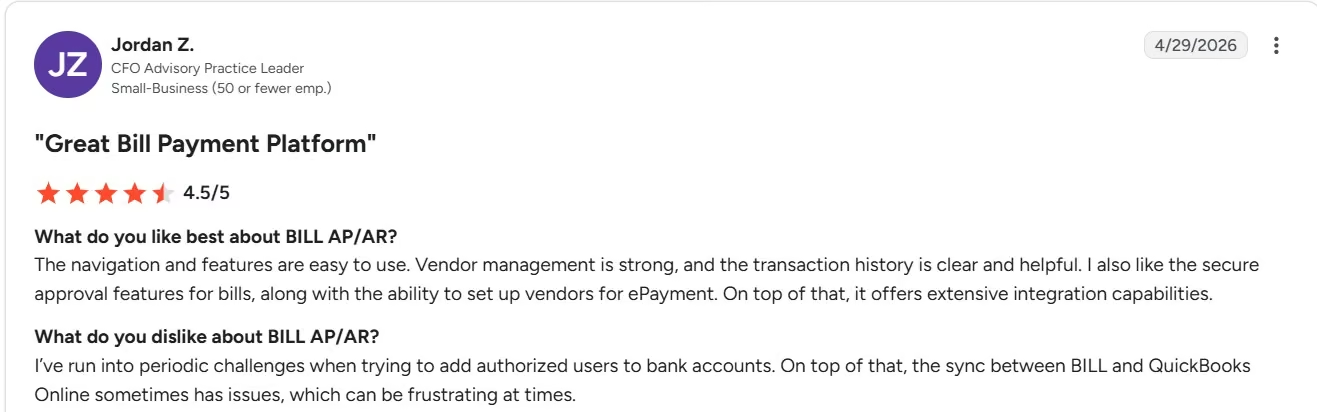
BILL AP/AR's G2 reviews showed 4.4/5 across more than 1,800 reviews at the time of writing.
In April 2026, Jordan Z. praised BILL's vendor controls, transaction history, bill approvals, and integration options. He also reported periodic issues with the QuickBooks Online sync.
Pricing
Essentials: $49/user/month. Team costs $65/user/month, Corporate costs $89/user/month, and Enterprise uses custom pricing. BILL Spend & Expense has no subscription or per-user software fee.
12. ChatGPT for Fast First-Pass Bookkeeping Review
ChatGPT was the easiest product to put through my controlled 12-transaction benchmark.
I pasted the review prompt before supplying the transaction data.
ChatGPT stopped and told me there was no transaction file in the conversation. It asked me to upload a CSV, Excel file, PDF, or pasted table before it would review the books.
The assistant was right to stop there.
Once the data was present, I used this prompt:
I'm reviewing the month-end bookkeeping for a fictional US service business called Lone Star Roofing & Repairs.
Review the transaction data I've provided and help me identify anything that needs human attention before month-end close.
In particular, look for:
- Possible duplicates
- Transfers that shouldn't be treated as income or expenses
- Refunds
- Personal-looking or ambiguous expenses
- Loan transactions that cannot safely be categorized from the bank description alone
- Missing information
Do not invent account codes, tax treatment, receipts, or business context.
If you don't have enough information to decide, flag the transaction for human review.
Tell me what you found, what you could handle confidently, what still needs a bookkeeper, and what you would do next.
The useful result came back in around three minutes.

ChatGPT caught all six issue types.
TX-002 and TX-003 became a possible duplicate pair. TX-005 was identified as an inter-account transfer. TX-007 stayed open because the restaurant charge lacked a clear business purpose.
It recognized TX-008 as a customer refund. It asked for a statement or amortization schedule before splitting TX-010's loan payment. TX-012 stayed open because an ACH debit with no vendor or memo wasn't safe to classify.
Seven rows appeared in the review because the duplicate involved two transactions.
Nothing was invented. ChatGPT left the account code, tax treatment, loan split, receipt, and business purpose blank rather than filling them in.
A general-purpose AI chatbot can work well as a first-pass reviewer when you give it clear data and limits.
If you're a solo bookkeeper handling client work alongside admin and marketing, this same flexibility is why ChatGPT also appears across many AI tools for freelancers.
My verdict: Use ChatGPT to shrink and explain the review queue. Keep your accounting system as the financial record and check every proposed bookkeeping decision.
Key Features
- File review: Analyze spreadsheets, CSV files, PDFs, and pasted data. Remove client names and account numbers first, and check your workspace's data controls before any real client file goes in.
- Plain-English explanations: Ask why an entry was flagged.
- Client-question drafting: Turn unclear transactions into specific follow-up questions.
- Flexible review rules: Change the prompt to focus on duplicates, transfers, unusual amounts, or missing support.
Pros and Cons
Pros:
- Fast result: The controlled review took about three minutes.
- All six planted issues appeared: The test covered the full answer key.
- It respected the prompt limits: Unclear accounting decisions stayed open.
Cons:
- There is no native bookkeeping ledger in this workflow: You still need your accounting system.
- Prompt quality affects the result: Clear instructions produced the safer answer.
- Specific financial output needs checking: Current finance-user feedback says precision can drop on narrow tasks.
What Users Say

A Finance Manager named Hazal said on G2 that she uses ChatGPT for tasks including financial-data analysis and structuring reports because it reduces manual effort and speeds up her workflow.
She also warned that responses can lose depth or precision in highly specific situations and should be double-checked. That is close to my experience. Give ChatGPT a well-defined review job, then verify the result against the books.
Pricing
Go: $8/month in the US. Plus costs $20/month, and Pro costs $200/month.
For firms, ChatGPT Business has two seat types that can be mixed in one workspace: Standard at $25/user/month ($20/user/month billed annually) and Premium at $125/user/month ($100/user/month billed annually).
Read More: 12 Best Free AI Tools I Tested: From Chat to Code (2026)
Other AI Bookkeeping Tools Worth Checking Out
- Paula by Bookeeping.ai: Paula combines transaction categorization, reconciliation, reporting, receipt matching, and chat-based accounting tasks. Its Start plan begins at $35/month, and I kept it here because several broad automation claims on the site went beyond what I could verify in my own test.
- Puzzle: Puzzle is aimed heavily at startups and accounting firms, with categorization, reconciliation, financial statements, AI Close, and chat. Starter costs $30/month ($25/month billed annually), but its startup focus makes it a stronger fit for venture-backed or finance-led companies than for the wider bookkeeping audience in this article.
- Zeni: combines software with a dedicated finance team, so you're buying a managed finance service as well as bookkeeping technology. Starter begins at $549/month ($494/month billed annually). I kept it outside the main list because it fits businesses that want to hand over more of the finance function, while this roundup focuses on tools bookkeepers can use inside their own practice.
- Microsoft 365 Copilot in Excel: Copilot helps explain formulas, summarize tables, and work through spreadsheet analysis inside Excel.
Microsoft 365 Copilot Business costs $25.20/user/month ($21/user/month billed annually) and requires a qualifying Microsoft 365 plan. I left it off the main list because it works on bookkeeping data without running the bookkeeping workflow.
Which AI Tool Should You Choose?
Start with the part of your week you want back.
Choose Emergent if:
- Your firm has a close, exception, request, or approval process that keeps falling back into spreadsheets.
- You want to build a workflow around the accounting software you already use.
- You have a clear idea of how your firm wants the process to work.
Choose QuickBooks with Intuit Intelligence if:
- Most client books already live in QBO.
- You want AI working with the ledger, bank feed, reports, and invoices already in the file.
- Familiar transaction coding consumes too much review time.
Choose Xero with JAX if:
- Your firm already prefers Xero.
- Reconciliation takes a large part of the week.
- You want AI suggestions tied directly to the accounting record.
Choose Booke AI if:
- You want to keep QBO or Xero.
- Bank-feed coding and missing documents create daily work.
- Your team needs a smaller exception queue.
Choose Dext if:
- Receipts and supplier invoices arrive constantly.
- Data entry is slowing the books down.
- Duplicate documents are a recurring headache.
Choose Double if:
- Several people manage client closes.
- Client questions are spread across inboxes and task tools.
- You want close status, documents, and communication together.
Choose Docyt if:
- You manage several client books or entities.
- You want ongoing categorization and reconciliation.
- A firm-level view would save your team time.
Choose Digits if:
- You want an accounting system designed around AI bookkeeping.
- Plain-language questions about the books appeal to your team.
- You want bookkeeping and close tools in the same product.
Choose Vic.ai if:
- Supplier invoice volume is high.
- PO matching and approval routing take real staff time.
- Your AP process deserves a dedicated system.
Choose Ramp if:
- Card spend and reimbursements create messy bookkeeping later.
- You want receipts and business context collected when people spend.
- Finance also needs spend controls.
Choose BILL if:
- Vendor bills, customer invoices, approvals, and payments are the bottleneck.
- Your clients need stronger AP and AR workflows.
- You want a clear approval and payment history.
Choose ChatGPT if:
- You want a fast review of an exported file.
- You need help turning unclear transactions into useful client questions.
- You already have accounting software and want a flexible analysis layer.
A wider stack of AI productivity tools can also help with email, meetings, research, and admin around your bookkeeping work.
Final Verdict on AI Tools for Bookkeepers
The best AI tools for bookkeepers solve different parts of the job.
QuickBooks and Xero make sense when the books already live there. Booke AI works deeper inside QBO and Xero bank feeds. Dext was excellent for the two receipts I tested. Digits gave me the strongest conversational experience inside an accounting product.
Double and Docyt target the close and multi-client work around the ledger. Vic.ai, Ramp, and BILL tackle narrower finance jobs where volume can eat up a bookkeeper's day.
ChatGPT was the fastest controlled reviewer in my test. It found all six planted issue types in around three minutes.
And Emergent covered a different gap. CloseDesk turned a custom month-end process into a working view with 12 transactions, five open exceptions, two missing documents, and a six-step close checklist.
Use AI to make the review queue smaller. Keep the bookkeeper in charge of unclear entries, financial judgment, permissions, and close approval.
If your biggest headache is the workflow around the books, Emergent lets you describe that process in plain English and build a first version with fictional data before real client information enters it.

Most AI app builders stop at prototypes. Emergent creates production-ready apps you can actually launch.
- Production-ready apps
- Web & mobile apps
- Deploy in minutes







