




Type a few sentences, and a small business website is ready by lunch. Hire a developer instead, and a modest project can stretch into a year or more. That's the AI website builder vs developer math this piece runs.
I spent three sessions spread across a two-week stretch building a five-page café website in Emergent, then tracked what it took and where it needed a second pass. I also dug through wage data and independent research to see what hiring a developer involves for a small business, beyond the first quote.
By the end, you'll have the cited cost ranges and comparison points to choose a path for your own project.
What Is an AI Website Builder?
An AI website builder is software that turns a written description into a working website, with no coding required.
That means:
- You type out what you want, in plain language
- The tool generates the pages and wires them together
- Hosting comes bundled in, often without a separate setup step
These tools are built for speed. Most can get a simple site live in a single sitting, no multi-week engagement required. That's why they show up so often for landing pages, portfolios, local service businesses, and quick first versions of an idea.
Emergent is the tool I used for the test build in this piece. You describe the site, watch it generate the pages, then refine anything that's off by prompting again, with no drag-and-drop editor to learn or blocks to click into place. That's how you build with AI.
The limitation shows up in customization. A tool that builds fast by picking sensible defaults trades some design freedom for that speed, and a hand-built site doesn't make that trade.
Hiring a Developer
When you hire a developer, you're paying a freelancer or agency, anywhere from one person to a full team, to build custom logic a template can't offer. A developer can wire up custom business rules, connect specialized integrations, and harden security around customer data or payments.
Website development from start to finish typically runs four weeks to a year depending on complexity, per Clutch, with custom logic and integrations like these pushing toward the upper end.
You're also paying for someone accountable to call when something breaks, though that comes with its own fine print: ownership of the finished code and design depends on the contract, and the site may still carry hosting, support, or plugin fees.
How I Tested the AI Website Builder Side of This

I tested with specific constraints on purpose, the kind that separates a tool that looks impressive from one that holds up: five pages for The Marigold Table, a fictional brunch spot, with a reservation system built to the rules below, the same core checks you'd need when you create a booking app.
I ran the build across three sessions inside a two-week window. The first session generated all five pages. Two shorter follow-ups then fixed the reservation-capacity logic and pushed for a less generic first-pass look.
Here's the exact brief that kicked off the build:
"Build a five-page website for The Marigold Table, a small independent brunch spot open Thursday through Sunday, 8 am to 2 pm.
I need a home page with a hero photo and our tagline, a menu page organized into three sections (Morning Plates, Coffee and Drinks, Sweets), a photo gallery with exactly 12 images split evenly across food, interior, and patio shots, a reservation page, and a contact page with our address, hours, and an embedded map.
The reservation form needs a party size field capped at 8 guests (anything bigger has to email us directly; do not let the form silently accept it), a date picker, and a time picker limited to our actual seatings: 8 am, 9:30 am, 11 am, and 12:30 pm.
We only have 6 tables, so once 6 reservations exist for a given seating, that time slot should show as full and suggest the next open seating instead of letting someone book a seventh.
Whatever I set as this week's featured dish needs to show on both the home page hero and at the top of the menu page automatically; I do not want to update it in two places every week.
Keep the whole thing readable on a phone without a hamburger menu hiding the reservation button. When I am done testing, I want to be able to pull the code and hand it to a developer later if we ever add real online ordering."
Four of the five pages were right, or close enough to right, on the first pass, across those three sessions.
The layout and page structure came together almost immediately, but the reservation-capacity logic took real iteration: the first output didn't correctly treat six reservations for a given seating as full or route a seventh attempt to the next open slot. A similar cap or scheduling rule on your own build may need the same back-and-forth.
The first full pass looked like a website within minutes, but it read generic, with safe spacing, evenly weighted sections, and nothing that said "brunch spot" specifically. A second, more specific prompt about the café's actual look and feel fixed that.
AI Website Builder vs Hiring a Developer: At a Glance
A quick side-by-side before the details:
AI Website Builder vs Developer: Key Differences
Both paths get a small business online by sharply different routes. Six differences separate them: who does the work, what it costs, how long it takes, how far you can push the design, what it can connect to, and who maintains it after launch. Most only show up once you start building.
Skill Required and Ease of Use
The skill gap between the two paths shows up before either site goes live.
I built The Marigold Table's site, reservation logic and all, without touching a line of code, which is the basic appeal of no-code website builders. When the capacity logic needed two more passes, I fixed it with additional prompts, no debugger required.
A developer using traditional coding works from a different baseline. Building that same reservation logic by hand takes:
- Comfortable command of the languages a browser reads (HTML, CSS, and JavaScript)
- The data storage and business logic running behind the interface
- The know-how to make a live booking rule hold up under real traffic
That's a specific, learned skill set, the kind that takes real time to develop, well beyond what a business owner picks up over a weekend to build a site alone.
That gap is why the two options attract different buyers. Someone willing to prompt and re-prompt until a page looks right can run an AI builder without anyone else's help.
If you'd rather hand the iterating to someone else, you're paying for a developer's technical fluency more than their time.
Cost: Sticker Price vs Total Cost of Ownership
Emergent's Standard plan runs $20 a month, while a freelancer's quote for the same five pages starts around $500. Neither number is what you end up paying.
Emergent's pricing runs in five tiers:
- Free: $0/month, no card required, 10 credits a month.
- Standard: $20/month ($17 billed annually), 100 credits a month.
- Pro: $200/month ($167 billed annually), 750 credits a month and a 1M-token context window.
- Business: No public price; contact sales. Adds role-based access control, single sign-on, and shared team workspaces on top of Pro.
- Enterprise: No public price; contact sales. Adds audit logs, self-hosted database support, and priority SLA on top of Business.
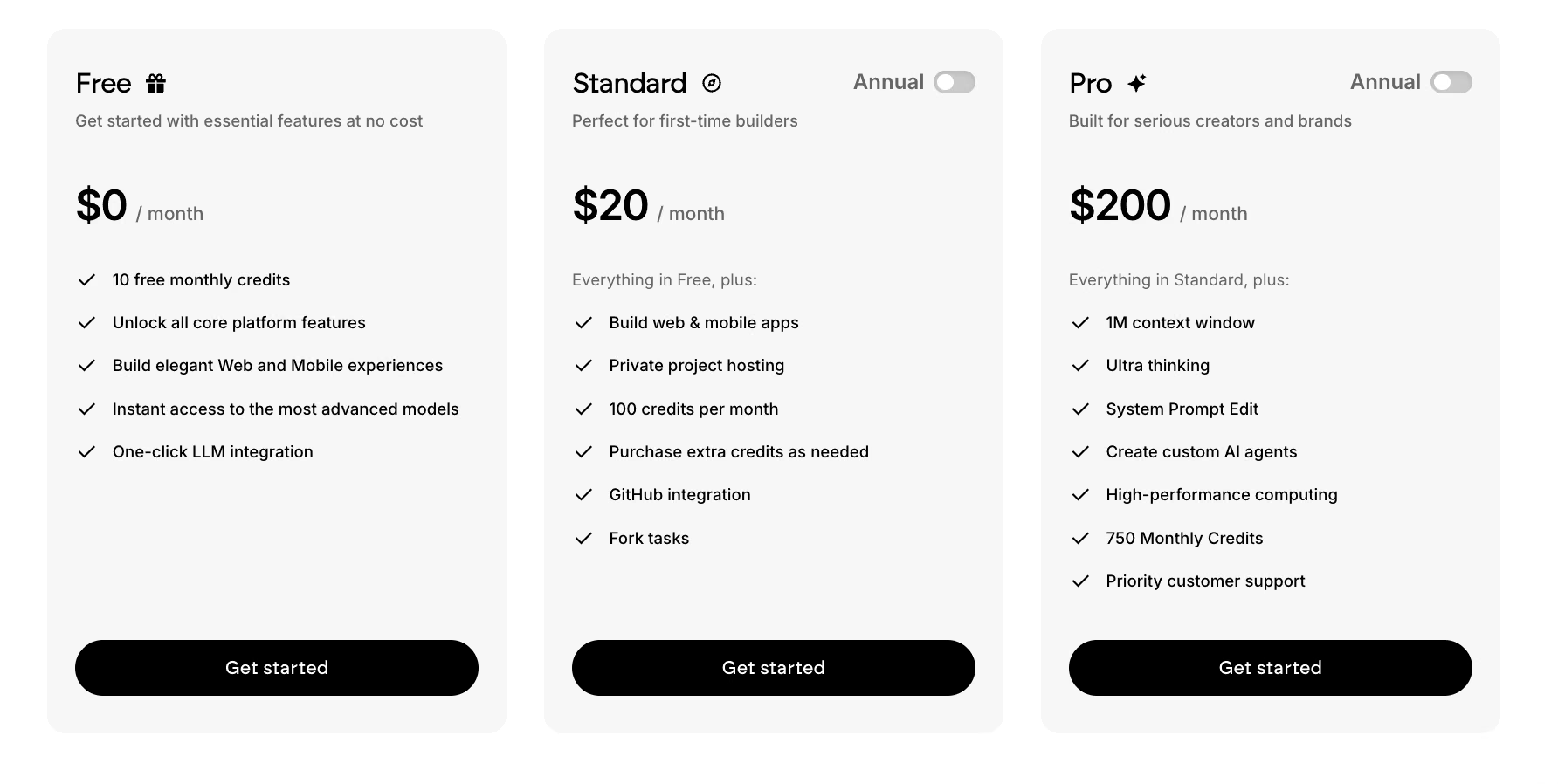
My build used 34 credits across three sessions, more than the Free plan allows, so this scale of project needs a paid tier.
On the developer side, wage data and independent cost research show the fuller number:
- Median pay (2025): $92,650 a year for web developers, $104,000 a year for web and digital interface designers, $99,520 a year combined, or $47.85 an hour, per the Bureau of Labor Statistics. That's wage data alone, before an agency's overhead and margin get added.
- Freelancer-built site: $500 to $5,000 for a basic five- to 10-page site, per Clutch's cost research.
- Freelance hourly rate: $15 to $50 typical, up to $200 for expert-level work, per Upwork's own cost data.
- Agency-built site: Around $66,000 total, with an average retainer of $7,100/month for ongoing work, per Clutch's cost research.
- Agency hourly rates: $25 to $150 depending on region and expertise, per Clutch's cost research. Web design work specifically lands closer to $100 to $149 an hour.
- Other website-builder subscriptions: About $3/month for WordPress up to $159/month for Wix's higher tiers, per Clutch's cost research. Emergent's Standard plan sits inside that same range, and its Free plan undercuts it entirely, but the comparison isn't quite like-for-like: Emergent bills in credits, so what a plan covers depends on what you build. My five-page café site used 34 credits; a full booking app or a catalog store would use meaningfully more.
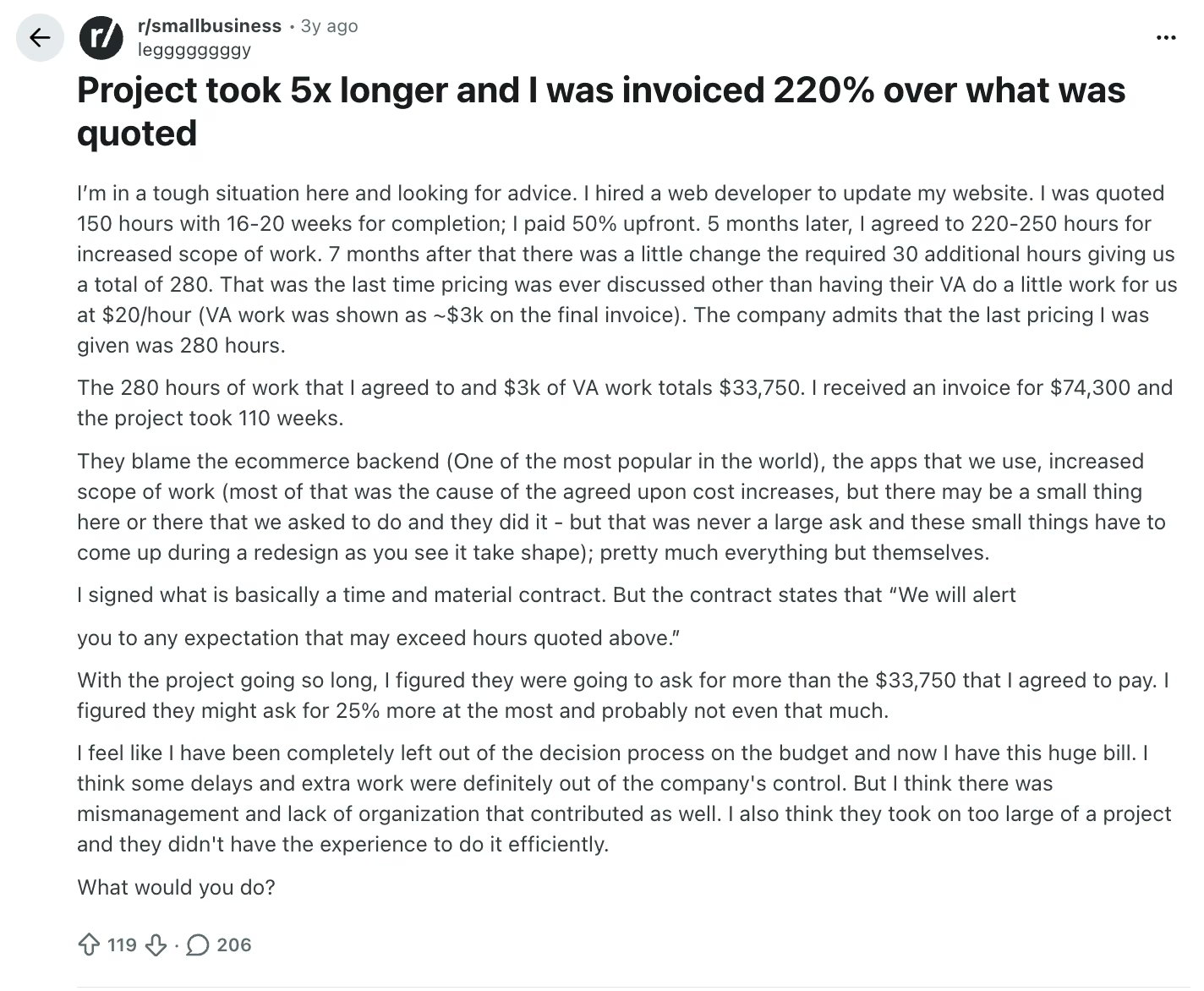
Those numbers are still only the starting point, on both sides. One small-business owner posted that a developer originally quoted 150 hours and 16 to 20 weeks for a site update.
Five months in, the scope grew to 220 to 250 hours. Seven months after that, one more change pushed the agreed total to 280 hours and $33,750. Further out-of-scope work kept landing on top of that. By the time the project wrapped, 110 weeks had passed, roughly five times the original timeline, and the final invoice came to $74,300.
That risk cuts both ways. Stack Overflow's 2025 Developer Survey, which polled more than 49,000 developers, found 66% say they spend more time fixing "almost-right" AI-generated code. That's the same second-pass tax I paid on the reservation logic, except billed by the hour if a developer is the one cleaning it up.
Speed and Timeline
The upfront numbers make this look like a blowout. How long it takes to build a website depends heavily on the build method: a simple AI-built site is often ready in a single sitting, while a developer engagement can take months, per the range cited above.
My own build's hands-on time matched that pattern. Actual prompting came to 55 minutes across three sessions in a two-week window, because the reservation-capacity logic needed real back-and-forth. That's still an afternoon's work stretched over two weeks, far short of a multi-week engagement.
The bigger time cost on the developer side often shows up later. Under a fixed-scope contract, a copy change outside scope can require approval and extra billing. With an AI builder, you can request the change immediately, though the result may still need review and another prompt.
Customization and Design Control
Speed has a cost, and you pay it first in design freedom.
Fixing the generic first pass took one more prompt, and the hero section made the clearest jump: a placeholder-style landing image became something that reads like an actual café. The tool worked from my brief throughout; any instinct for what a brunch spot should feel like still had to come from me, prompt by prompt.
Emergent's AI website builder doesn't lock you into the pre-set blocks and themes a page-builder tool hands you, so the layout isn't fixed by a template you picked off a list. What comes back still depends on how precisely you describe it.
That flexibility cut both ways in my test:
- Prompted well, my build got specific.
- Prompted vaguely, it defaulted to the safest possible version of everything.
A developer starts from a blank canvas, so nothing about typography, layout, or interaction design is limited to what a prompt can produce. You'll pay for revision rounds and wait weeks for them, but the ceiling on how specific the result can get is much higher.
Technical Complexity, Integrations, and Scalability
This is the widest gap in the whole comparison. Emergent's reservation form enforced the party-size cap and the seating limits I specified, from prompts alone. What it never had to do was talk to anything outside itself: no host stand, no POS, and no test of what happens at hundreds of bookings a night.
A developer works from the other end, where connecting two systems that were never built to talk to each other is the job you are paying for. Syncing a booking page to a restaurant's POS is exactly that kind of billable work.
If You Outgrow the Build
Emergent's GitHub integration, live on the Standard plan and up, keeps your code exportable: push it to your own repository and host it independently whenever you need to.
The original brief already planned for this (pulling the code and handing it to a developer later, if the café added real online ordering), and you're free to take the project elsewhere if it outgrows what the tool can do.
SEO and Ongoing Maintenance
SEO is easy to forget about until months after launch.
AI website builders generally ship with basic SEO features handled out of the box: the page titles, meta descriptions, and clean URLs that most small sites need. A developer can go further, with deeper technical optimization and custom schema markup, work that pays off more as a site grows past the basics.
The ongoing cost echoes the build cost. That same agency retainer from earlier, around $7,100/month, covers updates, fixes, and this technical upkeep. An AI builder's ongoing cost is whatever you're already paying for the plan, plus your own time if something needs adjusting.
A standard small-business website usually needs just the basics; a site competing hard on organic search is where a developer's deeper optimization earns its cost.
When to Use AI Website Builder vs Hiring a Developer
The choice comes down to what the site needs. Standard tasks, like selling a few products, taking bookings, or showing a portfolio, lean toward an AI builder. Custom features like user accounts or specialized data tools tip the scales toward a developer.
There's a third option worth naming: a template builder such as Squarespace or WordPress, which trades prompting for a visual editor and a theme you pick rather than describe.
Use an AI website builder when:
- Your project is standard and template-shaped, like a landing page, a portfolio, a basic business site, or a small catalog store.
- Speed and a low upfront cost outweigh the need for deep customization.
- You're comfortable owning the ongoing prompting and edits yourself.
Use a developer when:
- Your project needs custom business logic or third-party integrations that exceed what the builder supports.
- You're working under compliance requirements, like healthcare or payments, or expect extreme scale.
- You want someone accountable to call when something breaks, and you're not comfortable troubleshooting it yourself.
The Hybrid Path: Start on a Builder, Hand Off Later
Some projects don't have to pick a single path start to finish. Building the first version in Emergent and exporting the code once a developer is needed, the plan The Marigold Table's own brief called for from day one, keeps that handoff open (see the GitHub export covered above). Start fast and cheap on a builder, then bring in a developer only for what's grown past it.
How to Vet a Developer Before You Hire
If a developer is the right call for your project, a few checks upfront can save you from the kind of scope creep and cost overruns covered earlier in this piece.
- Ask to see live sites they have built, check how those load on a phone, and ask about their process.
- Get a fixed-price quote for defined work, and confirm in writing who owns the finished code and design.
- Ask what happens after launch (who fixes a bug, at what cost, how fast), and talk to a past client about communication and surprise costs.
Quick Scenarios: Which Path Fits?
That general split covers most cases, but a few concrete situations make it easier to see where you'd land.
- A local café or service business needs a standard site: An AI website builder fits, the same category as The Marigold Table build.
- A store needs custom loyalty logic tied to a proprietary rewards system: A developer fits, since that kind of integration goes beyond what a builder supports out of the box.
- A freelancer needs a portfolio ready this week: An AI website builder fits, since speed and low cost matter more here than deep customization.
- A healthcare or finance business needs a site built to specific compliance requirements: A developer fits, since compliance expertise usually needs specialized knowledge a general-purpose builder doesn't provide.
- A growing business wants to launch fast now and add custom features later: Either path can start the work, and the GitHub export covered earlier keeps a developer handoff open down the line.
The best online website builders in this category fit standard small-business, freelancer, and creator projects when speed and upfront cost lead the decision. Regulated work or projects that exceed the builder's supported capabilities may still call for a developer.
How to Price Your Own Build on Emergent
My five-page café site cost 34 credits, roughly a third of a $20 Standard month. Build the first version, watch the credit counter, and you'll know your number in an afternoon instead of waiting on a quote.
Emergent is worth trying for standard projects such as The Marigold Table. You shape the site through prompts without hiring a developer or writing code. For a real-business comparison, here's a case study of a car detailing company that built a website on Emergent in four days.
Key benefits:
- A working site from a plain-language description, without hiring anyone
- Hosting and initial setup handled in Emergent, with custom-domain configuration depending on where you bought the domain
- Code that stays yours to export through GitHub, from the Standard plan up
For a restaurant site with a menu and reservation flow, restaurant-specific AI builders go further on features such as online ordering. This build never needed to prove that.
Try building your own first version, and see how the AI website builder vs developer math looks for your project.

Most AI app builders stop at prototypes. Emergent creates production-ready apps you can actually launch.
- Production-ready apps
- Web & mobile apps
- Deploy in minutes







