



TL;DR
- Emergent: Best for a CRM shaped around your own sales process
- HubSpot: Best for marketing, sales, and support on one record
- Salesforce: Best for large sales organizations running AI agents
- Zoho CRM: Best for AI agents at a mid-market price
- Pipedrive: Best for small teams who want a visual pipeline
- Freshsales: Best for testing AI scoring on the smallest budget
- Attio: Best for startups that want a flexible data model
- Close: Best for outbound teams living on calls and email
- monday CRM: Best for teams already working in monday boards
Two months ago, a founder we work with priced out AI CRM software for a five-person sales team. The sticker was $14 per user, so $70 a month for the team. The invoice came to just under $700 once the AI tier, the automation tier, and the lead-enrichment add-on were switched on.
Nothing was hidden. She'd read the number on the front of the pricing page instead of the plan where the AI lives.
That gap is what most comparison articles skip, so we did the opposite and pulled the official pricing page for all nine platforms below, flipping every billing toggle. Emergent is our own product, and it goes first here.
By the end, you'll know what separates these platforms, which fits how your team sells, and what you'll pay.
What Actually Matters When You Choose AI CRM Software
Five things separate these platforms once you're past the demo. We applied all five identically to every tool below, and you can apply them to any CRM that isn't here.
- Where the AI starts on the price list: Vendors advertise a low entry tier and put the AI above it. Freshsales sells its agent as a $49 add-on, Zoho puts agents two tiers up from free, and Salesforce reserves its full suite for the top plan. Every tool here has AI. What you're buying is the line on the price list where it switches on.
- Whether you pay per seat or per usage: A $50 seat costs $600 a year for one rep and $6,000 for 10, used or not. Credit pricing tracks consumption, cheaper for small teams and harder to forecast for large ones.
- How far the software bends to your process: Every CRM has an opinion about what a deal is. If your business matches it, you're fine. If you run something the vendor didn't imagine, a roofing company tracking permits and crew assignments, say, you'll spend months on custom fields half your team ignores.
- What the AI is doing: Drafting writes an email you send. Scoring ranks a lead you still call. Acting books the meeting itself. Most "AI CRM" marketing describes the third and ships the first.
- What it costs to leave: We haven't scored this one, because every vendor's export story needs testing with your own data. Check the export path before you import a single contact.
Nine in 10 sales teams use AI agents already or expect to within two years, according to the seventh edition of Salesforce's State of Sales report, a survey of 4,050 sales professionals run by a vendor on this list. The live question is which of these you can't compromise on.
Read More: How to Build Your Own CRM With AI (Step-by-Step)
How We Put This List Together
This isn't an objective ranking, and we won't pretend otherwise. Emergent is ours, so it opens the list. The order after that reflects who each tool suits; it isn't a scoreboard. The five criteria above are the yardstick we held every one of them to. Disagree with our pick and the comparison still works.
We built with Emergent in depth because we make it. For the other eight, we worked from official pricing pages, product documentation, and user reviews we can point to, and we're not claiming hands-on time we didn't put in.
Every price came from the vendor's own page with both billing toggles flipped wherever a vendor offers both, because most pages default to annual and show a number you can't pay month to month. We cut names too: Zendesk retires Sell on 31 August 2027, and Apollo, Jobber, and Housecall Pro solve narrower problems.
Quick Comparison of the Nine Platforms
Two prices per vendor: the cheapest paid plan on their page, and the plan where the AI you'd actually use switches on. Monthly billing unless the cell says otherwise.
| Tool | Best For | Entry Paid Plan | Plan Where the AI Lives |
|---|---|---|---|
| Emergent | Custom-fit CRMs | $20/month(Standard) | $20/month (Standard) |
| HubSpot | One shared record | Free tools | $50/seat/month (Professional) |
| Salesforce | Large sales orgs | $25/user/month(Starter Suite) | $550/user/month (Max, billed annually) |
| Zoho CRM | Value seekers | $20/user/month(Standard) | $35/user/month (Professional) |
| Pipedrive | Visual pipelines | $24/user/month(Lite) | $79/seat/month (Premium) |
| Freshsales | Tight budgets | $11/user/monthbilled annually (Growth) | $47/user/month (Pro) |
| Attio | Fast-moving startups | $44/user/month(Plus) | Free plan (100 credits) |
| Close | Outbound calling | $19/user/month(Solo) | $19/user/month (Solo) |
| monday CRM | monday teams | $18/seat/month(Basic) | $25/seat/month (Standard) |
Emergent: Best for a CRM Shaped Around Your Own Sales Process
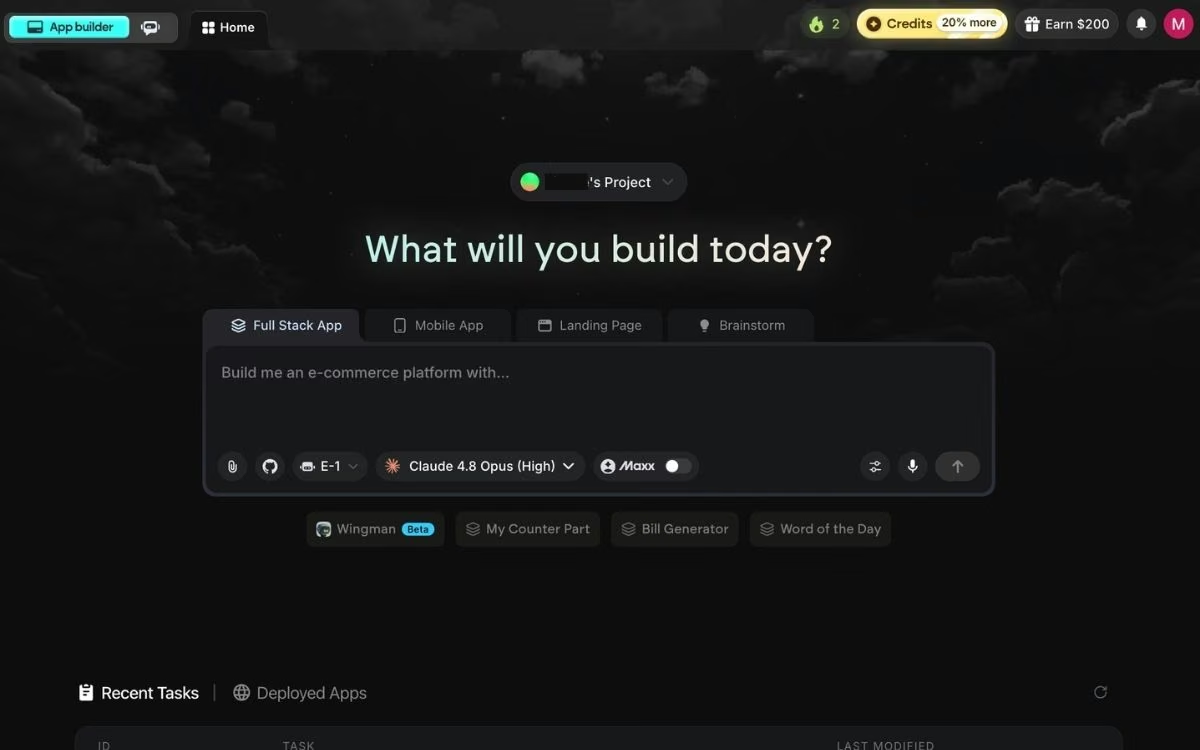
We'll start with our own product, since this is our blog and you should know that going in. We held it to the same criteria as everything else here, and we've written the cons the way we'd write a competitor's.
What it does: Emergent is a vibe coding platform with an AI CRM builder. Describe the pipeline stages, the fields, and the permissions your team actually works with in plain English, and it builds a running CRM with the customer records, the screens, the sign-in, and the payments handled.
Best for: Businesses whose sales process doesn't fit a standard pipeline.
Every other platform sells you a CRM and asks you to adapt. Emergent works the other way around: you describe the CRM your business needs, and a coordinated system of specialized agents produces it through vibe coding, with testing agents running end-to-end checks.
Against the five criteria, there's no AI tier to buy past; credits mean your fourth salesperson doesn't change the bill, and you own the code. Credits don't burn evenly, though. A contact list stretches far; a pipeline tool with payments eats a month's allowance fast.
Key Features
- Plain-English pipeline builds: Describe the deal stages, the rep roles, and who sees which accounts, then click through the working CRM.
- Emmy, the built-in assistant: A chat assistant on every page that already knows your CRM build, free and costing no credits.
- Going live in minutes: Click Deploy, and in 10 to 15 minutes the CRM is live on a .emergent.host address. Buy a domain through the built-in IONOS integration or point one you own at it.
Pros and Cons
Pros:
- Matches your process, removing the custom-field workarounds that kill adoption
- Credit pricing means headcount growth doesn't multiply the bill
- You own and export the code, and Stripe and Google sign-in wire in during the build
Cons:
- No library of pre-built reports waiting on day one
- Credit consumption is hard to predict before your first project
- Heavy PDF reporting is weak, since charts break across pages
What Users Say
Across six G2 reviews, Emergent averages 4.3 out of 5, and the feedback splits along a clear line: the build experience earns praise, the credit model takes the hits.
One reviewer, Luis F., a builder with no coding background, says "Emergent is very easy to use, even for someone without a programming background."

The credit model draws the opposite reaction. Himanshu J. writes that "pricing and token usage aren't very transparent," describing budgets that ran out partway through a build.

Pricing
Emergent has a free plan with 10 monthly credits. Standard runs $20/month ($17/month billed annually) for 100 credits. Pro is $200/month ($167/month billed annually) for 750 credits, Maxx mode, and custom agents. Business and Enterprise are custom-quoted.
Bottom Line
A spreadsheet you've kept alongside your CRM for a year is the argument for building your own. It's the wrong call if you want something configured before lunch, and if you want to see what other teams built first, here are 10 CRM system examples.
HubSpot: Best for One Shared Customer Record Across Teams

What it does: HubSpot puts marketing, sales, and support on one customer record, with AI across all three through Breeze.
Best for: Companies where a lead touches marketing before sales and support after.
HubSpot's edge is the shared record. The AI reads one customer history, so the prospecting agent sees the emails opened, the tickets filed, and the deal stage together.
Gating is moderate: Breeze Assistant comes with Professional, but the agents run on HubSpot Credits, metered separately from seats at $0.010 each with no rollover.
Key Features
- Breeze Assistant: Summarizes an account's history before a call, so reps stop scrolling notes.
- Prospecting and customer agents: Handle outreach and inbound questions, metered in credits.
- Data agent: Enriches and categorizes records at 10 credits each.
Pros and Cons
Pros:
- One record across marketing, sales, and service, hard to replicate with integrations
- The free tools run a real CRM with no expiry date on them
- Onboarding is fast, and reps adopt it without a fight
Cons:
- Costs climb steeply from Starter into Professional
- Agent credits bill on top of per-seat pricing, so two meters run at once
- Contact-tier pricing raises your bill as your list grows
What Users Say
Across almost 14,000 G2 reviews, HubSpot Sales Hub averages 4.4 out of 5, and the praise is usually about visibility.
One reviewer, Tomislav T., says "the pipeline view gives a clear overview of deal stages, tasks, and next steps."

The upgrade path draws the sharpest criticism. A Sales Hub reviewer, Prabhat C., notes that "some automation and reporting capabilities are locked behind higher-tier plans."

Pricing
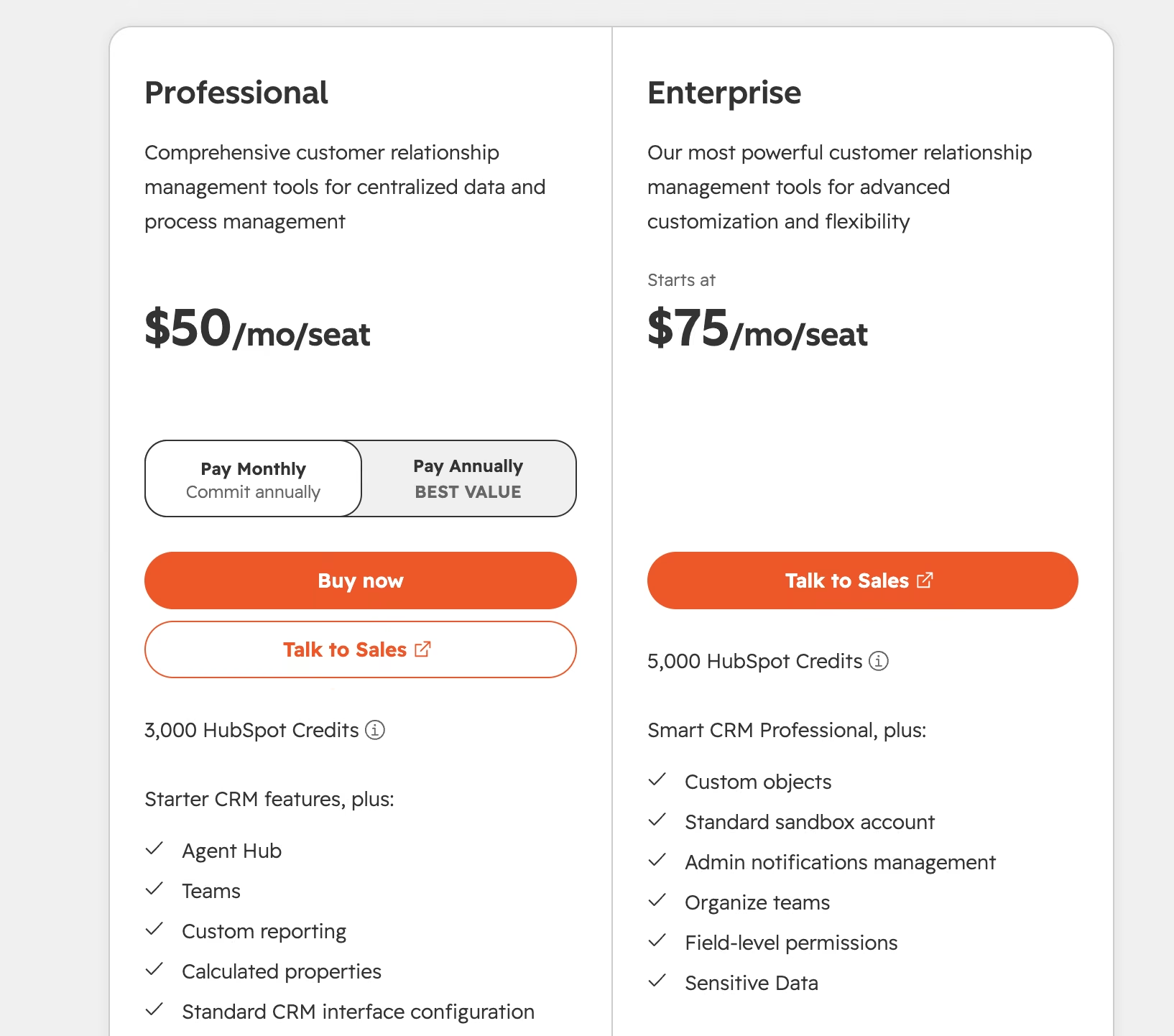
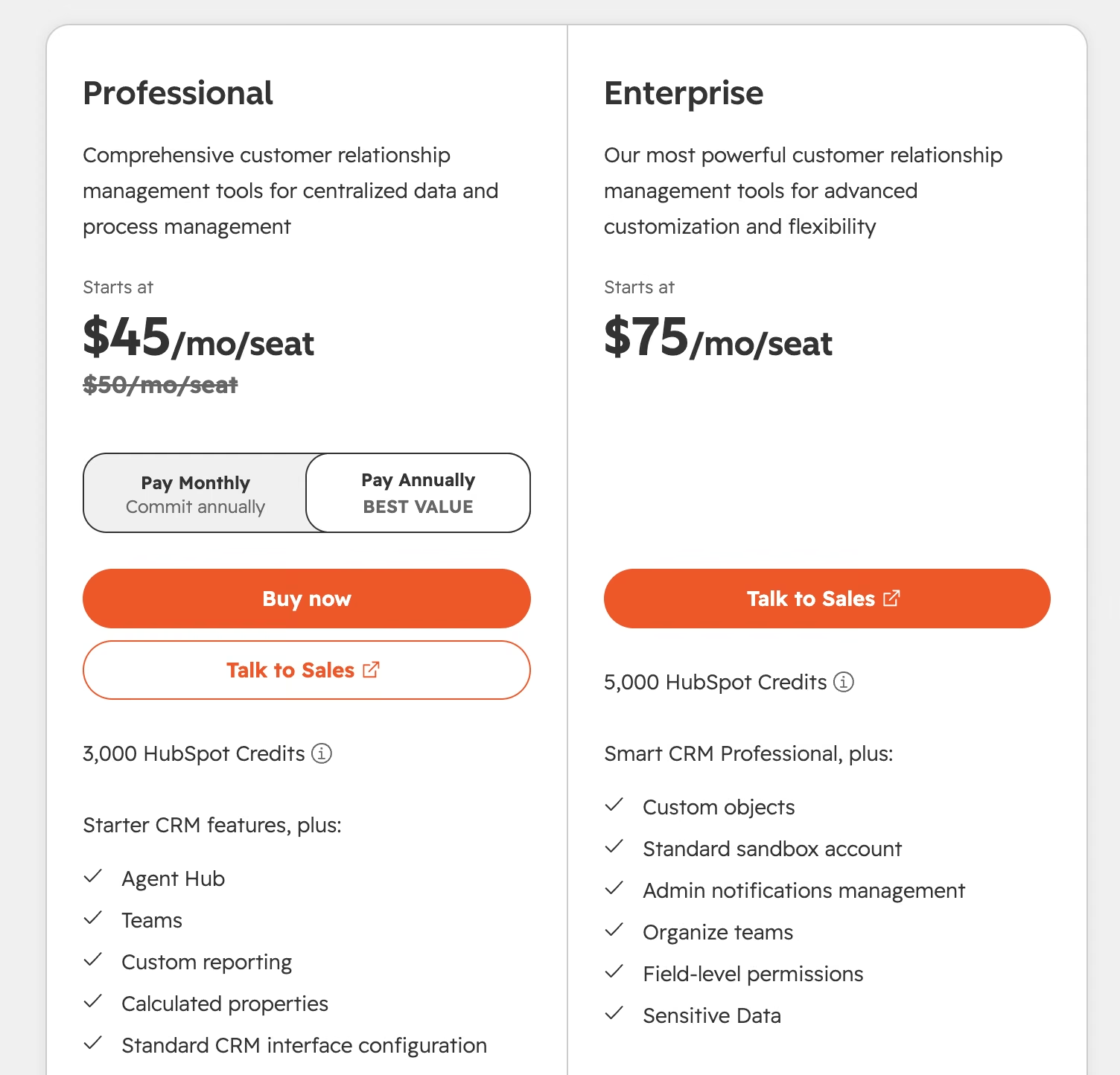
HubSpot's free tools cover a basic CRM. Smart CRM Professional runs $50/seat/month ($45/seat/month billed annually) with 3,000 credits. Enterprise starts at $75/seat/month with 5,000 credits.
Bottom Line
Buy HubSpot when the handoff between teams is what's broken. Skip it if you're a pure sales team with no marketing motion, and if you're weighing it against the enterprise option, we've put HubSpot and Salesforce head to head.
Salesforce: Best for Large Sales Organizations Running AI Agents

What it does: Salesforce is the enterprise standard for sales automation, with Agentforce adding AI agents across planning, prospecting, and quoting.
Best for: Sales organizations with 50 or more reps and a dedicated admin.
Nothing else here handles territory management, approval chains, and multi-entity forecasting as thoroughly, and Agentforce puts agents inside those processes. The gating is the steepest of the nine: the full agent suite sits on Max at $550 per user per month (billed annually), and Salesforce routes AI on Core and above through a sales conversation.
Key Features
- Agentforce for Sales: Agents that operate across the sales cycle, beyond one step.
- Territory and forecasting depth: Assigns accounts by region, rep, and product line, then rolls multi-entity forecasts up through approval chains.
- Flex Credits: Max includes 2.75M per organization per year, metering agent usage.
Pros and Cons
Pros:
- Deepest configuration and process control of any CRM here
- Agentforce is genuinely agentic, which most competitors can't claim yet
- Slack and Tableau bundled at Core and above
Cons:
- The plans where the AI lives cost several times what competitors charge
- Configuration usually needs an admin or consulting partner
- The learning curve is steep enough that adoption failures are common
What Users Say
Across over 25,800 G2 reviews, Agentforce Sales averages 4.4 out of 5, with most praise aimed at pipeline discipline.
Pipeline discipline is what reviewers name. Jenil V. credits "the lead scoring, assignment, and nurturing features."

The complaints are strikingly consistent about onboarding. Another reviewer, Jay P., writes that "the biggest hurdle is the initial setup and the sheer learning curve."

Pricing
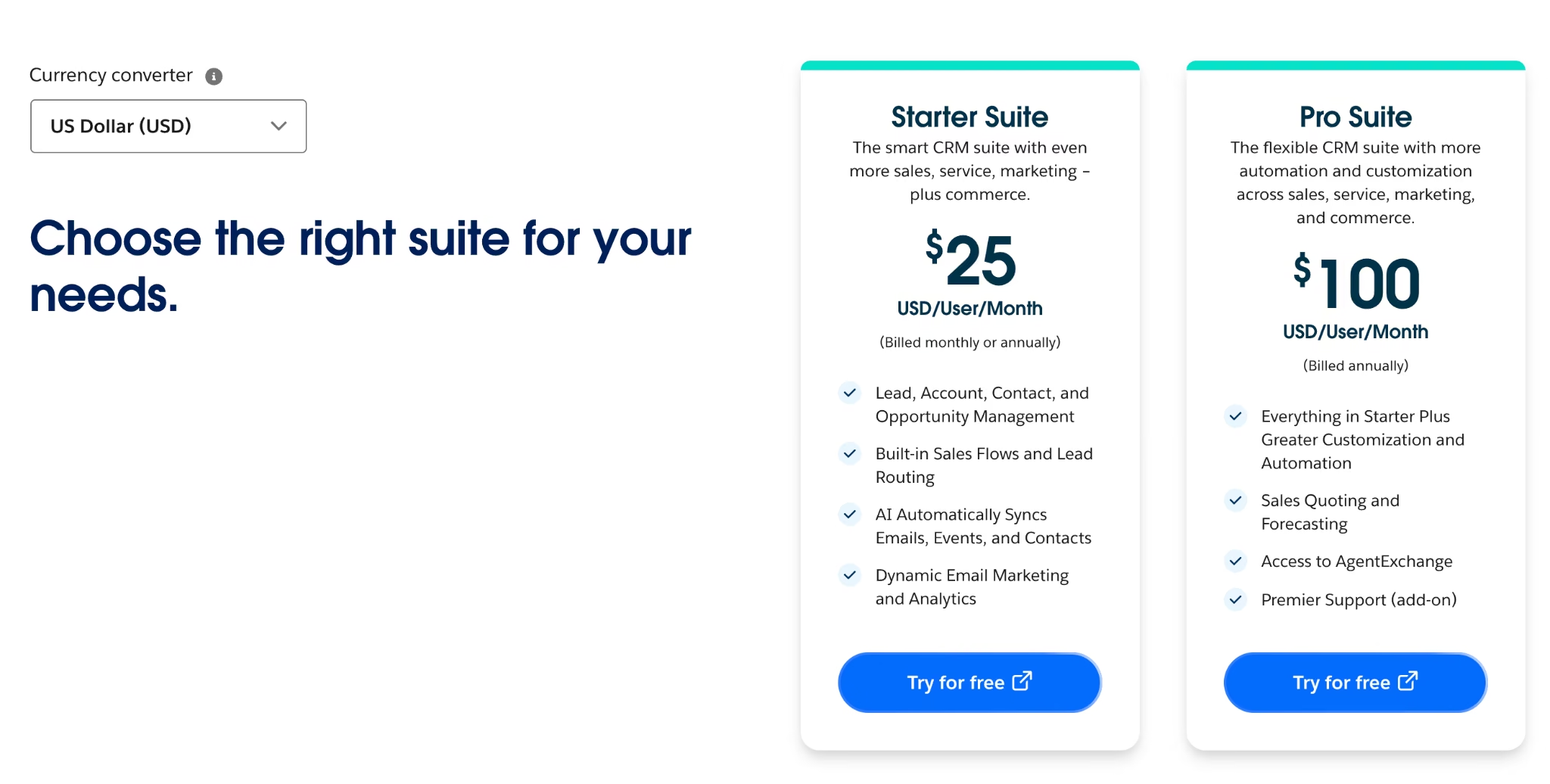
Starter Suite runs $25/user/month, billed monthly or annually. Pro Suite is $100/user/month, Core $195, Advanced $395, and Max $550, all billed annually.
Bottom Line
Where a bad forecast costs more than the license, Salesforce makes sense. Under 20 reps, you'll pay enterprise prices for capability you won't reach.
Zoho CRM: Best for AI Agents at a Mid-Market Price

What it does: Zoho CRM covers the sales cycle with Zia, an AI assistant handling lead scoring, churn prediction, and deployable agents.
Best for: Small and mid-sized teams who want predictive AI without an enterprise contract, a group we cover more widely in our small business CRM roundup.
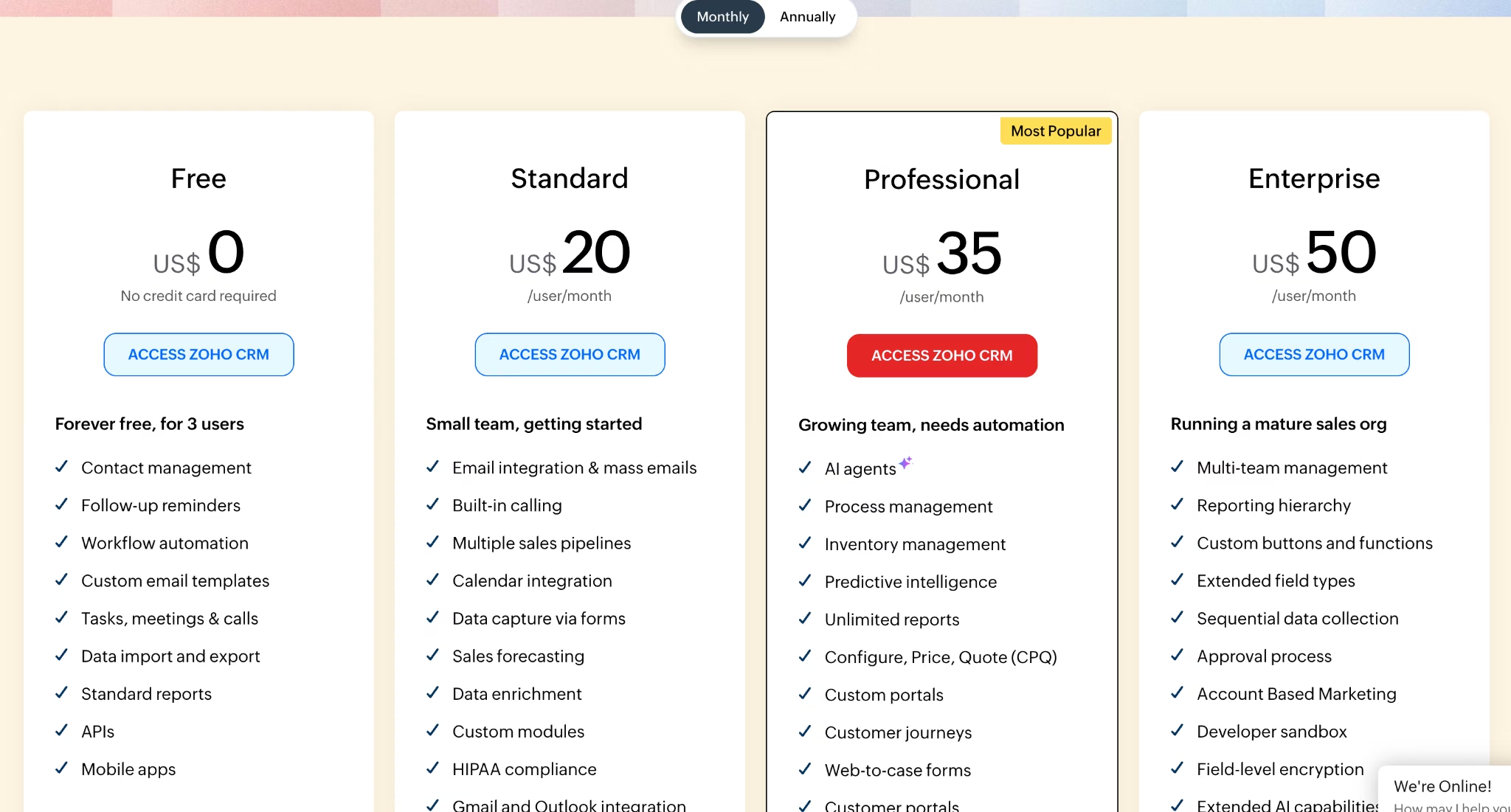
On AI gating, Zoho holds up better than most: agents and predictive intelligence sit on Professional, the middle of five tiers, so churn prediction is reachable at a price a 10-person team can approve. The cost lands elsewhere. Teams underestimate the setup time, and the interface crowds once several modules are on.
Key Features
- Zia predictive intelligence: Scores conversion likelihood and flags deals drifting toward churn, from Professional.
- Deployable AI agents: Execute defined tasks, going past suggestions.
- A genuinely free edition: Contacts, workflow automation, and reports for three users.
Pros and Cons
Pros:
- Predictive AI arrives two tiers earlier than most competitors put it
- Pricing undercuts comparable plans elsewhere by a wide margin
- The free edition does genuine work with no time limit
Cons:
- Setup time is the hidden cost, and it's substantial
- The interface clutters as you enable modules
- Support draws more complaints than the product itself
What Users Say
Across more than 2,900 G2 reviews, Zoho CRM averages 4.1 out of 5, the lowest score in this roundup, though Zia-specific feedback runs warmer.
Tyler Q. sums up the appeal: Zoho "automatically syncs our calls, logs customer data and keeps our operations running in one central dashboard."

Tier gating is the recurring complaint. A verified user in Events Services notes that "some advanced functions are restricted to more expensive tiers."

Pricing
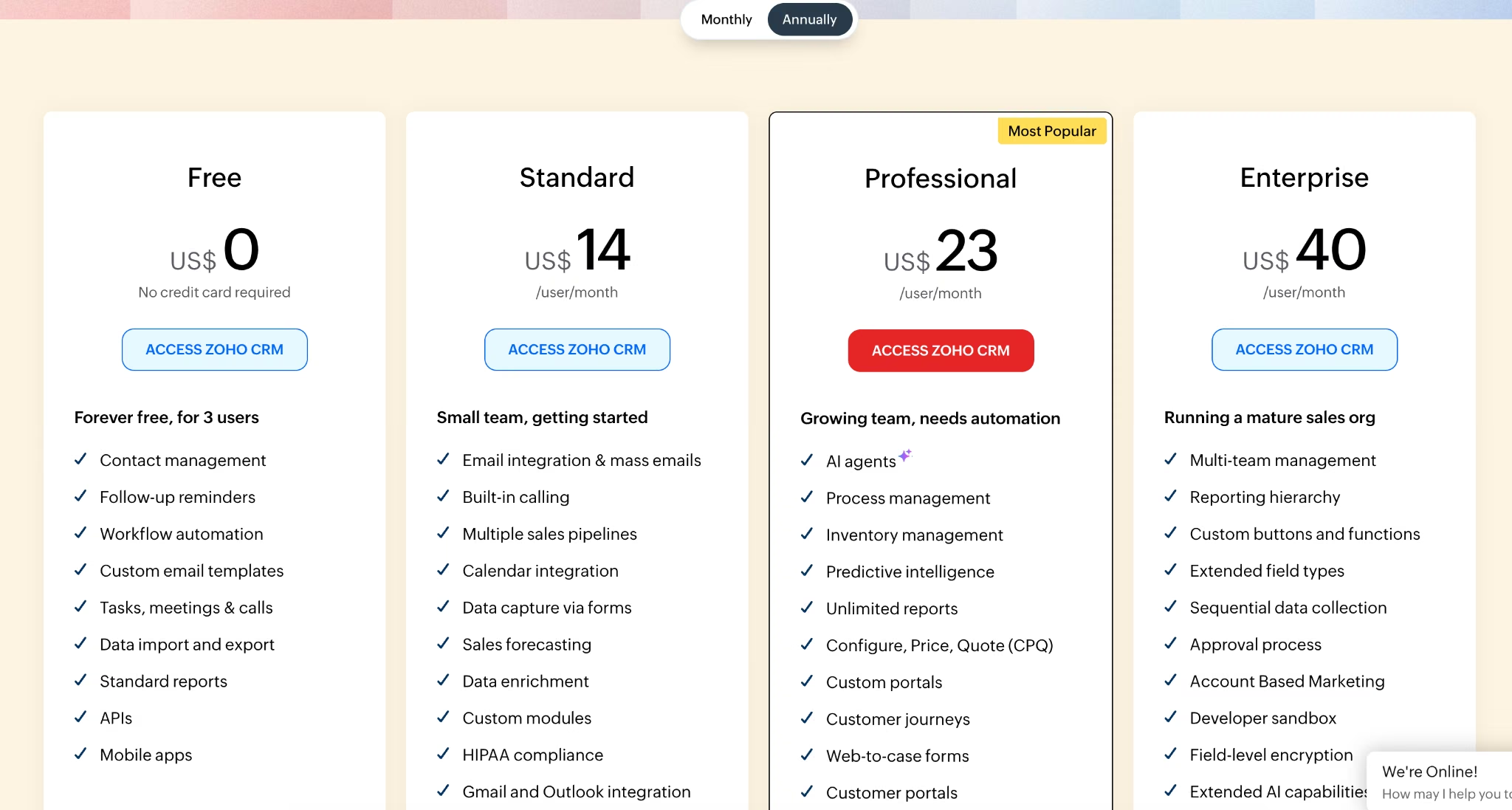
Zoho CRM's free edition covers three users. Standard runs $20/user/month ($14/user/month billed annually), Professional $35/user/month ($23/user/month billed annually), Enterprise $50/user/month ($40/user/month billed annually), and Ultimate $65/user/month ($52/user/month billed annually).
Bottom Line
You get more AI per dollar here than anywhere else in this roundup, provided someone spends two weeks configuring it. Budget two weeks of someone's time as part of the price.
Pipedrive: Best for Small Teams Who Want a Visual Pipeline

What it does: Pipedrive is a sales-first CRM built around a drag-and-drop pipeline, with an AI Sales Assistant recommending what to do next.
Best for: Sales teams of five to 50 who want the whole pipeline on one screen.
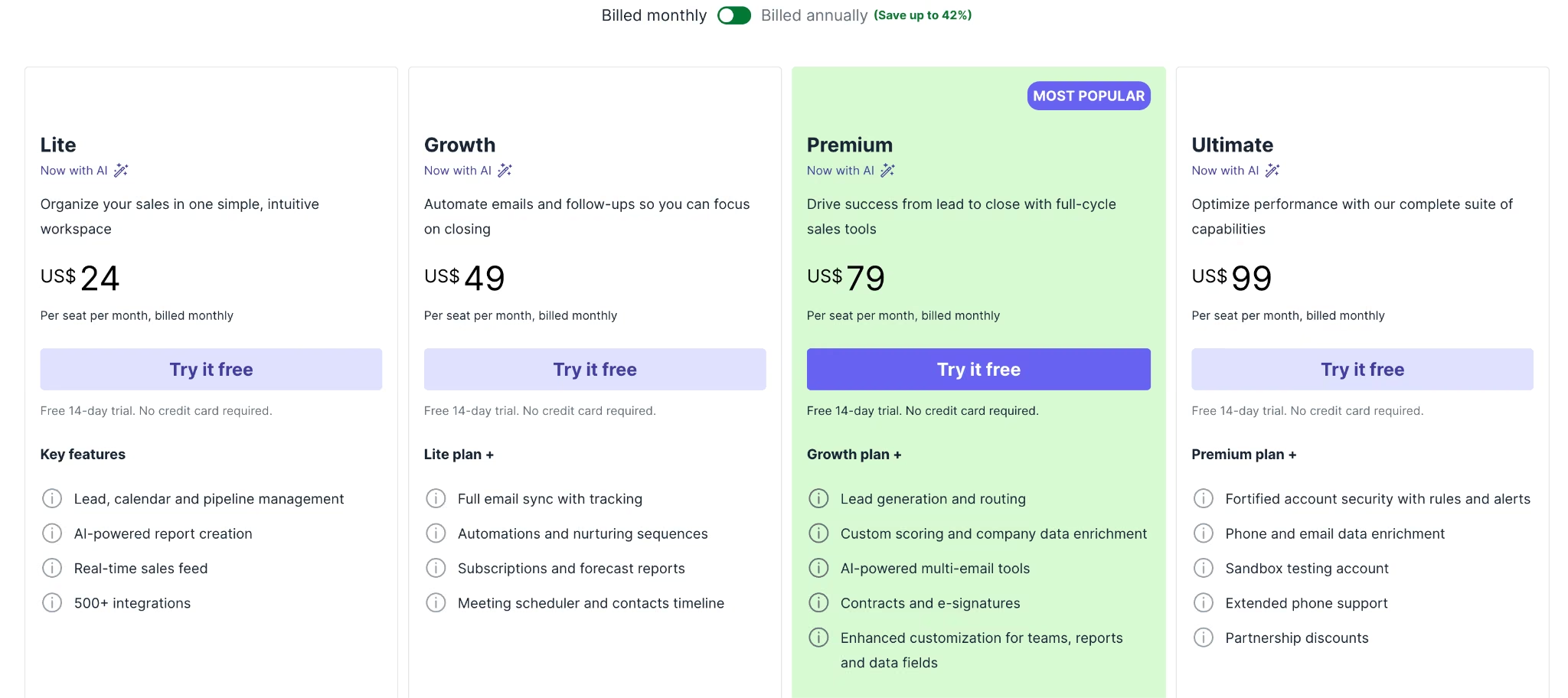
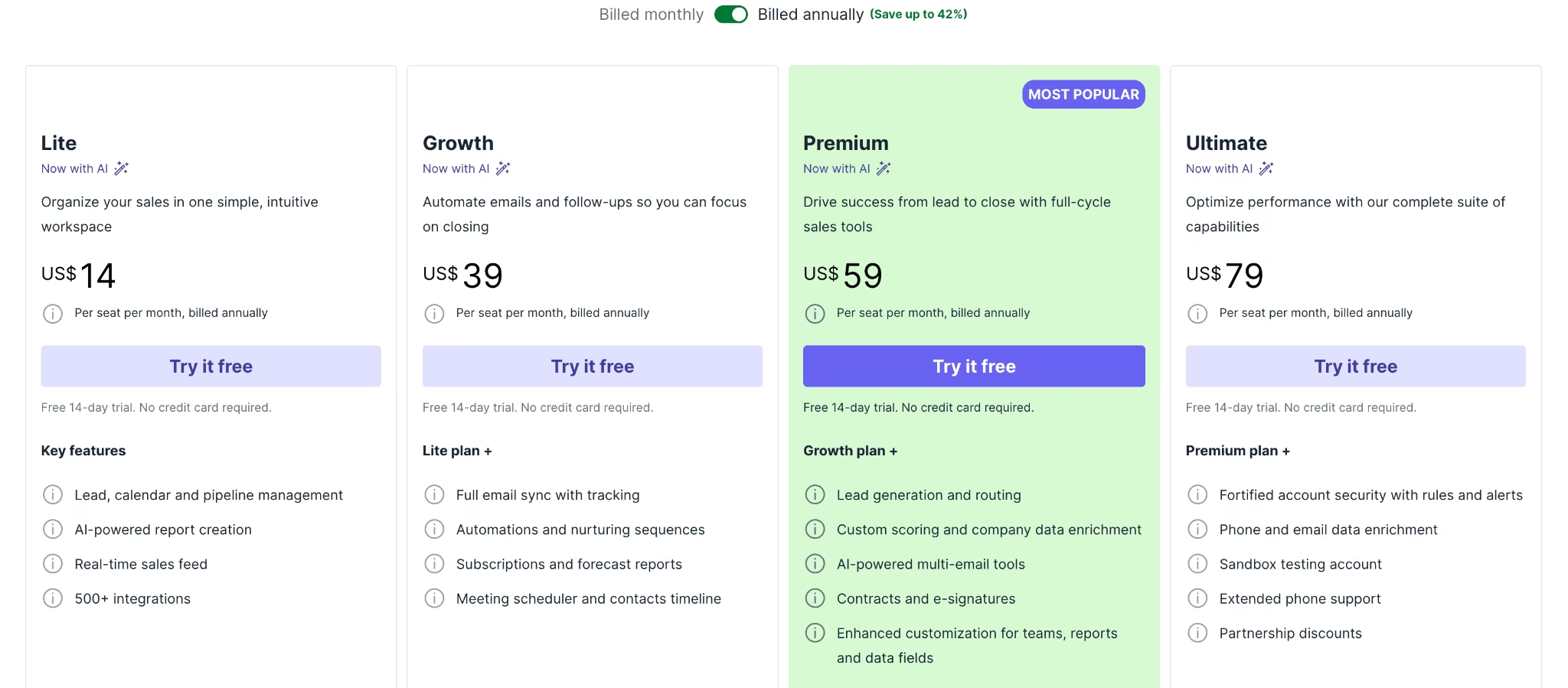
Pipedrive puts the whole pipeline on one drag-and-drop screen, which is why reps who ignore other CRMs keep this one open. Its AI Sales Assistant surfaces the deal that's gone quiet in the view where you'd act on it.
Gating is scattered: AI report creation sits on Lite, while the AI email tools and custom lead scoring sit two tiers up on Premium.
Key Features
- AI Sales Assistant: Flags overdue follow-ups and stalling deals inside the pipeline view.
- AI report creation: Generates reports from a text prompt, from Lite.
- AI email tools: Write, summarize, and reply from the inbox, on Premium and above.
Pros and Cons
Pros:
- Fastest adoption curve of any full CRM here
- The pipeline view answers the "which deal do I call" question
- AI report generation is on the cheapest paid plan
Cons:
- No free plan at all, only a 14-day trial
- Marketing tools are thin, so you'll buy something else alongside it
- The plan you start on rarely stays the plan you pay for
What Users Say
Across over 3,100 G2 reviews, Pipedrive averages 4.3 out of 5, and the praise almost always comes back to the pipeline view.
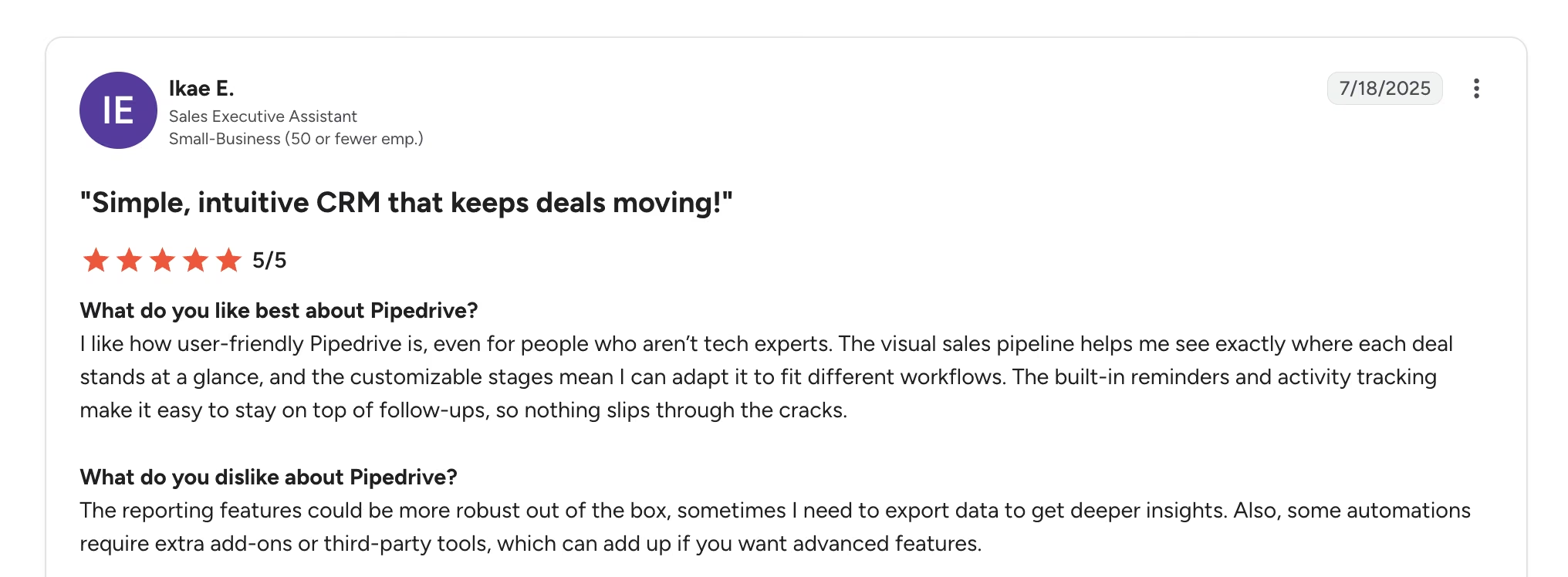
One reviewer, Ikae E., says, "The visual sales pipeline helps me see exactly where each deal stands."
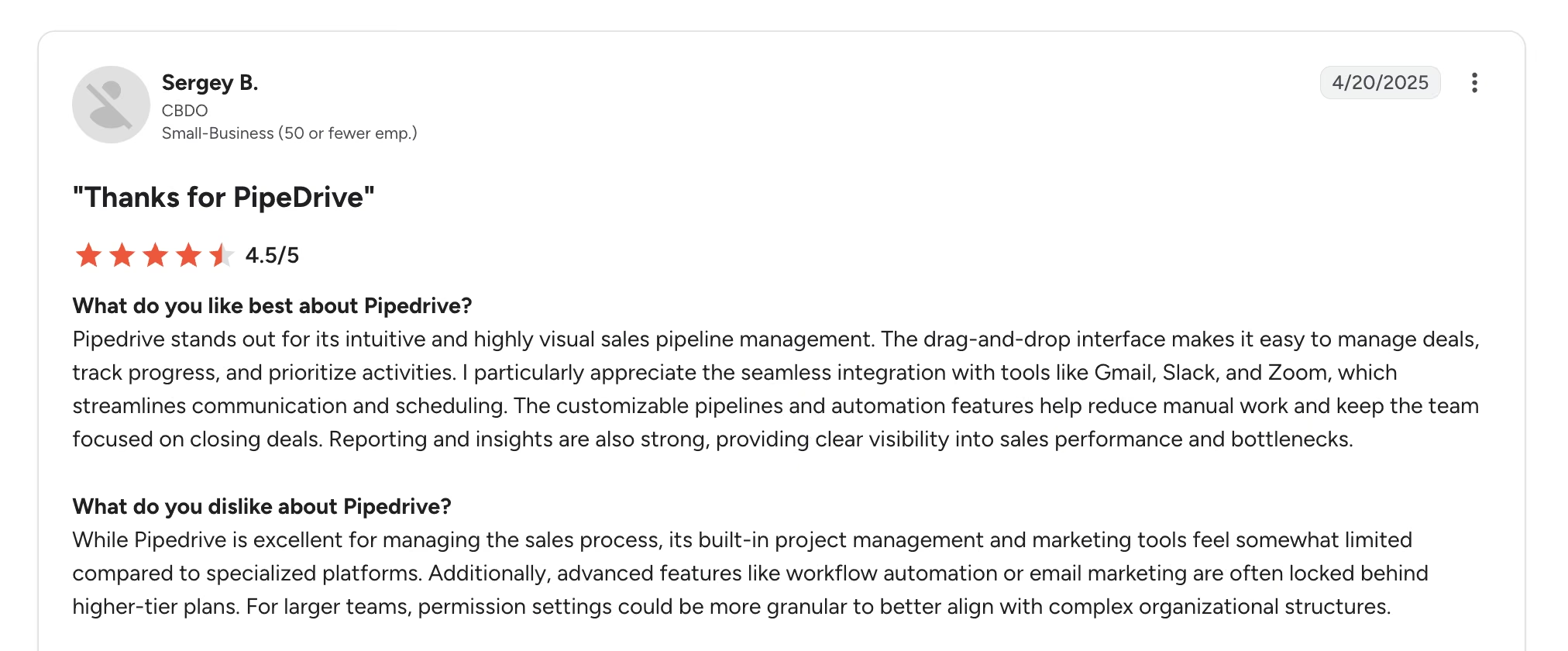
Reviewers who mark it down point at the upgrade path. Sergey B. flags that "advanced features like workflow automation or email marketing are often locked behind higher-tier plans."
Pricing
Pipedrive has no free plan. Lite runs $24/seat/month ($14/seat/month billed annually), Growth $49/seat/month ($39/seat/month billed annually), Premium $79/seat/month ($59/seat/month billed annually), and Ultimate $99/seat/month ($79/seat/month billed annually).
Campaigns and Web Visitors are paid add-ons on every plan.
Bottom Line
Adoption is the metric most CRM purchases fail on, and Pipedrive wins it. Budget for Premium, where the AI features people mean actually begin.
Freshsales: Best for Testing AI Scoring on a Tight Budget

What it does: Freshsales is Freshworks' sales CRM, with Freddy AI handling contact scoring, deal insights, and forecasting.
Best for: Small teams who want AI lead scoring at the lowest entry price.
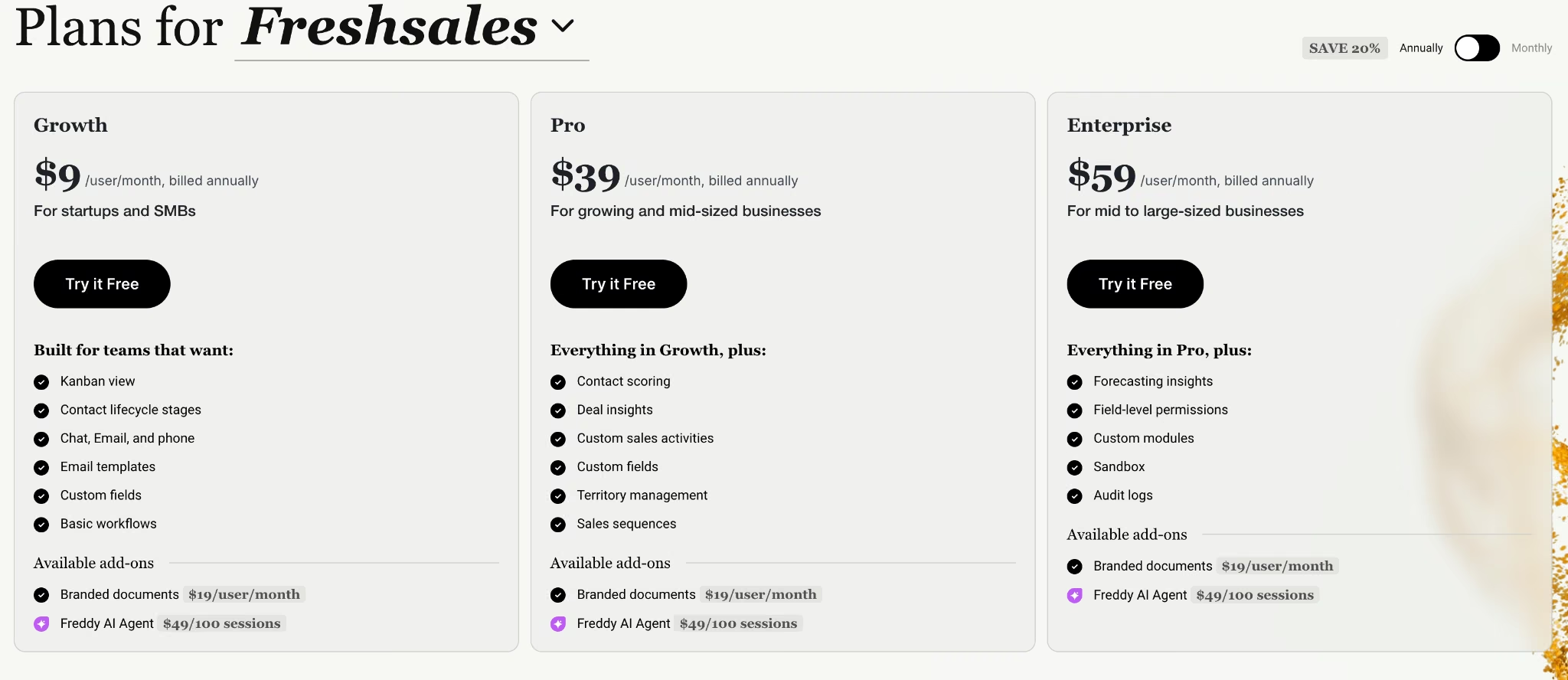
At $11 per user per month, Freshsales has the cheapest paid entry point of the nine, and it's a full CRM at that price. On annual billing it drops to $9, level with Close Solo.
The gating deserves attention: contact scoring and deal insights sit on Pro, forecasting moves up to Enterprise, and the Freddy AI Agent is a $49-per-100-sessions add-on on every plan. The advertised price and the AI you're picturing are one tier apart, plus the add-on if you want the agent.
Key Features
- Freddy contact scoring: Ranks contacts by engagement and history, from Pro.
- Deal insights: Flags at-risk deals and recommends next steps, also Pro and above.
- Built-in phone, email, and chat: Multichannel outreach without a separate dialer.
Pros and Cons
Pros:
- Lowest paid entry point of the nine, and that plan is usable on its own
- Clean interface that new reps pick up quickly
- Phone, email, and chat are included in the plan price
Cons:
- The AI features people buy it for sit a tier above the advertised price
- The conversational agent is session-metered on top of per-seat billing
- Reporting customization is limited on lower plans
What Users Say
Across Freshsales' G2 reviews, the praise concentrates on getting AI scoring at $9 per user per month and the criticism on what that price excludes.
One reviewer, Karthick P., says "Freddy AI and automation features also help with lead scoring."

Another reviewer, Kumar V., writes that "Sometimes the activity section updates automatically, which shouldn't happen."

Pricing
Freshworks lists Growth at $11/user/month ($9/user/month billed annually), Pro at $47/user/month ($39/user/month billed annually), and Enterprise at $71/user/month ($59/user/month billed annually), with a 21-day trial.

Bottom Line
The cheapest low-risk way to find out whether AI lead scoring changes anything for your team. Price the Pro plan when you budget.
Attio: Best for Startups That Want AI Reading a Flexible Data Model

What it does: Attio is a modern CRM built around a customizable data model, with AI woven into search, enrichment, and workflow automation.
Best for: Startups and small revenue teams who find traditional CRMs too rigid.
Attio gives you objects you define in place of a fixed idea of leads and deals, which puts it closer to the no-code CRM builders than to a traditional pipeline tool, then points AI at whatever structure you built.
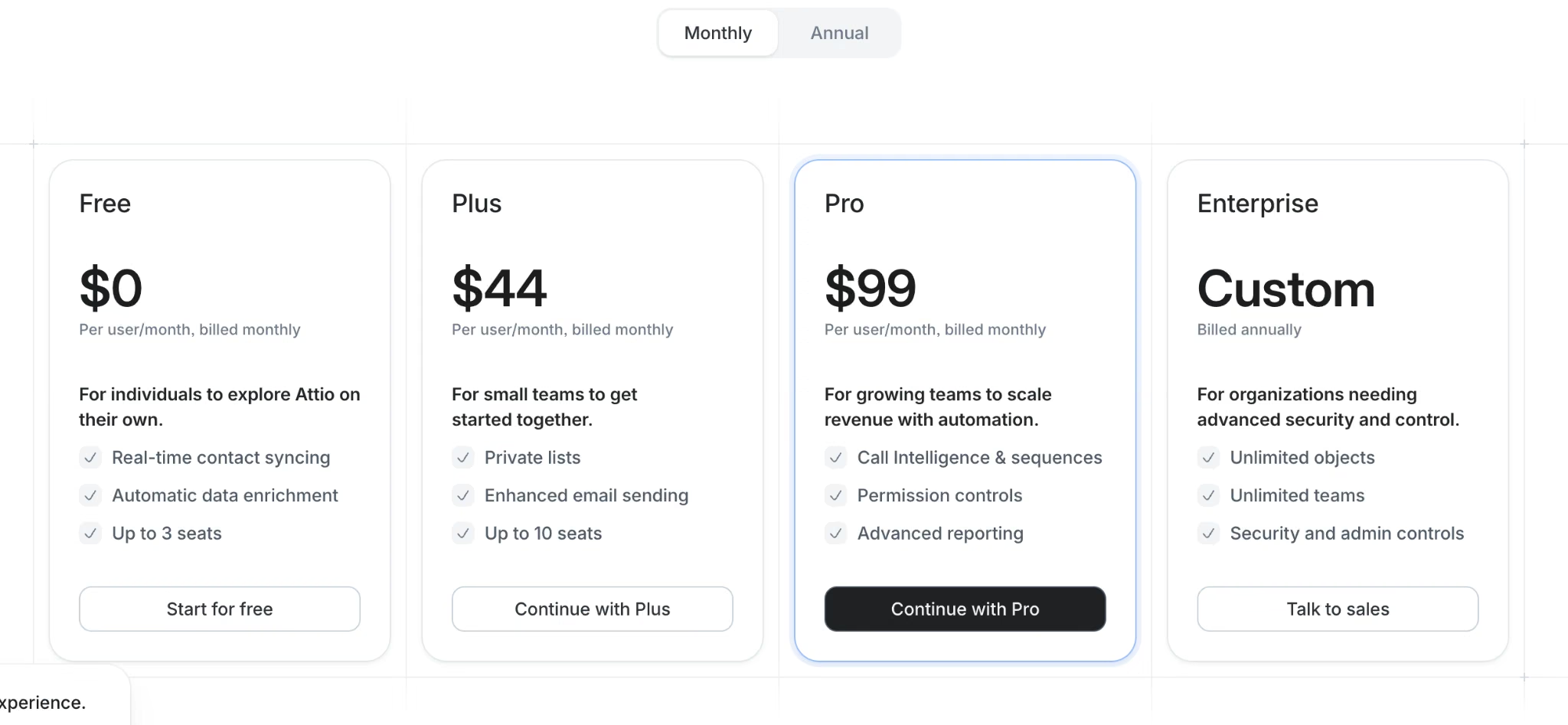
On gating, it's refreshingly direct: Ask Attio and the agents appear across the paid tiers with no plan wall, running on credits that scale from 100 per user monthly on the free plan to 500 on Plus and 1,000 on Pro.
Key Features
- Ask Attio: Finds and creates records from a natural-language request, no filter builder needed.
- A data model you define: Up to 12 custom objects on Pro, fitting businesses standard CRMs can't describe.
- Call intelligence: Records and analyzes meetings from Pro.
Pros and Cons
Pros:
- The most flexible data model of any off-the-shelf CRM here
- Every paid tier publishes its AI credit allowance up front, from 500 on Plus to 1,000 on Pro
- Setup is fast for something this flexible
Cons:
- Per-seat pricing is high and compounds quickly with team size
- The free plan caps at three seats and three objects
- Governance and permission controls trail the enterprise platforms
What Users Say
Across almost 600 G2 reviews, Attio averages 4.4 out of 5.
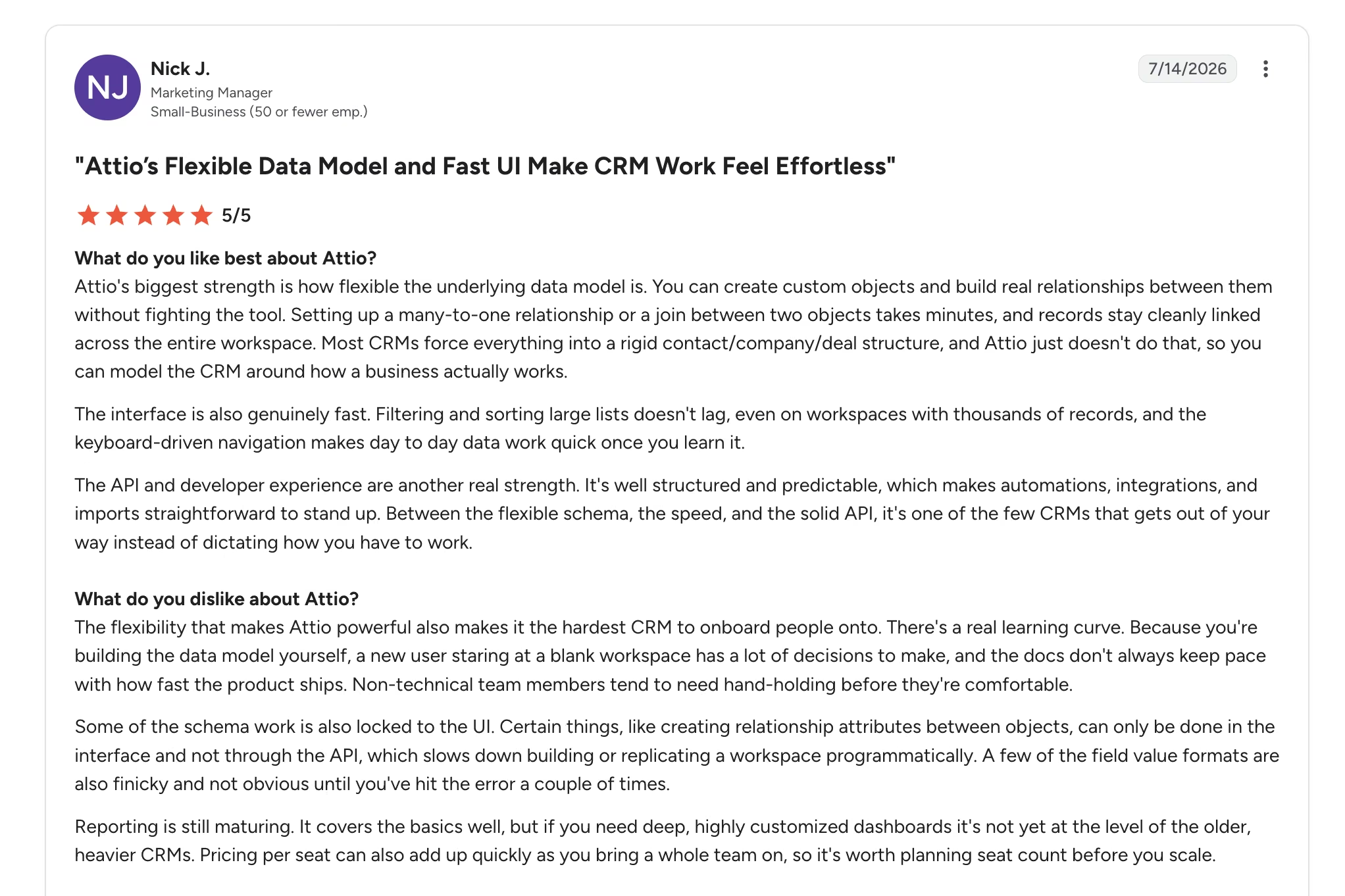
Reviewers reach for the interface first. Evheniia K. calls it "clean, fast, and intuitive."

The criticism is almost entirely about cost. Nick J. warns that "pricing per seat can also add up quickly."
Pricing
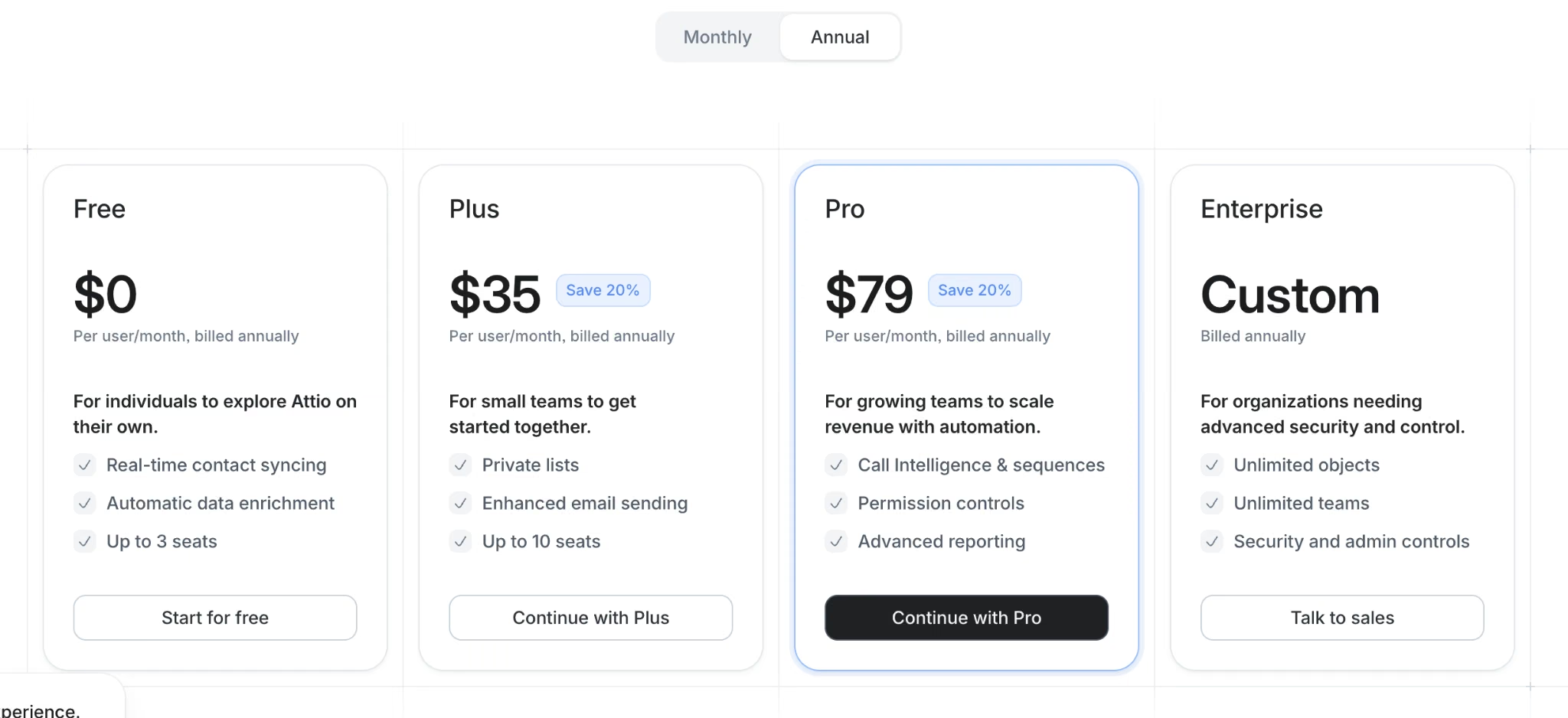
Attio's free plan covers three seats. Plus runs $44/user/month ($35/user/month billed annually) with 500 seat credits, and Pro is $99/user/month ($79/user/month billed annually) with 1,000 seat credits. Enterprise is custom, and extra workspace credits start at $85/month for 5,000.
Bottom Line
Pick Attio when Pipedrive feels too narrow and Salesforce too heavy. Past about 15 people, run the seat math before you commit.
Close: Best for Outbound Teams Living on Calls and Email

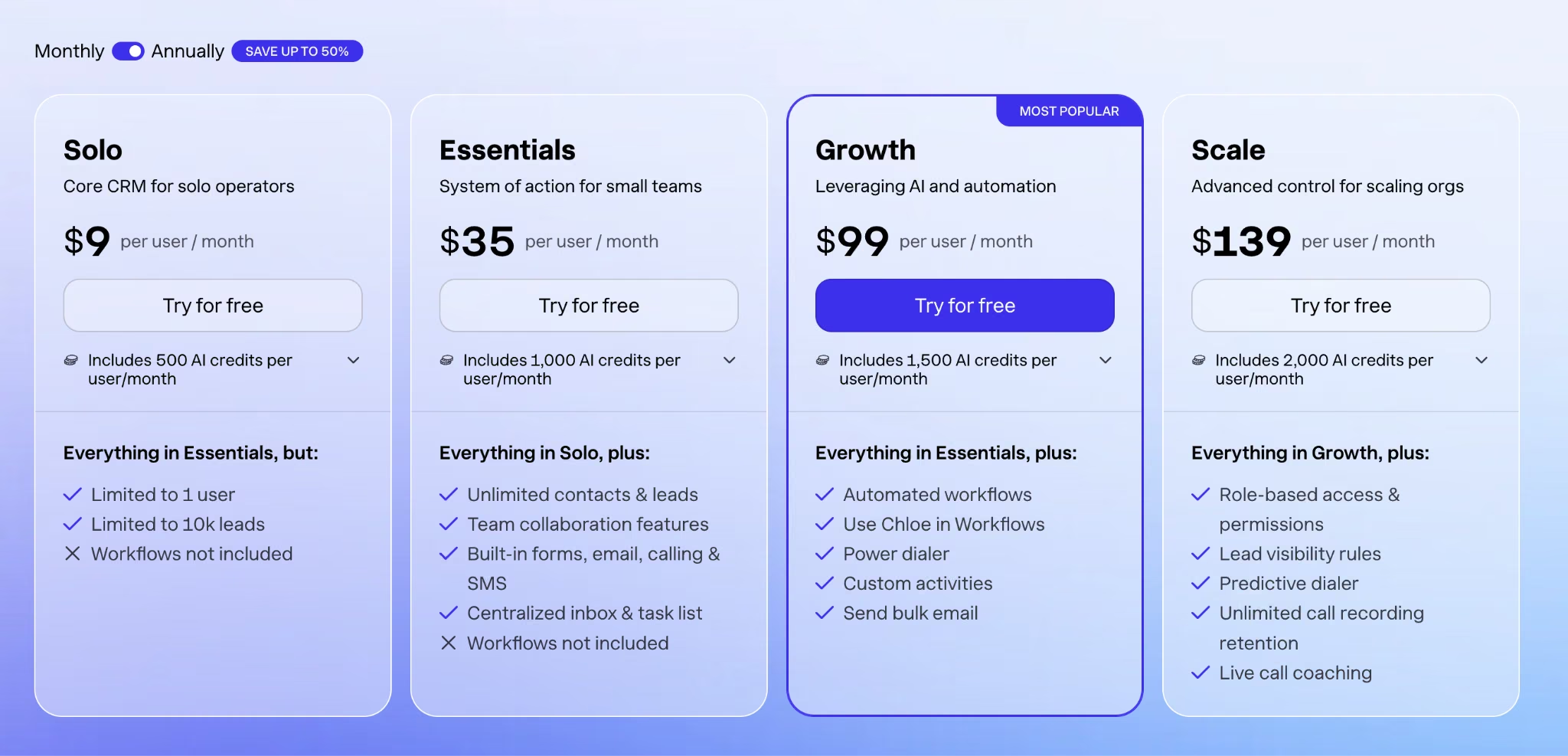
What it does: Close is a CRM built around outbound activity, combining calling, email, and SMS in one inbox with an AI agent called Chloe.
Best for: Outbound sales teams whose day is a call list.
Close makes a bet the others don't: for an outbound team, the CRM should be the place you communicate. The dialer, the shared inbox, and the sequences sit in one view, and Chloe operates there too.
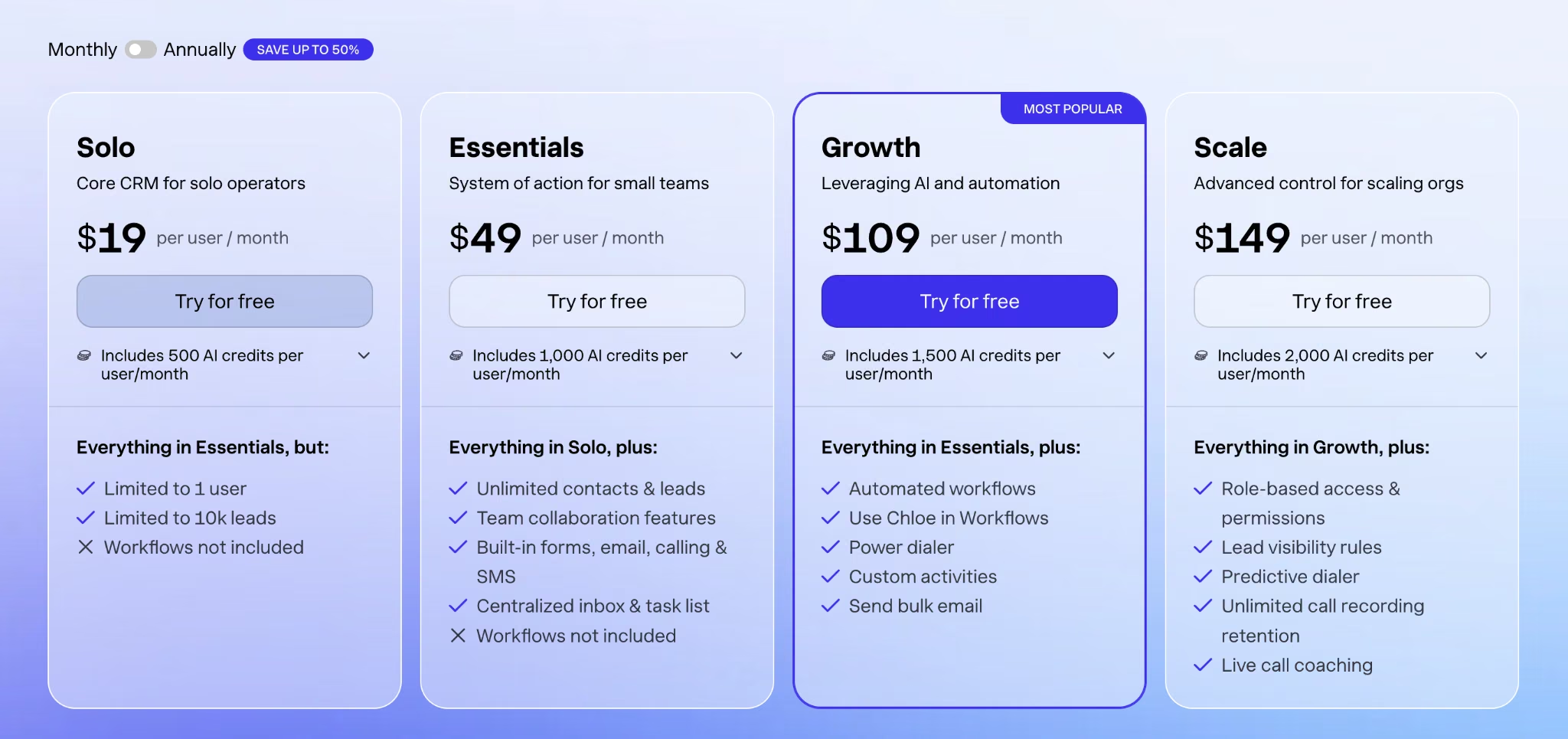
The gating is the most generous of the nine. Chloe is on every plan, including Solo, with credits scaling from 500 per user monthly to 2,000. What's gated is automation, and workflows start at Growth.
Key Features
- Chloe on every plan: The AI agent isn't reserved for higher tiers, which is unusual here.
- Built-in calling and SMS: No separate dialer subscription, plus a predictive dialer on Scale.
- Workflows with Chloe: Automated sequences the agent can act inside, from Growth.
Pros and Cons
Pros:
- AI is available at the entry price with no two-tier climb
- Close builds the dialer, inbox, and SMS itself, so they behave like one product
- Credits pool across the team instead of stranding per seat
Cons:
- Workflows require Growth, and the jump from $49 to $109 per user is steep
- Marketing and service capability is essentially absent
- Solo caps at one user and 10,000 leads
What Users Say
Close's 4.7 out of 5 across over 2,000 G2 reviews is the highest score here, and first-time buyers are why.
, a mid-market user, says that "if it's your first time using a CRM, it's perfect."

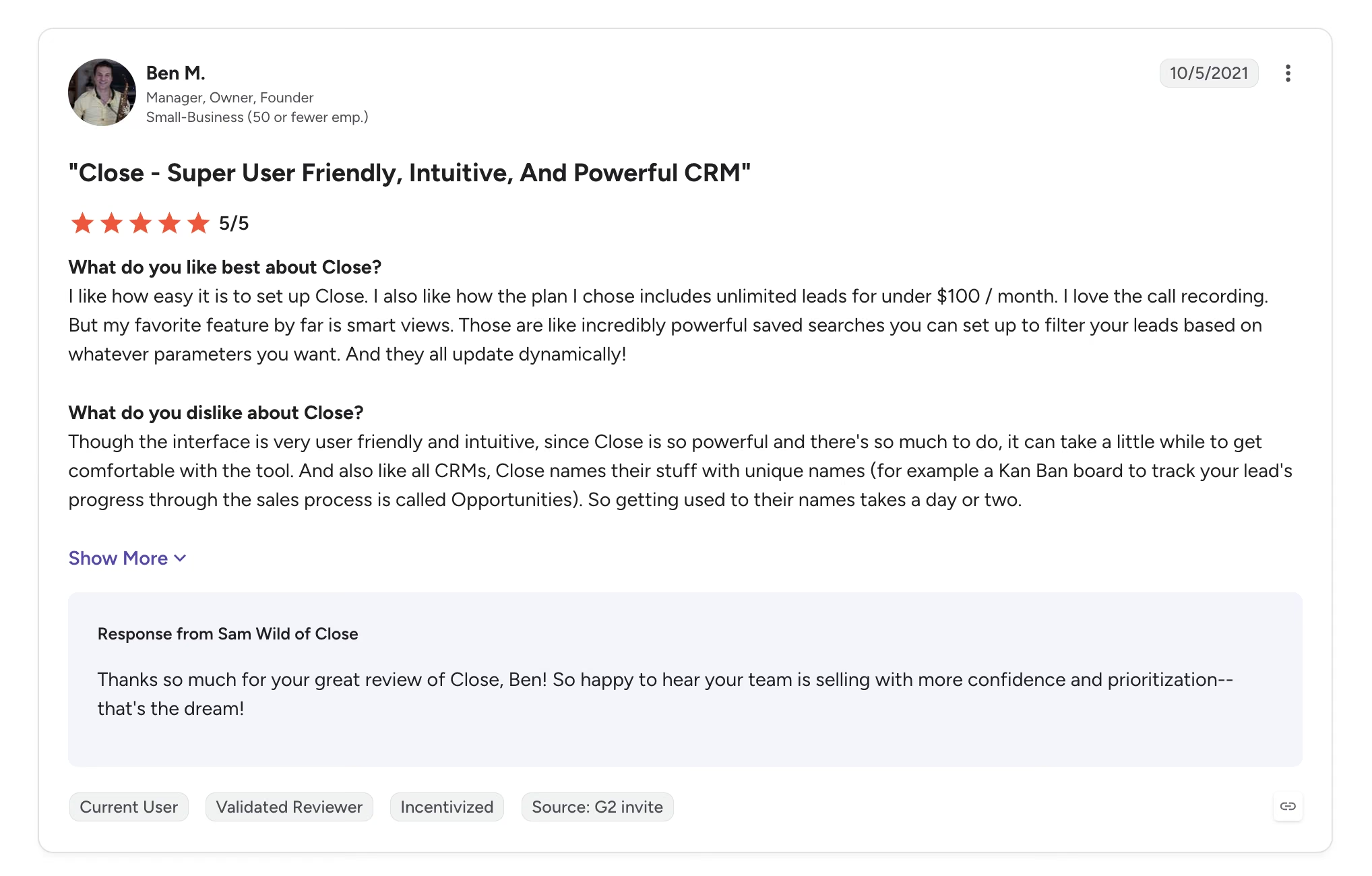
The one recurring knock is the ramp-up. Ben M. reports that "it can take a little while to get comfortable with the tool."
Pricing
Close has no free plan. Solo runs $19/user/month ($9/user/month billed annually) with 500 AI credits, Essentials $49/user/month ($35/user/month billed annually), Growth $109/user/month ($99/user/month billed annually), and Scale $149/user/month ($139/user/month billed annually). Credits refresh monthly and don't roll over.
Bottom Line
For a team making 60 calls a day, Close removes more friction than anything else here. Run a nine-month enterprise sale through it, and you'll be fighting the tool by week two.
monday CRM: Best for Teams Already Running Work in monday

What it does: monday CRM is a CRM built on monday's board system, with AI agents, an assistant called Sidekick, and a meeting notetaker.
Best for: Companies already using monday for projects who want sales in the same workspace.
The case for monday CRM is continuity. If your delivery team lives in monday boards, the handoff from closed-won to kickoff happens in one system. monday keeps its AI on one side of a single line. Basic gets none of it, and Sidekick, the lead sourcer, and the outreach caller agent all arrive together on Standard at $25 per seat monthly.
Automation limits are the real ceiling, since the agents run on automations and Basic lists no monthly allowance.
Key Features
- Sidekick assistant: Context-aware help across boards, from Standard.
- Lead sourcer and outreach agents: Find and engage prospects automatically, from Standard.
- AI meeting notetaker: Records and summarizes calls into board items.
Pros and Cons
Pros:
- Sales and project work share a workspace, removing a category of handoff errors
- Boards are visual and easy for non-sales staff to read
- AI credits are included from Standard up, with no separate agent add-on to buy
Cons:
- Basic has no AI at all, and automation caps on Standard throttle the agents in practice
- Three-seat minimum and no free CRM tier
- The board metaphor strains once your sales process gets complex
What Users Say
Across over 1,600 G2 reviews, monday CRM averages 4.6 out of 5, and automation is what reviewers name most.
One reviewer, Sefak T., says "automation helps me create tasks and reminders when a deal stalls."

Price leads the criticism. A verified user in Information Technology and Services writes simply that "the price is high compared to the competitor."

Pricing
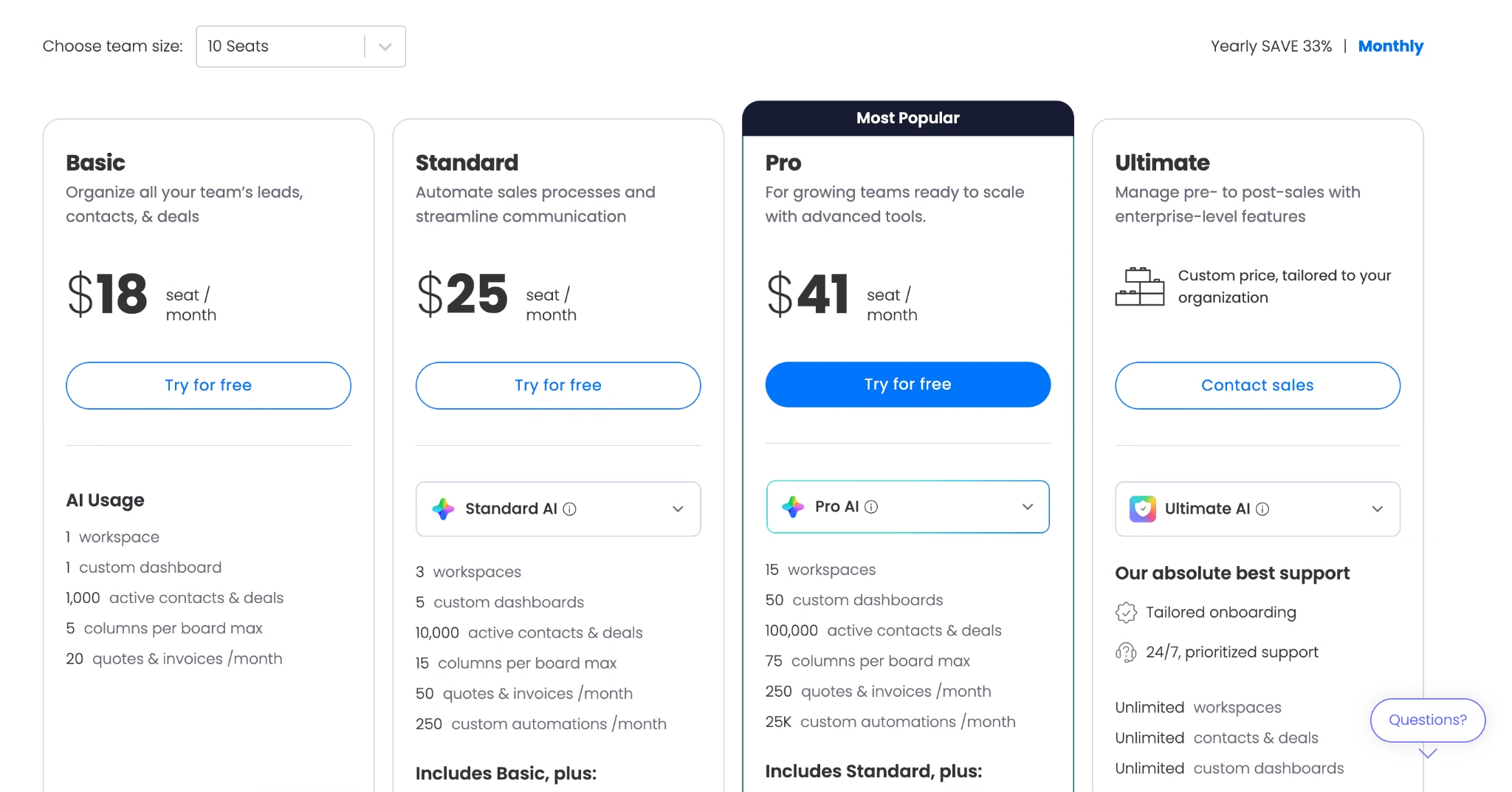
monday CRM Basic runs $18/seat/month ($12/seat/month billed annually), Standard $25/seat/month ($17/seat/month billed annually), and Pro $41/seat/month ($28/seat/month billed annually). Ultimate is custom.

Bottom Line
Choose monday CRM for the workspace, not the CRM. If your team isn't already in monday, the other arguments don't hold up alone.
Read More: How to Build a Sales Dashboard with AI (Step by Step)
Which AI CRM Should You Choose?
Start from the criterion you can't compromise on, then work back to the tool.
- Emergent: Your CRM can't describe your process, and you want the bill flat as you hire.
- HubSpot: You run marketing, sales, and support against the same contacts.
- Salesforce: You have 50 or more reps and a dedicated CRM admin.
- Zoho CRM: You want predictive scoring cheaply and can invest setup time.
- Pipedrive: You need a visual pipeline your team will adopt fast.
- Freshsales: You want the cheapest entry point for testing AI scoring.
- Attio: You have a data model no standard CRM describes.
- Close: You run high-volume outbound calling.
- monday CRM: You already live in monday boards.
Skip the category if you have fewer than 50 customers, where a spreadsheet still wins, or if nobody can own data quality, since every AI feature here degrades to noise on bad data. Agencies juggling several of these at once may find our one-tool-per-job breakdown more useful.
What This Comes Down To
The AI in these platforms is mostly good now, and the pricing around it mostly isn't. Every tool here can score a lead, draft an email, or summarize a call competently. What separates them is which plan you reach before that happens, and whether the meter runs per seat, per credit, or both at once.
That's why the five criteria matter more than the reviews do. A team that picks on features buys HubSpot Professional and discovers the agents bill separately. A team that picks on entry price buys Freshsales Growth and finds contact scoring two tiers up.
The harder question is whether to buy a CRM at all. Buy when a standard pipeline is genuinely what you run. Build when it isn't.
Should You Build Your Own AI CRM Instead?
Build when your process is the unusual part of your business, and buy when your volume is. Emergent's free plan includes 10 monthly credits, enough to describe your pipeline and get a first version back. Emergent's CRM builder page shows what that looks like when finished, and the same AI app builder covers the tools you'd hang off it.
- Stop paying per seat for fields nobody fills in: Credits track what you build, so a fourth rep doesn't change the bill.
- Describe your process in place of mapping it: Permits, crew assignments, referral chains, whatever you track becomes a field because you said so.
- Keep the data you're about to hand over: You own and export the code, so leaving means taking a codebase you already have.
- Get payments and sign-in without a second purchase: Mention invoicing or Google sign-in, and both wire in during the build.

Most AI app builders stop at prototypes. Emergent creates production-ready apps you can actually launch.
- Production-ready apps
- Web & mobile apps
- Deploy in minutes







