



TL;DR
- Niche job board: Best for a recruiter or marketer with contacts in one industry.
- Two-sided niche marketplace: Best for someone who deeply knows both sides of an underserved market.
- Paid membership or community platform: Best for a well-connected pro who can gather a founding cohort.
- Booking and scheduling app: Best for a founder who knows one service industry's scheduling pain.
- Niche directory website: Best for an SEO-savvy operator who spots a directory gap.
- Customer feedback or survey tool: Best for a builder who wants a focused first SaaS.
- Vertical CRM or internal tool for SMBs: Best for an industry insider who knows what generic CRMs miss.
- Client onboarding portal for agencies: Best for a former agency worker who lived the client-comms pain.
- Online course or e-learning platform: Best for a subject expert or trainer.
- Event management platform: Best for an organizer failed by generic event tools.
- AI chatbot builder for SMBs: Best for a builder chasing an AI-native niche.
- Social media or content calendar tool: Best for a marketer who wants a focused planning tool.
You've seen the headline: "50 startup ideas you can build without code." Those ideas are fun to scroll and useless the second you try to pick one. Half of them can't be built without a developer, and nothing tells you which is worth your weekend.
So I did the boring part. I looked at more than 50 no-code startup ideas. Then, over about two weeks, I spun up a quick throwaway test app for the 12 that held up.
I took each one just far enough to answer a single question: How close can a non-technical founder get to a working, money-making app in a weekend?
This list is ranked by that test. Idea appeal didn't earn a spot. Some of the most-hyped ideas are the hardest to ship, and a few quiet ones are far more buildable than they look. Here's what survived, who each idea is for, and what it takes to build.
How I Researched & Tested These No-Code Startup Ideas
I started with more than 50 no-code startup ideas, then cut the list to the 12 a non-technical person could realistically ship. I spun up a quick test app for each over about two weeks and set it aside once it answered my one question.
Plenty got cut, and the reasons matter. AR/VR experience builders are out because no-code AR tooling isn't mature. A blockchain or Web3 app has thin mainstream business demand. An IoT dashboard needs hardware wiring, so it's low-code at best. A video streaming platform dies on bandwidth costs before you charge a dollar.
A handful more (portfolio builders, recipe apps, niche dating) are real but too crowded or too thin to earn a slot.
One question guided every build: "How close can a non-technical founder get to a working, money-making app in a weekend?" I judged each idea on five things:
- Buildability: How close to a working app you get fast, without a developer.
- Demand proof: Whether real founders already make money on the model.
- Monetization: How obvious and recurring the revenue path is.
- No-code fit: Whether the idea hits a no-code ceiling early or has room to grow.
- Founder fit: Who's well positioned to win it.
Building each one, even halfway, taught me more than reading about them could. I learned fast which ideas are easy to start and hard to finish.
12 Best No-Code Startup Ideas: Quick Comparison
| Idea | Core Strength | Revenue Potential |
|---|---|---|
| Niche job board | Fast build, SEO upside | Recurring |
| Two-sided marketplace | Highest ceiling | High |
| Paid membership | Fastest to launch | Steady, recurring |
| Booking app | Clear pain to solve | Solid, recurring |
| Niche directory | Low effort, compounds | Moderate, slow to arrive |
| Feedback tool | Simple to build | Moderate |
| Vertical CRM | High willingness to pay | High, recurring |
| Onboarding portal | Underserved, agency budgets | Solid, recurring |
| Course platform | Repeat sales, high margin | High |
| Event platform | Go-vertical opening | Moderate to high |
| AI chatbot builder | Fast to a working app | High |
| Content calendar tool | Durable, broad need | Moderate, recurring |
1. Niche Job Board: Best for Recruiters With Industry Contacts
What it does: A job board serves one industry or role, matching employers who post openings with candidates who want them.
Best for: A recruiter, marketer, or operator with real employer contacts in a single vertical.
I wired a listings screen to an Airtable-style database in under an hour, added filters by role and location, and stood up a simple employer post form the same afternoon. The pieces are that mature, and no idea on this list got to a believable product faster.
The problem shows up the moment you open it. An empty job board looks dead, and no employer wants to be the first to post into silence. That cold-start problem is the whole game. I seeded about 20 fake listings just to see the page breathe, and it instantly changed how usable the app felt.

That's why the contacts matter more than the code. If you can call ten employers in your niche and get real openings on day one, this is one of the most defensible starts on the list. The SEO builds a moat over time, and employers pay to post.
What You'll Build
- Filterable listings: Search by role, location, and seniority so candidates find fits fast.
- Employer post flow: A self-serve form to submit and pay for a listing.
- Email capture: A job-alert signup that grows an audience you own.
Pros and Cons
Pros:
- Low build cost and a fast MVP.
- Repeat revenue from paid and featured postings.
- Search traffic compounds into a lasting advantage.
Cons:
- Cold-start emptiness until you seed real listings.
- Ongoing curation to keep listings fresh and trustworthy.
Pricing
- Build cost: A no-code subscription and your time.
- Monetize: Paid job postings, featured slots, or an employer subscription.
- Running cost: Low, mostly your builder's monthly plan and a domain.
Bottom Line
If you already know employers in one industry, start here. The build won't fight you, and your contacts solve the hardest part. If you can't fill the board in week one, don't start.
2. Two-Sided Niche Marketplace: Best for Founders Who Know Both Sides
What it does: A two-sided marketplace connects two groups, buyers and sellers or clients and providers, and takes a cut of each transaction.
Best for: Someone who lives inside an underserved market and understands both sides of it.
This idea has the highest ceiling on the list and the hardest launch. I built the core in a marketplace-focused no-code tool, wiring up a listings grid, provider profiles, and a booking-plus-checkout flow. The scaffolding came together over a weekend, which surprised me.
Then the test app taught me the business's hardest lesson for free. It looked lifeless until I fake-seeded one side with a dozen providers, and even then, a marketplace with no buyers is just a directory. The chicken-and-egg problem that kills marketplaces showed up in my throwaway build exactly the way it shows up in the real ones.

I seeded a dozen fake providers just to make the grid look alive, and it still sat there with no buyers. That's the whole problem in one screen. You can build the marketplace, but growth is a two-front war, and you only win that if you already have supply or demand in hand.
Pick a niche where you personally know the sellers, and seed that side by hand before you spend a cent on the buyer side.
What You'll Build
- Dual profiles: Separate flows for the two sides, each with the fields they need.
- Search and match: Filters that help one side find the right other side fast.
- Payments and commission: A checkout that takes your cut automatically.
Pros and Cons
Pros:
- Commission revenue scales with volume, no per-user selling.
- A defensible network once liquidity kicks in.
- The core product is more buildable than its reputation suggests.
Cons:
- Brutal cold-start, since you must seed one side manually.
- Trust, safety, and dispute handling add real overhead.
Pricing
- Build cost: A mid-tier no-code plan for payments and logins.
- Monetize: A commission per transaction, sometimes a listing fee.
- Running cost: Moderate, since payments and higher usage sit on paid tiers.
Bottom Line
Don't build this unless you can supply one side yourself on day one. If you can, the payoff outruns every other idea on this list. If you can't, build the job board instead and come back later.
3. Paid Membership or Community Platform: Best for Well-Connected Pros
What it does: A membership website gives paying members a gated space for content, discussion, and access to you.
Best for: A well-connected professional who can gather a founding group from their existing network.
I had a gated community screen, member sign-in, and a paywalled content area running in an afternoon using a community-focused no-code stack. There was almost no friction in the build itself.

A community's value comes from its members, not the software. My test app had a working paywall, a discussion feed, and gated posts, and it still read like an empty room. Thirty real people showing up and staying is the actual product; the app is just the container.
That reframes who should build it. If you have an audience or a professional network you can activate, you can be charging within weeks, since people pay for access and belonging. If you're starting from zero followers, the polished build will be a quiet room. Bring the people, then the tool is trivial.
What You'll Build
- Gated access: Members-only content and spaces behind a paywall.
- Recurring billing: Member subscriptions handled automatically.
- Discussion and events: Posts, threads, and a calendar to keep members active.
Pros and Cons
Pros:
- Fastest path to a working, chargeable product.
- Predictable recurring revenue from subscriptions.
- High margins once the community sustains itself.
Cons:
- Churns fast if engagement drops.
- Dead on arrival without an existing network to seed it.
Pricing
- Build cost: A community or membership no-code plan.
- Monetize: Member subscriptions, with tier options.
- Running cost: Low to moderate, scaling with member count.
Bottom Line
The standout here is speed to revenue. This is the quickest idea on the list to a paying customer, but only if you bring the people. Well-connected founders should move on it fast. Anyone hoping the software attracts the crowd should look elsewhere.
4. Booking and Scheduling App: Best for One Service Industry
What it does: A booking and scheduling app lets a service business show availability, take appointments, and send reminders.
Best for: A founder who knows one service industry's scheduling headaches inside out.
This idea is deceptively hard, and my test app proved it. A booking screen with a service list and a time picker took maybe an hour in a standard no-code builder. It demoed beautifully.
The wall is the logic, and it hits fast. Calendar sync, double-booking prevention, time zones, and automated reminders ate most of my testing time. Customers judge a booking tool on those reminders. Generic scheduling tools already do the simple version well, so a flat clone has no reason to exist.

You win this by going narrow. Build the version a tattoo studio, a dog groomer, or a physiotherapy clinic needs, with the industry's specific rules baked in. The vertical details are the moat, because the big scheduling tools stay generic.
What You'll Build
- Availability calendar: Real-time open slots customers can book themselves.
- Automated reminders: Email or text nudges that cut no-shows.
- Industry rules: Buffers, deposits, or intake steps specific to one trade.
Pros and Cons
Pros:
- A pain every service business feels and pays to fix.
- Recurring per-business subscription revenue.
- Vertical focus wins where big tools stay generic.
Cons:
- Scheduling logic gets complex fast.
- You compete with entrenched, polished incumbents.
Pricing
- Build cost: A no-code plan that supports scheduling logic and integrations.
- Monetize: A per-business monthly subscription.
- Running cost: Moderate, since calendar and messaging integrations add up.
Bottom Line
A generic scheduler already exists, and free versions are everywhere. Build the one weird version one industry can't get anywhere else, and you have a business. This one rewards deep domain knowledge over building skill.
5. Niche Directory Website: Best for SEO-Savvy Operators
What it does: A directory website lists and organizes businesses, tools, or resources in one category so people can find and compare them.
Best for: An SEO-minded operator who spots a category with no good directory.
I had a filterable directory of about 30 seeded entries running in under two hours using a database-plus-interface no-code combo. Nothing else here took less effort to stand up, and the payoff is slow but compounding.
The catch is the wait. A directory earns through search traffic, and that ramp takes six to twelve months of content and SEO before it pays.
Google puts the wait at four months to a year, and my "done" test app would have sat with zero visitors for most of that stretch. The waiting is what this idea asks of you.

That makes it a great fit for someone who already understands SEO and can pick a keyword-rich niche. The build won't stop you, and the running costs stay tiny. If you need money this quarter, this isn't it. If you can play a longer game, it becomes a quiet, durable asset.
What You'll Build
- Filterable entries: Categories and tags so visitors narrow fast.
- Submission flow: Let businesses add or claim their own listing.
- SEO-friendly pages: Individual pages built to rank for long-tail searches.
Pros and Cons
Pros:
- Among the easiest builds here.
- Traffic and revenue compound as the content builds.
- Cheap to run indefinitely.
Cons:
- Slow six-to-twelve-month payoff via SEO.
- Needs steady content to stay useful and ranked.
Pricing
- Build cost: A low-tier no-code subscription and a domain.
- Monetize: Paid or featured listings, sponsorships, and lead fees.
- Running cost: Very low, one of the cheapest to keep alive.
Bottom Line
If you know SEO and can wait out the ramp, a niche directory is a low-risk way to build an asset that keeps earning as the traffic grows. Choose the niche for search demand you can verify.
6. Customer Feedback or Survey Tool: Best for a Focused First SaaS
What it does: A feedback tool helps businesses collect surveys, reviews, and in-app feedback, then makes sense of the responses.
Best for: A first-time SaaS builder who wants one clear, buildable product.
One no-code startup I studied does exactly this. James Devonport built UserLoop, a Shopify customer feedback and survey app, on Bubble without a development team. I built a form builder feeding a response dashboard in an afternoon, and the core loop of collecting then visualizing works cleanly in no-code.
My form-to-dashboard loop worked on the first try. So does the next person's, which is exactly why a plain survey tool vanishes the day it launches.

Your angle has to be sharp, which means one channel and one audience, with one job done better than the generalists. Think feedback for a specific platform's sellers, or surveys built into one industry's workflow. Either takes about a weekend to build.
What You'll Build
- Form builder: Drag-and-drop questions with logic and branching.
- Response dashboard: Live charts that turn answers into decisions.
- Integrations: Push responses into the tools a team already uses.
Pros and Cons
Pros:
- Clean, well-understood build with a clear core loop.
- Recurring SaaS subscription revenue.
- Easy to demo and explain to buyers.
Cons:
- Extremely crowded category.
- Winning demands sharp niche differentiation.
Pricing
Build cost: A no-code plan with database and integration support.
Monetize: A tiered monthly SaaS subscription.
Running cost: Moderate, mostly usage-based tiers as responses grow.
Bottom Line
The build is friendly, so this is a fine first SaaS to learn on. Don't ship a generic survey tool into a crowded room. Pick one audience the big players ignore, or your polished build competes on price alone.
7. Vertical CRM or Internal Tool for SMBs: Best for Industry Insiders
What it does: A vertical CRM manages contacts, deals, and workflows for one specific industry, instead of trying to fit everyone. A no-code CRM builder lets you shape those fields around a single trade rather than settling for a generic setup.
Best for: An industry insider who knows exactly what generic CRMs get wrong for their trade.
A contact list and deal pipeline were quick to build in an internal-tool no-code platform, maybe an afternoon for a usable record view. The surface comes together fast.
Then the depth arrives. Relational data, custom roles, and permissions are where a CRM lives or dies, and that logic is where my build slowed to a crawl. The difficulty is also the protection. If it were trivial, generic CRMs would already fit every industry, and they pointedly don't.

That's why insiders win this. You know the fields a real estate team, a home-services crew, or a law practice needs, and you can bake them in.
One contracting business proved it, replacing a scattered mix of texts, spreadsheets, and inboxes with a four-stage pipeline tool the owner built themselves, cutting lead response time 38% and lifting Google review volume 56%.
Businesses pay well for a tool that speaks their language. The build asks more of you here, and the reward matches.
What You'll Build
- Industry-specific pipeline: Stages and fields matched to one trade's real process.
- Roles and permissions: Control who sees and edits what across a team.
- Automations: Follow-up nudges and status changes that run themselves.
Pros and Cons
Pros:
- High willingness to pay, with customers who stay.
- Real logic depth creates a durable advantage.
- Insider knowledge is hard for competitors to copy.
Cons:
- Relational logic and permissions get complex.
- Onboarding a business's data takes real effort.
Pricing
- Build cost: A per-seat internal-tool no-code plan.
- Monetize: Per-seat subscriptions or a per-business retainer.
- Running cost: Moderate, rising with seats and data volume.
Bottom Line
This is the idea for someone who knows a trade cold and is willing to build past the easy part. Nail one industry's workflow and you'll own a high-value tool that customers stick with. A generalist version won't win here.
8. Client Onboarding Portal for Agencies: Best for Ex-Agency Builders
What it does: An onboarding portal gives agencies a branded space to collect client info, share files, and track project status.
Best for: A former agency worker who felt the client-communication chaos firsthand.
This one is underrated, and agency budgets make it worth attention. I built a white-label client portal with logins, a file area, and a status tracker over a weekend in a portal-friendly no-code tool. For a client-facing product, it came together comfortably.
Multi-tenancy is where it gets hard. The moment you want each agency to have its own branded, isolated space with its own clients, data separation and per-agency customization get fiddly. My test app handled one agency fine and showed me the work a real multi-agency version would take.
The upside is that agencies pay for tools that make them look professional and save account-manager hours.

If you've lived the messy onboarding pain, you know exactly which friction to remove. That lived experience is the edge here, more than any feature.
What You'll Build
- Branded portals: White-label spaces each agency can make their own.
- File and form intake: Structured collection of everything a project needs.
- Status tracking: A clear view of where each client sits in the process.
Pros and Cons
Pros:
- Agencies have budget and a pain they feel firsthand.
- Recurring per-agency subscription revenue.
- Less crowded than consumer-facing categories.
Cons:
- Multi-tenant data separation adds complexity.
- Per-agency customization requests pile up.
Pricing
- Build cost: A no-code plan supporting logins and white-labeling.
- Monetize: A per-agency monthly subscription, tiered by seats or clients.
- Running cost: Moderate, growing with tenants and storage.
Bottom Line
Ex-agency builders should look at this one, because they already know the pain and the buyer. It rewards lived experience over technical range, and the multi-tenant work is the price of a niche that pays well and holds on to its customers.
9. Online Course or E-Learning Platform: Best for Subject Experts
What it does: An e-learning platform hosts courses, lessons, and quizzes, and tracks each learner's progress.
Best for: A subject-matter expert or trainer with knowledge worth paying for.
This idea earns repeat sales and high margins once it works, and the shell is quick to build. I stood up a course structure with modules, video embeds, and a member login in an afternoon using a no-code app builder.

The work is everything the shell holds. Progress tracking, quizzes, certificates, and content that keeps people learning took far longer, and the content itself is a project of its own.
I opened the finished build and had nothing to teach.
Adam Carbaugh, a travel ICU nurse with seven years of critical care experience, put that to the test: he built Zero Deficit, a CCRN certification prep app loaded entirely with his own study material, quizzes, and progress tracking. It launched to 47 registered users and $468 in revenue within weeks, for under $1,000 in build cost.
His edge was seven years of knowing exactly what the exam actually tests, not the platform. That's the pattern: If you already teach something people pay to learn, the platform is a straightforward wrapper around your knowledge. If you don't have the content or the authority, no amount of polish fills the room. Bring the curriculum, and the build cooperates.
What You'll Build
- Course structure: Modules and lessons learners move through in order.
- Progress and quizzes: Tracking and assessments that prove learning.
- Gated content: Paid access with tiers or one-time course purchases.
Pros and Cons
Pros:
- High margins on every sale after the first.
- Learners who return, plus recurring or repeat revenue.
- The platform shell builds quickly.
Cons:
- Content creation is a large, ongoing job.
- Needs genuine authority to attract learners.
Pricing
Build cost: A no-code plan with logins and media hosting.
Monetize: Course sales, subscriptions, or cohort pricing.
Running cost: Moderate, mostly media storage and bandwidth.
Bottom Line
If you already have expertise people pay for, this turns it into a product that keeps selling long after you build it. Experts should build it, and everyone else should pick an idea that doesn't hinge on what they already know.
10. Event Management Platform: Best for Organizers Underserved by Generic Tools
What it does: An event platform handles registration, ticketing, schedules, and attendee communication for events.
Best for: An organizer whose event type is poorly served by generic ticketing tools.
Generic event tools cover the mainstream, so this idea lives in the gaps they ignore. I built registration and a ticketing flow with a schedule view over a weekend in a no-code app builder, and the interface came together fine.
Payments and logistics are where it gets heavy. Handling real ticket money, refunds, check-in, and multi-session schedules pushed my test app to its limits, and those are exactly the parts attendees and organizers care about most. A shallow clone of the big platforms won't win anyone over.

The opening is vertical or format-specific events, like recurring workshops, community meetups with membership perks, or a niche conference series the big tools handle clumsily. Go where the incumbents are generic and clunky, and your focused version wins on fit.
What You'll Build
- Registration and ticketing: Sign-ups and paid tickets in one flow.
- Schedule builder: Multi-session agendas attendees can browse.
- Attendee comms: Reminders and updates that reach everyone booked.
Pros and Cons
Pros:
- Clear opening where generic tools underserve.
- Revenue from ticket fees or organizer subscriptions.
- Repeat events bring repeat usage.
Cons:
- Payments and logistics add real complexity.
- Established platforms own the mainstream.
Pricing
- Build cost: A no-code plan supporting payments and logins.
- Monetize: A small-ticket fee or an organizer subscription.
- Running cost: Moderate, tied to payment processing and traffic spikes.
Bottom Line
Chasing the general event market is a losing move, because the incumbents own it. If you know an event type they handle badly, a focused platform fits where they can't. Everything here depends on picking the right narrow lane.
11. AI Chatbot Builder for SMBs: Best for an AI-Native Niche
What it does: An AI chatbot builder lets small businesses launch a support or lead-capture bot trained on their own content.
Best for: A builder who wants an AI-native niche with fresh 2026 demand.
I wired a working FAQ and lead-capture bot in a no-code app builder connected to a language-model API, and had it answering from a sample knowledge base in an afternoon. It's the most 2026-relevant idea on the list, and it appeared in the real-startup examples I studied.
My test bot cheerfully made things up about a business that didn't exist until I built in guardrails. Answer accuracy, guardrail rules, and the ongoing per-message model cost are the whole business.

Small businesses want this and don't want to build it themselves, which is the opening. Package a bot trained on one industry's common questions, priced as a simple monthly subscription, and you're selling relief from a headache. Budget for the model costs, because they scale with every conversation.
What You'll Build
- Trainable knowledge base: The bot answers from a business's own docs.
- Lead capture: Conversations that collect contact details and hand off.
- Channel embedding: Drop the bot on a site or into a chat widget.
Pros and Cons
Pros:
- Strong, current demand from small businesses.
- Recurring subscription revenue with clear value.
- Fast to wire a working app.
Cons:
- Answer quality needs constant tuning and guardrails.
- Per-message model costs eat into margin.
Pricing
- Build cost: A no-code plan plus language-model API usage.
- Monetize: A per-business monthly subscription.
- Running cost: Variable, since model costs rise with conversation volume.
Bottom Line
Build this if you like tuning AI systems and don't mind watching a usage meter. Demand is strong, and the build comes together fast, so the timing is on your side. Just know your bill is never the same twice.
12. Social Media or Content Calendar Tool: Best for Focused Marketers
What it does: A content calendar tool helps marketers plan, schedule, and track posts across social channels in one place.
Best for: A marketer who wants a focused, single-purpose planning tool.
This idea is crowded but durable, because the need never goes away. I built a content calendar with a planning board and a scheduling view over a weekend, using a database-backed no-code app, and the planning side felt useful fast.
The fragile part is the connection to the platforms. Social APIs change and break scheduling without warning, and that maintenance is a permanent tax on the product. My test app planned posts nicely, then reminded me that auto-posting is a moving target.

The way in is focus. A lean planner for one platform or one type of creator beats another everything-tool. Marketers happily pay for a calm, focused workflow, as long as the scheduling holds. Keep the scope tight and the maintenance manageable, and it's a steady earner.
What You'll Build
- Visual calendar: A board to plan posts across weeks at a glance.
- Scheduling: Queue posts to publish automatically per channel.
- Simple analytics: Track what landed to guide the next round.
Pros and Cons
Pros:
- Steady, ongoing demand from marketers.
- Recurring subscription revenue.
- The planning core builds quickly.
Cons:
- Social API changes break scheduling and demand upkeep.
- Crowded field of established tools.
Pricing
- Build cost: A database-backed no-code plan.
- Monetize: A tiered monthly subscription.
- Running cost: Moderate, plus the upkeep of platform integrations.
Bottom Line
Go in only if you'll commit to maintaining the integrations, because that's the ongoing job. Keep the scope narrow, serve one kind of creator well, and a focused calendar tool holds its own against the bloated all-in-ones.
Which No-Code Startup Idea Should You Choose?
The right no-code startup idea depends less on the idea and more on what you already bring to it. Pick the one that matches your unfair advantage.
Choose a niche job board or directory if you:
- Have contacts in one industry or understand SEO well.
- Want the fastest, lowest-risk path to a live product.
Choose a paid membership or online course if you:
- Already have an audience, a network, or teachable expertise.
- Want recurring revenue and can bring the people yourself.
Choose a vertical CRM or booking app if you:
- Know one trade's workflow better than any generic tool does.
- Are willing to build past the easy surface into real logic.
Skip building any of these if:
- You want passive income with zero ongoing work.
- You lack a way to reach customers, an audience, or a niche you know well.
Final Verdict
The most defensible no-code startup ideas are the niche job board, the directory, and the paid community. Each pairs a quick build with a clear way to charge.
If you have deep knowledge of one market and more patience, the two-sided marketplace and the vertical CRM carry the highest ceilings. That comes at the cost of harder builds and slower starts. Match the idea to your edge, and any of the 12 can work.
How Emergent Helps Founders When a No-Code Idea Outgrows the Stack
Several of these ideas, if built using other tools, hit a ceiling fast. The marketplace's payment logic, the vertical CRM's permissions, and the booking app's scheduling rules are where a no-code builder causes trouble for you. Those same limits are where you can't fully own or extend the code underneath.
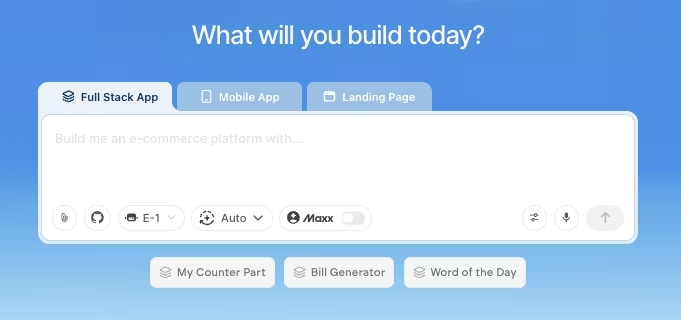
That's the point where Emergent’s AI app builder fits. You describe the app you want in plain language. A coordinated set of specialized agents splits the planning, the interface, and the wiring between them, and the result is a working app with the data, logins, payments, and custom logic that a template-based tool struggles to reach.
The outcome is real code you own and can keep shaping, instead of a workaround stretched past its limits.
A weekend directory or a simple community should stay on a no-code tool, and Emergent won't replace one for the ideas that stay simple. But say your idea gets traction and outgrows the stack you started on.
Then Emergent is worth a look for turning that same idea into custom software, without hiring a dev team. Build the quick version first, then reach for it when you hit those limits.

Describe what you want and Emergent builds it. A real, production-ready app you can launch the same day.
- One prompt to build
- Zero code required
- Deploy in minutes







