



Last week I walked four minutes to a coffee cart near my building, stood behind 12 people, and walked back without a coffee. Eight minutes gone, for information I could have had before I left my desk.
I picked that exact problem and set out to build an app in a day without a multi-week polish pass or a team.
LineCheck tells you how long the line is at one coffee cart before you walk over. I described it in Emergent and tested the working build it handed back, inside a single tracked session. I wrote down every credit and minute it cost me.
A tested one-day build is possible, but only for a job this small. Here's exactly what a day got me, and where the clock kept running after I closed my laptop.
Why Most "Built in a Day" Claims Fall Apart Before You Even Open the App
Type "build an app in a day" into any search bar, and you'll find no shortage of people claiming they did it. Most of them are leaving out the same thing.
A day gets you a small, single-purpose working app. It doesn't get you a full product, the kind with onboarding, every edge case handled, and a design refined over months.
That's the limit of what a single day can do. LineCheck works because it does exactly one thing, and I never pretended it would do more.
If your idea needs multiple user roles, a payment flow, and months of edge cases sorted out, a day was never going to be enough. That's a scope problem.
What You'll Need Before Starting
You don't need a computer science degree or a team to try this yourself. You need three things, and keeping your idea narrow decides more than which app you build with.
- An AI app builder account: A tool you describe your app to, that hands a working build back for you to test. Emergent is what I used, and its free plan gives you 10 credits a month, no card required.
- A narrow idea: It fits on one screen and does one job, so it helps you make one decision faster. If you can't describe what it does in a single sentence, it's too big for a day.
- A single uninterrupted block of time: You don't need a full 24 hours. My own hands-on build time for LineCheck came to 24 minutes across two passes. I spent longer than that testing it on my phone and thinking through the app-store side.
How to Build an App in a Day: Step-by-Step
The walkthrough below tracks the credits and minutes I logged, plus what happened at each step along the way.
Step 1: Scope to One Job and Set Your Ground Rules

Before I opened Emergent, I limited LineCheck to one coffee cart, three report buttons (No Line, Some Wait, Long Wait), and an optional 40-character note. Nothing else.
It also excluded user profiles, multiple locations, and a settings screen. I cut every extra feature before typing the first prompt.
The scoping happened before I opened the tool. An AI app builder moves fast on a narrow brief, but deciding what to cut is still your call. If you're stuck on a blank prompt, Emmy, Emergent's free in-product assistant, helps turn a rough idea into a build-ready brief. It doesn't cost credits, so use it before you spend any.
Scoping is the one step that decides whether the rest of the day goes smoothly or not.
Step 2: Pick the Approach That Fits Your Idea
I'd settled on Emergent before the clock started, but the reasoning is worth having. The wrong approach eats into the same one day you're trying to protect. You've got three broad ways to build something like this.
An AI app builder turns a written description into a working app. Visual no-code app builders have you assemble screens and logic by hand with drag-and-drop controls. Or you write the code yourself.
I never touched code for this build. Every screen and every rule in LineCheck came from what I typed into Emergent.
Between the other two, the AI mobile app builder's edge was speed on a first pass. I described LineCheck's screens and logic in a written brief and got a working scaffold faster than assembling the same thing block by block would have.
A drag-and-drop platform is still the better call if your idea leans more on custom visual layout than on rules-heavy logic like LineCheck's update-not-duplicate requirement. For a narrow, logic-heavy app on a one-day clock, prompting won.
Step 3: Build the Core Flow First
I gave Emergent this exact brief to start the build:
Build a small app called LineCheck for checking how long the line is at one specific coffee cart before I walk over. I want three screens: a Report screen where anyone can tap one of three buttons, No Line, Some Wait, or Long Wait, plus an optional note capped at exactly 40 characters, no more. A Glance screen showing the current best estimate for that one spot.
And a Spot Detail screen for that same spot, showing that same current estimate. If two reports come in for the same spot within 10 minutes of each other, update the existing current estimate instead of creating a second entry, weighted toward whichever report is newer.
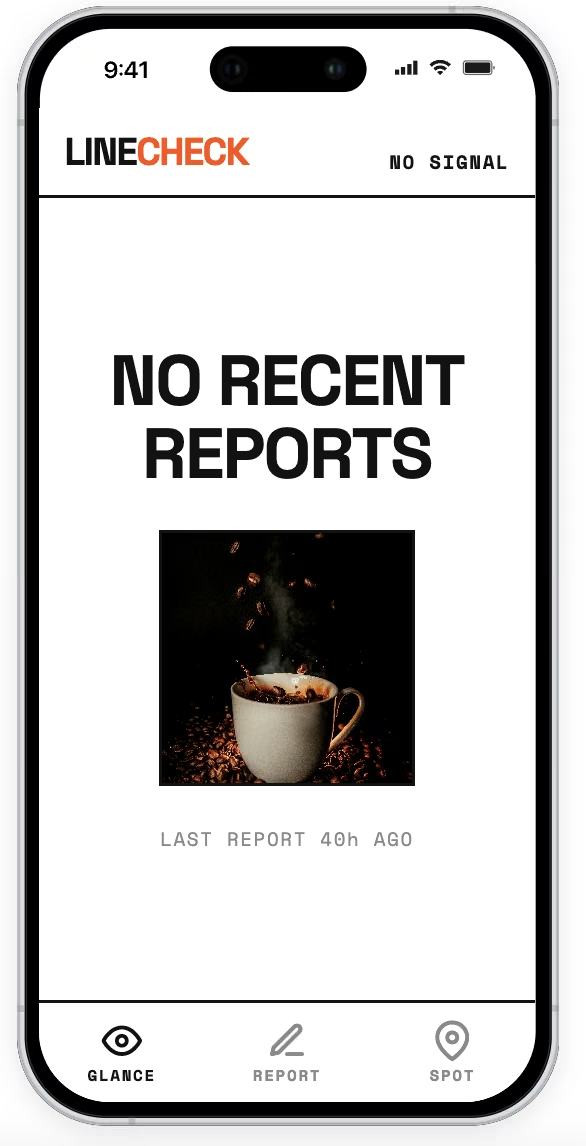
Once a report passes 25 minutes old, stop counting it toward the current estimate and show "No recent reports" instead of quietly leaving stale data on screen. The current estimate has to match exactly whether someone opens the Glance screen or taps into a separate Spot Detail screen for that same spot, no separate cached copies drifting apart. Require a simple sign-in before anyone can submit a report, so one person can't flood the log with five fake reports in a row, but reading the current estimate should never require an account.
By the end of today, I want this running on my own phone through a real, shareable preview link, not a browser mockup on my laptop, and I want to know exactly what packaging this for an actual app store submission would take afterward.
I deliberately front-loaded the hard parts into this brief, well past a soft, one-line ask like "build a line-checker app."
- A 40-character cap on the optional note.
- An update-not-duplicate rule for reports inside a 10-minute window.
- The 25-minute decay threshold.
- Keeping Glance and Spot Detail in exact sync.
- A sign-in requirement that gates reporting but not reading.
Any one of these is where a tool can cut a corner and still look like it worked.
The first pass came back clean. Emergent scaffolded the Report screen with its three tap buttons and the capped note field, the Glance screen, and the update-not-duplicate logic, all in one build.
It held on the first try:
- I submitted two reports for the same spot within 10 minutes and watched the Glance status update in place instead of stacking a second entry.
- I repeated the test in a second browser tab, and the status still resolved to one current entry.
That first working version cost 13 credits and nine minutes, from typing the brief to a build I could click through screen by screen.
Nothing broke on this pass, but sign-in, decay, and Spot Detail weren't part of it yet. It was the cleanest, fastest stretch of the whole day, and the second pass is where that changed.
Our how to build a web app guide covers the same build without the one-day constraint.
Step 4: Layer In the Logic That Breaks Things
The second pass layered in everything the first one skipped:
- Sign-in for reporting.
- The 25-minute decay threshold.
- The requirement that Spot Detail always match Glance exactly.
My first attempt at adding sign-in gated the entire app behind an account, blocking even a simple status check on the Glance screen.
That directly broke the brief's own rule. The estimate should never require signing in to read, but submitting a report should.
I caught it by trying to open Glance in a fresh, signed-out session and hitting a login wall where a status should have been. One follow-up prompt, telling Emergent explicitly to scope the sign-in requirement to reporting only and leave reading open, fixed it. The second attempt matched the brief exactly.
That fix held up on a second try:
- I read Glance with no account at all.
- I signed in separately to submit a fresh report, exactly the split the brief asked for.
I used sign-in to gate reporting, but I did not test a per-user submission limit, so this build did not verify that one signed-in user couldn't submit repeatedly.
The decay threshold and the Glance/Spot Detail consistency check both worked cleanly once the sign-in scope was right. I let a test report sit past 25 minutes and watched the status flip to "No recent reports," with no stale estimate left on screen. Spot Detail showed that same message too, matching Glance exactly.
This second pass cost 24 credits and 15 minutes and included one issue that I caught and corrected in the same session.
Budget time for a pass like this on any build that touches sign-in. It's the one place a single prompt didn't get the scope right on the first attempt.
Step 5: Get It Onto an Actual Phone
With the core logic working, the last piece was getting LineCheck off my laptop and onto an actual phone, the explicit ask in my original brief.
Emergent generates a temporary preview link for testing. Its documentation says the link expires after 30 minutes and requires an active session.
I opened that link on my own phone and ran through the same flow myself. I submitted a report, watched Glance update, and checked that Spot Detail matched. The report, Glance, and Spot Detail flow worked the same way on my phone.
By day's end, LineCheck opened and ran on an actual phone through a link, no install required. That is what I tested on my own device.
A link that works on your phone and an app that's live in the App Store are two different things.
Step 6: Plan for What "Live" Still Requires
LineCheck worked on my phone through Emergent's temporary preview link. It has never been submitted to an app store. A day of building gets you to the point where you're ready to launch an app, but the review and approval that follow run on the stores' timeline.
Emergent's iOS and Android projects use Expo and React Native. After export, Expo EAS builds the AAB or IPA used for store submission, and Apple or Google then handles review and approval.
Apple's own numbers say 90% of submissions are reviewed in less than 24 hours. Apple doesn't publish a timeline for the other 10%. It only warns that an incomplete submission can delay review, so budget for a wait you can't predict rather than one you can.
Google Play requires new personal developer accounts to run a closed test with at least 12 testers opted in for 14 continuous days before granting production access. After that, Google says production-access review usually takes seven days or less, though it can run longer.
Plan around that step so you don't skip it. If you want to move fast after the build, budget for three things a day of building can't shortcut:
- A review queue you don't control.
- Setting up a developer account beforehand, including Apple's $99-a-year developer fee and Google's one-time $25 registration fee.
- Reading the policy checklist before you submit, so a rejection doesn't catch you off guard.
Common Mistakes to Avoid
LineCheck's own snag showed up when I added sign-in, covered above. The three patterns below are failure modes to check when you build quickly. They still apply even if your own build stays clean.
Three patterns to check when you build quickly:
- Treating the interface as your only security layer: Hiding a button from the wrong user isn't the same as blocking the request behind it. If the underlying access point still answers anyone who calls it directly, hiding the button did nothing.
- Skipping error tracking because the demo looked fine: A build that never crashed while you were testing it can still fail silently once real conditions hit it. Add basic error tracking while you build, so a later break leaves you a record of why.
- Assuming a passed test means a passed production run: A scheduled task, a time zone assumption, or a rule checked only at the exact moment you tested it can pass every time you run it yourself. It can still fail the first time someone hits it at a different hour. Test the edge as well as the happy path.
Is "Built in a Day" Real?
Yes, for a narrow, single-purpose idea like LineCheck. That's the ceiling. A full product also brings in the rest of the app design and development process, so it needs more than a single day.
A day is enough time for one clear job, a few connected screens, and rules simple enough to describe in a single detailed brief. LineCheck met that scope in my test. Two build passes together ran 37 credits and 24 minutes, with one bug caught and fixed inside the same session.
Scope sets the ceiling here:
- One narrow job fits a day.
- A handful of connected screens and a data model start to need a week.
- Multiple user roles, payments, and the edge cases that come with actual users start to need a month or more, no matter which tool builds it.
What a day doesn't get you is a spot in an app store that runs on somebody else's clock.
For the website version, read our idea to live website in a day guide.
How Emergent Helps You Get From Idea to a Testable App in a Day
Every step above happened because I typed out what I wanted and tested what came back on my own phone before calling it done. Emergent's own workflow points toward launching and going live in a store as a later step. I stopped short of that step on purpose, the same limit this whole playbook has been upfront about.
Four things about Emergent got me from idea to a testable app in a day:
- Mobile store path: Emergent supports iOS and Android projects that can be built for store submission through Expo EAS. LineCheck's phone test covered the browser preview, so this test did not confirm store-ready packages for the project.
- A Progressive Web App fallback: If you'd rather skip the store queue than sit in one, Emergent also supports building or converting a project into a Progressive Web App. LineCheck reached my phone through Emergent's temporary browser preview, with no install or store review.
- Room for real, ongoing development: Exportable code, an editable structure, custom workflows, and access controls are part of the same platform, so a narrow one-day build like LineCheck has somewhere to grow if you keep working on it yourself.
- A heads-up on where the time goes: The second pass took longer than the first, mostly because of sign-in and permission splits. Plan on that stretch taking longer on your own build too.
Emergent's free plan runs on 10 credits a month, no card required. LineCheck's first pass alone costs 13 credits, already past that monthly allotment. Try Emergent to scope and test a narrower idea of your own, or see how many credits your own build needs.

Most AI app builders stop at prototypes. Emergent creates production-ready apps you can actually launch.
- Production-ready apps
- Web & mobile apps
- Deploy in minutes







