




TL;DR
- Wix: Best for a general small business site that needs to look finished fast without touching a plugin.
- Squarespace: Best for service businesses that want polished design and built-in appointment booking.
- Shopify: Best for ecommerce businesses that need inventory, checkout, and POS handled in one system.
- Webflow: Best for designers and agencies who want layout-level control over a content-heavy marketing site.
- Ghost: Best for writers and publishers monetizing a newsletter or subscription blog.
WordPress used to be the shortcut. Back when building a site meant hand-coding HTML tables and hoping nothing broke in Internet Explorer, WordPress let you skip all of that and just start writing. I built my first site on it years ago and felt like I'd cracked some kind of code.
A plugin update can still take a site like that down for an afternoon, and fixing it still means the same slog through error logs. A dozen newer platforms now claim to be the shortcut WordPress used to be, so I went looking for WordPress alternatives to see which ones deliver.
I tested five of them against the same brief, plus Emergent as a sixth for comparison, and checked what each one does well and where it falls short. You'll know which platform fits your situation by the end, and what to reach for if none of the five do.
Why Look for WordPress Alternatives?
WordPress runs a large share of the web for good reason.
W3Techs puts it at roughly 42% of all websites, and at around 60% of the sites where a content management system is identifiable at all. The plugin and theme library explains why. Almost anything you want a site to do already has a plugin for it.
But four specific frustrations usually send people looking elsewhere. They are:
- Plugins and themes sit behind a paywall. WordPress.com's free plan blocks plugin installations and third-party theme uploads. Reaching the plugin library that WordPress is known for requires the Personal plan or higher first.
- Once plugins are unlocked, they become the main source of conflicts and security risks. Patchstack's 2026 State of WordPress Security report counted 11,334 new vulnerabilities across WordPress sites and plugins in 2025, and 91% of them were in the plugins themselves.
When a plugin update falls out of sync with the theme or another plugin, the fix usually means digging through error logs.
- Custom functionality gets assembled feature by feature, each with its own setup. A booking flow, a members-only area, or an approval workflow each usually needs a separate plugin, its own settings, and its own place in the update-conflict and security math covered above.
- No plan produces a native mobile app. WordPress.com's own mobile apps let the site owner write posts and check stats from a phone, but they don't turn the business site itself into something a customer downloads from the App Store or Google Play.
People now spend close to 3.6 hours a day in mobile apps, so a bookmarked website doesn't compete with a home-screen icon.
WordPress.com is still a solid platform. Plugin access, security patching, and mobile reach are just three separate costs to weigh before you decide to stay.
How I Tested These WordPress Alternatives
Not every platform builds from a prompt, so I adapted the brief wherever a tool had no prompt field to type into. The five hands-on builds took just over an hour combined, with Emergent tested separately as the sixth.
The prompt I used:
Build a web app for Marlow & Birch, an independent coffee roastery based in Asheville, North Carolina.
Core idea: A Coffee Club membership portal where customers create an account, see their subscription status, and manage their orders.
Must include:
- A homepage with the same brand story: small-batch coffee, direct-trade beans, founded 2019
- User sign-up and login (email and password)
- A logged-in dashboard showing the customer's current subscription plan (House Blend, Ethiopia Single Origin, or Decaf Blend) and next delivery date
- A page where logged-in customers can change their subscription plan or pause deliveries
- An admin view (or simple way to simulate one) showing a list of all current subscribers
- A contact page with name, email, and message fields
Tone: Warm and approachable, not corporate. Name of the business to display in the header and footer: Marlow & Birch.
Wix's Aria, Shopify's storefront generator, and Emergent all took that brief directly. Squarespace's Blueprint AI worked through guided choices instead of an open prompt, and Webflow generated a sitemap from the prompt before it needed manual correction.
Ghost is the exception. Ghost has no AI build flow, so the brief above became a manual checklist instead: write the homepage copy by hand, set up the free and paid membership tiers, publish one public post and one gated to members only, and turn on the newsletter.
Which WordPress Alternative Should You Choose?
- Choose Wix if: Getting a general business site live quickly matters more than controlling every mobile and desktop layout detail.
- Choose Squarespace if: You’d rather pay for Acuity separately than piece together appointment booking through plugins.
- Choose Shopify if: You need checkout, inventory, and in-person selling in one system and accept that paid apps can raise the final cost.
- Choose Webflow if: Deeper design control is worth a steeper learning curve and outside tools for logins or memberships.
- Choose Ghost if: Paid publishing is central to the business and you’re comfortable setting up the site manually.
- Stick with WordPress if: Your current site already does the job, your team already knows the plugin stack, and none of the frustrations above have cost you meaningful time yet.
5 Best WordPress Alternatives: At a Glance
How the five compare at a glance:
| Platform | Core Strength | Starting Price |
|---|---|---|
| Wix | Fast setup plus a large app market | $24 monthly($17 monthly billed annually) |
| Squarespace | Design polish plus integrated Acuity booking | $25 monthly($19 monthly billed annually) |
| Shopify | Checkout, inventory, and POS in one system | $39 monthly($29 monthly billed annually) |
| Webflow | Detailed layout and responsive design control | $25 monthly($15 monthly billed annually) |
| Ghost | Publishing, newsletters, and paid memberships | $18 monthly ($15 monthly billed annually) |
Pricing correct as of July 2026. Verify current numbers on each platform's own pricing page before deciding.
The 5 Best WordPress Alternatives
1. Wix
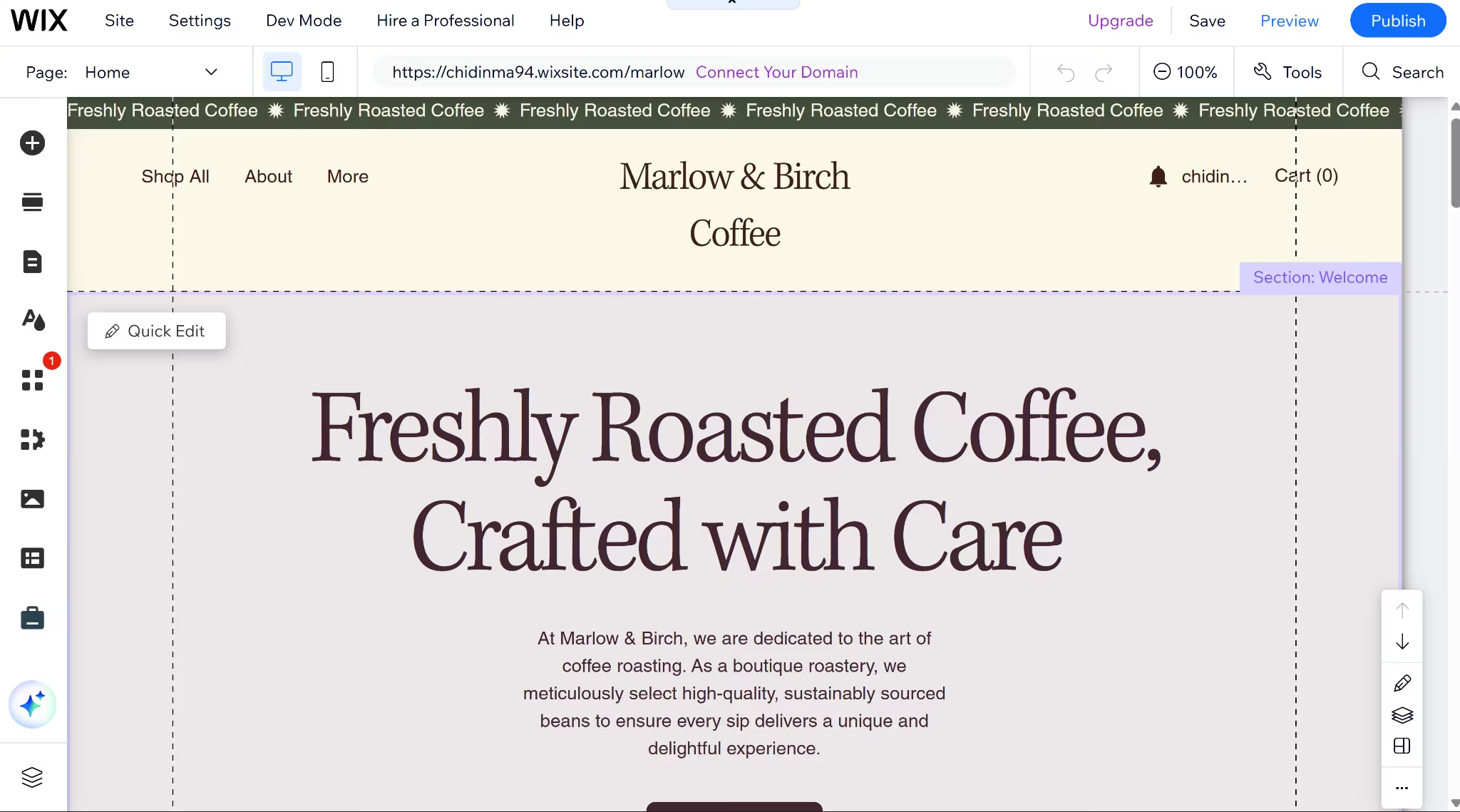
Wix is the most direct swap for a general WordPress site. Wix's Aria assistant opens with a chat that asks what the site is for, your level of experience, and your niche, then recommends templates or generates a starting site from what you've described.
I ran the Marlow & Birch brief through Aria and had a starting site in about 15 minutes: a homepage with the brand story, a contact page, and the site name in the header and footer. The build had no Coffee Club membership dashboard, subscription plan page, or admin subscriber view.
Wix gives you 2000+ templates sorted by industry and an app market of over 800 apps, Wix-built and third-party, covering the features WordPress would otherwise handle with a plugin.
The free-form editor lets you place any element anywhere on the page rather than within a fixed grid. That gives you more control than Squarespace’s structured layout, but it can create layout drift between desktop and mobile if you don’t check both.
Wix doesn’t allow template switching after a site is created, whether it has been published or not. A full redesign means rebuilding on a new site.
Wix and Squarespace are the only two platforms here that track AI citations natively; Shopify, Webflow, and Ghost leave it to a third-party tool.
Aria puts Wix among the AI website builders that generate a starting site directly from a description. Squarespace and Shopify use a similar setup.
Key Features
- Aria setup chat: Answers a few questions about the business and generates a starting site or recommends templates to build from.
- AI Visibility Overview: Tracks citations and mentions across ChatGPT, Gemini, and Perplexity, plus which pages AI crawlers have scanned.
- App Market: Roughly 800 third-party apps covering scheduling, marketing, and store add-ons on top of what's already built in.
Also read our best Wix alternatives guide for what else is worth trying when the App Market add-ons or platform limits become a concern.
Pros
- Largest template library of all the platforms tested here, sorted by industry
- Built-in e-commerce up to 50,000 items from the Core plan up
- Free-forever plan available to build and preview before paying
Cons
- No template switching once the site is live
- Free plan blocks a custom domain and payment acceptance entirely
- Free-form editor can let mobile and desktop layouts fall out of sync
Also read our Wix Review for a closer look at how the pros and cons play out in real testing.
Best For
- General small business sites without a heavy design or commerce requirement
- Teams that want an app marketplace instead of hand-picking plugins
- Anyone who wants to test the platform on a free plan before committing
Pricing
Wix's official plans run Light $24 monthly ($17 monthly billed annually), Core $36 monthly ($29 monthly billed annually), Business $46 monthly ($39 monthly billed annually), and Business Elite $172 monthly ($159 monthly billed annually), plus a free plan.
Want the full breakdown of what each plan actually covers? Read our Wix pricing guide before you commit.
2. Squarespace
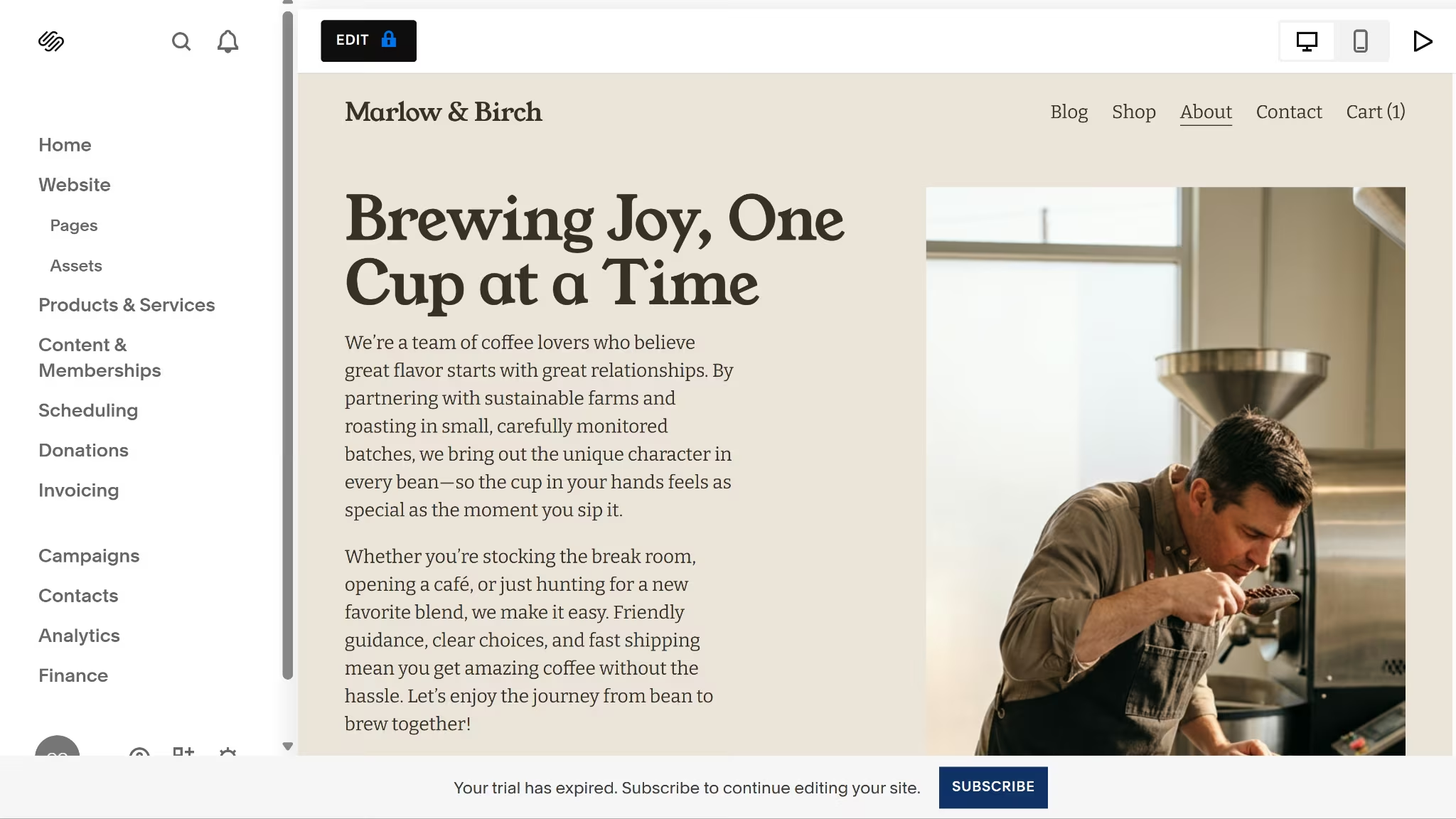
Squarespace suits a service business more than a general WordPress swap does.
Blueprint AI uses guided choices instead of an open prompt, walking through the site title, brand personality, and color palette before generating a starting design.
The 10-minute build produced a homepage and shop-style layout, not the Coffee Club portal. Acuity slotted into the navigation cleanly, but Squarespace provided no native subscription or admin view. The subscriber list stayed a static page I had to build and update by hand, and every plan change a customer made would have needed the same manual edit to stay accurate.
Squarespace can't run any custom code behind the scenes, so anything past visual design tweaks requires an external service. Squarespace 7.1 doesn’t support template switching, even before the site is published. You can restyle the existing site, but you can’t apply a different template.
Where Squarespace pulls ahead of Wix is in the cost of getting started. Squarespace's Basic plan can accept payments from day one, while Wix requires the Core plan before checkout works at all.
Squarespace also owns Acuity Scheduling, a native appointment booking tool, though it's billed as a separate subscription from the website plan.
Also read our best Squarespace alternatives guide for what else is worth trying when the no-code limitation or transaction fees become a concern.
Key Features
- Blueprint AI: A guided setup wizard that generates a finished starting design from style choices rather than a written prompt.
- Acuity Scheduling: Native appointment and class booking, billed separately from the website subscription.
- Site Styles: Site-wide controls for fonts, colors, spacing, and buttons, applied through the visual editor.
- AI Visibility: Tracks how often the site gets mentioned and ranked in ChatGPT and Gemini results, included on every website plan.
Pros
- Sells from the entry-level Basic plan, no upgrade required to accept payments
- Acuity booking integrates directly into the site
- Template design was the most polished of the five I built on, and the closest to looking finished
Cons
- No permanent free plan, only a 14-day trial
- 2% online store transaction fee on Basic, dropping to 0% on Core and above; digital content and memberships run a separate ladder that only reaches 0% on Advanced
- No template switching once a site is live, and no server-side code support
Best For
- Coaches, consultants, and wellness professionals who take appointments
- Small service businesses that want light selling without a large online store
- Anyone who prioritizes design polish over deep customization
Also read our Squarespace Review for a closer look at how the pros and cons play out in real testing.
Pricing
Squarespace's official pricing starts at Basic ($25 monthly, $19 monthly billed annually), Core ($39 monthly, $29 monthly billed annually), Plus ($65 monthly, $49 monthly billed annually), and Advanced ($139 monthly, $99 monthly billed annually).
Also read our Wix vs Squarespace breakdown to see how the two compare side by side before you commit to either.
3. Shopify
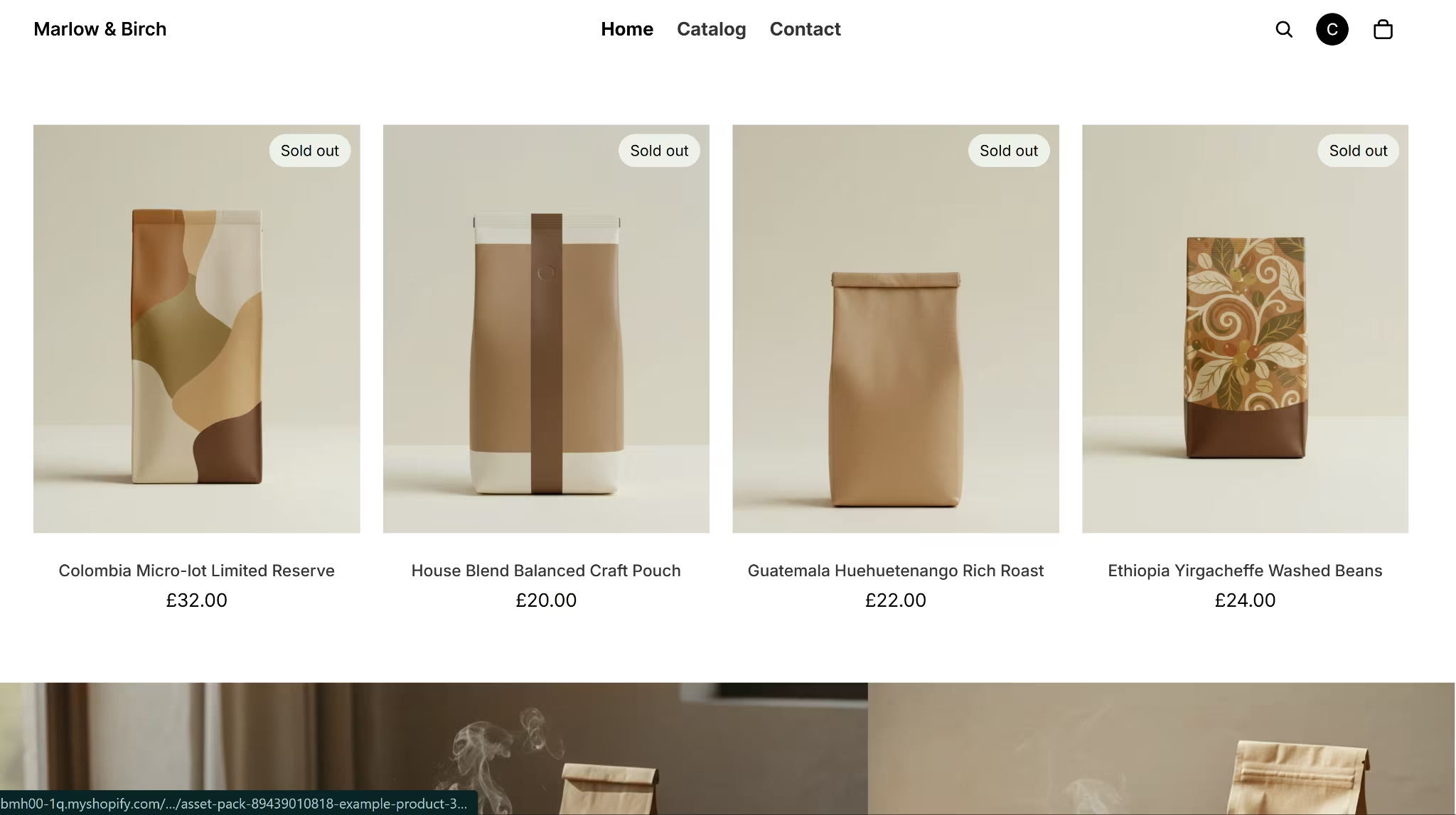
Shopify treats the store as the main product a business is built around. Its AI storefront generator builds a personalized theme from a written description, returning several visibly different designs to choose from, already populated with pages, a contact form, and customer account access.
The generator built a themed store with a contact form and customer accounts in under 20 minutes, but it read the brief as a product catalog, not a membership portal.
The three coffee plans became products to buy rather than subscriptions to manage or pause, and there was no admin subscriber view; I had to approximate one through the orders page instead of getting anything built for that purpose.
Sidekick, Shopify's AI assistant, handles admin tasks directly, including multi-step changes like replacing a placeholder store name across settings, headers, and SEO fields in one request.
Every paid plan includes Shopify POS Lite for pop-ups, markets, and events. Brick-and-mortar retailers can add POS Pro for $89 per month per location to access its advanced retail tools. Shopify stores meet PCI compliance (the security standard for handling card payments) by default.
The tradeoff shows up in the URL structure. Shopify locks the path folders for product and collection URLs, something a WordPress.com store on a plan that allows plugins can fully control with a permalinks extension.
Also read our best Shopify alternatives guide for what else is worth trying when the store-first model or URL structure limits become a concern.
Key Features
- AI storefront generator: Builds a themed storefront with pages, navigation, and a contact form from a written business description.
- Sidekick: An AI assistant for store settings, content, and admin tasks, capable of multi-step changes across the dashboard.
- Built-in POS: Point of Sale tools included on every paid plan for in-person selling alongside the online store.
Pros
- AI generator hands you a storefront already filled with pages, navigation, and a contact form
- PCI compliance and SSL come handled by the platform automatically
- POS Lite is included with every plan for casual in-person selling; POS Pro costs $89 per month per location.
Cons
- No free plan; 3 days free, then $1/month for three months before full pricing starts
- Product and collection URL paths can't be fully customized
- Costs climb quickly once paid apps are added for anything past the basics
Best For
- Ecommerce businesses selling products as the core of the business
- Merchants who also sell in person and want POS in the same system
- Store owners who want AI-generated groundwork but plan to review and refine it
Pricing
Shopify's official pricing starts at Basic ($39 monthly, $29 monthly billed annually), Grow ($105 monthly, $79 monthly billed annually), and Advanced ($399 monthly, $299 monthly billed annually).
Also read our WooCommerce vs Shopify breakdown to see how the two compare before you commit to either.
4. Webflow
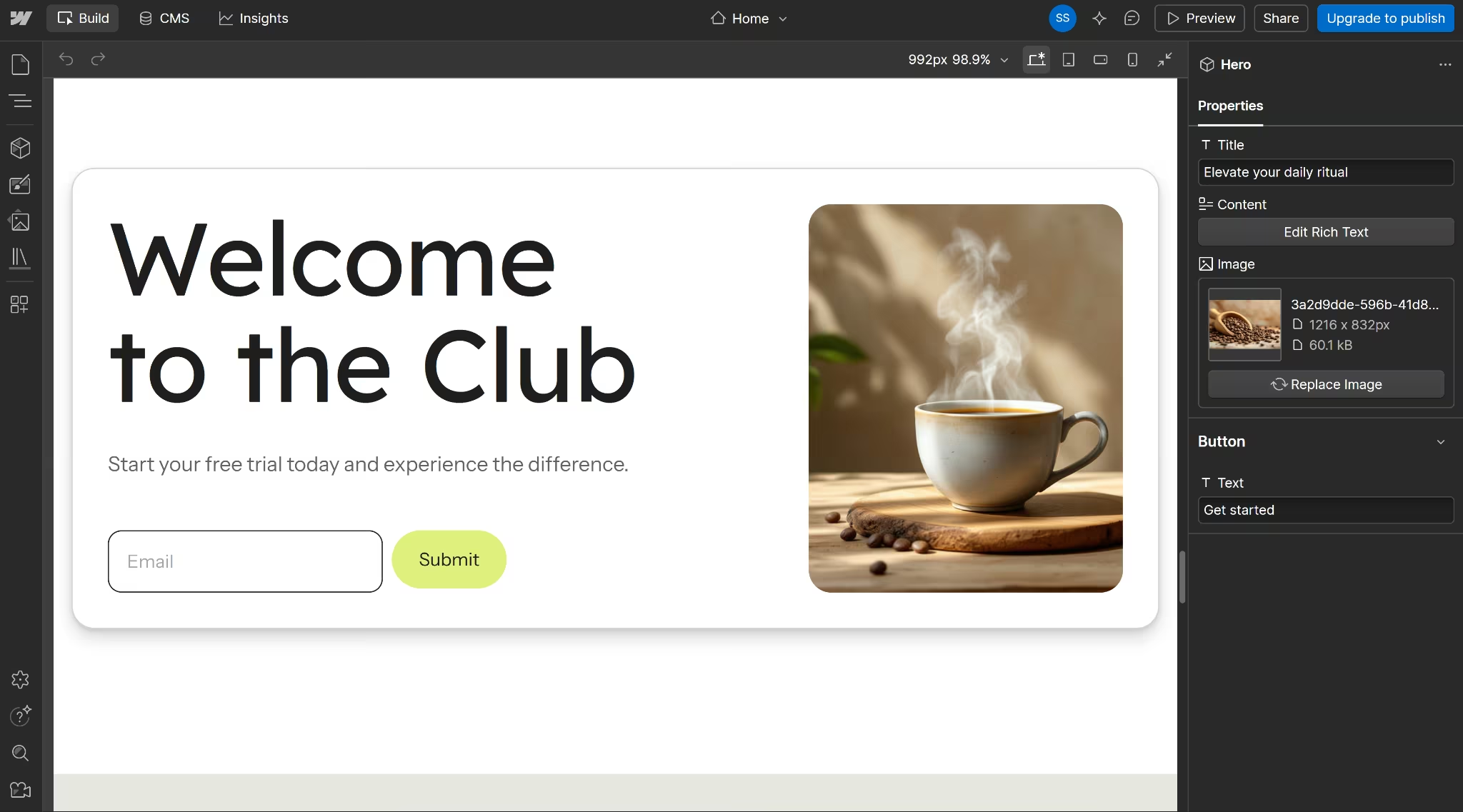
Webflow gives up ease of use for design control. Its AI Site Builder proposes a sitemap and section plan from a prompt before generating pages.
The whole build took about 11 minutes and produced a homepage plus a pricing-style page for the three coffee plans, but it invented plan names and placeholder testimonials that a writer would need to replace before publishing.
No sign-in or subscriber dashboard came out of it either.
Webflow's strength shows up once you're inside the Style panel, which offers layout, spacing, typography, and responsive breakpoint controls in greater depth than Wix's or Squarespace's drag-and-drop editors.
CMS Collections handle structured, repeating content like case studies or team bios, which is closer to what a WordPress custom post type does.
Webflow retired its native User Accounts feature on January 29, 2026. A gated members area now needs a third-party tool such as Memberstack or custom development.
Also read our best Webflow alternatives guide for what else is worth trying when the retired login feature or design complexity becomes a barrier.
Key Features
- Style panel: Visual controls for layout, spacing, typography, and responsive breakpoints inside the Designer.
- CMS Collections: Structured content types for blog posts, case studies, or team bios, reusable across pages.
- AI Site Builder: Proposes a page structure and sections from a prompt, editable before generation completes.
Pros
- Layout and typography control that goes deeper than a drag-and-drop editor
- CMS Collections suit content-heavy sites with repeating structures
- Free Starter plan with no time limit, enough to build and preview a full site before paying
Cons
- No native logins or memberships since the January 2026 feature sunset
- AI-generated drafts needed manual correction to match the actual brief in testing
- No CMS access on the Basic plan; content sites need Premium
Best For
- Design agencies and marketing teams building a content-heavy site
- Brands with a designer available to take over after the first draft
Also read our Webflow Review for a closer look at how the design control and CMS limitations play out in real testing.
Pricing
Webflow's official pricing starts at Starter (free), Basic ($25 monthly, $15 monthly billed annually), and Premium ($39 monthly, $25 monthly billed annually).
Want the full breakdown of what each plan actually covers? Read our Webflow pricing guide before you commit.
5. Ghost
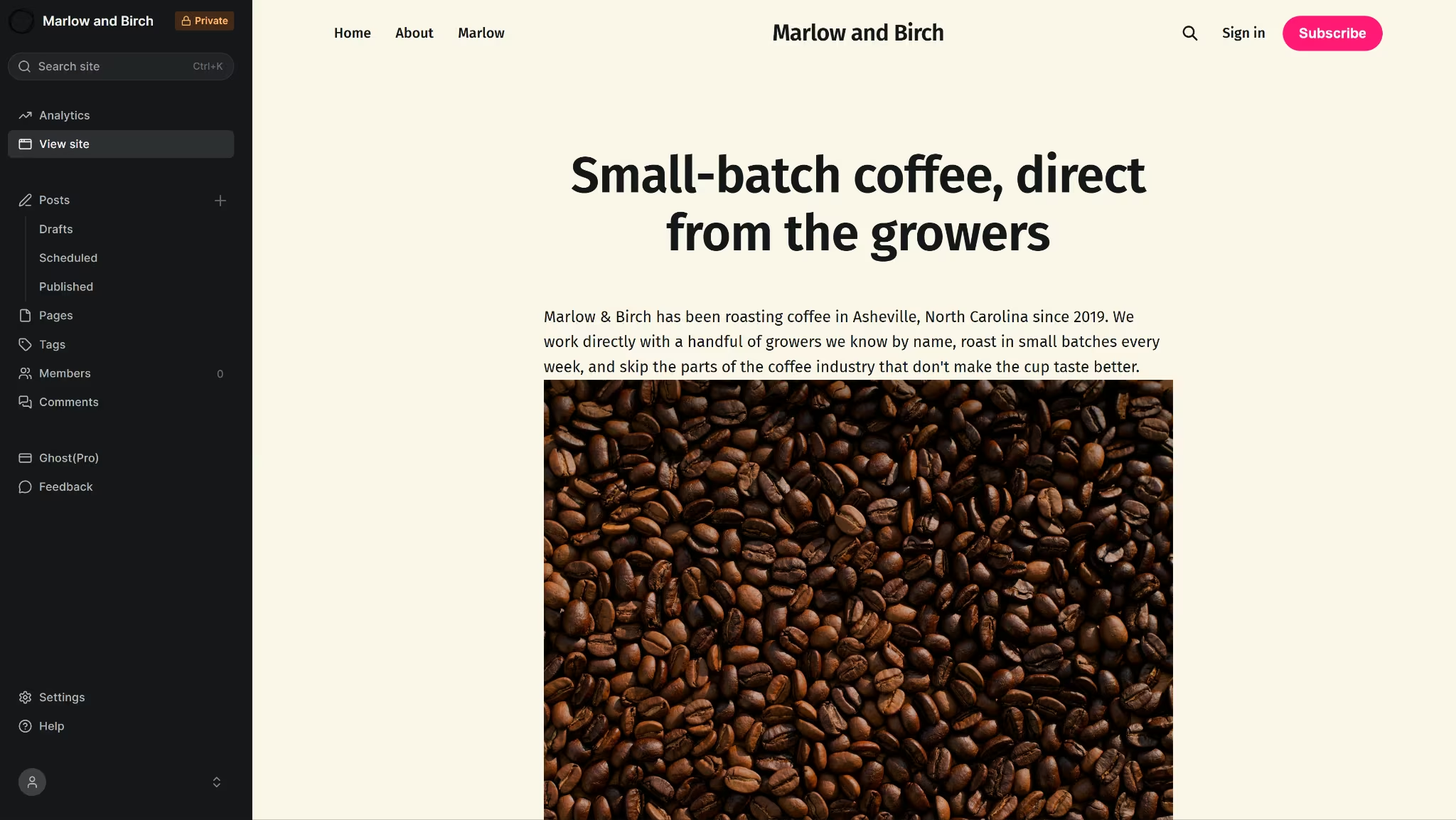
Ghost is mostly built for writing. There's no AI setup flow here. The trial drops you into a default theme with your site name filled in and stock placeholder copy, and everything past that point is manual. You choose a theme, upload a logo, and write every page yourself.
There's no prompt step to test here. In about 10 minutes, I wrote the homepage copy by hand, set the three coffee plans up as membership tiers, and gated one post to paid members, all of it manual rather than generated from the brief. The result matched the Coffee Club structure exactly, since I built it to spec rather than getting an AI's interpretation of it.
Design controls stay limited to an accent color, a logo and cover upload, and font pickers, with no section-by-section layout editor the way Wix's and Squarespace's editors work.
Switching themes, though, doesn't touch existing content. In testing, activating a new theme kept every page and post in place and only changed the color palette, unlike Wix and Squarespace, where a live site can't change templates at all.
Ghost's Starter plan doesn't support paid memberships, so you need Publisher or above for paid tiers, gated posts, and Stripe-based subscriptions. Native paid subscriptions are one of the main reasons to choose Ghost over a WordPress membership plugin.
Most WordPress membership plugins also take 0%, though they charge an annual license fee on top of your hosting; with Ghost, the memberships are already in the plan.
Ghost's migration tools also include a native WordPress importer, alongside Substack, Beehiiv, Medium, and Squarespace importers. Wix and Squarespace have first-party WordPress importers too, but Ghost is the only one that brings paid subscribers across with the content rather than just posts and pages.
Key Features
- Native paid memberships: Stripe-based paid tiers and gated posts built into the platform.
- Native email newsletter: Publishing a post can send it directly to subscribers, with no separate email tool required.
- WordPress import: A first-party migration tool for moving content and members over from WordPress.
Pros
- 0% platform fee on subscription revenue; only Stripe's standard rate applies
- Themes switch freely without disturbing existing pages or posts
- Native WordPress import built into the Migration tools panel
Cons
- No free tier on Ghost(Pro), just a 14-day trial with no card required (the self-hosted version is free)
- Paid subscriptions require the Publisher plan
- No AI setup assistance and limited design controls outside color and font
Best For
- Writers and publishers monetizing a newsletter or subscription blog
- Anyone who wants native paid memberships without a plugin
- Sites where the content itself is the product, rather than a shop, booking flow, or portal
Pricing
Ghost's official pricing scales by audience size. At the smallest tier, Starter runs $18 monthly ($15 monthly billed annually), Publisher $35 monthly ($29 monthly billed annually), and Business $239 monthly ($199 monthly billed annually). Prices climb with subscriber count.
If You Want to Stay Open-Source
Ghost isn't only available as the hosted Ghost(Pro) plans covered above. Ghost ships as free, self-hosted software too, released under an MIT license, with no subscription or audience-based pricing.
Joomla and Drupal work the same way, both free and self-hosted under the GPL license, and both are common WordPress alternatives for teams that want a content management system rather than a hosted website builder.
Self-hosting any of the three gets you the core software for free, minus the monthly bill a hosted plan would charge. The tradeoff is the one WordPress.com users already know well: you're back to managing your own server, database, and updates, the work Ghost(Pro) and WordPress.com's paid plans both hand over for a fee.
Self-hosting makes sense for a technical team comfortable running its own server, whether that's Node.js and MySQL for Ghost or PHP and MySQL for Joomla and Drupal. For anyone else, one of the five hosted platforms above is the more practical starting point.
When These Five Tools Aren't Enough
Each of the platforms above can handle a homepage, a store, or a newsletter well. Three limits show up past that point.
Custom logic and user roles: A site needs its own logic when it has to remember who’s logged in, show a contractor something different from a client, or run an approval step no template covers. App builders support custom logic and are designed for this kind of work.
Squarespace can't run its own code behind the scenes, so a custom portal or workflow needs an outside tool.
Wix’s Velo supports custom code, but you have to write that code yourself. Ghost’s memberships handle subscription-based access, but they stop short of giving each user type a separate view of the same information.
No native mobile app. Wix, Squarespace, Shopify, Webflow, and Ghost produce sites customers open in a browser, not an icon they tap on their home screen. WordPress.com stops in the same place.
Some of these tools can get really costly, too.
Shopify gets more expensive when you add paid apps. Webflow charges extra for seats, Workspace plans, and add-ons. Ghost charges more as your audience grows. The listed price may not be the final monthly cost.
You can get past all three walls without starting from scratch or hiring a developer. A site can have its own logic, a native mobile app, and a cost you can trace to what you actually built, with no template underneath it.
Where Emergent Comes In
Emergent is a prompt-to-app platform built on a multi-agent architecture. Specialized agents split the work across interface design, logic, data, integrations, testing, and other parts of the build. The app starts from your description instead of a template with plugins bolted on. A simple site runs through its AI Website Builder; anything needing its own logic goes further from there.
I ran the same small business brief through Emergent. Emergent asked how sign-in should work and how to tell admins apart from customers before writing anything. Customers could switch coffee plans or pause deliveries themselves, and the change appeared immediately in the admin table, with no separate sync step.
The contact form only logged messages, with no database storage added, exactly what the brief called for.
All the acceptance checks I ran against the build were successful.
A few things aren't tied to any single build and shape how a small business would use this day to day:
- Native mobile: Describing an app to the Mobile Agent returns an export-ready iOS and Android build. From there, Expo's build tools handle submission to the App Store and Google Play. The Mobile Agent is available on any paid plan starting at $20 a month.
- Integrations: Stripe handles payments, and the integrations list covers email, scheduling, and accounting tools, all wired in through the same chat.
- Code access: Every build syncs to a private GitHub repository, so nothing is locked inside the platform if a developer needs to take over later or the business wants to move the code elsewhere.
Worth naming what it doesn't cover: no Swift output, so no Apple Watch or iPad-native apps. Projects handling health records or PII need the compliance layer sorted separately before going live.
Emergent runs on a credit system, so cost tracks with how much gets built rather than a flat monthly fee, the same logic as a phone plan billed by data instead of a flat rate.
How to Evaluate WordPress Alternatives
The first step is to write out what you need your WordPress alternative to do. It could be:
- Content, commerce, or membership. A blog and newsletter have different needs than a store, and a store has different needs than a subscription publication. Match the platform's core strength to the site's core job first.
- AI setup versus manual control. Wix, Squarespace, and Shopify generate a starting point from a prompt or guided setup. Webflow and Ghost lean manual. Decide whether a generated first draft saves time or adds more cleanup.
- Design flexibility versus speed to launch. Webflow's Style panel goes deeper than any drag-and-drop editor here, at the cost of a steeper learning curve. Wix and Squarespace trade some of that control for a faster path to a finished-looking site.
- Different user views. Anything where two kinds of users need separate screens sits outside what these five platforms handle natively.
- Migration effort from WordPress specifically. Ghost has a first-party WordPress importer. Wix and Squarespace also have first-party WordPress importers, though only for content. Ghost is the only one that migrates paid subscribers along with it; Shopify and Webflow require CSV exports and manual rebuilds.
Stop Patching Together Custom Functionality
Each of the five platforms above solves a different problem, and the right pick depends on why you're leaving WordPress in the first place. A general business site, a service business with bookings, a store, a content-heavy marketing site, and a subscription newsletter each point to a different platform from this list.
Sometimes the problem sits underneath all five. WordPress plugins have been holding together custom logic and connected user roles, and none of these five platforms build that in either.
Forcing one of them into that job with more plugins just recreates the same problem on a new platform. Emergent builds that kind of logic directly instead, with no plugin stack standing between the idea and the finished app.
Start building the app your plugin stack can't.

Every alternative has trade-offs. Emergent just builds production-ready apps from one prompt.
- Production-ready apps
- Web & mobile apps
- Deploy in minutes







