

Build a Church Survey Your Congregation Will Answer
Build a church survey that members answer on a phone or a paper card, with no names collected and results sorted by ministry.
Build a church survey for my congregation that keeps every answer anonymous and shows results for each ministry.
Trusted by Builders Worldwide
Active Builders Worldwide
Apps Successfully Created
Countries Globally Reached



Made for the Way a Congregation Answers
Each piece covers a real Sunday: phones in the seats, cards in the pews, and leaders who need their own numbers.
Anonymous answers with a group minimum
Leave name and email off the survey and say so on the first screen. A group needs 5 answers before it shows in a report. If four of a class of six reply, that class stays hidden.
Paper cards typed in by volunteers
Print the questions on a card for members who prefer to write. Volunteers enter each card on a short screen, and those answers sit beside the phone answers, marked as paper.
Ministry questions only for those involved
Ask parents about the kids' program and skip that page for everyone else. Each ministry section opens only for people who say they take part, which keeps the survey short.
A guest card that asks before calling
Print a QR code on the card first-time guests fill in and keep it to a handful of questions. Anyone who asks for a call goes on a list emailed to the welcome team lead.
Results each ministry leader can read
Give the youth leader the youth answers and the groups director the groups table. The leadership team sees the whole survey, and every chart compares this year with last year.
Every answer in a database you own
Keep each response as a row in your own database, with no cap on how many come in. Export the full survey app to your GitHub repository on paid plans and keep changing it.
Four Church Surveys in the Field
Paper cards and phones, counted as one
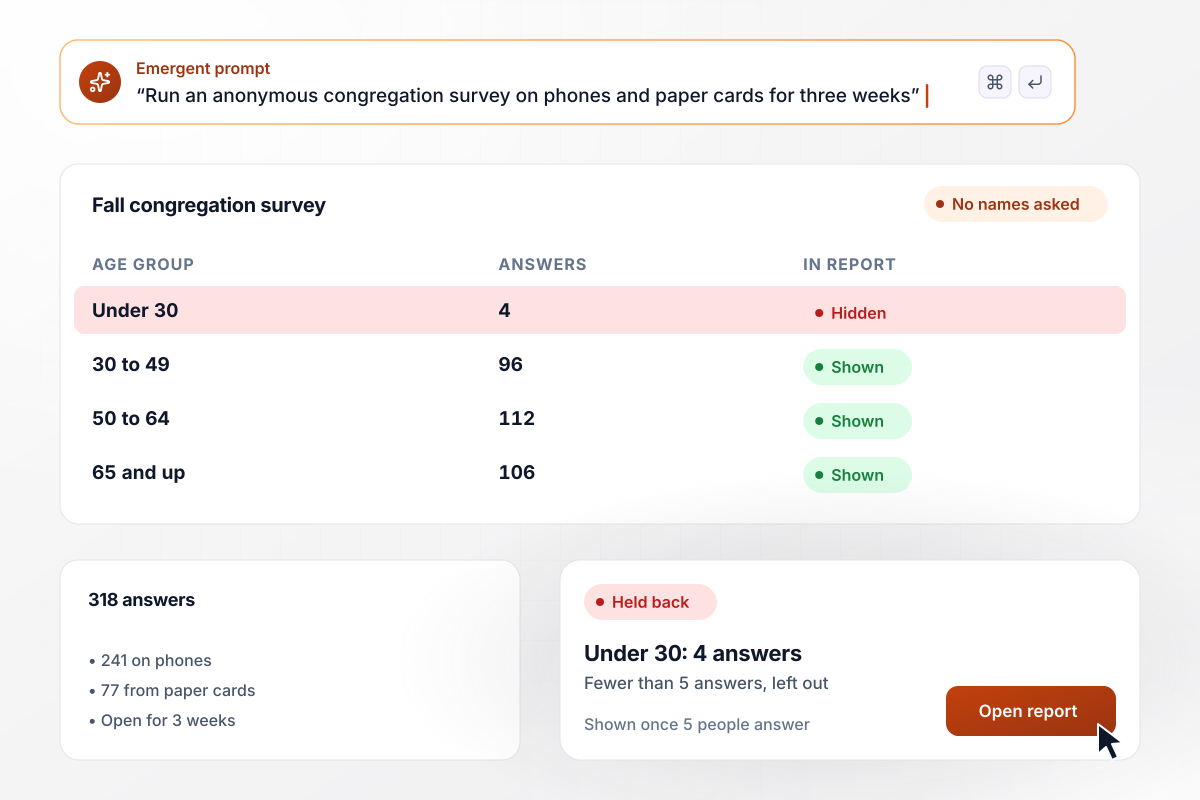
Tolland Street Church runs its congregation survey for three weeks each fall. Members answer on their phones through a QR code in the bulletin, or on a paper card that volunteers type in after the service. This year 318 people answered, 77 of them on paper. An age group with fewer than 5 answers stays out of the report.
window.awbMockup = { annualSurvey: "Build an anonymous congregation survey for my church that stays open for three weeks. Members answer on their phones from a QR code in the bulletin, or on paper cards that volunteers type in on a separate entry screen. Show answers by age group, but hide any group with fewer than 5 answers, and show how many came in on paper.", firstTimeGuests: "Set up a four-question guest card for my church that first-time visitors open from a QR code on the welcome card. Ask how they heard about us, whether kids came with them, what they want to know more about, and whether they would like a call. Every Monday at 8 a.m., email our welcome team lead the guests who asked for a call.", smallGroups: "Create an end-of-season survey for my church's small groups that goes to every member after the 10-week season. Ask what would help them keep coming, with options like childcare and an earlier start. Each leader sees only their own group once 5 members reply, and the groups director sees a table of every group.", serviceTimes: "Create a survey for my church asking each household which start time it would attend if we add a second Sunday service, 9:00 or 11:15. Ask whether children live in the household. Keep it open for two weeks, then show the leadership team the totals for households with children next to all households." };
Every first-time guest on a Monday list
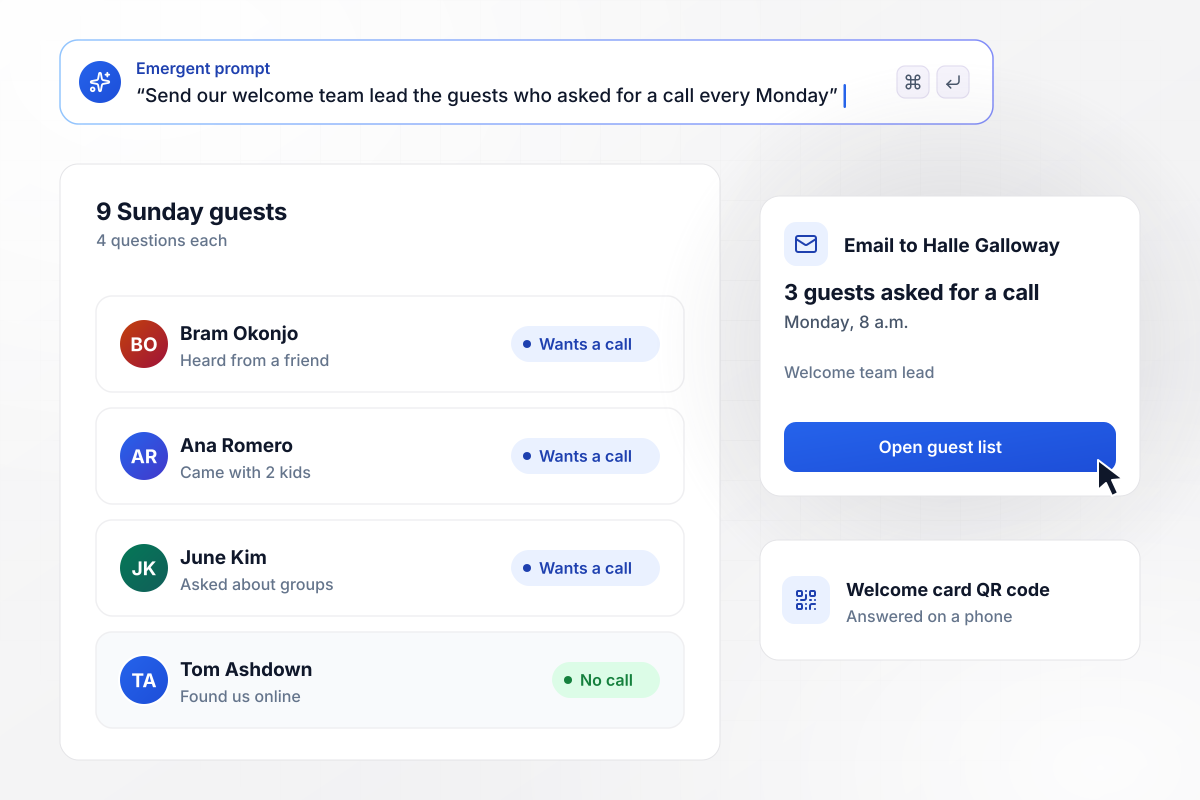
Guests at Copper Ridge scan a QR code on the welcome card and answer four questions, ending with whether they would like a call. Last Sunday 9 guests filled it in. At 8 a.m. Monday, Halle Galloway, who leads the welcome team, got an email naming the 3 who said yes.
What 164 members asked for after the season
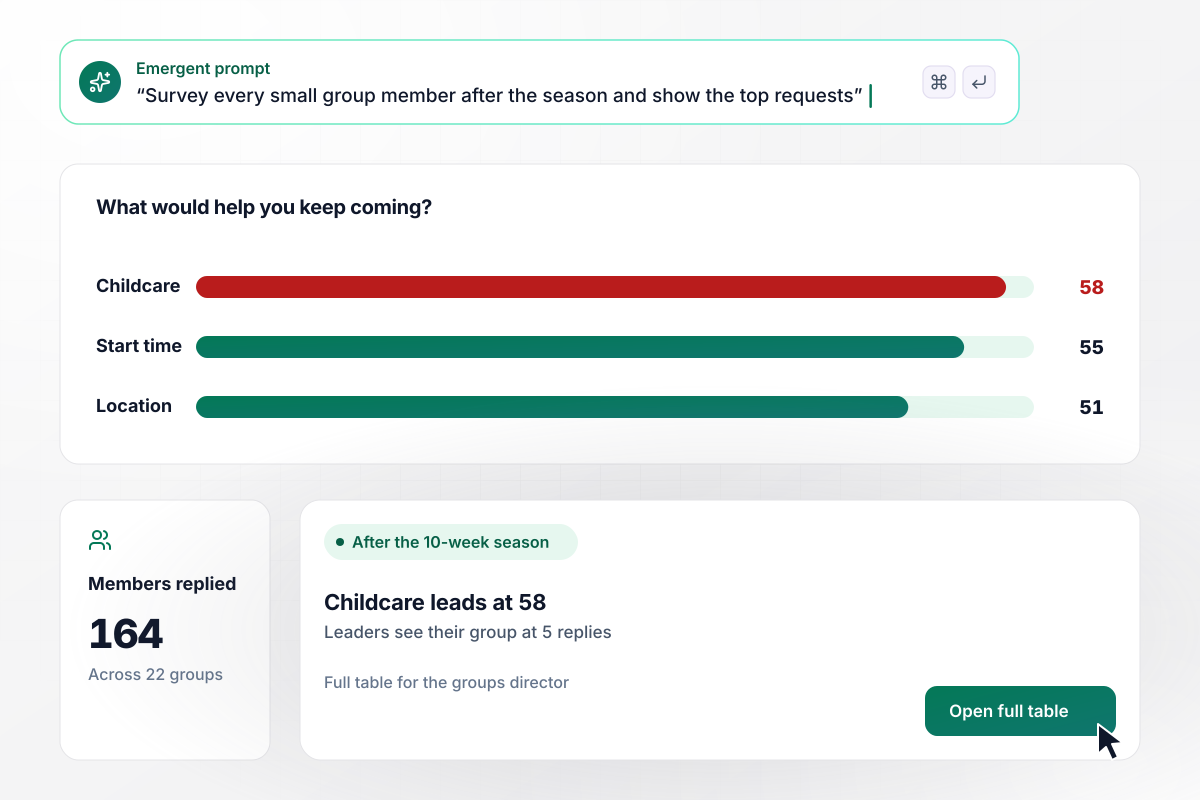
Linden Hall ends each 10-week small group season with a short survey. Leaders see their own group, and only once 5 members have replied. This fall 164 members answered across 22 groups. Childcare during the meeting topped the requests at 58, and the groups director has the full table.
Which start time 205 households would pick
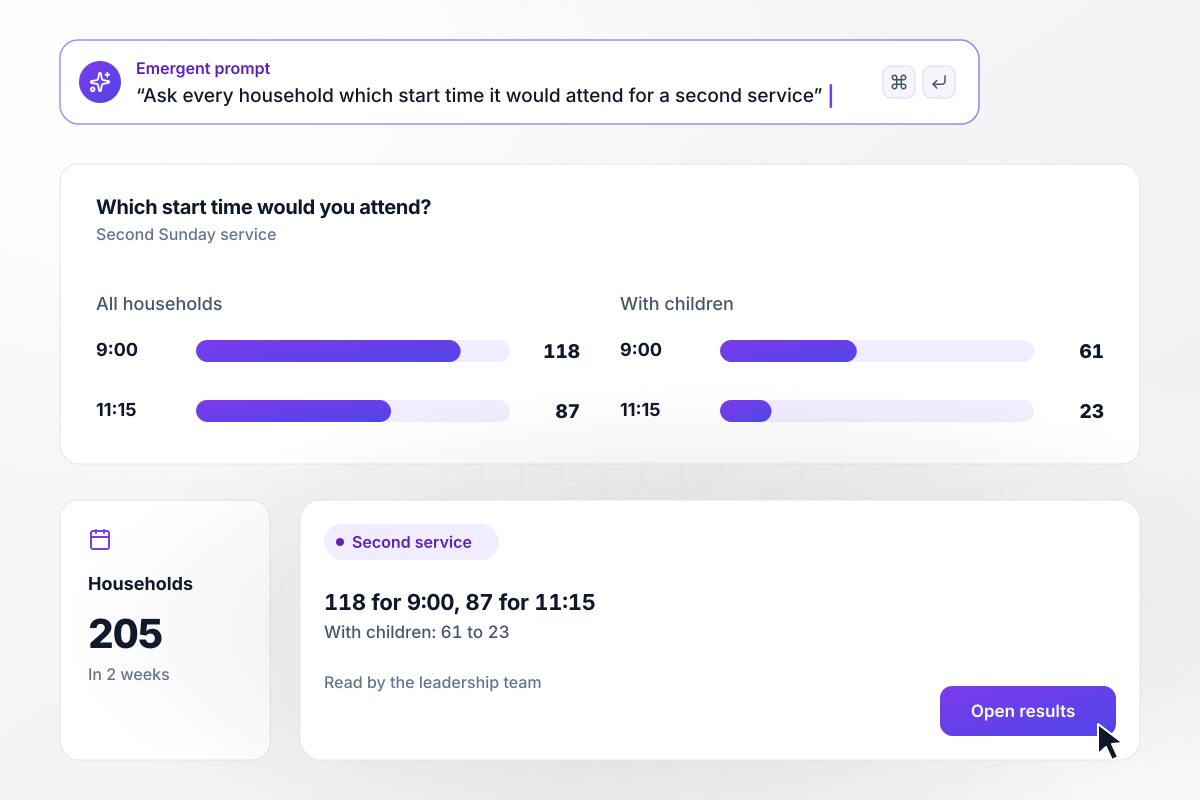
Sparrow Hill is weighing a second Sunday service and asked every household which start time it would attend. In two weeks, 205 households answered: 118 chose 9:00 and 87 chose 11:15. Households with children leaned to 9:00 by 61 to 23. The leadership team read the split before setting a date.






How to Create a Church Survey
Seven steps to plan a church survey members will finish and trust, then build it with Emergent.
Name the decisions the answers should inform before writing any question, such as service times or how the church shares news. A survey with nothing riding on it spends the congregation's goodwill and gives the staff nothing to act on.
Aim for a survey people can finish in about 7 minutes on a phone, and time it on a volunteer before it goes out. Completion drops once surveys run longer, and the open questions near the end are often the ones staff most want answered.
Ask about one thing per question and keep the wording neutral. A question that praises the program before asking for a rating pushes people toward a kind answer. Offer a balanced scale, and add a skip option for questions that may not apply.
Say on the first screen that no names are collected, and leave out name and email fields. Set a reporting minimum of 5 for every group. Age bands and ministry areas should be broad enough that nobody can be picked out.
Print the same questions on a card and leave a stack in the seats. Some members will never open a link, and a card reaches them. Ask two volunteers to type the cards in each week while the survey stays open.
Keep a handful of questions word for word every year, in the same order, and add new ones after them. Only identical wording lets you say belonging went up or down. Field the survey in the same month each year as well.
Sit down with the people who run each ministry and go through their section first. Then share a short summary with the congregation, with one or two changes the church will make, before the next survey opens.
Why Build Your Church Survey With Emergent?
Members can answer without a response cap, and the survey, its answers, and its code stay with the church.

|
LimeSurvey | SurveyMonkey | Jotform | |
|---|---|---|---|---|
| How you build | Prompt for the survey, quiz, or poll and the app around it | Editor and template library | Templates and editor | Templates, editor, AI generator |
| Response limits | No response caps | Response caps by cloud plan | Response caps by plan | Monthly submission caps by plan |
| Behavior at cap | Keeps collecting, no cap | Participants can no longer answer | Overage billed per extra response | Form is disabled until the reset or an upgrade |
| Where responses live | A database table you own, plus any integration | LimeSurvey Cloud, or your own server | SurveyMonkey account | Jotform account |
| Code ownership | Full code export to GitHub on paid plans | Open source (GPL); self-host the community edition | None | None |


Pick the Pricing Plan That Works for You
Choose the plan that fits your building ambitions. From weekend projects to enterprise applications, we've got you covered.




Find the right survey, quiz, or poll
for your team















Frequently Asked Questions
Your Questions, Answered
Don't change this element unless you know what you are doing
More things you can build
with Emergent









on Emergent today


