

Build Internal Communications Survey Questions Staff Answer
Get internal communications survey questions that show which teams hear company news, saved to a database you own.
Build internal communications survey questions asking my 340 plant employees where they first hear company news, split by plant.
Trusted by Builders Worldwide
Active Builders Worldwide
Apps Successfully Created
Countries Globally Reached



What Goes Into an Internal Comms Survey
Emergent builds the survey and the results table behind it, and a follow-up prompt changes either before the next round goes out.
Questions drafted for your channels
List the channels people use, from the intranet to the Monday huddle. Emergent drafts questions on where staff first hear news and what they took from it, and a prompt rewords any.
Answers split by site and department
The survey asks for a site and a department, never a name. Results filter by either, so a plant that never opens email shows up as its own bar instead of a company average.
A one-question rating under each update
Attach a single 1-5 rating and an optional comment to a newsletter or a CEO note. Each issue gets its own score, and the trend shows whether a shorter format lands better.
Alerts when a group falls behind
Set a threshold on any question. When a site drops under it, the app emails that site's manager or posts in a Slack channel, with the score and the comments attached to it.
Every round kept as rows you can compare
Each answer lands in a database you own, tagged with the survey round, the site, and the department. Put this spring next to last fall and see which groups moved, and by how much.
Your domain, your code
Host the survey on your own domain, which is included in Emergent and uses credits. On paid plans, export the full code to your GitHub repository and keep the survey app as your own.
How Four Companies Read Their Answers
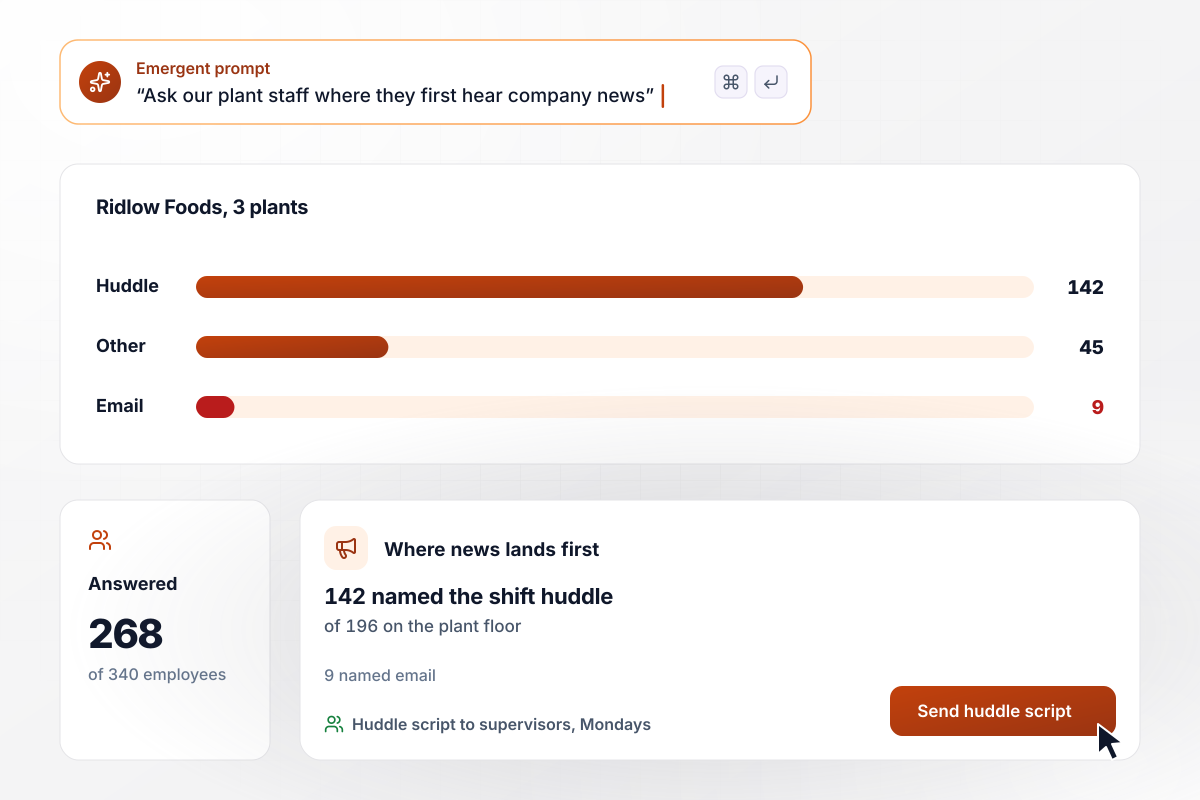
For the plant floor, news comes at the shift huddle
Ridlow Foods runs three plants, and the app asked all 340 employees where they first hear company news. Of the 268 who answered, 196 work on the plant floor. Among them, 142 named the shift huddle and 9 named email. Supervisors now get a huddle script with the week's news every Monday.
window.awbMockup = { plantNewsReach: "Ask all 340 employees at our 3 plants where they first hear company news: shift huddle, break-room screen, a text from a supervisor, or email. Ask for their plant and whether they work on the floor or in the office, never their name. Show me a bar for each channel, split by floor and office.", fridayUpdateRating: "Under every Friday update from our CEO, add one question: how useful was this, from 1 to 5, with an optional comment. Show me each week's average and number of answers in a table, and list the comments that mention length.", schedulingChangeCheck: "Three days after we announce a change, ask staff at each of our 4 hotels whether they know what changes for them on the go-live date: yes, not sure, or no. Show the share saying yes by hotel. If fewer than 7 in 10 at a hotel say yes, email its general manager with the comments.", siteComparison: "Twice a year, ask every employee to rate one statement: I hear about decisions before they affect my work. Ask for their group: head office, distribution center, or stores. Show the share who agree by group, with this round next to the last one." };
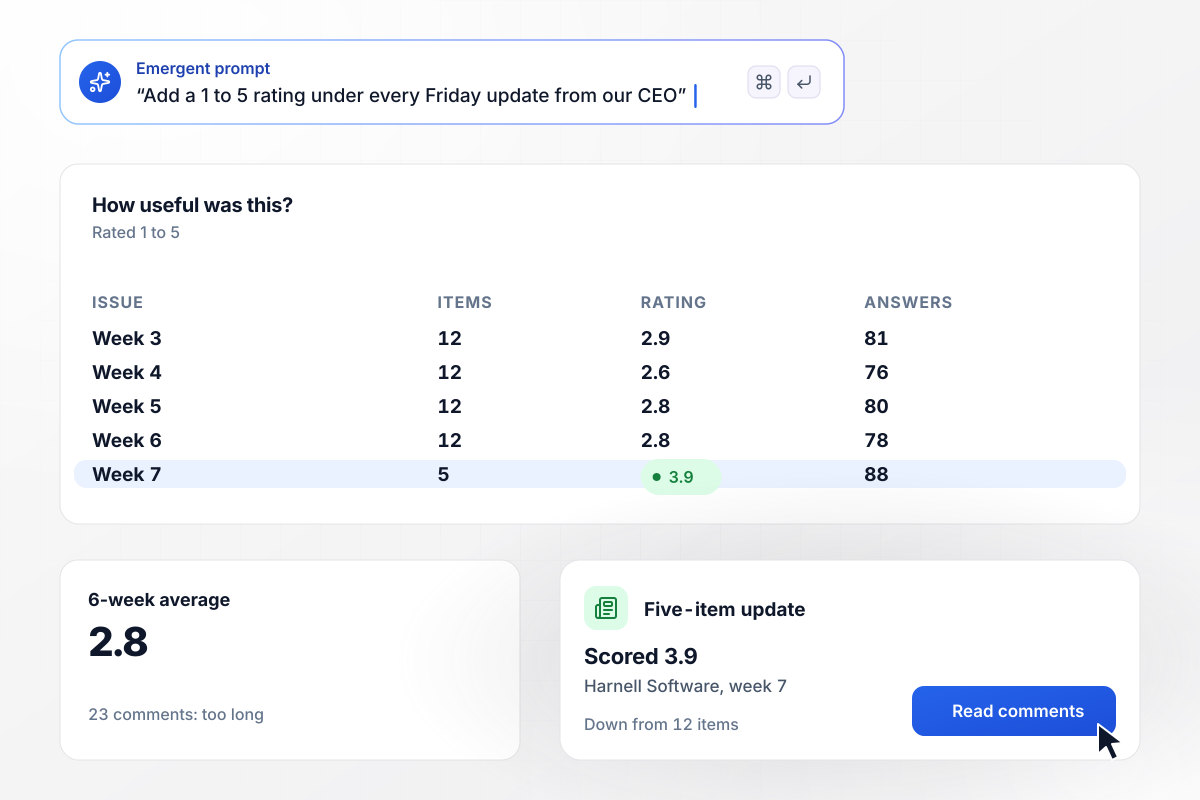
When the Friday update scored 2.8, it shrank to five items
Under every Friday update from Harnell Software's CEO, the app asks one question: how useful was this, from 1 to 5? Over six weeks the 12-item update averaged 2.8, and 23 comments said it ran too long. The CEO cut it to five items, and the first shorter issue scored 3.9.
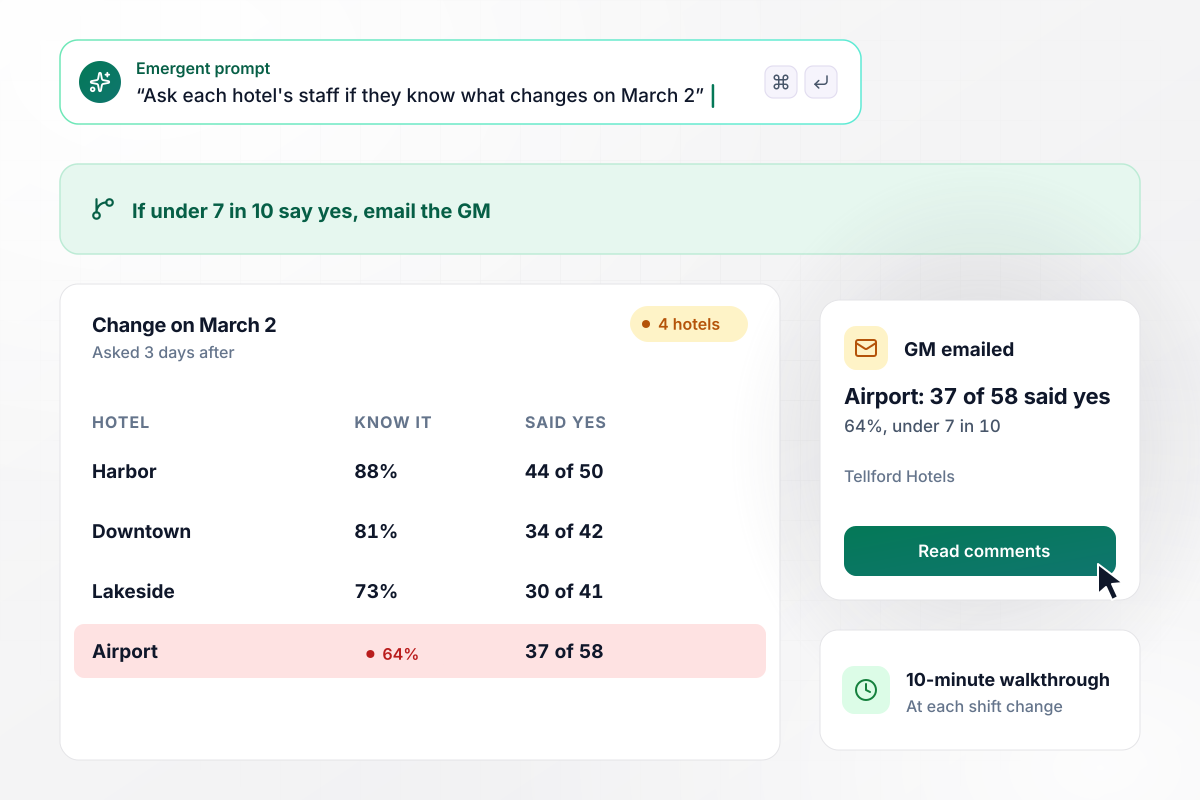
Which hotel staff know what changes on March 2?
Three days after Tellford Hotels announced a new scheduling tool, the app asked staff at all 4 hotels if they know what changes on March 2. If under 7 in 10 say yes, the app emails that hotel's general manager. At the airport hotel, 37 of 58 said yes, and its manager now runs a 10-minute walkthrough at each shift change.
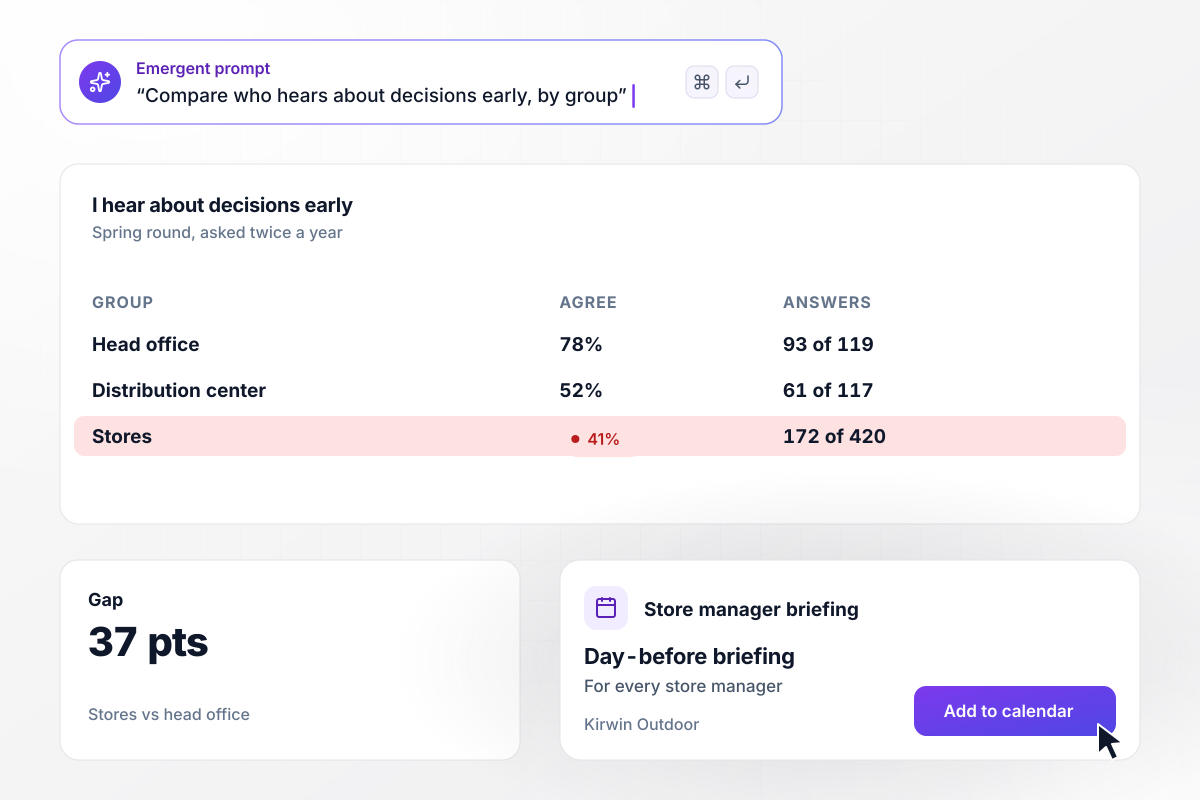
A 37-point gap between stores and head office
Twice a year, Kirwin Outdoor asks every employee to rate one statement: I hear about decisions before they affect my work. This spring, 93 of 119 people at head office agreed, against 172 of 420 in stores. Store managers now join a briefing call the day before each announcement goes out.






How to Write an Internal Comms Survey
Seven steps to write internal communications survey questions that show which messages reach which teams, then build the survey.
Decide what the round should settle before you write a word. Maybe it is whether frontline staff see the newsletter, or whether people trust what leaders tell them. Every question that does not serve that goal comes out.
Name the update, the date, or the change in the question itself. Ask whether the March 2 scheduling change is clear, not whether communication is good. A specific message gets a specific answer, and you can act on it.
Ten questions take a few minutes on a phone, so people finish between tasks. Save one open text box for the end and ask what they wish they had heard sooner. A longer survey loses the shift workers you most need.
Pick a five-point scale from strongly disagree to strongly agree and keep it. Changing the scale or the wording between rounds makes this spring impossible to compare with last fall, which defeats the point of asking twice.
Ask where people work and which group they belong to, then stop. Leave out names and employee IDs, and say so in the first line of the survey. People tell you a channel is ignored only when they know it cannot be traced back.
Share what you heard and the one change you are making, in the channel that scored best. A survey that disappears teaches staff to skip the next one. Name the owner of the change and the date it starts.
Describe your channels, groups, and questions in one prompt. Emergent builds the survey and a database for every answer. Send it to one team as a test, fix any confusing question by prompt, then open it to the company.
Why Build Your Comms Survey With Emergent?
A question list stops at the wording. Emergent builds the survey and keeps every answer, by site and department, in a table you own.

|
SurveyMonkey | Microsoft Forms | SurveyHero | |
|---|---|---|---|---|
| What you get | Survey, logic, and response database, as code you own | Survey builder with templates, including employee engagement | Surveys, quizzes, and polls with response summaries | Survey builder with templates, including employee satisfaction |
| Pricing model | Credits, no response caps or per-response fees | Per-user team plans with a seat minimum, billed annually | Free with a Microsoft account; included in Microsoft work and school subscriptions | Free plan, then per-account plans with unlimited responses |
| Where responses live | A database table you own, plus any integration | SurveyMonkey account | Microsoft Forms, with export to Excel | SurveyHero account, EU data centers |
| Code ownership | Full code export to GitHub on paid plans | None | None | None |




Pick the Pricing Plan That Works for You
Choose the plan that fits your building ambitions. From weekend projects to enterprise applications, we've got you covered.




Find the right survey, quiz, or poll
for your team















Frequently Asked Questions
Your Questions, Answered
Don't change this element unless you know what you are doing
More things you can build
with Emergent









on Emergent today


