

Build a Safety Quiz From Your Own Site Rules
Take the safety quiz below, or build one from your site rules with a pass mark and every answer saved to a database you own.
Build a safety quiz for new hires at my warehouse, with 10 questions on forklifts, ladders, and fire exits, and a pass mark of 8.
Trusted by Builders Worldwide
Active Builders Worldwide
Apps Successfully Created
Countries Globally Reached



What Goes Into Your Safety Quiz
Emergent builds the questions and the table behind each attempt from one prompt. Another prompt changes either one.
Questions written from your site rules
Paste your site rules or the outline of a toolbox talk. Emergent writes multiple-choice questions with the right answer marked, and changes any question you flag by prompt.
A pass mark, then a retake
Set the score a worker needs, such as 8 out of 10. Anyone below it sees the questions they missed and the right answers, then takes the quiz again before starting work.
The supervisor hears about a fail
When a worker scores under the pass mark, the app emails their supervisor the name, the score, and each missed question. Or send it to the supervisor as a Slack message.
Every attempt in a database you own
Each attempt is a row in a database you own, with the worker, the date, the score, and every answer. Sort by question to find the rule a whole crew keeps getting wrong.
One question per screen, on any phone
Workers answer one question per screen on a phone, at the gate or in the break room. Emergent puts no cap on responses, so a crew of 12 and a plant of 400 use one build.
Your domain, your code
Host the quiz on your own domain, included in Emergent and billed in credits. On paid plans, export the full code to your GitHub repository and keep it with your training files.
How Four Workplaces Run Their Safety Quiz
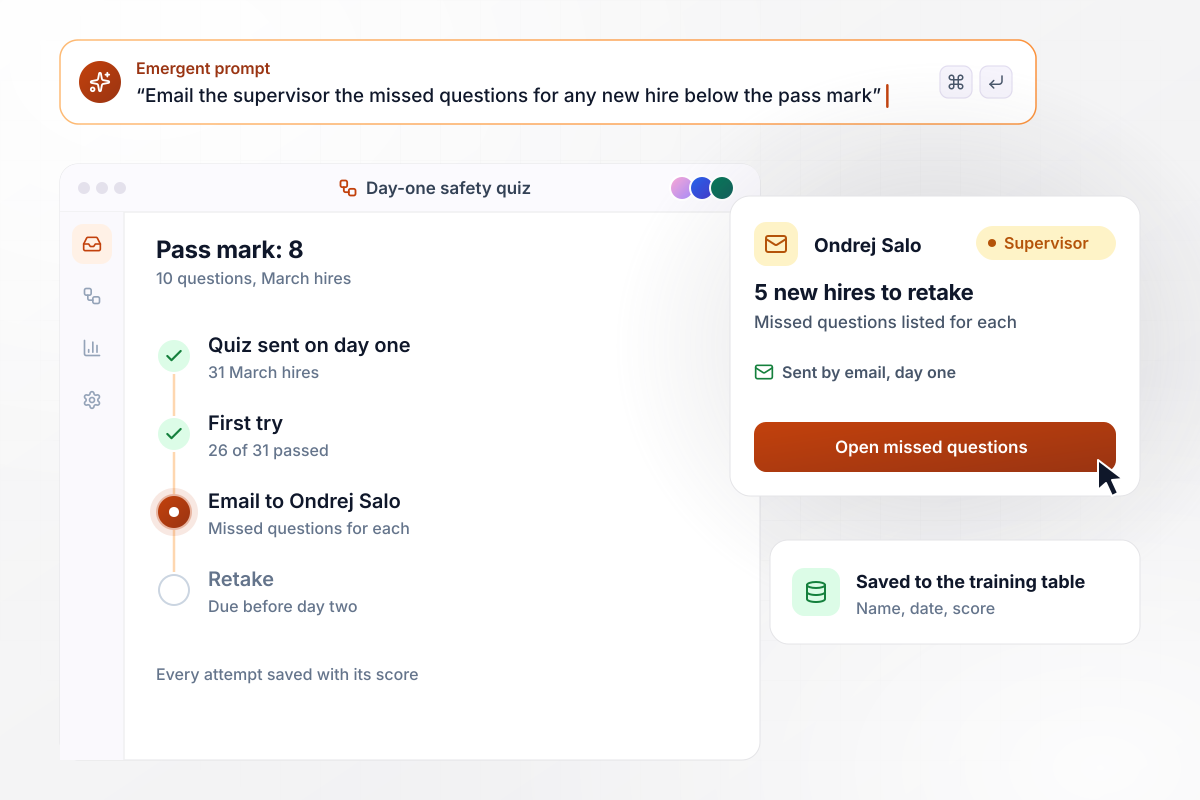
5 new hires retake it before day two
On day one, each new hire at Coldbrook Mill Distribution takes a 10-question safety quiz. The pass mark is 8, and 26 of 31 March hires passed first time. Supervisor Ondrej Salo got the missed questions for the other 5 by email, went over those rules with each, and all 5 passed the retake before day two.
window.awbMockup = { newHireQuiz: "Build a 10-question safety quiz for new hires at my warehouse to take on day one, before they go onto the floor. Cover forklifts, ladders, and fire exits. Set the pass mark at 8, email the supervisor the missed questions for anyone below it, allow one retake, and save every attempt with the name, date, and score.", toolboxTalkQuiz: "Build a 5-question quiz my crew answers on their phones after the Monday toolbox talk at 7:00. This week's talk is fall protection. Count how many workers missed each question, send me the counts in a Slack message, and save each answer with the worker's name and the talk it followed.", chemicalLabels: "Build an 8-question yearly refresher on chemical labels and safety data sheets for the 64 staff in my lab. Each person picks their lab group at the start. Show a dashboard with the average score for each group out of 8, and save every answer so I can see which questions each group missed.", fireDrillQuiz: "Build a 6-question quiz on fire extinguishers and exits for the 140 staff at my 3 restaurants to take the week after our fire drill. Each person picks their restaurant. Show how many people chose each assembly point, broken down by restaurant, and save every answer to my database." };
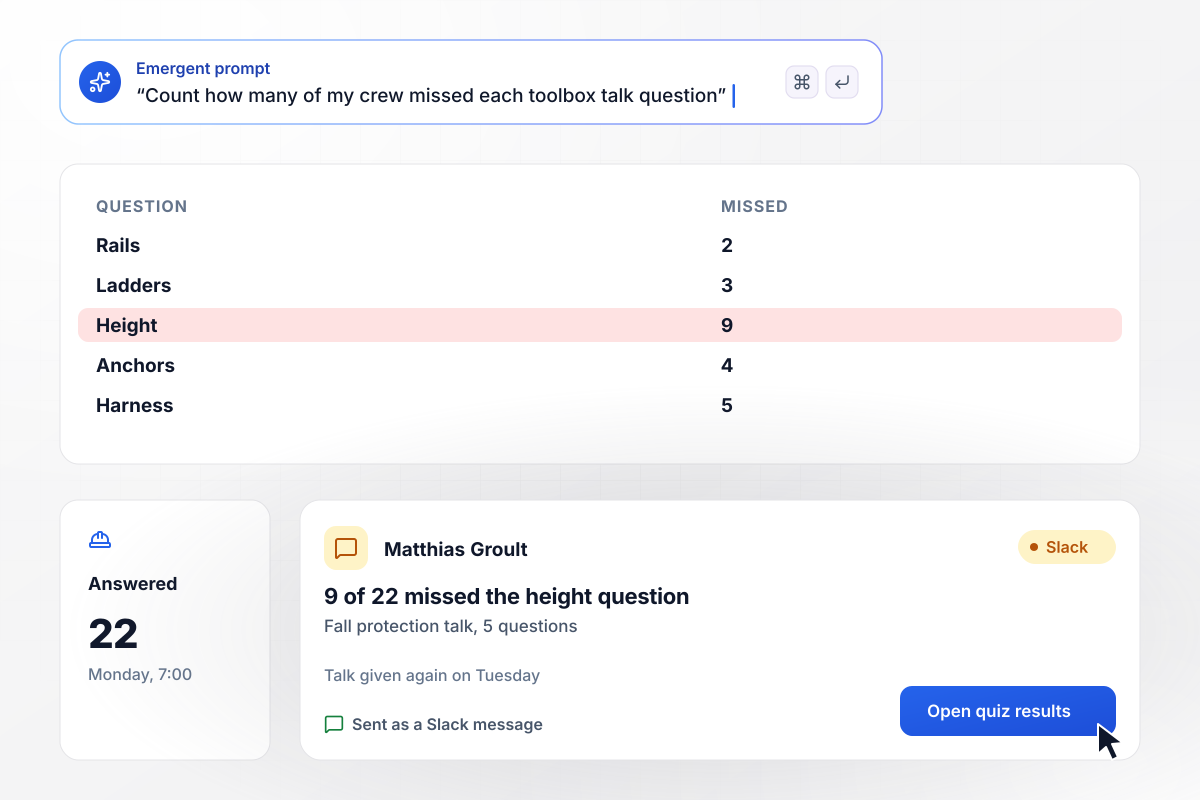
With 9 workers unsure, the fall talk runs twice
Every Monday at 7:00, a Halloran Sands Builders crew hears a toolbox talk and answers 5 questions on their phones. After the fall protection talk, 9 of 22 workers missed the question on when fall protection starts. Foreman Matthias Groult got the count in a Slack message and gave the talk again on Tuesday.
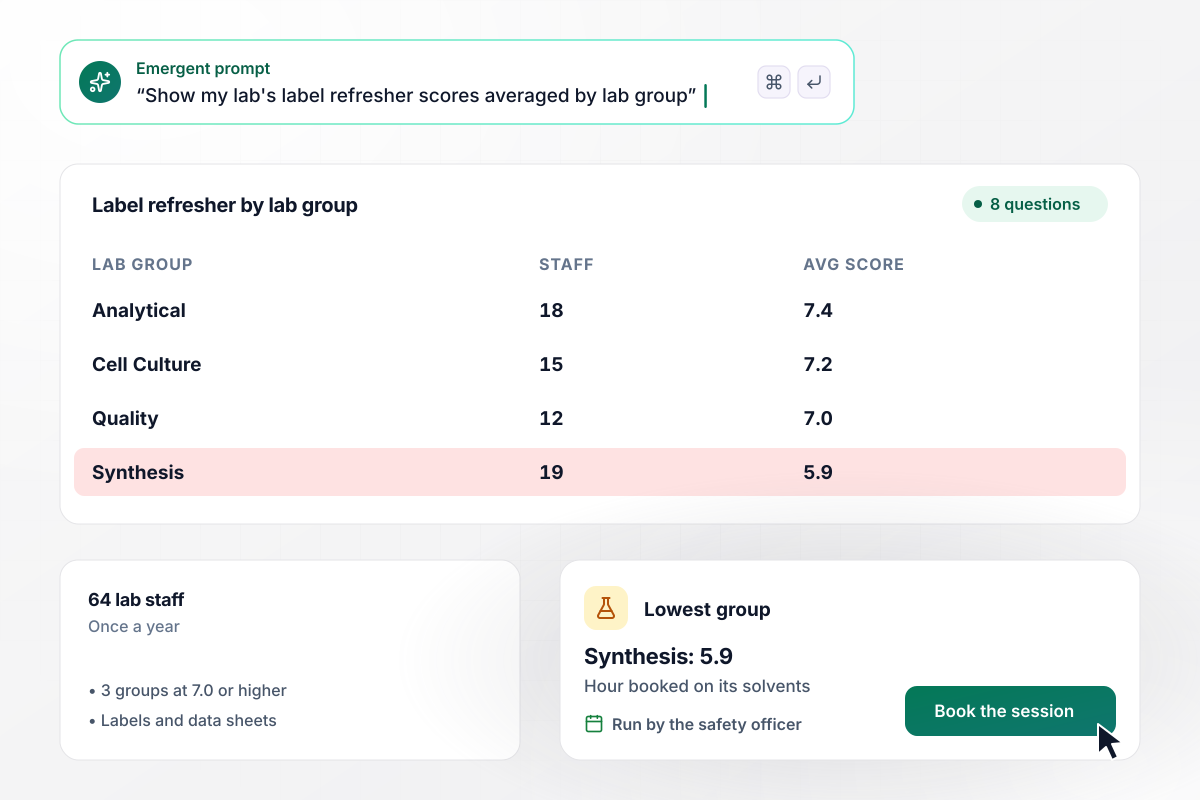
Synthesis averages 5.9 and rereads its own sheets
Once a year, Quarrow Bioscience sends its 64 lab staff an 8-question refresher on chemical labels and safety data sheets, with scores split by lab group. Three groups averaged 7.0 or higher out of 8. Synthesis averaged 5.9. The safety officer booked that group an hour on the sheets for its most-used solvents.
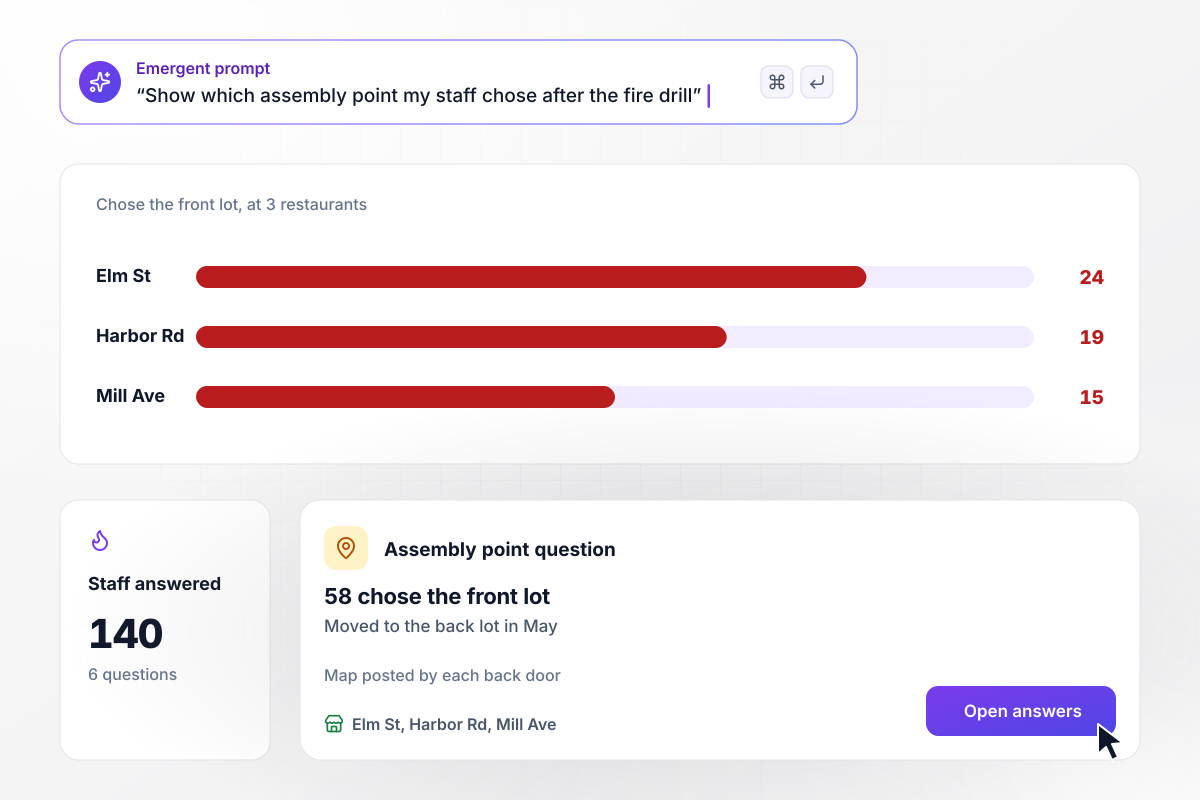
Where 58 staff went wrong after a fire drill
The week after its fire drill, Linnet Row Kitchens sends 6 questions on extinguishers and exits to the 140 staff at its 3 restaurants. Of those, 58 chose the front lot as the assembly point, though it moved to the back lot in May. Each general manager posted a map of the new assembly point by the back door.






How to Build a Safety Quiz for Your Crew
Seven steps to build a safety quiz that checks the rules your crew uses each day, then run it with Emergent.
List the hazards your workers meet this month, such as forklifts, ladders, or a new solvent. Write questions about those, not general trivia. Put the hazard list and the people taking the quiz in your prompt, and Emergent drafts a question for each hazard.
Each question should check a single rule a worker can act on, like where to point an extinguisher. A question that mixes two rules hides which one the worker missed, and the results stop telling you what to retrain.
Give four options of the same length and kind. Use the mistakes you have seen on the floor as the wrong answers, so a worker who guesses or skims the talk gets caught. Leave out joke options and 'all of the above'.
Quote the line in your site rules or the OSHA page that settles each answer, and keep it beside the question. If you cannot point to a line, rewrite the question or cut it before anyone takes the quiz.
Decide the passing score and what happens below it before the first worker starts. A retake after a short talk with the supervisor gives the worker a second look at the rule. Write both rules into the prompt so the build matches them.
Send the quiz to one crew or shift and read every result. Fix any question that half the crew missed for the same wrong answer, since the wording may be at fault, then open the link to the rest of the site.
After each round, sort the results by question. Retire the ones every worker gets right, keep the ones that split the crew, and add questions when equipment or tasks change. A follow-up prompt updates the same quiz.
Why Build Your Safety Quiz With Emergent?
A safety quiz built on Emergent keeps every score in a database you own. Next year's refresher starts from this year's questions and results.

|
ProProfs | Interact (quiz specialist) | Typeform | |
|---|---|---|---|---|
| How you build | Prompt for the survey, quiz, or poll and the app around it | Templates, question library, and AI quiz builder | Templates and AI quiz maker | Templates and editor, AI assist |
| Pricing model | Credits, no response caps or per-response fees | Free plan, then billed per active quiz taker | Free plan capped by monthly responses, then paid plans | Plans by monthly response limit; discount for annual billing |
| Where responses live | A database table you own, plus any integration | ProProfs account; reports export to Excel, CSV, or PDF | Interact account | Typeform account |
| Code ownership | Full code export to GitHub on paid plans | None | None | None |




Pick the Pricing Plan That Works for You
Choose the plan that fits your building ambitions. From weekend projects to enterprise applications, we've got you covered.




Find the right survey, quiz, or poll
for your team















Frequently Asked Questions
Your Questions, Answered
Don't change this element unless you know what you are doing
More things you can build
with Emergent









on Emergent today


