

Build a Mattress Quiz That Matches Shoppers to Your Beds
Build a mattress quiz that matches each shopper to a bed you stock and saves every answer to a database you own.
Build a mattress quiz for my store that asks how shoppers sleep and matches each one to a bed on my showroom floor.
Trusted by Builders Worldwide
Active Builders Worldwide
Apps Successfully Created
Countries Globally Reached



What Emergent Builds Into a Mattress Quiz
Describe your beds and your shoppers, and Emergent builds the questions, the matching, and the table where each result is saved.
Questions about how people sleep
Name the beds you stock and what sets each apart, and Emergent drafts questions on sleep position, feel, bounce, and warmth. Change any question or option with a follow-up prompt.
Every option mapped to a bed
Each answer adds a point to one of your beds, and the bed with the most points becomes the shopper's result. When a new model arrives, one prompt adds it to the mapping.
Answers saved in a database you own
Every finished quiz is a row with the shopper's answers, the result, and the date, in a database you own. Sort by result to see which bed the quiz recommended most this month.
One question per phone screen
Shoppers answer one question per screen on a phone, from a link in an ad or a QR code on a showroom tag. Emergent puts no cap on how many shoppers take the quiz each month.
Alerts when a lead needs a person
Set a rule, such as two partners far apart on firmness, and the app sends your sales team a Slack or email alert with their answers. Every other shopper goes on to the result.
Your domain, or the code itself
Run the quiz on your store's own domain; custom domains are included in Emergent and use credits. On paid plans, export the full code to your GitHub repository for your developer.
How Four Stores Run a Mattress Quiz
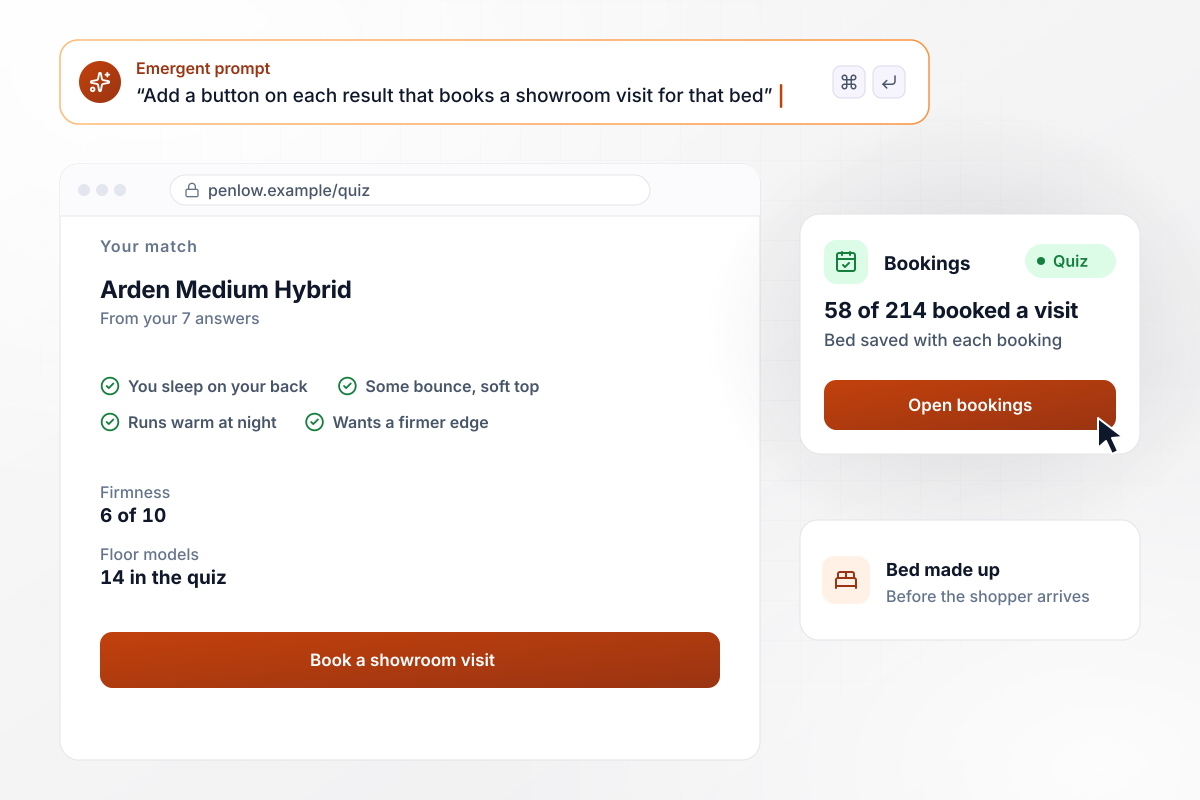
Quiz results put 58 shoppers in the showroom
Penlow Sleep Shop has 14 floor models and a 7-question quiz on its website. Each result names one of those beds, with a button to book a showroom visit. In October, 214 shoppers finished the quiz and 58 booked. Each booking names the matched bed, so staff have it made up before the shopper arrives.
window.awbMockup = { mattressShowroom: "Build a 7-question mattress quiz for my store's website that matches each shopper to one of our 14 floor models. Put a button on each result to book a showroom visit, save the matched bed with the booking, and show me each month how many quiz takers booked.", onlineMattressBrand: "Build a mattress quiz for my online store that matches shoppers to one of our 3 mattresses. Save each shopper's answers with their order number, and show me returns by quiz answer so I can see which answers lead to a return.", couplesShopping: "Build a mattress quiz for couples where each partner rates the firmness they like from 1 to 10. When the ratings differ by 3 or more, send my sales team a Slack alert with both sets of answers so someone can call the couple.", sleepReviewSite: "Build a mattress quiz for my review site's readers that names a bed type: soft foam, hybrid, innerspring, or latex. Save every result, and on the first of each month email me a count of how many takers landed on each type." };
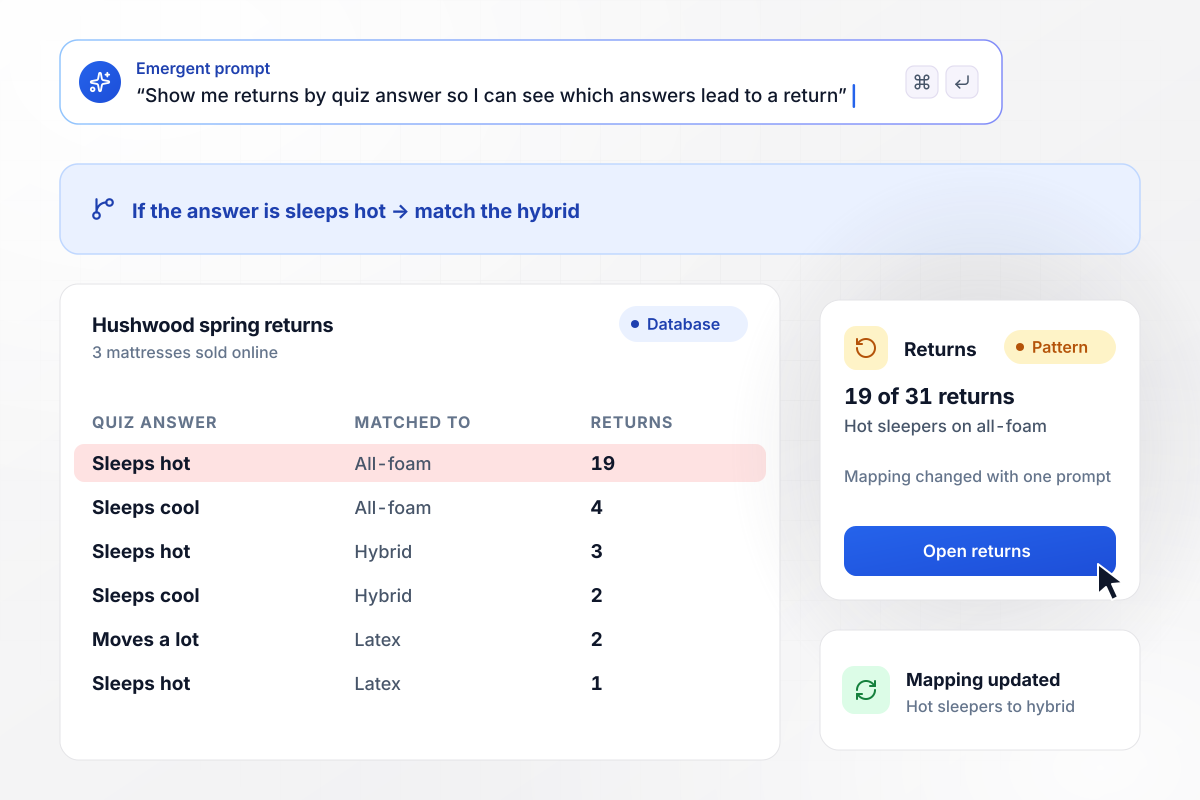
Hybrid replaces all-foam for hot sleepers
Hushwood Sleep Co. sells 3 mattresses online and saves each shopper's quiz answers with the order. This spring brought 31 returns, and 19 came from shoppers who said they sleep hot and were matched to the all-foam model. One prompt changed the mapping, and the quiz now sends hot sleepers to the hybrid.
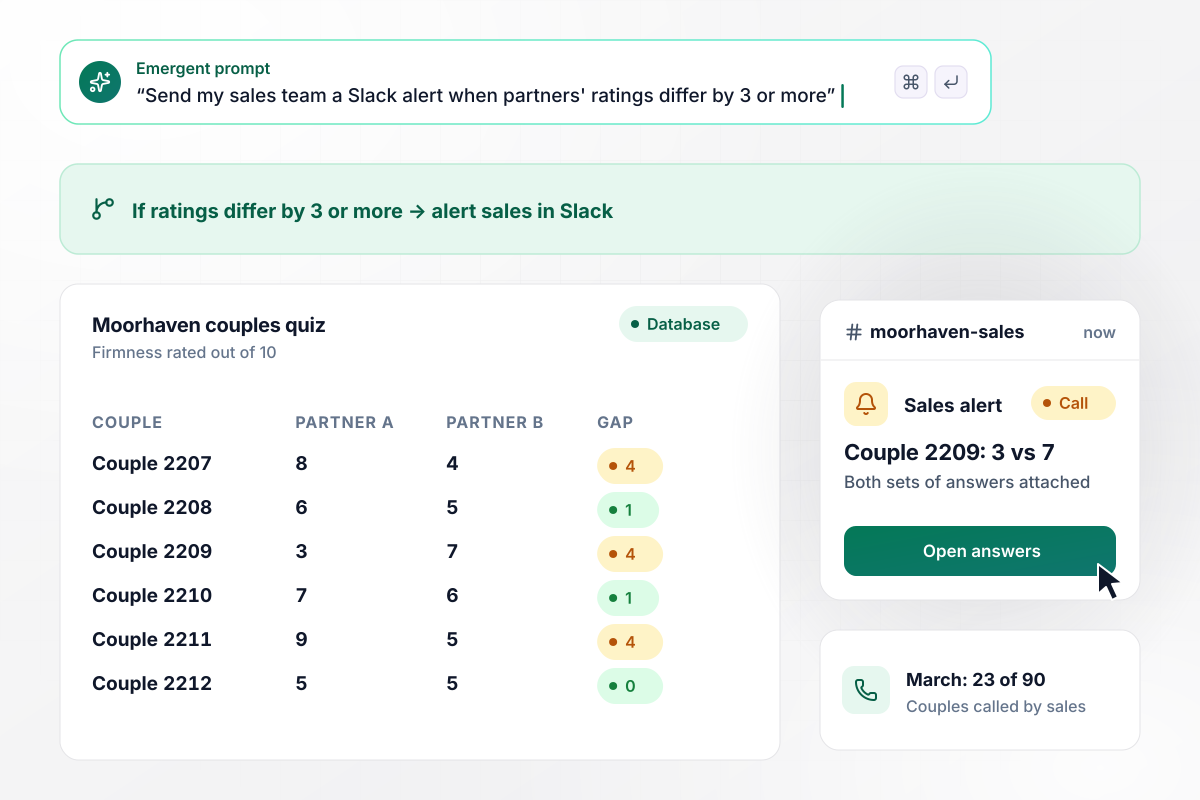
When partners differ by 3 points, sales steps in
Moorhaven Home's quiz asks each partner to rate the firmness they like on a 10-point scale. When the ratings differ by 3 or more, the sales team gets a Slack alert with both sets of answers, and a salesperson calls the couple. In March, 23 of the 90 couples who took the quiz got that call.
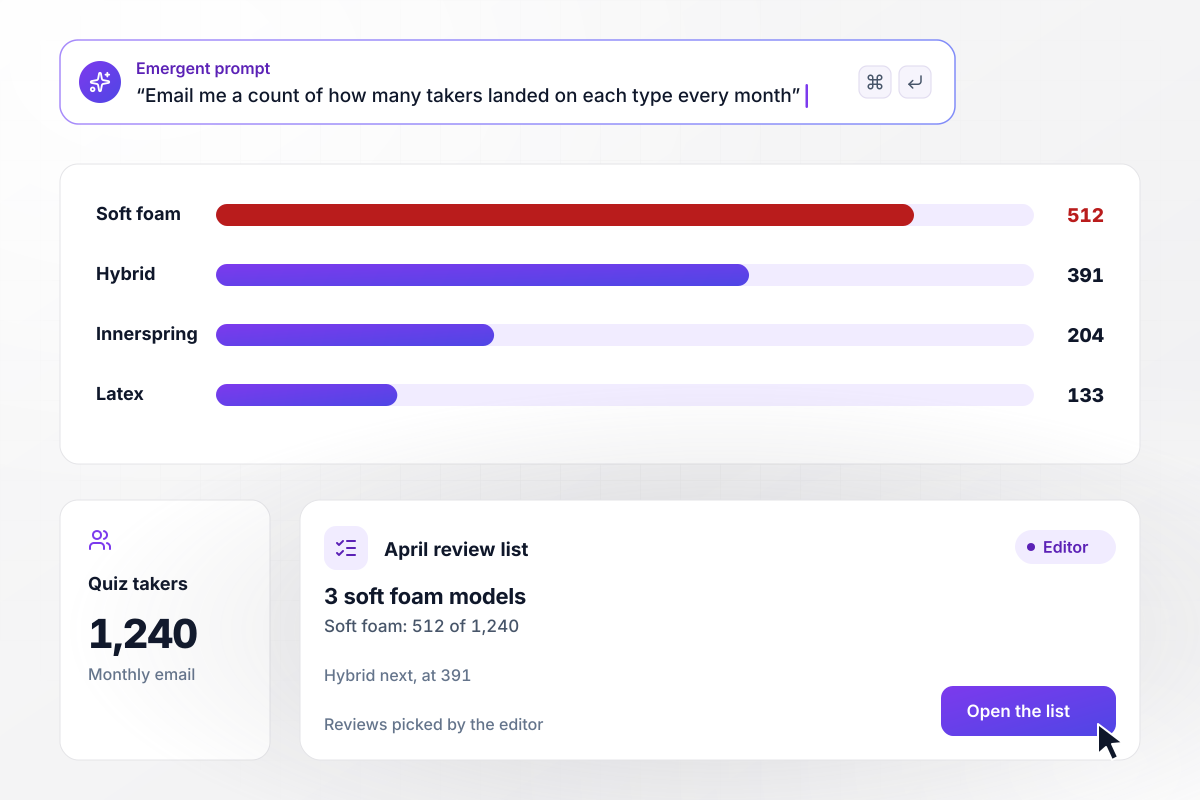
Reviews follow 512 soft foam results into April
The Pillow Ledger reviews mattresses and gives readers a quiz that names a bed type. A monthly email counts the results. March brought 1,240 takers: 512 landed on soft foam and 391 on hybrid. The editor put 3 soft foam models on April's review list.






How to Make a Mattress Quiz
Seven steps to make a mattress quiz that recommends a bed from how people sleep, then improves it with real results.
Start with the beds, not the questions. Write down each model the quiz may recommend, with what it is made of and how firm it feels on your own scale. Four to six results is plenty, and the list goes straight into your prompt.
Shoppers know how they sleep far better than they know coil counts. Ask about sleep position, how warm they run, who shares the bed, and what bothers them about the mattress they own now. Give each question four options a shopper can pick at a glance.
Give each option one point toward one of your beds, and check that every bed collects points from at least two questions. Then take the quiz yourself as a side sleeper and as a back sleeper, and see whether each lands on the bed you would pick for that sleeper.
Firmness numbers are not comparable from one brand to the next. Describe the feel instead: sinks in, or stays flat. If you do show a number, call it your store's scale, and use that scale on every result and every floor tag.
Each result should name the bed, give one reason it fits drawn from the shopper's own answers, and offer a single next step, such as booking a visit or adding the bed to the cart. Pick the step that matches how your store sells.
Ask for an order number or an email address at the end. With it, every quiz result can be matched to what the shopper bought and whether it came back. Without that link you can count results, but you never learn which answers led to a return.
Once a month, put results beside returns and bookings. If one answer keeps leading to returns, move it to a different bed with a prompt, then let a full month of new results come in before you change anything else.
Why Build Your Mattress Quiz With Emergent?
Emergent builds the mattress quiz as your own app: questions that fit your beds, and answers in a database you own.

|
ProProfs | Interact (quiz specialist) | Typeform | |
|---|---|---|---|---|
| How you build | Prompt for the survey, quiz, or poll and the app around it | Templates, question library, and AI quiz builder | Templates and AI quiz maker | Templates and editor, AI assist |
| Pricing model | Credits, no response caps or per-response fees | Free plan, then billed per active quiz taker | Free plan capped by monthly responses, then paid plans | Plans by monthly response limit; discount for annual billing |
| Where responses live | A database table you own, plus any integration | ProProfs account; reports export to Excel, CSV, or PDF | Interact account | Typeform account |
| Code ownership | Full code export to GitHub on paid plans | None | None | None |




Pick the Pricing Plan That Works for You
Choose the plan that fits your building ambitions. From weekend projects to enterprise applications, we've got you covered.




Find the right survey, quiz, or poll
for your team















Frequently Asked Questions
Your Questions, Answered
Don't change this element unless you know what you are doing
More things you can build
with Emergent









on Emergent today


