

Build a Makeup Quiz for Beauty Brands and Makeup Artists
Build a makeup quiz that matches a look or a foundation shade, or take the eight-question one below to find your everyday look.
Build a makeup quiz for my cosmetics brand that matches shoppers to one of four looks and shows the shades for each.
Trusted by Builders Worldwide
Active Builders Worldwide
Apps Successfully Created
Countries Globally Reached



How a Makeup Quiz on Emergent Works
A makeup quiz turns answers about routine, finish, and skin into one look or shade. Emergent builds the quiz and the table behind it.
Match a look or score a test
Choose how answers count. In a look finder, every option points to one of your looks. In a class quiz, one option per question is correct, and the result is a total score.
Shades listed on the result screen
Tag foundation, blush, and lip shades to each look in a product table. The result screen lists the shades tagged to that look, and a retagged shade shows up on the next result.
One row for every finished quiz
The look, each option picked, and an email when someone offers one are saved as a row in a database you own. Filter for the Bold look and read what those shoppers chose first.
Sized for a thumb on a phone
Emergent builds the quiz as a conversational flow with one question per screen. Someone tapping in from a video link answers all eight without zooming in or scrolling sideways.
An alert when a result needs an artist
Send an email or Slack alert when a result needs a person, such as a bride booking her makeup trial. The alert names her look and links to each answer she gave in the quiz.
Your domain, and your code on paid plans
Host the quiz on your brand's own domain: custom domains are included in Emergent and use credits. On paid plans, export the full code to your GitHub repository for a developer.
Four Beauty Businesses Run a Makeup Quiz
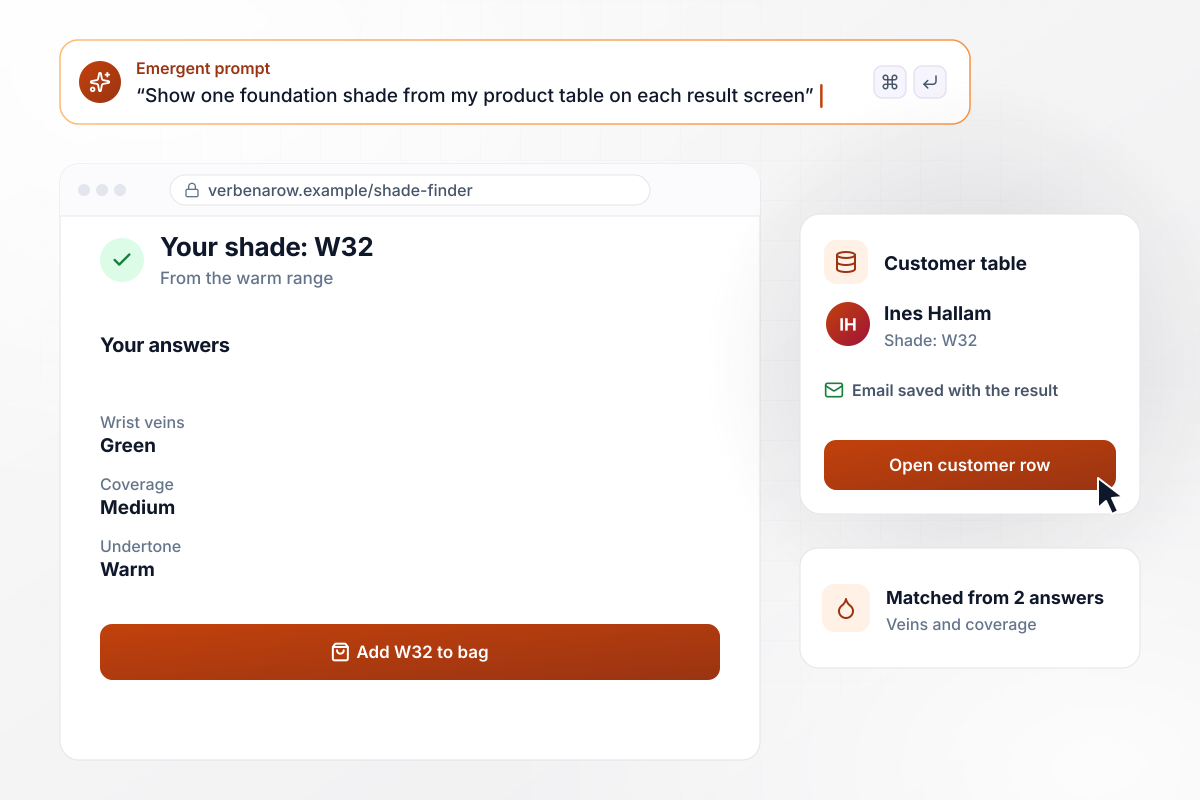
From two answers, a match on shade W32
Ines Hallam opens the shade finder on Verbena Row Cosmetics' site. She says the veins on her wrist look green and picks medium coverage. Her result screen shows foundation shade W32 from the brand's warm range, and her result and email are saved to the customer table.
window.awbMockup = { cosmeticsBrand: "Build a shade finder quiz for my cosmetics brand. Ask about the color of the veins on the shopper's wrist and the coverage she wants, then show one foundation shade from my product table on the result screen, such as W32 for green veins and medium coverage. Save each result with the shopper's email to my customer table.", bridalMakeupArtist: "Build a makeup quiz I send with every bridal trial booking confirmation. Sort each bride into one of four looks and ask about lashes and skin. Seven days before her trial, email me her look and every answer, and save both to my bookings table so I can pack the right kit.", makeupClass: "Build a ten-question makeup quiz for my Saturday course with one correct answer per question and an answer key. Score each of my 18 students, save their answers to my database, and show me how many students missed each question so I know which lesson to teach again.", beautyCreator: "Build a makeup quiz I can link from every video. Sort viewers into four looks: Glam, Classic, Natural, and Bold. Save every finished quiz to my database, and show me a monthly dashboard with the count for each look and the total, so I can plan my next tutorial series." };
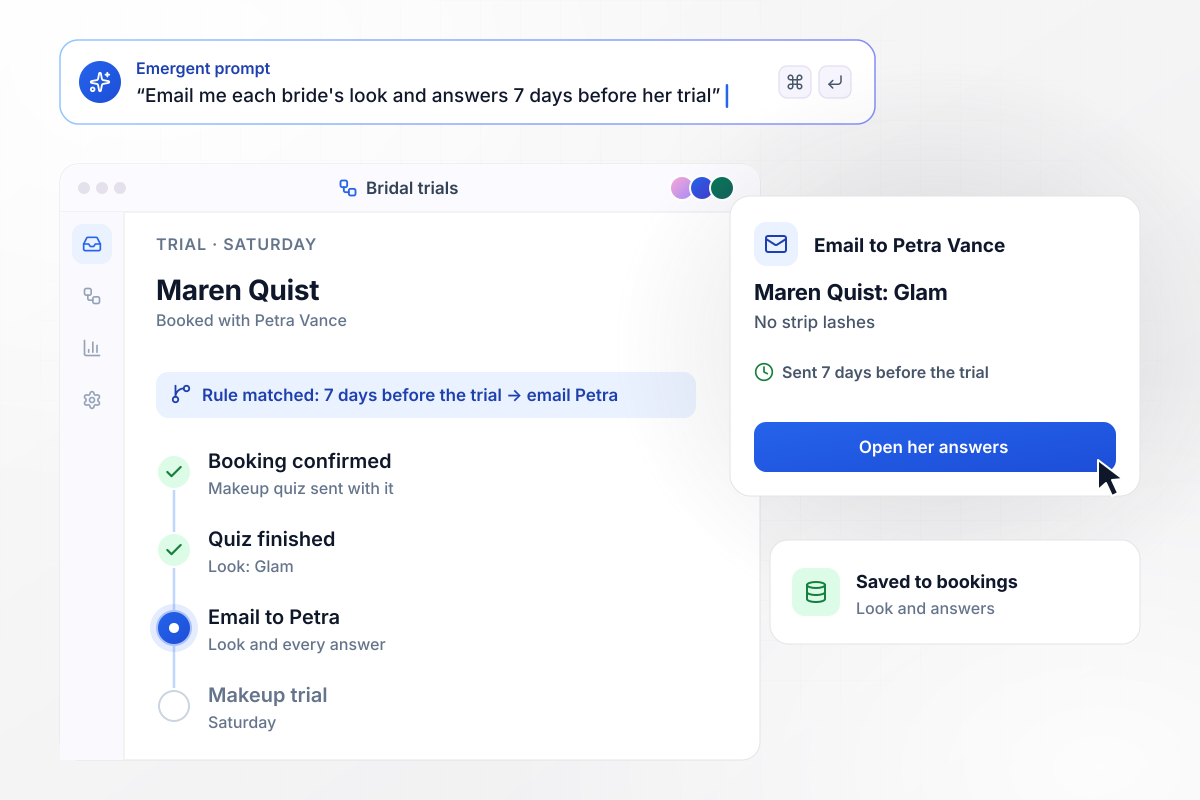
Every bride's result lands 7 days before her trial
Petra Vance books bridal makeup trials and sends the makeup quiz with each booking confirmation. Seven days before a trial, the app emails Petra the bride's look and answers. Maren Quist landed on Glam and asked for no strip lashes. Petra packed individual lashes for her Saturday trial.
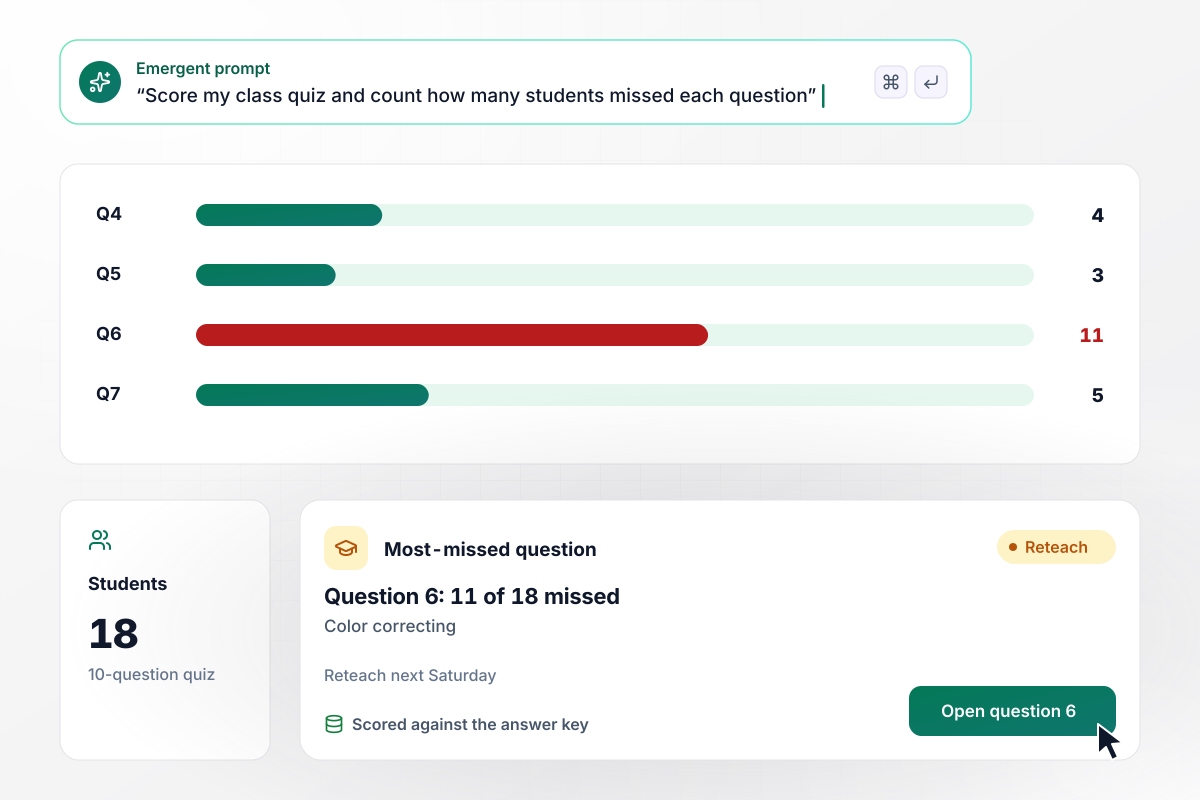
Color correcting, missed by 11 students in 18
Joelle Marchetti teaches a Saturday makeup course and gives her 18 students a ten-question quiz after the color theory lesson. The app scores every answer against her answer key. Question 6, on color correcting, was missed by 11 of 18, and she reteaches it next Saturday.
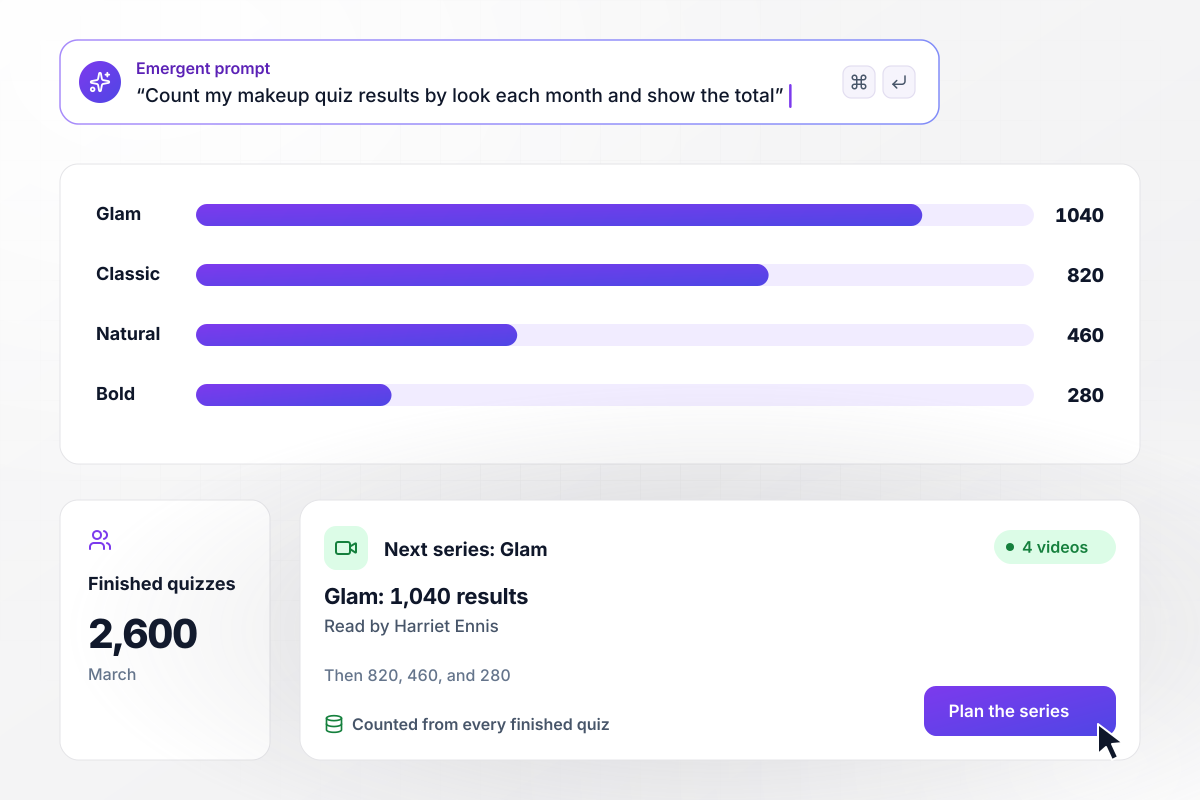
After 1,040 Glam results, a four-part series
Harriet Ennis films makeup tutorials and links her makeup quiz from every video. In March, 2,600 viewers finished it. Glam led with 1,040, ahead of Classic at 820, Natural at 460, and Bold at 280. Her next four videos are a Glam series.






How to Make a Makeup Quiz
Seven steps to make a makeup quiz that gives each person one look or one shade and keeps the answers behind it.
Pick one job before writing a question. A look finder sorts people into looks, and a shade finder points each shopper to one foundation shade. A class quiz scores what students know instead. Put the job in your first prompt to Emergent.
Write the results before the questions: four looks such as Natural, Classic, Glam, and Bold, each with two lines on what sets it apart. The questions get easier once you know what they have to separate. Four results keep eight questions enough.
Ask what people do on an ordinary morning: how many minutes makeup takes and which finish they reach for. Habits separate looks better than asking which photo someone likes. Give every question one option per look, worded in plain shopper terms.
For a shade finder, ask about wrist veins. L'Oreal Paris says blue or purple veins suggest a cool undertone and greenish veins a warm one, and seeing both points to neutral. Pair it with a coverage question to land on one shade.
Under the shade on the result screen, add one line on checking it. The same L'Oreal Paris guide says to test shades on your jawline or just below it, in natural daylight, because store lighting often distorts undertones.
Before launch, have four people take the quiz, one you expect to land in each look. When someone lands somewhere unexpected, reword the question that separated the two looks least. Then run all four through again before you share the link.
After a month, open the results table and set the count for each look beside your stock or lesson plan. Drop any question that every person answers the same way, since it separates nothing. Rename a look nobody lands on.
Why Build Your Makeup Quiz on Emergent?
Each look a shopper lands on is saved with the options behind it, in a database you own. Change any question or shade by prompt.

|
Interact (quiz specialist) | ProProfs | Typeform | |
|---|---|---|---|---|
| How you build | Prompt for the survey, quiz, or poll and the app around it | Templates and AI quiz maker | Templates, question library, and AI quiz builder | Templates and editor, AI assist |
| Pricing model | Credits, no response caps or per-response fees | Free plan capped by monthly responses, then paid plans | Free plan, then billed per active quiz taker | Plans by monthly response limit; discount for annual billing |
| Where responses live | A database table you own, plus any integration | Interact account | ProProfs account; reports export to Excel, CSV, or PDF | Typeform account |
| Code ownership | Full code export to GitHub on paid plans | None | None | None |




Pick the Pricing Plan That Works for You
Choose the plan that fits your building ambitions. From weekend projects to enterprise applications, we've got you covered.




Find the right survey, quiz, or poll
for your team















Frequently Asked Questions
Your Questions, Answered
Don't change this element unless you know what you are doing
More things you can build
with Emergent









on Emergent today


