

Build a Math Quiz That Grades Itself and Shows the Working
Build a math quiz that grades every answer and saves each score, by student and by problem, to a database you own.
Build a math quiz for my middle school math classes that grades every answer and shows the working behind each problem.
Trusted by Builders Worldwide
Active Builders Worldwide
Apps Successfully Created
Countries Globally Reached



Inside a Math Quiz Built With Emergent
A math quiz is a set of problems on one skill, graded as students answer. Emergent builds the quiz and the answer table behind it.
Problems written for the skill you name
Name the skill, such as adding fractions or two-step equations, and Emergent writes the problems with their answers and wrong options. A follow-up prompt rewrites any one of them.
Wrong options built from real mistakes
Each wrong option can carry the mistake that leads to it, such as adding 5 where the student should subtract. The answer table then counts students by mistake, not only by score.
The working behind every answer
When a student finishes, the result screen lists each problem with the right answer and the steps that reach it. A student who missed 8 + 2 x 5 sees the multiplication done first.
Every answer saved to a database you own
Each answer is a row in a database you own, with the student, the problem, the option chosen, and the date. Sort by problem to see what a class missed, or by student to plan retakes.
One problem per screen, on any phone
Students answer one problem per screen with a progress bar at the top, on a phone or a laptop in class. Emergent puts no cap on responses, and a whole grade can take one quiz.
Your domain, and the code on GitHub
Run the quiz on your school's own domain, included in Emergent and billed in credits. On paid plans, export the full code to your GitHub repository and keep the quiz past the term.
How Four Groups Put a Math Quiz to Work
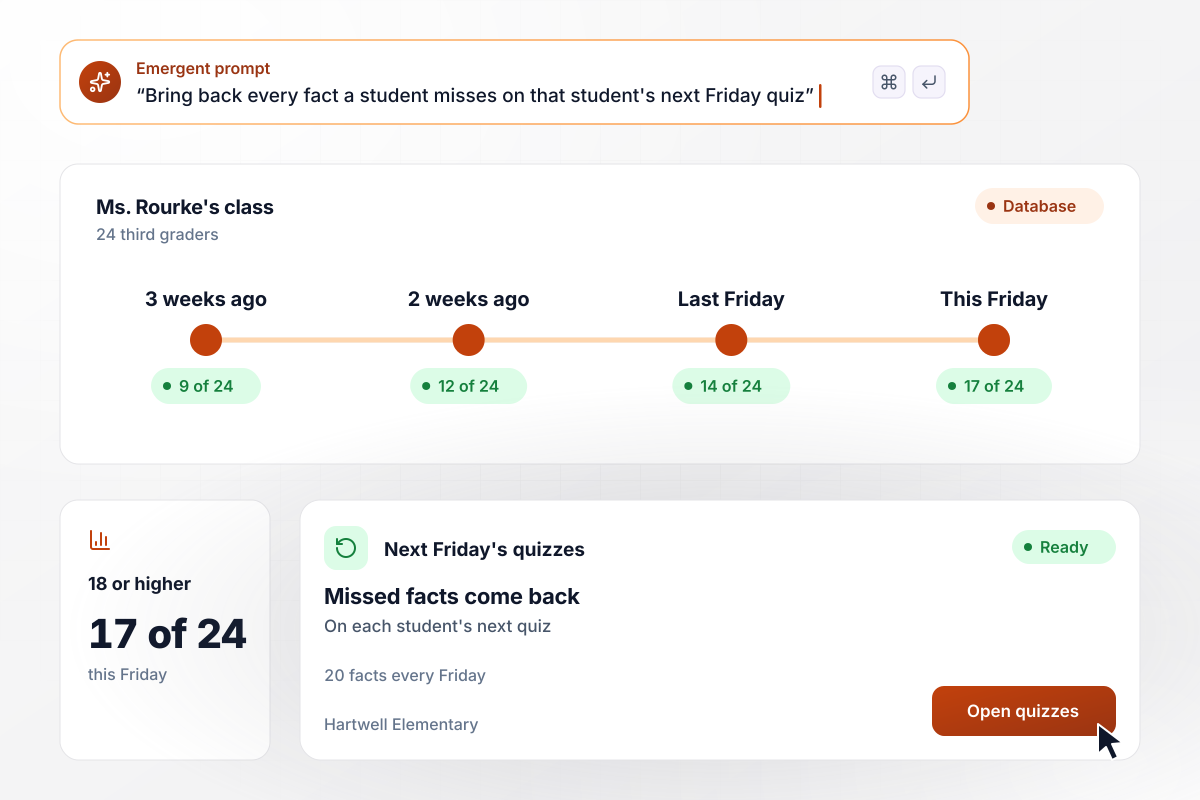
Missed facts come back on each student's next quiz
Every Friday, Ms. Rourke's 24 third graders at Hartwell Elementary take a 20-fact multiplication quiz on tablets. Any fact a student misses comes back on that student's next quiz. Three weeks ago, 9 of 24 scored 18 or higher. This Friday, 17 of 24 did.
window.awbMockup = { thirdGradeFacts: "Build a weekly multiplication quiz for my 24 third graders. Each Friday they take 20 facts on tablets. Any fact a student misses should come back on that student's next quiz. Show me how many of the 24 score 18 or higher each week, beside the weeks before.", algebra1Check: "Build an Algebra 1 unit check for my two sections, 58 students. For 3x + 5 = 20, tag each wrong option with its mistake: x = 25/3 means the student added 5 instead of subtracting it, and x = 15 means they divided only 3x by 3. Count students by mistake. The ones who added 5 get Tuesday's reteach.", coopPlacement: "Build a 12-question math placement quiz for my homeschool co-op's 38 students before fall groups form. A score of 0 to 5 is Group A, 6 to 9 is Group B, and 10 to 12 is Group C. The evening the quiz closes, email each parent the group letter, and show me how many students landed in each group.", mathClubRounds: "Build practice rounds for my middle school math club of 16. Each round is 10 problems in 30 minutes, with answers typed as numbers, not picked from options. After each round, show me how many members solved each problem. I work the lowest one on the board at Thursday's meeting." };
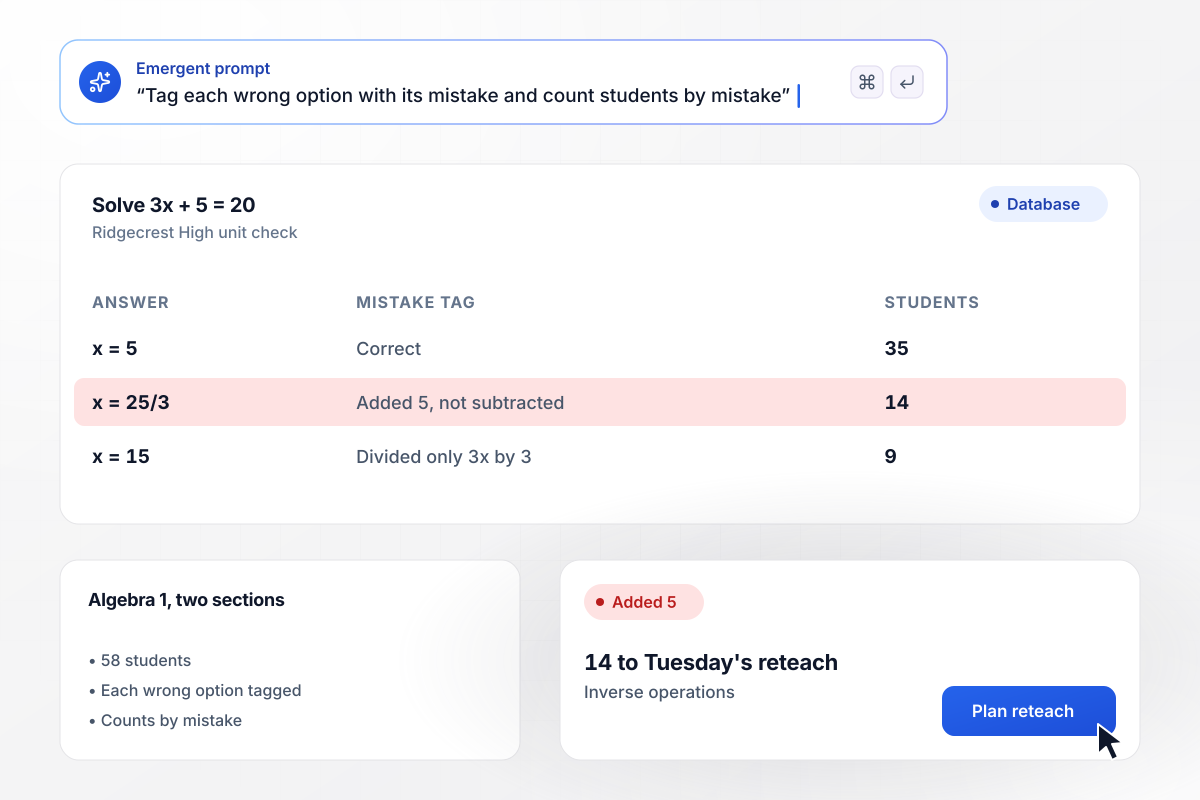
Wrong answers sorted by the mistake behind them
Ridgecrest High gives 58 students in two Algebra 1 sections a unit check, and each wrong option for 3x + 5 = 20 is tagged with its mistake. The right answer, x = 5, drew 35. Another 14 chose x = 25/3 by adding 5 instead of subtracting it. The 14 got Tuesday's reteach on inverse operations.
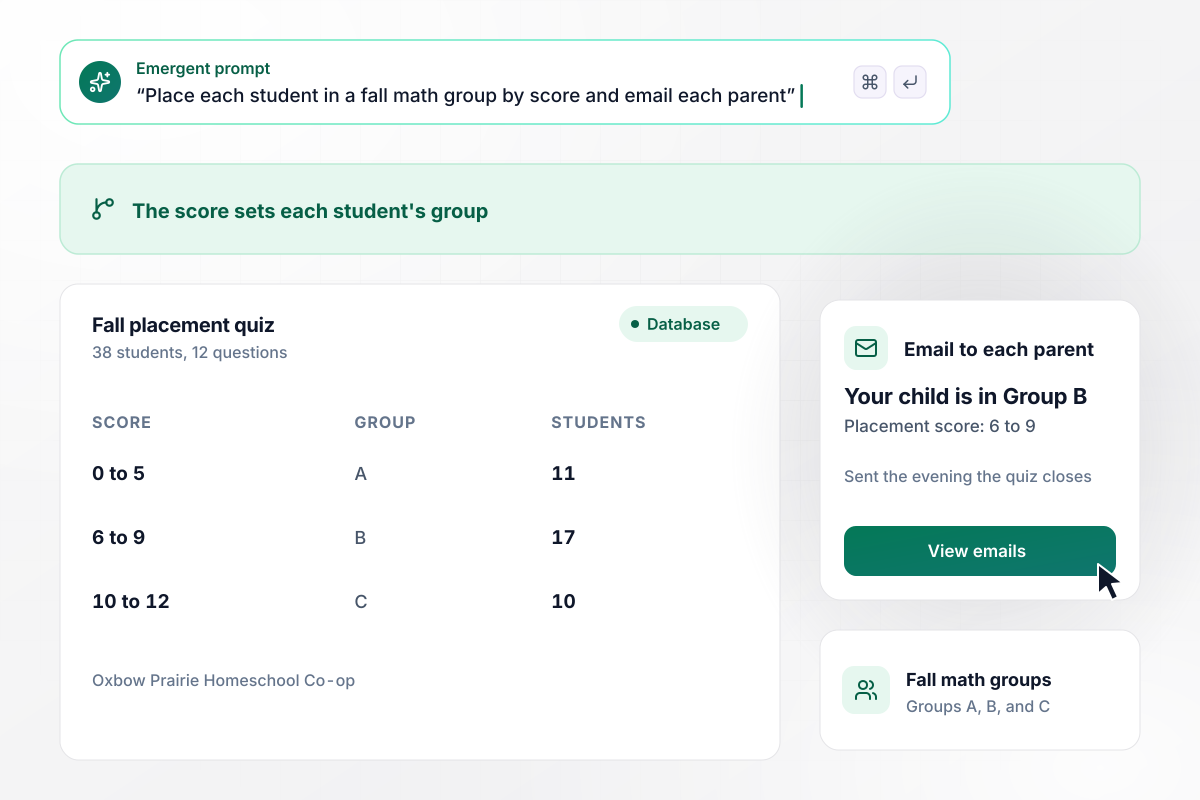
Placement scores turn into group letters for parents
Oxbow Prairie Homeschool Co-op gives 38 students a 12-question placement quiz before fall math groups form. The score sets each student's group: 0 to 5 is Group A, 6 to 9 is Group B, and 10 to 12 is Group C. Each parent gets the group letter by email the evening the quiz closes.

Ten missed problem 8, and it opens Thursday's club
The 16 students in the Holloway Middle School math club meet after school. Each practice round is 10 problems in 30 minutes, with answers typed as numbers. In the last round, only 6 of 16 solved problem 8, a triangle area question, and the coach works it on the board to open Thursday's meeting.






How to Make a Math Quiz
Seven steps to make a math quiz that tests one skill, explains every answer, and shows what to reteach.
Test one skill at a time, such as multiplying fractions or solving two-step equations. A quiz that mixes five topics gives a score nobody can act on. Name the skill and the grade in your prompt, and Emergent drafts the problems for it.
Work each problem on paper before it goes in, and write down every step. Use numbers that come out clean when arithmetic is not the skill being tested. A slip in long division should not hide whether a student can set up the equation.
Build each wrong option from a specific error, like adding where the step calls for subtracting, or dropping a negative sign. Write the mistake next to the option, and the results can count it. Skip silly options that can be ruled out without doing any math.
After a student answers, show the right answer with the steps that reach it, in the same order you would write them on the board. For 3 + 4 x 2, show 4 x 2 = 8 first, then 3 + 8 = 11.
Choose the cutoffs before the first student starts. On an 8-problem quiz, a student under 4 needs the skill taught again, and one at 7 or 8 is ready for the next unit. Write the message each band sees, with one next step in it.
Ask a colleague and one student to take the quiz before it opens. Look for a problem with two defensible answers, a typo in a number, or a wrong option nobody chose. Fix each one, and check that every score lands in the table as you expect.
When the quiz closes, sort the answers by problem and then by the wrong option chosen. Reteach the mistake the most students made, using a new problem with different numbers, and put a version of it on the next quiz.
Why Build Your Math Quiz With Emergent?
Every answer lands in a table you own, with the option each student picked. Sort by problem to find the step a class got wrong.

|
ProProfs | Interact (quiz specialist) | Typeform | |
|---|---|---|---|---|
| How you build | Prompt for the survey, quiz, or poll and the app around it | Templates, question library, and AI quiz builder | Templates and AI quiz maker | Templates and editor, AI assist |
| Pricing model | Credits, no response caps or per-response fees | Free plan, then billed per active quiz taker | Free plan capped by monthly responses, then paid plans | Plans by monthly response limit; discount for annual billing |
| Where responses live | A database table you own, plus any integration | ProProfs account; reports export to Excel, CSV, or PDF | Interact account | Typeform account |
| Code ownership | Full code export to GitHub on paid plans | None | None | None |




Pick the Pricing Plan That Works for You
Choose the plan that fits your building ambitions. From weekend projects to enterprise applications, we've got you covered.




Find the right survey, quiz, or poll
for your team















Frequently Asked Questions
Your Questions, Answered
Don't change this element unless you know what you are doing
More things you can build
with Emergent









on Emergent today


