

Build a Link in Bio Landing Page for Every Profile You Run
Get a link in bio landing page from one prompt, with buttons, forms, and a database you own behind every tap.
Build a link in bio landing page that saves every signup to a database I own.
Trusted by Builders Worldwide
Active Builders Worldwide
Apps Successfully Created
Countries Globally Reached



What Goes Behind the One Link in Your Profile
Emergent builds the page your profile links to, the table each button reads from, and what happens after a visitor taps.
A whole page from one sentence
Describe the buttons, the order, and the forms, and Emergent builds the page with its database. When the plan changes, a second prompt adds a button or rewrites the headline.
Buttons that read from a table
Ask for a button whose label and address come from a row, such as today's stop or this week's event. Staff change the row, and the button shows the new value to the next visitor.
Visits counted per profile
Give each profile its own address for the same page, and the app saves every visit with the profile it came from. Sort the rows by month to see which profile is worth posting on.
A form on the page itself
Put a signup or inquiry form under the buttons so visitors stay on the page. Emergent can build it as one question per screen, and each answer lands in a database you own.
Inquiries sent to the right person
Write a rule in the prompt, such as a party of 20 guests or more, and the app sends an email or Slack alert to the person who handles it, with the guest's answers in the message.
Your own address in every bio
Publish the page on a custom domain (custom domains use credits), and the link in each bio reads as your own name. On paid plans, export the full code to your GitHub repository.
Link in Bio Landing Page Examples
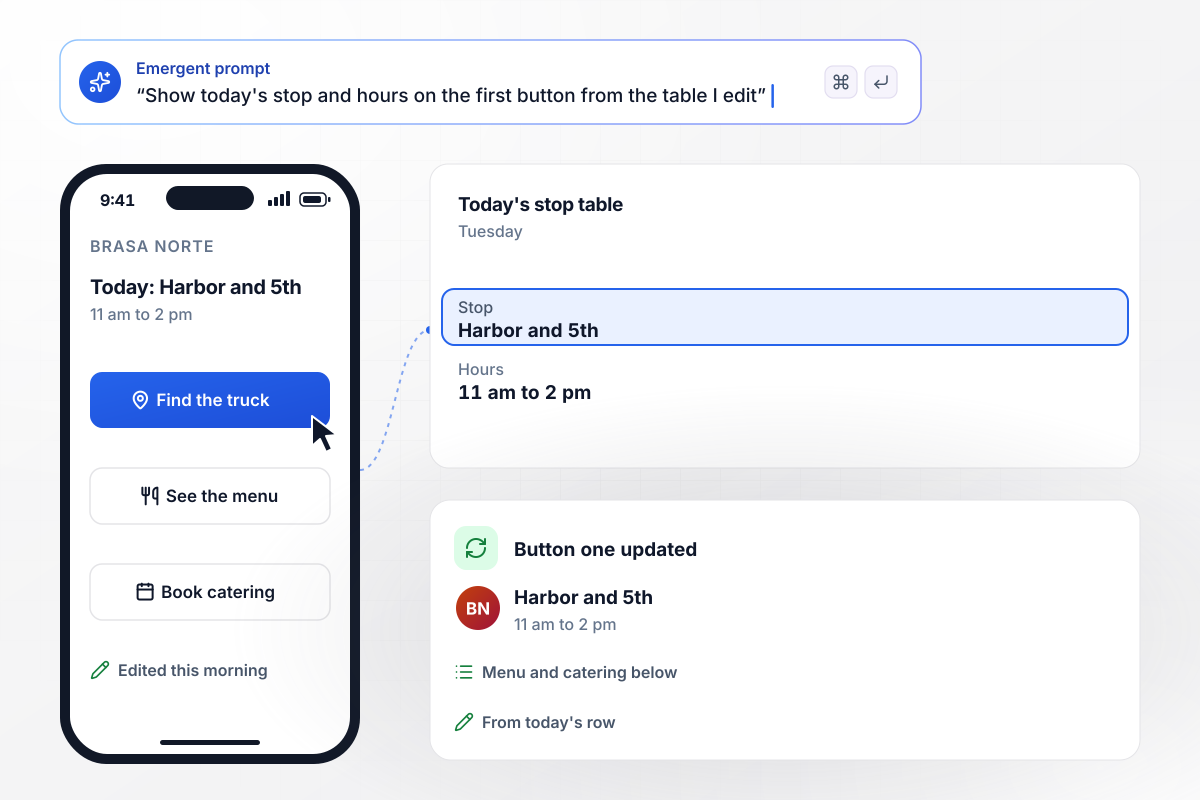
Today's parking spot is always button one
Brasa Norte parks somewhere different each weekday. The first button on its link in bio landing page reads from a table the owner edits each morning. On Tuesday the row says Harbor and 5th, 11 am to 2 pm, and the button shows exactly that. The menu and catering links sit below it and stay put.
window.awbMockup = { tacoTruck: "Build the page my taco truck, Brasa Norte, links to from every profile. Make the first button show today's stop and hours from a table I edit each morning, and put the menu and catering links below it.", bookshop: "Build one link page for Larkspur Lane Books that my TikTok, YouTube, and Pinterest profiles all link to, each with its own address. Save every visit with the profile it came from and show me a monthly count per profile.", taproom: "Build a link page for Copperline Taproom that shows tonight's tap list from a table my bar staff update. Add a private party form for the date and head count, email groups of 20 or more to Ines Calloway, and send the rest to the front-of-house inbox.", animalRescue: "Build a link page for Hollow Pine Animal Rescue that shows a card for each adoptable dog in our table. When staff mark a dog adopted, take its card off the page. Add a volunteer signup that saves each name to a volunteers table." };
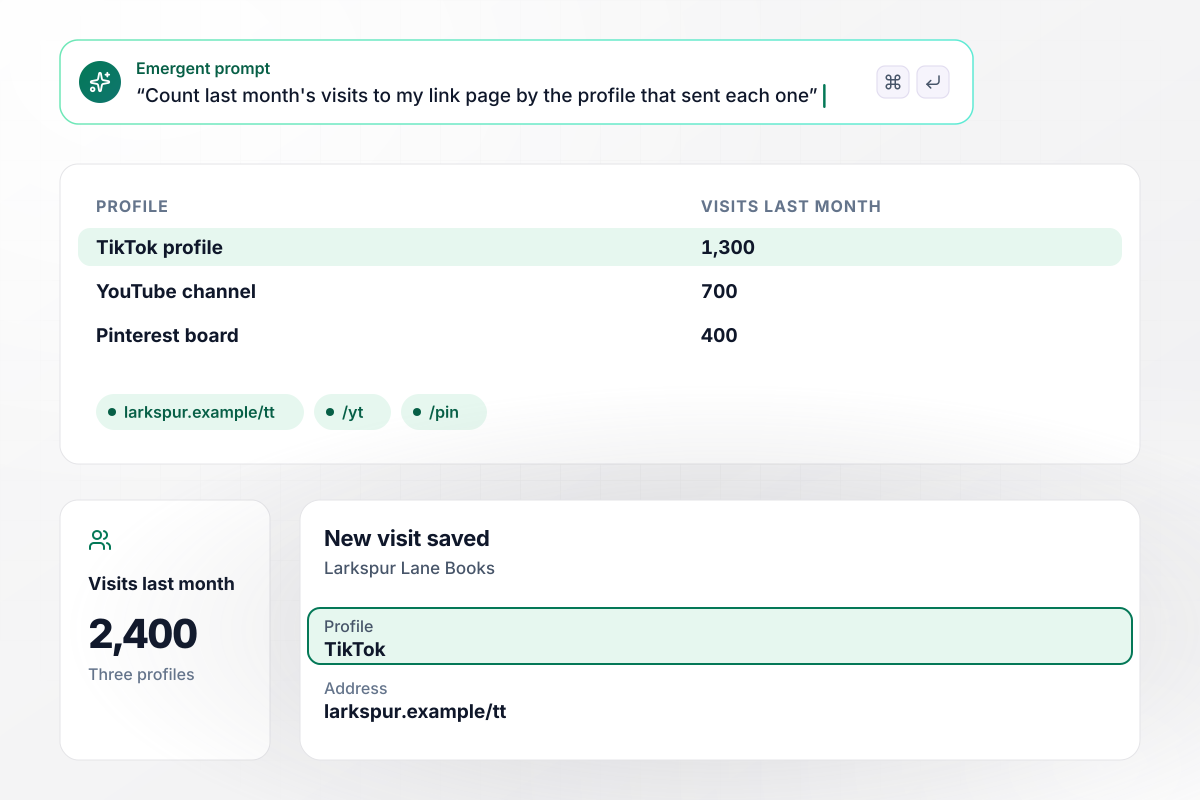
Every visit is counted by the profile that sent it
Larkspur Lane Books posts on three platforms, and each profile links to the page through a different address. The app tags every visit with its profile and saves it as a row. Of last month's 2,400 visits, the TikTok profile sent 1,300, the YouTube channel 700, and the Pinterest board 400.
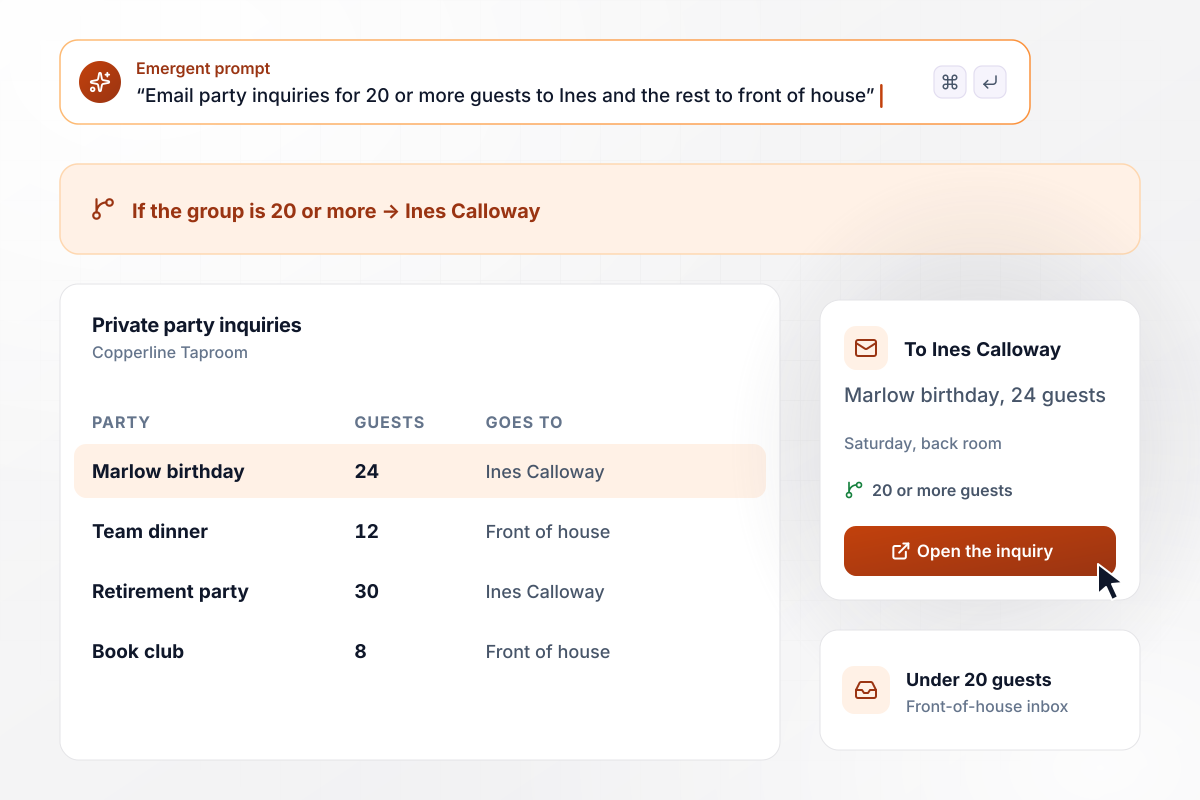
An inquiry for 20 or more guests goes to the events manager
Bar staff at Copperline Taproom keep the tap list in a table that feeds the page. Below it, a private party form asks for the date and the head count. An inquiry for 20 or more guests, such as the Marlow birthday for 24, is emailed to events manager Ines Calloway. Smaller groups go to the front-of-house inbox.
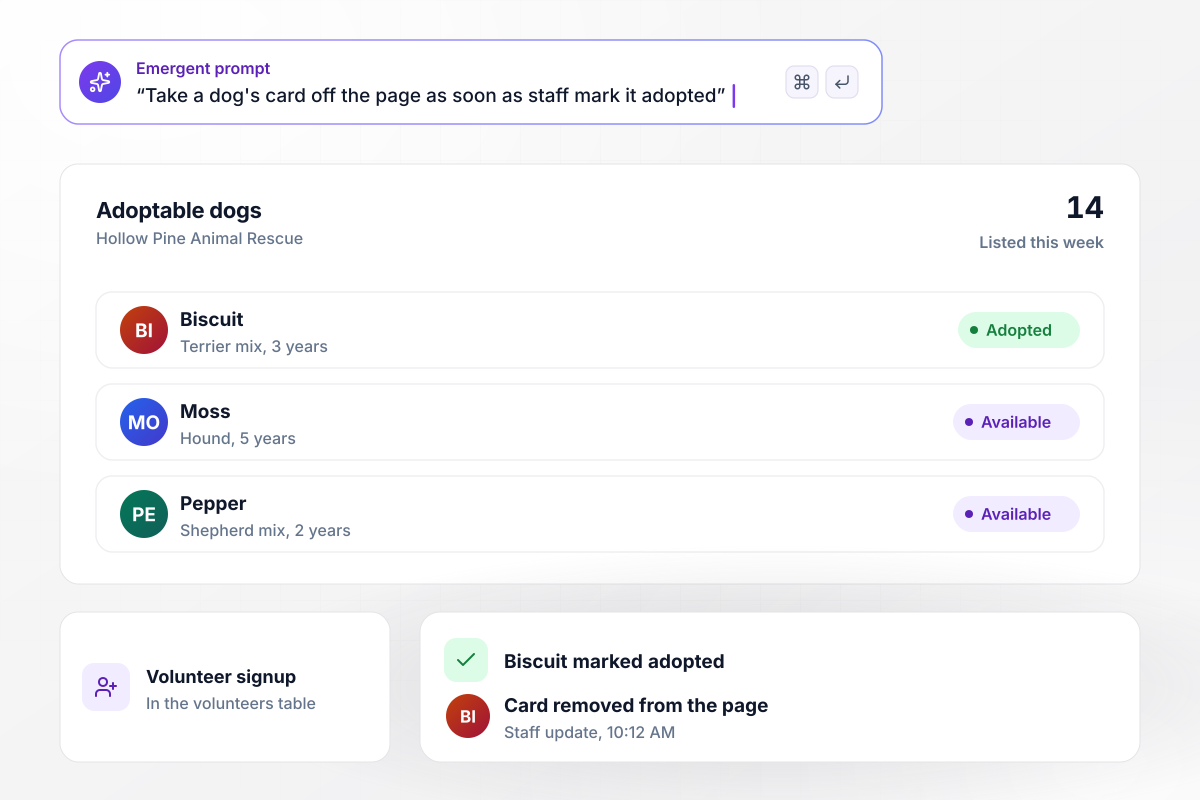
Each dog marked adopted drops off the list
Hollow Pine Animal Rescue tracks its adoptable dogs in a table, and a card for each of the 14 listed this week appears on the page. When staff mark a dog adopted, as they did for Biscuit, its card leaves the page. A volunteer signup at the bottom saves each name to the volunteers table.






How to Create a Link in Bio Landing Page
Seven steps take a link in bio landing page from a list of profiles to a tested page with its address in every bio.
List each profile the page will sit behind, from the shop's video account to the founder's channel. Note what a visitor from each one came for, because a follower who found you through a recipe video wants something different from a wholesale buyer.
Pick the single thing you want visitors to do this week, such as finding the truck or claiming a seat, and make it the first button. Put everything else below it in order of how often people ask for it, and cut what nobody asks for.
Tell Emergent what each button does, which forms sit on the page, and who hears about each answer. Emergent builds the page and its database from that prompt. A follow-up prompt reorders the buttons or adds a new one later.
Anything that changes weekly, such as today's location or this month's event, belongs in a table row, not in the page itself. Ask for that button to read its label and address from the row, then hand the table to whoever updates it.
Google's Android accessibility guidance suggests touch targets of at least 48x48dp, separated by 8dp of space or more. Use that as the floor for every button, keep labels to a few words, and check that the first button shows without scrolling.
Open the published page from every profile on a phone, tap each button, and submit one test entry per form. Check that each visit lands as a row with the right profile and that each alert reaches the person it names.
Add the page's address to each profile, using the address you gave that profile. Once a month, sort the visits by profile and by button, move the busiest button up, and retire any link nobody has tapped.
Why Build Your Link in Bio Page With Emergent?
The page works like a small app: buttons change when a row changes, and every visit and inquiry is saved where you can sort it.

|
Unbounce | Landingi | Wix | |
|---|---|---|---|---|
| How you build | Prompt for a campaign page | Templates and drag-and-drop, AI copy assist | Templates and drag-and-drop, AI assist | Prompt for a full site |
| Where submissions go | A database table you own, plus integrations | Unbounce lead storage and integrations | Vendor lead storage and integrations | Wix dashboard submissions and Contacts |
| Visitor limits | No per-visitor pricing | Monthly visitor caps by plan | Tiered by traffic on most plans | Site plan bandwidth |
| A/B testing | Generate variants by prompt | A/B testing on higher-tier plans only | Higher plans | Limited or add-on |
| Code ownership | Full code export to GitHub on paid plans | Hosted only | Hosted only | Hosted only |


Pick the Pricing Plan That Works for You
Choose the plan that fits your building ambitions. From weekend projects to enterprise applications, we've got you covered.




Find the right landing page for you






Frequently Asked Questions
Your Questions, Answered
Don't change this element unless you know what you are doing
More things you can build
with Emergent









on Emergent today


