

Build a Local Business Landing Page That Takes Orders
Build a local business landing page with your hours and address up top, and every order saved to a database you own.
Build a local business landing page for my neighborhood shop that shows the hours up top and takes orders online.
Trusted by Builders Worldwide
Active Builders Worldwide
Apps Successfully Created
Countries Globally Reached



What Emergent Builds Into a Local Page
A local business landing page shows nearby visitors where you are, when you open, and how to book. Emergent builds one by prompt.
A page written from your description
Describe the shop and the streets you cover. Emergent builds the page around it, with your opening times and address set above an order or booking form. Prompt to change any part.
Every order saved as a row
Each order or booking lands as a row in a database you own, with the customer's name and the time they picked. Sort the rows by day before the doors open on a busy Saturday.
A heads-up when someone books
The app sends a Slack or email alert to whoever runs the counter the moment a booking arrives. Add a reminder for the customer that goes out on the evening before the visit.
Limits the page holds to
Tell Emergent the limit, such as 12 orders per pickup slot or one client per stylist at a time. The page stops offering a time once it is taken, and nobody needs to watch it.
Connected to the tools you run
Built apps connect to any tool with an API, such as Stripe or HubSpot, and sync data in and out. A new customer from the page can land in the contact list you already keep.
Your street address, your web address
Publish the page on your own domain, such as yourshop.com; custom domains are included in Emergent and use credits. Paid plans export the full code to your GitHub repository.
Local Business Landing Page Examples
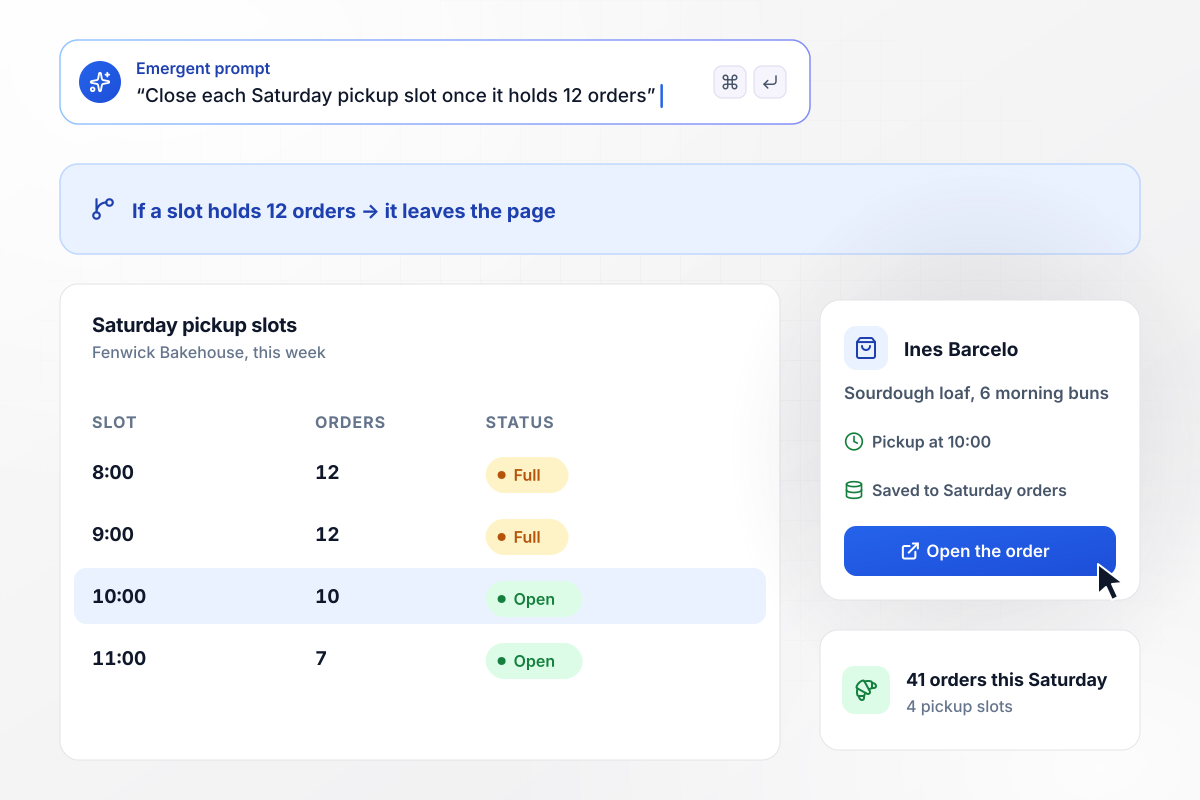
All 4 pickup slots close at 12 orders
Fenwick Bakehouse takes Saturday pre-orders in 4 pickup slots, one each hour. A slot leaves the page once it holds 12 orders. This week 41 orders came in: the 8:00 and 9:00 slots filled, 10:00 took 10, and 11:00 took 7. Ines Barcelo ordered a sourdough loaf and 6 morning buns for 10:00.
window.awbMockup = { bakeryPreOrders: "Build a pre-order page for my bakery, Fenwick Bakehouse. Offer Saturday pickup in 4 slots, one each hour starting at 8:00, and close each slot once it holds 12 orders. Let customers pick loaves and morning buns, choose a slot, and save every order with their name and pickup time.", salonBooking: "Build a booking page for my salon, Larkspur Salon. Ask visitors to pick a stylist first, then show only that stylist's open times for the week. Let them choose a service such as a 90-minute color, save each booking, and email the stylist when one comes in.", bikeShopPickup: "Build a repair page for my bike shop, Ruefield Cycles. Ask for the visitor's address and the repair they need. Offer free van pickup when the address is in one of my 6 pickup neighborhoods, and a drop-off time for everyone else. Save each request with its neighborhood and the pickup or drop-off day.", multiLocationCafe: "Build a page for each of my 3 coffee shops, Thistledown Coffee. Give every page its own address, hours, and map link, and keep the menu the same on all three. When I send new holiday hours, change them on every location page at once." };
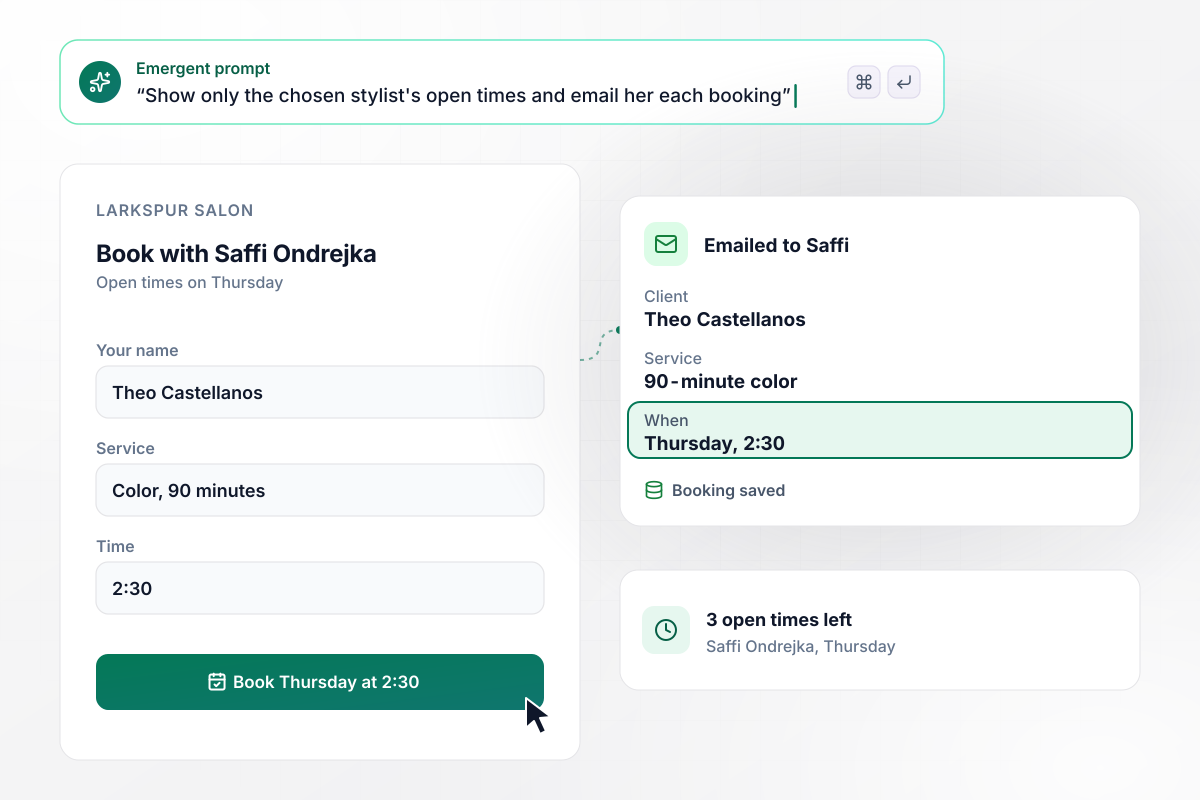
For each stylist, only their open times show
A visitor to Larkspur Salon picks a stylist first, and the page shows that stylist's open times and nobody else's. Theo Castellanos chose Saffi Ondrejka and booked a 90-minute color at 2:30 on Thursday. The app saved the booking and emailed it to Saffi, who has 3 open times left that day.
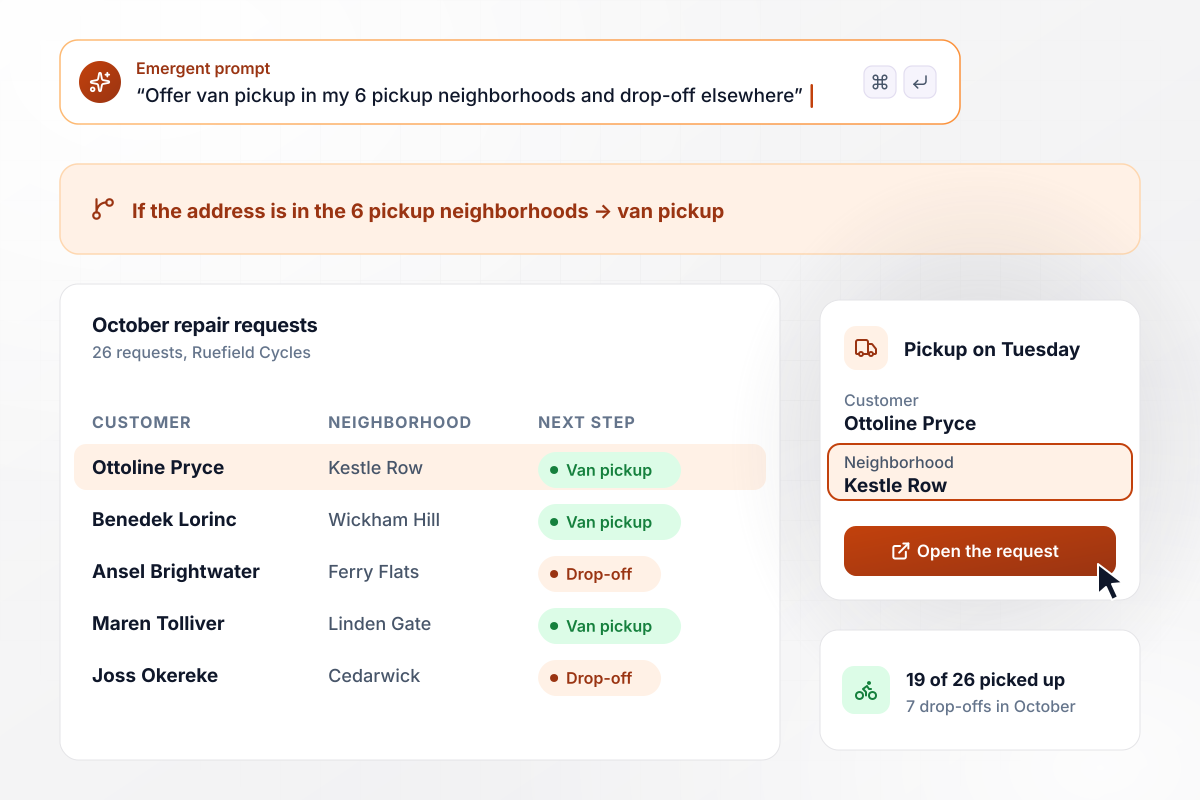
Repairs from 6 neighborhoods ride in the van
Ruefield Cycles sends its van for repairs in 6 neighborhoods near the shop. A visitor enters an address, and the page offers free van pickup inside those 6 and a drop-off time everywhere else. Of 26 repair requests in October, 19 got van pickup and 7 got drop-off. Ottoline Pryce in Kestle Row was picked up on a Tuesday.
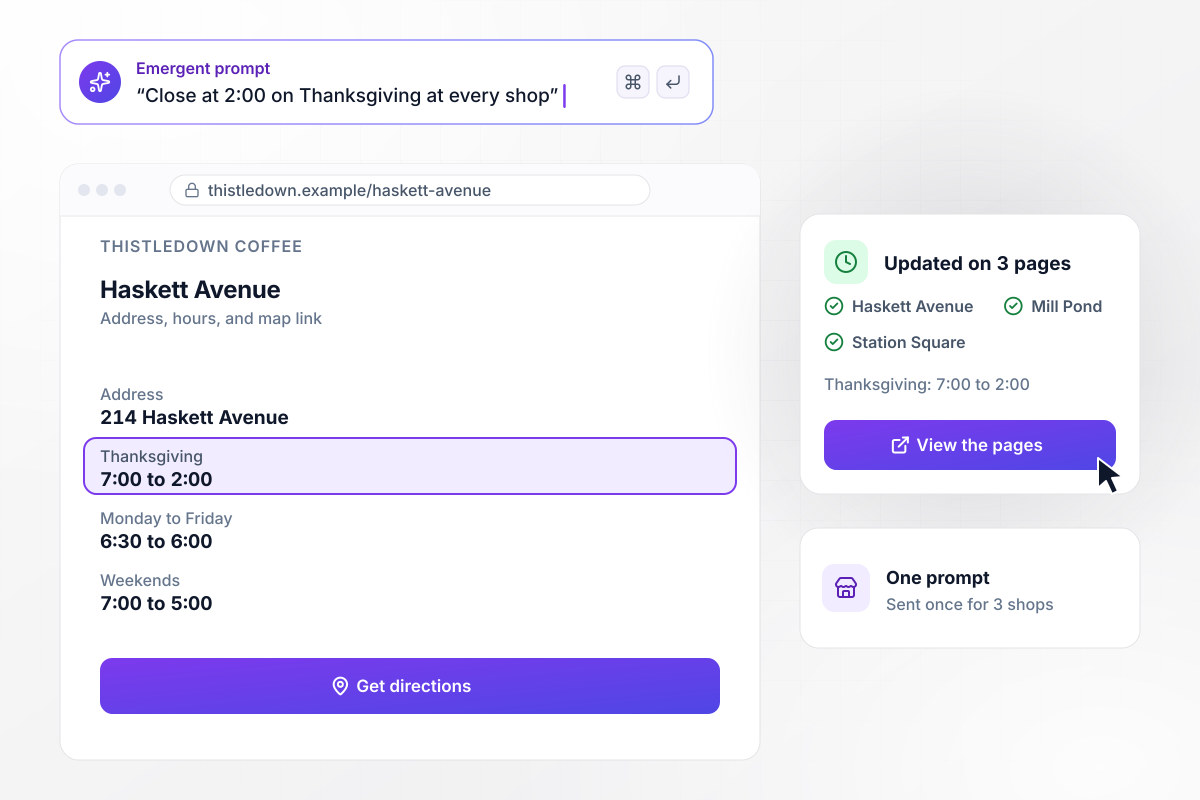
One prompt set holiday hours on 3 location pages
Thistledown Coffee runs three shops, and each has a page of its own with the address and opening times beside a map link. One prompt, "Close at 2:00 on Thanksgiving at every shop," changed the hours on all 3 pages. The Haskett Avenue page now lists Thanksgiving as 7:00 to 2:00.






How to Create a Local Business Landing Page
Seven steps to a local business landing page that answers a nearby visitor's first questions and saves every order or booking.
Write down the one thing a nearby visitor should do: order for pickup, book a chair, or request a repair. Build the page around that action. Links to the menu, the story of the shop, and gift cards can sit lower down.
Put the address and hours where a phone shows them without scrolling. Match the hours on your Google business profile. Google's help page for profiles lists your business hours, including special store hours, among the details to keep up to date. A visitor should never find two answers.
Write each limit down as a number before you prompt: orders per pickup slot, bookings per stylist per day, how far the van goes. A number becomes a rule the page can hold. A phrase like busy Saturdays gives the page nothing to enforce.
Describe the business to Emergent in plain words, with what you sell and the limits from step 3. Emergent builds the page and a table for every entry its form takes. Read the draft as a customer would, then prompt changes.
If you run more than one shop, give each one its own page with its address and directions. Keep one shared menu or price list that every location page reads from. A visitor near one shop should not scroll past the other two.
Ask three regular customers for one sentence each about what they bought, and add their first names. Use photos of your actual counter or workbench in place of stock images. Show a visitor choosing between two shops on one street what yours looks like inside.
Place a test order or booking on your phone, then check the new row in your database and the alert that reached the counter. Change the hours once by prompt and confirm every page shows the new times before you share the link.
Why Build a Local Business Page on Emergent?
One prompt builds the page and the database behind it. Each pre-order and booking is a row you own, ready to sort by day.

|
Unbounce | Landingi | Wix | |
|---|---|---|---|---|
| How you build | Prompt for a campaign page | Templates and drag-and-drop, AI copy assist | Templates and drag-and-drop, AI assist | Prompt for a full site |
| Where submissions go | A database table you own, plus integrations | Unbounce lead storage and integrations | Vendor lead storage and integrations | Wix dashboard submissions and Contacts |
| Visitor limits | No per-visitor pricing | Monthly visitor caps by plan | Tiered by traffic on most plans | Site plan bandwidth |
| A/B testing | Generate variants by prompt | A/B testing on higher-tier plans only | Higher plans | Limited or add-on |
| Code ownership | Full code export to GitHub on paid plans | Hosted only | Hosted only | Hosted only |



Pick the Pricing Plan That Works for You
Choose the plan that fits your building ambitions. From weekend projects to enterprise applications, we've got you covered.




Find the right landing page for you















Frequently Asked Questions
Your Questions, Answered
Don't change this element unless you know what you are doing
More things you can build
with Emergent









on Emergent today


