

Build a Fitness Quiz That Turns Answers Into a Starting Routine
Build a fitness quiz that matches each person to a workout style and saves every answer to a database you own.
Build a fitness quiz for my gym's join page that names each new member's workout style and saves it to their member record.
Trusted by Builders Worldwide
Active Builders Worldwide
Apps Successfully Created
Countries Globally Reached



Inside a Fitness Quiz Built on Emergent
One prompt gives you the quiz and the table of answers behind it. Describe a change, and Emergent makes it.
Every option mapped to a result
Name the workout styles you want as results, such as Strength or Mobility. Emergent writes questions about daily habits and maps each option to one style. Reword any by prompt.
Right answers scored, misses explained
For a knowledge quiz, the app marks one correct option per question, adds up each score, and shows a short explanation under every miss. Scores can be split by class period or group.
Class suggestions from your calendar
Connect your class calendar or booking tool through its API. The result screen then lists the upcoming classes tagged with that style, and a new member leaves with a class to try.
An alert for the coach of that style
When someone finishes, the coach who leads their style gets an email or Slack alert with the result and every answer. Pick a different coach for each style in your prompt.
One question per screen, no response cap
People answer one question per screen with a progress bar, which suits a phone at the front desk. Emergent puts no cap on responses, and a January signup rush records every result.
Your own domain and full code export
Host the quiz on your gym's own domain, included with Emergent and paid in credits. Export the full code to your GitHub repository on paid plans and keep building it there.
A Gym, a Class, an App, and a Rec Center
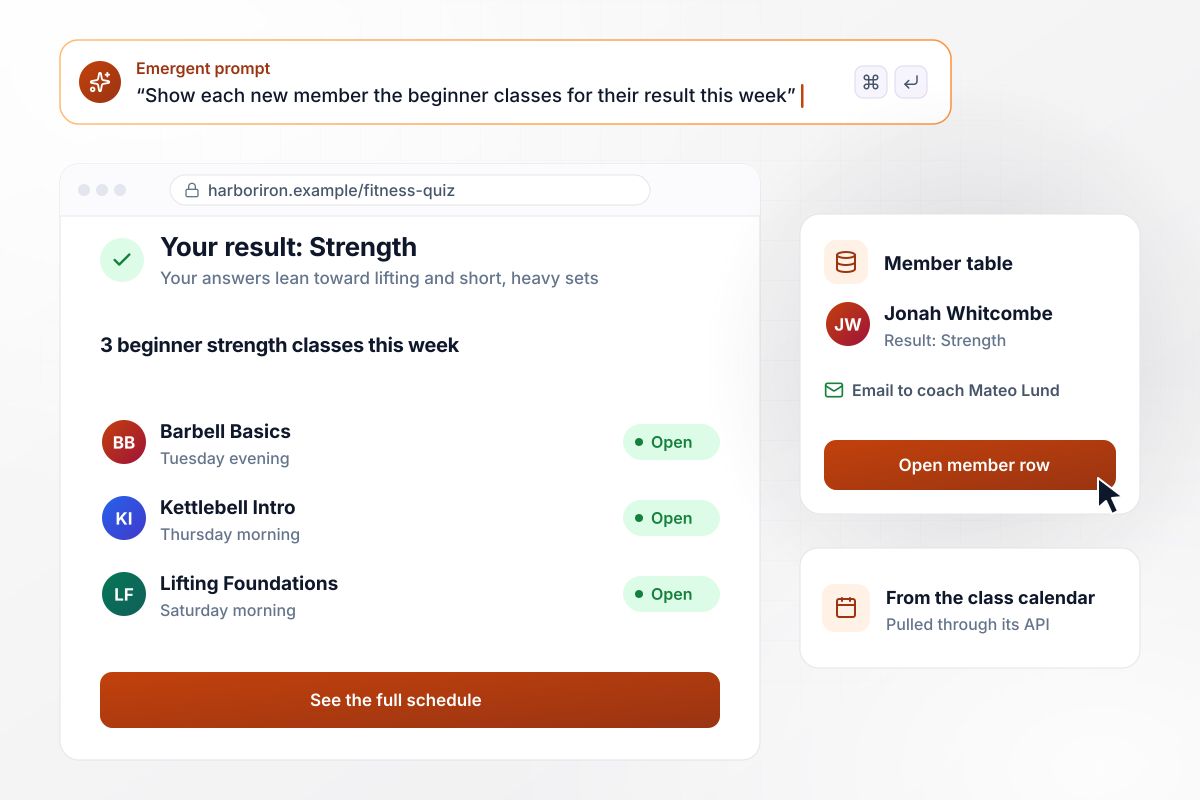
Jonah gets 3 classes to try from a Strength result
Harbor Iron Gym puts the fitness quiz on its join page. Jonah Whitcombe finishes with Strength, and the result screen lists the 3 beginner strength classes on this week's calendar, pulled through the calendar's API. His result goes to the member table, and coach Mateo Lund gets an email with every answer.
window.awbMockup = { gymJoinPage: "Build a fitness quiz for my gym's join page that sorts new members into Strength, Cardio, Mobility, or Sport. On the result screen, list the beginner classes for that style from this week's class calendar. Save each result with the member's email to my member table, and email the coach who leads that style every answer when someone finishes.", peClass: "Build a 10-question fitness knowledge quiz for my 8th grade PE classes on heart rate and muscle groups. Score each student on submit and show the explanation for every miss. Give me a table with each class period, its number of students, and how many missed each question, so I can see what to reteach.", workoutApp: "Build a 6-question fitness quiz that new users of my workout app answer on their phone at signup. Sort them into Strength, Cardio, Mobility, or Sport, and save the result to their profile. Start their first week with 3 sessions of 20 minutes for that style, and ask one check-in question after session 3.", recCenter: "Build a fitness quiz for my rec center that runs on a lobby tablet and on my website. Sort answers into Strength, Cardio, Mobility, or Sport and save every finished quiz. Show me a dashboard with the total for the season and the count for each result, so I can plan the spring class schedule." };
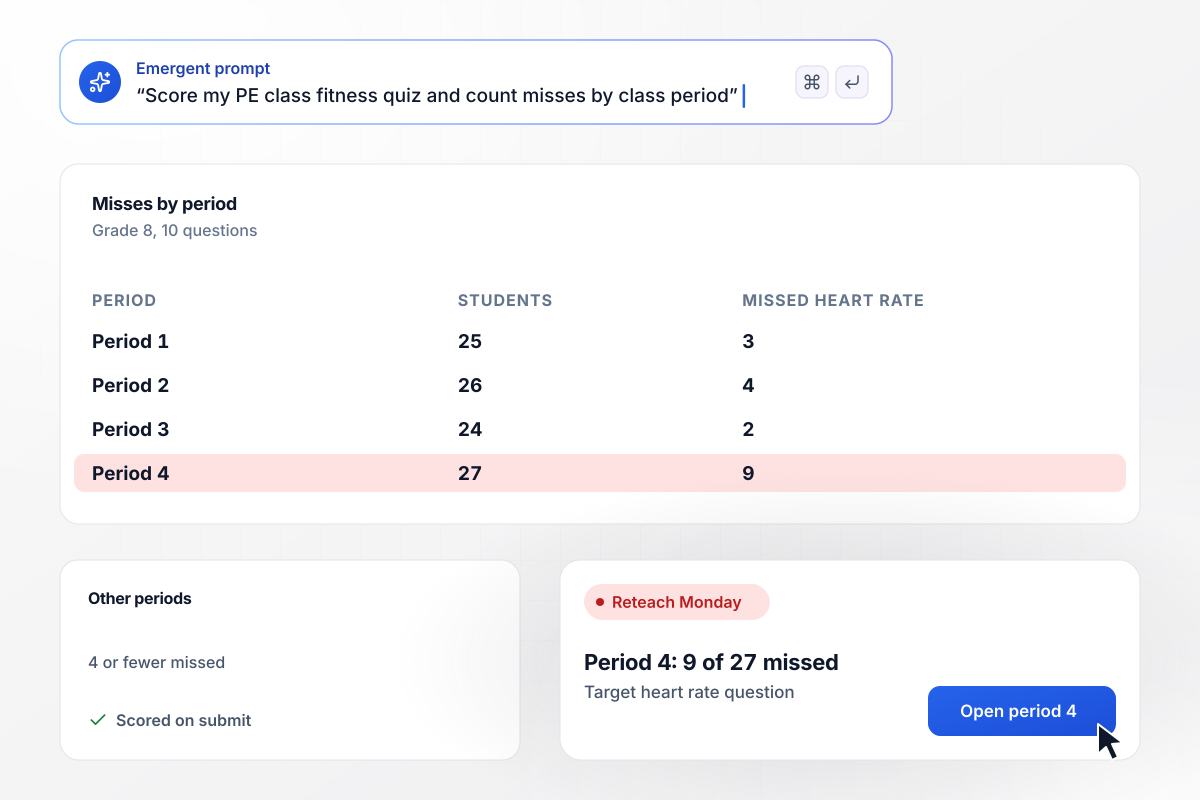
Period 4 gets heart rate retaught by Monday
Coach Ingrid Salo gives her 8th graders a 10-question fitness knowledge quiz on heart rate and muscle groups. The app scores each student and counts misses by period. In period 4, 9 of 27 students missed the target heart rate question, against 4 or fewer in every other period, and she reteaches it Monday.
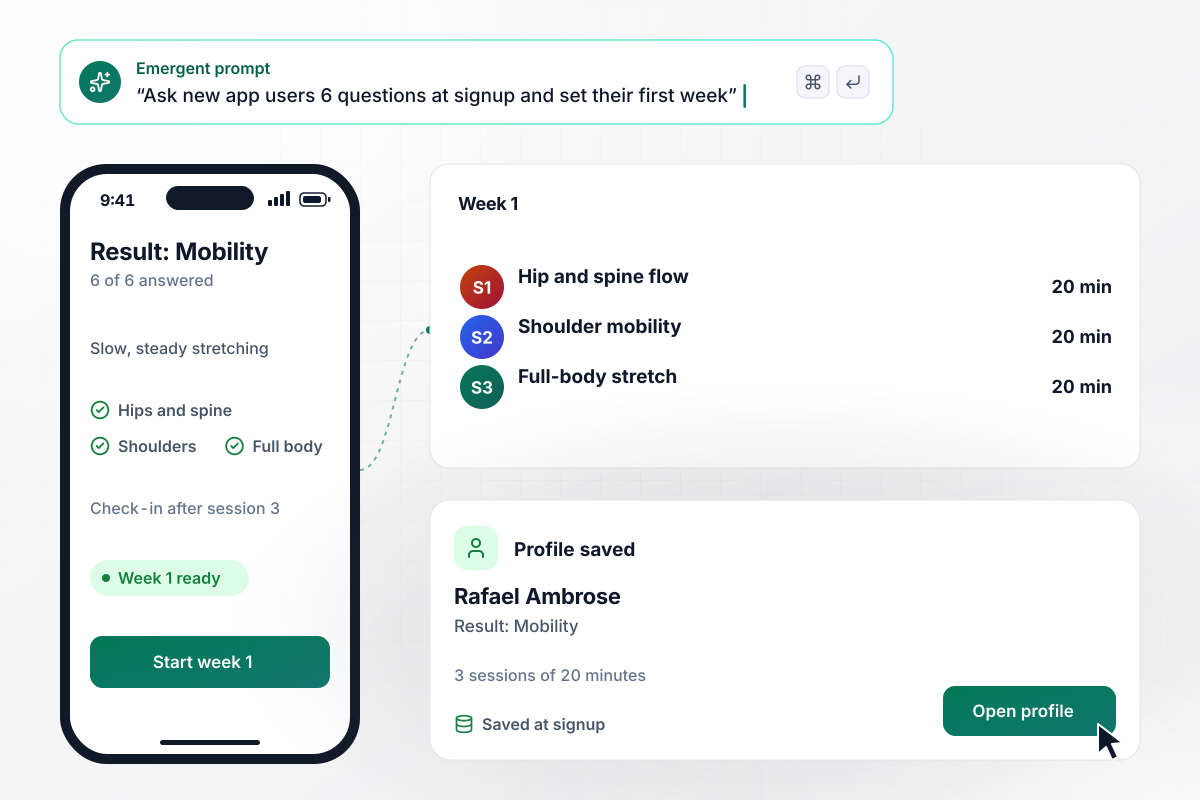
Rafael opens the app to a week of mobility work
Fennwick asks new users 6 questions at signup, before it shows a single workout. Rafael Ambrose answers on his phone and lands on Mobility. The app saves the result to his profile and opens his first week with 3 mobility sessions of 20 minutes each, then asks one check-in question after session 3.
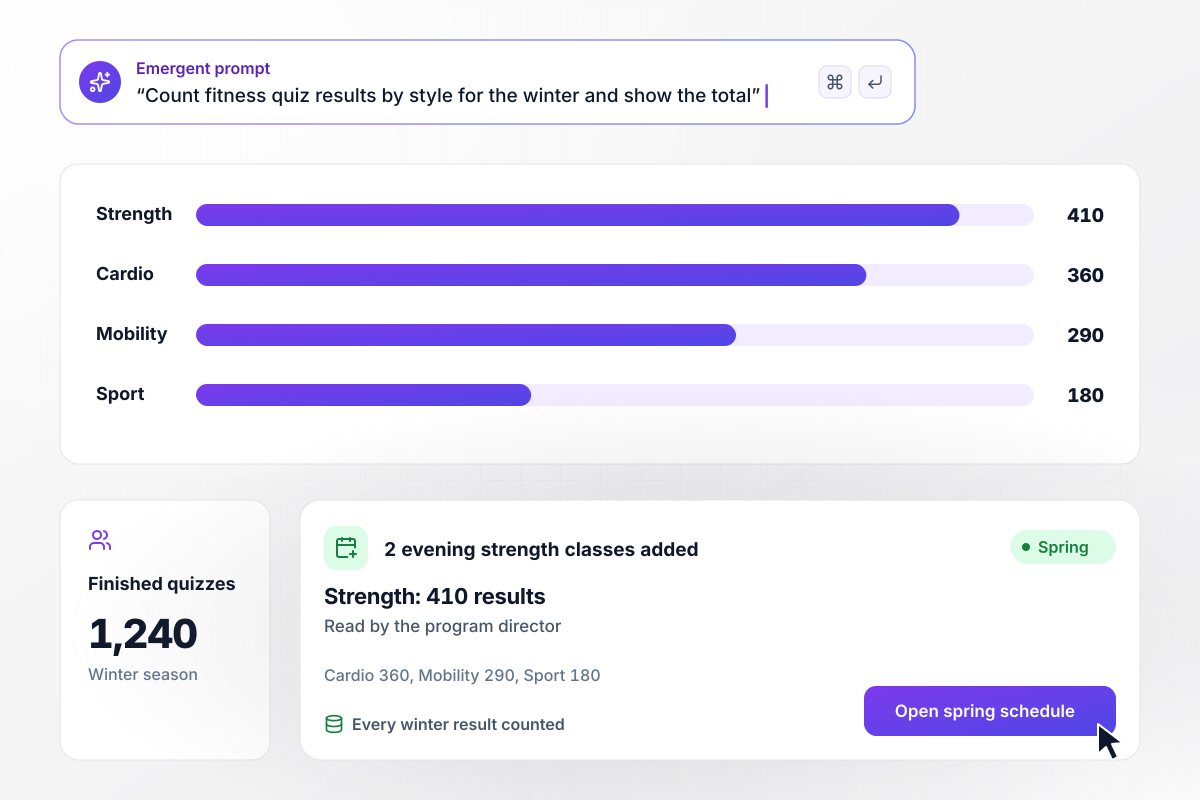
2 strength classes added for spring after 1,240 results
All winter, the quiz ran on a lobby tablet and the website at Alder Point Rec Center, and 1,240 people finished it. Strength led with 410 results, then Cardio with 360, Mobility with 290, and Sport with 180. The program director added 2 evening strength classes to the spring schedule.






How to Create a Fitness Quiz
Seven steps to create a fitness quiz that sorts people by workout style or scores what they know, with every result tested.
Settle this first, because it changes every question. A knowledge quiz for a class marks answers right or wrong and adds up a score. A gym or app quiz matches habits to a workout style, and each option points to a result instead.
Give each result a name, two sentences on what the style looks like, and a few classes or sessions to start with. Four styles, such as Strength, Cardio, Mobility, and Sport, leave room for every option to land somewhere.
Ask what people do and enjoy: how they spend a free Saturday, or which class they would pick first. Skip questions that ask people to rate how fit they are, and save injuries and health history for a conversation with a coach.
For a knowledge quiz, take each answer from a published guideline, such as the CDC's physical activity guidelines for adults. Show a one-line explanation with the source under each question, and students learn the fact from the miss as well as the score.
Put one question on each screen with a progress bar, and keep a matching quiz near 8 questions. Before you share it, take it on a phone and time yourself. If it runs past 3 minutes, cut the weakest question.
Decide what a person can do the moment the result appears: book a first class, start a week of sessions, or hear from the coach who leads that style. Put that step in your prompt, and Emergent builds it along with the quiz.
Run through the quiz four times, once aiming at each style, and confirm the right result appears every time. For a scored quiz, miss every question on purpose once and read each explanation. Then open the saved rows.
Why Build Your Fitness Quiz With Emergent?
Results land in a table you own. A coach reads them the day they arrive, and the same rows answer next season's scheduling questions.

|
ProProfs | Interact (quiz specialist) | Typeform | |
|---|---|---|---|---|
| How you build | Prompt for the survey, quiz, or poll and the app around it | Templates, question library, and AI quiz builder | Templates and AI quiz maker | Templates and editor, AI assist |
| Pricing model | Credits, no response caps or per-response fees | Free plan, then billed per active quiz taker | Free plan capped by monthly responses, then paid plans | Plans by monthly response limit; discount for annual billing |
| Where responses live | A database table you own, plus any integration | ProProfs account; reports export to Excel, CSV, or PDF | Interact account | Typeform account |
| Code ownership | Full code export to GitHub on paid plans | None | None | None |




Pick the Pricing Plan That Works for You
Choose the plan that fits your building ambitions. From weekend projects to enterprise applications, we've got you covered.




Find the right survey, quiz, or poll
for your team















Frequently Asked Questions
Your Questions, Answered
Don't change this element unless you know what you are doing
More things you can build
with Emergent









on Emergent today


