

Build a Market Research Survey for the Market You Want to Reach
Get a market research survey with screener questions, segment quotas, and every response saved to a database you own.
Build a market research survey that collects every answer in a database I own.
Trusted by Builders Worldwide
Active Builders Worldwide
Apps Successfully Created
Countries Globally Reached



The Parts That Make the Answers Usable
The first three decide who answers and how. The last three are for your team, once responses start to arrive.
A screener that ends the survey early
Emergent builds the screener and its logic from your prompt. Anyone who has never hired a dog walker gets a short thank-you screen after question 1 and counts as screened out.
Quotas that close a full segment
Set a number for each segment, such as 150 renters and 150 homeowners. Once a group reaches its number, the app stops taking its answers and the other group stays open.
Phone-first, one question at a time
A link opened on a phone shows one question per screen, with a bar that counts what is left. The layout suits a QR code on a booth sign or a link sent by text message.
Every result split by segment
Ask for the segment as a pick list, and the dashboard shows each question by segment beside the total. A feature that looks lukewarm overall can be one group's first choice.
Responses in a database you own
Each response is a row in a database that belongs to you, segment and date included. The app can send qualified respondents to HubSpot, or any tool with an API, for interviews.
Code you can take to GitHub
On paid plans, Emergent exports the full survey app to your GitHub repository, with the screener logic and the dashboard. Anyone on the team can read it or reuse it later.
Four Teams With a Product Call to Make
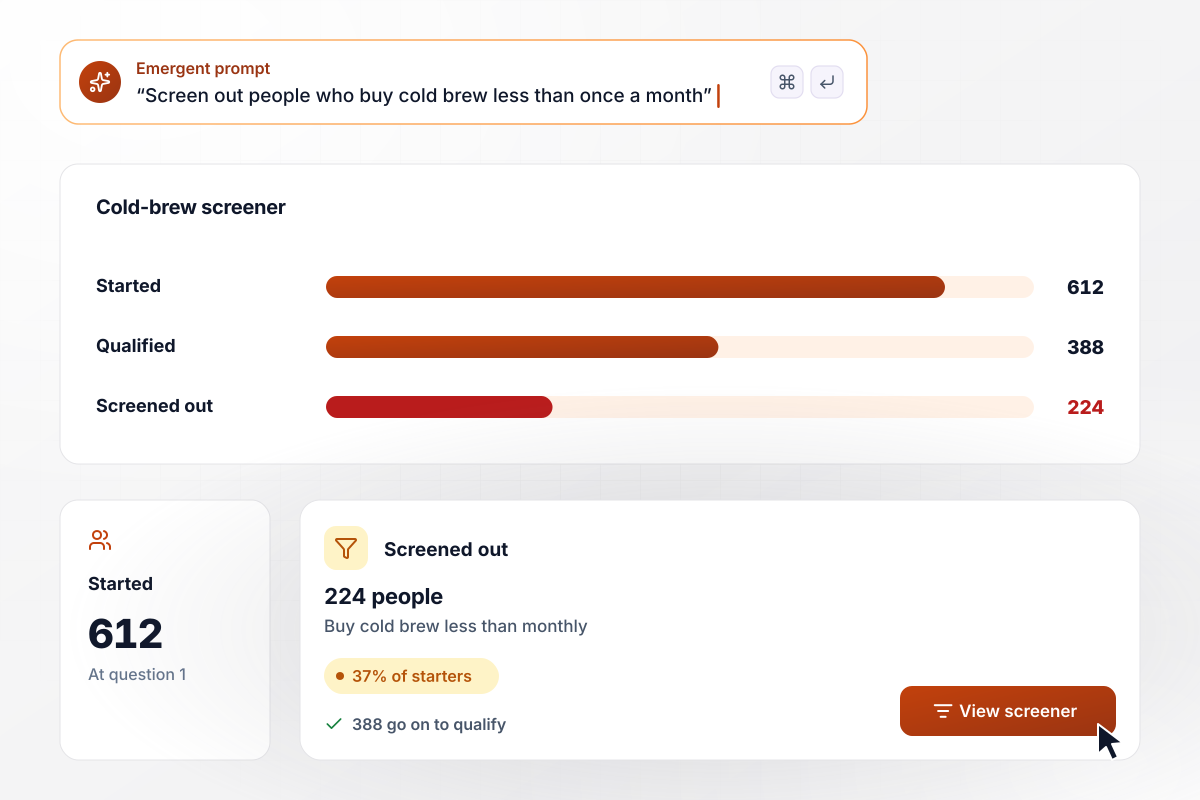
For 224 of 612 people, the survey ends at the screener
Tallgrass Coffee wants to know whether cold-brew drinkers would sign up for a monthly subscription. Question 1 asks how often each person buys cold brew. Of the 612 people who start, 224 buy it less than once a month and see a thank-you screen. The other 388 go on to the subscription questions.
window.awbMockup = { startups: "Build a market research survey for my coffee startup. We are testing a monthly cold-brew subscription. Question 1 asks how often people buy cold brew, and anyone who buys it less than once a month gets a thank-you screen and leaves. Everyone else answers 8 questions about the subscription. Show how many people started, qualified, and were screened out.", retailers: "I run a pet supply store chain with a loyalty program. Survey our members about same-day delivery for pet food. Ask whether they own a dog, a cat, or both, then whether they would order food for same-day delivery. Show the yes share for each pet group side by side on a dashboard.", b2bSoftware: "Build a survey for accountants about bookkeeping software. Ask firm size first: solo, 2-10 staff, or 11-50 staff. Set a quota of 100 answers for each size and close a group once it is full. Send me a Slack message when any group fills, and show progress toward each quota.", tradeShows: "We have a booth at a kitchenware trade show. Build a 6-question survey that opens from a QR code on a phone, one question per screen. One question asks which skillet feature matters most: dishwasher-safe, lifetime warranty, or a handle that stays cool. Show a running count of answers for each feature." };
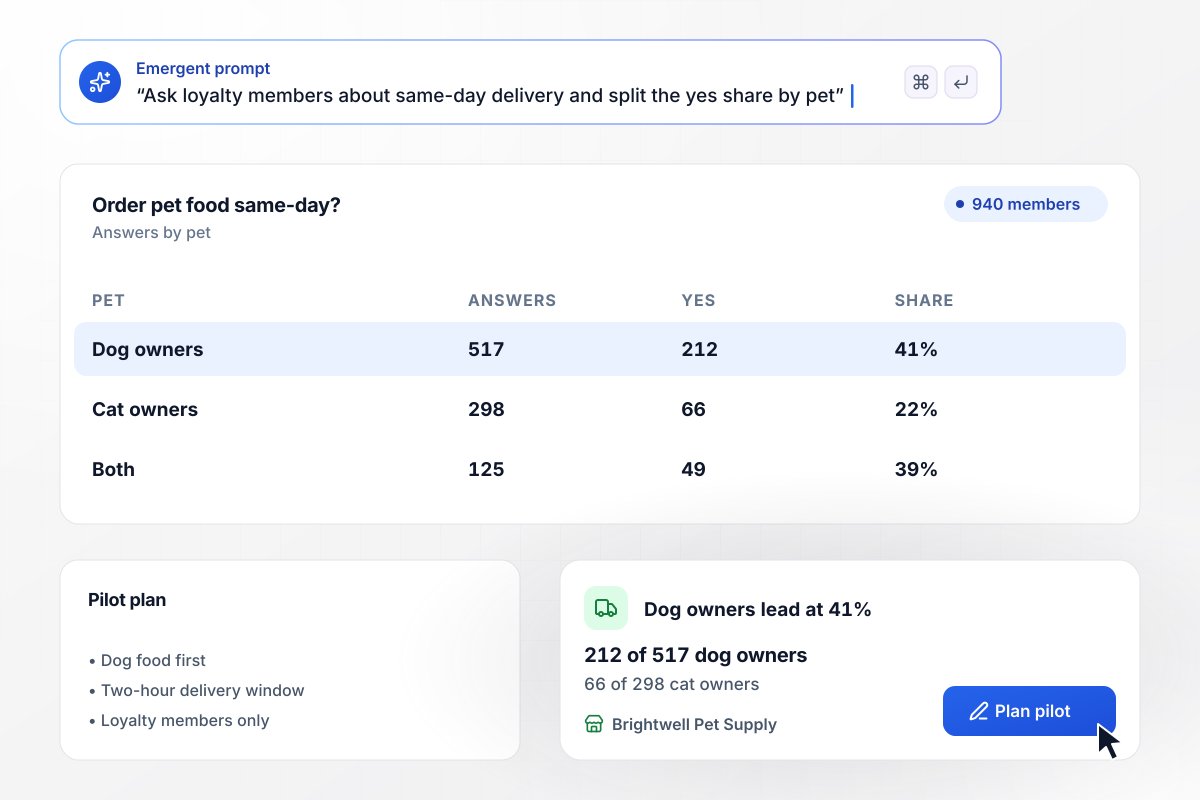
Same-day delivery gets a yes from 212 dog owners
Brightwell Pet Supply asks 940 loyalty members whether they would order pet food for same-day delivery, and the dashboard splits the answers by pet. Dog owners say yes 212 of 517 times, against 66 of 298 cat owners. The same-day pilot starts with dog food.
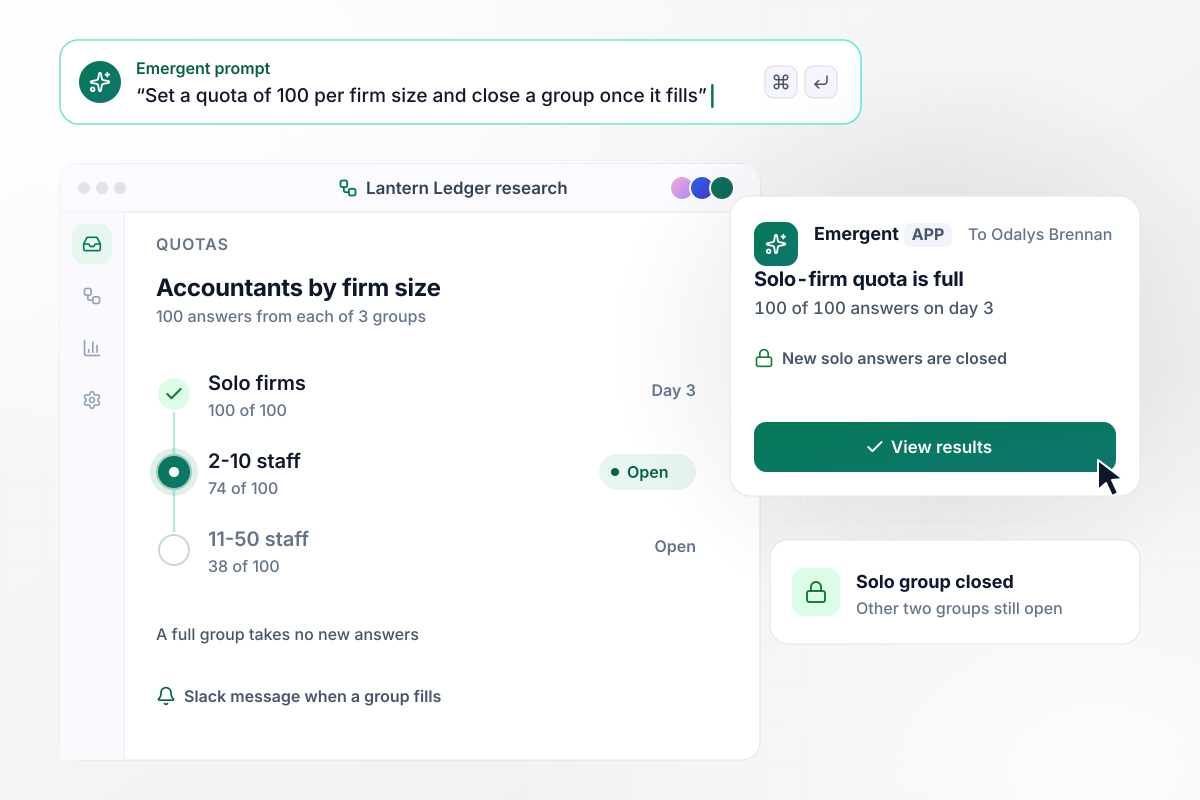
By day 3, the solo-firm quota of 100 is full
Lantern Ledger, a bookkeeping app, needs 100 accountants from each of 3 firm sizes before it picks which plan to build first. Solo firms fill their 100 on day 3. The app closes that group to new answers and sends product manager Odalys Brennan a Slack message, while the other two groups keep collecting.
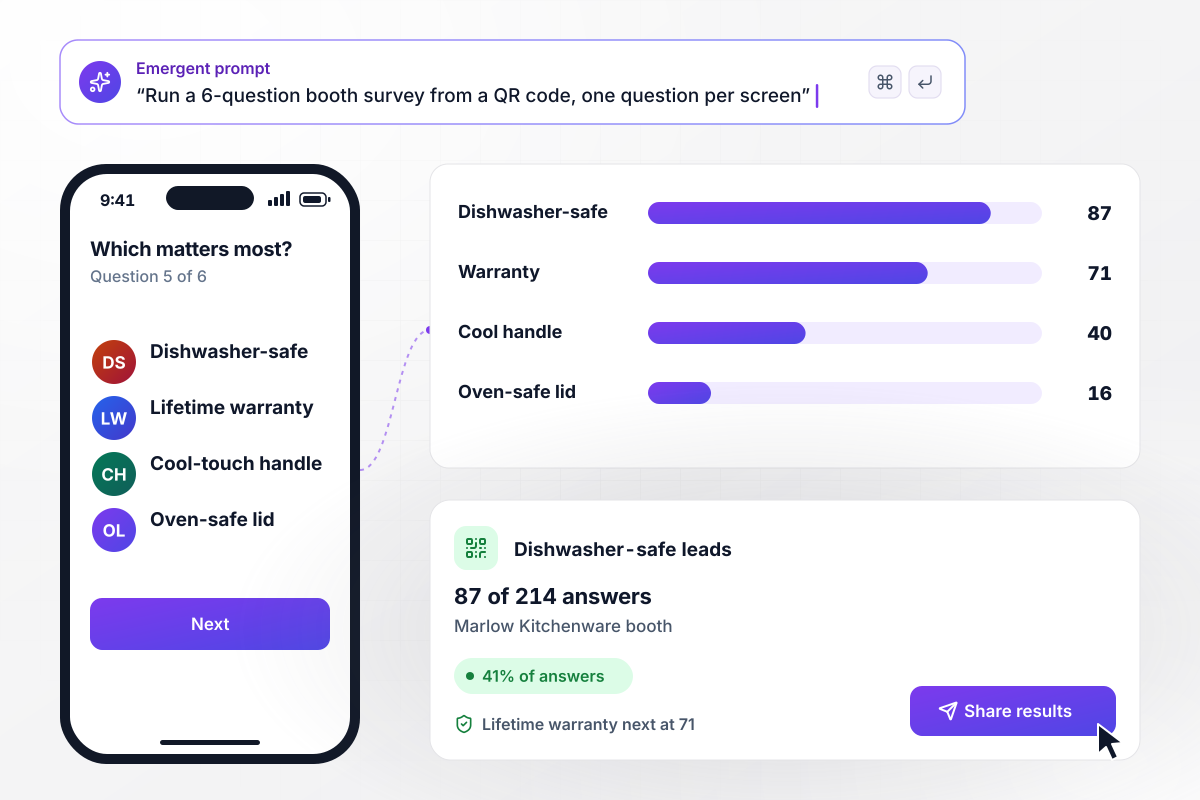
On question 5, dishwasher-safe leads with 87
At its trade show booth, Marlow Kitchenware hangs a QR code that opens a short survey on visitors' phones, one question per screen. On question 5 of 6, the skillet feature that matters most, dishwasher-safe leads with 87 of 214 answers. A lifetime warranty follows at 71.






How to Create a Market Research Survey
Follow these steps to build a market research survey, reach only people in your market, and read the answers by segment.
Write down the product call the survey will settle, such as whether to launch the subscription or which plan to build first. Every question should move that call. Anything that is only nice to know waits for a later study.
Type the survey in plain English: who should answer, who should be screened out, and what the results page shows. Emergent builds the survey, its database, and the dashboard from that prompt. Ask for any change in a sentence.
Put one or two screener questions first, and ask what people did in the past month instead of what they intend. Decide which answers end the survey before you write the rest. Word the screener so nobody can guess the answer that qualifies.
Pick the segments you will compare, such as firm size or pet type, and set a number of answers for each. Make the segment question a fixed list of choices, so the quota count and the dashboard split read from one field.
Send the link to 10 people in your market who did not help write it, at least half of them on a phone. Time how long each one takes, and rewrite any question that two people read differently.
Publish the survey on its own link or on a custom domain (built into Emergent, uses credits). Then send it where your market already is: a customer email list, a QR code at a booth, or a link in a community newsletter.
Close the survey once every quota is full. Read each question by segment before you look at the totals, and write down the decision next to the numbers that drove it.
Why Run Market Research Surveys on Emergent?
A study can keep collecting until every segment fills its quota, with no response cap, and each answer is saved in a database you own.

|
SurveyMonkey | Microsoft Forms | SurveyHero | |
|---|---|---|---|---|
| What you get | Survey, logic, and response database, as code you own | Survey builder with templates, including employee engagement | Surveys, quizzes, and polls with response summaries | Survey builder with templates, including employee satisfaction |
| Pricing model | Credits, no response caps or per-response fees | Per-user team plans with a seat minimum, billed annually | Free with a Microsoft account; included in Microsoft work and school subscriptions | Free plan, then per-account plans with unlimited responses |
| Where responses live | A database table you own, plus any integration | SurveyMonkey account | Microsoft Forms, with export to Excel | SurveyHero account, EU data centers |
| Code ownership | Full code export to GitHub on paid plans | None | None | None |


Pick the Pricing Plan That Works for You
Choose the plan that fits your building ambitions. From weekend projects to enterprise applications, we've got you covered.




Find the right survey, quiz, or poll
for your team
Frequently Asked Questions
Your Questions, Answered
Don't change this element unless you know what you are doing
More things you can build
with Emergent









on Emergent today


