

Build a Needs Assessment Survey That Shows Where to Act First
Create a needs assessment survey that shows which needs go unmet for which group, with every answer in a database you own.
Build a needs assessment survey that collects every answer in a database I own.
Trusted by Builders Worldwide
Active Builders Worldwide
Apps Successfully Created
Countries Globally Reached



How the Survey Turns Ratings Into Priorities
Emergent builds all six from a plain-English prompt, and you change any of them the same way.
Questions drafted from your decision
Describe the people you serve and the decision the results will settle. Emergent drafts the list of needs and the wording of each item, and a follow-up prompt rewrites any of them.
Two ratings per need, one gap score
Each need gets two ratings on a scale of 1 to 5: how important it is and how well it is met today. The survey subtracts the second from the first and ranks every need by the gap.
Answers split by group
Every answer lands in a database you own, next to the details you chose to ask for, such as neighborhood, team, or age. Filter the ranking by any of them to see whose needs differ.
Alerts when a gap crosses your line
Set a line, such as a gap of 2.0, and name who acts on it. When a need crosses that line, or a respondent asks to be contacted, that person gets a Slack or email alert.
No cap on answers
Emergent puts no cap on survey responses, so a county with 40,000 households can ask every one of them. Reminders go only to the people on your list who have not answered yet.
Your own domain and a full code export
Publish the survey on your own domain, included with Emergent and paid in credits. On paid plans, export the full code to your GitHub repository and run next year's round from it.
Four Surveys and the Top Need Each Found
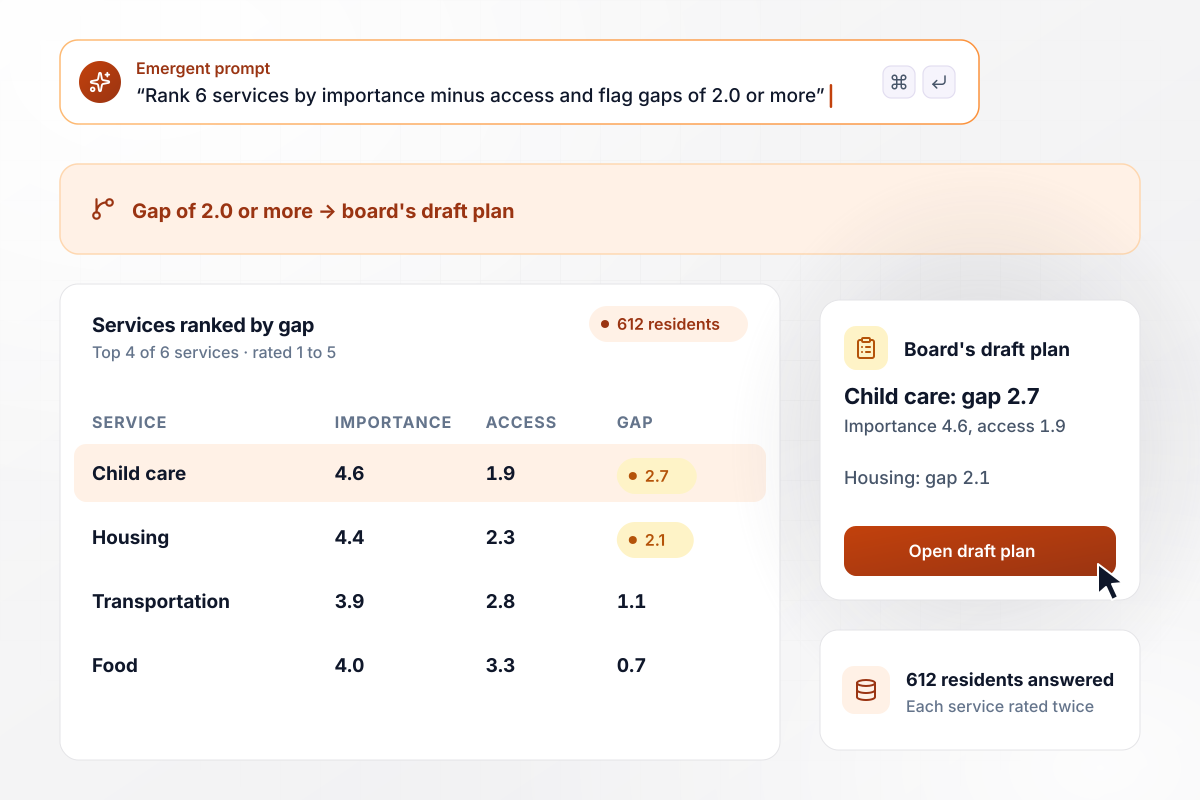
Child care leads with a 2.7-point gap
Harlow County Community Action asks residents to rate 6 services on a 1 to 5 scale, for importance and for how easy each is to get today. Of 612 residents, child care scored 4.6 for importance and 1.9 for access, a gap of 2.7. Housing came next at 2.1. Any gap of 2.0 or more goes into the board's draft plan.
window.awbMockup = { communityAction: "Build a needs assessment survey for my community action agency. List 6 services, including child care, housing, transportation, and food, and ask residents to rate each one on a 1 to 5 scale for how important it is to their household and how easy it is to get today. Subtract access from importance, rank the services by that gap, and flag any gap of 2.0 or more for the board.", staffTraining: "Build a training needs survey for the staff at my dental group. Pull the staff list and teams from my HR system. Ask each person to rate 8 skills on how much their job uses it and how confident they feel, both on a 1 to 5 scale. Show the widest gap for each team, and send the results to my training lead.", localBusinesses: "Build a business needs survey for my city economic development office. Email it to 300 local businesses and ask each one to pick the barrier that holds it back most: hiring, permits, rent, or loans. Add a comment box and a checkbox asking for a call. Count the answers per barrier, and send every call request to my business liaison with the comment attached.", healthNeeds: "Build a health needs survey for my hospital that patients open from QR codes in clinic waiting rooms. Show a question at a time on a phone. Ask for their neighborhood first, then what makes it hardest to get care: getting to appointments, cost, wait times, or finding a doctor. Show each answer as a share of each neighborhood total." };
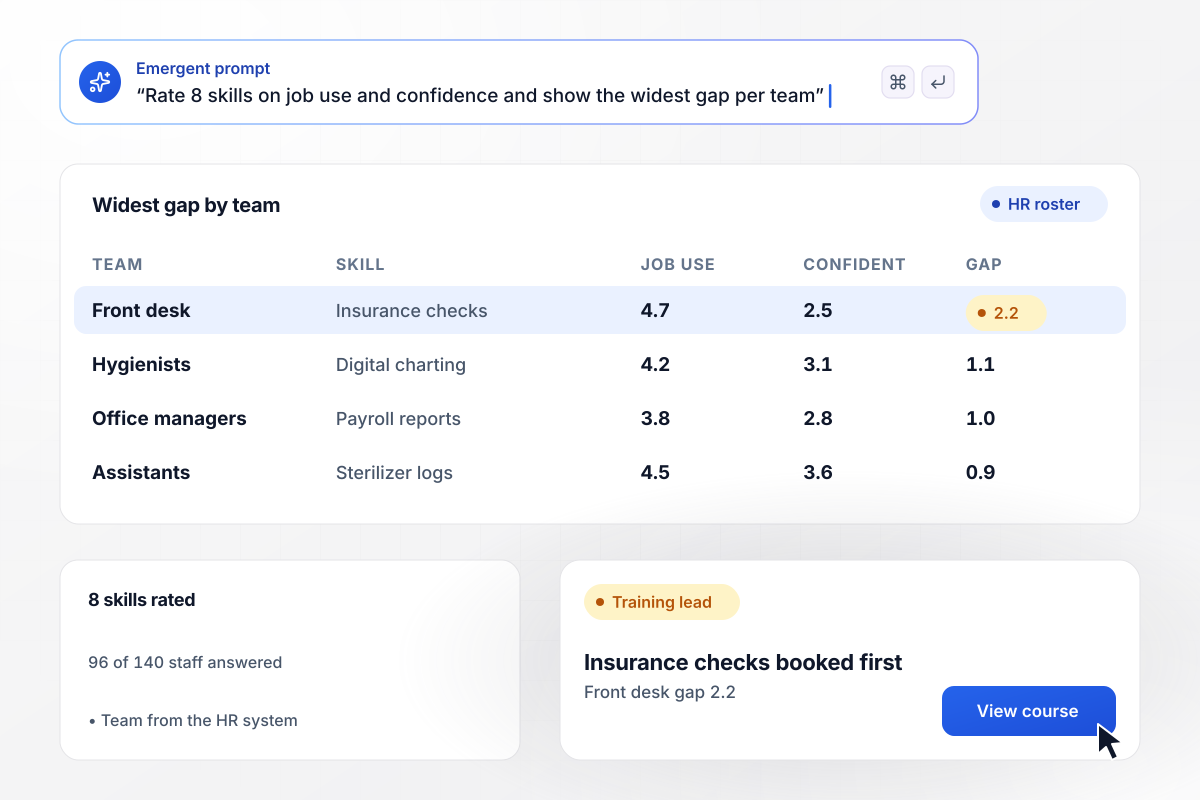
Front desk training that starts with insurance checks
Every employee at Brightwater Dental rates 8 skills on how much their job uses each and how confident they feel. Each answer carries a team, pulled from the HR system's API. By the close, 96 of 140 staff had answered. The front desk's widest gap is insurance checks, at 2.2, and the training lead books that course first.
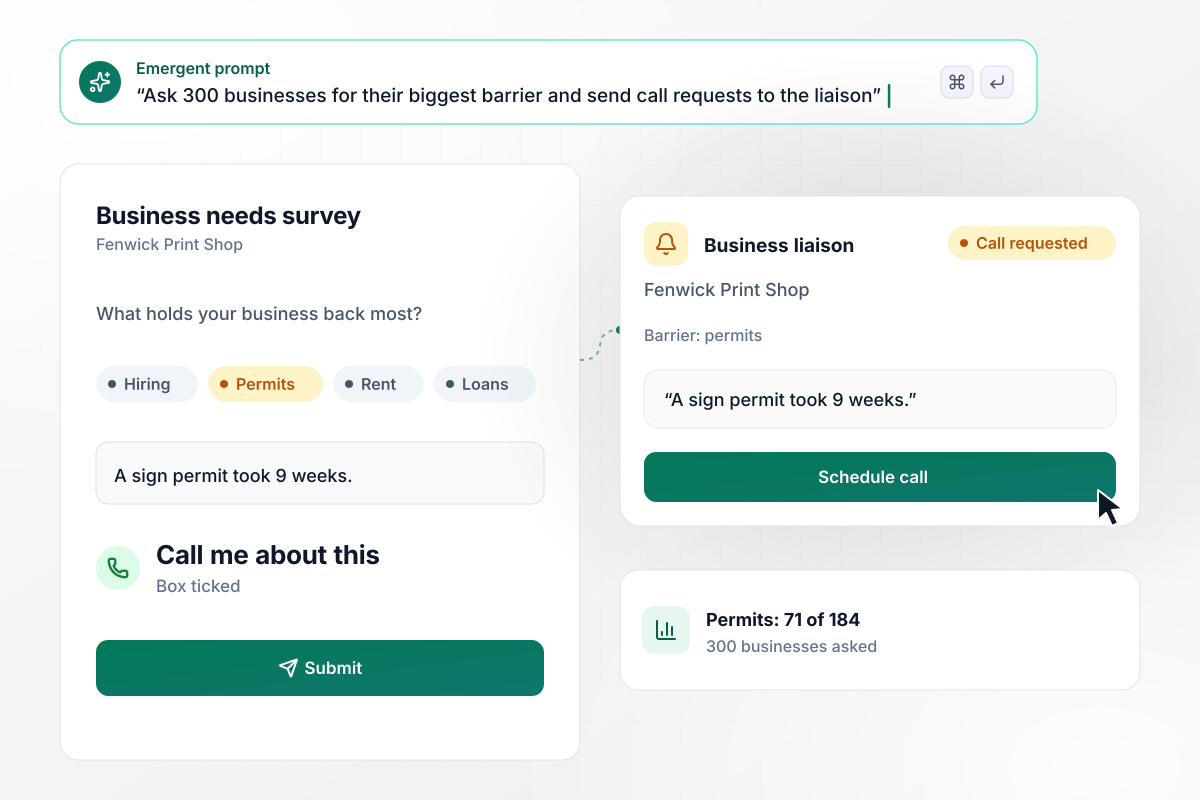
Permits slow down 71 of the businesses that answered
Millbrook's economic development office emails a short survey to 300 local businesses. Each picks the barrier that holds it back most and can ask for a call. Of the 184 that answered, 71 picked permits. Fenwick Print Shop wrote that a sign permit took 9 weeks. Its answer went straight to the business liaison.
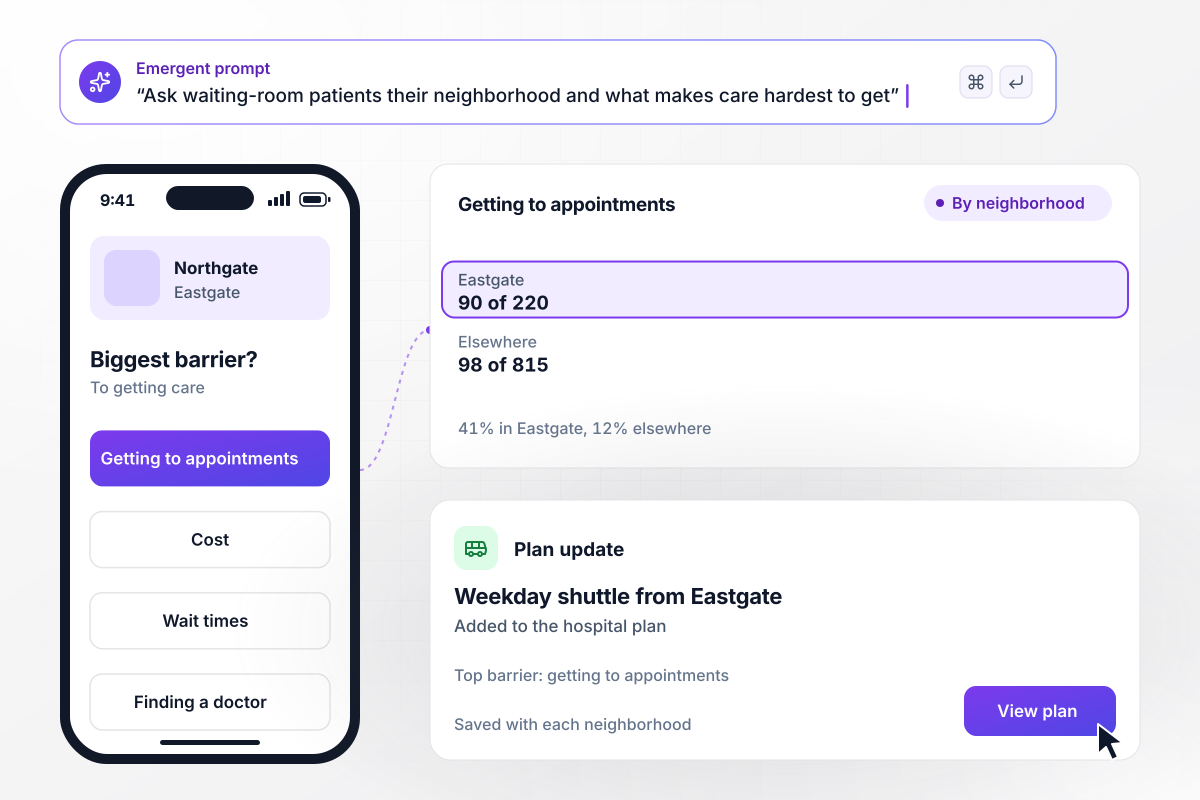
Getting to appointments comes first in Eastgate
Northgate Regional Hospital posts QR codes in clinic waiting rooms, and patients answer on their phones after picking a neighborhood. In Eastgate, 90 of 220 answers named getting to appointments as the biggest barrier, against 98 of 815 elsewhere. The hospital's plan adds a weekday shuttle from Eastgate.






How to Run a Needs Assessment Survey
Seven steps to plan a needs assessment survey whose gap scores tell you what to fix first.
Name the choice the results feed, such as which 2 services get next year's grant money or which course runs first. Every item on the survey should inform that choice. Put the decision at the top of your prompt, and Emergent drafts the needs around it.
Pull what intake records, census tables, or last year's round already tell you, and drop the questions they answer. Ask people only what no record holds, such as why they stopped using a service or what they would use if it existed.
Keep the list between 6 and 12 needs, each named the way your group would say it: help paying rent, not housing cost burden. Split any item that bundles two needs, since a double-barreled item asks people to judge more than one thing at once.
Ask how important each need is, then how well current services cover it, using one scale for both. The difference is the gap. A need rated 5 and met at 4 matters less to your plan than one rated 4 and met at 1.
Add the 2 or 3 details you will split results by, such as neighborhood or household size, and make them optional where you can. A gap that looks small county-wide can be the top need in one neighborhood.
Submit 5 test answers with ratings you chose and check that each gap comes out right and that alerts reach their owner. Then have a few people from the group take it: Pew Research Center calls pretesting an essential step for seeing how people respond.
Sort the needs by gap, then compare the top few across groups before you decide. Tell the people who answered which need you will act on first and when, using the same channel that reached them for the survey.
Why Run Your Needs Survey on Emergent?
Skip the spreadsheet step. The survey computes each need's gap for every group you ask about, and the data stays in your own database.

|
Microsoft Forms | SurveyMonkey | SurveyHero | |
|---|---|---|---|---|
| What you get | Survey, logic, and response database, as code you own | Surveys, quizzes, and polls with response summaries | Survey builder with templates, including employee engagement | Survey builder with templates, including employee satisfaction |
| Pricing model | Credits, no response caps or per-response fees | Free with a Microsoft account; included in Microsoft work and school subscriptions | Per-user team plans with a seat minimum, billed annually | Free plan, then per-account plans with unlimited responses |
| Where responses live | A database table you own, plus any integration | Microsoft Forms, with export to Excel | SurveyMonkey account | SurveyHero account, EU data centers |
| Code ownership | Full code export to GitHub on paid plans | None | None | None |


Pick the Pricing Plan That Works for You
Choose the plan that fits your building ambitions. From weekend projects to enterprise applications, we've got you covered.




Find the right survey, quiz, or poll
for your team
Frequently Asked Questions
Your Questions, Answered
Don't change this element unless you know what you are doing
More things you can build
with Emergent









on Emergent today


