

Build an Exit Survey That Shows Why People Leave
Create an exit survey that reaches every leaver before the last day and shows HR which teams lose the people they meant to keep.
Build an exit survey that sends when HR logs a resignation and counts every reason for leaving.
Trusted by Builders Worldwide
Active Builders Worldwide
Apps Successfully Created
Countries Globally Reached



What an Exit Survey Has to Get Right
An exit survey asks people on their way out what made them go and what might have kept them, in a form HR can count.
Reasons from a fixed list
Opens with the primary reason for leaving, picked from a list you control, then a comment box. Fixed codes let HR count reasons across 200 exits, not reread 200 essays.
Timed around the last day
Sends on a day you pick before the last day, while the details are still fresh, and closes on a date you set after departure. One reminder goes out if no answer has arrived.
Confidential, with a team minimum
Shows HR every answer with the name attached. Managers see a team's results once it has five or more responses, and the comments they read arrive with names removed.
Regretted exits counted apart
Pulls the regretted tag HR sets at offboarding. The dashboard then shows why the people you wanted to keep chose to go, kept apart from retirements and dismissals for cause.
Splits from your HR records
Reads department and manager from your HRIS, such as BambooHR. Results split along those lines, and the survey never has to ask a leaver a single question about who they are.
Your exit survey app, exported
Exports the whole app to your GitHub on paid plans, with its send rules, reason codes, and response database. Host it on your own servers or keep changing it in Emergent.
Exit Surveys for Four Kinds of Leavers
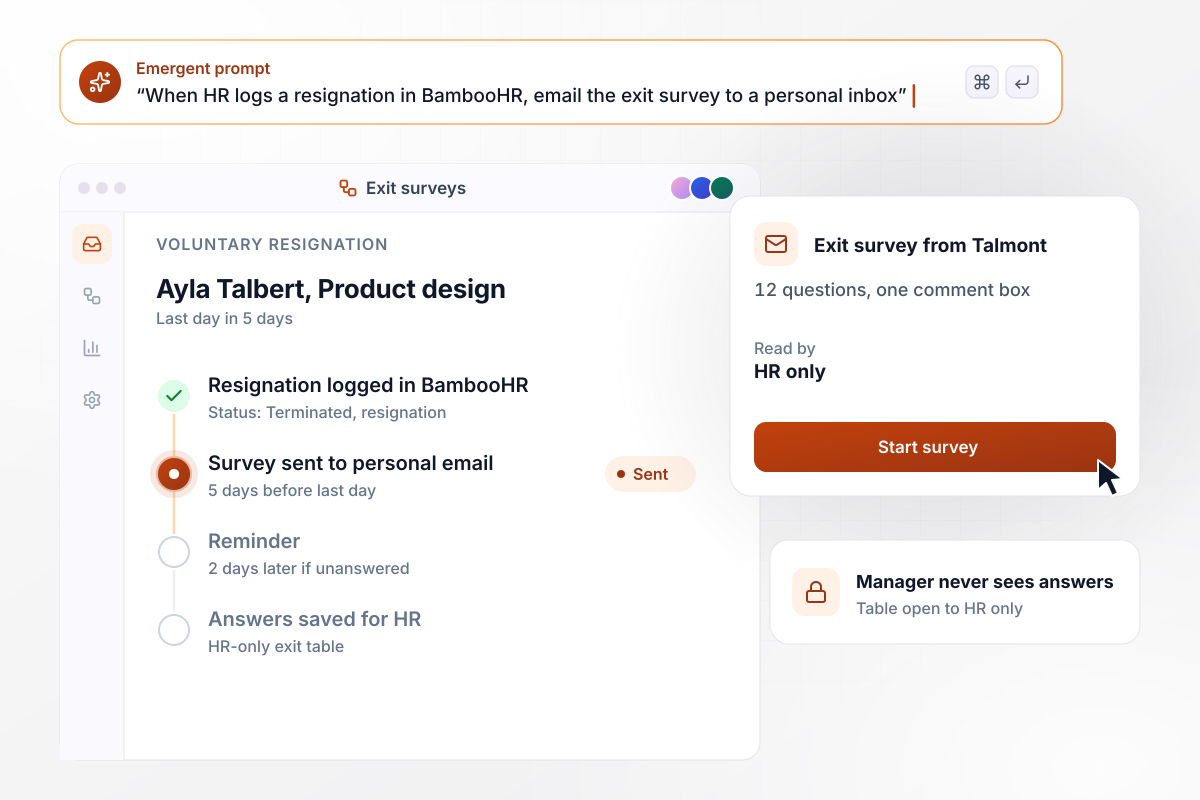
A resignation in BambooHR sends the survey
When HR changes a status to Terminated with a resignation reason in BambooHR, the leaver gets 12 questions at the personal email on file, five days before the last day. One reminder follows two days later. Answers land in a table only HR can open, and the manager never sees them.
window.awbMockup = { voluntaryResignations: "Build an exit survey for my company. When HR marks someone Terminated with a resignation reason in BambooHR, email 12 questions to their personal email five days before their last day, with one reminder two days later. Start with the primary reason for leaving from a fixed list. Save answers to a table only HR can open, and keep them away from the person's manager.", seasonalStaff: "Build an end-of-season exit survey for my 48 lifeguards and camp staff, sent on their final shift. Ask what worked, what did not and whether they would work here next season. Anyone who says yes and is marked eligible for rehire goes onto next May's rehire list for our recruiter, with their role and comments.", regrettedExits: "Build an exit survey dashboard for HR. Tally the last 12 months of exits by team and reason, and split regretted from non-regretted using the tag HR sets at offboarding. Hide any team with fewer than five responses. When most of a team's regretted exits cite the same reason, send its HR business partner a direct message in Slack.", graduatingSeniors: "Build a graduating senior exit survey for my university. Send it when a student applies to graduate. Ask whether they would recommend their program, plus questions on advising, courses, and career preparation. Show each program its response rate and the share who would recommend it, and send each chair the comments for their program." };
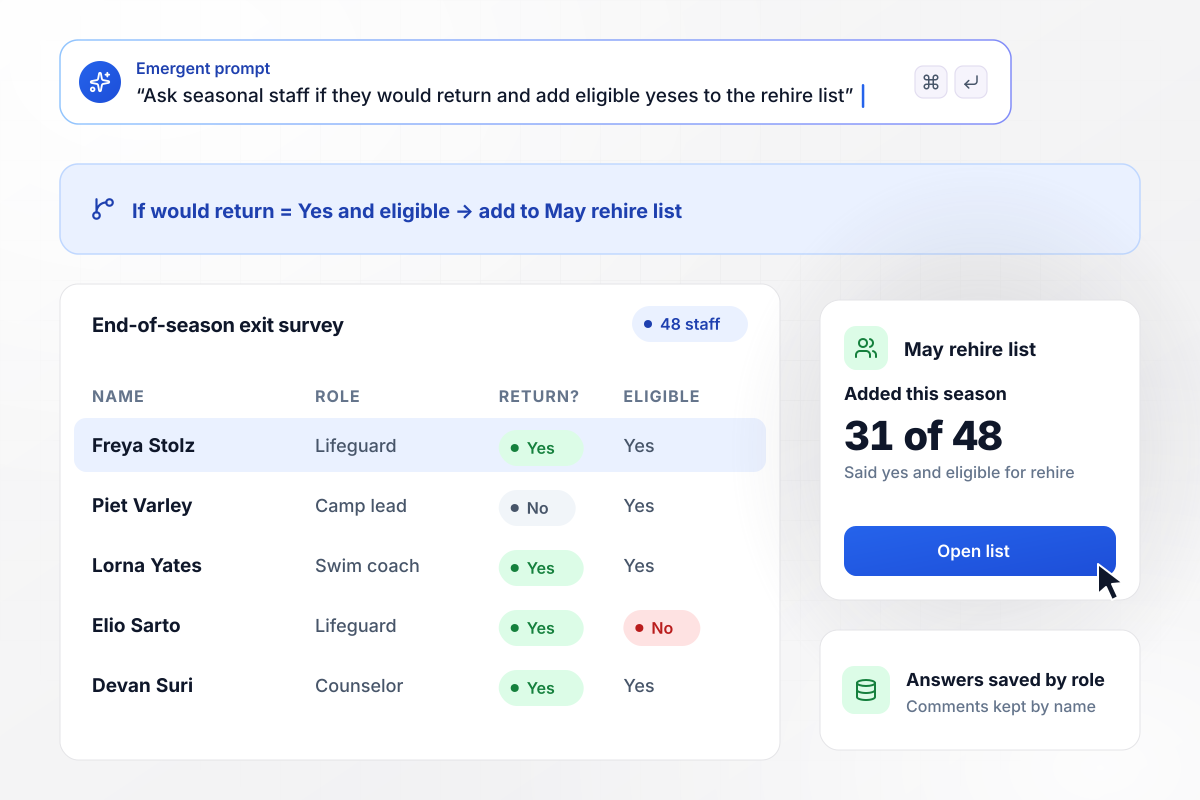
Who wants to come back next summer
All 48 lifeguards and camp staff get an exit survey on their final shift, with one question the recruiter cares about most: would you work here next season? Anyone who answers yes and is marked eligible for rehire joins the May rehire list. This season, 31 of the 48 made the list.
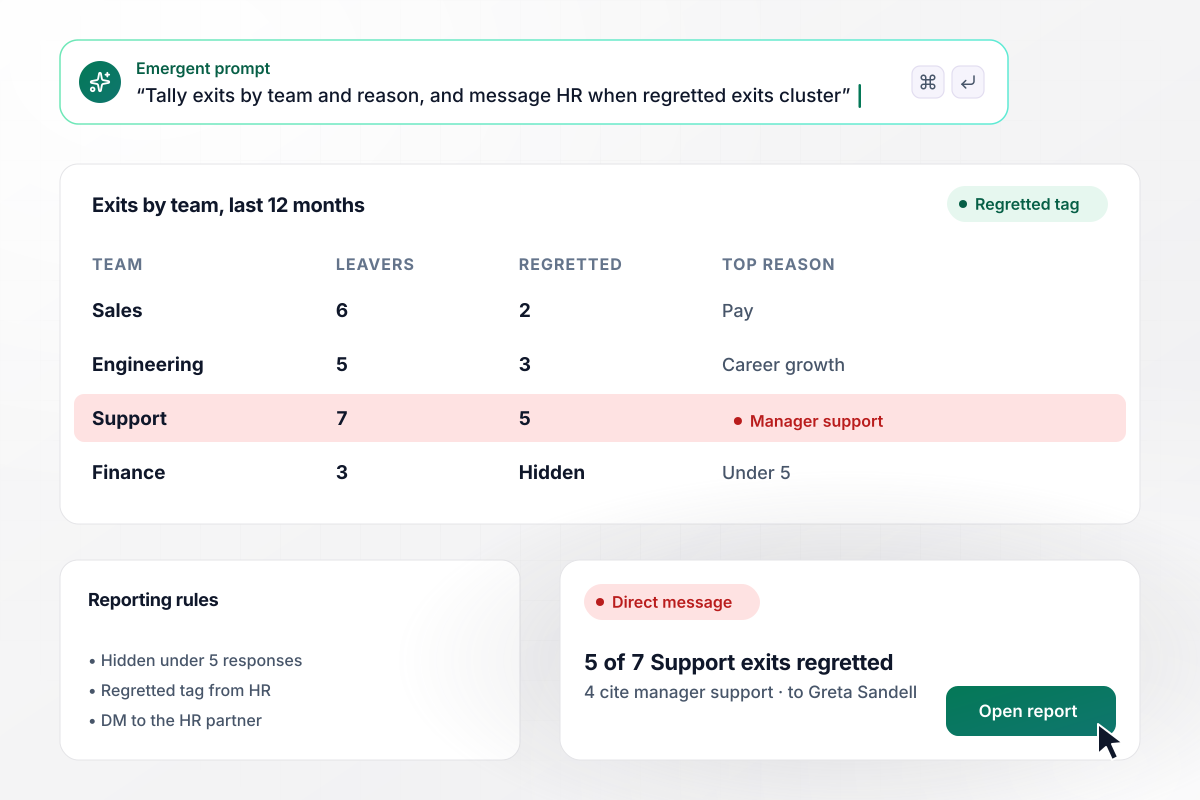
Support lost five people it wanted to keep
Over the last 12 months, each team's exits are tallied by reason and by the regretted tag. Support had seven leavers, five of them regretted, and four named manager support as the main reason. Because the team cleared the five-response minimum, its HR business partner got a direct message.
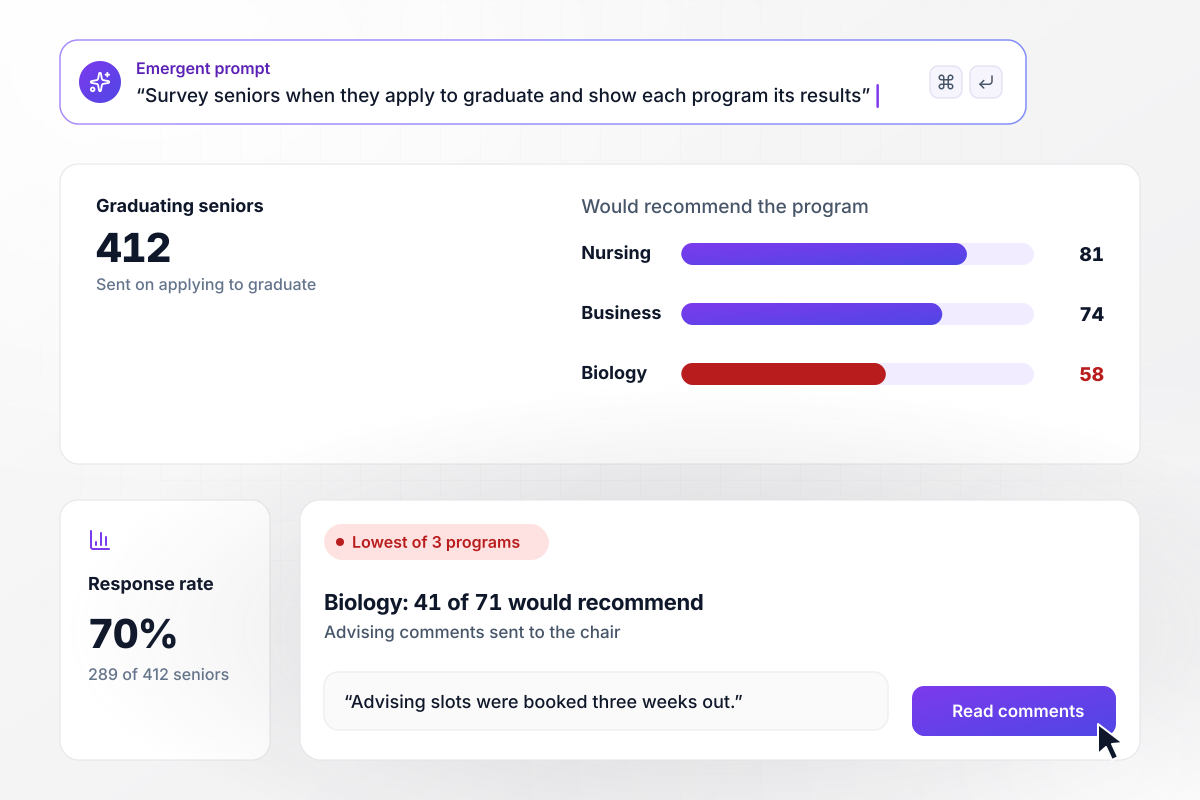
Seniors grade their program before commencement
Seniors get the survey when they apply to graduate, and 289 of 412 answered this spring. Each program sees the share of its students who would recommend it. Biology came in lowest of three, with 41 of 71 saying yes, and its chair received the advising comments behind the score.






How to Run an Exit Survey
Seven steps to plan an exit survey that leavers finish and HR can count, then build it in Emergent.
Choose between voluntary leavers only and everyone who leaves. People who were dismissed or laid off are answering a different question. Decide whether retirees and contract ends count too. Write the rule down, because someone will ask why one person got it and another did not.
A few days before the last day, the details are still fresh. Send the link to a personal address so it keeps working after the work account closes. Set one reminder and a closing date about two weeks after departure.
Write eight to ten reasons for leaving, such as pay or manager support. Ask for one primary reason and one secondary. Add a single open question for detail. The list makes reasons countable, and the comments explain them.
Decide whether HR reads each response with the name attached. Managers see team totals only above a minimum you set. Put both rules on the first screen in plain words, before anyone reaches question one.
Write it the way you would brief a colleague, covering the audience, the timing, the reason list, and who sees what. Emergent builds the survey with its send rules, response table and HR dashboard. A later change takes one more message.
Connect BambooHR or any HRIS with an API. Department, manager and the regretted tag then come from HR records, not from the leaver. The survey stays short, and every split matches the org chart HR already keeps.
Read the reason counts once a quarter, not after each departure. Compare regretted exits by team and tenure, and look for a reason that keeps rising. Take one finding to the leadership meeting with the comments behind it, then check next quarter's numbers.
Why Build Your Exit Survey With Emergent?
Engagement platforms price exit survey software by headcount. Emergent builds the survey as an app with responses in your database.

|
SurveyMonkey | Culture Amp | Qualtrics EmployeeXM | |
|---|---|---|---|---|
| What you get | Pulse and annual surveys, confidential reporting, and manager dashboards, as code you own | Survey builder with templates, including employee engagement | Engagement, pulse, onboarding, and exit surveys with analytics | Employee listening inside the Qualtrics XM platform |
| Pricing model | Credits, no response caps or per-response fees | Per-user team plans with a seat minimum, billed annually | Quote-based, per employee by module, billed annually | Quote-based, priced by employee count |
| Where responses live | A database table you own, plus any integration | SurveyMonkey account | Culture Amp platform | Qualtrics platform |
| Code ownership | Full code export to GitHub on paid plans | None | None | None |



Pick the Pricing Plan That Works for You
Choose the plan that fits your building ambitions. From weekend projects to enterprise applications, we've got you covered.




Find the right survey, quiz, or poll
for your team
Frequently Asked Questions
Your Questions, Answered
Don't change this element unless you know what you are doing
More things you can build
with Emergent









on Emergent today


