

Build a Pulse Survey That Tracks the Trend Round by Round
Build a pulse survey that runs on your schedule, charts every team's scores over time, and saves answers to a database you own.
Build a biweekly pulse survey for my teams that charts each team's trend and flags any drop.
Trusted by Builders Worldwide
Active Builders Worldwide
Apps Successfully Created
Countries Globally Reached



What Keeps a Pulse Survey Useful
A pulse survey repeats a short set of questions on a fixed schedule to show how answers move between rounds.
Core items that never change
Locks the same core statements into every cycle, word for word, which lets a March score sit cleanly beside June's. Rotating items come and go with one message to Emergent.
A cadence you set per group
Sends weekly or every other week, on the day and hour you pick. Reminders reach only the people who have not answered yet, and each round closes on schedule regardless.
A trend line for every team
Charts each team cycle by cycle against its own average instead of the company's. A real slide shows up within two rounds, while a one-week dip stays small on the chart.
Group minimums for confidentiality
Hides any team or comment set with fewer answers than the minimum you choose, such as five. Results open once a group crosses that line, and no view ever shows a name.
Questions where people already are
Posts each question as a Slack message or an email. Staff without a work account scan a QR code in the break room instead, and every answer lands in the same response table.
Your pulse app, in your GitHub
Exports the finished app to your GitHub on paid plans, including the questions, schedule logic, dashboards and response database. Host it yourself or keep building it in Emergent.
Four Pulses Worth Running
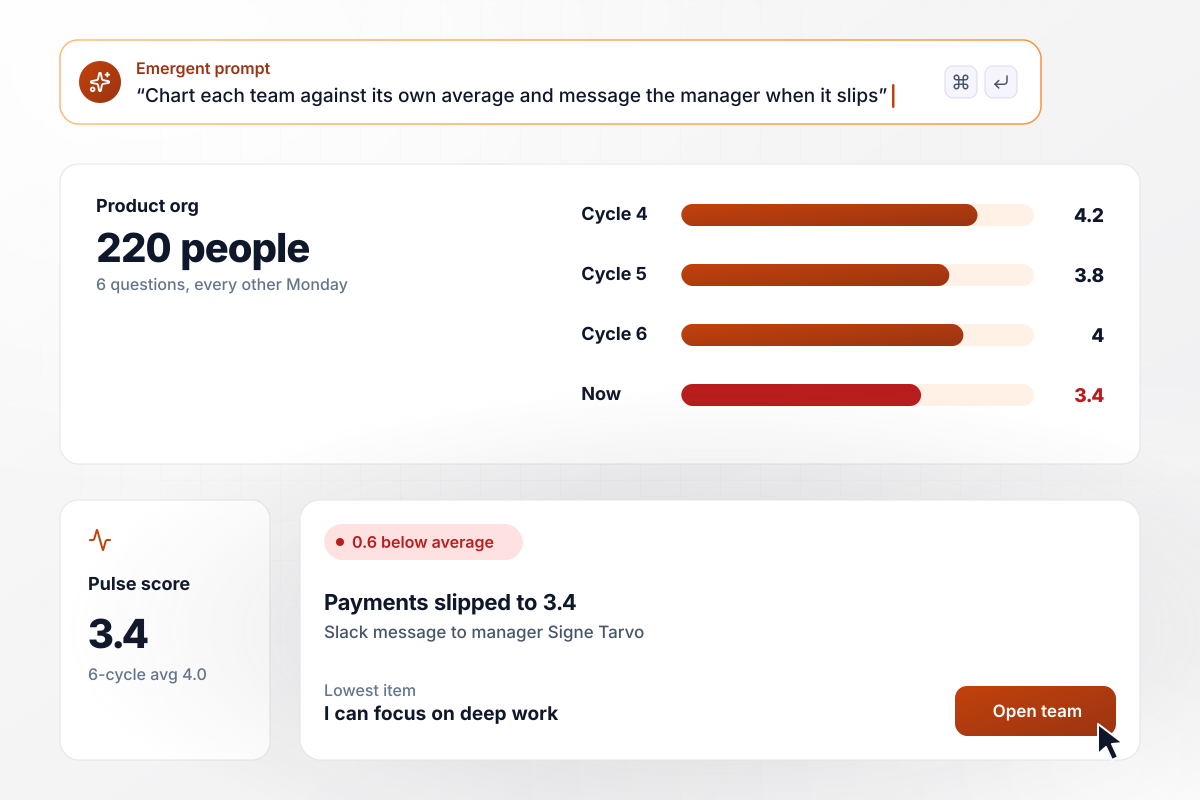
Payments dips under a six-cycle average
Every other Monday, 220 people in a product org answer six questions about workload and manager support. Each team is charted against its own six-cycle average, not the company's. When Payments fell to 3.4, 0.6 under its average, the team's manager got a Slack message naming the lowest item.
window.awbMockup = { biweeklyTeamPulse: "Build a pulse survey for my product org of 220 people. Every other Monday, send six statements on workload and manager support, rated 1 to 5. Chart each team against its own average over the last six cycles. When a team falls more than half a point below that average, send its manager a Slack message with the lowest-scoring item.", slackCheckIn: "Build a Slack pulse for my remote staff. Each Monday morning, send one question as a Slack message that people rate 1 to 5 without leaving Slack. Rotate through a bank of 12 questions so each comes back every 12 weeks. Keep a team's result hidden until five people have answered, and save every rating with the person's team.", hybridScheduleChange: "Build a weekly pulse for our new hybrid schedule. Every Friday, staff at our four offices answer three statements, including \"The new schedule works for me.\" Show agreement by office each week. If agreement at any office falls below 60%, email that office's lead with the week's comments.", keyAccountPulse: "Build a monthly pulse for our 40 key accounts. Email two questions: a service score out of 10 and an open box for what we should fix. Show each account's score next to last month's in a table. When an account drops 2 points or more, add it to its account manager's list with the comment." };
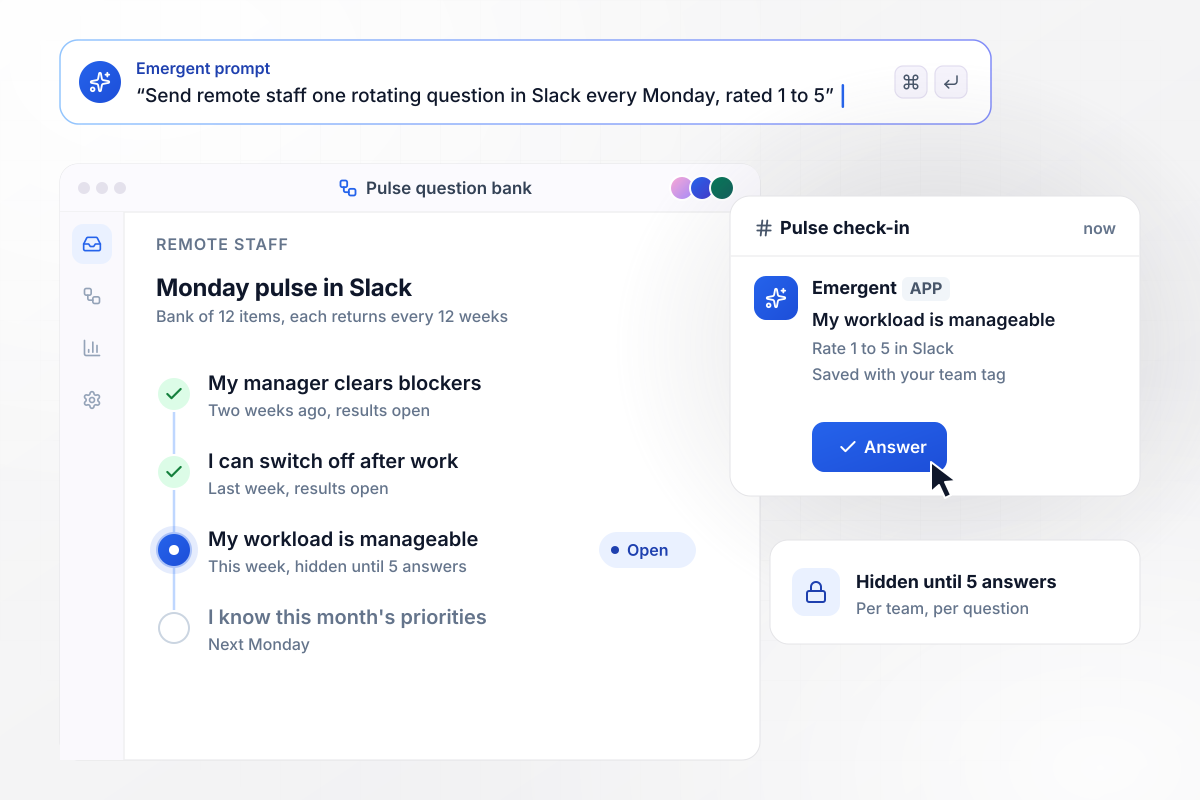
Ratings come in through Slack on Mondays
Remote staff get a pulse question as a Slack message each Monday morning and rate it 1 to 5 without opening another app. Questions rotate through a bank of 12 items, and each returns every 12 weeks with its own trend. A team's result stays hidden until five answers are in, and every rating is saved with its team tag.
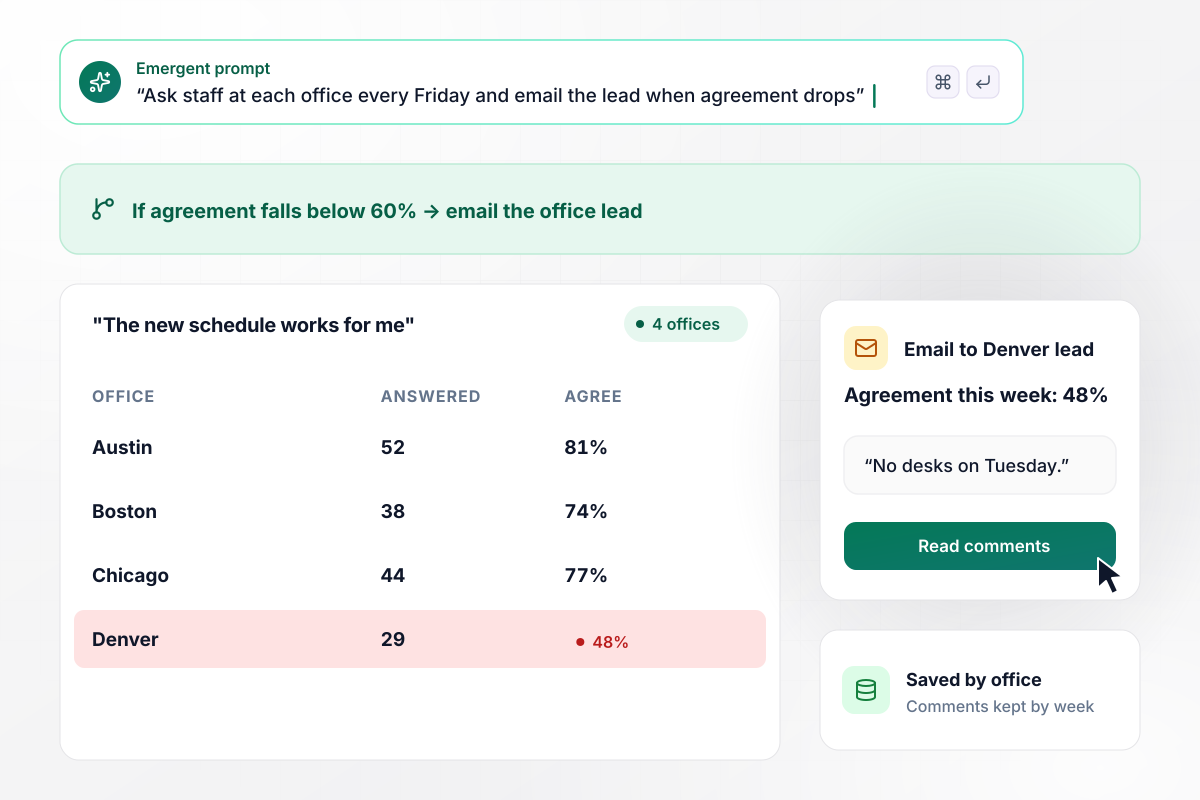
Which office the new schedule is failing
After a switch to a new hybrid schedule, staff at four offices answer a short pulse each Friday. The item that matters is the statement "The new schedule works for me." When agreement at any office falls below 60%, that office's lead gets an email with the week's comments. Denver tripped it this week.
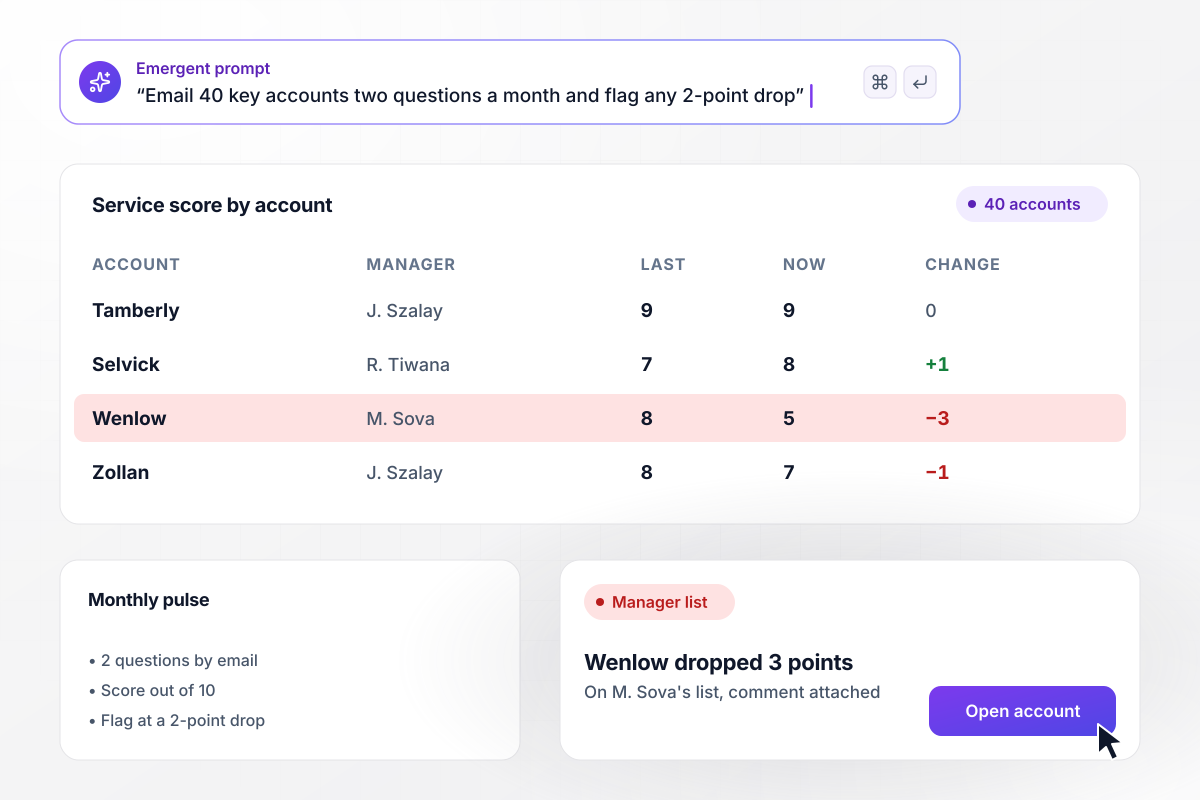
Key accounts rate the service monthly
Once a month, 40 key accounts get two questions by email: a service score out of 10 and an open box for what to fix. Each score sits beside last month's. A drop of 2 points or more puts the account on its manager's list with the comment attached. Wenlow landed there this month after a 3-point drop.






How to Run a Pulse Survey
Seven steps to plan a pulse survey people keep answering for months, then build it with Emergent.
Start with the one decision the pulse should inform, such as whether a new on-call rotation is wearing a team down. Without one, the questions drift and the results have no audience. Write that decision at the top of the brief.
The more often a pulse runs, the shorter it should be. Five statements on a 1-5 agreement scale suit a weekly or biweekly round. Freeze their wording once the first round goes out, or the trend line compares two different questions.
Choose the day, the hour and how long each round stays open. Then set the smallest group that may see its own results. Below that number, answers still count toward the company figure but never show for the group on its own.
Write it out in plain English: who answers, which statements, the scale, the channel, and the alert rule. Emergent builds a working pulse with its own response table and team dashboards. A later change, such as a new rotating item, takes one more message.
Open the first round with two plain facts: who sees results, and how small a group can be before its results hide. People answer a recurring survey honestly only when they trust those two facts, and the trust has to last for months.
A single low round can be a bad week. Two in a row against the team's own average is a signal worth a conversation. Compare each team with its own past, not with other teams whose work and pressures differ.
After a drop, the manager tells the team what they heard and the one change they will try. The next rounds show whether it worked. A pulse that changes nothing gives people no reason to keep answering.
Why Build Your Pulse Survey With Emergent?
Pulse platforms bill per employee and hold your trend data. Emergent builds the pulse as an app with responses in your database.

|
Culture Amp | Qualtrics EmployeeXM | SurveyMonkey | |
|---|---|---|---|---|
| What you get | Pulse and annual surveys, confidential reporting, and manager dashboards, as code you own | Engagement, pulse, onboarding, and exit surveys with analytics | Employee listening inside the Qualtrics XM platform | Survey builder with templates, including employee engagement |
| Pricing model | Credits, no response caps or per-response fees | Quote-based, per employee by module, billed annually | Quote-based, priced by employee count | Per-user team plans with a seat minimum, billed annually |
| Where responses live | A database table you own, plus any integration | Culture Amp platform | Qualtrics platform | SurveyMonkey account |
| Code ownership | Full code export to GitHub on paid plans | None | None | None |


Pick the Pricing Plan That Works for You
Choose the plan that fits your building ambitions. From weekend projects to enterprise applications, we've got you covered.




Find the right survey, quiz, or poll
for your team















Frequently Asked Questions
Your Questions, Answered
Don't change this element unless you know what you are doing
More things you can build
with Emergent









on Emergent today


