

Build a Customer Satisfaction Survey That Acts on Every Low Score
Build a customer satisfaction survey that asks for a rating after each order or ticket and sends every low score to an owner.
Build a customer satisfaction survey for my customers.
Trusted by Builders Worldwide
Active Builders Worldwide
Apps Successfully Created
Countries Globally Reached



Everything a Customer Satisfaction Survey Needs
Emergent builds the rating, a follow-up for each score and the alert to an owner, and saves every answer in a database you own.
A rating scale that fits the moment
Ask for a 1-5 rating, five stars or a row of faces, then one open question about the reason. Change the scale or the wording later by describing the change in a sentence.
Every response tied to the customer
Pass the customer ID, account, plan, or ticket ID with the survey link and every response is saved with that context. A low CSAT score becomes an account your team can call today.
Follow-up questions that change by score
Happy customers are asked to leave a review others can read, and unhappy ones get a box to explain what went wrong. You set the score that splits them in one line of the prompt.
Alerts on low scores
Send a Slack message to the support lead, a HubSpot task to the account owner, or an email to whoever owns the order. Each alert carries the score, the comment, and the customer.
A CSAT trend you can split
The dashboard is generated with the survey and reads from the same response table. Filter it by agent or week, and share one live view with your team instead of a monthly report.
Responses in a database you own
Every response lands in a table in your project, with no response cap. On paid plans, the full code of the survey and its dashboard exports to your own GitHub repository.
Satisfaction Surveys Built From One Prompt
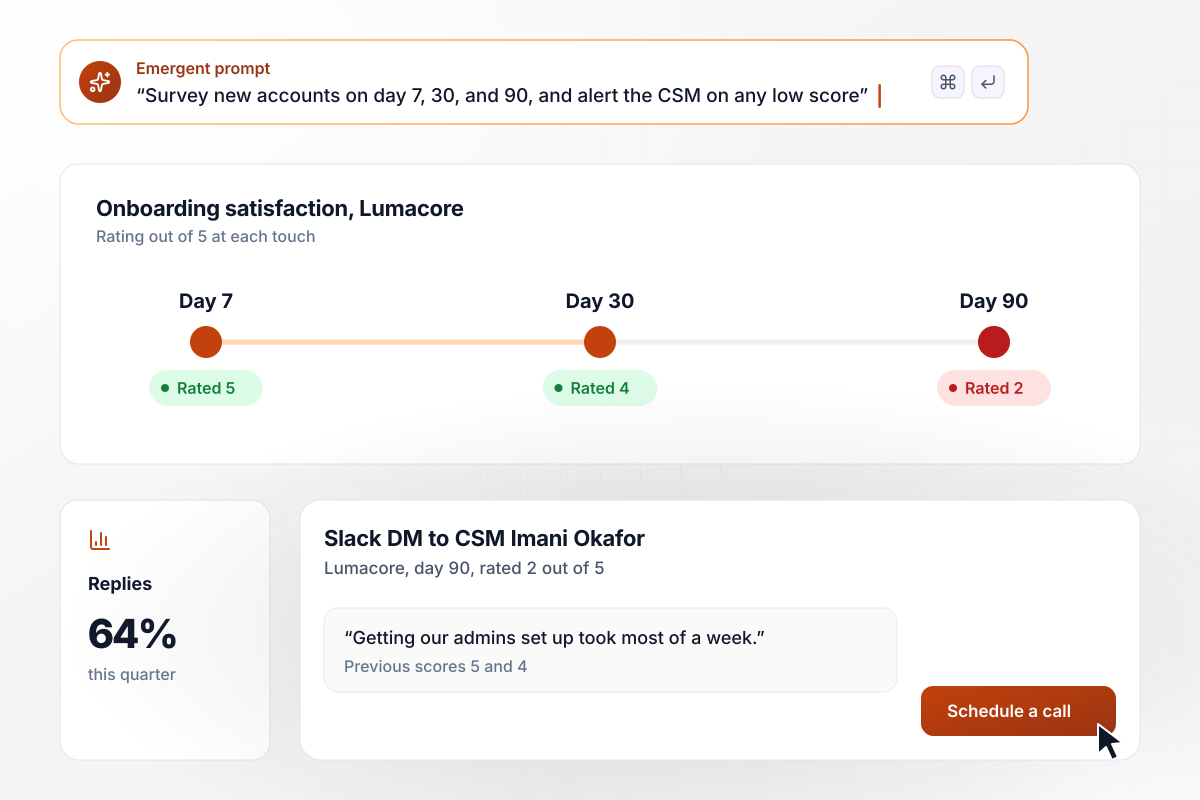
Spot a slipping account long before renewal
New accounts rate their experience out of 5 on day 7, day 30, and day 90, with one open follow-up each time. Answers are saved with the plan and the customer success manager who owns the account. When a score drops to 2, the CSM gets the comment in Slack next to the earlier scores.
window.awbMockup = { saasOnboarding: "Build a three-touch SaaS onboarding satisfaction survey that runs on day 7, day 30, and day 90. Each touch has a 1-5 rating, an open follow-up, and a field for role. Tie every response to the account, plan, and CSM, and send any score of 2 or lower to the CSM in Slack with the earlier scores.", postPurchase: "Build a post-purchase customer satisfaction survey sent a week after delivery, with a 1-5 product rating, a 1-5 delivery rating, and an open question on whether the product met expectations. Tie every response to the order, SKU, and customer, flag any rating of 2 or lower for the returns team, and send a review request to anyone who rates 5.", b2bQuarterly: "Build a quarterly B2B customer satisfaction survey with a 1-5 rating for each product line, a short open comment, and a role field. Tie every response to the account and account executive. At quarter close, write a three-bullet summary per account to the HubSpot record, and alert the account executive when an account's average drops by a point or more.", supportTicket: "Build a CSAT survey that fires on every closed support ticket, with a single 1-5 satisfaction question and a comment box shown for any score of 2 or lower. Tie every response to the ticket ID, agent, resolution time, and product area. Add a live dashboard for the support lead by agent and week, and a Slack alert to the support leads' channel on any score of 2 or lower, with the comment and the ticket link." };
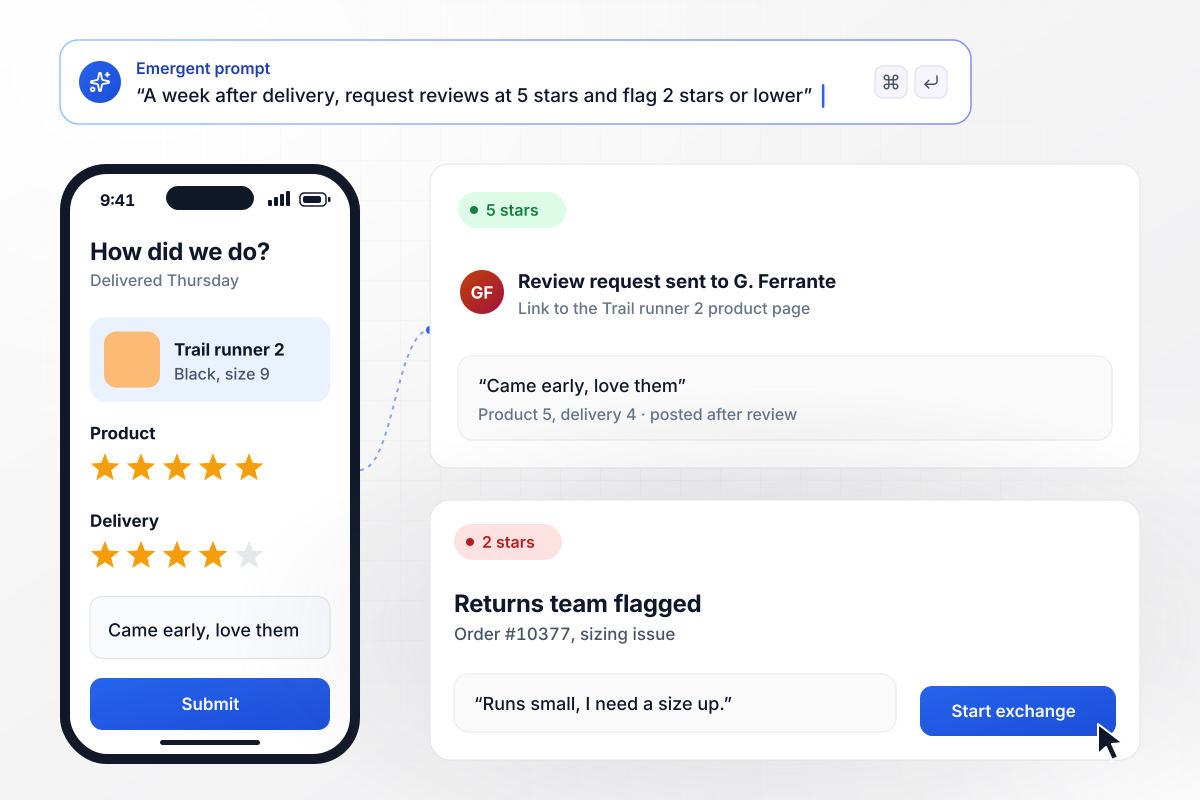
Reviews from 5-star buyers, exchanges for low ratings
A week after delivery, the buyer rates the product and the delivery out of five stars and can leave a comment. A 5 on the product sends a link to post a public review. A rating of 2 or lower flags the order for the returns team with the comment and order number attached.
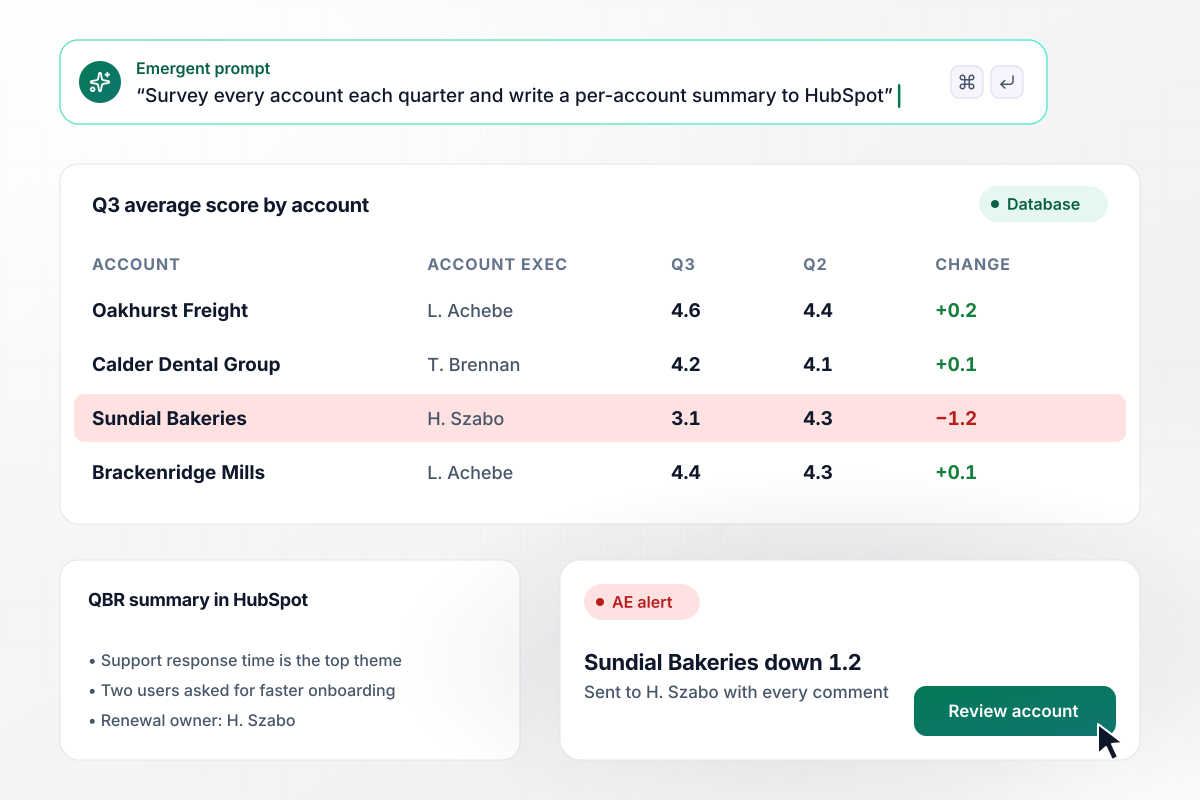
Per-account scores in HubSpot before every QBR
Each quarter, every contact at a B2B account rates their product line and can add a comment. Scores roll up by account beside last quarter's, and a short summary lands on the HubSpot company record. When an account's average falls by a point or more, the account executive gets every comment from it.
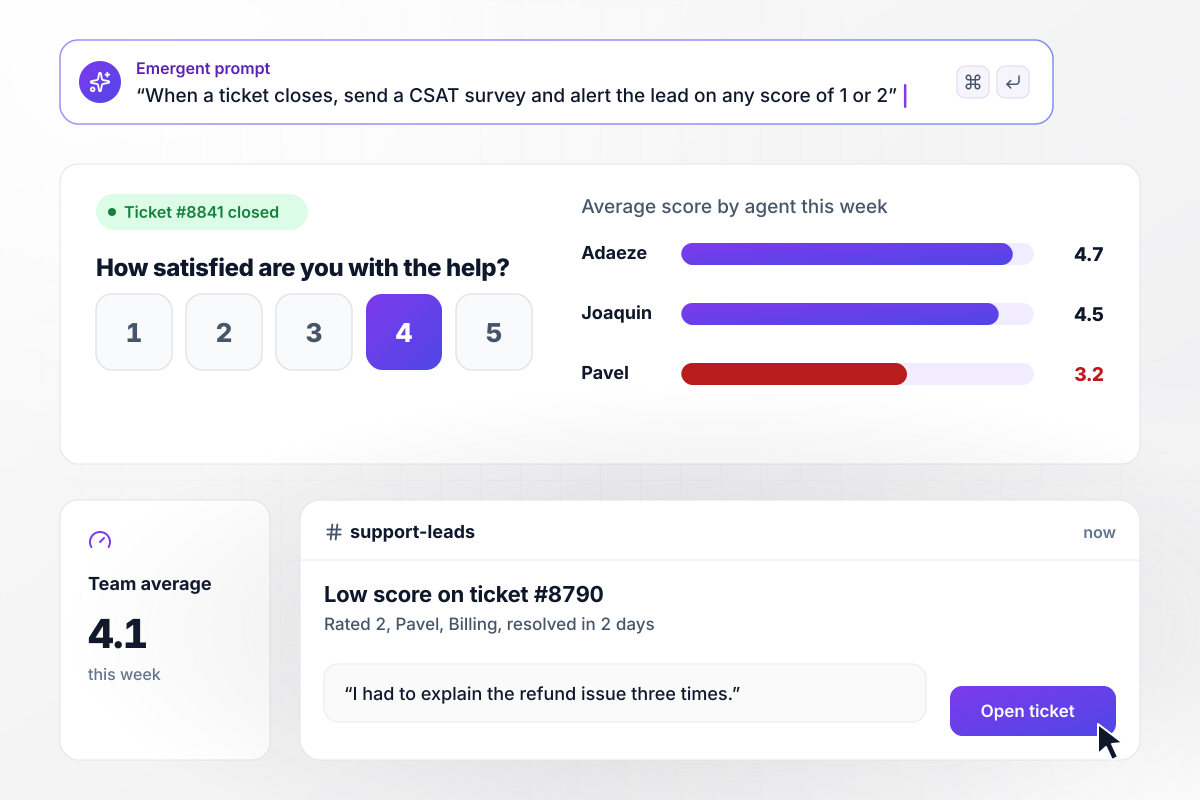
Every closed ticket scored, sorted by agent
When a ticket closes, the customer gets a single question on a 1-5 scale about the help they received. Each answer is saved with the agent and with how long the ticket stayed open. A score of 2 or lower posts to the support leads' Slack channel with the comment and a link to the ticket.






How to Create a Customer Satisfaction Survey
Seven steps to build a customer satisfaction survey: pick the score and the moment, write the follow-ups, route alerts, and read the trend.
Use CSAT when you want a verdict on one transaction, such as a delivery, a closed ticket or a renewal call. How likely a customer is to recommend you is a job for NPS, and ease for CES. Pick one headline score per survey and leave the others for a separate send.
Send it close to the experience it rates: on ticket close, seven days after delivery, at day 30 of onboarding, or at quarter end for B2B accounts. Keep the gap short enough that the customer still remembers the details of what happened.
Pair the rating with one question about why and one field you will filter by, such as plan or region. Then decide what each end of the scale sees next: a thank-you and a review link at the top, a comment box at the bottom.
Decide which fields travel with the link before anything goes out: account ID and plan for SaaS, order number for retail, ticket ID for support. Those fields let the dashboard split scores by segment and let every alert name the account behind the number.
Decide who hears about which score before launch. A 1 from a key account might email its owner, while a low ticket rating goes to the support lead in Slack. Name one person per alert and agree how fast they reply to the customer.
Emergent generates the survey with its branching and alerts, plus a CSAT dashboard, all reading from a response database you own. Link it from your app or emails, or publish it on your own domain (included in Emergent, uses credits).
Read the CSAT trend each week by segment and product area, and call back every customer who scored 1 or 2 within a day. Tell customers what changed because of their feedback, and adjust the questions and thresholds by prompting as patterns appear.
Why Build Your CSAT Survey With Emergent?
A low score helps only if someone acts on it. Each answer arrives with its account, and low ones go to that account's owner.

|
SurveyMonkey | Typeform | Interact (quiz specialist) | |
|---|---|---|---|---|
| How you build | Prompt for the survey, quiz, or poll and the app around it | Templates and editor | Templates and editor, AI assist | Templates and AI quiz maker |
| Response limits | No response caps | Response caps by plan | Monthly response caps by plan; the form stops at the cap | Monthly completion and lead caps by plan |
| Behavior at cap | Keeps collecting, no cap | Overage billed per extra response | Form stops collecting | Free plan quiz pauses; paid plans cap leads |
| Where responses live | A database table you own, plus any integration | SurveyMonkey account | Typeform account | Interact account |
| Code ownership | Full code export to GitHub on paid plans | None | None | None |




Pick the Pricing Plan That Works for You
Choose the plan that fits your building ambitions. From weekend projects to enterprise applications, we've got you covered.




Find the right survey, quiz, or poll
for your team















Frequently Asked Questions
Your Questions, Answered
Don't change this element unless you know what you are doing
More things you can build
with Emergent









on Emergent today


